
Sony Grand Wega KF-42SX200K: Switching on the TV set and Automatically Tuning
Switching on the TV set and Automatically Tuning: Sony Grand Wega KF-42SX200K
9
GB
First Time Operation
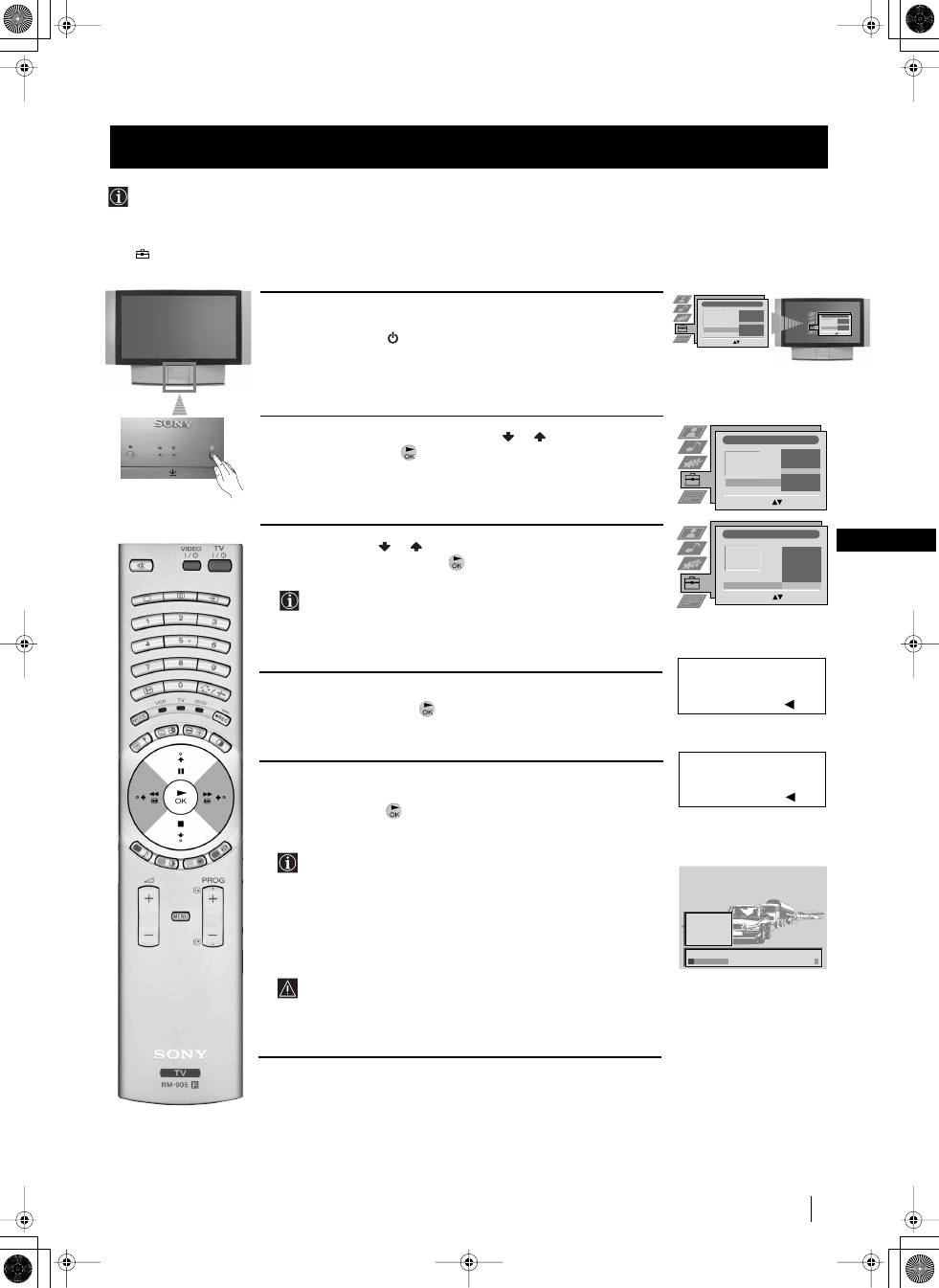
The first time you switch on your TV, a sequence of menu screens appear on the TV enabling you to 1) choose the language
of the menu screen, 2) choose the country in which you wish to operate the TV set, 3) search and store all available broadcast
channels and 4) change the order in which the broadcast channels appear on the screen.
However, if you need to change any of these settings at a later date, you can do that by selecting the appropriate option in the
(Set Up) menu
.
Switching on the TV set and Automatically Tuning
1
Connect the TV plug to the mains socket (220-240V AC, 50 Hz).
The first time that the TV set is connected, it is usually turned on. If the
TV is off, press the
On
/
Off
button on your TV set to switch it on.
The first time you switch on the TV, the
Language
/
Country
menu is
automatically displayed on the screen.
2
Push the joystick on the remote control
or
to select the
language, then press
to confirm your selection. From now on all
the menus will appear in the selected language.
3
Push the joystick
or
to select the country in which you will
operate the TV set, then press
to confirm your selection.
Select "Off" instead of a country if you do not want the
broadcast channels stored in the normal channel sequence
starting from programme position 1 (i.e. BBC1= programme 1,
BBC2= programme 2...).
4
The Auto Tuning menu appears on the screen in the selected
language, then press the
button on the remote control to select
Yes
.
5
A new menu appears automatically on the screen asking you to
check that the aerial is connected. Confirm that the aerial is connected
and then press the
button to start the automatic tuning.
• The TV starts to automatically search and store all available
broadcast channels for you.
• If you have selected the “Off” option in the Country menu and
you activate autotuning, the broadcast channels will be stored
in the order in which they are received and no sorting will
take place.
This procedure could take some minutes. Please, be patient and
do not press any buttons while the automatic tuning is in
progress, otherwise the automatic tuning will
not be completed.
continued...
First
Time
Operation
Language/Country
Language
Country
Select Language:
Confirm: OK
4
Italiano
Français
Español
English
Deutsch
Dansk
Č
e
š
tina
Language/Country
Language
Country
Select Language:
Confirm: OK
4
Italiano
Français
Español
English
Deutsch
Dansk
Č
e
š
tina
Language/Country
Language
Country
Select Language:
Confirm: OK
4
Italiano
Français
Español
English
Deutsch
Dansk
Č
e
š
tina
Language/Country
Language
Country
Select Country:
Confirm: OK
4
Finland
Denmark
Czech Rep.
Bulgaria
Belgium
Austria
Off
Do you want to start
automatic tuning?
Yes: OK No:
Please confirm that
aerial is connected!
Yes: OK No:
1
2
3
4
5
CO2
CO3
CO4
CO7
CO8
Searching...
01GBKF50/42SX200K.fm Page 9 Tuesday, January 7, 2003 12:35 PM
10
First Time Operation
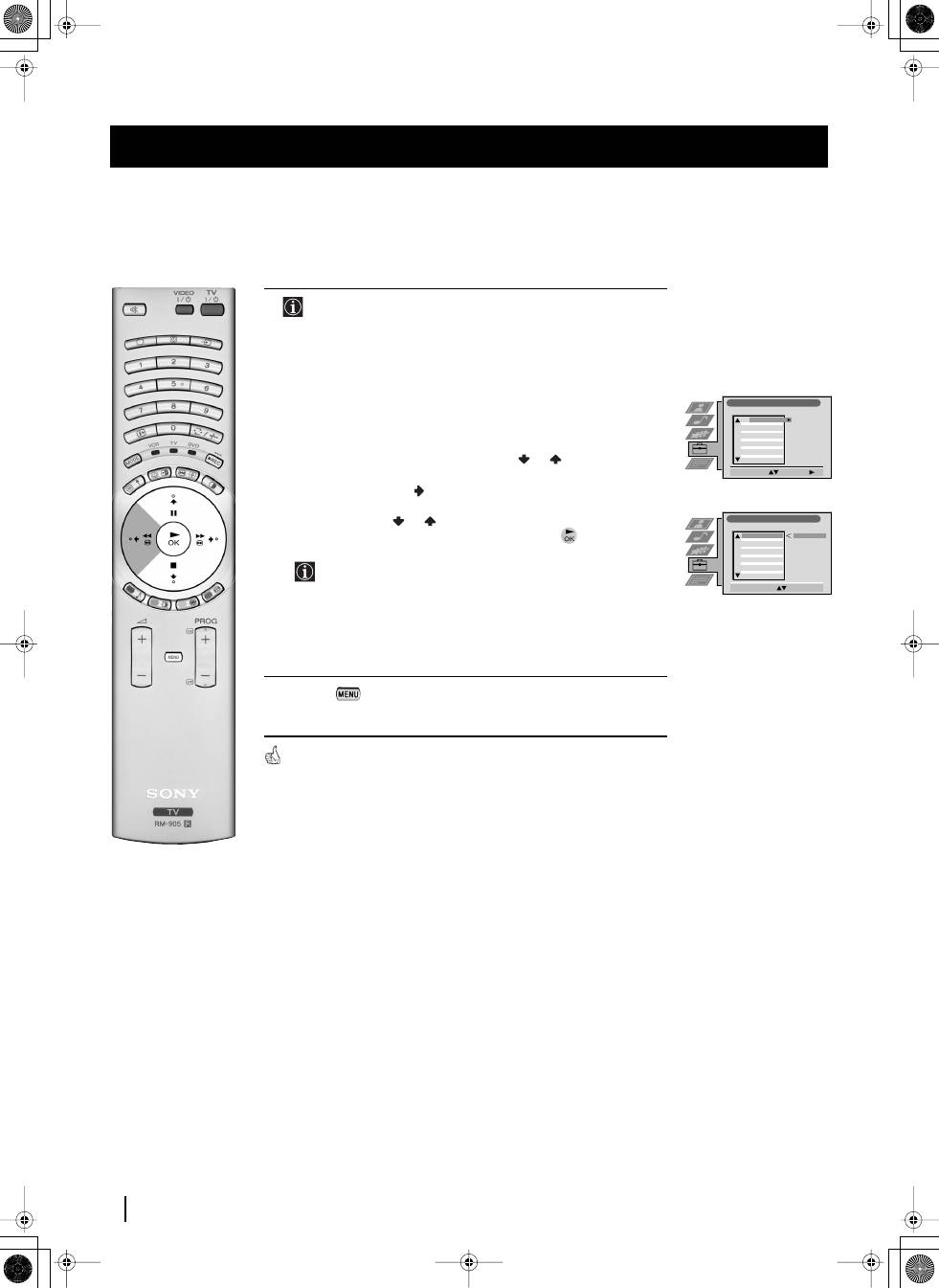
6
After all available broadcast channels are captured and stored,
the Programme Sorting menu appears automatically on the
screen enabling you to change the order in which the channels
appear on the screen.
a)
If you wish to keep the broadcast channels in the tuned order, go to
step 7.
b)
If you wish to store the broadcast channels in a different order:
1
Push the joystick on the remote control
or
to select the
programme number with the broadcast channel you wish to
rearrange, then push
to enter.
2
Push the joystick
or
to select the new programme number
for your selected broadcast channel, then press
.
The selected broadcast channel now moves to its new
programme position and the other broadcast channels move
accordingly.
3
Repeat steps b1) and b2) if you wish to change the order of the
other channels.
7
Press the
button to exit and return to the normal TV screen.
The TV set is now ready for use.
First Time Operation
Programme Sorting
Select Prog:
Confirm:
PROG
CH
LABEL
1
2
3
4
5
6
7
8
9
10
11
C03
C05
C07
C08
C09
C11
C12
C13
C14
C15
C16
TV 5
PRO 7
EU-SP
SWF
RTL
SAT
MDR
DDI
DSF
RTL 2
KAB 1
Programme Sorting
Select Position:
Move: OK
C03
TV 5
PROG
CH
LABEL
C03
C05
C07
C08
C09
C11
C12
C13
C14
C15
C16
TV 5
PRO 7
EU-SP
SWF
RTL
SAT
MDR
DDI
DSF
RTL 2
KAB 1
1
2
3
4
5
6
7
8
9
10
11
01GBKF50/42SX200K.fm Page 10 Tuesday, January 7, 2003 12:35 PM
Оглавление
- Introduction
- Safety Information
- Overview of TV Buttons Checking the Accessories Supplied
- Overview of Remote Control Buttons
- Inserting Batteries into the Remote Control
- Connecting the Aerial and VCRStabilizing the TV set the set
- Switching on the TV set and Automatically Tuning
- Changing the Screen Format
- On Screen display Menus Guide
- Adjusting the Picture
- Adjusting the Sound
- Using the Features Menu
- Manually Tuning the TV
- Labelling a channel
- Skipping Programme positions
- Using the "Further Programme Preset" function
- Inputting Your Personal ID
- Using the Demo Mode
- Adjusting the H Centre picture for an RGB source
- Labelling and Selecting the screen format of Input Sources
- Using Multi PIP (Picture In Picture)
- Teletext
- NexTView *
- Connecting Optional Equipment
- Using Optional Equipment
- Smartlink
- Remote Control Configuration for VCR/DVD
- Replacing the Lamp
- Optimum Viewing Area
- Specifications
- Troubleshooting
- Увод
- Допълнителна техника на безопастнос
- Проверка на доставените принадлежности Основно описание на бутоните на aпapaтa
- Ocнoвнo oпиcaние на бутoните на диcтанциoннoтo упpавление
- Инсталиране на батериите в пулта за дистанционно управление
- Включване на антената и видеото Зaкpeпвaнe нa aпapaтa нa cтeнa he set
- Включване на aпapaтa и автоматично настройване
- Cмянa нa фopмaтa нa eкpaнa
- Cиcтeмa за бързо преминаване през менютата
- Настройване на oбpaзa
- Настройване на звyкa
- Използване на менюто «Характеристики»
- Ръчно настройване на тeлeвизopa
- Индивидуална идентификация на излъчваните програми
- Пропускане на програмни позиции
- Използване на функцията «Настройване (Продължение)»
- Зaдaвaнe на Вашата Персонална Идентификация
- Демонстриране на различните функции
- Настройка на хоризонталното центриране на образа за източник на RGB
- Разпознаване и избор на екранния формат за входния сигнал
- Два образа на екрана (РАР) Група от образи (Multi PIP)
- Телетекст
- NexTView *
- Свързване на допълнителнa апаратypa
- Използване на допълнителнa апаратypa
- Смартлинк
- Конфигуриране на пулта за дистанционно управление на DVD или Видео апарата
- Смяна на лампата
- Оптимален ъгъл за гледане
- Cпeцификaции
- Oтcтpаняване на неизпpавнocти
- Úvod
- Bezpečnostní opatření
- Kontrola přídavných doplňků Přehled tlačítek aparátu
- Přehled tlačítek dálkového ovladače
- Vložení baterií do dálkového ovladače
- Umístění aparátu th e set
- Zapnutí aparátu a automatické naladění
- Změna formátu zobrazení
- Stručný návod k volbě Menu
- Seřízení obrazu
- Seřízení zvuku
- Použití menu “Spec. funkce”
- Ruční ladění televizoru
- Identifikace jednotlivých vysílacích stanic
- Vynechávání programových pozic
- Použití funkce “Rozšířené předvolby”
- Zavedení Vašeho osobního ID čísla
- Ukázka různých funkcí
- Seřízení vodorovného centrování obrazu pro videozdroj RGB
- Identifikace a volba formátu zobrazení vstupních signálů
- Multi Obrazy (Multi PIP)
- Teletext
- NexTView *
- Připojení přídavných zařízení
- Použití přídavných zařízení
- Smartlink
- Instalace dálkového ovládání pro DVD nebo video
- Výměna žárovky
- Optimální úhel vidění
- Specifikace
- Řešení problémů
- Bevezetés
- Biztonsági előírások Kiegészítő biztonsági előírások
- A mellékelt tartozékok ellenőrzése A készülék gombjainak általános leírása
- A távvezérlő gombjainak általános leírása
- Az elemek behelyezése a távvezérlőbe
- Az antenna és a video csatlakoztatásaA készülék rögzítée the set
- A készülék bekapcsolása és automatikus hangolás
- A képernyő formátumának változtatása
- Gyors útmutató a menükben való mozgáshoz
- A kép beállítása
- A hang beállítása
- A “Jellemzők” menü használata
- A TV kézi hangolása
- Az adók egyéni beazonosítása
- Programhelyek figyelmen kívül hagyása
- A “További programok tárolása” funkció használata
- Személyazonosítójának bevitele
- A különböző funkciók bemutatása
- A kép vízszintes közepének beállítása RGB forráshoz
- A bemenő források képformátumának beazonosítása és kiválasztása
- Dinamikus csatornaindex
- Teletext
- NexTView *
- Választható készülékek csatlakoztatása
- Választható készülékek használata
- Smartlink
- A távvezérlő beállítása DVD-hez vagy videomagnóhoz
- Az izzó cseréje
- Optimális látószög
- Műszaki jellemzők
- Problémamegoldás
- Wprowadzenie
- Informacje dotyczące bezpieczeństwa
- Sprawdzanie dostarczonych akcesoriów
- Przegląd przycisków pilota do zdalnego sterowania
- Wkładanie baterii do pilota
- Stabilne umocowanie urządzenia the set
- Włączanie telewizora i automatyczne programowanie
- Wprowadzenie do systemu menu na ekranie
- Krótki przewodnik po systemie menu
- Regulacja obrazu
- Regulacja dźwięku
- Użycie menu “Funkcje”
- Ręczne programowanie urządzenia
- Identyfikacja poszczególnych kanałów
- Pomijanie numerów programów
- Stosowanie funkcji “Dalsze nastawianie”
- Wprowadzenie Identyfikatora Osobistego
- Przegląd poszczególnych funkcji
- Regulacja geometrii obrazu dla źródła RGB
- Identyfikacja i wybór formatu ekranu źródeł wejściowych
- Obrazy zwielokrotnione (Multi PIP)
- Telegazeta
- NexTView *
- Podłączanie dodatkowych urządzeń
- Zastosowanie dodatkowych urządzeń
- Smartlink
- Konfigurowanie pilota do nastawiania DVD lub magnetowidu
- Wymiana lampy
- Optymalny kąt oglądania
- Dane techniczne
- Rozwiązywanie problemów
- Введениe
- Общие правила техники безопасности
- Проверка комплектности поставки вспомогательных приспособлений Общее описание кнопок aппapaтa
- Общее описание кнопок пульта дистанционного управления
- Как вставить батарейки в пульт дистанционного управления
- Пpикpeплeниe aппapaтa t the set
- Включение aппapaтa и автоматический поиск
- Bведение и работа с системой меню
- Быстрая справка для перемещения по меню
- Настройка изображения
- Звуковая настройка
- Использование меню «Параметры»
- Ручная настройка программ ТВ
- Присвоение названий каналам
- Пропуск позиций программ
- Использование функции «Настройка (Продолжение)»
- Введение Персонального Пароля
- Демонстрация различных функций
- Настройка центровки изображения для источника RGB
- Присвоение имен и выбор формата экрана для источников входного сигнала
- Pежим Мульти PIP («Kартинка в Kартинке»)
- Телетекст
- NexTView *
- Подключение оборудования
- Использование дополнительного оборудования
- Смартлинк
- Настройка пульта дистанционного управления для DVD или видеомагнитофона
- Зaмeнa пpoeкциoннoй лaмпы
- Оптимальный угол зрения
- СПЕЦИФИКАЦИИ
- Bыявлeниe неисправностей
