
Sony SPK-HC: 1 When recording on a cassette tape or a disc, turn the POWER
1 When recording on a cassette tape or a disc, turn the POWER: Sony SPK-HC
Using the Sports Pack
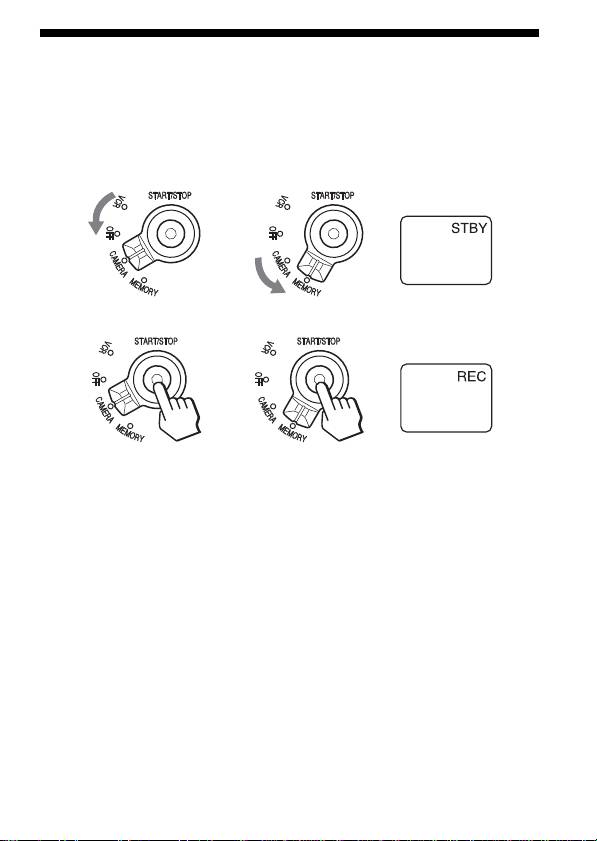
Shooting Moving Pictures
1 When recording on a cassette tape or a disc, turn the POWER
switch to “CAMERA” (1). When recording on “Memory Stick,”
turn the POWER switch to “MEMORY” (2).
12
DISPLAY
2 Press START/STOP button to start recording.
DISPLAY
Notes
•When using DCR-DVD201/DVD101/DVD91, you cannot shoot moving
pictures with the POWER switch turned to “MEMORY.”
•When using DCR-HC40/HC30/HC20/HC18/HC16/HC15/HC14/
TRV33/TRV22/TRV19/TRV14/TRV12 in CAMERA mode, moving
pictures are recorded on a cassette tape and when using DCR-DVD201/
DVD101/DVD91 in CAMERA mode, they are recorded on a disc.
To stop shooting
Press the START/STOP button.
If you press the START/STOP button once more, shooting will start again.
To turn off the power
Stop recording before turning the POWER switch to “OFF.”
13-GB
Оглавление
- 1 Remove filter, conversion lens, lens cap or the shoulder strap
- 1 Choose the mounting shoe and the arrow number according
- 1 Attach the camera mounting shoe.
- 5 Connect the plugs to the each jacks of the video camera
- 6 Installing the video camera recorder.
- 1 Adjust the grip strap.
- 1 When recording on a cassette tape or a disc, turn the POWER
- 1 Slide the mirror hood while holding the OPEN mark and open
- 1 Turn the POWER switch to “MEMORY.” 2 Lightly press the PHOTO button.
- 1 Turn the POWER switch to “VCR.” 2 Press N PLAY on the remote.
- 1 Turn the POWER switch to “OFF.” 2 Release the buckles, and open the rear body.
- 4 Stop taking out the video camera recorder at the point where
- 5 Detach the camera mounting shoe.
- 1 Retirez le filtre, le convertisseur, le capuchon d’objectif ou la
- 1 Choisissez le sabot et le numéro de flèche en vous reportant
- 1 Fixez le sabot de montage du caméscope.
- 5 Branchez les fiches sur chaque prise du caméscope.
- 6 Installation du caméscope.
- 1 Ajustez la sangle.
- 1 Lorsque vous enregistrez sur une cassette ou un disque,
- 1 Faites coulisser le viseur à miroir en maintenant la marque
- 1 Régler le commutateur POWER sur « MEMORY ». 2 Appuyez légèrement sur la touche PHOTO.
- 1 Régler le commutateur POWER sur « VCR ». 2 Appuyez sur N PLAY de la télécommande.
- 1 Mettez le commutateur POWER en position « OFF ». 2 Relâchez les boucles et ouvrez la partie arrière.
- 4 Arrêtez de sortir le caméscope lorsque la fiche de
- 5 Détachez le sabot de montage.
- 1 Nehmen Sie Filter, Konverter, Objektivkappe und den
- 1 Entnehmen Sie den Montageschuh und die Pfeilnummer aus
- 1 Bringen Sie den Kameramontageschuh an.
- 5 Stecken Sie die Stecker in die Buchsen des Camcorders.
- 6 Setzen Sie den Camcorder ein.
- 1 Stellen Sie das Griffband ein.
- 1 Wenn Sie auf Cassette oder Disc aufnehmen, drehen Sie den
- 1 Drücken Sie auf die OPEN-Markierung, und klappen Sie die
- 1 Drehen Sie den POWER-Schalter auf „MEMORY“. 2 Drücken Sie leicht auf die PHOTO-Taste.
- 1 Drehen Sie den POWER-Schalter auf „VCR“. 2 Drücken Sie N PLAY auf der Fernbedienung.
- 1 Drehen Sie den POWER-Schalter auf „OFF“. 2 Lösen Sie die Verschlussklappen, und nehmen Sie das hintere
- 4 Nehmen Sie den Camcorder soweit heraus, bis Fernsteuer-
- 5 Nehmen Sie den Kameramontageschuh ab.
- 1 Quite el filtro, el objetivo de conversión, la tapa del objetivo,
- 1 Elija la zapata de montaje y el número de flecha de acuerdo
- 1 Fije la zapata de montaje de cámara.
- 5 Conecte las clavijas a las tomas de la videocámara.
- 6 Instale la videocámara.
- 1 Ajuste la correa de fijación.
- 1 Para grabar en un videocasete o en un disco, ponga el selector
- 1 Deslice la cubierta del espejo mientras mantenga presionada
- 1 Ponga el selector POWER en “MEMORY”. 2 Presione ligeramente el botón PHOTO.
- 1 Ponga el selector POWER en “VCR”. 2 Pulse N PLAY del mando a distancia.
- 1 Ponga el selector POWER en “OFF”. 2 Suelte las hebillas, y abra el cuerpo posterior.
- 4 Deje de extraer la videocámara en el punto en el que la clavija
- 5 Extraiga la zapata de montaje de cámara.
- 1 Verwijder de schouderband, de lensdop en een eventueel
- 1 Kies de cameramontageschoen en het pijlnummer volgens het
- 1 Breng de cameramontageschoen aan.
- 5 Sluit de stekkers aan op de bijbehorende stekkerbussen van
- 6 Installeer de videocamera/recorder.
- 1 Stel de handgreepband in.
- 1 Voor opnemen op een cassette of een disc draait u de POWER
- 1 Schuif het spiegelkapje open terwijl u de OPEN markering
- 1 Zet de POWER schakelaar in de "MEMORY" stand. 2 Druk de PHOTO toets licht in.
- 1 Zet de POWER schakelaar in de "VCR" stand. 2 Druk op de N PLAY weergavetoets van de
- 1 Zet de POWER schakelaar in de "OFF" stand. 2 Maak de sluitklemmen los en open de achterkant van het
- 4 Schuif de videocamera/recorder uit, maar stop zodra de
- 5 Maak de videocamera/recorder los van de
- 1 Ta bort filter, konverter, objektivskydd eller axelremmen från
- 1 Välj monteringssko och pilnummer enligt tabellen nedan.
- 1 Sätt på videokamerans monteringssko.
- 5 Anslut kontakterna till respektive uttag på videokameran.
- 6 Sätt i videokameran i sporthuset.
- 1 Justera handledsremmen.
- 1 Vid inspelning på ett kassettband eller en skiva, vrid
- 1 Skjut på spegelhuven samtidigt som du håller i OPEN-märket.
- 1 Vrid strömbrytaren POWER till ”MEMORY”. 2 Tryck mjukt på PHOTO-knappen.
- 1 Vrid strömbrytaren POWER till ”VCR”. 2 Tryck på N PLAY på fjärrkontrollen.
- 1 Vrid strömbrytaren POWER till läget ”OFF”. 2 Lossa på spännena och öppna bakre hushalvan.
- 4 Stoppa urtagningen av videokameran i det läge då
- 5 Ta loss videokamerans monteringssko.
- 1 Rimuovere il filtro, l’obiettivo di conversione, il copriobiettivo
- 1 Scegliere l’attacco di montaggio e il numero freccia secondo la
- 1 Applicare lo zoccolo di supporto videocamera.
- 5 Collegare le spine alle relative prese sulla videocamera
- 6 Installare la videocamera registratore.
- 1 Regolare l’impugnatura a cinghia.
- 1 Quando si registra su nastro o su disco, regolare l’interruttore
- 1 Spostare il coprispecchietto tenendo il segno OPEN e aprirlo. 2 Aprire le alette e isnerire le sporgenze nei relativi fori.
- 1 Ruotare l’interruttore POWER su “MEMORY”. 2 Premere leggermente il tasto PHOTO.
- 1 Ruotare l’interruttore POWER su “VCR”. 2 Premere N PLAY sul telecomando.
- 1 Regolare l’interruttore POWER su “OFF”. 2 Sganciare le fibbie e aprire il corpo posteriore.
- 4 Fermare l’estrazione della videocamera quando la spina di
- 5 Staccare lo zoccolo di supporto videocamera.
- 1 Remova o filtro, a objectiva de conversão, a tampa da
- 1 Escolha o calço de montagem e o número da seta de acordo
- 1 Instale o calço de montagem da câmara.
- 5 Ligue as fichas em cada uma das tomadas da videocâmara.
- 6 Instalação da videocâmara.
- 1 Ajuste a correia da pega.
- 1 Quando for gravar numa fita cassete ou num disco, rode o
- 1 Deslize a tampa do espelho enquanto segura a marca OPEN e
- 1 Rode o interruptor POWER até “MEMORY”. 2 Carregue na tecla PHOTO levemente.
- 1 Rode o interruptor POWER até “VCR”. 2 Carregue em N PLAY no telecomando.
- 1 Regule o interruptor POWER a “OFF”. 2 Desprenda os fechos e abra a parte traseira da embalagem.
- 4 Durante o processo de remoção da videocâmara, pare a
- 5 Desacople o calço de montagem da câmara.
- 1 Снимайте светофильтр, конверсионный объектив, его
- 1 Выберьте установочный башмак и номер стрелки в
- 1 Прикрепите установочный башмак видеокамеры.
- 5 Подсоедините штекеры к соответствующим гнездам
- 6 Установите видеокамеру.
- 1 Отрегулируйте ремень захвата.
- 1 При записи на кассетной ленте или диске, поверните
- 1 Передвиньте зеркальную крышку, захватывая ее возле
- 1 Переведите переключатель POWER в положение
- 1 Переведите переключатель POWER в положение “VCR”. 2 Нажмите кнопку N PLAY на пульте дистанционного
- 1 Поверните переключатель POWER в положение “OFF”. 2 Освободите защелки и откройте заднюю часть корпуса.
- 5 Отсоедините установочный башмак видеокамеры.
- 1 從攝影機上拆下濾鏡,轉換鏡頭、鏡頭蓋或肩帶。
- 1 根據下表來選擇安裝極履和箭頭號碼。
- 1 裝好攝影機的安裝極履。
- 5 將插頭連接到攝影機的各個插頭。
- 6 安裝攝影機。
- 1 調整腕帶。
- 1 當錄製到磁帶或光碟上時,將 POWER 開關轉至“CAMERA”(1)。當錄
- 1 按著 OPEN 標誌,同時滑動鏡套將其打開。 2 打開翼片,將各突塊插入各個孔中。
- 1 把 POWER 開關轉到“MEMORY”。 2 輕按 PHOTO 按鈕。
- 1 把 POWER 開關轉到“VCR”。 2 按遙控器上的 NPLAY 。
- 1 將 POWER 開關轉到“OFF”(關掉)。 2 釋放扣環,打開後包體。
- 4 在遙控器插頭和麥克風插頭從戶外包中露出時停止取出攝影機,然
- 5 拆開攝影機安裝極履。
- 1 从视频录影机上拆下滤镜,转换镜头,镜头盖或肩带。
- 1 根据下表来选择安装极履和箭头号码。
- 1 安装视频录影机的安装极履。
- 5 将插头连接到视频录影机的各个插孔。
- 6 安装视频录影机。
- 1 调整腕带。
- 1 当录制到磁带或光盘上时,将 POWER开关转至“CAMERA”(1)。
- 1 按着 OPEN 标志,同时滑动镜套将其打开。 2 打开翼片,将各突块插入各个孔中。
- 1 把 POWER 开关转到“MEMORY”。 2 轻按 PHOTO 按钮。
- 1 把 POWER 开关转到“VCR”。 2 按遥控器上的 NPLAY。
- 1 把 POWER 开关转到“OFF”(关机)。 2 解开扣环,打开后包体。
- 4 在遥控器插头和麦克风插头从户外包中露出时停止取出视频录影
- 5 拆下视频录影机安装极履。
- 1 비디오 카메라 레코더의 필터나 컨버전 렌즈, 렌즈 캡, 어깨 끈을 분리합
- 1 마운트 슈와 화살표 번호를 다음 표에서 선택합니다.
- 1 카메라 마운트 슈를 장착합니다.
- 5 비디오 카메라 레코더의 각 단자에 플러그를 연결합니다.
- 6 비디오 카메라 레코더를 장착합니다.
- 1 손잡이 끈을 조절합니다.
- 1 비디오 테이프 또는 디스크에 기록할 때에는 POWER 스위치를
- 1 OPEN 마크를 들어올리면서 미러 후드를 밀어서 엽니다. 2 윙을 열고 각 구멍에 돌기부를 넣습니다.
- 1 POWER 스위치를 “MEMORY”로 돌립니다. 2 PHOTO 버튼을 반쯤 누릅니다.
- 1 POWER 스위치를 “VCR”로 돌립니다. 2 리모컨의 N PLAY를 누릅니다.
- 1 POWER 스위치를 “OFF”로 돌립니다. 2 버클을 해제하고 뒷면 본체를 엽니다.
- 4 리모컨 플러그 및 마이크로폰 플러그가 스포츠팩에서 나온 상태에서 비
- 5 카메라 마운트 슈를 분리합니다.
- 5
- 4
- 1 POWER "OFF" 2 ,
- 1 POWER "VCR"
- 1 POWER "MEMORY" 2 PHOTO
- 1 OPEN 2
- 1 , POWER
- 1
- 6
- 5
- 1
- 1
- 1 , ,
Топ 10 инструкций
100.00
MB QUART DSG 21399.98
Skil 0790 RA99.98
Bosch KGN39VW2199.97
Sony CDX-CA750X RU99.97
Braun 310 Series 399.96
Asus P3-PE599.96
Siemens MQ 5 N 29899.96
YUKON EXTEND LRS-1000