
Sony MZ-B100: Recording an MD right away!
Recording an MD right away!: Sony MZ-B100
Recording an MD right away!
Use the built-in microphones to record in stereo. Make sure the
record-protect tab on the disc is closed (page 54). The use of new
alkaline dry battery is recommended. The recording may not be
possible if you use manganese dry battery.
1
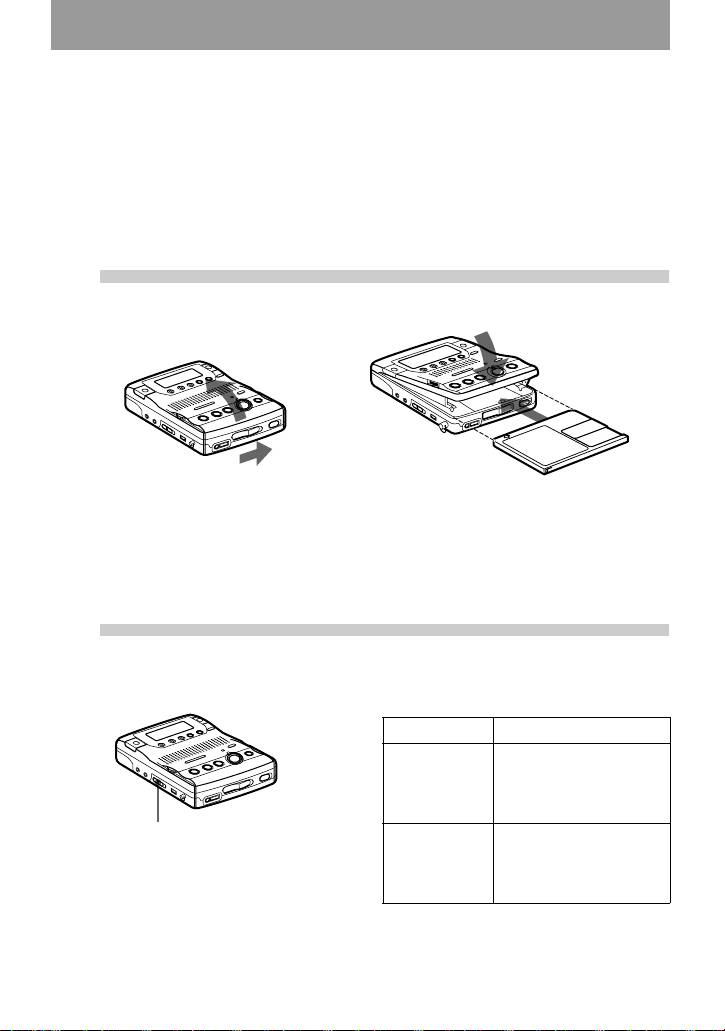
Insert a recordable MD.
1 Slide OPEN to open the lid. 2 Insert a recordable MD with the label
side facing up, and press down on the
lid (at the center of the front edge as
shown above) to close it firmly.
2
Select the microphone sensitivity.
1 Slide MIC SENS to H or L.
MIC SENS When
H (high) recording a soft or a
sound in the distance
(e.g. to record a
meeting).
MIC SENS
L (low) recording a laud or a
sound at close range
(e.g. to record a speech
through a microphone).
11-GB
3
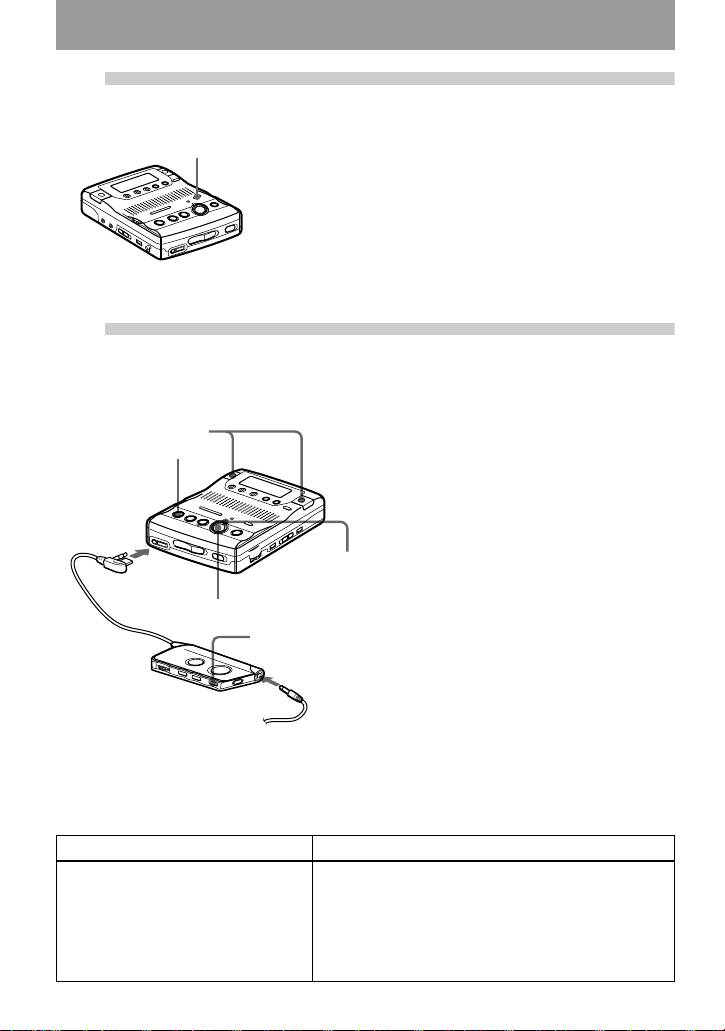
Select the recording mode.
1 Press REC MODE repeatedly until “STEREO” lights
REC MODE
up in the display.
You can select normal stereo, LP2 stereo, LP4 stereo,
or monaural as the recording mode. For details, see
“Recording for long times” (page 16). The factory
setting is normal stereo.
The recording mode cannot be changed when
recording is in progress.
4
Record an MD.
1 Press zREC.
built-in
“REC” appears, REC indicator lights
microphones
up, and then recording starts.
xSTOP
You can monitor the recording
conditions, such as the recording
position, through the display or the REC
indicator (page 26).
Connect
If the disc is blank, the recording
firmly to i.
starts from the beginning. If the
disc is partially recorded, the
REC
recording automatically starts
indicator
from the end of the existing
material.
zREC
To stop recording, press xSTOP.
x
After you press the xSTOP button to stop the
recorder, the recorder will automatically turn
off after about 10 seconds (when using an
alkaline dry battery) or 5 minutes (when using
Connect firmly to i
the AC power adaptor).
To monitor the sound during recording.
Connect the supplied headphones with remote control to the i jack. You can adjust the volume by
turning the VOL control. This adjustment does not affect the recording level since the level is adjusted
automatically.
To Operation
Record partway through the
Press NPLAY, >CUE/AMS or .REVIEW/
previous recording
AMS to find the beginning of the material to be
recorded, and then press XPAUSE.
Press zREC so that the recorder changes to
recording pause.
Press XPAUSE again to start recording.
12-GB

To Operation
1)
Pause
Press XPAUSE while recording.
Press XPAUSE again to resume recording.
Remove the MD xSTOP to stop recording and open the lid. (Be sure
that “TOC Edit” has disappeared from the display
before opening the lid.)
1)
The REC indicator flashes during recording pause. Track marks are not added while recording with
microphones, even when the recorder is paused.
If the recording does not start
• The built-in microphones do not operate
• Make sure the recorder is not locked (pages 9
whenever an optical cable or a line cable is
and 41).
connected into the LINE IN (OPTICAL) jack
• Make sure the MD is not record-protected
on the recorder.
(page 54).
• Premastered MDs cannot be recorded over.
Notes
• For long recordings, it is recommended that
you power the recorder from a house current
using an optional AC power adaptor AC-
E30HG (page 43).
• Do not connect an optional AC power adaptor
during a recording operation if you are
operating the recorder on battery power. If you
do, the material recorded up to that point will
not be saved to the disc
• The lid will not open during recording or until
“TOC Edit” disappears from the display after
the recording has completed.
• If the power supply is disrupted (i.e. the
batteries are removed or becomes exhausted
or the optional AC power adaptor is
disconnected) during a recording operation, or
while “TOC Edit” appears in the display, then
it will not be possible to open the lid until
power is restored.
• “Data Save” or “TOC Edit” flashes while data
of the recording (the track’s start and end
points, etc.) is being recorded. Do not move or
jog the recorder or disconnect the power
source while the indication is flashing in the
display. If you do, the material recorded up to
that point will not be saved to the disc.
• When you record through the microphones,
the various sounds made by the recorder may
also be recorded.
• The built-in microphones do not operate
whenever an optional microphone is
connected into the MIC (PLUG IN POWER)
jack on the recorder.
13-GB
Оглавление
- MZ-B100
- Looking at the controls
- Preparing a power source
- Recording an MD right away!
- Playing an MD right away!
- Controles
- Preparación de la fuente de alimentación
- Grabación de un MD
- Reproducción de un MD
- Обзор управления
- Подготовка источника питания
- Выполните запись на минидиск прямо сейчас
- Прослушайте минидиск прямо сейчас
