
Sony KV-21CL5K: Connecting Optional Equipment
Connecting Optional Equipment: Sony KV-21CL5K
master page=right
01GBKV21CL5K.fm Page 17 Monday, October 6, 2003 3:11 PM
Connecting Optional Equipment
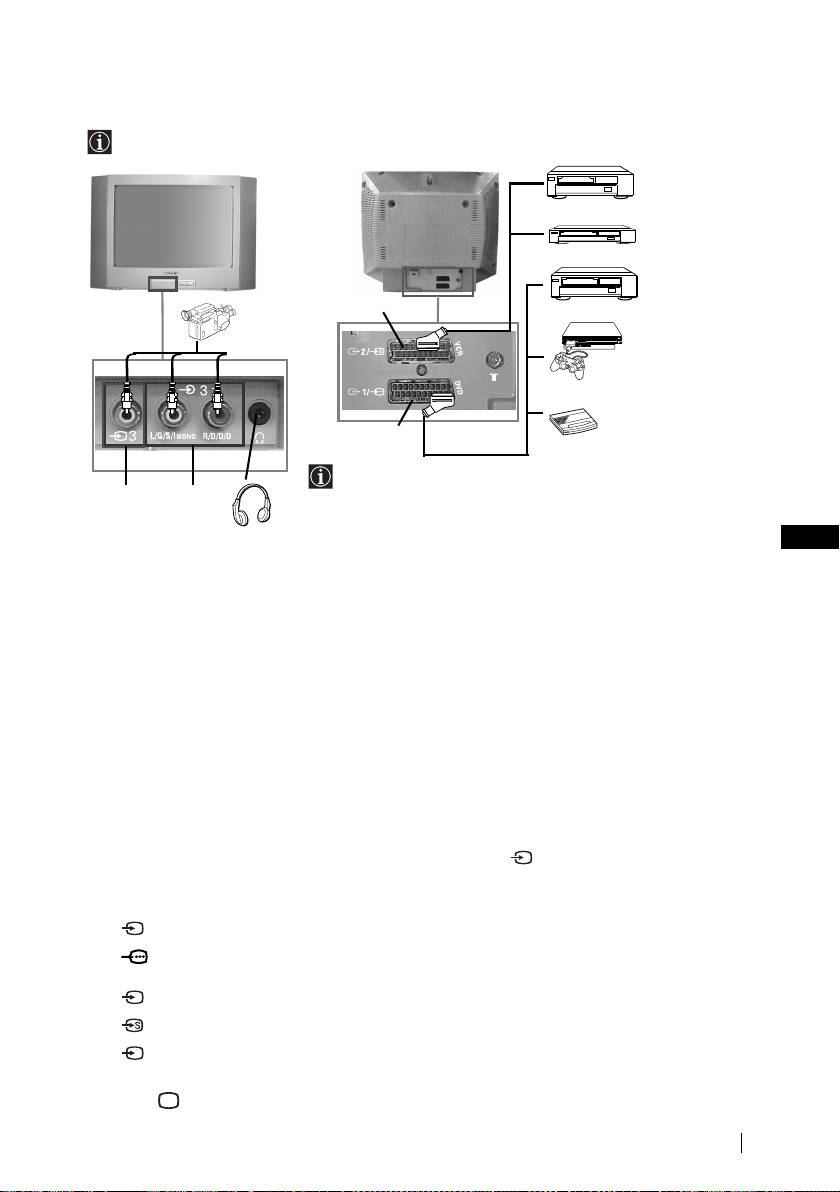
Using the following instructions, you can connect a wide range of optional equipment to
your TV set (connecting cables are not supplied).
VCR
DVD
8mm/Hi8/
D
DVD/VCR
DVC
camcorder
“PlayStation
2”*
C
decoder
When you connect the
* “PlayStation
2”
is a product
headphones, the TV
of Sony Computer
A
B
speakers will
Entertainment, Inc.
automatically be muted.
* “PlayStation
” is a trademark
of Sony Computer
GB
Entertainment, Inc.
Connecting a VCR:
To connect a VCR, please refer to the section “Connecting an aerial and VCR” of this instruction
manual. We recommend you connect your VCR using a Scart lead. If you do not have a Scart
lead, tune in the VCR test signal to the TV programme number “0” by using the “Manual
Programme Preset” option (for details on how to manually programme these presets, see page
14, step a).
Refer to your VCR instruction manual to find out how to find the output channel of your VCR.
To connect a “PlayStation
2”, please refer to the instruction manual of “PlayStation 2”.
Using Optional Equipment
1 Connect your equipment to the designated TV socket, as indicated above.
2 Switch on the connected equipment.
3 To watch the picture of the connected equipment, press repeatedly until the correct
input symbol appears on the screen.
Symbol Input Signals
•Audio / video input signal through the Scart connector C
1
•RGB input signal through the Scart connector C. This symbol appears
1
only if a RGB source has been connected.
•Audio / video input signal through the Scart connector D.
2
•S Video input signal through the Scart connector D.
2
•Video input signal through the phono socket A and Audio input signal
3
through B.
4 Press button on the remote control to return to the normal TV picture.
Additional Information
17
KV-21CL5K_Grp U21
4-098-284-12(1)
Оглавление
- Introduction
- Safety Information
- Overview of Remote Control Buttons
- Overview of TV Buttons
- Switching On the TV and Automatically Tuning
- Introducing and Using the Menu System
- Channel Set Up
- Teletext
- Connecting Optional Equipment
- Specifications
- Troubleshooting
- Увод
- Мерки за безопасност
- Основно описание на бутоните на дистанционното управление
- Основно описание на бутоните на телевизора
- Включване и автоматично настройване на телевизора
- Увод и боравене със системата от менюта
- Настр. на каналите
- Телетекст
- Свързване на допълнителни апарати
- Xарактеристики
- Отстраняване на неизправности
- Úvod
- Bezpečnostní opatření
- Všeobecný přehled tlačítek dálkového ovladače
- Všeobecný přehled tlačítek televizoru
- Zapnutí a automatické naladění TV
- Úvod a použití různých nabídek
- Nastavení kanálu
- Teletext
- Připojení přídavných zařízení
- Technické údaje
- Řešení problémů
- Bevezetés
- Biztonsági előírások
- A távirányító gombjainak áttekintése
- A televízió gombjainak áttekintése
- A TV bekapcsolása és a csatornák automatikus beállítása
- A képernyőn megjelenő menürendszer és használata
- Csatorna beállítása
- Teletext
- Egyéb készülékek csatlakoztatása
- Műszaki adatok
- Hibaelhárítás
- Wprowadzenie
- Informacje dotyczące bezpieczeństwa
- Ogólny przegląd przycisków pilota
- Ogólny przegląd przycisków telewizora
- Włączanie telewizora i automatyczne programowanie
- Wprowadzenie do systemu menu na ekranie
- Dźwięk
- Programowanie kanałów
- Telegazeta
- Podłączanie dodatkowych urządzeń
- Dane techniczne
- Rozwiązywanie problemów
- Bвeдeниe
- Общиe правила тeхники бeзопасности
- Общee описаниe кнопок тeлeвизора
- Включeниe и автоматичeская настройка тeлeвизора
- Ввeдeниe и работа с систeмой мeню
- Настройка канaлoв
- Тeлeтeкст
- Подключeниe дополнитeльных устройств
- Спeцификации
- Выявлeниe нeисправностeй
- Úvod
- Bezpečnostné predpisy
- Všeobecný popis tlačidiel na diakovom ovládači
- Všeobecný popis tlačidiel na televízore
- Zapnutie a automatické naladenie televízora
- Úvod a použitie rôznych menu
- Ladenie
- Teletext
- Pripojenie prídavných zariadení
- Technické údaje
- Riešenie problémov
