
Sony CPD-E230: Setup
Setup: Sony CPD-E230
â
•Trinitron
is a registered trademark of Sony Corporation.
Table of Contents
• Macintosh is a trademark licensed to Apple Computer, Inc., registered in
Setup . . . . . . . . . . . . . . . . . . . . . . . . . . . . . . . . . . . 3
the U.S.A. and other countries.
â
• Windows
and MS-DOS are registered trademarks of Microsoft
Adjustments . . . . . . . . . . . . . . . . . . . . . . . . . . . . . 4
Corporation in the United States and other countries.
Troubleshooting . . . . . . . . . . . . . . . . . . . . . . . . . . 6
• IBM PC/AT and VGA are registered trademarks of IBM Corporation of
the U.S.A.
Specifications . . . . . . . . . . . . . . . . . . . . . . . . . . . . 7
ä
• VESA and DDC
are trademarks of the Video Electronics Standard
Precautions . . . . . . . . . . . . . . . . . . . . . . . . . . . . . . 8
Association.
•
ENERGY STAR is a U.S. registered mark.
Appendix . . . . . . . . . . . . . . . . . . . . . . . . . . . . . . . . . i
• All other product names mentioned herein may be the trademarks or
Preset mode timing table . . . . . . . . . . . . . . . . . . . . . i
registered trademarks of their respective companies.
• Furthermore, “
ä” and “â” are not mentioned in each case in this manual.
TCO’99 Eco-document . . . . . . . . . . . . . Back Cover
Setup
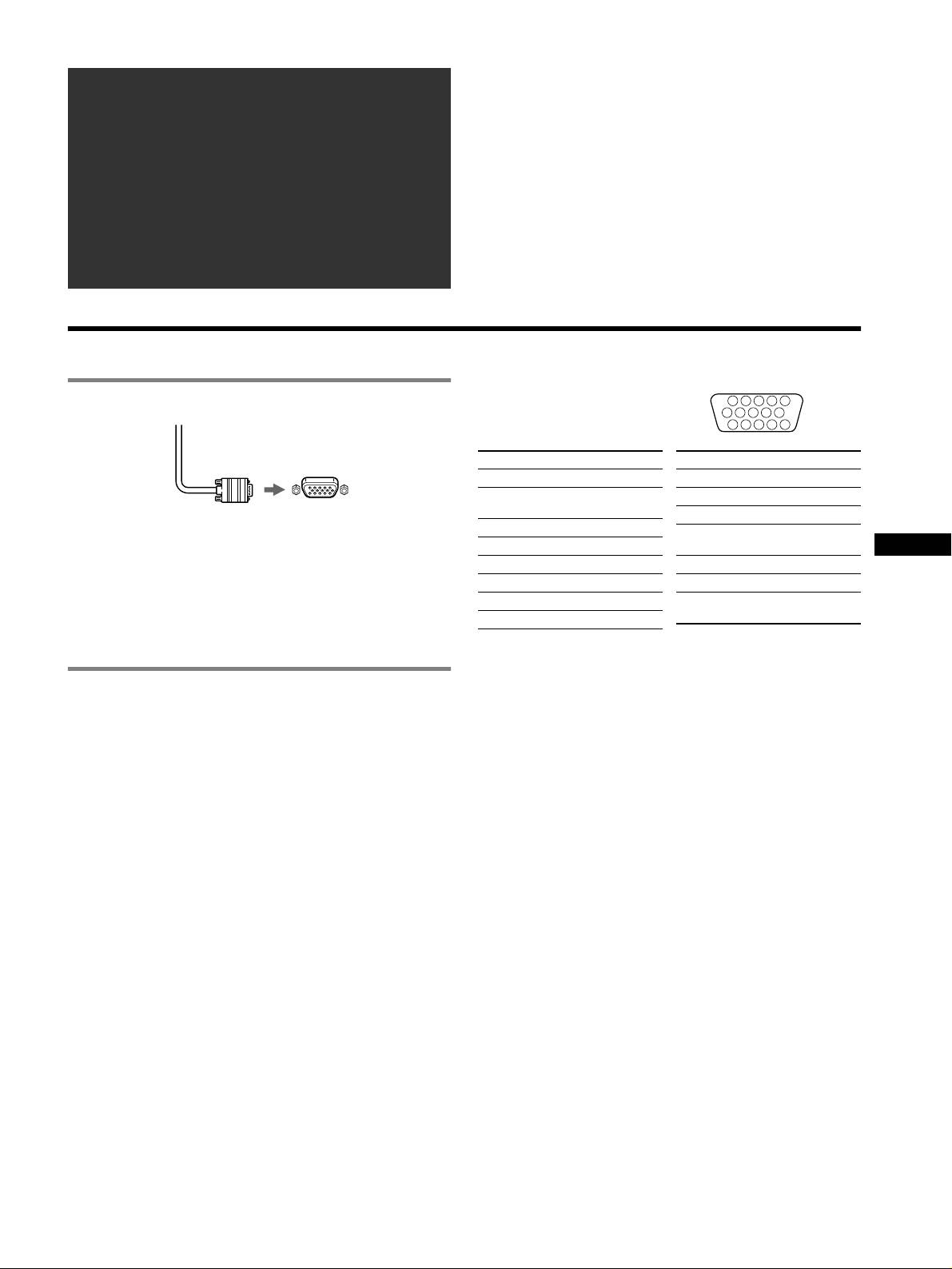
HD15 input connectors
1 Connecting your monitor to your computer
1
5432
678910
11 12 13 14 15
Pin No. Signal
Pin No. Signal
1Red
9 DDC HOST 5V*
Green (Sync on
10 Ground
2
Green)
Video signal cable
11 ID (Ground)
to HD15 of the
of the monitor
connecting computer
3Blue
Bi-Directional
12
4 ID (Ground)
Data (SDA)*
GB
5 DDC Ground*
13 H. Sync
Connecting to a Macintosh or compatible
6 Red Ground
14 V. Sync
computer
7 Green Ground
Data Clock
15
When connecting this monitor to a Macintosh computer, use the
(SCL)*
8 Blue Ground
Macintosh adapter if necessary. Connect the Macintosh adapter to
* DDC (Display Data Channel) is a standard of VESA.
the computer before connecting the cable.
2 Turning on the monitor and computer
1 Connect the power cord to the monitor and press the
1 (power) switch to turn on the monitor.
2 Turn on the computer.
No need for specific drivers
This monitor complies with the “DDC” Plug & Play standard and
automatically detects all the monitor’s information. No specific driver
needs to be installed to the computer.
The first time you turn on your PC after connecting the monitor, the setup
Wizard may appear on the screen. In this case, follow the on-screen
instructions. The Plug & Play monitor is automatically selected so that you
can use this monitor.
Notes
• Do not touch the pins of the video signal cable connector.
• Check the alignment of the HD15 connector to prevent bending the pins
of the video signal cable connector.
3
Оглавление
- CPD-E230
- Setup
- Adjustments
- Troubleshooting
- Specifications
- Precautions
- Configuration
- Réglages
- Dépannage
- Spécifications
- Précautions
- Anschließen des Monitors
- Einstellen des Monitors
- Störungsbehebung
- Technische Daten
- Sicherheitsmaßnahmen
- Configuración
- Ajustes
- Solución de problemas
- Especificaciones
- Precauciones
- Installazione
- Regolazioni
- Guida alla soluzione dei
- Caratteristiche tecniche
- Precauzioni
- Подготовка к работе
- Регулировка
- Устранение неисправностей
- Технические
- Меры предосторожности
- Installation
- Inställningar
- Felsökning
- Specifikationer
- Försiktighetsåtgärder
- Opstelling
- Regelingen
- Verhelpen van storingen
- Technische gegevens
- Voorzorgsmaatregelen
- Appendix
