
Dell DX6000: инструкция
Раздел: Профоборудование
Тип: Аппарат
Инструкция к Аппарату Dell DX6000
Оглавление
- Примечания, предупреждения и предостережения
- Установка и конфигурирование Распаковка системы Установка направляющих и системы в стойку
- Необязательно — подключение клавиатуры, мыши и монитора Подключение кабелей питания
- Фиксация кабелей питания Включение системы
- Установка дополнительной лицевой панели Прочая полезная информация
- Получение технической поддержки Информация NOM (только для Мексики)
- Технические характеристики Процессор Шина расширения Память
- Память Накопители Разъемы
- Разъемы Видео Power (Питание)
- Power (Питание) Физические характеристики Условия эксплуатации
- Условия эксплуатации
Dell™ DX6000 Systems
Getting Started
With Your System
Začínáme se systémem
Guide de mise en route
Handbuch zum Einstieg in das System
Τα πρώτα βήματα με το σύστημά σας
Rozpoczęcie pracy z systemem
Приступая к работе с системой
Pasos iniciales con el sistema
Sistem Başlangıç Kılavuzu


Dell™ DX6000 Systems
Getting Started
With Your System
Regulatory Model E02S Series
Notes, Cautions, and Warnings
NOTE: A NOTE indicates important information that helps you make better use
of your computer.
CAUTION: A CAUTION indicates potential damage to hardware or loss of data if
instructions are not followed.
WARNING: A WARNING indicates a potential for property damage,
personal injury, or death.
____________________
Information in this document is subject to change without notice.
© 2010 Dell Inc. All rights reserved.
Reproduction of these materials in any manner whatsoever without the written permission of Dell Inc.
is strictly forbidden.
Dell and the DELL logo are trademarks of Dell Inc.; Intel and Xeon are registered trademarks of
Intel Corporation in the U.S. and other countries;
Other trademarks and trade names may be used in this document to refer to either the entities claiming
the marks and names or their products. Dell Inc. disclaims any proprietary interest in trademarks and
trade names other than its own.
Regulatory Model E02S Series
May 2010 P/N RGF9J Rev. A01
Installation and Configuration
WARNING: Before performing the following procedure, review the safety
instructions that came with the system.
Unpacking the System
Unpack your system and identify each item.
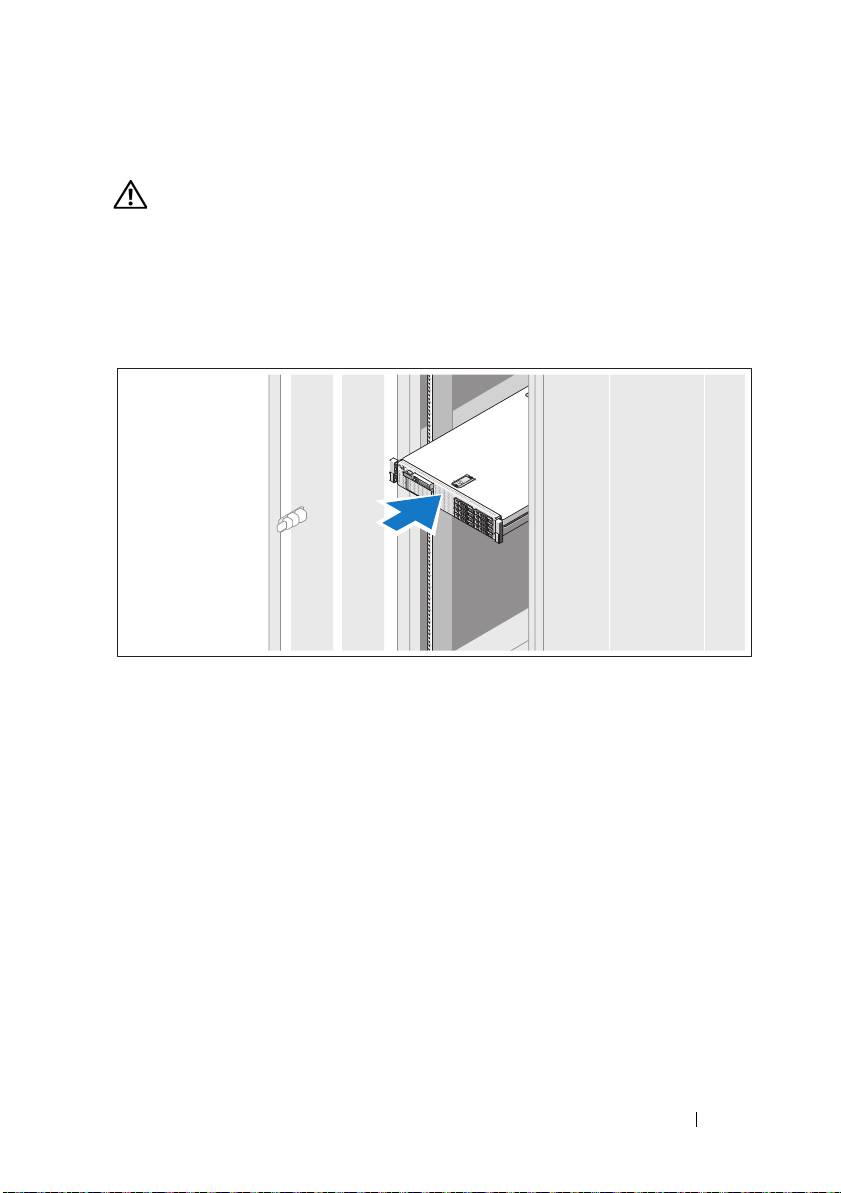
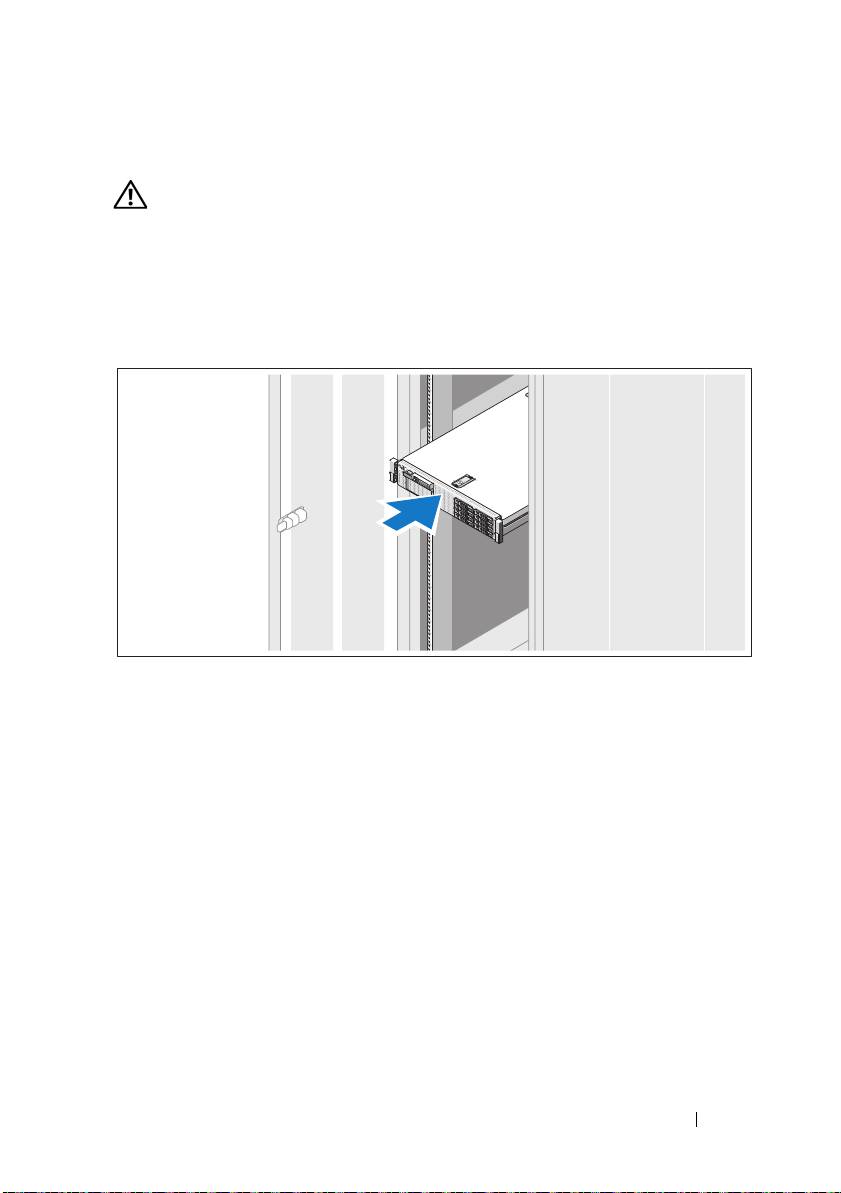
Installing the Rails and System in a Rack
Assemble the rails and install the system in the rack following the safety
instructions and the rack installation instructions provided with your system.
Getting Started With Your System 5
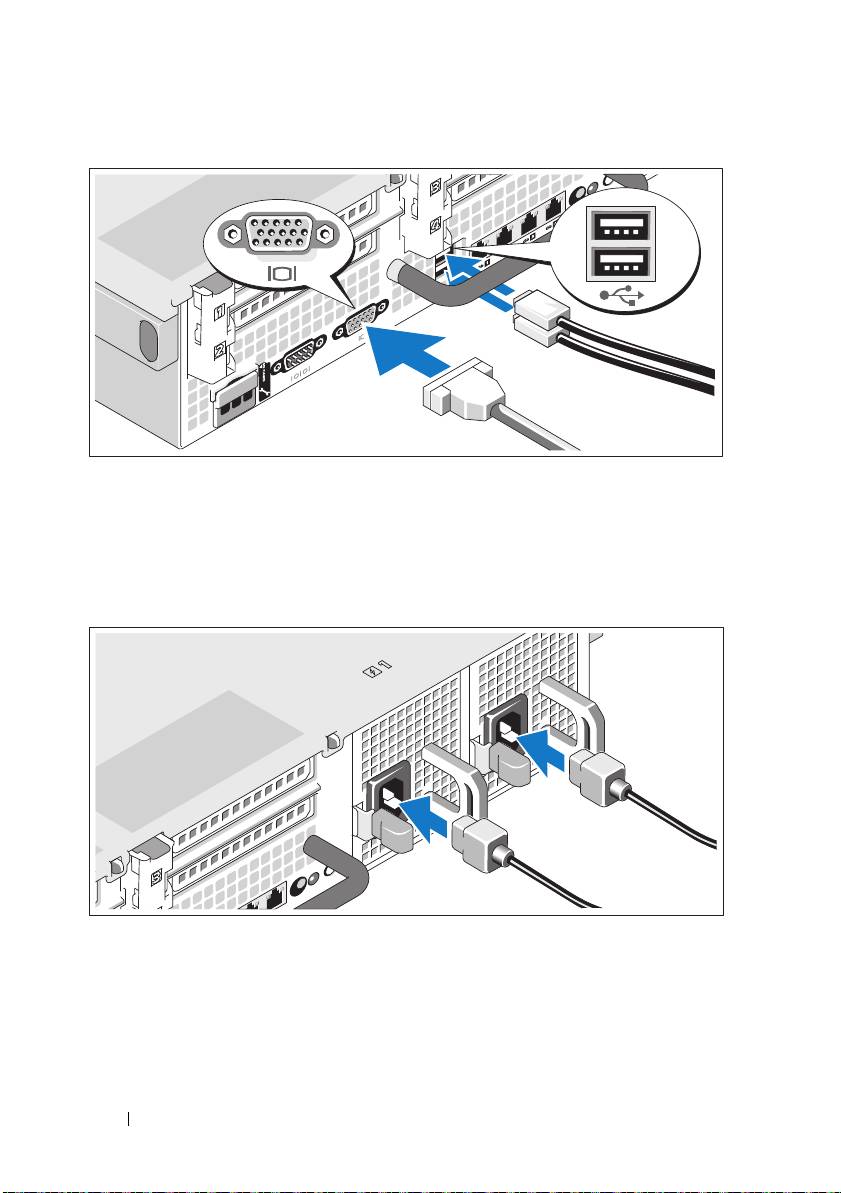
Optional—Connecting the Keyboard, Mouse, and Monitor
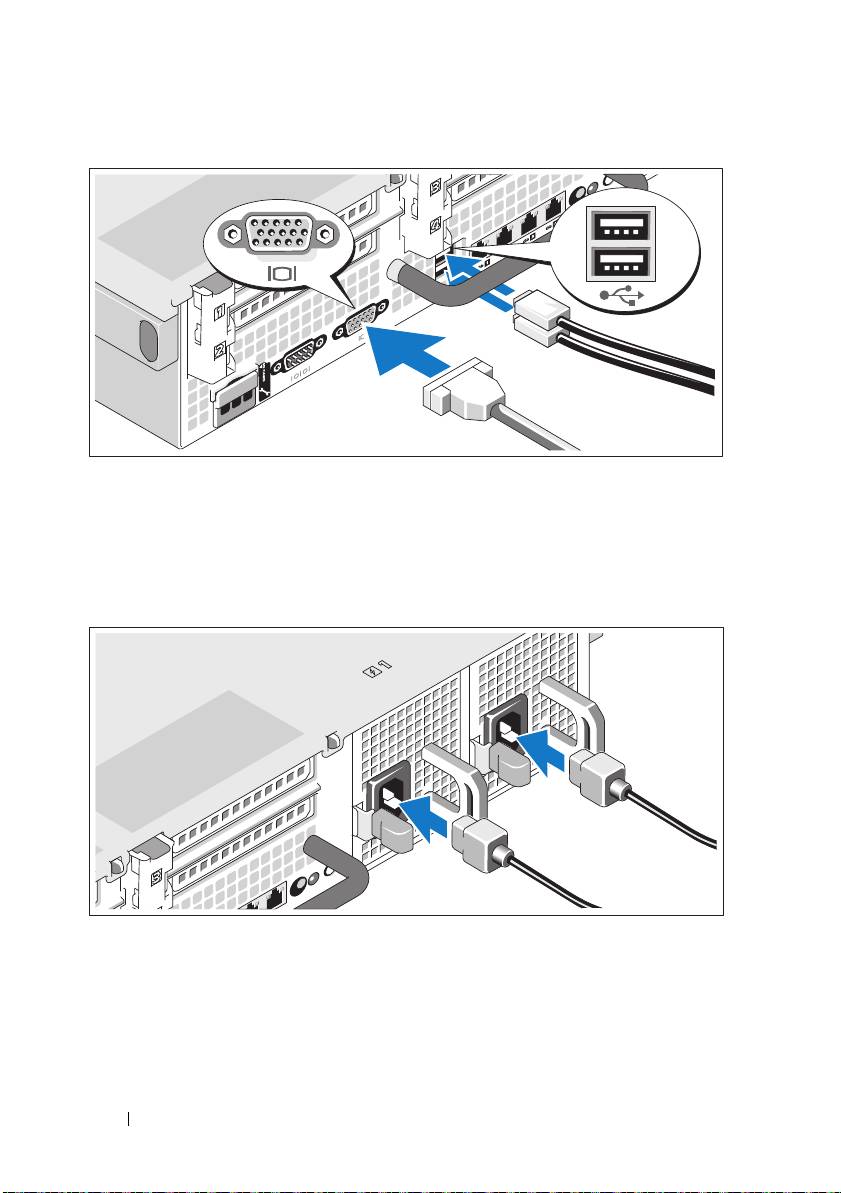
Connect the keyboard, mouse, and monitor (optional).
The connectors on the back of your system have icons indicating which cable
to plug into each connector. Be sure to tighten the screws (if any) on the
monitor's cable connector.
Connecting the Power Cable(s)
Connect the system’s power cable(s) to the system and, if a monitor is used,
connect the monitor’s power cable to the monitor.
6 Getting Started With Your System
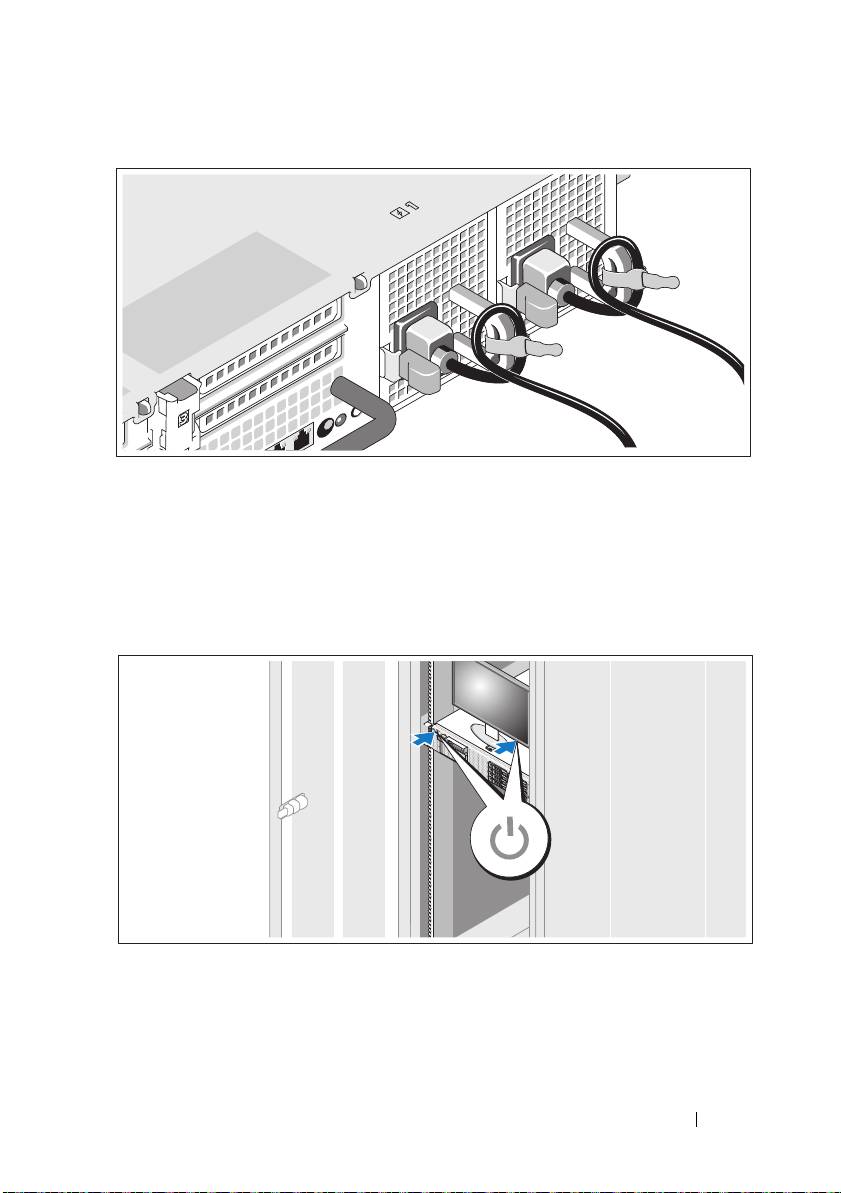
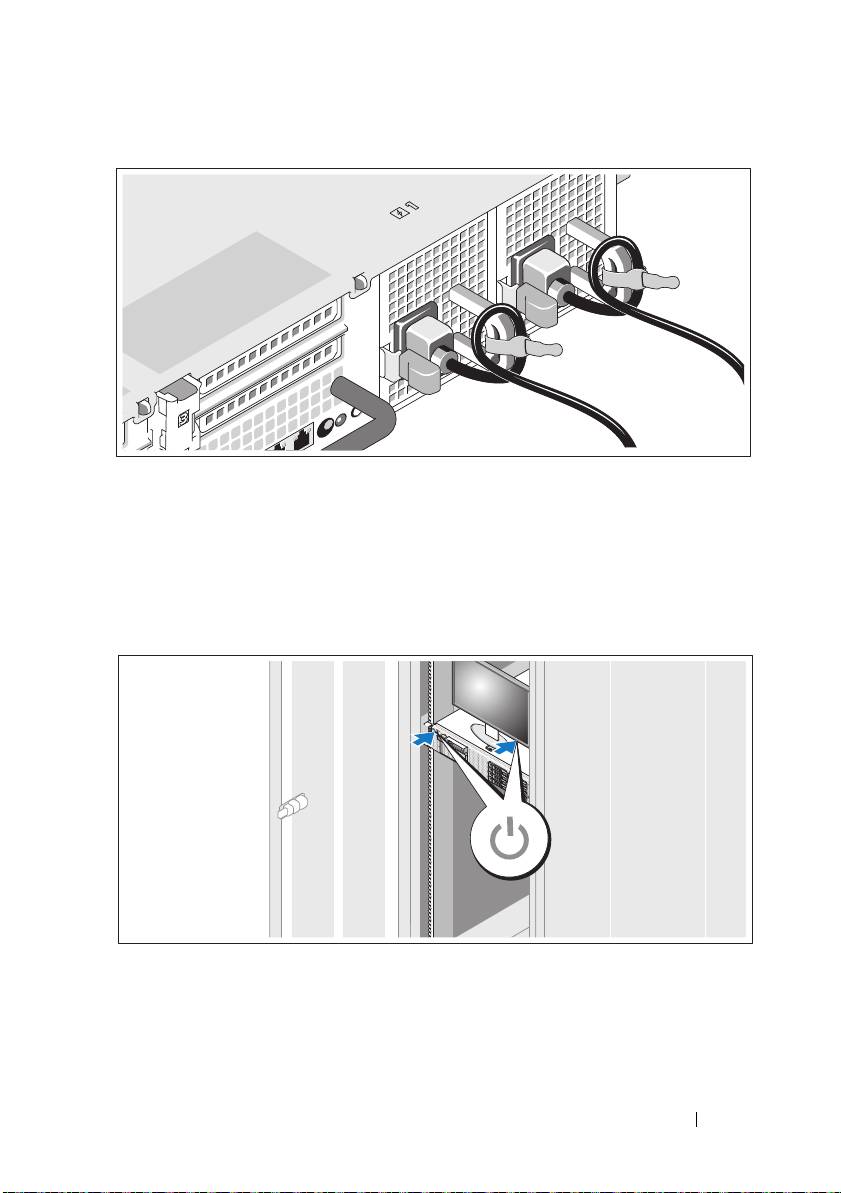
Securing the Power Cable(s)
Bend the system power cable into a loop as shown in the illustration and
secure the cable to the bracket using the provided strap.
Plug the other end of the power cable into a grounded electrical outlet or
a separate power source such as an uninterruptible power supply (UPS) or
a power distribution unit (PDU).
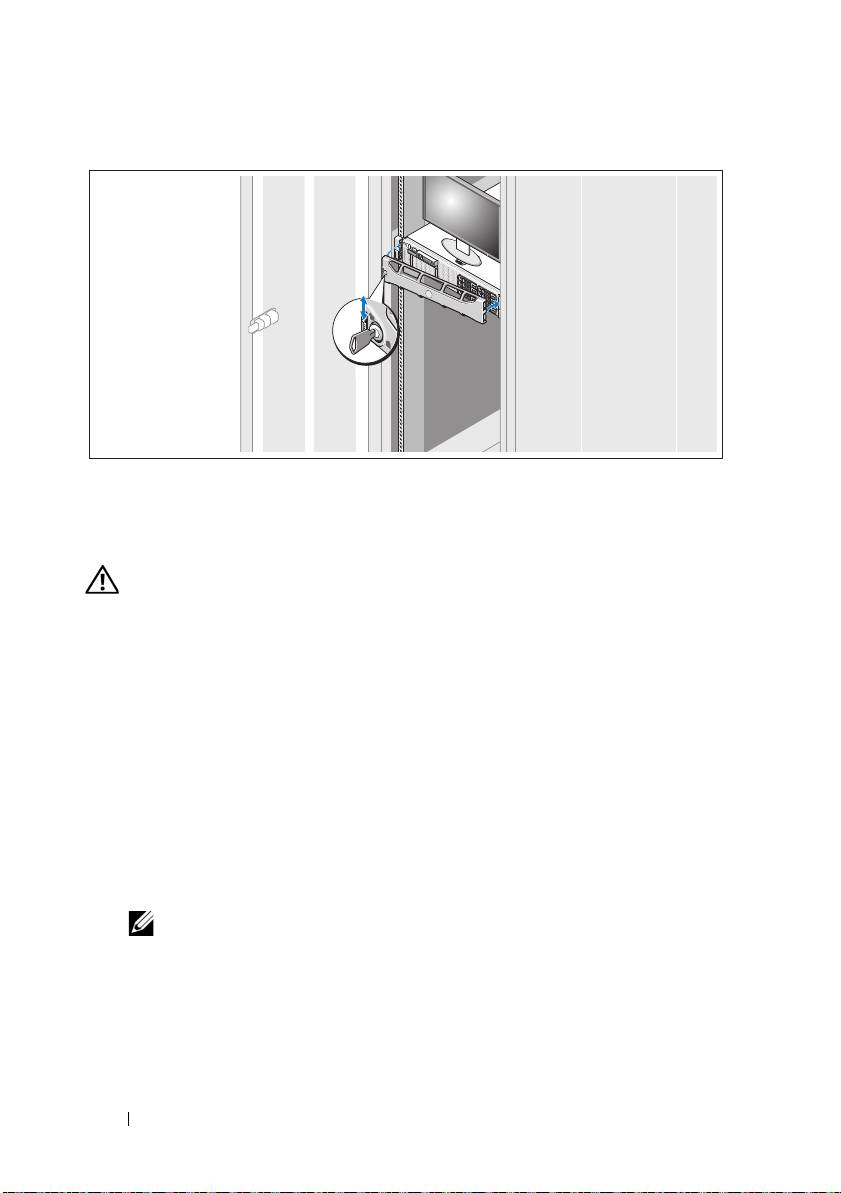
Turning On the System
Press the power button on the system and the monitor. The power indicators
should light.
Getting Started With Your System 7
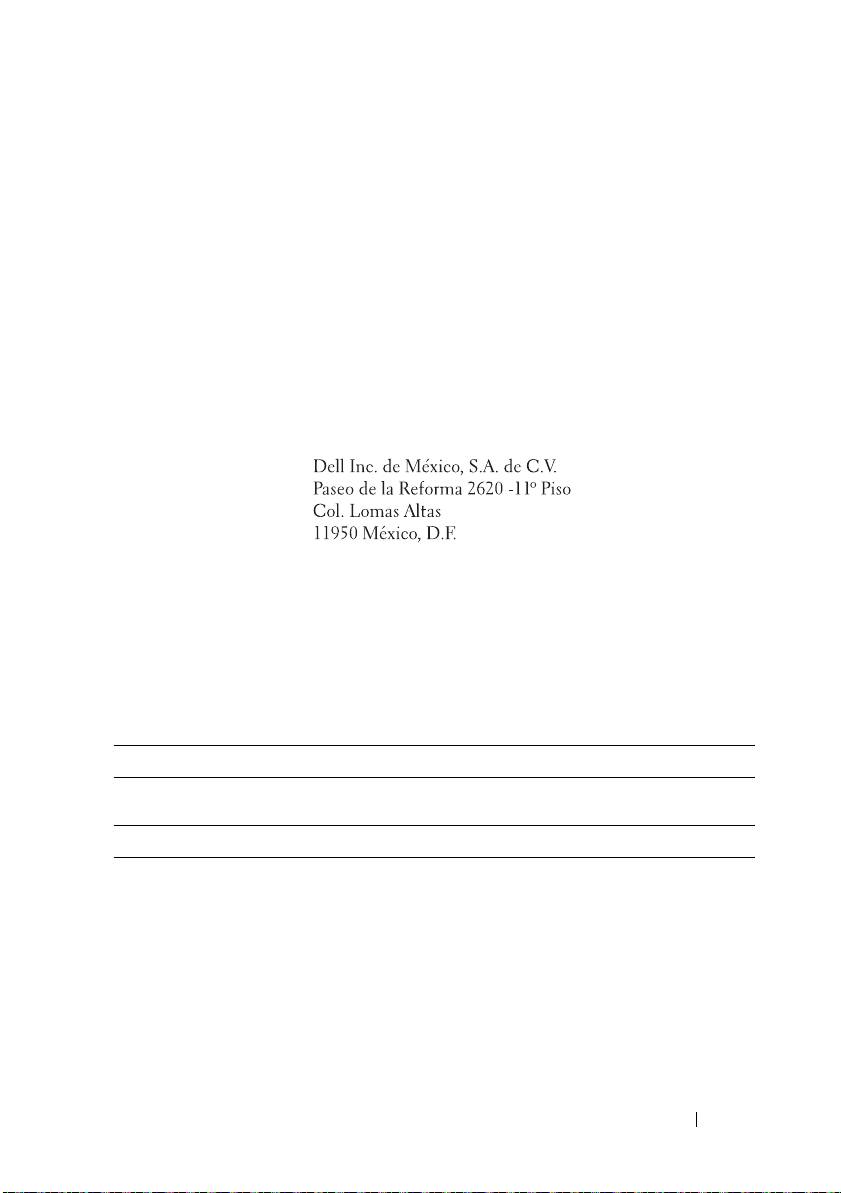
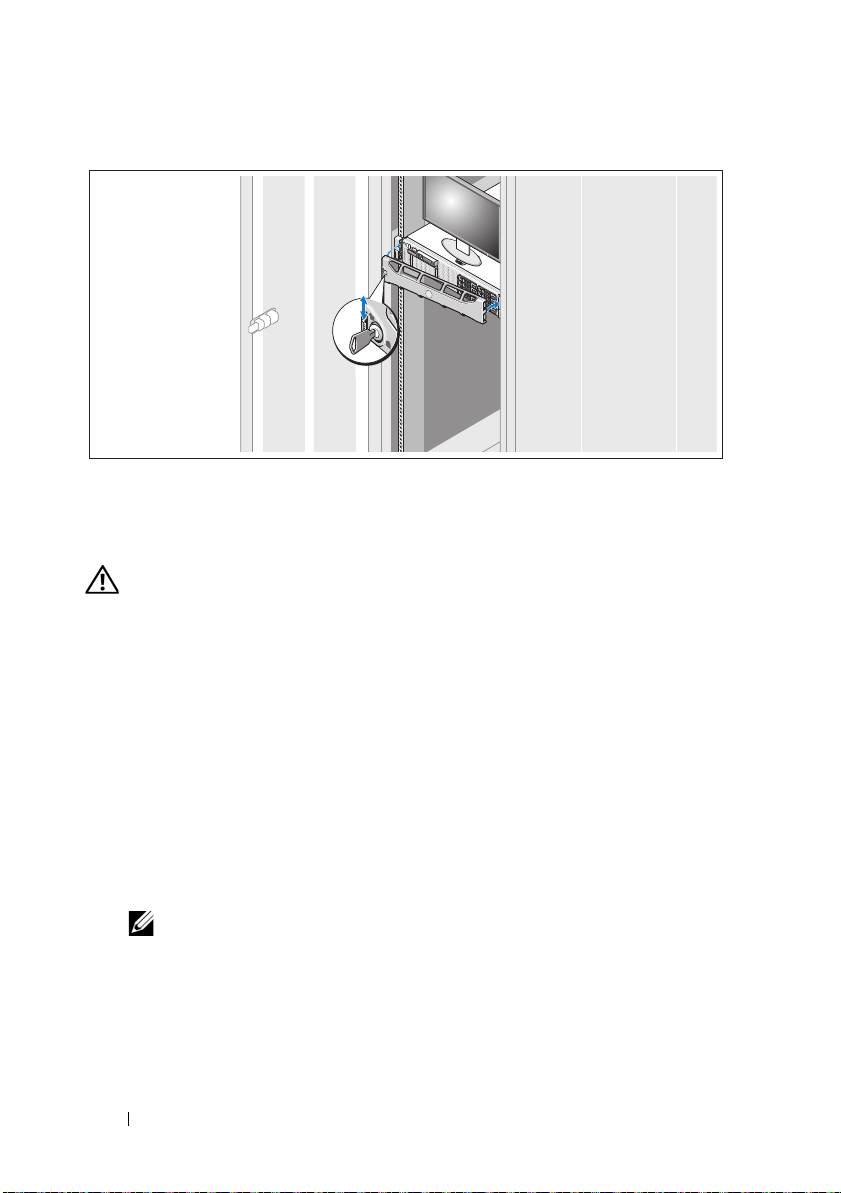
Installing the Optional Bezel
Install the bezel (optional).
Other Information You May Need
WARNING: See the safety and regulatory information that shipped with your
system. Warranty information may be included within this document or as
a separate document.
• The rack documentation included with your rack solution describes how to
install your system into a rack.
•The
Hardware Owner’s Manual
provides information about system
features and describes how to troubleshoot the system and install or
replace system components. This document is available online at
support.dell.com/manuals.
• Any media that ships with your system that provides documentation and
tools for configuring and managing your system, including those
pertaining to the operating system, system management software, system
updates, and system components that you purchased with your system.
NOTE: Always check for updates on support.dell.com/manuals and read the
updates first because they often supersede information in other documents.
8 Getting Started With Your System
Obtaining Technical Assistance
If you do not understand a procedure in this guide or if the system does not
perform as expected, see your Hardware Owner’s Manual. Dell™ offers
comprehensive hardware training and certification. See www.dell.com/training
for more information. This service may not be offered in all locations.
NOM Information (Mexico Only)
The following information is provided on the device described in this
document in compliance with the requirements of the official Mexican
standards (NOM):
Importer:
Model number: E02S
Supply voltage: 100–240 V AC
Frequency: 50/60 Hz
Current consumption: 7.0–3.5 A
Technical Specifications
Processor
®
®
Processor type One Intel
Xeon
5000 series processor
Expansion Bus
Bus type PCI Express Generation 2
Expansion slots using
riser cards:
One full-height, 9.5" length, x4 link (slot 1)
Riser 1 (Center Riser)
NOTE: This slot can be upgraded to 12.2".
One low-profile, 9.5" length, x4 link (slot 2)
Getting Started With Your System 9

Expansion Bus (continued)
Riser 2 (Left Riser)
Two full-height, 9.5" length, x8 link (slot 3 and 4)
NOTE: Support for up to 25 W is available only on the first
two cards installed in the system; any additional cards
installed in the system must be 15 W or less.
Memory
Architecture 800, 1066, or 1333 MHz DDR3 registered or unbuffered
Error Correcting Code (ECC) DIMMs. Support for
Advanced ECC or Memory Optimized operation
Memory module
Eighteen 240-pin
sockets
Memory module
1 GB and 2 GB UDIMMs, and 2 GB, 4 GB,
capacities
or 8 GB RDIMMs
(single, dual, or quad-rank dependent on capacity)
Minimum RAM 1 GB with a single processor (1 DIMM)
Maximum RAM 96 GB (with quad-rank 8 GB RDIMM), 144 GB
(with dual-rank 8 GB RDIMM), or 24 GB (with 2 GB
UDIMMs)
Drives
Hard drives Up to six 3.5-inch, internal, hot-swappable SAS or SATA
hard drives
Diskette Drive Optional external USB 1.44 MB drive
Optical drive One internal slimline SATA DVD-ROM or
SATA DVD+RW drive
Optional external USB DVD
NOTE: DVD devices are data only.
Flash Drive Optional internal USB
Optional internal Secure Digital (SD) memory card
Optional external SD memory card
Connectors
Back
NIC
Four RJ-45 10/100/1000 Mbps Ethernet
10 Getting Started With Your System

Connectors (continued)
Serial
9-pin, DTE, 16550-compatible
USB
Two 4-pin, USB 2.0-compliant
Video
15-pin VGA
Optional external
One flash memory card slot on the back panel
VFlash card
Front
Video
15-pin VGA
USB
Two 4-pin, USB 2.0-compliant
Internal
USB
One 4-pin, USB 2.0-compliant
Optional internal
One internal flash memory card slot
SD module
Video
Video type Integrated Matrox G200
Video memory 8 MB shared
Power
AC Power Supply (per power supply)
Wattage
870 W (High Output)
570 W /200840 KB (Energy Smart)
Voltage
90–264 VAC, autoranging, 47–63 Hz
Heat dissipation
2968.6 BTU/hr maximum (High Output)
1944.9 BTU/hr maximum (Energy Smart)
Maximum inrush
Under typical line conditions and over the entire system
current
ambient operating range, the inrush current may reach
55 A per power supply for 10 ms or less
Getting Started With Your System 11

Power (continued)
Batteries
System battery
CR 2032 3.0-V Lithium coin cell
RAID battery
3.7-V Lithium ion battery pack
(optional)
Physical
Height 8.64 cm (3.4")
Width 48.24 cm (18.99") with rack latches
44.31 cm (17.4") without rack latches
Depth 72.06 cm (28.4") with power supplies and bezel
68.07 cm (26.8") without power supplies and bezel
Weight (maximum
26.1 kg (57.54 lb)
configuration)
Weight (empty) 17.7 kg (39 lb)
Environmental
NOTE: For additional information about environmental measurements for specific
system configurations, see www.dell.com/environmental_datasheets.
Temperature
Operating
10° to 35°C (50° to 95°F) with a maximum temperature
gradation of 10°C per hour
NOTE: For altitudes above 2950 ft, the maximum operating
temperature is derated 1°F/550 ft.
Storage
–40° to 65°C (–40° to 149°F) with a maximum temperature
gradation of 20°C per hour
Relative humidity
Operating
20% to 80% (non-condensing) with a maximum humidity
gradation of 10% per hour
Storage
5% to 95% (non-condensing) with a maximum humidity
gradation of 10% per hour
12 Getting Started With Your System

Environmental (continued)
Maximum vibration
Operating
0.26 Gms from 5–350 Hz for 5 minutes in operational
orientations
Storage
1.54 Gms from 10–250 Hz for 10 minutes in all orientations
Maximum shock
Operating
Half sine shock in all operational orientations of 31 G plus
or minus 5% with a pulse duration of 2.6 ms plus or minus
10%
Storage
Half sine shock on all six sides of 71 G plus or minus 5%
with a pulse duration of 2 ms plus or minus 10%
Square wave shock on all six sides of 27 G with a velocity
change at 597 cms/sec or greater
Altitude
Operating
–16 to 3048 m (–50 to 10,000 ft)
NOTE: For altitudes above 2950 ft, the maximum operating
temperature is derated 1°F/550 ft.
Storage
–16 to 10,600 m (–50 to 35,000 ft)
Getting Started With Your System 13

14 Getting Started With Your System

Systémy
Dell™ DX6000
Začínáme se systémem
Regulační model série E02S
Poznámky a upozornění
POZNÁMKA:
POZNÁMKA označuje důležité informace, které pomáhají lepšímu využití
počítače.
UPOZORNĚNÍ: UPOZORNĂNÍ poukazuje na možnost poškození hardwaru nebo
ztráty dat v případě nedodržení pokynů.
VAROVÁNÍ: VAROVÁNÍ upozorňuje na potenciální nebezpečí poškození majetku,
úrazu nebo smrti.
____________________
Informace obsažené v tomto dokumentu podléhají změnám bez předchozího upozornění.
© 2010 Dell Inc. Všechna práva vyhrazena.
Jakákoli reprodukce těchto materiálů bez písemného povolení společnosti Dell Inc. je přísně zakázána.
Dell a logo DELL jsou ochranné známky společnosti Dell Inc.; Intel a Xeon jsou registrované ochranné
známky společnosti Intel Corporation ve Spojených státech amerických a dalších zemích.
V tomto dokumentu mohou být použity další ochranné známky a obchodní názvy s odkazem na
společnosti vlastnící tyto známky a názvy nebo na jejich produkty. Společnost Dell Inc. nemá
vlastnické zájmy vůči ochranným známkám a obchodním názvům jiným než svým vlastním.
Regulační model série E02S
Květen 2010 Č. dílu RGF9J Rev. A01
Instalace a konfigurace
VAROVÁNÍ: Před provedením následujícího postupu si prostudujte bezpečnostní
pokyny dodané se systémem.
Rozbalení systému
Rozbalte systém a identifikujte jeho jednotlivé součásti.
Instalace kolejniček a systému do stojanu
Sestavte kolejničky a nainstalujte systém do stojanu podle bezpečnostních
pokynů a pokynů k instalaci do stojanu dodaných se systémem.
Začínáme se systémem
17
Volitelné - připojení klávesnice, myši a monitoru
Připojte klávesnici, myš a monitor (volitelné).
Konektory na zadní straně systému mají ikony znázorňující, který kabel se má
připojit ke kterému konektoru. Zajistěte, aby šrouby na konektoru kabelu
monitoru byly dobře dotaženy (je-li jimi konektor vybaven).
Připojení napájecích kabelů
Připojte napájecí kabely k systému, a pokud používáte monitor, připojte napájecí
kabel také k monitoru.
18
Začínáme se systémem
Zajištění napájecích kabelů
Ohněte napájecí kabel systému do smyčky, jak je znázorněno na obrázku, a
připevněte jej dodanou páskou k držáku.
Poté zasuňte druhý konec napájecího kabelu do uzemněné elektrické zásuvky
nebo jej připojte k samostatnému zdroji napájení, například ke zdroji
nepřerušitelného napájení (UPS) nebo jednotce rozvaděče (PDU).
Zapnutí systému
Stiskněte vypínač na systému a na monitoru. Indikátory napájení by se měly
rozsvítit.
Začínáme se systémem
19
Instalace volitelného čelního krytu
Nainstalujte čelní kryt (volitelný).
Další užitečné informace
VAROVÁNÍ: Prostudujte si informace o bezpečnosti a předpisech, které byly
dodány se systémem. Informace o záruce jsou součástí tohoto dokumentu nebo
jsou přiloženy samostatně.
• Pokyny k instalaci do stojanu dodané se stojanovým řešením popisují
instalaci systému do stojanu.
•
Příručka majitele hardwaru
obsahuje informace o funkcích systému a
popisuje řešení problémů se systémem a instalaci nebo výměnu
komponent. Tento dokument je k dispozici online na adrese
support.dell.com/manuals
.
• Média dodaná se systémem obsahují dokumentaci a nástroje pro
konfiguraci a správu systému. Mohou být dodána například média týkající
se operačního systému, softwaru pro správu systému, aktualizací systému a
komponent zakoupených se systémem.
POZNÁMKA:
Vždy nejprve zkontrolujte a pročtěte aktualizace uvedené na adrese
support.dell.com/manuals
, protože tyto aktualizace často nahrazují informace v
ostatních dokumentech.
20
Začínáme se systémem
