
Dell PowerEdge 1900: инструкция
Раздел: Компьютерные комплектующие
Тип:
Инструкция к Dell PowerEdge 1900
Оглавление
- Примечания, символы внимания и предупреждения
- Характеристики системы
- Поддержка операционных систем
- Дополнительная полезная информация Получение технической поддержки Установка и конфигурирование
- Распаковка системы Установка стабилизирующих опор
- Подключение клавиатуры, мыши и монитора Подключение питания
- Включение системы Установка лицевой панели
- Завершение установки операционной системы Технические характеристики Процессор Шина расширения Память Диски
- Диски (продолжение) Разъемы Видео Электропитание
- Электропитание (продолжение) Габаритные размеры Требования к окружающей среде
Dell™ PowerEdge™ 1900 Systems
Getting Started
With Your System
Začínáme se systémem
Guide de mise en route
Erste Schritte mit dem System
Τα πρώτα βήµατα Με το σύστηµά σας
Rozpoczęcie pracy z systemem
Начало работы с системой
Procedimientos iniciales con el sistema
www.dell.com | support.dell.com


Dell™ PowerEdge™ 1900 Systems
Getting Started
With Your System
www.dell.com | support.dell.com
Notes, Notices, and Cautions
NOTE: A NOTE indicates important information that helps you make better use of your computer.
NOTICE: A NOTICE indicates either potential damage to hardware or loss of data and tells you how to avoid the
problem.
CAUTION: A CAUTION indicates a potential for property damage, personal injury, or death.
____________________
Information in this document is subject to change without notice.
© 2006 Dell Inc. All rights reserved.
Reproduction in any manner whatsoever without the written permission of Dell Inc. is strictly forbidden.
Trademarks used in this text: Dell and the DELL logo are trademarks of Dell, Inc.; Intel and Xeon are registered trademarks of Intel Corporation;
Microsoft and Windows are registered trademark and Windows Server is a trademark of Microsoft Corporation; Red Hat is a registered trademark
of Red Hat, Inc.; SUSE is a registered trademark of SUSE LINUX Products GmbH.
Other trademarks and trade names may be used in this document to refer to either the entities claiming the marks and names or their products.
Dell Inc. disclaims any proprietary interest in trademarks and trade names other than its own.
Model ECM01
February 2006 P/N FF593 Rev. A00

System Features
The major hardware and software features of your system include:
®
®
• One or two Dual-Core Intel
Xeon
Processors 5000 Sequence.
• Support for symmetric multiprocessing (SMP), which is available on systems with two Intel Xeon
processors. SMP greatly improves overall system performance by dividing processor operations
between independent processors. To take advantage of this feature, you must use an operating
system that supports multiprocessing.
NOTE: If you decide to upgrade your system by installing a second processor, you must order the
processor upgrade kits from Dell. Not all versions of the Intel Xeon processor will work properly as
additional processors. The upgrade kit from Dell contains the correct version of the processor and heat
sink.
• A minimum of 512 MB of 533 or 667 MHz (when available), Fully Buffered DIMMs (FBD),
upgradable to a maximum of 16 GB by installing combinations of 256-MB, 512-MB, 1-GB or 2-GB
memory modules in the eight memory module sockets on the system board.
• Support for up to six 3.5-inch, internal Serial-Attached SCSI (SAS) hard drives or six 3.5-inch,
internal SATA hard drives.
• Peripheral bay provides support for an optional optical drive and an optional half-height tape
backup unit (TBU).
• An optional single, 1.44-MB, 3.5-inch diskette drive.
• An optional CD, DVD, or combination CD-RW/DVD drive.
NOTE: DVD devices are data only.
• An intrusion switch that signals the appropriate systems management software if the top cover
is opened.
• An 800-W power supply.
• Six system cooling fans.
The system board includes the following features:
• Six PCI slots located in an expansion-card cage. Slots 1 and 2 are 3.3-V, 64-bit, 133-MHz PCI-X
slots; slot 3 is a 3.3-V, PCIe x8 lane; slots 4 through 6 are 3.3-V, PCIe x4 lanes. Expansion-card slots
2 through 6 accommodate full-height, full-length expansion cards. Slot 1 accommodates half-
length expansion cards. PCIe slots accommodate up to x8 expansion cards.
Getting Started With Your System 3

• Dedicated PCI slot for an optional integrated RAID controller card.
NOTE: System boot is not supported from an external device attached to a SAS or SCSI adapter, including
SAS 5/E, PERC 5/E, or PERC 4e/DC. Contact your technical support provider for the latest support information
about booting from external devices.
• An integrated Gigabit Ethernet NIC, capable of supporting 10-Mbps, 100-Mbps, and 1000-Mbps data
rates.
• Six USB 2.0-compliant connectors (two on the front and four on the back) capable of supporting
a diskette drive, a CD-ROM or DVD-ROM drive, a keyboard, a mouse, or a USB flash drive.
• Optional remote access controller (RAC) for remote systems management.
• An integrated VGA-compatible video subsystem with an ATI ES1000, 33-MHz PCI video controller.
This video subsystem contains 16 MB of DDR SDRAM video memory (nonupgradable). Maximum
resolution is 1600 x 1200 with 64 K colors; true-color graphics are supported in the following
resolutions: 640 x 480, 800 x 600, 1024 x 768, 1152 x 864, and 1280 x 1024. When the optional RAC
is installed, the video resolution is 1024 X 768.
• Systems management circuitry that monitors operation of the system fans as well as critical system
voltages and temperatures. The systems management circuitry works in conjunction with the systems
management software.
• Standard baseboard management controller with serial access.
• Back-panel connectors include one serial, one video, four USB, and one NIC connector.
• Front-panel connectors include a video and two USB connectors.
• Front-panel 1x5 LCD for system ID and error messaging.
• System ID button on the front and back panels.
For more information about specific features, see "Technical Specifications" on page 9.
Supported Operating Systems
®
• Microsoft
Windows Server™ 2003 Standard and Enterprise Editions
• Microsoft Windows Small Business Server 2003, Standard and Premium Editions
• Microsoft Windows Server 2003 Standard and Enterprise x64 Editions
®
•Red Hat
Enterprise Linux AS and ES (version 3 and version 4) for Intel x86
• Red Hat Enterprise Linux AS and ES (version 4) for Intel Extended Memory 64 Technology
(Intel EM64T)
®
•SUSE
Linux Enterprise Server 9 for Intel EM64T
4 Getting Started With Your System
Other Information You May Need
CAUTION: The Product Information Guide provides important safety and regulatory information. Warranty
information may be included within this document or as a separate document.
• The
Hardware Owner’s Manual
provides information about system features and describes how to
troubleshoot the system and install or replace system components. The
Hardware Owner’s Manual
is available on the CDs that came with your system or from
support.dell.com
.
• CDs included with your system provide documentation and tools for configuring and managing
your system.
• Updates are sometimes included with the system to describe changes to the system, software, and/or
documentation.
NOTE: Always check for updates on support.dell.com and read the updates first because they often
supersede information in other documents.
• Release notes or readme files may be included to provide last-minute updates to the system or
documentation or advanced technical reference material intended for experienced users or
technicians.
Obtaining Technical Assistance
If you do not understand a procedure in this guide or if the system does not perform as expected,
see your Hardware Owner’s Manual.
Installation and Configuration
CAUTION: Before performing the following procedure, read and follow the safety instructions and important
regulatory information in your Product Information Guide.
This section describes the steps to set up your system for the first time. Refer to the documentation
included with your system on installing the stabilizer feet on your system.
CAUTION: Installing the feet is necessary to provide a stable foundation for the system. Failure to install the feet
poses the risk of having the system tip over, possibly causing bodily injury or damage to the system.
CAUTION: Whenever you need to lift the system, get others to assist you. To avoid injury, do not attempt to lift the
system by yourself.
Getting Started With Your System 5
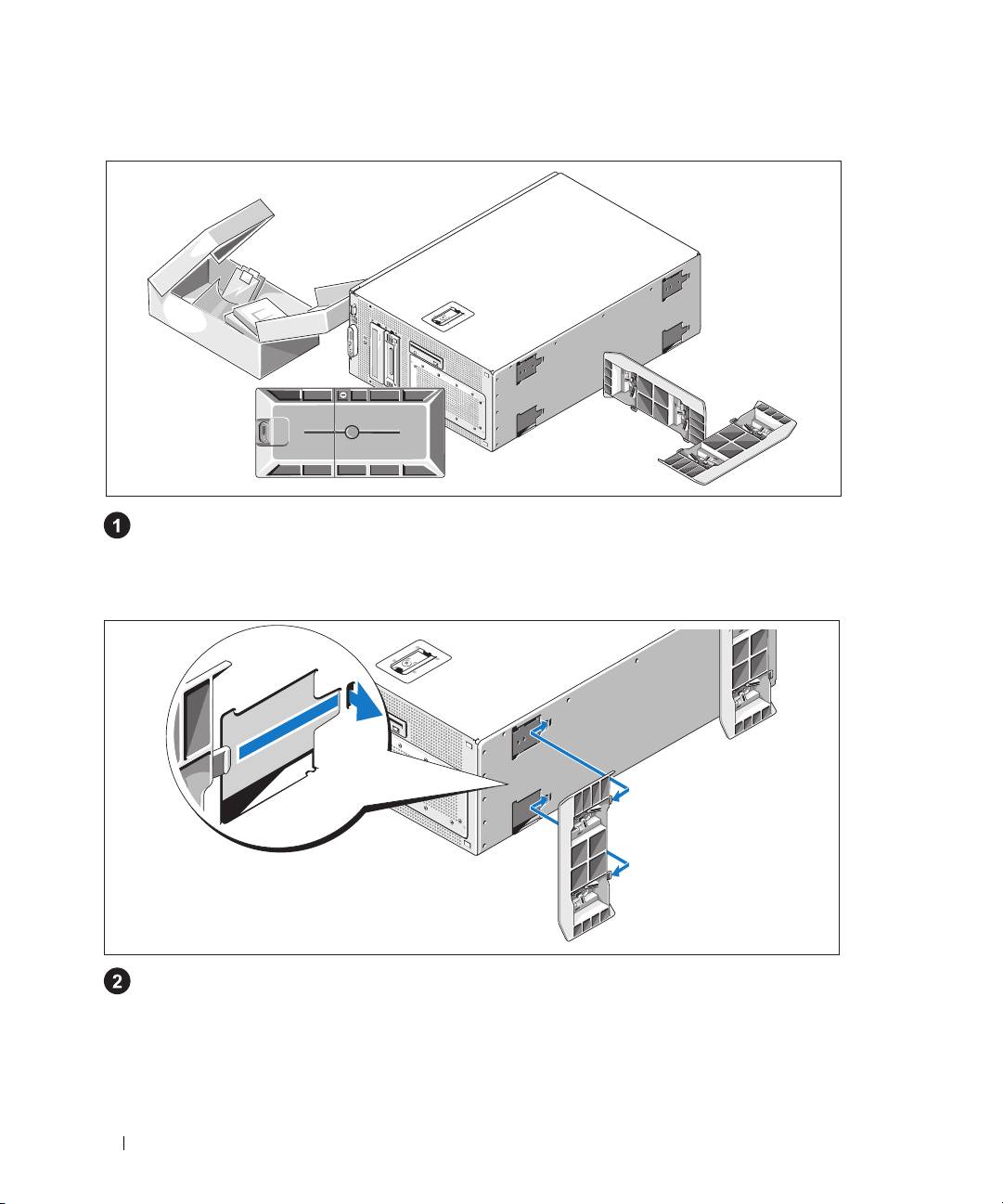
Unpacking the System
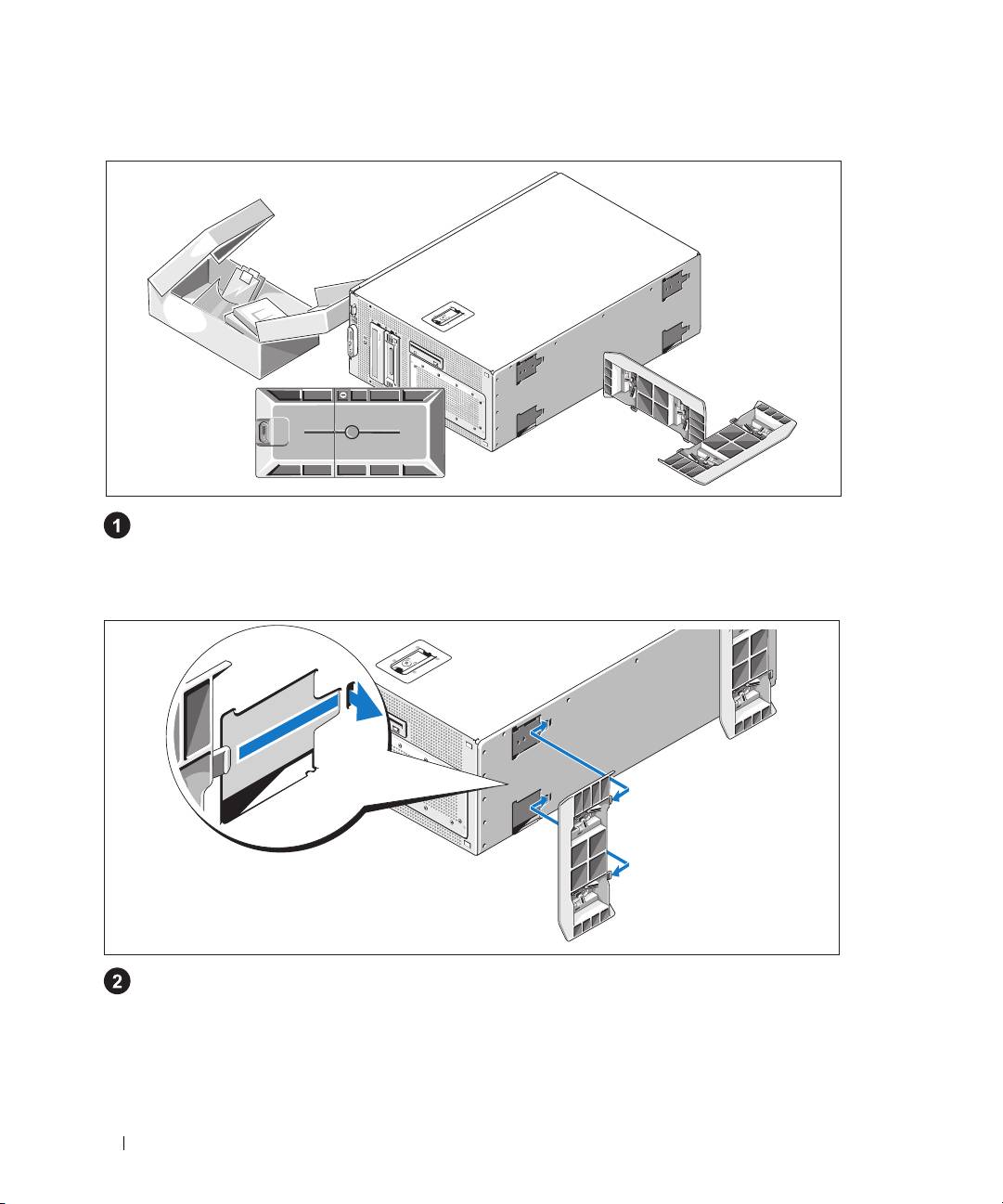
Unpack your system and identify each item.
Keep all shipping materials in case you need them later.
Installing the Stabilizer Feet
See the documentation included with your system on installing the system stabilizer feet.
6 Getting Started With Your System
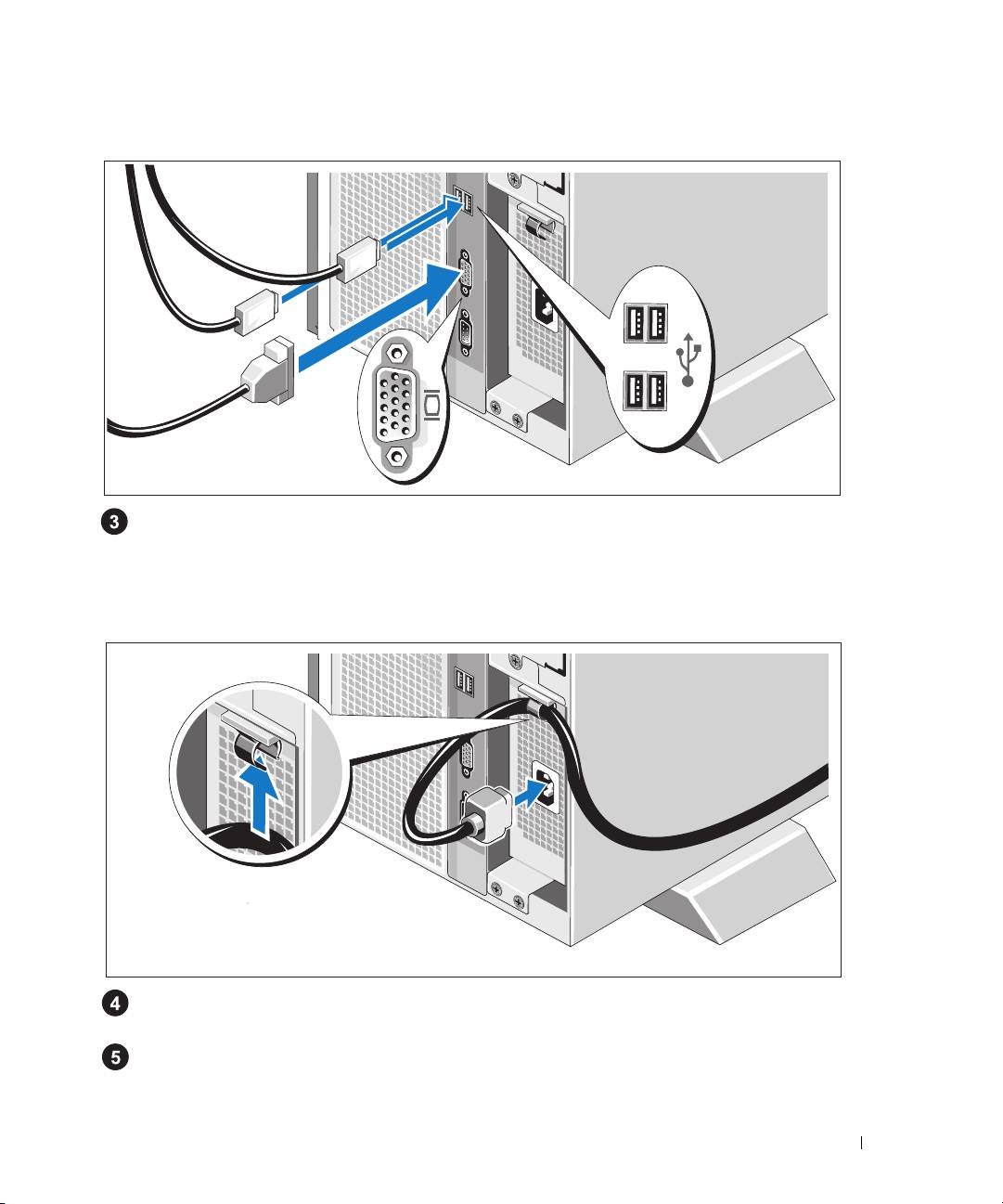
Connecting the Keyboard, Mouse, and Monitor
Connect the keyboard, mouse, and monitor (optional).
The connectors on the back of your system have icons indicating which cable to plug into each
connector. Be sure to tighten the screws (if any) on the monitor's cable connector.
Connecting the Power
Attach the system’s power cable to the cable clasp at the top of the power supply and connect it
to the system.
Plug the other end of the cable into a grounded electrical outlet or a separate power source
such as an uninterrupted power supply (UPS) or a power distribution unit (PDU).
Getting Started With Your System 7
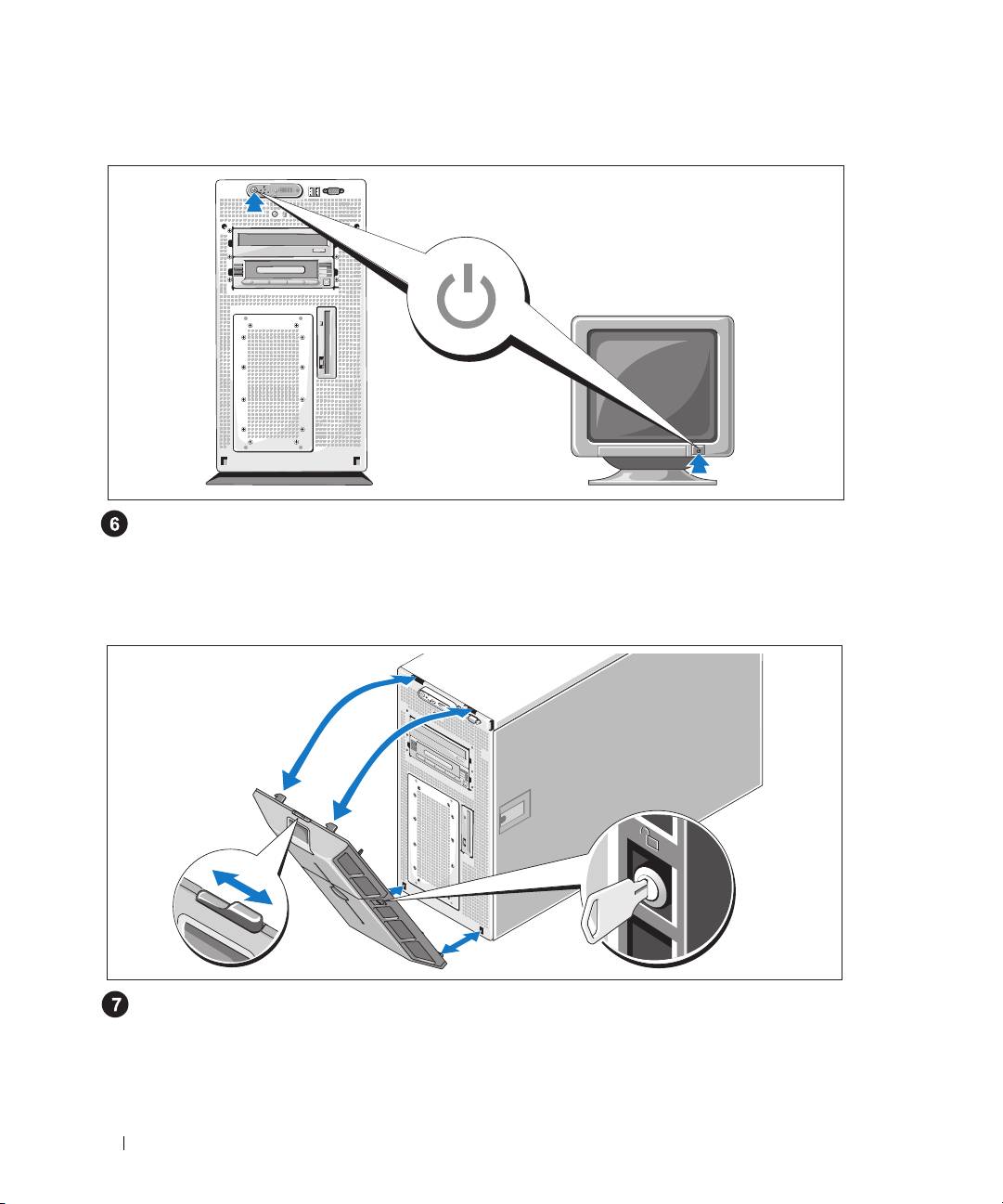
Turning on the System
Turn on the system and monitor (optional).
Press the power button on the system and the monitor. The power indicators should light.
Adjust the monitor’s controls until the displayed image is satisfactory.
Installing the Bezel
Install the bezel.
8 Getting Started With Your System

Complete the 0perating System Setup
If you purchased a preinstalled operating system, see the operating system documentation that ships
with your system. To install an operating system for the first time, see the Quick Installation Guide.
Be sure the operating system is installed before installing hardware or software not purchased with
the system.
Technical Specifications
Processor
Processor type One or two Dual-Core Intel Xeon Processors 5000
Sequence
Expansion Bus
Bus type PCI, PCI-X, PCIe
Expansion slots
PCI-X
one full-height, half-length 3.3-V, 64-bit,
133-MHz (slot 1)
one full-height, full-length 3.3-V, 64-bit, 133-MHz
(slot 2)
PCIe
one x8 lane, 3.3-V (slot 3)
three x4 lanes, 3.3-V (slots 4 through 6)
Memory
Architecture 533 or 667 MHz (when available) Fully Buffered
DIMMs (FBD)
Memory module sockets eight 240-pin
Memory module capacities 256 MB, 512 MB, 1 GB, or 2 GB
Minimum RAM 512 MB (two 256-MB modules)
Maximum RAM 16 GB
Drives
Hard drives up to six 3.5-inch, internal, SAS or SATA
Diskette drive one optional internal 3.5-inch, 1.44-MB
optional external USB 3.5-inch, 1.44-MB
Getting Started With Your System 9

Drives (continued)
Optical drive one optional CD, DVD, or combination
CD-RW/DVD
NOTE:
DVD devices are data only.
optional external USB CD-ROM
optional external USB DVD-ROM
Flash drive optional external USB
Connectors
Back
NIC
TOE-capable RJ-45 (for integrated 1-GB NIC)
Serial
9-pin, DTE, 16550-compatible
USB
Four 4-pin, USB 2.0-compliant
Video
15-pin VGA
Front
Video
15-pin VGA
USB
Two 4-pin, USB 2.0-compliant
Video
Video type ATI ES1000 video controller; VGA connectors
Video memory 16 MB of DDR SDRAM
Power
AC power supply
Wattage
800 W
Voltage
90–264 VAC, autoranging, 47–63 Hz
Heat dissipation
2320 BTU/hr maximum
Maximum inrush current
Under typical line conditions and over the entire
system ambient operating range, the inrush
current may reach 55 A per power supply for
10 ms or less
Batteries
System battery
CR 2032 3.0-V lithium ion coin cell
RAID battery (optional)
4.1-V lithium ion
10 Getting Started With Your System

Physical
Tower (without bezel)
Height
47.89 cm (18.85 in) with feet, no casters
Width
22.66 cm (8.92 in)
Depth
66.13 cm (26.04 in) does not include control
panel or bezel; control panel adds an additional
1.3 cm (.51 in)
Weight (maximum configuration)
49.9 kg (110 lb)
Environmental
NOTE: For additional information about environmental measurements for specific system configurations,
contact your technical support provider.
Temperature
Operating
10° to 35°C (50° to 95°F)
Storage
–40° to 65°C (–40° to 149°F)
Relative humidity
Operating
20% to 80% (noncondensing) with a maximum
humidity gradation of 10% per hour
Storage
5% to 95% (noncondensing)
Maximum vibration
Operating
0.26 G from 5–350Hz for 2 min in the Z axis
Storage
1.54 G from 10–250 Hz for 15 min in all
orientations
Maximum shock
Operating
One shock pulse in the positive z axis (one pulse
on each side of the system) of 41 G for up to 2 ms
Storage
Six consecutively executed shock pulses in the
positive and negative x, y, and z axes (one pulse
on each side of the system) of 71 G for up to 2 ms
Altitude
Operating
–16 to 3048 m (–50 to 10,000 ft)
Storage
–16 to 10,600 m (–50 to 35,000 ft)
Getting Started With Your System 11

12 Getting Started With Your System

Dell™ PowerEdge™ 1900 Systems
Začínáme se systémem
www.dell.com | support.dell.com
title.fm Page 2 Monday, February 27, 2006 11:40 AM
Poznámky, upozornění a výstrahí
POZNÁMKA: POZNÁMKA označuje důležitou informaci, s jejíž pomocí lépe využijete svůj počítač.
UPOZORNĚNÍ: UPOZORNĚNÍ poukazuje na možnost poškození hardwaru nebo ztráty dat a poskytuje
návod, jak se danému problému vyhnout.
POZOR: Výstraha („POZOR“) poukazuje na riziko poškození majetku, poranění nebo smrtelného
úrazu.
____________________
Informace obsažené v tomto dokumentu podléhají změnám bez předchozího upozornění.
© 2006 Dell Inc. Všechna práva vyhrazena.
Reprodukce jakýmkoli způsobem bez písemného povolení společnosti Dell Inc. je přísně zakázána.
Ochranné známky použité v tomto textu: Dell a logo DELL jsou ochranné známky společnosti Dell Inc.; Intel a Xeon jsou registrované ochranné
známky společnosti Intel; Microsoft a Windows jsou registrované ochranné známky a Windows Server je ochranná známka společnosti
Microsoft; Red Hat je registrovaná ochranná známka společnosti Red Hat, Inc.; SUSE je registrovaná ochranná známka společnosti
SUSE LINUX Products GmbH.
V tomto dokumentu mohou být použity další ochranné známky a obchodní názvy odkazující na subjekty, kterým tyto známky či názvy patří,
nebo na jejich výrobky. Společnost Dell Inc. se zříká jakýchkoli vlastnických zájmů o jiné než vlastní ochranné známky a obchodní názvy.
Model ECM01
Únor 2006 P/N FF593 Rev. A00

body.fm Page 15 Monday, February 27, 2006 11:40 AM
Systémové funkce
Hlavní hardwarové a softwarové funkce systému jsou:
®
®
•
Jeden nebo dva dvoujádrové procesory řady Intel
Xeon
5000.
•
Podpora SMP (symmetric multiprocessing), která je k dispozici u systémů se dvěma procesory
Intel Xeon. SMP výrazně zvyšuje celkový výkon systému rozdělením procesorových operací mezi
nezávislé procesory. Pro využití výhod této funkce je třeba použít operační systém podporující SMP.
POZNÁMKA: Jestliže se rozhodnete pro upgrade vašeho systému instalací druhého
procesoru, je nutné objednat procesorovou soupravu pro upgrade od společnosti Dell. Ne
všechny verze procesorů Intel Xeon jsou na pozici druhého procesoru plně funkční. Souprava
pro upgrade od společnosti Dell obsahuje správnou verzi procesoru a vybavení pro odvod
tepla.
•
Minimálně 512 MB v pamět’ových modulech FB-DIMM (fully buffered) s frekvencí 533 nebo
667 MHz (je-li k dispozici), s možností rozšíření až na 16 GB instalací příslušných kombinací
pamět’ových modulů o velikostech 256 MB, 512 MB, 1 GB nebo 2 GB do osmi slotů na systémové
desce.
•
Podpora až šesti 3,5 palcových interních sériově propojených SCSI (SAS) pevných disků nebo
šesti 3,5 palcových interních SATA pevných disků.
•
Periferní pozice (drive bay) poskytuje podporu pro volitelnou optickou mechaniku a volitelné
polovysoké páskové zálohovací zařízení.
•
Volitelná jedna disketová mechanika 1,44 MB, 3,5 palce.
•
Volitelná CD, DVD mechanika nebo CD-RW/DVD kombo.
POZNÁMKA: DVD zařízení jsou určena pouze pro data.
•
Spínač při vniknutí, který předává příslušnému softwaru systémové správy signál v případě, že dojde
k otevření vrchního krytu.
•
Napájecí zdroj 800 W.
•
Šest chladicích ventilátorů.
Systémová deska má následující funkce:
•
Šest PCI slotů umístěných v ochranné kleci pro rozšiřovací karty. Sloty 1 a 2 jsou 3,3 V, 64 bit,
133 MHz PCI-X sloty; slot 3 je 3,3 V, PCIe x8 lane; sloty 4 až 6 jsou 3,3V, PCIe x4 lane. Do slotů pro
rozšiřovací karty 2 až 6 je možné instalovat celovysoké, celodélkové rozšiřovací karty. Do slotu 1 je
možné instalovat polodélkové rozšiřovací karty. Do slotů PCIe je možné instalovat rozšiřovací karty
až x8.
Začínáme se systémem 15

•
Dedikovaný PCI slot pro volitelnou integrovanou kartu RAID řadiče.
POZNÁMKA: Zavádění systému není podporováno z externího zařízení připojeného k adaptéru
SAS nebo SCSI, včetně SAS 5/E, PERC 5/E nebo PERC 4e/DC. Pro aktuální informaci k podpoře
při zavádění systému z externích zařízení se obrat’te na svého poskytovatele technické podpory.
•
Integrovaná sít’ová karta Gigabit Ethernet podporující datový přenos rychlostí 10 Mbps, 100 Mbps
a 1000 Mbps.
•
Šest konektorů USB 2.0 (dva na přední a čtyři na zadní straně) podporující disketovou mechaniku,
CD-ROM nebo DVD-ROM mechaniku, klávesnici, myš nebo USB flash disk.
•
Volitelný ovladač pro vzdálený přístup umožňující vzdálenou správu systému.
•
Integrovaný VGA kompatibilní grafický subsystém s ATI ES1000, 33 MHz PCI grafickým adaptérem.
Tento grafický subsystém disponuje 16 MB DDR SDRAM grafické paměti (bez možnosti rozšíření).
Maximální rozlišení je 1600 x 1200 bodů při 64 tisících barev; grafiky true color jsou podporovány
v následujících rozlišeních: 640 x 480, 800 x 600, 1024 x 768, 1152 x 864 a 1280 x 1024. Je-li
nainstalována volitelná karta ovladače pro vzdálený přístup, je grafické rozlišení 1024 x 768.
•
Okruhy systémové správy monitorující funkci systémových ventilátorů a kritická napětí a teploty
v systému. Okruhy systémové správy spolupracují se softwarem systémové správy.
•
Standardní BMC (baseboard managment controller) se sériovým přístupem.
•
Konektory na zadním panelu - jeden sériový port, jeden video, čtyři USB a jeden sít’ový konektor.
•
Konektory na předním panelu - video a dva USB konektory.
•
1x5 LCD na předním panelu pro zobrazení ID systému a chybových hlášení.
•
Tlačítko ID systému na předním a zadním panelu.
Pro více informací o specifických funkcích viz „Technická specifikace“ na strane 21.
Podporované operační systémy
®
•
Microsoft
Windows Server™ 2003 Standard a Enterprise Editions
•
Microsoft Windows Small Business Server 2003, Standard a Premium Editions
•
Microsoft Windows Server 2003 Standard a Enterprise x64 Editions
®
•
Red Hat
Enterprise Linux AS a ES (verze 3 a verze 4) pro Intel x86
•
Red Hat Enterprise Linux AS a ES (verze 4) pro Intel Extended Memory 64 Technology (Intel EM64T)
®
•
SUSE
Linux Enterprise Server 9 pro Intel EM64T
16 Začínáme se systémem
Další užitečné informace
POZOR: Informační příručka výrobku obsahuje důležité bezpečnostní a právní informace.
Informace o záruce je součástí tohoto dokumentu nebo je přiložena samostatně.
•
Uživatelská příručka k hardwaru
obsahuje informaci o funkcích systému a popisuje řešení problémů
se systémem a instalaci nebo výměnu systémových komponent.
Uživatelská příručka k hardwaru
je
k dispozici na CD, která byla dodána s vaším systémem, nebo na adrese
support.dell.com
.
•
CD dodaná se systémem obsahují dokumentaci a nástroje pro konfiguraci a správu vašeho systému.
•
Se systémem bývají dodávány aktualizace, které popisují změny v systému, softwaru a/nebo
v dokumentaci.
POZNÁMKA: Vždy nejprve zkontrolujte a pročtěte aktualizace uvedené na adrese
support.dell.com, protože tyto aktualizace často nahrazují informace v ostatních dokumentech.
•
Poznámky a soubory „readme“ mohou být také součástí dodávky a obsahují poslední aktualizace k
systému nebo dokumentaci, příp. rozšířené technické materiály určené zkušeným uživatelům a technikům.
Odborná pomoc
Nerozumíte-li některému z postupů popsaných v této příručce nebo nepracuje-li systém podle očekávání,
nahlédněte do Uživatelské příručky k hardwaru.
Instalace a konfigurace
POZOR: Před provedením následujícího postupu si pročtěte a postupujte podle následujících
bezpečnostních pokynů a důležitých předpisů uvedených v Informační příručce výrobku.
V této části jsou popsány kroky, které je nutné provést při první instalaci vašeho systému. Nahlédněte
do dokumentace dodané s vaším systémem, ve které je popsán postup instalace stabilizačních noh.
POZOR: Instalace stabilizačních noh je nutná, jen tak lze zajistit stabilní základnu celého
systému. Neprovedete-li instalaci stabilizačních noh, hrozí nebezpečí převrácení systému
a následného zranění osob nebo poškození systému.
POZOR: Při každém zvedání systému požádejte o asistenci. Systém nezvedejte sami, vyvarujete
se tak možného zranění.
Začínáme se systémem 17
Rozbalení systému
Rozbalte systém a identifikujte jeho jednotlivé součásti.
Veškerý obalový materiál uschovejte pro případ pozdější potřeby.
Instalace stabilizačních noh
Nahlédněte do dokumentace dodané s vaším systémem, ve které je popsán postup instalace
stabilizačních noh.
18 Začínáme se systémem
