
Sony 2(sl).St.Pin – страница 3
Инструкция к Sony Playstation Sony 2(sl).St.Pin
Оглавление
- ПPEДУПPEЖДEHИE
- Содержание
- Меры предосторожности Здоровье Безопасность Использование и управление
- Примечания по технике безопасности при использовании аналогового контроллера Использование адаптера AC (переменного тока) и шнура питания AC (переменного тока) Подключение с помощью сетевого кабеля
- При подключении консоли к плазменному или проекционному* телевизору. Обращение с дисками Конденсация влаги Очистка Запрещается разбирать консоль и прилагаемые дополнительные устройства Защита от внешних повреждений
- Установка консоли Начало работы Проверка содержимого упаковки
- Крышка диска
- Подсоединение к телевизору Перед подключением Подсоединение к телевизору используя прилагаемый Кабель AV (интегрированный аудио/видео)
- Предупреждение Подсоединение к телевизору с разъемом Euro-AV (аудио/видео) с помощью Соединительного разъема Euro-AV (аудио/ видео)
- Шкала качества изображения Использование кабелей, продаваемых отдельно
- Подсоединение цифрового аудиооборудования
- Подсоединение адаптера AC (переменного тока) и шнура питания AC (переменного тока)
- Передняя панель консоли
- Кнопка =/1/RESET Передняя панель консоли Индикатор =/1
- Игры Перед началом игры Запуск игры
- Завершение игры
- Использование Аналогового контроллера (DUALSHOCK®2)
- Использование Аналогового контроллера (DUALSHOCK®) (SCPH-110 E)
- Передняя панель консоли
- Сохранение или загрузка игровых данных Копирование или удаление игровых данных
- Управление проигрывателем CD во время воспроизведения Воспроизведение аудио CD Воспроизведение аудио CD
- Завершение воспроизведения аудио CD Воспроизведение в различных режимах
- Использование Панели управления Воспроизведение DVD-видео
- Значок Функция Значок Функция
- Значок Функция Завершение воспроизведения DVD x Воспроизведение с места, где диск был остановлен ранее (Возобновление воспроизведения) Воспроизведение диска DVD
- Выбор определенной сцены для Поиск определенного места на диске (Поиск) воспроизведения
- Отображение информации о Выбор Original или Play List при воспроизведении воспроизведении DVD-RW
- Использование режимов воспроизведения Произвольное воспроизведение Программа
- Повтор A-В Повторное воспроизведение Отключение режимов воспроизведения
- Нaстройкa установок DVD проигрывателя Установка параметров языка
- DNR Установка режима изображения телевизора Тип ТВ экрана Резкость контура
- Индикация Прогрессивный режим
- Установка параметров просмотра Режим паузы Родительский контроль Список региональных кодов
- Воспроизведение диска, защищенного функцией Родительского контроля Чтобы изменить пароль
- Установка параметров звука Цифровой выход звука
- Режим автоматического выбора звуковой дорожки Громкость DVD
- Использование экрана браузера Вызов главного меню 3 Вставьте диск или MEMORY CARD (карту памяти).
- 4 Выберите значок, затем нажмите кнопку . Использование меню Конфигурация системы 1 Отображать главное меню ( стр. 90).
- 4 Выберите желаемое значение, затем нажмите кнопку Размер экрана Настройка часов
- DIGITAL OUT (OPTICAL) (цифровой оптический выход) Пульт дистанционного управления Компонентный видео выход
- Использование экрана Информация о версии Язык Дополнительные параметры 1 Используя кнопки направлений, выберите элемент, затем нажмите кнопку .
- 2 Выберите элемент, затем нажмите кнопку . Драйвер PlayStation® 3 Выберите желаемое значение, затем нажмите кнопку Консоль
- Проигрыватель DVD Сбросить прогрессивный режим
- Подключение с помощью сетевого кабеля Подключение к сети
- Подсоединение консоли
- Сетевые настройки Необходимое оборудование
- Совместимое программное обеспечение
- Аксессуары Аксессуары, не совместимые с этой моделью консоли PlayStation®2
- Примечания относительно пульта ГАРАНТИЯ дистанционного управления DVD (для PlayStation®2) Multitap (разветвители)
- Технические характеристики
- Экспортный контроль Защита от копирования Управление доступом
- Устранение неисправностей На изображении имеются помехи. Прежде всего убедитесь, что: Изображение Изображение отсутствует. На экране появляется сообщение “Ошибка чтения диска”.
- При воспроизведении DVD изображение отсутствует или на нем Размер видеоизображения не соответствует экрану телевизора. имеются помехи. Звук Звук отсутствует. Форматное соотношение экрана не меняется даже при воспроизведении DVD с настроенными параметрами формата экрана и (или) воспроизведении изображений формата 16:9 с DVD.
- Низкое качество звука. При воспроизведении диска DVD-видео, содержащего звуковую дорожку в формате Dolby Digital, эффект объемного звучания отсутствует. Звук отсутствует или качество звука цифрового Работа аудиооборудования низкое. Контроллер не работает. Консоль не распознает MEMORY CARD (карту памяти). Данные не удается сохранить или копировать на MEMORY CARD (карту памяти).
- Диск DVD не воспроизводится. Забыли пароль. Сохраненные на MEMORY CARD (карте памяти) данные повреждены. Консоль не работает должным образом. Не выполняются некоторые функции. Индикатор @/1 мигает красным, и консоль не работает. Консоль гудит или вибрирует.
- Некоторые установки DVD невозможно изменить. Работа в сети Подключение к сети не выполняется.

7 Close the disc cover.
Playback begins.
Note
The setting will not be cleared if 1) you do not start a DVD after step 4 or 2) you reset
or turn off the console before step 6.
GB
Main menu
Using the Version Information screen
41
Networking
Connecting with a network cable
Connecting to a network
You can connect the console to a network using an Ethernet network cable
connected to the NETWORK connector on the console rear. You can
connect to a 100 Base-TX or 10 Base-T network. Refer to the instructions
supplied with the network device for details.
Please be aware that Network Gaming is not supported in all countries
at the time of going to print.
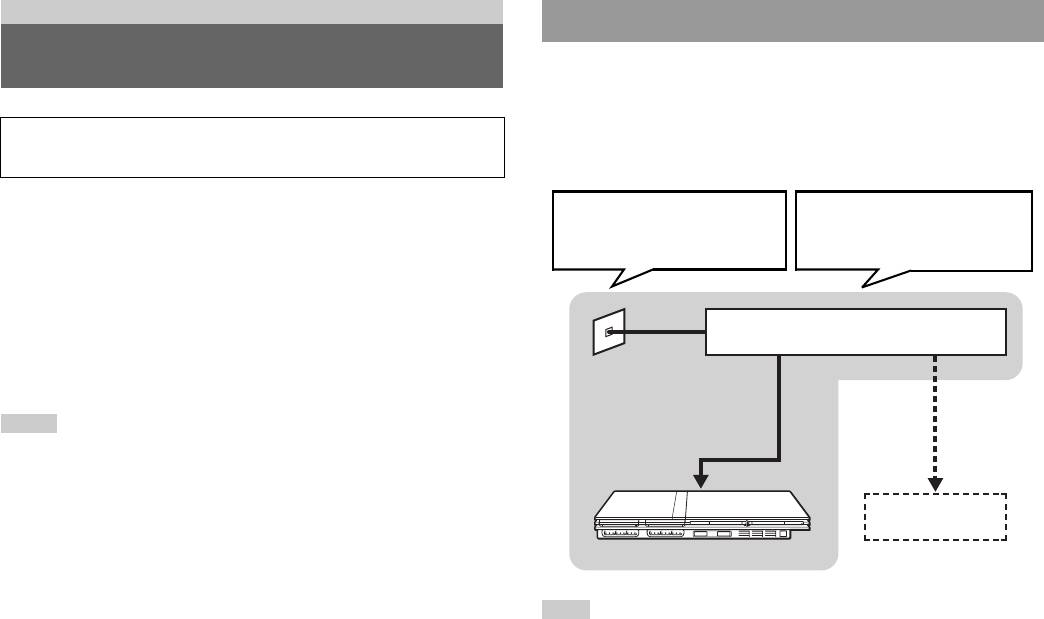
Basic network setup
You can enjoy online games by connecting the PlayStation®2 console to a
Network line
Network equipment
broadband network. To play all online games, you will need the following:
This will vary depending on the
The type of equipment used will also
type of broadband service in your
vary depending on the type of
• A Network Access Disc (supplied separately)
home.
service.
• A Memory Card (8MB) (for PlayStation®2) (sold separately)
• A service contract with a Broadband Internet Service Provider (sold
separately)
• An Ethernet Cable (sold separately)
Broadband modem, router etc.
• An External Network Device such as a Broadband enabled digital set-top
box, a cable modem, an ADSL modem or a router (sold separately)
Notes
Commercially
• You cannot play online games with this console using a dial-up or ISDN
available network cable
connection.
• USB connectivity from the External Network Device to the USB connector is not
supported.
PC
• There are two types of network cables: straight-through cable and crossover cable.
Ensure that you use the correct type of cable when connecting your PlayStation®2
console to your Broadband Internet connection. Refer to the Instruction Manual
supplied with the network device, or your Broadband Internet Service Provider for
details.
Note
When connecting the console and a PC to the network, a network device such as a
router or a hub may be required. Refer to the instructions supplied with the network
device for details.
For more information on network setup, visit www.playstation.com
42
Connecting to a network
Connecting the console
Warning
Do not connect network cables or telephone cords of the following types to the
network connector; too much electrical current may pass through the connector,
Warning
causing a malfunction, excessive heat or fire in the connector:
Do not plug the AC power cord for the console into the electrical outlet until you
have made all other connections.
- Standard residential telephone lines
- Network cables not appropriate for use with a 10Base-T/100Base-TX network
- Any ISDN (digital) compatible phone or data line
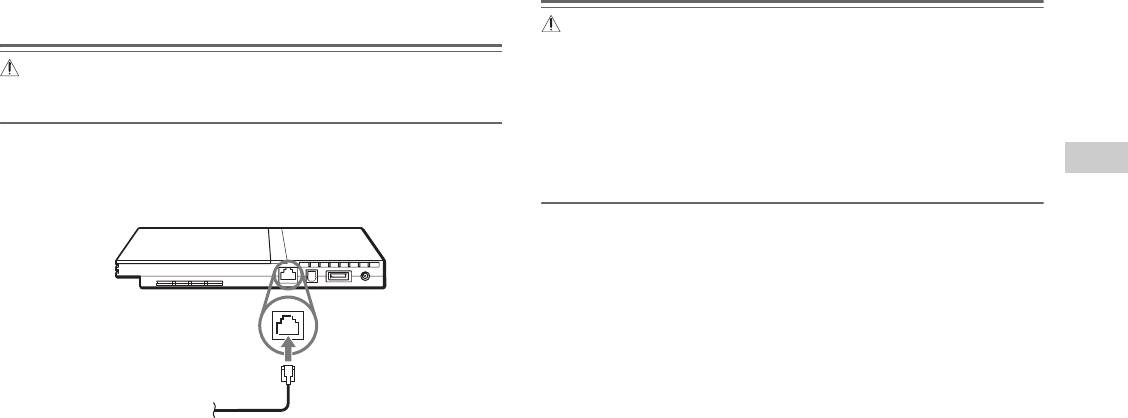
1 Connect the Ethernet network cable to the NETWORK
GB
- PBX phone lines
connector on the console rear.
Networking
- Other "unknown" types of telephone lines
Console rear
Commercially available network cable
2 Insert the connector on the network cable to the network
device.
The connection method will vary depending on the network device.
Refer to the instructions supplied with the network device for details.
Connecting to a network
43
Creating network settings
After you have connected a network cable to the console, you will need to
create and save network settings. To do this you need a Network Access
Disc supplied by registering your PlayStation
®2 console. You can register
your PlayStation®2 console by completing the Registration Card enclosed
or by visiting www.ps2registration.com
Items you will need
To create a network setting, you will need the following items:
• A Memory Card (8MB) (for PlayStation®2) (sold separately)
• Login and network setup information provided by your Broadband
Internet Service Provider
Note
Depending on the type of Internet service used, you may need to provide your
Broadband Internet Service Provider with your MAC Address. You can find the
MAC Address for your console listed in the Version Information screen
( page 39).
44
Creating network settings
About DVD-Videos
Additional information
• The console can only play discs recorded for the PAL broadcast standard.
You cannot play discs recorded for other broadcast standards (such as
Compatible software
NTSC) on this console (unless the NTSC disc displays the "ALL" label
and an NTSC compatible TV is used).
• DVD-Videos are assigned a number (region code) for the geographic
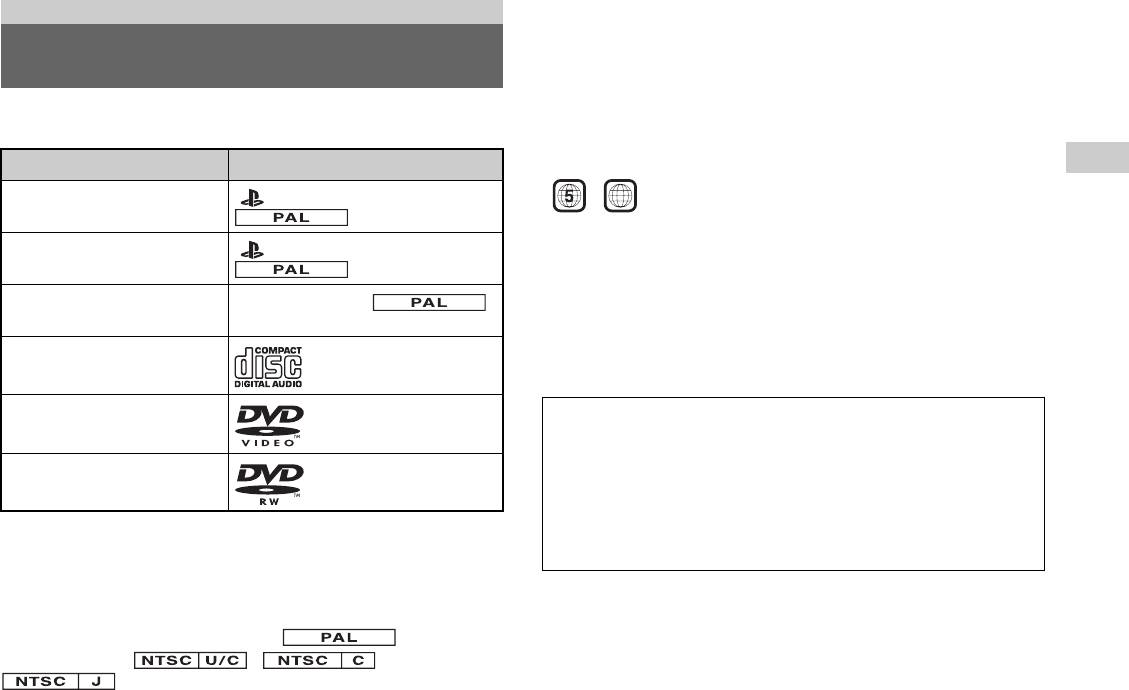
You can play discs of the following types on the PlayStation®2 console:
region in which the disc can be played. This console can only play discs
marked with region code "5" or "ALL".
Disc type Disc logo
GB
Additional information
PlayStation®2 format DVD-ROM
" ", PlayStation®2 logo and
ALL
[12 cm, Silver]
designation
PlayStation®2 format CD-ROM
" ", PlayStation®2 logo and
About DVD-R, DVD-RW, DVD+R and DVD+RW discs
[12 cm, Blue]
designation
• Some discs may not be playable due to scratches, dust or problems
encountered during recording.
PlayStation® format CD-ROM
PlayStation® logo and
[12 cm, Black]
designation
• Only discs that have been "finalised" can be played.
• Sections of video recorded on CPRM (Content Protection for Recordable
Audio CD
Media)-compatible DVD-RW discs or on CPRM-compatible DVD-R
[12 cm, 8 cm]
discs using the "copy-once" capability cannot be played on this console.
DVD-Video*
The "DVD VIDEO" logo is a
Music discs encoded with copyright protection
[12 cm, 8 cm]
trademark.
technologies
DVD-RW (VR mode)
The "DVD-RW" logo is a
The audio CD playback feature of this product is designed to conform
[12 cm, 8 cm]
trademark.
to the Compact Disc (CD) standard. Recently, some record companies
have started marketing music discs encoded with copyright protection
* Throughout this manual, the term "DVD-Video" is used to refer to DVD-R,
technologies. Some of these music discs do not conform to the CD
DVD-RW (Video mode), DVD+R and DVD+RW discs.
standard and may not be playable on this product.
About PlayStation®2 format CD-ROM and DVD-ROM, and
About DualDiscs
PlayStation® format CD-ROM discs
A DualDisc is a two sided disc product which contains DVD recorded
The console can only play discs with the designation.
material on one side and digital audio material on the other side. However,
Discs marked with , or
since the audio material side does not conform to the Compact Disc (CD)
cannot be played.
standard, playback on this product is not guaranteed.
Compatible software
45

About the DVD Remote Control (for
Accessories
PlayStation®2)
• This model of the PlayStation®2 console features a built-in IR Receiver.
Optional accessories are available for this model of PlayStation®2 console.
When operating with a DVD Remote Control (for PlayStation®2) (sold
When using optional accessories, be sure to purchase those that are
separately), do not insert an IR Receiver (for PlayStation®2) into a
compatible with your PlayStation
®2 console. Contact the appropriate
controller port of the console.
PlayStation® customer service helpline which can be found within every
PlayStation® and PlayStation®2 format software manual or visit
• When purchasing a DVD Remote Control for use with this console,
www.playstation.com for details on the accessories that can be used with
choose one that does not include a separate IR Receiver Unit.
this model.
• You cannot open or close the disc cover using the DVD Remote Control.
Accessories not compatible with this model of
About Multitaps
PlayStation®2 console
Only the Multitap (for PlayStation
®2) (SCPH-70120 E)* (sold separately)
can be used with this console. Do not connect Multitap products with other
The following accessories are not
compatible with this model of
model numbers to the console as this may result in damage to the console.
PlayStation®2 console:
* You can use this product with both PlayStation®2 and PlayStation® format
software titles.
Model number Product name
SCPH-1070 E Multitap
SCPH-10090 E Multitap (for PlayStation®2)
SCPH-10040 E Vertical Stand (for PlayStation®2)
SCPH-10110 E Horizontal Stand (for PlayStation®2)
- Product that use the S400 i.LINK connector
i.LINK and i.LINK logo " " are trademarks.
46
Accessories

GUARANTEE Specifications
Refer to the Guarantee Card supplied with this Product.
General
Sony Computer Entertainment Europe
Power requirements ! DC IN 8.5V
GB
30 Golden Square, London
Electrical current consumption
5.3 A
Additional information
W1F 9LD UK
(approx.)
Console dimensions (approx.) 230 × 28 × 152 mm (w/h/d)
Console mass (approx.) 900 g
Signal format PAL
Operating temperature 5 °C to 35 °C
Inputs/outputs on the console
Controller port (2)
front
MEMORY CARD slot (2)
USB connector (2)
Inputs/outputs on the console
NETWORK connector
rear
! DC IN 8.5V connector
AV MULTI OUT connector
DIGITAL OUT (OPTICAL) connector
GUARANTEE
47

AC adaptor
About national export control
This product may fall within the scope of national export control
Power requirements 100-240 V AC, 50/60 Hz
legislation. You must comply fully with the requirements of such
legislation and of all other applicable laws of any jurisdiction in relation to
Voltage/electrical current
8.5 V, 5.65 A
this product.
output (approx.)
Adaptor dimensions (approx.) 60 × 28 × 124 mm (w/h/d)
About copy protection
Attempted copying of DVD's played on this device, may be prevented or
Adaptor mass (approx.) 350 g
restricted by copy protection technology contained on the DVD.
Attempted recording or copying of DVD's for private use by the removal
Supplied accessories
or circumvention of copy protection technology may be prohibited under
applicable law.
page 7
About access control
Design and specifications are subject to change without notice.
This product incorporates access control technology. Use of software not
Copyrights
specifically designed for this product (excluding DVD-Videos and audio
CDs) and copies of software designed for this product are prevented by
This product incorporates copyright protection technology that is protected
access control. Unauthorized transfer, delivery, display, export, import, or
by method claims of certain U.S. patents and other intellectual property
transmission of programs, devices, or the product modified with programs
rights owned by Macrovision Corporation and other rights owners. Use of
or devices, to defeat the purpose of this access control feature is or may be
this copyright protection technology must be authorized by Macrovision
prohibited by law.
Corporation, and is intended for home and other limited viewing uses only
unless otherwise authorized by Macrovision Corporation. Reverse
engineering or disassembly is prohibited.
This product is manufactured under license from Dolby Laboratories.
"Dolby" and the double-D symbol are trademarks of Dolby Laboratories.
Confidential unpublished works. ©1992-1997 Dolby Laboratories. All
rights reserved.
"DTS" and "DTS Digital Out" are trademarks of Digital Theater Systems,
Inc.
48
Specifications
Picture noise appears on the TV screen.
, Check that the disc is clean and does not have any scratches. If the disc is dirty,
Troubleshooting
clean it ( page 6).
, If you move the console from a cold to a warm location, allow the console to
adjust to room temperature before use.
Go through this section if you experience difficulty in operating the
, If moisture condensation occurs, remove the disc and do not use the console for
PlayStation®2 console. Should any problem persist, call the PlayStation®
several hours until the condensation evaporates ( page 6).
service line at the number listed on your guarantee card for assistance.
, For some output connectors on a TV, the component video output setting needs
GB
to be set. Check that the correct settings have been made ( page 38).
Additional information
Check the following items first:
, Some PlayStation® format software titles may not perform properly on the
PlayStation®2 console. For more information, call the PlayStation® service line
• The console is turned on.
at the number listed on your guarantee card for assistance.
• The AC power cord is connected properly to the electrical outlet.
, Some TVs may experience a bouncing effect in their pictures when using the
• The cables are correctly and securely connected.
PlayStation®2 console. If this happens, connect the console to another TV.
Check also for the TV or monitor and other connected devices.
"The disc could not be read" is displayed on the screen.
, Check that the disc is placed in the console with the label side facing up
Picture
( page 15).
, Check that the disc is clean and does not have any scratches. If the disc is dirty,
There is no picture on the TV screen.
clean it ( page 6).
, Check whether the =/1 (on/standby) indicator on the console front is lit in red. If
it is red, press the =/1 (on/standby)/RESET button to turn on the console (the
There is no picture or picture noise appears when playing a DVD.
=/1 indicator will turn green).
, When playing a DVD, connect the console to the TV directly ( page 10). If
, Switch the input mode of the TV (or VCR) as appropriate for the connector in
the video signal from the console is coming through a VCR to the TV, copy
use on the console.
protection on some DVDs may affect picture quality.
, Try using another compatible AV Cable. There may be a problem with the AV
, If the console is connected to a TV or cable* that does not support progressive
Cable in use.
scan (480p), no image will be displayed when you set "Progressive" to "On" in
, Set "Component Video Out" to "Y Cb/Pb Cr/Pr" in the System Configuration
the Control Panel. Clear the "Progressive" setting ( pages 30, 40). If picture
menu ( page 38) when connecting the console to the component AV inputs on
noise appears when using a TV that supports progressive scan (480p), also clear
a TV. Use the supplied AV Cable (integrated audio/video) to make the setting,
the "Progressive" setting.
and then connect to the TV using the Component AV Cable (for PlayStation®2)
* The Component AV Cable (for PlayStation®2) (sold separately) is compatible
(sold separately).
with progressive scan.
, Check that the inserted disc can be played with the PlayStation®2 console
, A DVD-R or DVD-RW disc that is not finalised cannot be played on the
( page 45).
PlayStation®2 console.
, Content of a video recorded on CPRM-compatible DVD-R or CPRM-compatible
DVD-RW discs cannot be played on the PlayStation®2 console.
Troubleshooting
49
, See also "There is no picture on the TV screen" and "Picture noise
Sound quality is poor.
appears on the TV screen".
, Check that the disc is clean and does not have any scratches. If the disc is dirty,
clean it ( page 6).
The aspect ratio does not change even when playing the DVD with the
, If you move the console from a cold to a warm location, allow the console to
aspect ratio setting adjusted and/or playing 16:9 pictures of a DVD.
adjust to room temperature before use.
, Depending on the DVD, the aspect ratio cannot be changed.
, If moisture condensation occurs, remove the disc and do not use the console for
, Check that the console is connected to the TV directly. If there is a selector or
several hours until the condensation evaporates ( page 6).
receiver (AV amplifier) connected between the console and TV, depending on
, Some PlayStation® format software titles may not perform properly on the
the type of device connected, the aspect ratio cannot be changed.
PlayStation®2 console. For more information, contact the appropriate
, Depending on the TV, the aspect ratio cannot be changed.
PlayStation® customer service helpline which can be found within every
PlayStation® and PlayStation®2 format software manual.
The size of the video image and the TV screen do not match.
, Set the aspect ratio to match your TV screen ( page 29). If changing the
There is no sound or the sound quality from the digital audio equipment
setting does not work, try adjusting the aspect ratio of your TV. Refer to the
is poor.
instructions supplied with your TV for details.
, Check that the disc is clean and does not have any scratches. If the disc is dirty,
clean it ( page 6).
Sound
, Set "Digital Out (Optical)" to "On" in the System Configuration menu
( page 37).
There is no sound.
, If playing a DTS audio track using an audio device with a built-in DTS decoder,
, Switch the input mode of the TV (or VCR) as appropriate for the connector in
check that the settings are correct ( pages 33, 37). If the console is connected
use on the console.
to an audio device without a built-in DTS decoder, select tracks other than DTS
, Check that the TV volume is not set to "mute". Also check that the TV volume
audio tracks to play.
level is set properly.
, Some PlayStation®2 format software titles do not support audio output from the
, If the console is connected to an audio device, check the settings on the
DIGITAL OUT (OPTICAL) connector. Connect the console to the audio device
connected device. Refer to the instructions supplied with the device for details.
using an analog AV Cable, such as the supplied AV Cable (integrated audio/
, Try using another compatible AV Cable ( page 9). There may be a problem
video) ( page 9).
with the AV Cable in use.
, See also "There is no sound" and "Sound quality is poor".
, Some PlayStation®2 format software titles do not support audio output from the
DIGITAL OUT (OPTICAL) connector. Connect the console to the audio device
Surround effect is not present when playing a DVD with a Dolby Digital
using an analog AV Cable, such as the supplied AV Cable (integrated audio/
audio track.
video) ( page 9).
, Check that the console is connected to an audio device with a built-in Dolby
Digital decoder using an optical digital cable.
, Check that the settings of the audio device are correct. Refer to the instructions
supplied with the device for details.
, Set "Dolby Digital" to "On" in "Audio Digital Out" ( page 33).
50
Troubleshooting
, For some DVDs with a Dolby Digital audio track, the output signal may not
The console does not function properly.
comprise the entire 5.1 channel range.
, Static electricity and other similar occurrences may affect the console's
operation. Turn off the console and unplug it from the electrical outlet. Then,
Operation
replug and turn on the console by pressing the @/1/RESET button.
The controller does not function.
The @/1 indicator flashes in red and the console does not work.
, If the software title is compatible only with the Analog Controller
, Do not use the console until the flashing stops. Placing the console in an
(DUALSHOCK®2), it will not work properly with the Analog Controller
extremely hot location or blocking the console's vents raises the internal
(DUALSHOCK®). Use a controller that is appropriate for the software title.
temperature of the console, thereby preventing proper operation.
GB
Refer to the instructions supplied with the software for details.
Additional information
, Check that the controller is set to the appropriate mode for the software. Refer to
The console makes noise or shakes.
the instructions supplied with the software for details.
, Because PlayStation®2 format software titles load at a higher speed than
, Try using another controller that is compatible with the PlayStation®2 console.
PlayStation® format software titles, the noise or vibration may be greater.
There may be a problem with the controller in use.
The DVD does not play.
The console does not recognise the Memory Card. Data cannot be
, Check that the DVD has the correct region code. Also check that the broadcast
saved or copied to the Memory Card.
signal of the disc is compatible with the console ( page 45).
, Check that the Memory Card is compatible with the software in use
, The Parental Control feature may be set on the disc. Follow the on-screen
( page 18).
instructions and temporarily raise the level of Parental Control ( page 32).
, Check that the Memory Card is inserted securely ( page 19).
, Check that you are saving the data correctly. Refer to the instructions supplied
You forget your password.
with the software for details.
, You can clear the password using the following procedure:
, Data cannot be saved if there is not enough free space on the Memory Card.
1 Start a DVD, and then stop playback.
, Try using another Memory Card. There may be a problem with the Memory Card
Clear Resume Play ( page 24). Use a DVD without the Parental Control
in use.
feature.
2 At the Control Panel, select and then press the button
Data saved on a Memory Card is corrupted.
(page22).
, While saving, loading, copying or deleting data, do not attempt any of the
following. Doing so may damage the data.
3 Select "Parental Control", and then press the button.
• Do not remove the Memory Card or the controller.
The screen to enter a password is displayed. If the screen to register a
password is displayed, no password had been registered before. In this case,
• Do not open the disc cover.
register a new password.
• Do not reset the console.
• Do not turn off the console.
4 Press the SELECT button.
The screen to clear the password is displayed.
, Corrupted data can be deleted in the Browser menu ( page 19).
Troubleshooting
51
5 Enter the number "7444".
Network
The registered password is cleared, and the screen for registering a password
is displayed. Enter a new password ( page 31).
Connection to the network cannot be established.
, Check that the network settings are correct. Refer to the instructions supplied
Some functions are not available.
with the software or the information from your Internet service provider and
, Depending on the DVD, some functions may not be available:
adjust the setting accordingly.
• Stop, Search, Slow, Program Play, Shuffle Play or Repeat Play may be
, The network is busy. Wait a few minutes, and then try to access the network
prohibited.
again.
• The audio language cannot be changed on discs that do not have multiple audio
, Check that the network cable is properly connected ( page 43).
tracks. Also, there are DVDs that do not allow the audio language to be
, Check that you are using the correct type of network cable ( page 43).
changed.
, Check that the network settings or connections of the network device are correct.
• If multilingual subtitles are not recorded on the DVD, you cannot change the
Refer to the instructions supplied with the network device for details.
language for the subtitles. It may not be possible to change the subtitle
language or turn the subtitles off.
• If multiple angles are not recorded on the DVD, you cannot change the viewing
angles. Changing the viewing angles may be prohibited.
• You can only select when playing a DVD-RW disc (VR mode).
Check whether a DVD-RW disc (VR mode) is inserted in the console.
Some DVD settings cannot be changed.
, Some settings cannot be changed during playback or Resume Play ( page 28).
Stop playback completely or clear Resume Play ( page 24) before attempting
to adjust the settings.
52
Troubleshooting

53
Additional information
GB
Troubleshooting
Bнимaтeльно пpочтитe пepeд иcпользовaниeм
ПPEДУПPEЖДEHИE
конcоли PlayStation®2
Heкотоpыe люди могyт быть подвepжeны эпилeптичecким пpипaдкaм,
когдa видят мигaющиe огни или цвeтовыe пятнa в обычной жизни. Эти
Чтобы снизить риск возгорания и поражения
люди могyт быть подвepжeны пpипaдкaм пpи пpоcмотpe тeлeвизоpa или
электрическим током, берегите телевизор от дождя и
игpe в видeоигpы, в том чиcлe пpи пpоcмотpe диcков DVD-видeо или во
вpeмя игpы нa конcоли PlayStation®2. Oднaко игpоки, нe подвepжeнныe
влаги.
пpипaдкaм, могyт тaкжe иcпытывaть cкpытыe эпилeптичecкиe
cоcтояния. Пpeждe чeм иcпользовaть конcоль PlayStation®2, обpaтитecь
к вpaчy, ecли вы подвepжeны эпилeптичecким пpиcтyпaм или
Для пpeдотвpaщeния возгоpaния или поpaжeния
иcпытывaeтe любыe из cлeдyющиx cимптомов пpи пpоcмотpe
элeктpичecким током нe cтaвьтe нa конcоль eмкоcти,
тeлeвизионныx пpогpaмм или пpи игpe в видeоигpы: измeнeниe зpeния,
нaполнeнныe жидкоcтями.
подepгивaниe мышц, дpyгиe peфлeктивныe cоcтояния, потepя контaктa c
окpyжaющeй cpeдой, помyтнeниe cознaния и/или конвyльcии.
Bо избeжaниe поpaжeния элeктpичecким током нe
Некоторое программное обеспечение формата PlayStation® или
откpывaйтe коpпyc aппapaтa. Для peмонтa обpaщaйтecь
PlayStation®2 на этой консоли может работать иначе, нежели на
только к квaлифициpовaнномy cпeциaлиcтy.
консолях предыдущих версий PlayStation®2 и PlayStation®, или работать
некорректно. Для получения более подробной информации посетите
наш сайт: www.playstation.com
Пpeдyпpeждeниe
Использование, регулировка или обслуживание изделия
способами, не упомянутыми в данном руководстве, может
привести к воздействию опасного излучения.
Иcпользовaниe оптичecкиx пpибоpов c дaнным издeлиeм
являeтcя пpичиной повышeнной опacноcти для зpeния.
CLASS 1 LASER PRODUCT
LUOKAN 1 LASERLAITE
KLASS 1 LASERAPPARAT
Изделие относится к 1 КЛАССУ ЛАЗЕРОВ согласно IEC60825-1: 2001.
54
ПPEДУПPEЖДEHИE
Главное меню
Содержание
Вызов главного меню .............................................................90
Использование экрана браузера...........................................90
Использование меню Конфигурация системы..................91
ПPEДУПPEЖДEHИE........................................................... 54
Использование экрана Информация о версии ..................94
Меры предосторожности....................................................... 56
Работа в сети
Подготовительные операции
Подключение к сети................................................................97
Начало работы......................................................................... 59
Сетевые настройки..................................................................99
RU
Названия компонентов........................................................... 60
Подсоединение к телевизору ................................................ 61
Дополнительная информация
Подсоединение цифрового аудиооборудования............... 64
Совместимое программное обеспечение..........................100
Подключение контроллера................................................... 65
Подсоединение адаптера AC (переменного тока)
Аксессуары..............................................................................101
и шнура питания AC (переменного тока).................... 65
ГАРАНТИЯ ............................................................................102
Технические характеристики ..............................................103
Включение и выключение консоли .................................... 67
Устранение неисправностей ................................................105
Игры
Игры ........................................................................................... 68
Использование MEMORY CARD (карт памяти) ............72
Аудио CD
Воспроизведение аудио CD................................................... 74
Диски DVD
Воспроизведение DVD-видео............................................... 76
Использование режимов воспроизведения........................ 81
Нaстройкa установок DVD проигрывателя...................... 83
Содержание
55

• Перед началом использования проигрывателя DVD произведите его
необходимую настройку в соответствии с прилагаемыми к нему
Меры предосторожности
инструкциями. Если настройки проведены неправильно,
проигрыватель может издать громкий звук, который может
травмировать Ваш слух или повредить наушники.
При разработке данного изделия учтены все требования к обеспечению
• Не касайтесь руками диска в момент вращения, это может стать
полной безопасности пользователя. Однако любой электрический
причиной травмы или повреждения диска.
прибор при неправильном использовании является потенциальным
• Закрывая крышку диска, соблюдайте осторожность, чтобы рука или
источником возгорания, поражения электрическим током или травмы.
пальцы не попали под крышку - это может стать причиной травмы или
Для обеспечения безопасной работы изделия следуйте данной
повреждения консоли.
инструкции.
Здоровье
• Ознакомьтесь со всеми предупреждениями, мерами предосторожности
и инструкциями.
Немедленно прекратите использование консоли, если у Вас появились
• Немедленно прекратите использование и отключите шнур питания AC
какие-либо из следующих симптомов. Если такое состояние не проходит,
(переменного тока) от электрической сети, если Вы заметили, что
обратитесь к врачу.
изделие не работает должным образом, издает необычные звуки или
– Головокружение, тошнота или ощущение, аналогичное укачиванию
запахи.
– Усталость, дискомфорт или боль в руках
• Если консоль работает неправильно, обратитесь в соответствующую
– Усталость, сухость или резь в глазах
службу технической поддержки PlayStation®, адреса которой можно
• Используйте изделие в хорошо освещенной комнате и сохраняйте
найти в каждом руководстве по программному обеспечению формата
безопасное расстояние от телевизионного экрана.
PlayStation® и PlayStation®2.
• Старайтесь не использовать консоль чересчур долго. Через каждый час
игры устраивайте 15-минутный перерыв.
Безопасность
• Не пользуйтесь консолью, если чувствуете усталость или не выспались.
• Не снимайте внешние панели консоли и не разбирайте консоль.
• Продолжительное воздействие громкого звука может негативно
Лазерный луч, генерируемый данным изделием, может быть опасен для
повлиять на Ваш слух. Будьте особенно осторожны, используя
зрения.
наушники. Отрегулируйте громкость так, чтобы были слышны и
• Не используйте консоль вблизи водоемов.
окружающие звуки.
• Храните консоль, соединительные шнуры и кабели вне досягаемости
Использование и управление
маленьких детей.
• Не касайтесь мокрыми руками штепселя шнура питания AC
• Не бросайте и не роняйте консоль или дополнительные устройства к
(переменного тока).
ней и не подвергайте их механическому воздействию.
• Не касайтесь консоли и подсоединенных к ней дополнительных
• Не устанавливайте консоль и дополнительные устройства на
устройств во время грозы.
неустойчивые, наклонные или вибрирующие поверхности.
• Избегайте длительного контакта с включенной консолью или
• Не подвергайте консоль воздействию высоких температур, высокой
адаптером AC (переменного тока), это может привести к
влажности или прямых солнечных лучей (используйте изделие при
низкотемпературным ожогам.
температуре от 5 °C до 35 °C).
• Не устанавливайте консоль и дополнительные устройства на полу или
• Не располагайте консоль и дополнительные устройства в местах,
в местах, где о них можно споткнуться.
подверженных резким изменениям температуры (например, изменения
температуры в течение часа на 10 °C и более).
56
Меры предосторожности

• Не оставляйте консоль или дополнительные устройства в машине с
• Не подсоединяйте адаптер AC (переменного тока) и/или шнур питания
закрытыми окнами (особенно в летнее время).
AC (переменного тока) к трансформатору напряжения или
• Не устанавливайте консоль в местах с недостаточным доступом
преобразователю.
воздуха, например, в маленьких закрытых пространствах, вплотную к
стене, на толстом ковре или на постели.
Примечания по технике безопасности при
• Не подвергайте консоль воздействию сигаретного дыма или пыли или
использовании аналогового контроллера
пара. Это может привести к неисправности консоли.
(DUALSHOCK®2)*
• Не допускайте попадания внутрь консоли жидкости или мелких частиц.
• Немедленно прекратите пользоваться консолью, если почувствуете
• Ничего не кладите на поверхность консоли.
усталость или начнете испытывать дискомфорт или боль в кистях или
• Не касайтесь разъемов консоли или дополнительных устройств, не
других частях рук при использовании Аналогового контроллера
вставляйте в них инородные предметы.
(DUALSHOCK®2). Если такое состояние не проходит, обратитесь к
• Не располагайте консоль вблизи магнитных полей, создаваемых
RU
врачу.
магнитами или громкоговорителями.
• Аналоговый контроллер (DUALSHOCK®2) предназначен к
• Устанавливайте консоль только в вертикальном или горизонтальном
использованию только руками. Не прижимайте его к голове, лицу или
положении. Устанавливая консоль в вертикальном положении,
другим участкам тела.
используйте совместимую с ней вертикальную подставку (для
• Вибрирующее воздействие Аналогового контроллера
PlayStation®2) (продается отдельно). Не меняйте положения консоли в
(DUALSHOCK®2) может причинить травму. Не используйте функцию
момент ее работы.
вибрации, если у вас есть заболевание или повреждения костей,
суставов или мышц кистей или рук. Обратите внимание, что некоторые
Использование адаптера AC (переменного тока) и
диски программного обеспечения формата PlayStation®2 и PlayStation®
шнура питания AC (переменного тока)
включают функцию вибрации по умолчанию. В большинстве случаев
• С целью обеспечения безопасности работы изделия, регулярно
функцию вибрации можно отключить в меню параметров
проверяйте адаптер AC (переменного тока) и шнур питания AC
программного обеспечения. Для проигрывания таких дисков
(переменного тока). При обнаружении повреждения немедленно
пользуйтесь Аналоговым контроллером (DUALSHOCK®2) только с
прекратите его использование и обратитесь в соответствующую
отключенной функцией вибрации.
службу технической поддержки PlayStation®, адреса которой можно
• Избегайте длительного использования Аналогового контроллера
найти в каждом руководстве по программному обеспечению формата
(DUALSHOCK®2). Устраивайте перерывы примерно через каждые
PlayStation® и PlayStation®2.
30 минут.
• Используйте адаптер AC (переменного тока) и шнур питания AC
* Данные примечания также относятся и к другим контроллерам.
(переменного тока) только из комплекта поставки.
• Прежде чем вставить штепсель электропитания в розетку, убедитесь,
Подключение с помощью сетевого кабеля
что на штепселе нет пыли и волокон. Если штепсель загрязнился, перед
Не подсоединяйте к сетевому разъему сетевые кабели и телефонные
включением протрите его сухой тканью.
шнуры следующих типов:
• Перед очисткой или перемещением консоли, или если Вы не намерены
• Стандартные домашние телефонные линии
использовать ее в ближайшее время, извлеките шнур питания AC
• Сетевые кабели, не предназначенные для использования в сети 10Base-
(переменного тока) из розетки.
T/100Base-TX
Вынимая шнур питания из розетки, держитесь за его штепсель и тяните
его прямо. Запрещается тянуть за шнур и вытаскивать штепсель под
углом к розетке.
Меры предосторожности
57
• Любая телефонная линия или канал передачи данных, совместимые с
При подключении консоли к плазменному или
ISDN (цифровая)
проекционному* телевизору.
• Телефонные линии мини-АТС
Не оставляйте на долгое время статическое изображение на экране
• Другие “незнакомые” типы телефонных линий
телевизора, так как от него может остаться след на экране.
Обращение с дисками
* За исключением ЖК-экранов.
• При обращении с дисками не прикасайтесь к их поверхности; держите
Конденсация влаги
их за края.
• Не приклеивайте на диски бумагу или скотч, не делайте на дисках
Если консоль или диск переносятся с холода в теплое помещение, то на
надписей.
линзе внутри консоли или на диске может сконденсироваться влага. Это
• Отпечатки пальцев, пыль, грязь или царапины на диске могут привести
может привести к неправильной работе консоли. В этом случае
к искажению изображения или ухудшению качества звука.
извлеките диск, выключите консоль и извлеките штепсель из розетки.
Обращайтесь с дисками аккуратно, а перед использованием убедитесь,
Не вставляйте диск, пока влага не испарится (это может занять
что диски чистые.
несколько часов). Если консоль по-прежнему работает неправильно,
• Не оставляйте диски рядом с источниками тепла, под воздействием
обратитесь в соответствующую службу технической поддержки
прямых солнечных лучей или высокой влажности.
PlayStation®, адреса которой можно найти в каждом руководстве по
• Когда диски не используются, храните их в коробках.
программному обеспечению формата PlayStation® и PlayStation®2.
• Чистить диски следует мягкой тканью, по направлению от центра к
краям. Не используйте растворители, например, бензин, доступные в
Очистка
продаже чистящие средства, не предназначенные для компакт-дисков,
• В целях безопасности перед началом очистки консоли или
или антистатические аэрозоли, предназначенные для виниловых
подсоединенных к ней дополнительных устройств 1) отключите
пластинок.
консоль, 2) извлеките штепсель консоли из электрической розетки и
• Не оставляйте диск в консоли, когда передвигаете ее или меняете ее
3) отсоедините сетевой кабель от сетевого разъема.
положение.
• Для чистки консоли пользуйтесь мягкой сухой тканью. Не используйте
• Не используйте диски неправильной формы (например, в форме сердца
для чистки устройства растворители, разбавители, другие химические
или звезды), поврежденные диски, диски с измененной формой или
вещества или салфетки с специальной пропиткой.
диски, подвергавшиеся ремонту.
• Если на вентиляционных отверстиях консоли скопилась пыль, удалите
ее с помощью маломощного пылесоса.
Запрещается разбирать консоль и прилагаемые
• Не касайтесь линз под крышкой диска. Чтобы линзы не запылились,
дополнительные устройства
держите крышку диска закрытой, за исключением случаев, когда Вы
вставляете или извлекаете диск.
Используйте консоль PlayStation®2 и дополнительные устройства в
соответствии с инструкциями в данном руководстве. Не разрешен анализ
Защита от внешних повреждений
или изменение модификации консоли, а также анализ и использование
конфигурации ее схем. Внутри консоли PlayStation®2 отсутствуют
Во избежание повреждения окрашенных частей необходимо соблюдать
компоненты, обслуживание которых может выполнить пользователь. В
следующие меры предосторожности:
случае разборки консоли гарантия на нее будет аннулирована. Кроме
• Не проливайте на устройство такие жидкости, как спирт, бензол,
того, существует опасность подвергнуться воздействию (лазерного)
растворитель, и прочие химические вещества.
излучения, а также поражению электрическим током.
• Не оставляйте на длительное время резиновые, виниловые или
пластиковые предметы на окрашенных поверхностях устройства.
58
Меры предосторожности
Подготовительные операции
Установка консоли
Начало работы
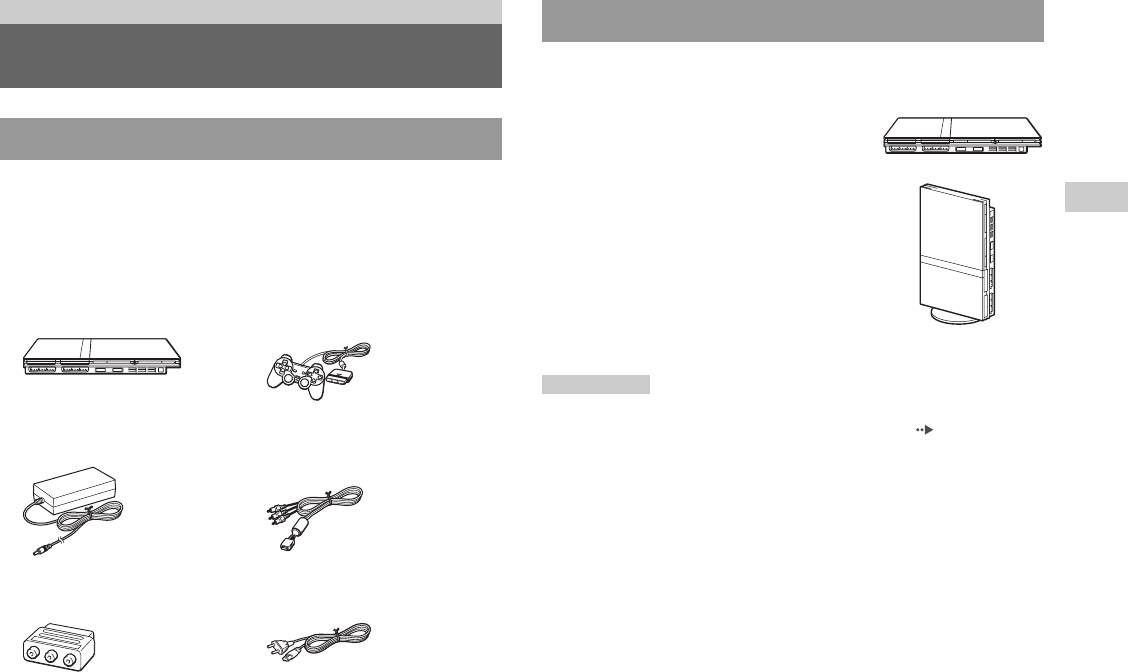
Консоль можно установить в горизонтальном или вертикальном
положении.
Горизонтальное положение
Проверка содержимого упаковки
Установите консоль горизонтально.
Проверьте наличие следующих предметов. Если какие-либо из
Вертикальное положение
предметов отсутствуют, обращайтесь в соответствующую
RU
службу техническое поддержки PlayStation
®, адреса которой
При установке консоли в вертикальное
Подготовительные операции
находятся в каждом руководстве по программному обеспечению
положение используйте SCPH-70110 E –
формата PlayStation
® и PlayStation®2.
вертикальную подставку (для
PlayStation
®2) (продается отдельно).
s Консоль PlayStation®2...1 s Аналоговый контроллер
(DUALSHOCK®2)...1
Примечание
Некоторые вертикальные подставки (для PlayStation®2) не могут быть
s Адаптер АС
s Кабель AV
использованы с этой моделью консоли PlayStation®2 ( стр. 101).
(переменного тока)…1
(интегрированный аудио/
Приобретая вертикальную подставку, выбирайте модель SCPH-70110E.
видео)…1
s Соединительный разъем
s Шнур питания АС
Euro-AV (аудио/видео)…1
(переменного тока)…1
s Руководство по эксплуатации…1
Начало работы
59
Предупреждение
Названия компонентов
Не устанавливайте консоль в местах, где возможно возникновение
следующих условий:
• Густой сигаретный дым или пыль. Сигаретный дым или пыль,
оседающие на внутренних компонентах, например, линзе, могут
стать причиной неисправности консоли.
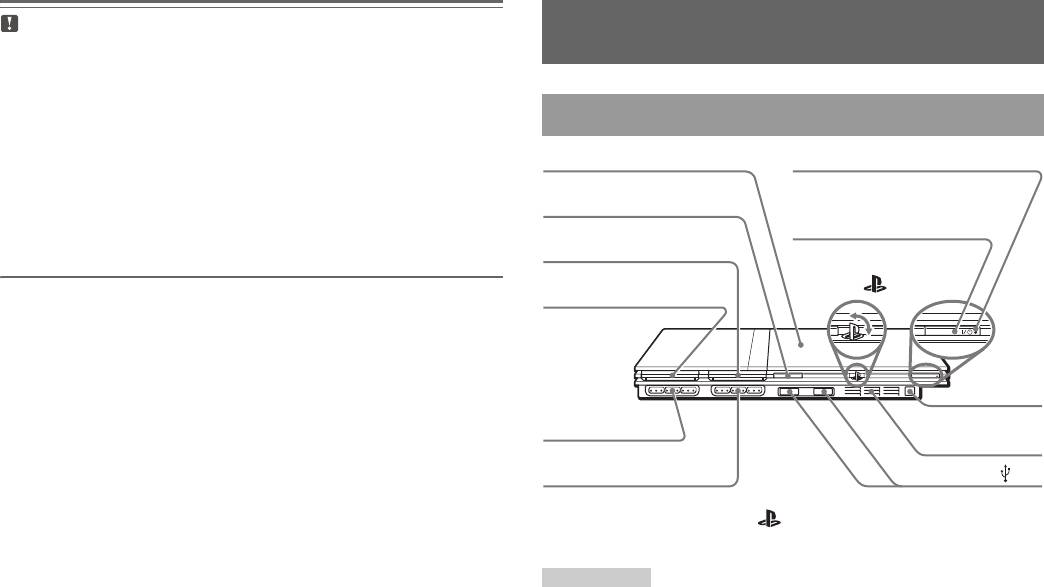
Передняя панель консоли PlayStation®2
• Слишком высокая или низкая температура, прямой солнечный
свет, источники тепла или автомобиль, в котором закрыты окна
(особенно летом). Это может привести к повреждению корпуса или
стать причиной неисправности консоли.
• Магнитные поля – например, созданные магнитами или
громкоговорителями.
• Вибрация.
* Логотип семейства изделий “ ” можно поворачивать в соответствии
с горизонтальным или вертикальным положением консоли.
Примечание
Существует возможность подключения USB-устройств, совместимых с
консолью PlayStation®2. Не все USB-совместимые изделия работают с
консолью PlayStation®2. Дополнительную информацию см. также в
руководстве пользователя подключаемого изделия.
60
Названия компонентов
RESET
индикатор ]/
Кнопка A (открывание)
гнездо MEMORY CARD 2
Логотип семейства
изделий “ ”*
гнездо MEMORY CARD 1
Переднее
Порт контроллера 1
вентиляционное
отверстие
Порт контроллера 2
Разъем USB
1
Крышка диска
(вкл./готовность)
Кнопка ]/1 RESET(вкл./
готовность/перезапуск)
Инфракрасн
ый приемник


