
Sony FD Trinitron KV-29XL71K: Troubleshooting
Troubleshooting: Sony FD Trinitron KV-29XL71K
01gb29xl.fm Page 21 Tuesday, March 30, 2004 11:48 AM
Troubleshooting
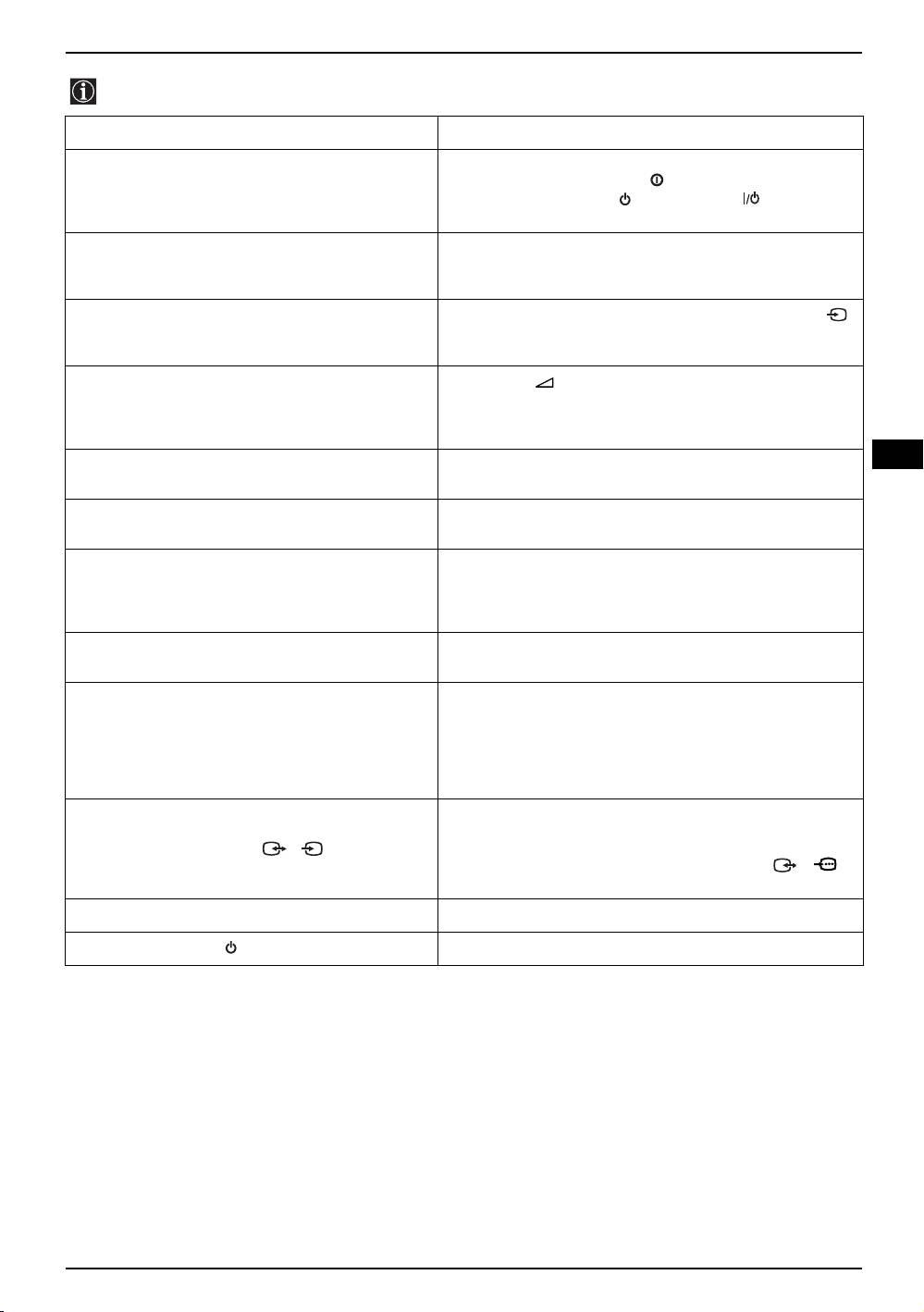
Here are some simple solutions to problems which may affect the picture and sound.
Problem Suggested Remedy
No picture (screen is dark), and no sound. • Check the aerial connection.
• Plug the TV in and press the button on the front of the TV.
• If the standby indicator is on press the button or a
numbered button on the remote control.
Poor or no picture (screen is dark), but good sound. • Using the MENU system, select the “Picture
Adjustment“ display and select “RESET“ to return to the
factory settings.
No picture or menu information from equipment
• Check that the optional equipment is on, and press the
connected to the Scart socket.
button of the remote control repeatedly until the correct input
symbol is displayed on screen.
Good picture, no sound. • Press the button on the remote control.
• Check that “TV Speakers” is “On” in the “Detail Set Up”
menu.
• Check the Headphones are not connected.
GB
No colour on colour programmes. • Using the MENU system, select the “Picture Adjustment“
and select “RESET“ to return to the factory settings.
Distorted picture when changing programmes or
• Turn off any equipment connected to the scart connectors on
selecting Teletext.
the rear of the TV.
Wrong characters appear when viewing teletext. • Using the menu system, display the “Language/Country”
menu and select the country in which you are operating the
TV set. For cyrillic languages, we recommend selecting
‘Russia’ if your own country does not appear in the list.
Picture slanted. • Using the menu system, select the “Picture Rotation” option
in the “Detail Set Up” menu to correct the picture slant.
Snowy picture when viewing a TV channel. • Using the menu system, select the “Manual Programme
Preset” menu and adjust Fine Tuning (AFT) to obtain better
picture reception.
• Using the menu system, select the “Noise Reduction” option
in the “Detail Set Up” menu and select “Auto” to reduce the
noise in the picture.
No unscrambled picture whilst viewing un
• Using the menu system, display the “Set Up” menu. Then
unscrambled channel with a decoder connected
select the “Detail Set Up” option and set “AV3 Output” to
through the scart connector 3/ 3.
S
“TV”.
• Check that the decoder is not connected to the 2/ 2
scart socket.
Remote control does not function. • Replace the batteries.
The standby indicator on the TV flashes. • Contact your nearest Sony service centre.
• If you continue to have problems, have your TV serviced by qualified personnel.
• NEVER open the casing yourself.
Additional Information 21

01gb29xl.fm Page 22 Tuesday, March 30, 2004 11:48 AM
22
Оглавление
- Introduction
- Safety Information
- Overview of the remote control buttons
- Overview of TV Buttons
- Switching on the TV and Automatically Tuning
- Switching on the TV and Automatically Tuning
- Introducing and Using the Menu System
- Teletext
- Connecting Additional Equipment
- Remote Control Configuration for VCR/DVD
- Specifications
- Troubleshooting
- Увод
- Техника на безопасност
- Основно описание на бутоните на дистанционното
- Основно описание на бутоните на телевизора
- Включване и автоматично настройване на телевизора
- Увод и боравене със системата от менюта
- Телетекст
- Свързване на допълнителни апарати
- Свързване на допълнителни апарати
- Конфигуриране на пулта за дистанционно управление на DVD или Видео апарата
- Характеристики
- Отстраняване на неизправности
- Úvod
- Bezpečnostní opatření
- Všeobecný přehled tlačítek dálkového ovladače
- Všeobecný přehled tlačítek televizoru
- Zapnutí a automatické naladění TV
- Úvod a použití různých menu
- Úvod a použití různých menu
- Úvod a použití různých menu
- Úvod a použití různých menu
- Úvod a použití různých menu
- Úvod a použití různých menu
- Úvod a použití různých menu
- Teletext
- Připojení přídavných zařízení
- Instalace dálkového ovládání pro DVD nebo video
- Technické údaje
- Řešení problémů
- Bevezetés
- Biztonsági előírások
- A távvezérlő gombjainak áttekintése
- A televízió gombjainak általános leírása
- A TV bekapcsolása és automatikus hangolás
- Bevezetés a képernyő menürendszereibe és azok használata
- Bevezetés a képernyő menürendszereibe és azok használata
- Bevezetés a képernyő menürendszereibe és azok használata
- Bevezetés a képernyő menürendszereibe és azok használata
- Bevezetés a képernyő menürendszereibe és azok használata
- Bevezetés a képernyő menürendszereibe és azok használata
- Bevezetés a képernyő menürendszereibe és azok használata
- Teletext
- Választható készülékek csatlakoztatása
- Választható készülékek csatlakoztatása
- A távvezérlő beállítása DVD-hez vagy videomagnóhoz
- Műszaki jellemzők
- Problémamegoldás
- Wprowadzenie
- Informacje dotyczące bezpieczeństwa
- Ogólny przegląd przycisków pilota
- Ogólny przegląd przycisków telewizora
- Włączanie telewizora i automatyczne programowanie
- Wprowadzenie do systemu menu na ekranie
- Telegazeta
- Konfigurowanie pilota do nastawiania DVD lub magnetowidu
- Podłączanie dodatkowych urządzeń
- Konfigurowanie pilota do nastawiania DVD lub magnetowidu
- Dane techniczne
- Rozwiązywanie problemów
- Введение
- Общие правила техники безопасности
- Назначение кнопок на пульте дистанционного управления
- Общее описание кнопок телевизора
- Включение и автоматическая настройка телевизора
- Введение и работа с системой меню
- Телетекст
- Подключение дополнительных устройств
- Спецификации
- Выявление неисправностей
