
Panasonic DMR-E65 EE-S: 4 Press [2, 1] to select “Yes” and
4 Press [2, 1] to select “Yes” and : Panasonic DMR-E65 EE-S
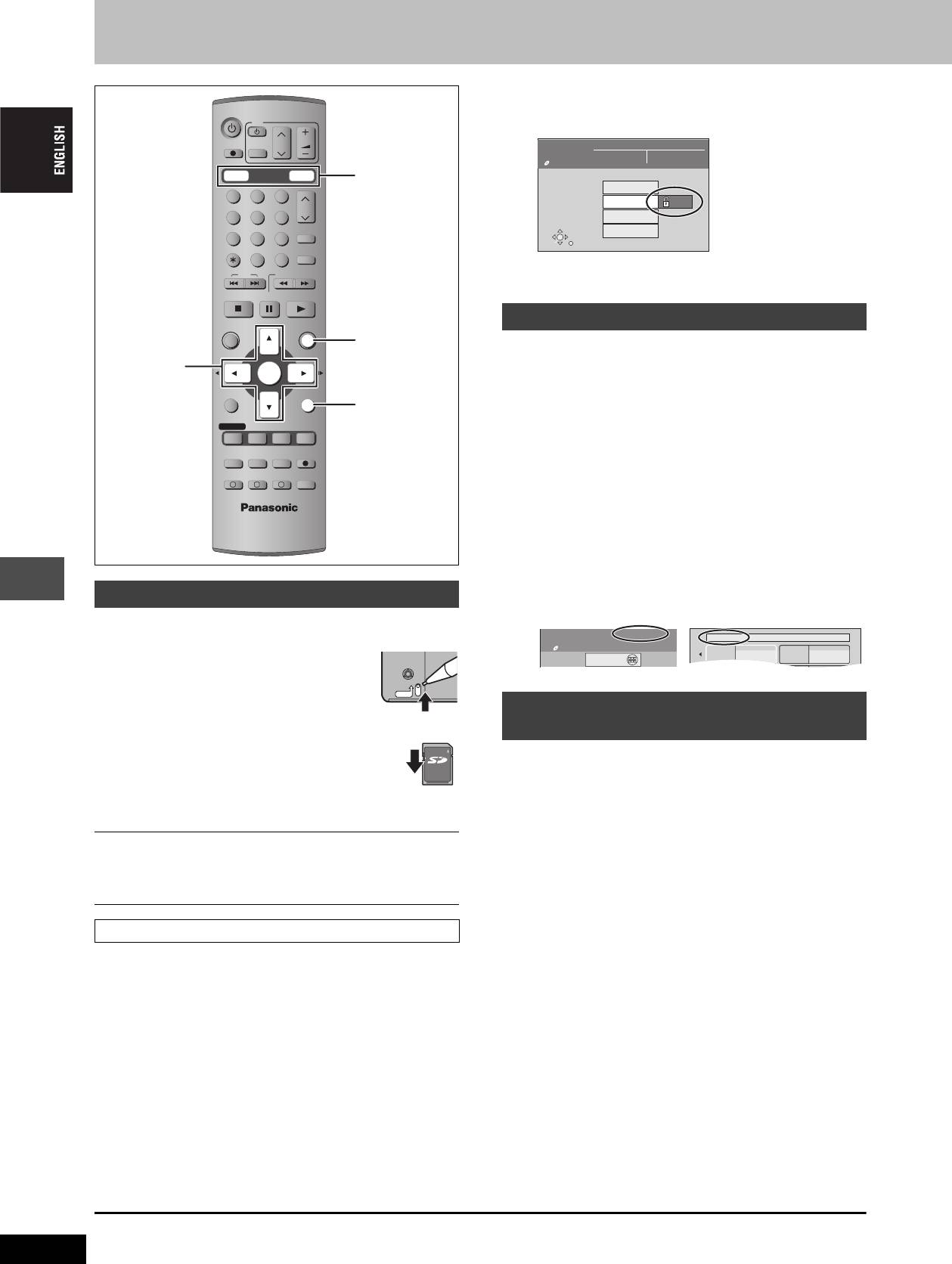
Disc and card management
4 Press [2, 1] to select “Yes” and
DVD
TV
press [ENTER].
DIRECT TV REC
CH
VOLUME
AV
DISC
MANAGEMENT
Title No. 11
Remain
5:38 (EP)
DVD-RAM
Used
0 : 22
DVD
DRIVE SELECT
SD/PC
DVD, SD/PC
Disc Name
123
Disc Protection
On
CH
456
Erase all titles
ShowView
SELECT
Format Disc
78
9
ENTER
CANCEL
INPUT SELECT
MANUAL SKIP
RETURN
0
The lock symbol appears closed when the disc is write-
SKIP
SLOW/SEARCH
protected.
STOP
PAU SE
PLAY/x1.3
Providing a disc with a name
DIRECT NAVIGATOR
FUNCTIONS
FUNCTIONS
[RAM] [DVD-R]
TOP MENU
3,4,2,1
Preparation
ENTER
ENTER
≥Press [DVD] to select the DVD drive.
SUB MENU
RETURN
≥Release protection (➡ left).
RETURN
PROG/CHECK
DISPLAY
STATUS
TIME SLIP
1 While stopped
TIMER
REC MODEERASE
REC
Press [FUNCTIONS].
F
EXT LINK
CREATE
CHAPTER
AUDIO
A B C
2 Press [3, 4, 2, 1] to select “DISC
MANAGEMENT” and press [ENTER].
3 Press [3, 4] to select “Disc Name”
and press [ENTER].
➡ page 40, Entering text
≥The disc name is displayed in the FUNCTIONS window.
Setting the protection
≥
With a finalized DVD-R, the name is displayed on the Top Menu.
∫ Setting the protection for the whole disc or card
≥For a DVD-RAM with a cartridge or for a card
[RAM]
With the write-protect tab in the protect position,
play automatically starts when inserted in the unit.
PROTECT
Erasing all titles and play lists—Erase
[SD] [PC]
Switch the write-protect switch to the
e.g. SD Memory Card
all titles
“LOCK” position.
LOCK
[RAM]
Convenient functions
≥For a DVD-RAM without a cartridge
Preparation
(➡ below, Disc Protection)
≥Press [DVD] to select the DVD drive.
≥Release protection (➡ left).
∫ Other protection settings
Title
1 While stopped
Select “Set up Protection” in step 4 on page 30.
Press [FUNCTIONS].
Still picture or folder
Select “Set up Protection” in step 4 on page 34.
2 Press [3, 4, 2, 1] to select “DISC
MANAGEMENT” and press [ENTER].
Disc Protection
3 Press [3, 4] to select “Erase all
[RAM]
titles” and press [ENTER].
Preparation
4 Press [2, 1] to select “Yes” and
Press [DVD] to select the DVD drive.
press [ENTER].
1 While stopped
5 Press [2, 1] to select “Start” and
Press [FUNCTIONS].
press [ENTER].
2 Press [3, 4, 2, 1] to select “DISC
A message appears when finished.
MANAGEMENT” and press [ENTER].
6 Press [ENTER].
3 Press [3, 4] to select “Disc
[Note]
Protection” and press [ENTER].
≥Once erased, the recorded contents are lost and cannot be
restored. Make certain before proceeding.
≥Still picture data (JPEG, TIFF) or computer data cannot be erased.
≥Erase does not work if one or more titles are protected.
RQT7448
To exit the screen
To return to the previous screen
Press [RETURN] several times.
Press [RETURN].
38
My favorite 01/02
01
02
Chapter 1
Chapter 2
FUNCTIONS
DVD
SD/PC
Disc Protection O
DVD-RAM
Playback
DIRECT NAVIGATOR
f
Documentary
Cartridge Protecti
o
38
Оглавление
- 1 Turn on the television and select the
- 1 Turn on the television and select the
- 3 Press [3, 4] to select “Connection”
- 1 While stopped
- 1 Press [DVD] to select the DVD drive.
- 1 Press [DIRECT NAVIGATOR].
- 1 Press [DVD] to select the DVD drive.
- 4 Press [ENTER].
- 1 Press [PROG/CHECK].
- 1∫
- 1 Press [1] while a track is highlighted
- 1 Press [DVD] or [SD/PC] to select the
- 1 Press [DISPLAY].
- 1 Press [DIRECT NAVIGATOR].
- 1 Press [ENTER] at the start point and end
- 2 Press [3, 4, 2, 1] to select “PLAY
- 1 Press [FUNCTIONS].
- 2 [RAM]
- 2 Press [REC MODE] to select the
- 5 Press [3, 4] to select “Set” and
- 1 While stopped
- 4 Press [2, 1] to select “Yes” and
- 1 While stopped 1 While stopped
- 1 Show Enter Name screen.
- 1 While stopped
- 5 Press [3, 4, 2, 1] 1 While stopped
- 1 While stopped
- 1 While stopped
- 1 Включите телевизор и выберите
- 1 Включите телевизор и выберите
- 3 Нажав кнопку [3, 4], выберите
- 1 В режиме остановки
- 1 Нажав кнопку [DVD], выберите
- 1 Нажмите кнопку
- 1 Нажав кнопку [DVD], выберите
- 4 Нажмите кнопку [ENTER].
- 1 Нажмите кнопку [PROG/CHECK].
- 1∫
- 1 Нажмите кнопку [1] при
- 1 Нажав кнопку [DVD] или [SD/PC],
- 1 Нажмите кнопку [DISPLAY].
- 2 Нажав кнопку [3, 4, 2, 1],
- 1 Нажмите кнопку [ENTER] в начальной и
- 2 Нажав кнопку [3, 4, 2, 1],
- 1 Нажмите кнопку [FUNCTIONS].
- 2 [RAM]
- 2 Нажав кнопку [REC MODE],
- 6 Нажав кнопку [3, 4], выберите 1 В режиме остановки
- 1 В режиме остановки
- 1 В режиме остановки
- 1 В режиме остановки 1 В режиме остановки
- 1 Отображение экрана Ввести титр
- 1 В режиме остановки
- 5 Нажав кнопку 1 В режиме остановки
- 1 В режиме остановки
- 1 В режиме остановки

