
Panasonic CU-PA18JKD: PRODUCT OVERVIEW & OPERATIONS PRODUCT OVERVIEW & OPERATIONS
PRODUCT OVERVIEW & OPERATIONS PRODUCT OVERVIEW & OPERATIONS: Panasonic CU-PA18JKD
PRODUCT OVERVIEW & OPERATIONS PRODUCT OVERVIEW & OPERATIONS
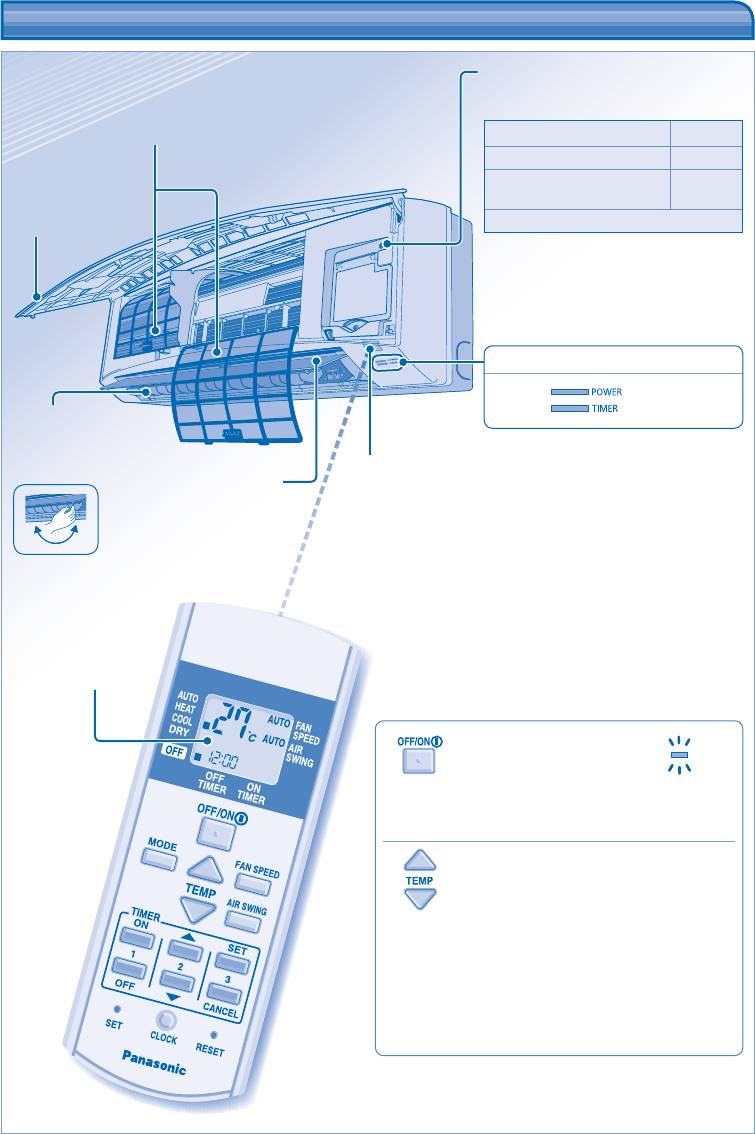
Auto OFF/ON button
• Used when remote control is misplaced
or malfunction.
Air Filters
Action Mode
Press once. Auto
Press and hold until 1 beep is
Cooling
heard, then release.
Press the button to turn off.
Front panel
INDICATOR
(Green)
(Orange)
Horizontal airfl ow
direction louver
• Manually
adjustable.
Receiver
Vertical airfl ow
direction louver
• Do not adjust
by hand.
Maximum distances: 8m
Remote control
display
POWE
TO TURN ON OR OFF THE UNIT
4
R
• Please be aware of the OFF indication on the remote
control display to prevent the unit from starting/stopping
improperly.
TO SET TEMPERATURE
• For heat, cool and dry modes, the range of temperature
for selection is 16°C ~ 30°C.
• Operating the unit within the recommended temperature
could induce energy saving.
HEAT mode : 20˚C ~ 24˚C.
COOL mode : 26˚C ~ 28˚C.
DRY mode : 1˚C ~ 2˚C lower than room temperature.
ENGLISH
5
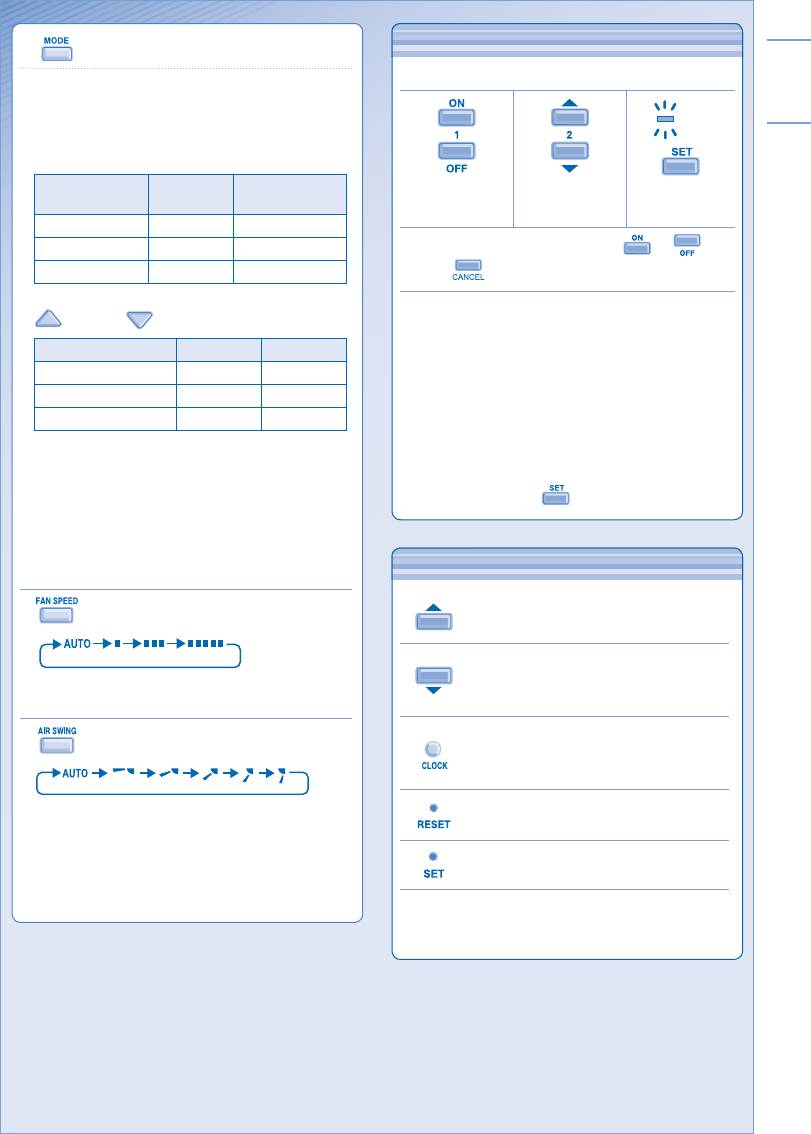
TO SET THE TIMER
TO SET THE TIMER
• To turn ON or OFF the unit at a preset time.
TIMER
Select ON or
Set the time. Confi rm.
OFF timer.
• To cancel ON or OFF timer, press or then
press .
• When ON Timer is set, the unit may start earlier (up
to 30 minutes) before the actual set time in order to
achieve the desired temperature on time.
• Timer operation is based on the clock set in the remote
control and repeats daily once set. For clock setting,
please refer to Remote Control Preparation at back
cover.
• If timer is cancelled manually or due to power failure,
you can restore the previous setting (once power is
resumed) by pressing .
OPTIONAL SETTINGS
TO SELECT OPERATION MODE
AUTO mode - For your convenience
• Unit selects the operation mode according to the
room temperature.
• Once auto mode is selected, the unit will operate at
the standard setting temperature.
Room
Operation
Standard setting
temperature
mode
temperature
23°C & above Cool 25°C
Below 23°C Dry 22°C
Below 20°C Heat 21°C
• To change the standard setting temperature, press
for “HI” or for “LO”.
Operation mode HI (+2°C) LO (-2°C)
Cool 27°C 23°C
Dry 24°C 20°C
Heat 23°C 19°C
HEAT mode - To enjoy warm air
• In heat mode, it takes a while for the unit to warm up.
The power indicator blinks during this operation.
COOL mode - To enjoy cool air
DRY mode - To dehumidify the environment
• Unit operates at low fan speed to give a gentle
OPTIONAL SETTINGS
cooling operation.
TO SELECT FAN SPEED
Press and hold for 5 seconds to dim or
(3 OPTIONS)
restore the unit’s indicator brightness.
Press and hold for approximately 10
seconds to show temperature setting in
• For AUTO, the indoor fan speed is automatically
°C or °F.
adjusted according to the operation mode.
TO ADJUST VERTICAL AIRFLOW
Press and hold for approximately 5 seconds
DIRECTION (5 OPTIONS)
to show 12-hour (am/pm) or 24-hour time
indication.
Press to restore the remote control’s default
• Keeps the room ventilated.
setting.
• If AUTO is set, the louvers swing up/down
automatically.
• In heat mode, the air blows horizontally for a while,
Not used in normal operations.
then starts to blow downwards and the airfl ow louver
start to swing left/right after the temperature rises.
Use curtains to screen off sunlight and outdoor heat to
reduce power consumption during cool mode.
Оглавление
- Operating Instructions Air Conditioner
- SAFETY PRECAUTIONS SAFETY PRECAUTIONS
- REGULATORY INFORMATION REGULATORY INFORMATION
- PRODUCT OVERVIEW & OPERATIONS PRODUCT OVERVIEW & OPERATIONS
- CARE & CLEANING CARE & CLEANING
- TROUBLESHOOTING TROUBLESHOOTING
- QUICK GUIDE/GUIDE RAPIDE/ GUÍA RÁPIDA/ QUICK GUIDE/GUIDE RAPIDE/ GUÍA RÁPIDA/ КРАТКАЯ ИНСТРУКЦИЯ ПОЛЬЗОВАТЕЛЯ/КОРОТКА ІНСТРУКЦІЯ КРАТКАЯ ИНСТРУКЦИЯ ПОЛЬЗОВАТЕЛЯ/КОРОТКА ІНСТРУКЦІЯ
- CONSIGNES DE SÉCURITÉ CONSIGNES DE SÉCURITÉ
- INFORMATION RÉGLEMENTAIRE INFORMATION RÉGLEMENTAIRE
- PRÉSENTATION DU PRODUIT ET OPÉRATIONS PRÉSENTATION DU PRODUIT ET OPÉRATIONS
- ENTRETIEN ET NETTOYAGE ENTRETIEN ET NETTOYAGE
- DÉPANNAGE DÉPANNAGE
- PRECAUCIONES DE SEGURIDAD PRECAUCIONES DE SEGURIDAD
- INFORMACIÓN REGLAMENTARIA INFORMACIÓN REGLAMENTARIA
- DESCRIPCIÓN DEL PRODUCTO Y FUNCİONAMİENTO DESCRIPCIÓN DEL PRODUCTO Y FUNCİONAMİENTO
- CUIDADO Y LIMPIEZA CUIDADO Y LIMPIEZA
- LOCALIZACIÓN DE AVERÍAS LOCALIZACIÓN DE AVERÍAS
- ﺔﻣﻼﺴﻟا ﻞﺟأ ﻦﻣ تاﺮﻳﺬﲢ ﺔﻣﻼﺴﻟا ﻞﺟأ ﻦﻣ تاﺮﻳﺬﲢ
- مﺎﻈﺘﻧﻻا تﺎﻣﻮﻠﻌﻣ مﺎﻈﺘﻧﻻا تﺎﻣﻮﻠﻌﻣ
- ﻞﻴﻐﺸﺘﻟا تﺎﻴﻠﻤﻋو ﺞﺘﻨﳌا لﻮﺣ ﺔﻣﺎﻋ ةﺮﻈﻧ ﻞﻴﻐﺸﺘﻟا تﺎﻴﻠﻤﻋو ﺞﺘﻨﳌا لﻮﺣ ﺔﻣﺎﻋ ةﺮﻈﻧ
- ﺔﻧﺎﻴﺼﻟاو ﺔﻳﺎﻨﻌﻟا ﺔﻧﺎﻴﺼﻟاو ﺔﻳﺎﻨﻌﻟا
- حﻼﺻﻻاو لﺎﻄﻋﻻا ﻦﻋ ﺚﺤﺒﻟا حﻼﺻﻻاو لﺎﻄﻋﻻا ﻦﻋ ﺚﺤﺒﻟا
- MEMO MEMO
- Инструкции по эксплуатации Кондиционер
- МЕРЫ ПРЕДОСТОРОЖНОСТИ МЕРЫ ПРЕДОСТОРОЖНОСТИ
- НОРМАТИВНАЯ ИНФОРМАЦИЯ НОРМАТИВНАЯ ИНФОРМАЦИЯ
- ОБЗОР ИЗДЕЛИЯ И ФУНКЦИЙ ОБЗОР ИЗДЕЛИЯ И ФУНКЦИЙ
- УХОД И ЧИСТКА УХОД И ЧИСТКА
- УСТРАНЕНИЕ НЕИСПРАВНОСТЕЙ УСТРАНЕНИЕ НЕИСПРАВНОСТЕЙ
- Інструкція з експлуатації Кондиціонер
- ТЕХНІКА БЕЗПЕКИ ТЕХНІКА БЕЗПЕКИ
- ІНФОРМАЦІЯ З ПРАВИЛ БЕЗПЕКИ ІНФОРМАЦІЯ З ПРАВИЛ БЕЗПЕКИ
- ЗАГАЛЬНА ІНФОРМАЦІЯ ПРО ВИРІБ ТА ЙОГО ЕКСПЛУАТАЦІЮ ЗАГАЛЬНА ІНФОРМАЦІЯ ПРО ВИРІБ ТА ЙОГО ЕКСПЛУАТАЦІЮ
- ДОГЛЯД ТА ЧИСТКА ДОГЛЯД ТА ЧИСТКА
- УСУНЕННЯ НЕСПРАВНОСТЕЙ УСУНЕННЯ НЕСПРАВНОСТЕЙ
- MEMO MEMO


