
Vitek VT-3773: ВОСПРОИЗВЕДЕНИЕ КОМПАКТДИСКА ВЫБОР РАЗЛИЧНЫХ РЕЖИМОВ ПРОИГРЫВАНИЯ ПРОГРАММИРОВАННОЕ ВОСПРОИЗВЕДЕНИЕ КОМПАКТДИСКА ПОВТОР ОДНОЙ ДОРОЖКИ
ВОСПРОИЗВЕДЕНИЕ КОМПАКТДИСКА ВЫБОР РАЗЛИЧНЫХ РЕЖИМОВ ПРОИГРЫВАНИЯ ПРОГРАММИРОВАННОЕ ВОСПРОИЗВЕДЕНИЕ КОМПАКТДИСКА ПОВТОР ОДНОЙ ДОРОЖКИ: Vitek VT-3773
Оглавление
- Гарантийный талон
- ОСНОВНЫЕ ТЕХНИЧЕСКИЕ ХАРАКТЕРИСТИКИ УСЛОВИЯ ГАРАНТИЙНОГО ОБСЛУЖИВАНИЯ
- ПОДКЛЮЧЕНИЕ К ЗВУКОВЫМ СИСТЕМАМ ГРАФИЧЕСКИЕ ЭКВАЛАЙЗЕРЫ ОБСЛУЖИВАНИЕ ЧИСТКА КОРПУСА ЧИСТКА ЛИНЗЫ СПЕЦИФИКАЦИЯ ПЕРЕНОСНОЕ УСТРОЙСТВО ЗВУК
- ПРОИГРЫВАНИЕ В РЕЖИМЕ “INTRO” ВОСПРОИЗВЕДЕНИЕ ДОРОЖЕК В ПРОИЗВОЛЬНОМ ПОРЯДКЕ ПОИСК ТРЕКА ПО НАЗВАНИЮ ПЕСНИ ПРОСЛУШИВАНИЕ ЧЕРЕЗ НАУШНИКИ
- ПРОГРАММИРОВАННОЕ ВОСПРОИЗВЕДЕНИЕ
- MP3ДИСК ПОВТОР ОДНОЙ ДОРОЖКИ ПОВТОР ОДНОГО КАТАЛОГА ПОВТОР ВСЕГО ДИСКА ВОСПРОИЗВЕДЕНИЕ ВЫБРАННЫХ ТРЕКОВ
- ПОВТОР ВСЕХ ДОРОЖЕК ПРОИГРЫВАНИЕ В РЕЖИМЕ “INTRO” ВОСПРОИЗВЕДЕНИЕ ДОРОЖЕК В ПРОИЗВОЛЬНОМ ПОРЯДКЕ АНТИШОК БЛОКИРОВКА КНОПОК
- ВОСПРОИЗВЕДЕНИЕ КОМПАКТДИСКА ВЫБОР РАЗЛИЧНЫХ РЕЖИМОВ ПРОИГРЫВАНИЯ ПРОГРАММИРОВАННОЕ ВОСПРОИЗВЕДЕНИЕ КОМПАКТДИСКА ПОВТОР ОДНОЙ ДОРОЖКИ
- КОМПАКТДИСК АВТОМАТИЧЕСКОЕ ВКЛЮЧЕНИЕ И ВЫКЛЮЧЕНИЕ ПЛЕЕРА
- ИСПОЛЬЗОВАНИЕ КОМПАКТДИСКОВ
- РАСПОЛОЖЕНИЕ ЭЛЕМЕНТОВ ДИСПЛЕЯ ПИТАНИЕ ОТ СЕТИ ПИТАНИЕ ОТ БАТАРЕЙ ЗАРЯД И ИСПОЛЬЗОВАНИЕ ПЕРЕЗАРЯЖАЮЩИХСЯ БАТАРЕЙ
- УВАЖАЕМЫЙ ПОКУПАТЕЛЬ! ВАЖНАЯ ИНФОРМАЦИЯ Расположение элементов управления
ENGLISH
РУССКИЙ
• During Mp3 disc playing, press ALBUM/10+ (3) button once to select the track over +10 in
ВОСПРОИЗВЕДЕНИЕ КОМПАКТДИСКА
the current catalog, adding ten after pressing each time.
1. Нажмите кнопку "PLAY/PAUSE" (6).
• In playing mode, if you are going to select the different tracks in different catalog, you
2. Чтобы временно прервать воспроизведение, нажмите кнопку "PLAY/PAUSE" (6).
select catalog first, then choose the tracks you need in the catalog, operations as follows:
Нажмите кнопку "PLAY/PAUSE" (6) еще раз, чтобы возобновить воспроизведение.
• Press and hold ALBUM button (3), catalog appears in the display.
3. Чтобы остановить воспроизведение, нажмите на кнопку “STOP” (7).
• Press the SKIP/SEARCH button (5 or 2) to select catalog.
4. Во время воспроизведения нажмите кнопку SKIP/SEARCH ! (2), чтобы перейти
• Press the PLAY/PAUSE button (6), the first track of the selec
на начало предыдущей дорожки.
ted catalog appears.
5. Нажмите кнопку SKIP/SEARCH " (5), чтобы перейти на начало следующей
• Press the SKIP/SEARCH button (5 or 2) to select the con*
дорожки.
crete track you are going to listen to.
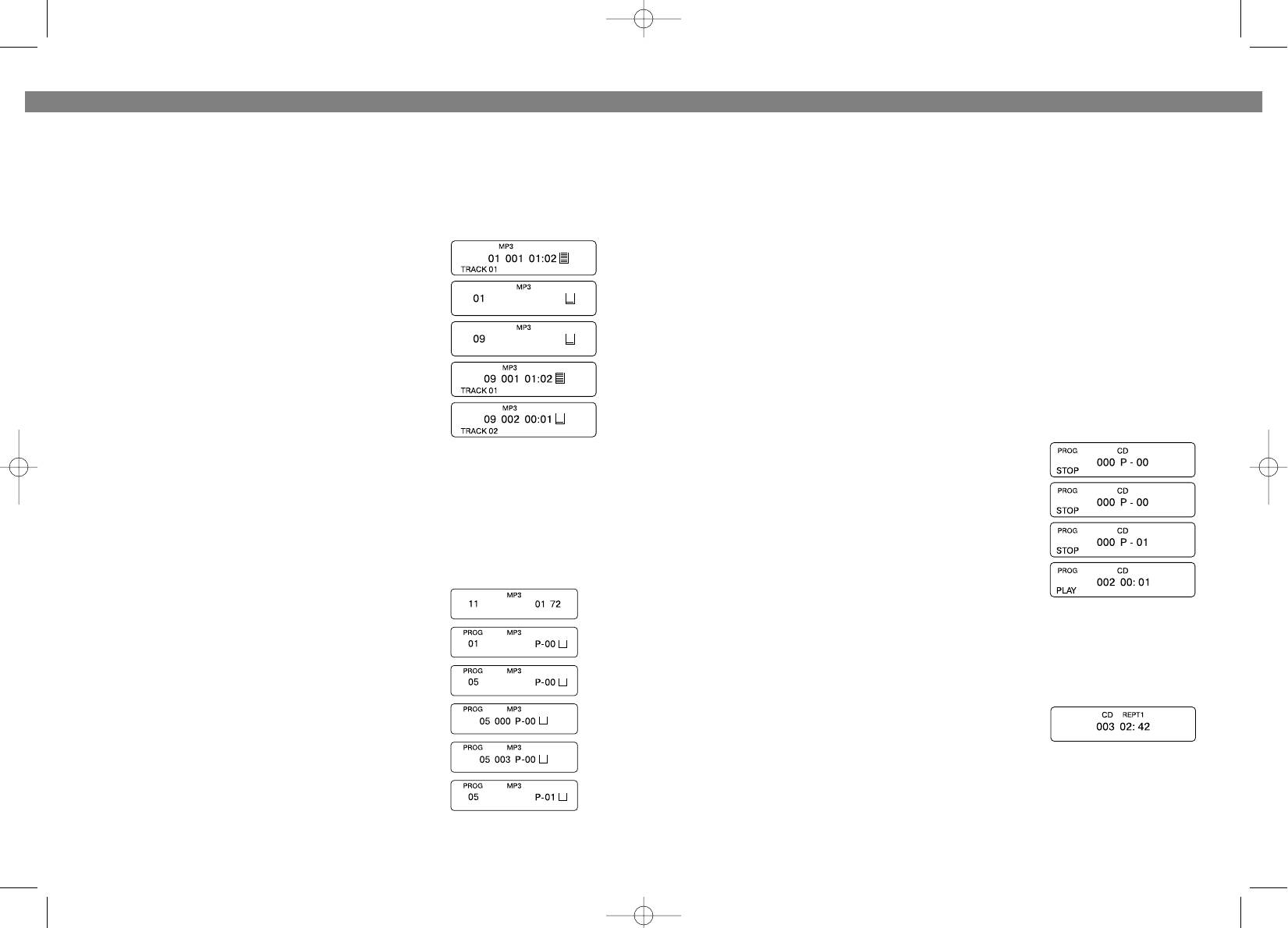
NOTE: Take track 5 of catalog 9 as an example:
6. Во время воспроизведения нажимайте кнопки SKIP/SEARCH !/" (2; 5) и
удерживайте их, чтобы прослушать дорожку на высокой скорости. Когда нужное
• Presume the first playing track is in catalog 1 after reading
место будет найдено, отпустите кнопку для возвращения к нормальной скорости.
CD, the display showing as follows:
• Press and hold ALBUM button (3), the display will show cat*
alog "01".
ВЫБОР РАЗЛИЧНЫХ РЕЖИМОВ ПРОИГРЫВАНИЯ
• Press the SKIP/SEARCH button (
%or#) to select the cata
ПРОГРАММИРОВАННОЕ ВОСПРОИЗВЕДЕНИЕ КОМПАКТДИСКА
log, showing as follows:
Программированное воспроизведение позволяет прослушать желаемые мелодии в
• Press the PLAY/PAUSE button (6), the 1st track in catalog 9
нужном порядке.
appears, starting to play.
Существует множество возможных вариантов программирования дорожек. Во
• Press the SKIP/SEARCH button (5 or 2) to select track 2, the
время программирования на дисплее высветится “PROG”.
play may begin.
1. В режиме остановки нажмите кнопку “PROG/EQ” (8).
На дисплее появится указатель “РROG”.
PROGRAM PLAY (up to 60 tracks can be edited)
2. Нажимайте кнопки SKIP/SEARCH !/" (2, 5), пока
NOTE: This can only be done during stopping state.
номер нужной дорожки не высветится на дисплее.
• While the unit is in stop mode, press PROG/EQ button.
3. Нажмите “PROG/EQ” (8). Номер 1*го трека теперь
• Press the SKIP/SEARCH button (5 or 2 )to select catalog.
занесен в память.
• Press PROG/EQ button (8) again.
4. Повторите шаги 2 и 3 для программирования других
• Press the SKIP/SEARCH button (5 or 2) to select your required tracks, and then press
дорожек.
PROG/EQ button (8) to confirm.
5. Для воспроизведения нажмите на кнопку
• Repeat the above steps to program the other tracks.
"PLAY/PAUSE" (6).
• Press PLAY/PAUSE button (6) to enter program play.
Take the track 3 in catalog 5 as an example.
По окончании воспроизведения последней дорожки сработает режим остановки.
MP3
Для повторного воспроизведения запрограммированных мелодий нажмите на
• In stopping mode, display shows "11
0172".
кнопку “PROGRAM”, а затем "PLAY/PAUSE". После того, как плеер будет выключен
• Press the PROG/EQ button (8), display shows "01" and
запрограммированное воспроизведение не сохраняется.
"P*01".
• Press the SKIP/SEARCH button (5 or 5) to select catalog
ПОВТОР ОДНОЙ ДОРОЖКИ
5, the display shows "05".
• Press the PROG/EQ button (8), the display will show
1. Нажмите кнопку MODE (4) один раз, на дисплее
track number "000".
появится индикатор повторного воспроизведения
• Press the SKIP/SEARCH button (5 or 2) to select track 3,
“REPT 1”.
"003" appears on the display.
2. Нажимайте кнопки SKIP/SEARCH !/" (2, 5), пока номер нужной дорожки не
• Again press the PROG/EQ button (8),"P*02" appears on
высветится на дисплее.
the display, waiting for editing the second track.
3. Дорожка будет воспроизводиться непрерывно до тех пор, пока Вы не нажмете
• Repeat steps 3*6 to edit the required tracks, till the pro*
кнопку STOP (7).
gram finishes.
10
19
3773.qxd 10.06.03 17:33 Page 20


