
Vitek VT-3773: ПРОГРАММИРОВАННОЕ ВОСПРОИЗВЕДЕНИЕ
ПРОГРАММИРОВАННОЕ ВОСПРОИЗВЕДЕНИЕ: Vitek VT-3773
Оглавление
- Гарантийный талон
- ОСНОВНЫЕ ТЕХНИЧЕСКИЕ ХАРАКТЕРИСТИКИ УСЛОВИЯ ГАРАНТИЙНОГО ОБСЛУЖИВАНИЯ
- ПОДКЛЮЧЕНИЕ К ЗВУКОВЫМ СИСТЕМАМ ГРАФИЧЕСКИЕ ЭКВАЛАЙЗЕРЫ ОБСЛУЖИВАНИЕ ЧИСТКА КОРПУСА ЧИСТКА ЛИНЗЫ СПЕЦИФИКАЦИЯ ПЕРЕНОСНОЕ УСТРОЙСТВО ЗВУК
- ПРОИГРЫВАНИЕ В РЕЖИМЕ “INTRO” ВОСПРОИЗВЕДЕНИЕ ДОРОЖЕК В ПРОИЗВОЛЬНОМ ПОРЯДКЕ ПОИСК ТРЕКА ПО НАЗВАНИЮ ПЕСНИ ПРОСЛУШИВАНИЕ ЧЕРЕЗ НАУШНИКИ
- ПРОГРАММИРОВАННОЕ ВОСПРОИЗВЕДЕНИЕ
- MP3ДИСК ПОВТОР ОДНОЙ ДОРОЖКИ ПОВТОР ОДНОГО КАТАЛОГА ПОВТОР ВСЕГО ДИСКА ВОСПРОИЗВЕДЕНИЕ ВЫБРАННЫХ ТРЕКОВ
- ПОВТОР ВСЕХ ДОРОЖЕК ПРОИГРЫВАНИЕ В РЕЖИМЕ “INTRO” ВОСПРОИЗВЕДЕНИЕ ДОРОЖЕК В ПРОИЗВОЛЬНОМ ПОРЯДКЕ АНТИШОК БЛОКИРОВКА КНОПОК
- ВОСПРОИЗВЕДЕНИЕ КОМПАКТДИСКА ВЫБОР РАЗЛИЧНЫХ РЕЖИМОВ ПРОИГРЫВАНИЯ ПРОГРАММИРОВАННОЕ ВОСПРОИЗВЕДЕНИЕ КОМПАКТДИСКА ПОВТОР ОДНОЙ ДОРОЖКИ
- КОМПАКТДИСК АВТОМАТИЧЕСКОЕ ВКЛЮЧЕНИЕ И ВЫКЛЮЧЕНИЕ ПЛЕЕРА
- ИСПОЛЬЗОВАНИЕ КОМПАКТДИСКОВ
- РАСПОЛОЖЕНИЕ ЭЛЕМЕНТОВ ДИСПЛЕЯ ПИТАНИЕ ОТ СЕТИ ПИТАНИЕ ОТ БАТАРЕЙ ЗАРЯД И ИСПОЛЬЗОВАНИЕ ПЕРЕЗАРЯЖАЮЩИХСЯ БАТАРЕЙ
- УВАЖАЕМЫЙ ПОКУПАТЕЛЬ! ВАЖНАЯ ИНФОРМАЦИЯ Расположение элементов управления
РУССКИЙ
ENGLISH
1. Нажмите и, в течение нескольких секунд, удерживайте кнопку ALBUM/10+ (3), на
BASS BOOST
дисплее замигает номер текущего каталога.
Use the Bass Boost function (18) to increase the bass output when listening with
2. Для выбора номера каталога воспользуйтесь кнопками SKIP/SEARCH !/"
headphones/earphones.
(2, 5).
LOCATING A PARTICULAR SONG OR POINT
3. Нажмите кнопку "PLAY/PAUSE" (6), начнется
TRACK SEARCH
воспроизведение первого трека в выбранном
Press the FWD or BACKWARD SKIP/SEARCH BUTTON (5 or 2) during playing to
каталоге.
skip to the desired track.
4. Для выбора конкретного трека данного каталога,
1. Press the # button (5) to skip to the next track on the disc.
воспользуйтесь кнопками SKIP/SEARCH !/" (2, 5).
2. Press the % button (2) to skip to the beginning of the track currently played.
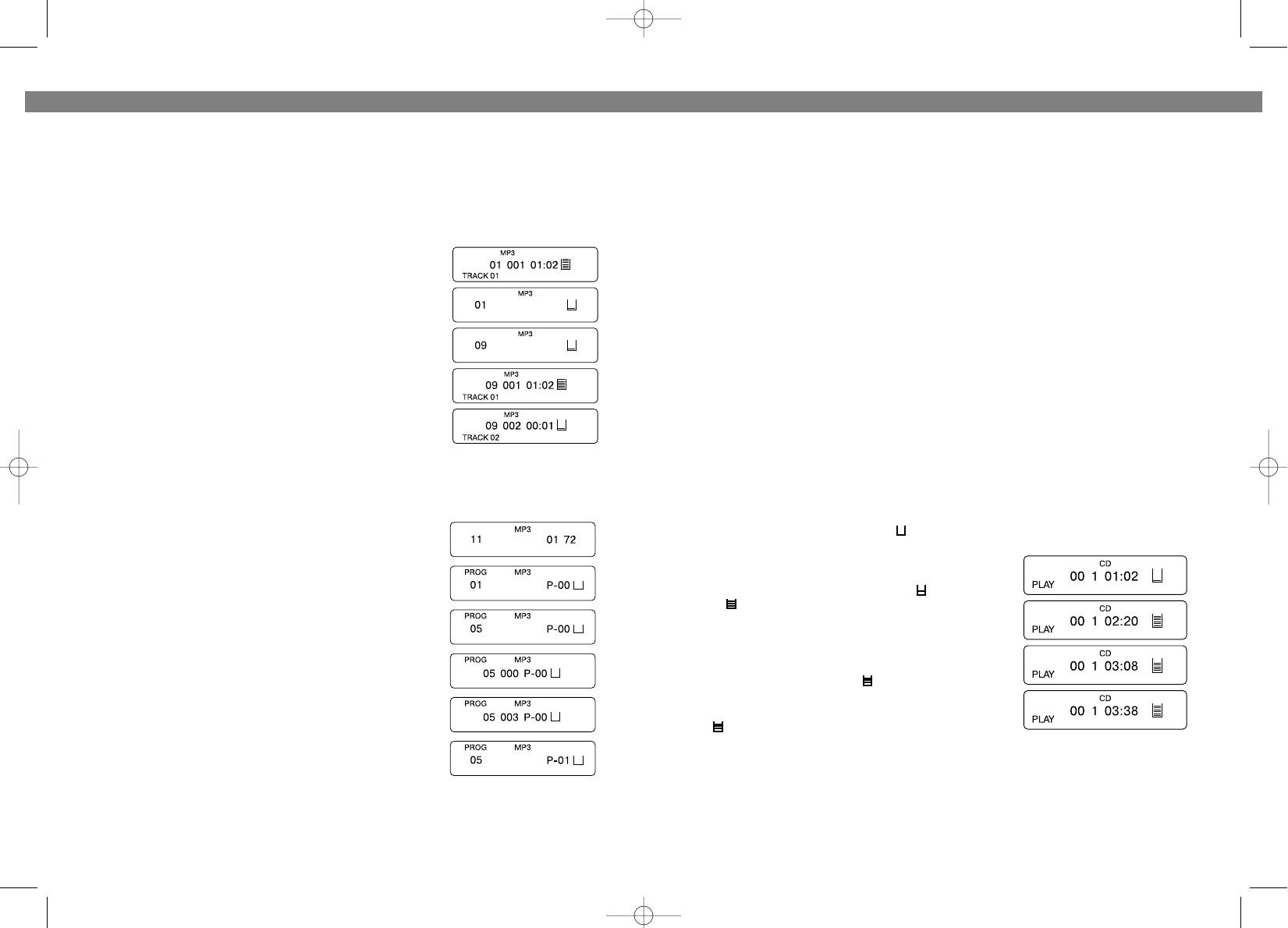
Пример: Вы хотите прослушать 2 трек 9*го каталога.
3. Press the % button (2) twice or more to skip to previous tracks.
Для этого:
* Нажмите и удерживайте кнопку ALBUM/10+ (3), на
FORWARD/BACKWARD SEARCH
дисплее замигает номер каталога “01”.
Press and hold the FWD or BACKWARD SKIP/SEARCH BUTTON (5 or 2) during
* Для поиска 9*го каталога воспользуйтесь кнопками
playing to scan the disc at high speed. When the desired section of the disc is found, release
SKIP/SEARCH !/" (2, 5).
the button. Normal play will resume.
* Нажмите кнопку "PLAY/PAUSE" (6), начнется
1. If you press and hold the FWD button (5) while playing, it will scan the current
воспроизведение 1*го трека 9*го каталога.
played track forward at high speed.
* Для выбора 2*го трека воспользуйтесь кнопкой
2. If you press and hold the BACK button (2) while playing, it will scan the current
SKIP/SEARCH " (5).
played track backward at high speed.
ПРОГРАММИРОВАННОЕ ВОСПРОИЗВЕДЕНИЕ
40/120 SECONDS ELECTRONIC SHOCK PROTECTION SYSTEM
Примечание: Программирование диска возможно только в режиме остановки
The digital ELECTRONIC SHOCK PROTECTION function uses semiconductor memory to
диска.
prevent the sound from skipping when the unit is subjected to shocks and vibration during
1. В режиме остановки нажмите кнопку PROG/EQ (8).
play.
• While the disc begins to play, the " " indicator appears
2. Для выбора номера каталога воспользуйтесь
in the display and the digital ELECTRONIC SHOCK PRO*
кнопками SKIP/SEARCH !/" (2, 5).
TECTION function turns on automatically. The digital
3. Нажмите кнопку PROG/EQ (8) еще раз.
data of music is stored in a "read*ahead" memory buffer
4. Для выбора конкретного трека данного каталога,
before it is decoded and played. The " " mark changes
воспользуйтесь кнопками SKIP/SEARCH !/" (2, 5).
to " " mark, indicating that the data buffer is full.
Для подтверждения номера выбранного трека
• When the unit is subjected to a shock during play, the
data stored in memory continues to be decoded and
нажмите кнопку PROG/EQ (8).
played. This gives the pickup time to stabilize and con*
5. Повторите шаг 4 для программирования других треков.
tinue reading new data. As the data is read from memo*
6. Для начала запрограммированного воспроизведения
ry the indicator changes to " ".
нажмите кнопку "PLAY/PAUSE" (6).
• Once the pickup returns to its original position, new data
Таким образом, Вы можете запрограммировать до 60
is stored in memory and the display changes back to the
треков.
" " mark.
Пример: Вы хотите запрограммировать 3*й трек 5*го
NOTE: When playing MP3, the EPS/10+ function could not be cancelled.
каталога.
1. В режиме остановки нажмите кнопку PROG/EQ (8), при
HOLD SWITCH HOLD ALL BUTTONS
этом на дисплее появится “01” и “Р*01”.
Once all adjustments/selections are finished, slide the HOLD switch (17) to the ON position,
2. Для выбора 5*го каталога воспользуйтесь кнопками SKIP/SEARCH !/" (2, 5),
"HOLD" appears on the display.
при этом на дисплее появится “05”.
22
7
3773.qxd 10.06.03 17:33 Page 14


