
Vitek VT-3773: КОМПАКТДИСК АВТОМАТИЧЕСКОЕ ВКЛЮЧЕНИЕ И ВЫКЛЮЧЕНИЕ ПЛЕЕРА
КОМПАКТДИСК АВТОМАТИЧЕСКОЕ ВКЛЮЧЕНИЕ И ВЫКЛЮЧЕНИЕ ПЛЕЕРА: Vitek VT-3773
Оглавление
- Гарантийный талон
- ОСНОВНЫЕ ТЕХНИЧЕСКИЕ ХАРАКТЕРИСТИКИ УСЛОВИЯ ГАРАНТИЙНОГО ОБСЛУЖИВАНИЯ
- ПОДКЛЮЧЕНИЕ К ЗВУКОВЫМ СИСТЕМАМ ГРАФИЧЕСКИЕ ЭКВАЛАЙЗЕРЫ ОБСЛУЖИВАНИЕ ЧИСТКА КОРПУСА ЧИСТКА ЛИНЗЫ СПЕЦИФИКАЦИЯ ПЕРЕНОСНОЕ УСТРОЙСТВО ЗВУК
- ПРОИГРЫВАНИЕ В РЕЖИМЕ “INTRO” ВОСПРОИЗВЕДЕНИЕ ДОРОЖЕК В ПРОИЗВОЛЬНОМ ПОРЯДКЕ ПОИСК ТРЕКА ПО НАЗВАНИЮ ПЕСНИ ПРОСЛУШИВАНИЕ ЧЕРЕЗ НАУШНИКИ
- ПРОГРАММИРОВАННОЕ ВОСПРОИЗВЕДЕНИЕ
- MP3ДИСК ПОВТОР ОДНОЙ ДОРОЖКИ ПОВТОР ОДНОГО КАТАЛОГА ПОВТОР ВСЕГО ДИСКА ВОСПРОИЗВЕДЕНИЕ ВЫБРАННЫХ ТРЕКОВ
- ПОВТОР ВСЕХ ДОРОЖЕК ПРОИГРЫВАНИЕ В РЕЖИМЕ “INTRO” ВОСПРОИЗВЕДЕНИЕ ДОРОЖЕК В ПРОИЗВОЛЬНОМ ПОРЯДКЕ АНТИШОК БЛОКИРОВКА КНОПОК
- ВОСПРОИЗВЕДЕНИЕ КОМПАКТДИСКА ВЫБОР РАЗЛИЧНЫХ РЕЖИМОВ ПРОИГРЫВАНИЯ ПРОГРАММИРОВАННОЕ ВОСПРОИЗВЕДЕНИЕ КОМПАКТДИСКА ПОВТОР ОДНОЙ ДОРОЖКИ
- КОМПАКТДИСК АВТОМАТИЧЕСКОЕ ВКЛЮЧЕНИЕ И ВЫКЛЮЧЕНИЕ ПЛЕЕРА
- ИСПОЛЬЗОВАНИЕ КОМПАКТДИСКОВ
- РАСПОЛОЖЕНИЕ ЭЛЕМЕНТОВ ДИСПЛЕЯ ПИТАНИЕ ОТ СЕТИ ПИТАНИЕ ОТ БАТАРЕЙ ЗАРЯД И ИСПОЛЬЗОВАНИЕ ПЕРЕЗАРЯЖАЮЩИХСЯ БАТАРЕЙ
- УВАЖАЕМЫЙ ПОКУПАТЕЛЬ! ВАЖНАЯ ИНФОРМАЦИЯ Расположение элементов управления
РУССКИЙ
ENGLISH
КОМПАКТДИСК
• After finishing programming, press PLAY/PAUSE button (6) to enter program playing
mode.
1. Подключите наушники (3,5 мм) в гнездо для наушников (13).
2. Нажмите на кнопку “OPEN” (15) для того, чтобы открыть отсек для компакт*диска.
INTRO SCAN MODE
3. Вставьте диск в отсек для компакт*диска.
In stopping mode, press the MODE button (4) fourth, "INTRO"
4. Плотно закройте крышку (1) до щелчка.
appears on the screen. Press the PLAY/PAUSE button (6) again
5. Для начала воспроизведения диска нажмите на кнопку “PLAY/PAUSE” (6). На
to enter intro scan mode.
дисплее высветится следующая информация “READING”, затем количество треков
и общее время проигрывания диска. Автоматически начнется проигрывание диска
RANDOM PLAY
с 1*й мелодии.
In stopping mode, press the MODE button (4) fifth, "SHUFF"
6. Отрегулируйте громкость по вашему желанию кнопками VOL +/* (9, 11).
appears on the display. Press PLAY/PAUSE button (6) again to
start the random play.
SEARCHING SONG BY ENGLISH
During MP3 play, you can select songs by inputting English letters:
In stop mode, press and hold the MODE button for a few seconds until "SONG SEARCH" is
displayed on the LCD, then the letter "A" appears, press the SKIP/SEARCH buttons (% or#)
to select letter (or digital number or other symbol). Press the MODE button to confirm the let*
ter (or digital number or other symbol), then another letters (or digital number or other sym*
bol) is displayed for you to select. Press STOP button to return to the last letter (or digital num*
ber or other symbol). After selection, press PLAY/PAUSE button to play the selected songs. If
it can not find any song, "NOT FOUND " will appear. Maximum of 8 characters can be inputted.
7. Установите переключатель усиления басов (18) в положение “ON”. При этом
If more than 1 song match the first 8 characters, it will select the first song.
получается более сильный звуковой эффект. Действие усиления басов меняется в
зависимости от регулирования громкости.
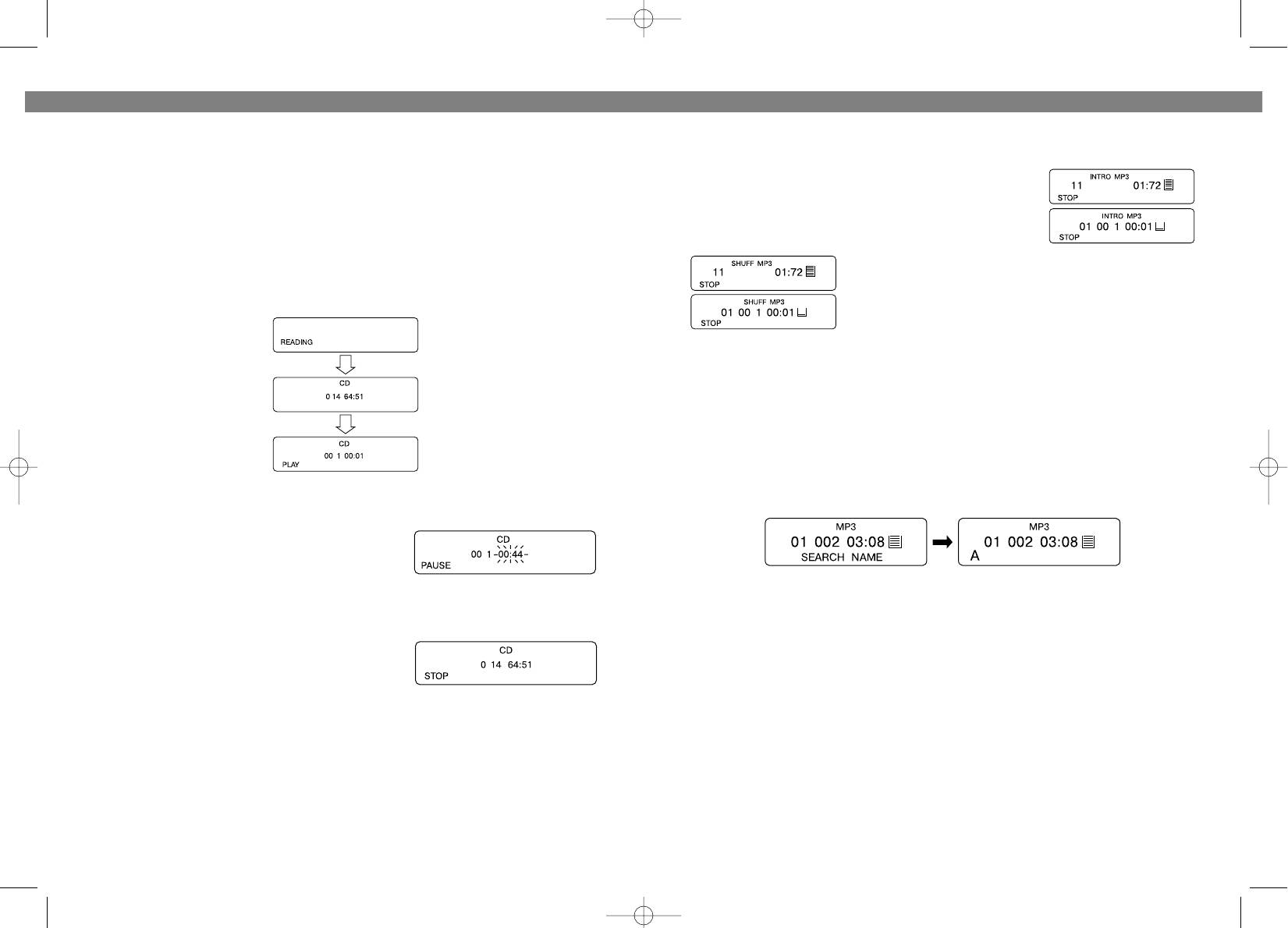
8. .Для временной остановки музыки нажмите на
кнопку “PLAY/PAUSE” (6). На дисплее высветится
следующая информация:
Нажмите еще раз на кнопку “PLAY/PAUSE” (6) для
продолжения воспроизведения.
RECORDING FROM THE LINE OUT JACK (12)
9. Для остановки воспроизведения нажмите на
• The output from the CD player can be recorded.
кнопку “STOP” (7). При этом на дисплее
Connect a patch cable from the LINE OUT jack (12) on the CD player to the LINE INPUT
высветится информация, содержащаяся на
jacks on a cassette recorder.
диске. При повторном нажатии на кнопку “STOP”
• The sound from the CD player can be heard through a pair of speakers.
(7) * на дисплее появится сообщение POWER
Connect a patch cable from the LINE OUT jack (12) on the CD player to the AUX or CD
OFF, затем дисплей очистится.
INPUT jacks on a stereo system.
АВТОМАТИЧЕСКОЕ ВКЛЮЧЕНИЕ И ВЫКЛЮЧЕНИЕ ПЛЕЕРА
MUSIC APPRECIATE EFFECT SELECTION
In playing mode, Pressing the PROG/EQ button (8) different times gives you the played track
Автоматическое включение плеера начинается после нажатия на кнопку
different types. The music of dbb type appears by pressing the button one time, and two times
“PLAY/PAUSE” (6) , а выключение * после нажатия на кнопку “STOP” (7), либо
pressing the button gives you the music of popular type, three times gives you the classic
происходит автоматическое отключение плеера через 30 секунд после
type, four times gives you the jazz type, five times gives you the rock type, and six times gives
проигрывания всех мелодий на диске.
you the normal type.
18
11
3773.qxd 10.06.03 17:33 Page 22


