
Vitek VT-3773: MP3ДИСК ПОВТОР ОДНОЙ ДОРОЖКИ ПОВТОР ОДНОГО КАТАЛОГА ПОВТОР ВСЕГО ДИСКА ВОСПРОИЗВЕДЕНИЕ ВЫБРАННЫХ ТРЕКОВ
MP3ДИСК ПОВТОР ОДНОЙ ДОРОЖКИ ПОВТОР ОДНОГО КАТАЛОГА ПОВТОР ВСЕГО ДИСКА ВОСПРОИЗВЕДЕНИЕ ВЫБРАННЫХ ТРЕКОВ: Vitek VT-3773
Оглавление
- Гарантийный талон
- ОСНОВНЫЕ ТЕХНИЧЕСКИЕ ХАРАКТЕРИСТИКИ УСЛОВИЯ ГАРАНТИЙНОГО ОБСЛУЖИВАНИЯ
- ПОДКЛЮЧЕНИЕ К ЗВУКОВЫМ СИСТЕМАМ ГРАФИЧЕСКИЕ ЭКВАЛАЙЗЕРЫ ОБСЛУЖИВАНИЕ ЧИСТКА КОРПУСА ЧИСТКА ЛИНЗЫ СПЕЦИФИКАЦИЯ ПЕРЕНОСНОЕ УСТРОЙСТВО ЗВУК
- ПРОИГРЫВАНИЕ В РЕЖИМЕ “INTRO” ВОСПРОИЗВЕДЕНИЕ ДОРОЖЕК В ПРОИЗВОЛЬНОМ ПОРЯДКЕ ПОИСК ТРЕКА ПО НАЗВАНИЮ ПЕСНИ ПРОСЛУШИВАНИЕ ЧЕРЕЗ НАУШНИКИ
- ПРОГРАММИРОВАННОЕ ВОСПРОИЗВЕДЕНИЕ
- MP3ДИСК ПОВТОР ОДНОЙ ДОРОЖКИ ПОВТОР ОДНОГО КАТАЛОГА ПОВТОР ВСЕГО ДИСКА ВОСПРОИЗВЕДЕНИЕ ВЫБРАННЫХ ТРЕКОВ
- ПОВТОР ВСЕХ ДОРОЖЕК ПРОИГРЫВАНИЕ В РЕЖИМЕ “INTRO” ВОСПРОИЗВЕДЕНИЕ ДОРОЖЕК В ПРОИЗВОЛЬНОМ ПОРЯДКЕ АНТИШОК БЛОКИРОВКА КНОПОК
- ВОСПРОИЗВЕДЕНИЕ КОМПАКТДИСКА ВЫБОР РАЗЛИЧНЫХ РЕЖИМОВ ПРОИГРЫВАНИЯ ПРОГРАММИРОВАННОЕ ВОСПРОИЗВЕДЕНИЕ КОМПАКТДИСКА ПОВТОР ОДНОЙ ДОРОЖКИ
- КОМПАКТДИСК АВТОМАТИЧЕСКОЕ ВКЛЮЧЕНИЕ И ВЫКЛЮЧЕНИЕ ПЛЕЕРА
- ИСПОЛЬЗОВАНИЕ КОМПАКТДИСКОВ
- РАСПОЛОЖЕНИЕ ЭЛЕМЕНТОВ ДИСПЛЕЯ ПИТАНИЕ ОТ СЕТИ ПИТАНИЕ ОТ БАТАРЕЙ ЗАРЯД И ИСПОЛЬЗОВАНИЕ ПЕРЕЗАРЯЖАЮЩИХСЯ БАТАРЕЙ
- УВАЖАЕМЫЙ ПОКУПАТЕЛЬ! ВАЖНАЯ ИНФОРМАЦИЯ Расположение элементов управления
ENGLISH
РУССКИЙ
This deactivates all buttons functions and eliminates the possi
MP3ДИСК
bility of accidentally pressing buttons. Slide the HOLD switch
1. Подключите наушники (3,5 мм) в гнездо для наушников (13).
(17) to the OFF position to unlock all buttons, "HOLD" disap*
2. Нажмите на кнопку “OPEN” (15) для того, чтобы открыть отсек для компакт*диска.
pears.
3. Отрегулируйте громкость по вашему желанию кнопками (9, 11).
VARIOUS PLAYING MODES
4. Вставьте диск в отсек для компакт*диска.
PROGRAMMED PLAY
5. Плотно закройте крышку (1) до щелчка.
The tracks on the disc can be programmed for playing in any order. (Up to 60 tracks can be
6. Нажмите на кнопку “PLAY/PAUSE” (6).
programmed.)
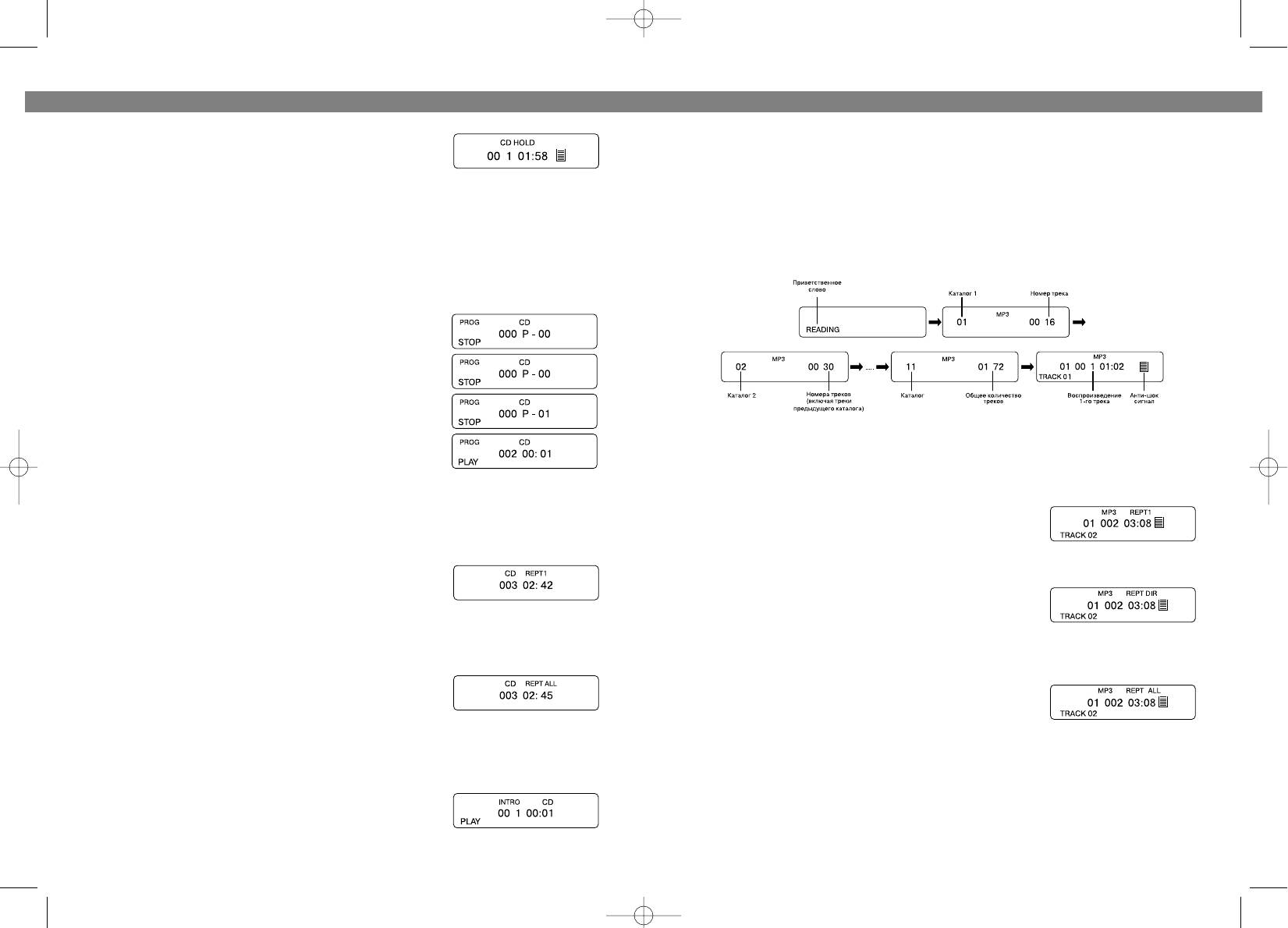
На дисплее высветится следующая информация (Пример):
1. Press the PROG/EQ button (8) in stop mode, "PROG" and
track number "000" are shown in the display.
2. Press the FWD or BACKWARD SKIP/SEARCH button (5 or 2)
to select the first be track to programmed.
3. Press the PROG/EQ button (8). The first track number is
now stored in memory, program number changes to "01"
waiting for your next selection.
4 Repeat steps 2 and 3 to program additional tracks.
5 After programming is finished, press the PLAY/PAUSE but*
ton (6).
Воспроизведение и остановка, поиск нужных треков для МР3 дисков
• Programmed play begins with the first programmed track.
осуществляется теми же кнопками, что и для компакт*дисков (см. раздел
• The player stops automatically after all programmed tracks
“Компакт*диск”).
have been played. The programmed tracks are stored in
memory until the disc compartment is opened, or the power
is turned off. To play the same program again, when “PROG”
ПОВТОР ОДНОЙ ДОРОЖКИ
still shown on display, press the PLAY/PAUSE button (6).
Во время воспроизведения МР3*диска, нажмите кнопку
MODE (4) один раз для повторного воспроизведения
SINGLE TRACK REPEAT
текущего трека. При этом на дисплее появится REPT1.
Press the MODE button (4) once during playing, "REPT 1"
appears in the display, press the SKIP/SEARCH button (5 or 2)
ПОВТОР ОДНОГО КАТАЛОГА
to select your favorite song. It plays one song over and over
Во время воспроизведения МР3*диска, нажмите кнопку
until you press the STOP/OFF Button (7) or press the MODE
MODE (4) два раза для повторного воспроизведения
button (4) twice to return to the normal play mode.
треков одного каталога. При этом на дисплее появится
REPT DIR.
ALL TRACKS REPEAT
Press the MODE button (4) twice during playing, “REPT ALL”
ПОВТОР ВСЕГО ДИСКА
shows in the display.
Во время воспроизведения МР3*диска, нажмите кнопку
All songs will keep playing in sequence 1, 2, 3 etc., and all
MODE (4) три раза для повторного воспроизведения
songs will be repeated over again until you press the STOP/OFF
всего диска. При этом на дисплее появится REPT ALL.
button (7) or press the MODE button (4) once to return to the
normal play mode.
ВОСПРОИЗВЕДЕНИЕ ВЫБРАННЫХ ТРЕКОВ
INTROSCAN PLAY
• Для поиска желаемых треков одного каталога воспользуйтесь кнопками
1. Press the MODE button (4) thrice in stop mode or during
SKIP/SEARCH !/" (2, 5).
playing.
• Если Вы желаете выбрать треки, находящиеся в разных каталогах, для этого:
2. “INTRO” appears in the display, then press PLAY/PAUSE
button (6).
8
21
3773.qxd 10.06.03 17:33 Page 16


