
Vitek VT-3774: ЗАПРОГРАММИРОВАННОЕ ВОСПРОИЗВЕДЕНИЕ (список может включать до 64 дорожек) РЕЖИМ ОЗНАКОМЛЕНИЯ
ЗАПРОГРАММИРОВАННОЕ ВОСПРОИЗВЕДЕНИЕ (список может включать до 64 дорожек) РЕЖИМ ОЗНАКОМЛЕНИЯ: Vitek VT-3774
Оглавление
- ЧИСТКА СЧИТЫВАЮЩЕЙ ЛИНЗЫ ЧИСТКА КОРПУСА УСТРОЙСТВА ТЕХНИЧЕСКИЕ ХАРАКТЕРИСТИКИ СЧИТЫВАНИЕ РАДИОПРИЕМНИК АУДИО ОБЩИЕ ХАРАКТЕРИСТИКИ
- ФИКСИРОВАННАЯ НАСТРОЙКА СТАНЦИЙ УХОД ЗА УСТРОЙСТВОМ ЧИСТКА ДИСКОВ
- ВОСПРОИЗВЕДЕНИЕ ДОРОЖЕК В ПРОИЗВОЛЬНОМ ПОРЯДКЕ ПОИСК КОМПОЗИЦИЙ ПО НАЗВАНИЮ ЗАПИСЬ С ПРОИГРЫВАТЕЛЯ КОМПАКТДИСКОВ (разъем линейного выхода 20) ЭКСПЛУАТАЦИЯ РАДИОПРИЕМНИКА
- ЗАПРОГРАММИРОВАННОЕ ВОСПРОИЗВЕДЕНИЕ (список может включать до 64 дорожек) РЕЖИМ ОЗНАКОМЛЕНИЯ
- ПОВТОРНОЕ ВОСПРОИЗВЕДЕНИЕ ВСЕГО ДИСКА ВОСПРОИЗВЕДЕНИЕ ВЫБРАННЫХ ДОРОЖЕК ВКЛЮЧЕНИЕ ЭКВАЛАЙЗЕРА
- ВОСПРОИЗВЕДЕНИЕ ДИСКОВ В ФОРМАТЕ MP3 ХАРАКТЕРИСТИКА ДИСКОВ В ФОРМАТЕ MP3 ПОВТОРНОЕ ВОСПРОИЗВЕДЕНИЕ ОДНОЙ ДОРОЖКИ ПОВТОРНОЕ ВОСПРОИЗВЕДЕНИЕ ДОРОЖЕК ОДНОГО КАТАЛОГА
- ПОВТОРНОЕ ВОСПРОИЗВЕДЕНИЕ ОДНОЙ ДОРОЖКИ ПОВТОРНОЕ ВОСПРОИЗВЕДЕНИЕ ВСЕХ ДОРОЖЕК РЕЖИМ ОЗНАКОМЛЕНИЯ ВОСПРОИЗВЕДЕНИЕ ДОРОЖЕК В ПРОИЗВОЛЬНОМ ПОРЯДКЕ
- ВЫКЛЮЧАТЕЛЬ HOLD БЛОКИРОВКА КНОПОК УПРАВЛЕНИЯ ВОСПРОИЗВЕДЕНИЕ ЗАПРОГРАММИРОВАННОГО СПИСКА ДОРОЖЕК
- ФУНКЦИЯ АВТОМАТИЧЕСКОГО ОТКЛЮЧЕНИЯ ЭЛЕКТРОПИТАНИЯ ПОИСК ЖЕЛАЕМОЙ КОМПОЗИЦИИ / ФРАГМЕНТА КОМПОЗИЦИИ ПОИСК ДОРОЖКИ ПОИСК ФРАГМЕНТОВ КОМПОЗИЦИЙ В НАПРАВЛЕНИИ ВОСПРОИЗВЕДЕНИЯ / В ОБРАТНОМ НАПРАВЛЕНИИ ФУНКЦИЯ ЭЛЕКТРОННОЙ ЗАЩИТЫ ОТ ВИБРАЦИИ
- ВОСПРОИЗВЕДЕНИЕ ЗАПИСЕЙ НА КОМПАКТ ДИСКАХ ФУНКЦИЯ АВТОМАТИЧЕСКОГО ВКЛЮЧЕНИЯ ЭЛЕКТРОПИТАНИЯ
- ВАЖНАЯ ИНФОРМАЦИЯ: ДОПУСТИМЫЕ ИСТОЧНИКИ ЭЛЕКТРОПИТАНИЯ (2) ЗАРЯДКА И ИСПОЛЬЗОВАНИЕ АККУМУЛЯТОРНЫХ БАТАРЕЙ УХОД ЗА КОМПАКТ ДИСКАМИ
- ДОПУСТИМЫЕ ИСТОЧНИКИ ЭЛЕКТРОПИТАНИЯ (1) ПИТАНИЕ УСТРОЙСТВА ОТ СЕТИ ПЕРЕМЕННОГО ТОКА МЕРЫ ПРЕДОСТОРОЖНОСТИ ПРИ ИСПОЛЬЗОВАНИИ СЕТЕВОГО АДАПТЕРА УСТАНОВКА ЩЕЛОЧНЫХ ЭЛЕМЕНТОВ ПИТАНИЯ ПРИМЕЧАНИЕ ПО ПОВОДУ ИСПОЛЬЗОВАНИЯ ЩЕЛОЧНЫХ ЭЛЕМЕНТОВ ПИТАНИЯ ПОМНИТЕ
- НАЗВАНИЯ КНОПОК УПРАВЛЕНИЯ СИМВОЛЫ ЖИДКОКРИСТАЛЛИЧЕСКОГО ДИСПЛЕЯ
- РАСПОЛОЖЕНИЕ КНОПОК УПРАВЛЕНИЯ
- ТРЕБОВАНИЯ К БЕЗОПАСНОСТИ И ВАЖНАЯ ИНФОРМАЦИЯ ВАЖНАЯ ИНФОРМАЦИЯ ВНИМАНИЕ! ОПАСНОСТЬ!
РУССКИЙ
ENGLISH
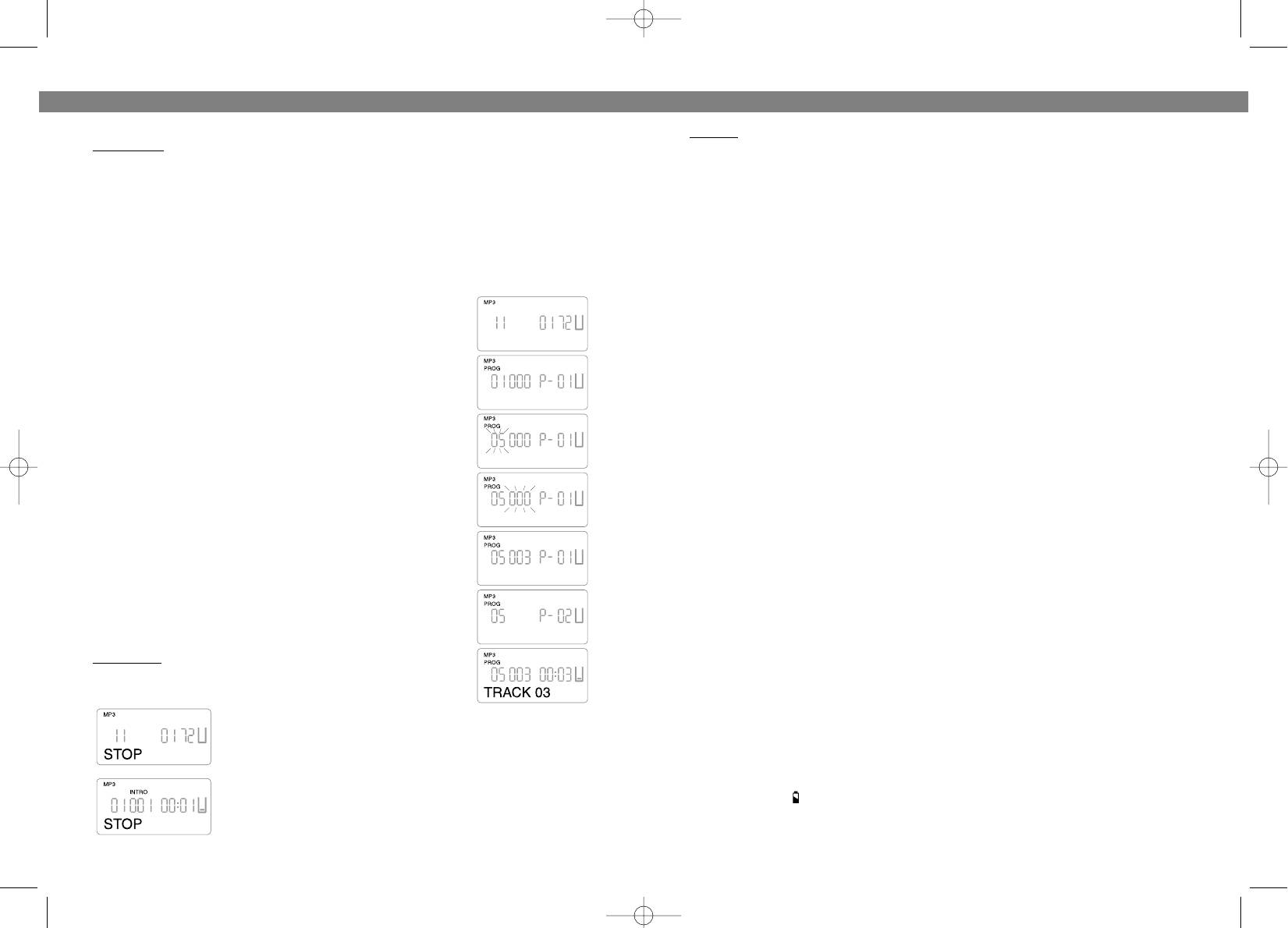
ЗАПРОГРАММИРОВАННОЕ ВОСПРОИЗВЕДЕНИЕ (список может включать до 64 дорожек)
NOTES:
Примечание:
Выполнение данной функции возможно только при выключенном режиме
1. The indications of "MP3" and "CD" are mutually exclusive, that is, when the player is
воспроизведения "СТОП".
playing MP3 disc, the indication will be "MP3" instead of "CD", and when the player is play
1. Нажмите кнопку режима программирования/эквалайзера PROG/EQ.
ing CD disc, the indication will be "CD" instead of "MP3".
2. Выберите желаемый каталог, используя кнопки ПЕРЕХОДА/ПОИСКА (SKIP/SEARCH ) (4 или 3).
2. The indications of "AM", "FM" and "FM ST" are mutually exclusive, that is, when the
3. Повторно нажмите на кнопку программирования режима/эквалайзера (PROG/EQ) (12).
Radio Band Button is pressed to choose AM bandwave, the indication will be "AM"; when
4. Используйте кнопки ПЕРЕХОДА/ПОИСКА (SKIP/SEARCH) (4 или 3) для выбора желаемых
дорожек, а также кнопку программирования режима/эквалайзера (PROG/EQ) (12) для
the Radio Band Button is pressed to choose FM bandwave, the indication will be "FM", and
подтверждения выбора.
when a stereo radio station is being tuned to, the indication will be "FM ST".
5. Осуществите программирование дополнительных дорожек, повторяя вышеуказанные шаги.
3. The indications of "KHz" and "MHz" are mutually exclusive, that is, when AM bandwave
6. Чтобы включить режим воспроизведения запрограммированных дорожек, нажмите на кнопку
is chosen, the indication will be "KHz" to match "AM"; when FM bandwave is chosen, the
ВОСПРОИЗВЕДЕНИЕ/ПАУЗА (PLAY/PAUSE) (17).
indication will be "MHz" to match "FM" or "FM ST".
4. The indications of "REPT 1", "REPT DIR" and "REPT ALL" are exclusive, that is, when
В качестве примера рассмотрим выбор и воспроизведение
MP3 is being played, they are to indicate the three different REPEAT modes; and when CD
дорожки 5 каталога 9:
is being played, the indications of "REPT 1" and "REPT ALL" are to indicate the two differ
1. Если функция воспроизведения выключена, на дисплее
MMPP33
ent REPEAT modes.
выведено: "
1111
0011 7722".
5. The indications of "PROG", "SHUFF" and "INTRO" are exclusive, they are to indicate the
2. Нажмите на кнопку программирования режима/эквалайзера
(PROG/EQ) (12), на дисплее будут выведены следующие
three different Play modes Programmed play, Random play and Introscan play respec
символы: "0011" и "PP0011".
tively.
3. Выберите каталог 5, используя кнопки ПЕРЕХОДА/ПОИСКА
(SKIP/SEARCH) (4 или 3). На дисплей будет выведен символ "
0055".
POWER SOURCES (1)
4. Нажмите на кнопку программирования режима/эквалайзера
AC OPERATION
(PROG/EQ) (12), на дисплее будет выведен номер дорожки и
Plug one end of the AC adaptor into the DC input jack (25), then plug the other end into AC
мигающий символ "
000000".
wall outlet.
5. Выберите дорожку 3, используя кнопки ПЕРЕХОДА/ПОИСКА
(SKIP/SEARCH) (4 или 3). На дисплее будет выведен символ
PRECAUTIONS ON USING THE AC ADAPTOR
"000033".
• Do not touch the AC adaptor with wet hands. Doing so is dangerous, as this could result
6. Повторно нажмите на кнопку программирования
режима/эквалайзера PROG/EQ (12), на дисплее появится символ
in an electrical shock.
"PP
0022", предназначенный для следующей дорожки,
• If the AC adaptor is connected when the batteries are installed, the power supply auto
программируемой по Вашему выбору.
matically switches to the AC power source and the batteries are disconnected.
7. Осуществляйте программирование дорожек, повторяя шаги с
3 по 6, вплоть до окончания программы.
ALKALINE BATTERY INSTALLATION
8. Чтобы включить режим воспроизведения
Insert two AA batteries into the battery compartment on the CD insertion area of the unit.
запрограммированных дорожек, после окончания
Be sure to observe the proper polarity (the "+" and "" signs) as indicated inside the bat
программирования нажмите на кнопку
ВОСПРОИЗВЕДЕНИЕ/ПАУЗА (PLAY/PAUSE) (17).
tery compartment.
Примечание:
Для отмены программы, нажмите на кнопку СТОП
(STOP) и удерживайте ее в нажатом положении до тех пор, пока
NOTE ON ALKALINE BATTERIES
надпись "PROG" не исчезнет с экрана проигрывателя.
• When replacing the alkaline batteries, use two new batteries of the same type. Do not
mix a used battery with a new one or mix different types of batteries.
• When inserting the batteries, mistakenly inserting even one with improper polarity will
cause leakage.
РЕЖИМ ОЗНАКОМЛЕНИЯ
При прослушивании компактдиска, или в режиме "СТОП",
• Never charge, heat, disassemble, or throw batteries into a fire.
четыре раза нажмите на кнопку выбора режима MODE (13) на
дисплее появится надпись "INTRO" (ОЗНАКОМЛЕНИЕ).
REMEMBER
Чтобы включить режим ознакомления, нажмите кнопку
• If the symbol " " flashes in the display, your batteries are weak, replace them or use
ВОСПРОИЗВЕДЕНИЕ/ПАУЗА (PLAY/PAUSE) (17).
the AC Adaptor.
• If the Display is blank no numbers show when Play/Pause button (17) is pressed, the
27
4
3774.qxd 11.03.04 15:59 Page 10


