
Vitek VT-1111: РЕЖИМ "ПАУЗА" СИСТЕМА "АВТОСТОП" КОМПАКТДИСК ПОИСК ЖЕЛАЕМОГО ТРЕКА ПОВТОРНОЕ ВОСПРОИЗВЕДЕНИЕ
РЕЖИМ "ПАУЗА" СИСТЕМА "АВТОСТОП" КОМПАКТДИСК ПОИСК ЖЕЛАЕМОГО ТРЕКА ПОВТОРНОЕ ВОСПРОИЗВЕДЕНИЕ: Vitek VT-1111
Оглавление
- ИНСТРУКЦИЯ ПО ЭКСПЛУАТАЦИИ
- Гарантийный талон
- ТЕХНИЧЕСКОЕ ОБСЛУЖИВАНИЕ КОМПАКТДИСК КАССЕТНАЯ ЛЕНТА СПЕЦИФИКАЦИЯ СРОК СЛУЖБЫ МАГНИТОЛЫ НЕ МЕНЕЕ 5ТИ ЛЕТ
- ПОИСК ТРЕКА ПО НАЗВАНИЮ ПЕСНИ АНТИШОК ГРАФИЧЕСКИЕ ЭКВАЛАЙЗЕРЫ ПРОСЛУШИВАНИЕ ЧЕРЕЗ НАУШНИКИ
- ПРОИГРЫВАНИЕ В РЕЖИМЕ “INTRO” ВОСПРОИЗВЕДЕНИЕ ДОРОЖЕК В ПРОИЗВОЛЬНОМ ПОРЯДКЕ ВОСПРОИЗВЕДЕНИЕ ВЫБРАННЫХ ТРЕКОВ ПРОГРАММИРОВАННОЕ ВОСПРОИЗВЕДЕНИЕ
- ПРОГРАММИРОВАННОЕ ВОСПРОИЗВЕДЕНИЕ MP3ДИСК ПОВТОР ОДНОЙ ДОРОЖКИ ПОВТОР ОДНОГО АЛЬБОМА ПОВТОР ВСЕГО ДИСКА
- РЕЖИМ "ПАУЗА" СИСТЕМА "АВТОСТОП" КОМПАКТДИСК ПОИСК ЖЕЛАЕМОГО ТРЕКА ПОВТОРНОЕ ВОСПРОИЗВЕДЕНИЕ
- РАДИОПРИЕМНИК МАГНИТОФОН ВОСПРОИЗВЕДЕНИЕ КАССЕТЫ ЗАПИСЬ С РАДИОПРИЕМНИКА ЗАПИСЬ С КОМПАКТДИСКА ЗАПИСЬ СО ВСТРОЕННОГО МИКРОФОНА (19)
- Расположение элементов управления ПИТАНИЕ ОТ СЕТИ ПИТАНИЕ ОТ БАТАРЕЕК
- ENGLISHРУССКИЙ
- УВАЖАЕМЫЙ ПОКУПАТЕЛЬ!
РУССКИЙENGLISH
PLAYING A CD
РЕЖИМ "ПАУЗА"
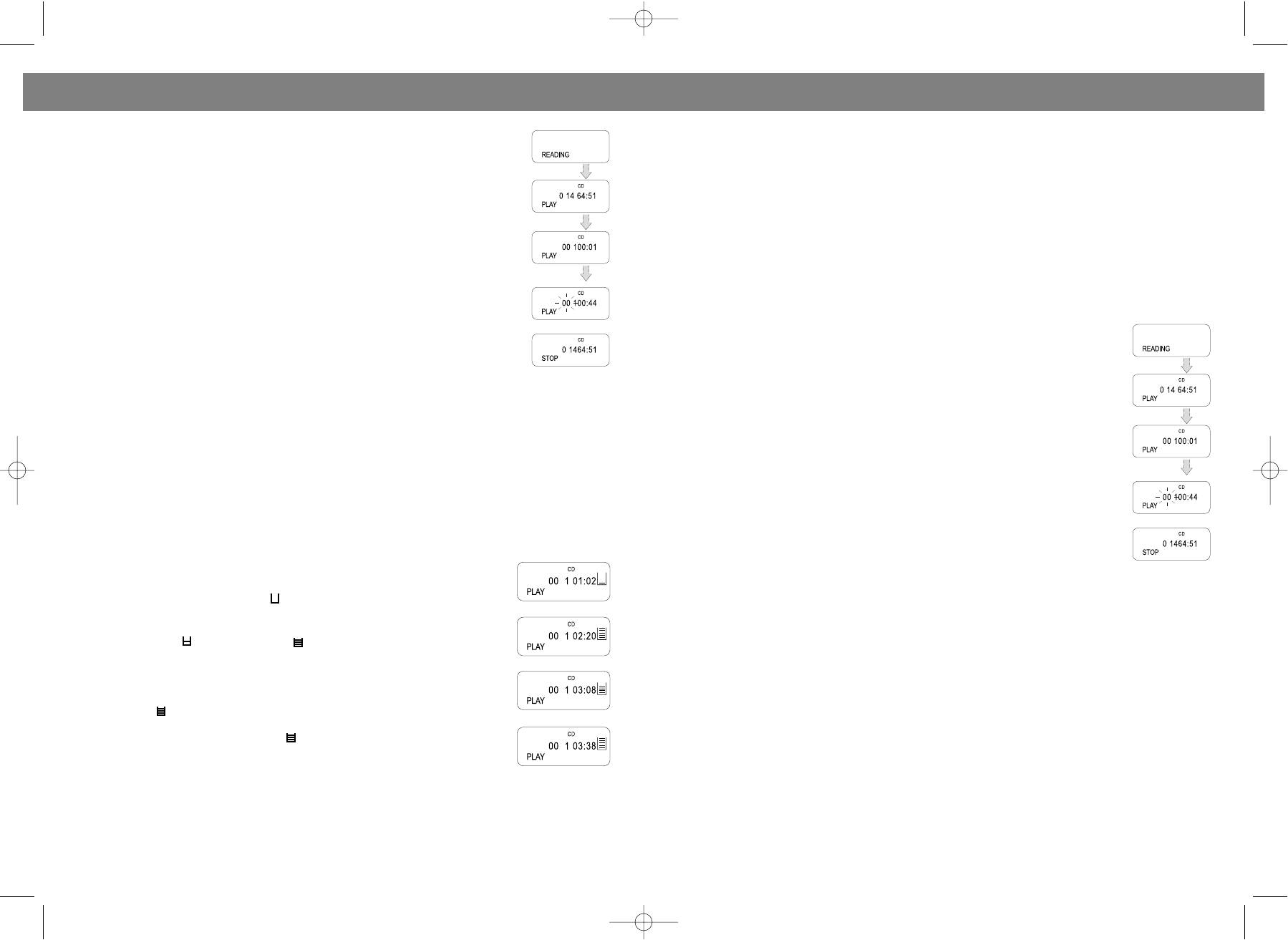
1. Make sure the power is connected, slide the FUNCTION switch (16) to CD(MP3)
Вы можете остановить воспроизведение или запись в любое время, нажав на клавишу "PAUSE"%
position, POWER indicator will light.
(21). Лентопротяжный механизм в это время продолжает работать, поэтому используйте эту
2. Load a disc into the CD compartment. Close the CD door, the disc will begin to
функцию на короткое время. Повторное нажатие клавиши отменяет паузу.
spin,
Предостережение:
and " " appears on the display.
• Механизм "Автостоп" может не сработать в режиме воспроизведения, если магнитола
3. Adjust the VOLUME control (1) to the desired volume level.
работает от подсевших батареек.
4. To stop playing temporarily, press the CD PLAY/PAUSE button.
• Отключайте прибор от сети, если вы его не используете длительное время.
• The current playing track will flash on the display.
• Не оставляйте клавиши в нажатом положении на долгое время.
• Resume to normal play by pressing PLAY/PAUSE button (9) again.
5. To stop playing, press the STOP button (6). The total tracks' number and whole
СИСТЕМА "АВТОСТОП"
playing time (e.g. A disc contains 14 tracks) will be shown on the display.
Магнитола снабжена механизмом "Автостоп", который автоматически выключает
6. To turn off the player, slide the FUNCTION switch (16) to TAPE position.
воспроизведение или запись, если кассета заканчивается.
TRACKS SKIPPING
КОМПАКТДИСК
Press the BACK and FWD SEARCH buttons during play to skip to the desired track.
ВОСПРОИЗВЕДЕНИЕ КОМПАКТДИСКА
1. Press the " button to skip to the next track on the disc.
• Установите режим "Компактдиск"(CD/МР3) при помощи
2. Press the ! button once to skip to the beginning of the track currently playing.
функционального переключателя (16).
3. Press the " button twice or more to skip to previous tracks.
• Установите регулятор громкости (1) в желаемое положение.
• Откройте отсек для компактдиска (17).
FORWARD/REVERSE SEARCH
• Загрузите компактдиск в отсек и закройте его. Дисплей (7) высветит
Press and hold the BACK or FWD SEARCH buttons (12 or 10) during play to scan the disc at high speed.
общее количество дорожек.
When the desired section of the disc is found, release the button. Normal play will resume.
• Нажмите кнопку "PLAY/PAUSE" $/%(9). Начнется воспроизведение диска.
" FWD ........................................... FORWARD
Дисплей высвечивает номер каждой воспроизводимой дорожки.
! BACK ......................................... REVERSE
• Чтобы временно прервать воспроизведение, нажмите кнопку
1. If you press and hold the FWD button while playing, it will scan the disc forward from the current played
"PLAY/PAUSE" $/%(9).
track at high speed.
• Чтобы прервать воспроизведение, нажмите на кнопку “STOP”&(6), при
2. If you press and hold the BACK button while playing, it will scan the disc backward from the current
этом на дисплее отразится общее количество треков.
played track at high speed.
ПОИСК ЖЕЛАЕМОГО ТРЕКА
ELECTRONIC SHOCK PROTECTION SYSTEM
Нажмите и удерживайте кнопки SKIP/SEARCH !/" (12,10), пока не найдете
The digital ELECTRONICSHOCK PROTECTION function uses semiconductor
нужную дорожку или нужный момент записи.
memory to prevent the sound from skipping when the unit is subjected to shocks
and vibration during play.
ПОВТОРНОЕ ВОСПРОИЗВЕДЕНИЕ
• While the disc begins to play, the " " indicator appears in the display and the
Вы можете повторить воспроизведение одной или нескольких дорожек множество раз.
digital ELECTRONIC SHOCK PROTECTION function turns on automatically.
ПОВТОР ОДНОЙ ДОРОЖКИ: Нажмите кнопку MODE (3) один раз, при этом на дисплее появится
The digital data is stored in a "readahead" memory buffer before it is decoded
индикатор REPT 1. Для выбора желаемого трека воспользуйтесь кнопками SKIP/SEARCH ! (12)
and played. The " " mark changes to " " mark, indicating that the data buffer
или " (10). Когда номер желаемой дорожки отразится на дисплее, нажмите "PLAY/PAUSE" $/%
is full.
(9).
• When the unit is subjected to a shock during play, the data stored in memory
ПОВТОР ВСЕХ ДОРОЖЕК: Нажмите кнопку MODE (3) дважды, при этом на дисплее появится
continues to be decoded and played. This gives the pickup time to stabilize and
continue reading new data. As the data is read from memory the indicator
индикатор REPT ALL. Для начала воспроизведения нажмите "PLAY/PAUSE" $/% (9).
Для отмены запрограммированного воспроизведения нажимайте кнопку MODE (3) до тех пор,
changes to " ".
пока индикаторы не исчезнут с дисплея.
• Once the pickup returns to its original position, new data is stored in memory
and the display changes back to the " " mark.
Press the ESP button to turn the digital electronic shock protection function off.
ВОСПРОИЗВЕДЕНИЕ В РЕЖИМЕ “INTRO”
NOTE: Keep the digital electronic shock protection function off when using the unit
1. В режиме остановки или воспроизведения нажмите кнопку MODE (3) три раза, при этом на
in a stable location where it will not be subjected to shocks. The battery power
дисплее появится индикатор INTRO.
consumption is reduced when the electronic shock protection function is turned off.
2. Нажмите на кнопку "PLAY/PAUSE" (9) для воспроизведения первых 10 секунд каждой дорожки.
NOTE: When the digital electronic shock protection function is switched on or off, the sound will be inter
rupted for 1 to 2 seconds. This is normal (the interrupted time is used for the memory on or off).
ВОСПРОИЗВЕДЕНИЕ ДОРОЖЕК В ПРОИЗВОЛЬНОМ ПОРЯДКЕ
NOTE: When playing MP3, the ESP function could not be cancelled.
Дорожки диска могут воспроизводиться в произвольном порядке (выбор последовательности
проигрыватель осуществляет самостоятельно). Для этого в режиме остановки или
8 17
VT-3450.qxd 27.06.03 16:54 Page 16


