
Vitek VT-1111: Расположение элементов управления ПИТАНИЕ ОТ СЕТИ ПИТАНИЕ ОТ БАТАРЕЕК
Расположение элементов управления ПИТАНИЕ ОТ СЕТИ ПИТАНИЕ ОТ БАТАРЕЕК: Vitek VT-1111
Оглавление
- ИНСТРУКЦИЯ ПО ЭКСПЛУАТАЦИИ
- Гарантийный талон
- ТЕХНИЧЕСКОЕ ОБСЛУЖИВАНИЕ КОМПАКТДИСК КАССЕТНАЯ ЛЕНТА СПЕЦИФИКАЦИЯ СРОК СЛУЖБЫ МАГНИТОЛЫ НЕ МЕНЕЕ 5ТИ ЛЕТ
- ПОИСК ТРЕКА ПО НАЗВАНИЮ ПЕСНИ АНТИШОК ГРАФИЧЕСКИЕ ЭКВАЛАЙЗЕРЫ ПРОСЛУШИВАНИЕ ЧЕРЕЗ НАУШНИКИ
- ПРОИГРЫВАНИЕ В РЕЖИМЕ “INTRO” ВОСПРОИЗВЕДЕНИЕ ДОРОЖЕК В ПРОИЗВОЛЬНОМ ПОРЯДКЕ ВОСПРОИЗВЕДЕНИЕ ВЫБРАННЫХ ТРЕКОВ ПРОГРАММИРОВАННОЕ ВОСПРОИЗВЕДЕНИЕ
- ПРОГРАММИРОВАННОЕ ВОСПРОИЗВЕДЕНИЕ MP3ДИСК ПОВТОР ОДНОЙ ДОРОЖКИ ПОВТОР ОДНОГО АЛЬБОМА ПОВТОР ВСЕГО ДИСКА
- РЕЖИМ "ПАУЗА" СИСТЕМА "АВТОСТОП" КОМПАКТДИСК ПОИСК ЖЕЛАЕМОГО ТРЕКА ПОВТОРНОЕ ВОСПРОИЗВЕДЕНИЕ
- РАДИОПРИЕМНИК МАГНИТОФОН ВОСПРОИЗВЕДЕНИЕ КАССЕТЫ ЗАПИСЬ С РАДИОПРИЕМНИКА ЗАПИСЬ С КОМПАКТДИСКА ЗАПИСЬ СО ВСТРОЕННОГО МИКРОФОНА (19)
- Расположение элементов управления ПИТАНИЕ ОТ СЕТИ ПИТАНИЕ ОТ БАТАРЕЕК
- ENGLISHРУССКИЙ
- УВАЖАЕМЫЙ ПОКУПАТЕЛЬ!
ENGLISH
РУССКИЙ
Расположение элементов управления
16. Функциональный переключатель
The upper designs explain: the MP3 has 14 catalogs and 156 tracks altogether, but the tracks' number in
1. Регулятор громкости
17. Отсек для компактдиска
each catalog may be different.
2. Динамики
18. Частотный перключатель
For example: Catalogue 1 has 14 tracks, catalogue 2 has 12 tracks...... After the whole catalogs and
3. Кнопка MODE
19. Встроенный микрофон
tracks shown, the unit will enter playback from the first track.
4. Кнопка EQ/PROG
20. Гнездо для подключения наушников
5. Индикатор работы
Кассетоприемник:
TRACKSELECTING PLAYBACK
6. Кнопка “Стоп” (CD)
21. Кнопка “Пауза”
• You can press SKIP/ SEARCH buttons (10or12) to select the tracks you require, the concrete opera
7. Дисплей
22. Кнопка “Стоп/Выброс кассеты”
tions are as same as the operations on section of CD.
8. Кнопка “Антишок/+10” (CD)
23. Кнопка ускоренной перемотки вперед
• During Mp3 disc playing, press 10+ button once to select the track over +10, adding ten after press
9. Кнопка “Воспроизведение/Пауза” (CD)
24. Кнопка ускоренной перемотки назад
ing each time.
10. Кнопка перехода на следующую дорожку (CD)
25. Кнопка “Воспроизведение”
11. индикатор FMстерео
26. Кнопка “Запись”
REPEAT PLAYING FUNCTION
12. Кнопка перехода на предыдущую дорожку (CD)
27. Отсек для батареек
SINGLE TRACK REPEAT
13. Регулятор настройки
28. Гнездо для подключения сетевого шнура
In stop mode or playing mode press the MODE button (3) once to repeat current playing track, display
14. Отсек для кассеты
29. Антенна
shows "REPT 1" (In stopping mode pressing the PLAY/PAUSE Button (9) again is required.).
15. Шкала настройки радио
30. Ручка магнитолы
SINGLE CATALOG'S TRACKS REPEAT
In playing mode or stop mode, press the MODE button (3) twice, the whole tracks in the current playing
ПИТАНИЕ ОТ СЕТИ
track's catalog will be repeated, display shows "REPT DIR" (In stopping mode pressing the PLAY/PAUSE
• Перед включением в сеть убедитесь, что напряжение, указанное на маркировке магнитолы,
Button (9) again is required.) .
совпадает с напряжением в вашем доме.
• Подключите один конец сетевого шнура в гнездо (28) на задней панели магнитолы, а другой
WHOLE DISC REPEAT
в розетку.
In playing mode or stop mode, press the MODE button (3) thrice, the whole disc's tracks would be
• При длительном неиспользовании магнитолы отключите ее из сети полностью, а также
repeatedly playing, display shows "REPT ALL" (In stopping mode pressing the PLAY/PAUSE Button (9)
извлеките батарейки из отсека.
again is required.) .
ПИТАНИЕ ОТ БАТАРЕЕК
INTRO SCAN MODE
Откройте отсек для батареек (27) и вставьте 6 батареек UM2 или размера C, соблюдая указанную
Press the MODE button (3) four times in stop mode or playing mode, "INTRO"
полярность. Закройте отсек.
appears on the display. Press the PLAY/PAUSE button (9) again to enter intro scan
mode.
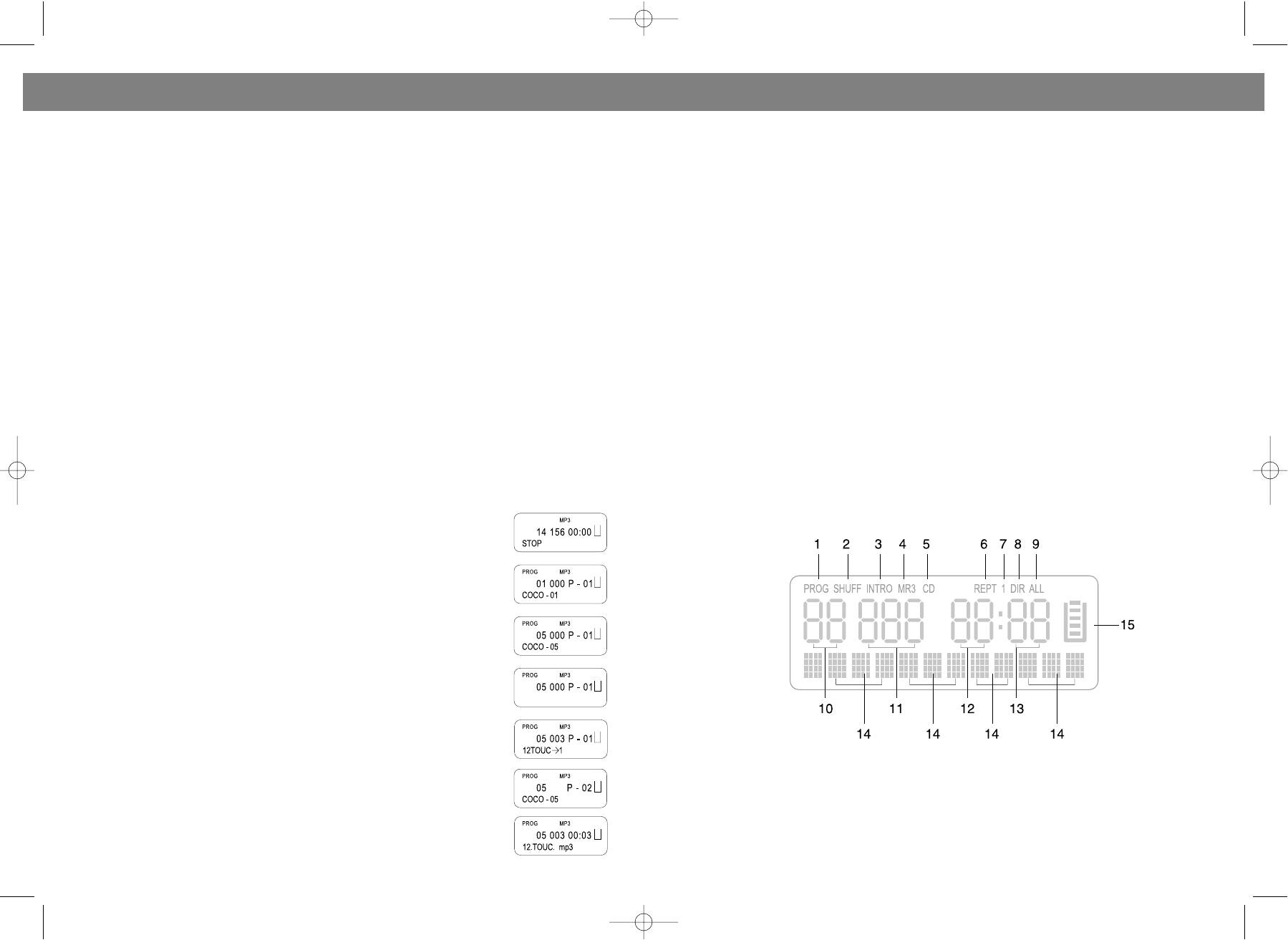
РАСПОЛОЖЕНИЕ ЭЛЕМЕНТОВ ДИСПЛЕЯ
RANDOM PLAY
Press the MODE button (3) five times in stop mode or playing mode, "SHUFF"
appears on the display. Press PLAY/PAUSE button (9) again to start the random
playback.
PROGRAM PLAY (up to 20 tracks can be edited)
NOTE: This can only be done during stop state.
1. While the unit being in stop mode, press EQ/PROGRAM button (4).
2. Press the SKIP/SEARCH buttons (10or12) to select catalog.
3. Press EQ/PROGRAM button (4) again.
4. Press the SKIP/SEARCH buttons (10or12) to select your required tracks.
5. Repeat the above steps to program the other tracks.
6. Press PLAY/PAUSE button (9) to enter program play.
Take the track 3 in catalog 5 as an example.
1. In stop mode, display shows "14 156 00:00".
2. Press the EQ/PROGRAM button (4), display shows "01 000 P01 " and the cat
1. Программированное воспроизведение
8. Повторное воспроизведение альбома
alog "01" will flash.
2. Произвольное воспроизведение
9. Повторное воспроизведение всего диска
3. Press the SKIP/SEARCH buttons (10or12) to select catalog 5, the display shows
3. Воспроизведение первых 10с. каждого трека
10. Номер текущего альбома
"05".
4. Обозначение MP3диска
11. Номер воспроизводимого трека
4. Press the EQ/PROGRAM button (4), the track number "000" will flash on the
5. Обозначение компактдиска
12. Индикация минут
display.
6. Повторное воспроизведение
13. Индикация секунд
5. Press the SKIP/SEARCH buttons (10or12) to select track 3, "003" appears on
7. Повторное воспроизведение трека
15. Индикатор функции “антишок”
the display.
10
15
VT-3450.qxd 27.06.03 16:54 Page 20


