
Vitek VT-1111: РАДИОПРИЕМНИК МАГНИТОФОН ВОСПРОИЗВЕДЕНИЕ КАССЕТЫ ЗАПИСЬ С РАДИОПРИЕМНИКА ЗАПИСЬ С КОМПАКТДИСКА ЗАПИСЬ СО ВСТРОЕННОГО МИКРОФОНА (19)
РАДИОПРИЕМНИК МАГНИТОФОН ВОСПРОИЗВЕДЕНИЕ КАССЕТЫ ЗАПИСЬ С РАДИОПРИЕМНИКА ЗАПИСЬ С КОМПАКТДИСКА ЗАПИСЬ СО ВСТРОЕННОГО МИКРОФОНА (19): Vitek VT-1111
Оглавление
- ИНСТРУКЦИЯ ПО ЭКСПЛУАТАЦИИ
- Гарантийный талон
- ТЕХНИЧЕСКОЕ ОБСЛУЖИВАНИЕ КОМПАКТДИСК КАССЕТНАЯ ЛЕНТА СПЕЦИФИКАЦИЯ СРОК СЛУЖБЫ МАГНИТОЛЫ НЕ МЕНЕЕ 5ТИ ЛЕТ
- ПОИСК ТРЕКА ПО НАЗВАНИЮ ПЕСНИ АНТИШОК ГРАФИЧЕСКИЕ ЭКВАЛАЙЗЕРЫ ПРОСЛУШИВАНИЕ ЧЕРЕЗ НАУШНИКИ
- ПРОИГРЫВАНИЕ В РЕЖИМЕ “INTRO” ВОСПРОИЗВЕДЕНИЕ ДОРОЖЕК В ПРОИЗВОЛЬНОМ ПОРЯДКЕ ВОСПРОИЗВЕДЕНИЕ ВЫБРАННЫХ ТРЕКОВ ПРОГРАММИРОВАННОЕ ВОСПРОИЗВЕДЕНИЕ
- ПРОГРАММИРОВАННОЕ ВОСПРОИЗВЕДЕНИЕ MP3ДИСК ПОВТОР ОДНОЙ ДОРОЖКИ ПОВТОР ОДНОГО АЛЬБОМА ПОВТОР ВСЕГО ДИСКА
- РЕЖИМ "ПАУЗА" СИСТЕМА "АВТОСТОП" КОМПАКТДИСК ПОИСК ЖЕЛАЕМОГО ТРЕКА ПОВТОРНОЕ ВОСПРОИЗВЕДЕНИЕ
- РАДИОПРИЕМНИК МАГНИТОФОН ВОСПРОИЗВЕДЕНИЕ КАССЕТЫ ЗАПИСЬ С РАДИОПРИЕМНИКА ЗАПИСЬ С КОМПАКТДИСКА ЗАПИСЬ СО ВСТРОЕННОГО МИКРОФОНА (19)
- Расположение элементов управления ПИТАНИЕ ОТ СЕТИ ПИТАНИЕ ОТ БАТАРЕЕК
- ENGLISHРУССКИЙ
- УВАЖАЕМЫЙ ПОКУПАТЕЛЬ!
РУССКИЙ
ENGLISH
РАДИОПРИЕМНИК
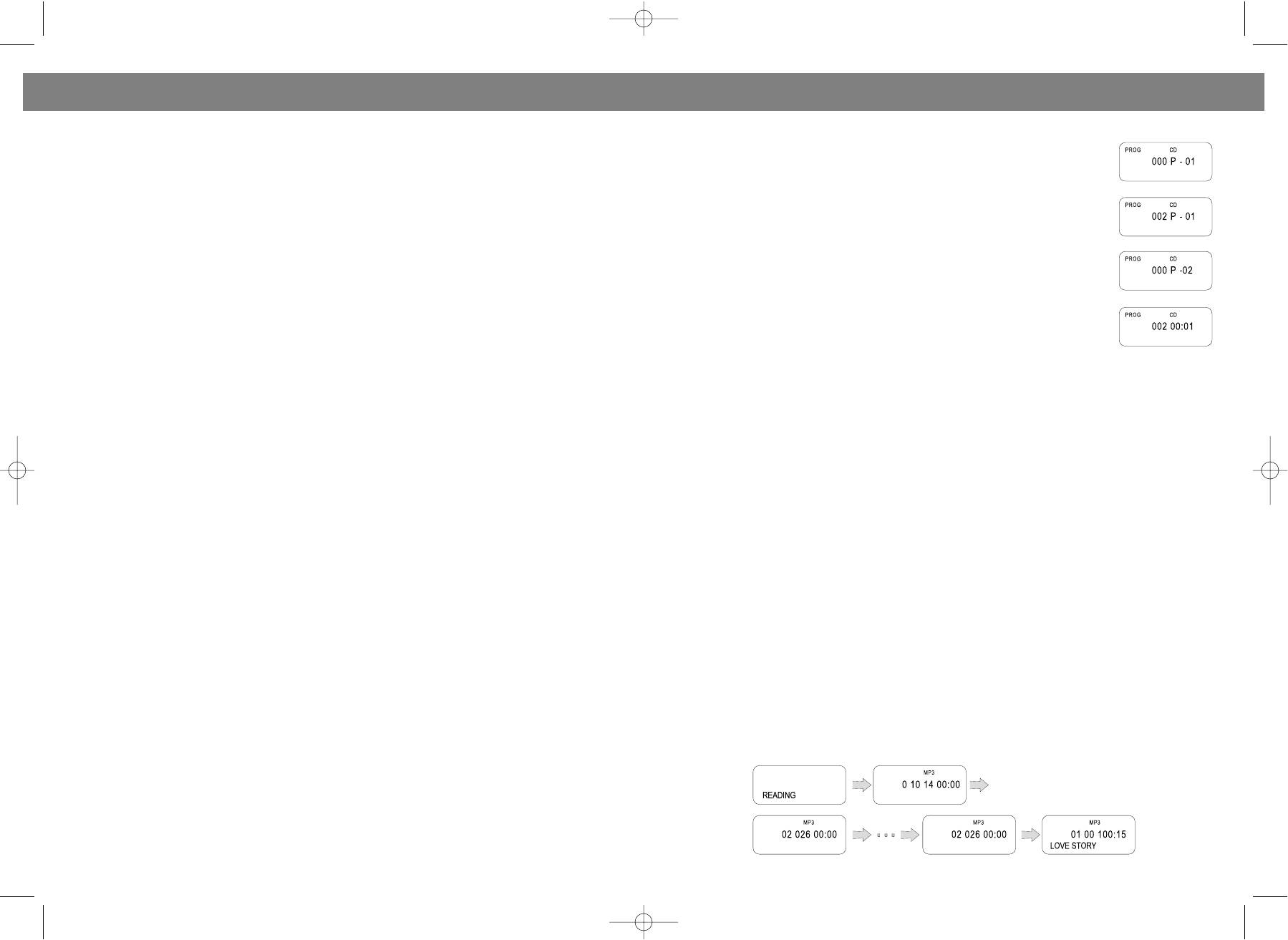
PROGRAMMED PLAY
• Установите функциональный переключатель (16) в положение "RADIO".
The tracks on the disc can be programmed for play in any order (Up to 20 tracks
• Выберите желаемый диапазон переключателем диапазонов (18).
can be programmed).
• Найдите нужную передающую станцию, вращая регулятор настройки (13).
1. Press the EQ/PROGRAM button (4) in stop mode , "PROG" and program num
• Установите регулятор громкости (1) в желаемое положение.
ber "P01" are shown in the display.
• Для наилучшего приема в диапазоне FM, выдвиньте полностью антенну (29) и сориентируйте
2. Press the FWD or BACK SKIP/SEARCH button (10or12) to select the first track
ее под нужным углом.
to be programmed.
• Для стереоприема установите частотный переключатель (18) в положение FM ST, при этом
3. Press the EQ/PROGRAM button (4). The first track number is now stored into
загорится индикатор FMстерео (11).
memory, program number changes to "P02" waiting for your next selection.
• Чтобы отключить радио, установите функциональный переключатель в положение TAPE.
4. Repeat steps 2 and 3 to program additional tracks.
5. After programming is finished, press the PLAY/PAUSE button (9).
МАГНИТОФОН
• Programmed play begins from the first programmed track.
• The player stops automatically after all programmed tracks have been played.
ВОСПРОИЗВЕДЕНИЕ КАССЕТЫ
To play the same programmed tracks again, press the PLAY/PAUSE button (9).
1. Установите функциональный переключатель (16) в положение TAPE.
• In stop mode, press the STOP button (6) once, "PROG" disappears from the
2. Нажмите кнопку STOP/EJECT&/' (22), чтобы открыть крышку кассетоприемника.
display and the programmed tracks in the memory will be cleared. The memo
ry will also be cleared if the disc compartment is opened, or power is turned off.
3. Вставьте кассету с записью в деку (14) и закройте крышку.
4. Для воспроизведения нажмите кнопку PLAY$(25).
INTRO SCAN PLAY
5. Чтобы остановить воспроизведение, нажмите клавишу STOP/EJECT&/' (22).
1. Press the MODE button (3) thrice in stop mode or playing mode.
6. Чтобы перемотать ленту вперед, нажмите кнопку F.FWD((23).
2. "INTRO" shows in the display, press the PLAY/PAUSE button (9). The first 10 seconds of each track
from track 1 will be played in order.
7. Чтобы перемотать ленту назад, нажмите кнопку REW )(24).
8. Чтобы временно остановить воспроизведение, нажмите кнопку PAUSE%(21).
RANDOM PLAY
9. Чтобы возобновить воспроизведение, нажмите кнопку PAUSE%(21) снова.
Press the MODE button (3) fourth in stop mode or playing mode. "SHUFF" shows in the display, press the
PLAY/PAUSE button (9). All tracks on the disc will be played in random order selected by CD player.
ЗАПИСЬ С РАДИОПРИЕМНИКА
SINGLE TRACK REPEAT
• Следуйте инструкциям из раздела "РАДИОПРИЕМНИК"; убедитесь, что прием радиосигнала
Press the MODE button (3) once in stop mode or playing mode, "REPT 1" appears in the display, press
устойчивый и без помех.
the SKIP/SEARCH buttons (10or12) to select your favourite song (In stopping mode pressing the
• Вставьте кассету в деку (14).
PLAY/PAUSE Button (9) again is required).
• Нажмите на клавиши "RECORD" (26) и “PLAY”$ (25).
This plays one song over and over till you press the STOP button (6) or press the MODE button (3) con
• Вы можете отрегулировать уровень звука, не опасаясь испортить качество записи.
tinuously to return to the normal play mode.
• Для остановки записи используйте кнопку “STOP/EJECT” &/'(22), для временного
прекращения записи нажмите кнопку “PAUSE”% (21).
ALL TRACKS REPEAT
Press the MODE button (3) twice in stop mode or playing mode, "REPT ALL" shows in the display (In
ЗАПИСЬ С КОМПАКТДИСКА
stopping mode pressing the PLAY/PAUSE Button (9) again is required.) .
• Установите функциональный переключатель (16) в положение "CD/МР3". Выберите
All songs will keep playing in sequence 1. 2. 3 etc. and all songs will repeat over again until you press the
желаемый трек и отрегулируйте уровень громкости.
STOP button (6) or press the MODE button (3) continuously to return to the normal play mode.
• Вставьте кассету в деку (14).
• Нажмите на клавиши "RECORD" (26) и “PLAY”$ (25) на деке.
MP3 DISC SECTION
• Нажмите на клавишу "PLAY/PAUSE" $/%(9)на CD.
PLAYING A MP3 DISC
• Для остановки записи используйте кнопку “STOP/EJECT” &/'(22), для временного
Make sure the power is connected, slide the FUNCTION switch (16) to CD(MP3) position, POWER indi
прекращения записи нажмите кнопку “PAUSE”% (21).
cator will light. Load a disc into CD compartment, close the CD door, the disc will begin to spin, mean
while "Reading" appears on the display. The discreading orders are as following:
ЗАПИСЬ СО ВСТРОЕННОГО МИКРОФОНА (19)
• Вставьте кассету в деку (14).
• Установите функциональный переключатель (16) в положение “TAPE”.
• Нажмите на клавиши "RECORD"
*(26) и “PLAY”$(25) на деке.
• Вы можете отрегулировать звук, не опасаясь испортить качество записи.
• Для остановки записи используйте кнопку “STOP/EJECT” (22), для временного прекращения
записи нажмите кнопку “PAUSE” (21).
16
9
VT-3450.qxd 27.06.03 16:54 Page 18


