
Vitek VT-1111: ПРОГРАММИРОВАННОЕ ВОСПРОИЗВЕДЕНИЕ MP3ДИСК ПОВТОР ОДНОЙ ДОРОЖКИ ПОВТОР ОДНОГО АЛЬБОМА ПОВТОР ВСЕГО ДИСКА
ПРОГРАММИРОВАННОЕ ВОСПРОИЗВЕДЕНИЕ MP3ДИСК ПОВТОР ОДНОЙ ДОРОЖКИ ПОВТОР ОДНОГО АЛЬБОМА ПОВТОР ВСЕГО ДИСКА: Vitek VT-1111
Оглавление
- ИНСТРУКЦИЯ ПО ЭКСПЛУАТАЦИИ
- Гарантийный талон
- ТЕХНИЧЕСКОЕ ОБСЛУЖИВАНИЕ КОМПАКТДИСК КАССЕТНАЯ ЛЕНТА СПЕЦИФИКАЦИЯ СРОК СЛУЖБЫ МАГНИТОЛЫ НЕ МЕНЕЕ 5ТИ ЛЕТ
- ПОИСК ТРЕКА ПО НАЗВАНИЮ ПЕСНИ АНТИШОК ГРАФИЧЕСКИЕ ЭКВАЛАЙЗЕРЫ ПРОСЛУШИВАНИЕ ЧЕРЕЗ НАУШНИКИ
- ПРОИГРЫВАНИЕ В РЕЖИМЕ “INTRO” ВОСПРОИЗВЕДЕНИЕ ДОРОЖЕК В ПРОИЗВОЛЬНОМ ПОРЯДКЕ ВОСПРОИЗВЕДЕНИЕ ВЫБРАННЫХ ТРЕКОВ ПРОГРАММИРОВАННОЕ ВОСПРОИЗВЕДЕНИЕ
- ПРОГРАММИРОВАННОЕ ВОСПРОИЗВЕДЕНИЕ MP3ДИСК ПОВТОР ОДНОЙ ДОРОЖКИ ПОВТОР ОДНОГО АЛЬБОМА ПОВТОР ВСЕГО ДИСКА
- РЕЖИМ "ПАУЗА" СИСТЕМА "АВТОСТОП" КОМПАКТДИСК ПОИСК ЖЕЛАЕМОГО ТРЕКА ПОВТОРНОЕ ВОСПРОИЗВЕДЕНИЕ
- РАДИОПРИЕМНИК МАГНИТОФОН ВОСПРОИЗВЕДЕНИЕ КАССЕТЫ ЗАПИСЬ С РАДИОПРИЕМНИКА ЗАПИСЬ С КОМПАКТДИСКА ЗАПИСЬ СО ВСТРОЕННОГО МИКРОФОНА (19)
- Расположение элементов управления ПИТАНИЕ ОТ СЕТИ ПИТАНИЕ ОТ БАТАРЕЕК
- ENGLISHРУССКИЙ
- УВАЖАЕМЫЙ ПОКУПАТЕЛЬ!
ENGLISHРУССКИЙ
воспроизведения нажмите кнопку MODE (3) четыре раза, при этом на дисплее появится индикатор
6. Start the CD playing by pressing the CD PLAY/PAUSE button (9).
SHUFF, а затем кнопку "PLAY/PAUSE" (9).
7. Press the cassette PAUSE button (21) again and then recording begins.
8. To end the recording, press the cassette STOP/EJECT button (22).
ПРОГРАММИРОВАННОЕ ВОСПРОИЗВЕДЕНИЕ
9. Press the CD STOP button (6) and then move the FUNCTION switch (16) to the TAPE position.
10. To listen to your recording, press the REWIND button (24) to return to the point where the recording
Программированное воспроизведение позволяет прослушать мелодии в
started and then press the PLAY button (25).
желаемом порядке. Вы можете запрограммировать до 20 дорожек.
1. Поместите диск в отсек (17).
TO RECORD FROM THE BUILTIN MICROPHONE
2. В режиме остановки нажмите кнопку EQ/PROG (4) , при этом на дисплее
1. Set the FUNCTION Switch (16) to the TAPE position.
появится “P01” и индикатор PROG.
2. Load the cassette, which you wish to record on into the guides on the cassette door. (Full reel on the
left hand side).
3. Нажмите кнопку SKIP/SEARCH !/" (12, 10), чтобы выбрать нужную
3. Press the cassette RECORD button (26) and speak into the BUILTIN MICROPHONE (19) on the top
дорожку. Дисплей высветит ее номер.
left of the unit.
4. Нажмите кнопку EQ/PROG (4) еще раз.
4. Press the STOP/EJECT button (22) to end the recording.
5. Повторите шаги 34 для программирования других дорожек.
5. Rewind the tape and then press the PLAY button (25) to listen to your recording.
6. Для воспроизведения нажмите на кнопку PLAY/PAUSE $/%(9). По
окончании воспроизведения последней запрограммированной дорожки
TO ERASE A TAPE
магнитола автоматически остановится.
1. Set the FUNCTION switch (16) to the TAPE position.
2. Press the cassette RECORD button (26). Any recording, which was present on the tape will be erased.
7. Для отмены запрограммированного воспроизведения нажмите кнопку
(During this process, take care that ambient sound is not recorded through the builtin microphone).
“STOP”&(6) дважды или просто откройте крышку отсека для компакт
диска.
CD OPERATION AND HANDLING A DISC
CARE AND HANDLING OF COMPACT DISCS
MP3ДИСК
In order to achieve a long trouble free performance from your compact discs, please observe the follow
• Установите режим CD/МР3 при помощи функционального переключателя (16).
ing points.
• Установите регулятор громкости (1) в желаемое положение.
• When handling the CD, take care not to touch the playing surface, hold the disc by its outer edge.
• Откройте отсек для компактдиска (17). Загрузите компактдиск в отсек и закройте его.
• Do not expose the disc to direct sunlight, high temperature or dusty environments.
• Do not stick labels onto the disc or write on them with a ball point pen or anything not specifically suit
• Нажмите кнопку "PLAY/PAUSE" $/%(9).
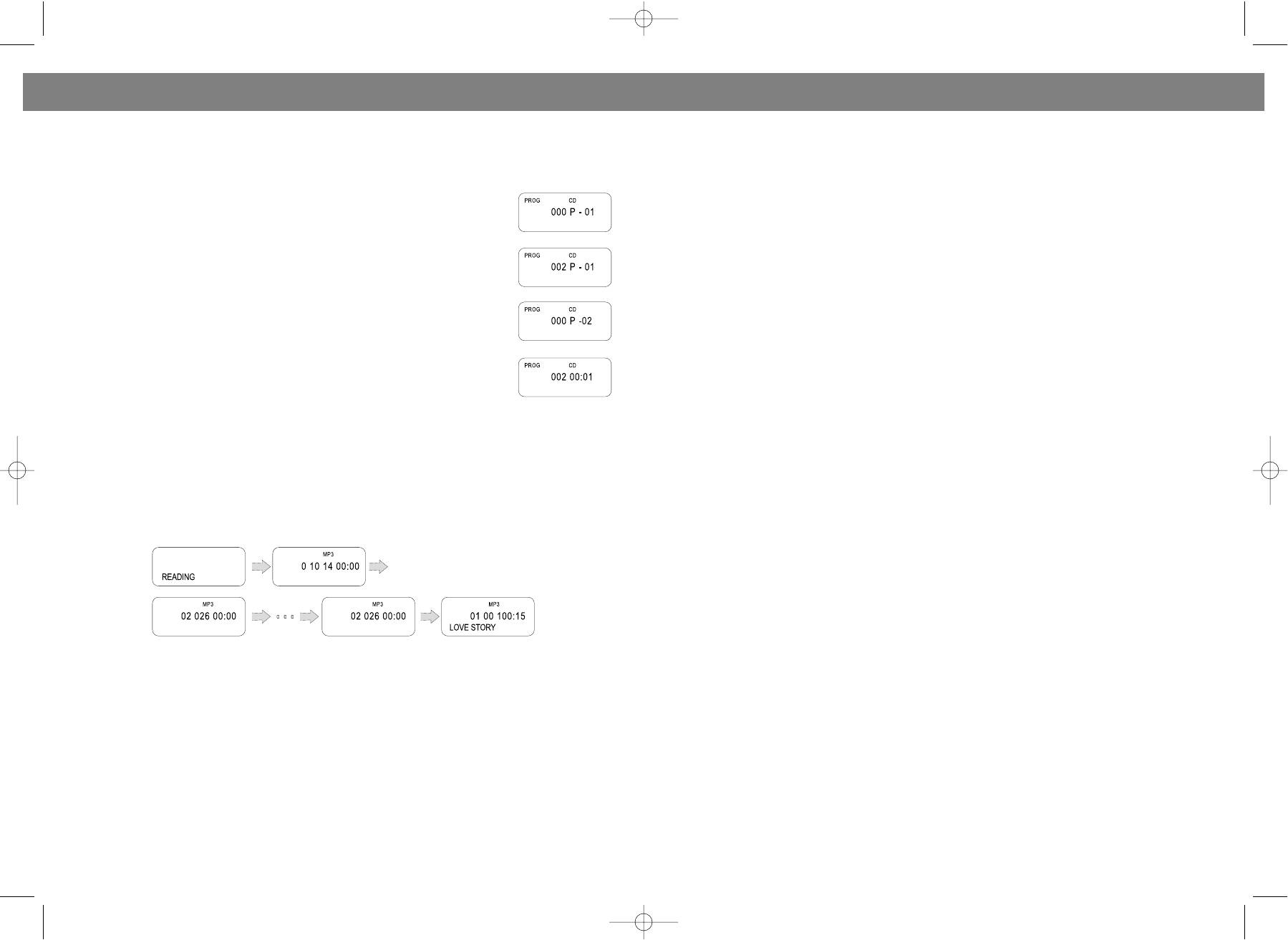
На дисплее высветится следующая информация (Пример):
ed to the purpose.
• Clean the disc by wiping from the center outwards, never use a circular motion.
• Use a clean dry cloth. Do not use any type of cleaning agent or solvent.
• When not in use, store them in their original protective cases.
LOADING A DISC
1. Slide the FUNCTION switch to the CD position.
2. Open the CD door.
3. Insert a disc with the label side facing upward (if the disc is upside down, the display will show
"No disc ").
4. Close the CD door by hand.
Воспроизведение и остановка, поиск нужных треков для МР3 дисков осуществляется теми же
NOTE: Never touch the laser lens inside the CD compartment. If it ever gets dirty, clean it with a CD
кнопками, что и для компактдисков (см. раздел “Компактдиск”).
cleaner disc.
ПОВТОР ОДНОЙ ДОРОЖКИ
REMOVING A DISC
Во время воспроизведения МР3диска, нажмите кнопку MODE (3) один раз для повторного
1. Make sure the CD is not playing. If it is, press the CD STOP button.
воспроизведения текущего трека. При этом на дисплее появится REPT1.
2. Open the CD door.
3. Gently remove the disc.
4. Close the CD door by hand.
ПОВТОР ОДНОГО АЛЬБОМА
5. Replace the disc in its protective storage box.
Во время воспроизведения МР3диска, нажмите кнопку MODE (3) два раза для повторного
воспроизведения треков одного альбома. При этом на дисплее появится REPT DIR.
MUSIC APPRECIATE EFFECT SELECTION
In CD/MP3 playing mode, Pressing the EQ/PROGRAM button (4) different times gives you different
ПОВТОР ВСЕГО ДИСКА
sound effects. The music of dbb type appears by pressing the button one time, and two times pressing
Во время воспроизведения МР3диска, нажмите кнопку MODE (3) три раза для повторного
the button gives you the music of popular type, three times gives you the classic type, four times gives
воспроизведения всего диска. При этом на дисплее появится REPT ALL.
you the jazz type, five times gives you the rock type, and six times gives you the normal type.
18
7
VT-3450.qxd 27.06.03 16:54 Page 14


