
Vitek VT-3781: ПРОИГРЫВАНИЕ ДИСКА
ПРОИГРЫВАНИЕ ДИСКА: Vitek VT-3781
Оглавление
- Гарантийный талон
- УСЛОВИЯ ГАРАНТИЙНОГО ОБСЛУЖИВАНИЯ
- ОБСЛУЖИВАНИЕ ЧИСТКА КОРПУСА ЧИСТКА ЛИНЗЫ СПЕЦИФИКАЦИЯ
- ПРОГРАММИРОВАНИЕ РАДИОСТАНЦИЙ ПРОСЛУШИВАНИЕ ЧЕРЕЗ НАУШНИКИ ПОДКЛЮЧЕНИЕ К ЗВУКОВЫМ СИСТЕМАМ
- ВОСПРОИЗВЕДЕНИЕ ДОРОЖЕК В ПРОИЗВОЛЬНОМ ПОРЯДКЕ АНТИШОК 40 СЕКУНД ПРОСЛУШИВАНИЕ РАДИО
- ПОВТОР ОДНОЙ ДОРОЖКИ ПОВТОР ВСЕХ ДОРОЖЕК ПРОИГРЫВАНИЕ В РЕЖИМЕ “INTRO”
- ВЫБОР РАЗЛИЧНЫХ РЕЖИМОВ ПРОИГРЫВАНИЯ ПРОГРАММИРОВАННОЕ ВОСПРОИЗВЕДЕНИЕ КОМПАКТДИСКА
- АВТОМАТИЧЕСКОЕ ВКЛЮЧЕНИЕ И ВЫКЛЮЧЕНИЕ ПЛЕЕРА ВОСПРОИЗВЕДЕНИЕ КОМПАКТДИСКА
- ПРОИГРЫВАНИЕ ДИСКА
- ЗАРЯД И ИСПОЛЬЗОВАНИЕ ПЕРЕЗАРЯЖАЮЩИХСЯ БАТАРЕЙ ИСПОЛЬЗОВАНИЕ КОМПАКТДИСКОВ
- ЭЛЕМЕНТЫ УПРАВЛЕНИЯ ПИТАНИЕ ОТ СЕТИ ПИТАНИЕ ОТ БАТАРЕЙ
- УВАЖАЕМЫЙ ПОКУПАТЕЛЬ! РАСПОЛОЖЕНИЕ ЭЛЕМЕНТОВ УПРАВЛЕНИЯ
РУССКИЙ
ENGLISH
• При обращении с диском следует держать его за края.
the sound wil be interrupted for 1 to 2 seconds.
Вынимая диск из коробки, держите его за края, слегка
нажимая на отверстие в центре.
RADIO OPERATION
• Нельзя писать на поверхностях диска, особенно на
1. Slide the CD/RADIO Function Switch (20) to RADIO position.
поверхности без лейбла. Сигналы считываются с
2. Press the AM/FM Band button (2) to select the desired wave
поверхности без лейбла.
band.
3. Tune to desired station by pressing the TUNING DOWN or UP
• Отпечатки пальцев, грязь или влага на диске могут
button (8 or 7). Each time the button is pressed, the frequency changes.
вызвать помехи или ошибку воспроизведения. Если диск
загрязнен или его воспроизведение неправильное, следует очистить его
4. To search for a station quickly (automatic tuning), keep the TUNING DOWN or UP
мягкой сухой тканью, стирая загрязнения от центра к краям по радиусу.
button (8 or 7) pressed until the frequency starts to change rapidly then release.
After tuning into a strong station, the search stops.
5. If you tune into a FM stereo station, “FM stereo” will show in the Display.
ПРОИГРЫВАНИЕ ДИСКА
6. Adjust the VOLUME CONTROL (10) to your listening preference.
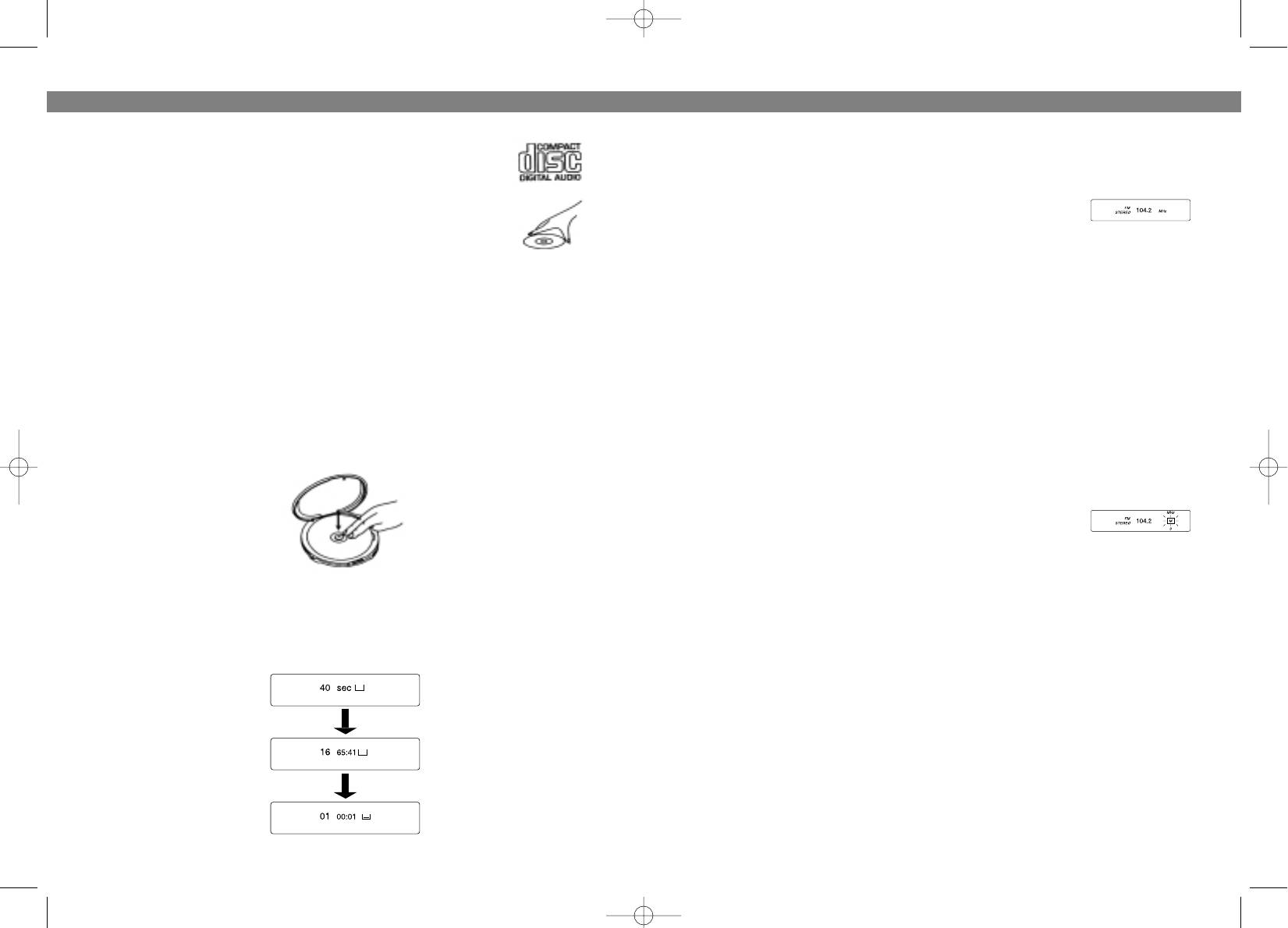
1. Установите режим CD с помощью функционального переключателя (20).
7. If you prefer more bass, slide the BASS BOOST Switch (21) to ON position.
2. Подключите наушники в гнездо для наушников (18).
8. To turn off the radio, slide the CD/RADIO Function Switch (20) to CD position.
3. Нажмите на кнопку “OPEN” (12) для того, чтобы открыть отсек для
компактдиска.
PRESETTING STATIONS
UP TO 5 AM AND 5 FM STATIONS CAN BE STORED INTO THE PRESET MEM
4. Отрегулируйте громкость по вашему желанию.
ORIES (THEY WILL BE REMAINED IN MEMORY AS LONG AS THE BATTERIES
5. Вставьте диск в отсек для компактдиска.
ARE INSTALLED, OR AC POWER CORD IS CONNECTED).
1. Slide the CD/RADIO Function Switch (20) to RADIO position.
2. Press the Band button (2) to select AM or FM band, and press
the TUNING DOWN or UP button (8 or 7) to select a station.
3. Press the STORE button (1), “M” will flash in the display.
4. While the “M” is blinking, press one of the RADIO PRESET but
tons (M1M5) (5) to store that station into the memory.
6. Плотно закройте крышку до щелчка.
7.Для начала воспроизведения диска нажмите на кнопку
NOTE: Steps 34 should be done quickly.
“ВОСПРОИЗВЕДЕНИЕ / ПАУЗА” (13). На дисплее высветится следующая
5. Repeat the above steps 2 through 4 to store other 4 station in the memory.
информация “40 SEC”, а затем общее время проигрывания диска.
6. Each memory location (M1M5) can store 2 stations, one for AM, the other for
Автоматически начнется проигрывание диска с 1й мелодии.
FM.
NOTE: Before you disconnect the power (AC and Battery) of the set, make sure the
CD/RADIO Function Switch (20) is at the CD position, then you have approximate
ly 30 seconds to reconnect the power. Otherwise, the memory may be lost and
needs to be reprogrammed.
RECORDING FROM THE LINE OUT JACK (9)
• The output from the CD player can be recorded.
Connect a patch cable from the LINE OYUT jack (9) on the CD player to the LINE
INPUT jacks on a cassette recorder.
1118
3781.qxd 02.07.03 15:38 Page 22


