
Vitek VT-4003: БЕЗОПАСНОСТЬ
БЕЗОПАСНОСТЬ: Vitek VT-4003
Оглавление
- DVD ПРОИГРЫВАТЕЛЬ
- 8. УКАЗАНИЯ ПО УСТРАНЕНИЮ НЕИСПРАВНОСТЕЙ 9. ТЕХНИЧЕСКИЕ СПЕЦИФИКАЦИИ
- 6. ФУНКЦИЯ ВОСПРОИЗВЕДЕНИЯ ДИСКОВ В ФОРМАТЕ MP3 7. ФОРМАТ JPEG
- 1.4.2 АУДИО 1.4.3 СУБТИТРЫ 1.4.4 ЯЗЫК МЕНЮ ДИСКА 1.4.5 РОДИТЕЛЬСКИЙ НАДЗОР 1.4.6 ПАРАМЕТРЫ ЗАДАННЫЕ ПО УМОЛЧАНИЮ
- 1.3.2 РЕЖИМ ТЕЛЕВИЗИОННОГО ПРИЕМНИКА 1.3.3 КАЧЕСТВО 1.3.3.1 РЕЗКОСТЬ 1.3.3.2 ЯРКОСТЬ 1.3.3.3 НАСТРОЙКА КОНТРАСТНОСТИ 1.4. ПРЕИМУЩЕСТВЕННЫЕ НАСТРОЙКИ 1.4.1 ТИП ТЕЛЕВИЗИОННОГО ПРИЕМНИКА
- 1.2.5.1 НАСТРОЙКА В РЕЖИМЕ PROLOGIC II 1.2.5.1.1 НАСТРОЙКА В РЕЖИМЕ PROLOGIC II 1.2.5.1.2 НАСТРОЙКА В РЕЖИМЕ PROLOGIC II 1.2.5.1.3 НАСТРОЙКА 1.2.5.1.4 НАСТРОЙКА 1.2.5.1.5 НАСТРОЙКА 1.2.5.2 РЕЖИМ МИКШИРОВАНИЯ 1.3 НАСТРОЙКА ВИДЕО РЕЖИМА 1.3.1 НАСТРОЙКА КОМПОНЕНТА
- 1.2.3.1 Настройка каналов левый + правый 1.2.3.2 КОМПРЕССИЯ ДИНАМИЧЕСКОГО ДИАПАЗОНА 1.2.4 УСТАНОВКА ЭКВАЛАЙЗЕРА 1.2.4.1 ТИП ЭКВАЛАЙЗЕРА 1.2.4.2 УСИЛИТЕЛЬ НИЗКИХ ЧАСТОТ 1.2.4.3 НИЗКОЧАСТОТНЫЙ ГРОМКОГОВОРИТЕЛЬ 1.2.4.4 УСИЛИТЕЛЬ ВЫСОКИХ ЗВУКОВЫХ ЧАСТОТ 1.2.5 НАСТРОЙКА ПРОЦЕССОРА 3D
- 1.2.1.3 ЦЕНТРАЛЬНЫЙ ГРОМКОГОВОРИТЕЛЬ 1.2.1.4 ЗАДНИЙ ГРОМКОГОВОРИТЕЛЬ 1.2.1.5 НИЗКОЧАСТОТНЫЙ ГРОМКОГОВОРИТЕЛЬ 1.2.1.6 ДИНАМИЧЕСКОЕ УПЛОТНЕНИЕ НА ВЫХОДЕ 1.2.2 НАСТРОЙКА ЦИФРОВОГО АУДИО РЕЖИМА 1.2.2.1 ЦИФРОВОЙ АУДИО ВЫХОД 1.2.2.2 ВЫХОД LPCM 1.2.3 НАСТРОЙКА ЦИФРОВОГО РЕЖИМА DOLBY
- 1.1.5. ЗАЩИТА ЭКРАНА 1.1.6. ТИП МЕНЮ 1.1.7. Настройка памяти воспроизведения 1.2. НАСТРОЙКА АУДИО РЕЖИМА 1.2.1. НАСТРОЙКА ГРОМКОГОВОРИТЕЛЯ 1.2.1.1 РЕЖИМ ПОНИЖАЮЩЕГО МИКШЕРА 1.2.1.2 ФРОНТАЛЬНЫЙ ГРОМКОГОВОРИТЕЛЬ
- 1.1 ОБЩИЕ НАСТРОЙКИ 1.1.1. ЭКРАН ТЕЛЕВИЗИОННОГО ПРИЕМНИКА 1.1.2. Метка угла обзора 1.1.3. ЯЗЫК ЭКРАНА 1.1.4. СКРЫТЫЕ СУБТИТРЫ
- 4.13 МАСШТАБИРОВАНИЕ 4.14 L/R (ЛЕВЫЙ/ПРАВЫЙ КАНАЛЫ) 4.15 Уровень громкости и выключение громкости 4.16 ПРОГРАММИРОВАНИЕ 4.17 ЗАМЕДЛЕННОЕ ВОСПРОИЗВЕДЕНИЕ 4.18 ПЕРЕКЛЮЧАТЕЛЬ PSCAN/NORMAL (ПРОГРЕССИВНАЯ РАЗВЕРТКА/НОРМАЛЬНЫЙ РЕЖИМ) 4.19 РЕЖИМ 5. НАСТРОЙКА СИСТЕМЫ
- 4.4 Угол обзора 4.5 Язык 4.6 Заголовок 4.7 Меню 4.8. Клавиши управления курсором 4.9 Пронумерованные клавиши 4.10 Время 4.11 Повтор от A до B 4.12 Повтор
- 3.1 Воспроизведение диска 4. ОПИСАНИЕ ФУНКЦИЙ 4.1 Вывод на экран 4.2 N/P (ФУНКЦИЯ ВЫБОРА СИСТЕМ NTSC/PAL) 4.3 Субтитры
- 2.4 Настройки режима воспроизведения 3. ОСНОВНЫЕ ОПЕРАЦИИ
- ПУЛЬ Т ДИСТАНЦИОННОГО УПРАВЛЕНИЯ 2. ПОДГОТОВКА К ИСПОЛЬЗОВАНИЮ 2.1 Комплектующие 2.2 Установка элементов питания в батарейный отсек пульта дистанционного управления 2.3 Системные соединения
- 1. КРАТКОЕ ОПИСАНИЕ КНОПОКОПЕРАТОРОВ ФУНКЦИИ КНОПОКОПЕР АТОРОВ НА ПЕРЕДНЕЙ ПАНЕЛИ: ОБОРУ ДОВАНИЕ ЗАДНЕЙ ПАНЕЛИ: ДИСПЛЕЙ
- РЕКОМЕНДАЦИИ ПОЛЬЗОВАТЕЛЯМ ПРОИГРЫВАТЕЛЯ DVD ДИСКОВ ПРОИГРЫВАТЕЛЬ DVD ДИСКОВ ЦИФРОВОЙ АУДИО ВЫХОД
- БЕЗОПАСНОСТЬ
ENGLISH РУССКИЙ
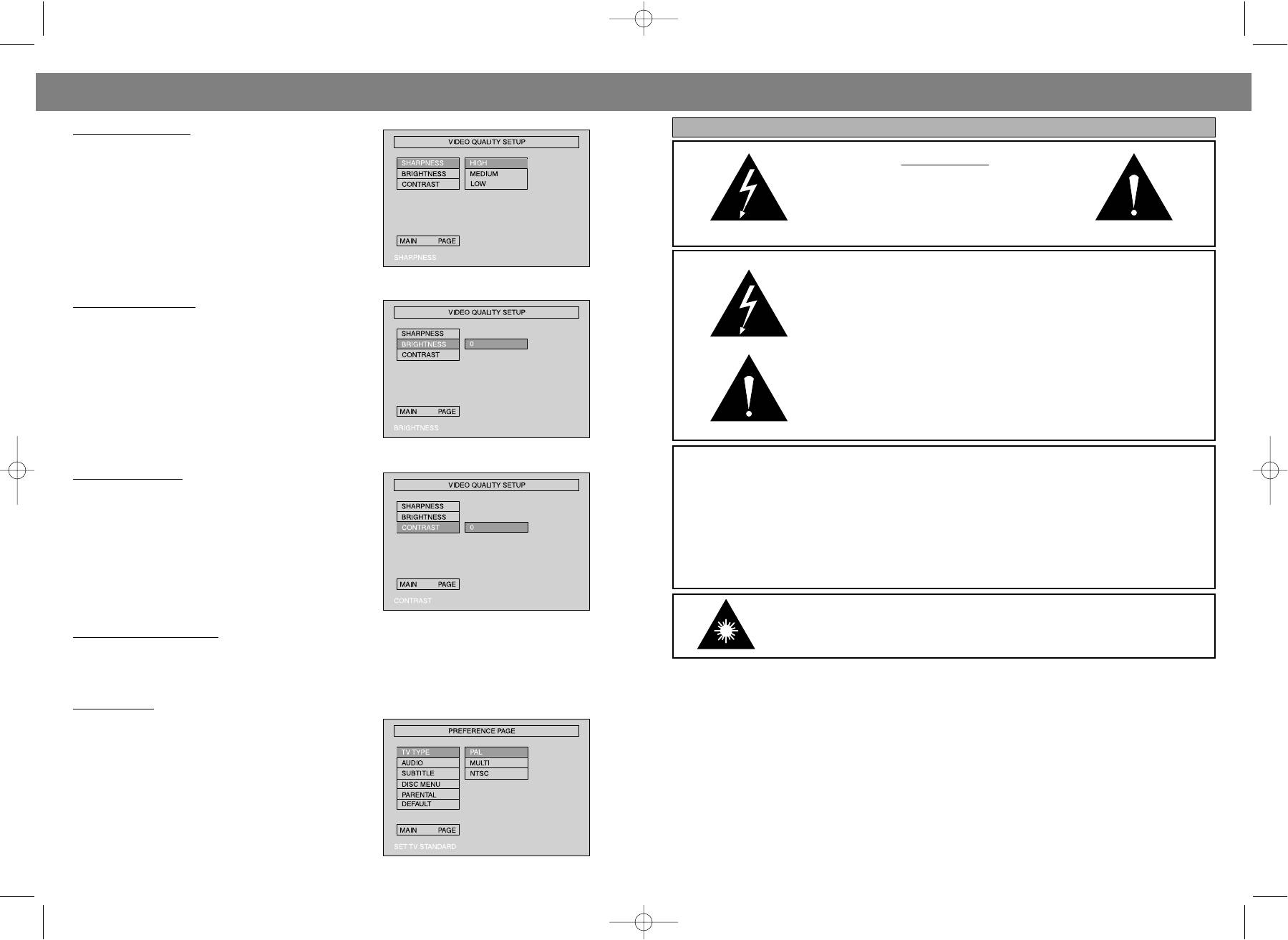
1.3.3.1 SHARPNESS
БЕЗОПАСНОСТЬ
Follow the operation Instructions stated In "DVD menu
setup" in combination with desired option in the follow
НЕ ОТКРЫВАТЬ!
ing figure.
ВО ИЗБЕЖАНИЕ ПОРАЖЕНИЯ
ЭЛЕКТРИЧЕСКИМ ТОКОМ НЕ СНИМАЙТЕ
ЗАДНЮЮ КРЫШКУ. ВНУТРИ АППАРАТА НЕТ
ДЕТАЛЕЙ, ТРЕБУЮЩИХ ОБСЛУЖИВАНИЯ
ПОЛЬЗОВАТЕЛЕМ.
1.3.3.2 BRIGHTNESS
ОПАСНОЕ НАПРЯЖЕНИЕ ВНУТРИ ПРИБОРА, КОТОРОЕ МОЖЕТ
Follow the operation instructions stated in "DVD menu
СЛУЖИТЬ ПРИЧИНОЙ ЭЛЕКТРИЧЕСКОГО УДАРА.
setup" In combination with desired option in the follow
ing figure.
Press right arrow button to enter adjustment mode;
press up and down buttons to make adjustment.
Press left arrow button to return to setup menu.
ИНСТРУКЦИЯ ПО ЭКСПЛУАТАЦИИ СОДЕРЖИТ ВАЖНЫЕ
РЕКОМЕНДАЦИИ, КОТОРЫХ СЛЕДУЕТ ПРИДЕРЖИВАТЬСЯ ДЛЯ
ВАШЕЙ БЕЗОПАСНОСТИ.
1.3.3.3 CONTRAST
ОСТОРОЖНО!
Follow the operation Instructions stated in "DVD menu
РИСК ЭЛЕКТРИЧЕСКОГО УДАРА!
setup" in combination with desired option in the follow
ing figure.
Press right arrow button to enter adjustment mode;
ПРЕДУПРЕЖДЕНИЕ: Для уменьшения опасности пожара или
press up and down buttons to make adjustment.
электрошока, запрещается подставлять прибор под дождь или
Press left arrow button to return to setup menu.
влажность.
НЕ ОТКРЫВАТЬ!
1. 4 PREFERENCE SETUP
ОПАСНОСТЬ ЛАЗЕРНОГО ИЗЛУЧЕНИЯ!
During stop mode, press the SETUP button to access the INITIAL SETUP menu, which includes items of
TV TYPE, AUDIO, SUBTITLE, DISC MENU, PARENTAL, DEFAULTS and MAIN PAGE.
Preset values are essential to a DVD player. The user may change these items as desired.
ВНИМАНИЕ!
С целью снижения риска возгорания или поражения электрическим током, запрещается снимать
1.4.1 TV TYPE
крышку корпуса прибора. Обслуживание прибора должно осуществляться исключительно
квалифицированными специалистами. Перед эксплуатацией электроприбора необходимо
Follow the operation Instructions stated In "DVD menu
внимательно ознакомиться с настоящим руководством по эксплуатации. Сохраните настоящее
setup" in combination with the desired option in the fol
руководство по эксплуатации для дальнейшего использования.
lowing figure. This product supports output of various
system, Including AUTO, NTSC, PAL.
РЕКОМЕНДАЦИИ ПО ЭЛЕКТРОПИТАНИЯ
1) lf your TV set has only NTSC or PAL system, the
• Рекомендуемый источник питания: 230В ~ 50Гц переменного тока.
screen will blink and become colorless when a wrong
• Отсоедините силовой кабель проигрывателя от сети переменного тока в том случае, если Вы не планируете
system to selected. In this case, press the N/P button
использовать его в течение длительного периода времени.
on the R.C to return to normal, screen always remem
• Для продления продолжительности службы проигрывателя следите за тем, чтобы интервал перехода от
bers to select the correct system.
одного режима к другому при переключении режимов длился не менее 10 секунд.
2) For more Intonations of output format, refer to the
instructions or your TV set.
18
23
4003.qxd 21.08.03 11:44 Page 36
ENGLISHENGLISH
9. DISC PROTECTION
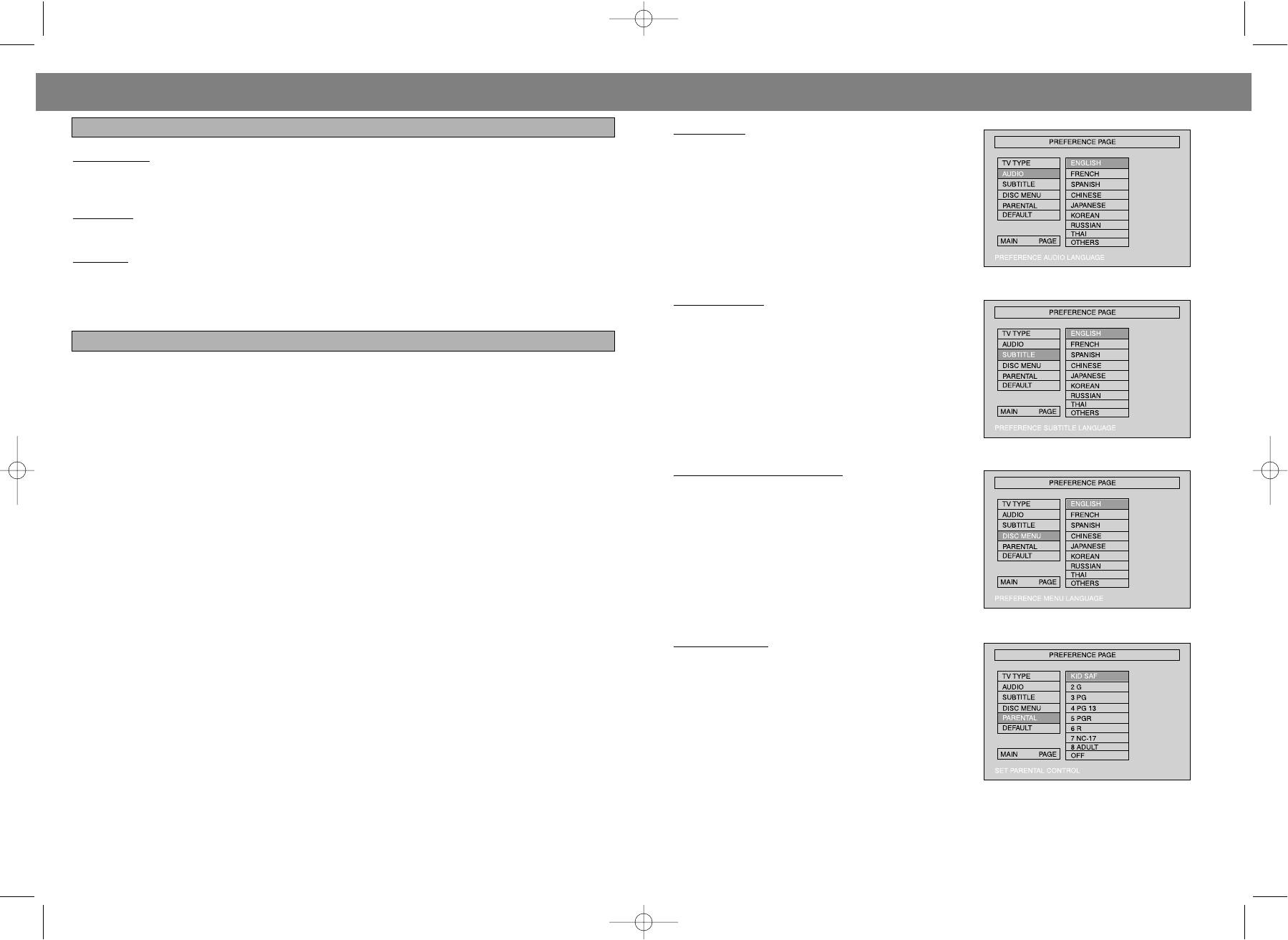
1.4.2 AUDIO
Follow the operating Instructions stated in "DVD MENU
PROTECTION
SETUP* In combination with the desired option In the
When loading or removing the discs, always hold them by the center and edge. Do not stick or write any
following figure.
thing on the surface. Protect discs against any fingerprint.
This machine provides English, French, Spanish,
Chinese and Japanese Korean, Russian, Thailand as
CLEANING
the builtin disc dubbing language options.
Wipe the discs from time to time using a soft doth. Always wipe from the center toward the edge.
ST
ORAGE
a. Never warp the discs. During nonsue periods, store them in their cases, which should be kept verti
cally. Do not expose discs to high temperature, dampness or extremely low temperature, or else it may
cause damage to the discs.
1.4.3 SUBTITLE
b. Do not expose discs to direct sunlight.
This machine provides English, French, Spanish,
Chinese and Japanese as the builtin subtitle lan
10. TECHNICAL SPECIFICATION
guages. When a DVD Is played, the user may hide the
subtitle or choose any of them as the preset subtitle
Play mode NTSC/PAL/AUTO
language.
Disc mode DVD, VCD, CD, 8VCD MP3, DVDR.CDR.CDRW
Follow the operating Instructions stated in "DVD MENU
Video characteristic
SETUP" in combination with the desired option In the
Resolution >= 500 lines
following figure.
Video S/N ratio >= 56 dB
Audio characteristic
Frequency response fs 96 KHz: 4Hz44KHz:+/1dB
Audio SIN ratio >= 90 dB
1.4.4 DISC MENU LANGUAGE
Dynamic range >= 90 dB
This machine provides English, French, Spanish,
Distortion < 0.01%
Chinese, Japanese Korean, Russian, Thailand and OFF
D/A converter 96 KHz/24 bit
as the film's menu language options.
Output characteristic
Follow the operating instructions stated in "DVD MENU
SETUP" in combination with the desired option in the
Video output 1Vpp (75 Ohm)
following figure.
SVideo output Y: 1Vpp(75 Ohm) C:0.3Vpp (75 Ohm)
Audio output 2.0 V ± 0.0 V~1.0 V
Digital audio output coaxial, optical
AC3 5.1 channel output
Power Voltage ~100 V 240 V 50/60 HZ
Power consumption <= 25 W
1.4.5 P
ARENTAL
Size 430 x 48 x 270 mm
Follow the operating Instructions stated in "DVD MENU
Weight 4.5 Kg
SETUP" in combination with the desired option hi the
following figure.
For a film to be restricted for children, the film class
SERVICE LIFE OF THE DVD PLAYER NOT LESS THAN 5 YEARS
may be set according to label marking on the disc.
This function doesn't work when the "password setup"
mode is "on".
22
19
4003.qxd 21.08.03 11:44 Page 38
ENGLISH ENGLISH
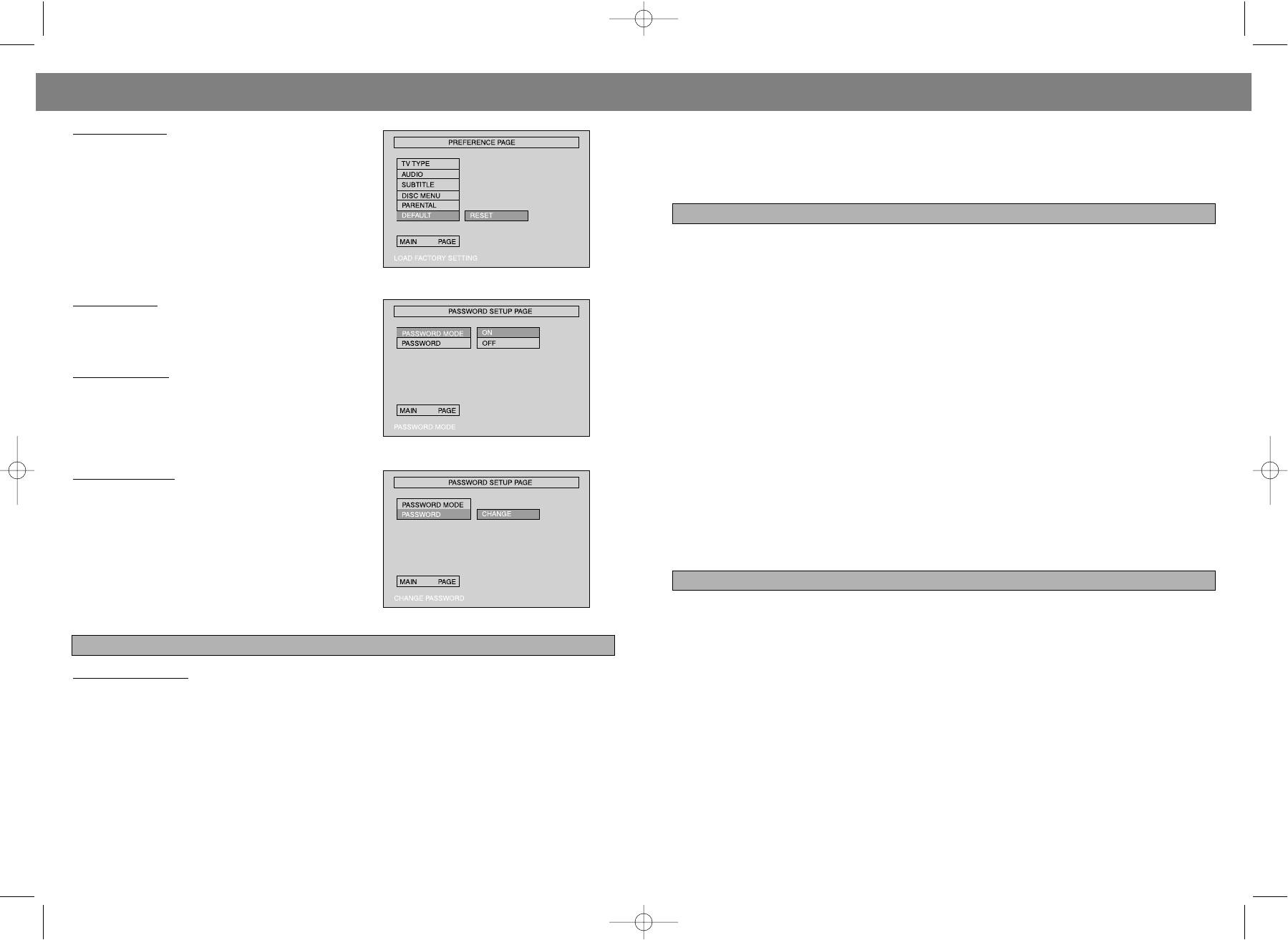
1.4.6 DEFAULTS
4. Cancel the repeat function, folder will be on screen.
This option will resume the original settings of this
machine.
Other functions:
Follow the operating instructions stated in "DVD MENU
When a MP3 disc is played, the features of mute, volume control, pause and forward and backward
SETUP" in combination with the desired option in the
search will also be available. The operations are the same with those of CDs.
following figure.
7. JPEG
JPEG adopting the most efficient compression is widely used as picture storage type flattened and stored
format. Even if pictures are compressed 1520 times, they still have good effect. Supported by most pic
tures processing software, fit for picture storage, it has small data and easy use. This machine can read
JPEGformatmade picture CD disc. Press revelant number key to select picture display.
1.5 PIN SETUP
1.Put In disc correctly the machine begins to search disc information.
Follow the operation instructions stated In "DVD menu
2. Press number key to select picture.
setup" in combination with desired option in the follow
3. It's efficient only in present picture when press number key.
ing figure.
Select to play by menu
1.5.1 PIN SETUP
1. Put in disc machine searches disc information and main menu displays on screen. Press number key
from 1 to select picture. Press play key to make sure.
2. Press direction key to select picture then press play key.
3. In condition of stop. Press direction key to select other pictures.
4. In condition of stop. Select the first line file item on the right. Then press play key to return to upper
menu.
1.5.2 P
ASSWORD
Other functions:
The default is "8888". The user may change it using
1. When play JPEG this machine has functions of pause. Play repeatand browse.
this option.
2. Press PREV and NEXT to select pictures.
Follow the operating instructions stated in "DVD MENU
3. You can zoom the picture to press zoom key. Pressing it again will return to normal play status.
SETUP" in combination with the desired option in the
4. When zoom on press fast forward or fast return key to get picture zoom in or out function.
following figure.
5. When zoom off press direction key to get picture turnover.
8. TROUBLE SHOOTING GUIDE
No sound
Remote controller does not work
• Make sure the good connection between play
• Move the obstacle between player and remote
er and other appliances such as power amplifi
controller away.
6. OPERATION OF MP3 FUNCTION
er or TV.
• Point the remote controller at the remote con
• Make sure the right operation on TV and power
trol sensor.
T
O PLAY A MP3DISC
amplifier.
• Check the battery.
Select the track using numbered buttons
1. Follow the basic operating Instructions to insert a MP3 disc. This machine will start to search the
No picture
Picture dividing
Information on the disc and show It In the display.
• Make sure the good connection between play
• Make sure the disc is clear and no any scratch
2. Press the number buttons to select the tack number desired.
er and other appliances such as TV.
on it
3. Press stop key then direction key to select to other menu.
• Make sure TV works on well.
• For the player is controlled by microcomputer, if
encountering problem, switch off the power
Repeat play
Disc does not play
first, and switch on again in a few second
Using this function, the user will be able to enjoy a particular song or all the songs on the disc over and
• Make sure the disc is loaded correctly (label
over again.
side Is facing up on the disc tray).
1. Choose a particular song to be repeated.
• Make sure the disc is dear.
2. Press the REPEAT button to show "REPEAT ONE" on the TV screen.
3. Exit repeat play, the screen will display as illustrated: Exit repeat
20
21
4003.qxd 21.08.03 11:44 Page 40


