
Vitek VT-1011: ВЫБОР РЕЖИМА TV/AV РЕГУЛЯТОР ЗВУКА
ВЫБОР РЕЖИМА TV/AV РЕГУЛЯТОР ЗВУКА: Vitek VT-1011
Оглавление
- ИНСТРУКЦИЯ ПО ЭКСПЛУАТАЦИИ
- РУССКИЙ
- ПРОЧИЕ ФУНКЦИИ ОТОБРАЖЕНИЕ ДОПОЛНИТЕЛЬНОЙ ИНФОРМАЦИИ НА ЭКРАНЕ ТЕЛЕВИЗОРА УСТРАНЕНИЕ НЕИСПРАВНОСТЕЙ
- ПРЕДВАРИТЕЛЬНАЯ НАСТРОЙКА КАНАЛОВ ДОПОЛНИТЕЛЬНЫЕ ФУНКЦИИ
- КНОПКА МЕНЮ НАСТРОЙКА ИЗОБРАЖЕНИЯ TV ВЫКЛЮЧЕНИЕ СИСТЕМЫ TV УСТАНОВКА ТАЙМЕРА
- ВЫБОР РЕЖИМА TV/AV РЕГУЛЯТОР ЗВУКА
- ПИТАНИЕ ОТ ИСТОЧНИКА ПОСТОЯННОГО ТОКА ПИТАНИЕ ОТ ДРУГИХ ИСТОЧНИКОВ ПОСТОЯННОГО ТОКА ВЫБОР КАНАЛОВ ВЫБОР РЕЖИМА TV/CATV (возможность приема кабельного телевидения)
- КНОПКИ НАЗНАЧЕНИЯ ПУЛЬТ ДИСТАНЦИОННОГО УПРАВЛЕНИЯ
- РАСПОЛОЖЕНИЕ ОРГАНОВ УПРАВЛЕНИЯ (ПЕРЕДНЯЯ И ЗАДНЯЯ ПАНЕЛИ)
- ОПИСАНИЕ ГРАФИЧЕСКИХ СИМВОЛОВ: МЕРЫ БЕЗОПАСНОСТИ
ENGLISH
РУССКИЙ
SWITCH ON/OFF THE UNIT
затем нажмите CH+ или CH, чтобы выбрать AREA (Зону). Нажмите кнопку VOL+/VOL, чтобы
сменить режим местного TV (TV или CATV ).
1. DC Power Supply:
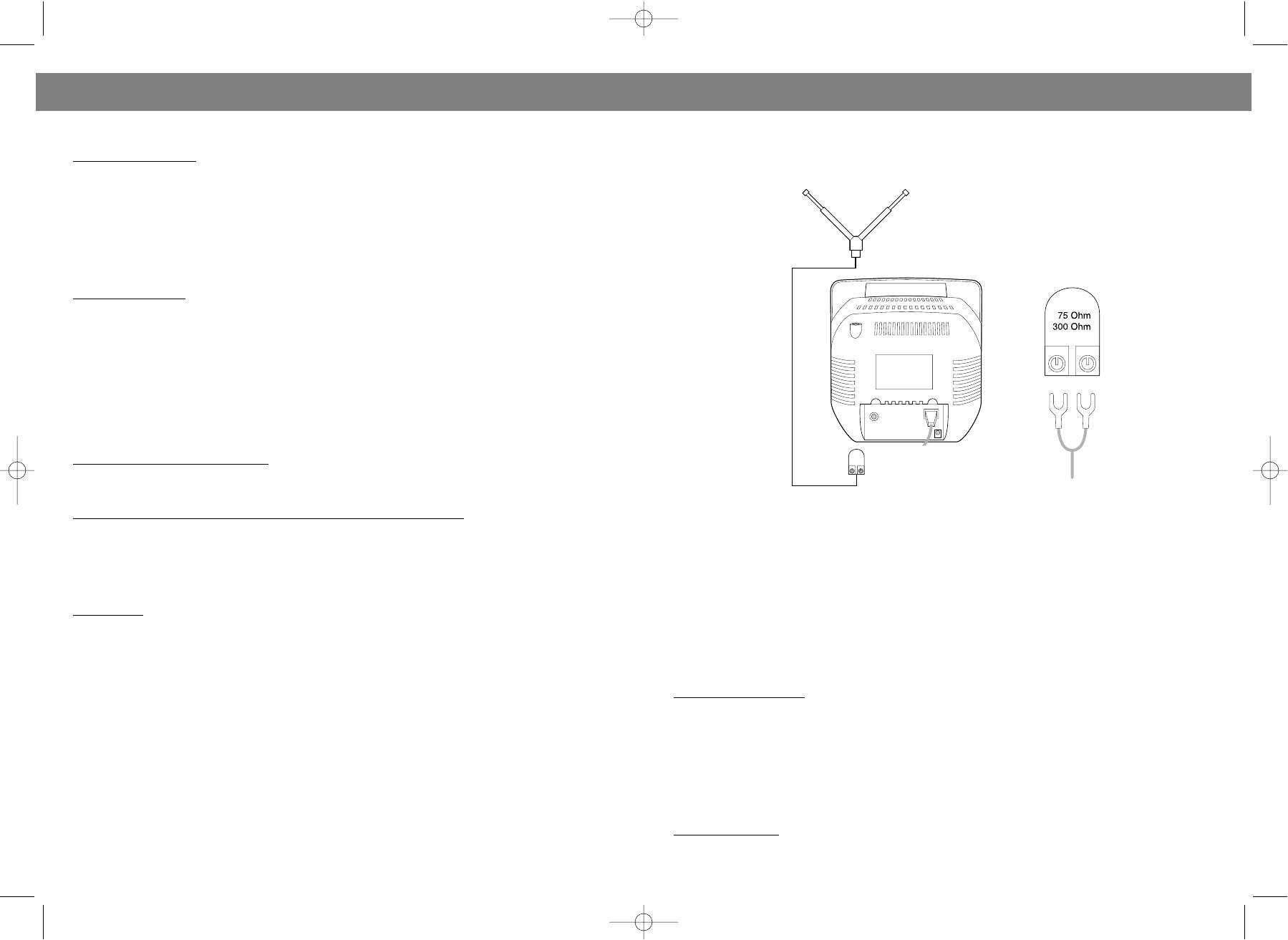
Для приема сигналов TV следует вставить переходник антенны в гнездо RF IN. Для лучшего
The unit is operated with external AC/DC adaptor. Insert AC plug into the AC outlet. Then insert DC plug
приема следует выбрать соответствующий угол расположения антенны (см. иллюстрацию ниже).
into the DC socket. Switch on POWER ON/OFF and press CH+/CH key on remote control( Or press
Power key on remote control ). The power indicator will turn green. After several seconds, picture will
be shown on screen.
Press PR+/PR key on unit to switch on the unit from standby status. Press Power key on remote con
trol to switch the unit on or off. When power indicator lights on red, the unit is in standby status. When
power indicator turns on green, the unit is in TV status.
If TV is not in use for a long time, make sure to switch off TV by pressing POWER ON/OFF on unit.
2. Other DC supply:
The TV is also operated with DC 12V. Make sure DC power can supply the current over 1.5A. If TV is
operated in car ( make sure the DC voltage is 12V ), car lighter socket can be used as power source.
Simply insert the DC plug of car cord to the DC in jack of the unit and follow same operation as above.
Note: 1. To ensure safety, power supply should be totally cut off if TV is not in use. 2. Make sure the
polarity is correct when DC power is used, otherwise TV will not work.
HOW TO SELECT THE CHANNELS
It is not necessary to prestore channels. Just connect antenna ( rod antenna or CATV antenna ) prop
erly and switch on the unit. Then press the Channel Up ( CH+) key and Channel Down (CH) key on
remote control to select the channel you want.
1. Selection by Channel Up/Down:
Press CH+/PR+ or CH/PR keys located on remote control or unit. Press CH+/PR+ to select the chan
nels up. Press CH/PR to select the channels down.
2. Selection by directly pressing No. keys located on remote control:
Для просмотра каналов CATV (кабельное телевидение) следует вставить кабель в гнездо RF IN.
When unit is in TV mode, input 2 digits. When unit is in CATV mode, input 3 digits. Please note that the
input must be completed within 4 seconds. If the number you input is not in the range of frequency, the
ВЫБОР РЕЖИМА TV/AV
input is invalid. For example, if you want to select Channel No.18, input the number by pressing digit 1
1. Для выбора режима TV/AV (TV/аудиовидео) нажмите кнопку TV/AV на устройстве или на пульте
and digit 8 once in turn.. If you want to select Channel No.66, just press digit 6 two times within 4 sec
ДУ.
onds.
2. Нажмите кнопку TV/AV на пульте ДУ. Индикатор питания станет светиться зеленым цветом. На
экране будут буквы AV. Это означает то, что устройство работает в режиме AV (аудиовидео). Для
3. Loop key:
просмотра видеокассет или видео компактдисков подсоедините устройство к проигрывателю
Press the Loop key located on remote control to switch the present channel to previous channel you
компактдисков (DVDпроигрыватель) или к видеомагнитофону (VCR). В режиме AV Вы можете
watched. For example, after you switch from Channel 18 to Channel 66, you can press Loop key to
смотреть телепрограммы в системах PAL/NTSC335/NTSC443.
watch Channel 18. Press twice to watch Channel 66 again.
РЕГУЛЯТОР ЗВУКА
4. When you press Power key to switch on the unit, screen will display the channel you watched before
you turned off the unit. For example, the channel was 66 when you turned off the TV. When you press
1. Регулировка звука:
Power key to switch on the unit, TV will display Channel 66.
Уровень звука регулируется нажатием кнопки VOL+ или VOL на пульте ДУ или на устройстве.
Для повышения громкости следует нажать кнопку VOL+. На экране отобразится зеленая полоска,
TV/AV SELECTION
которая будет двигаться вправо.
1. Press TV/AV key located on unit or remote control to select TV/AV mode.
Для понижения громкости следует нажать кнопку VOL. Зеленая полоска на экране будет
2. Press TV/AV key located on remote control and Power Indicator lamp will turn on green. At same
двигаться влево.
time, AV will be displayed on screen. That means that unit is in AV mode. Connect the unit to Video Disc
Примечание: При появлении "снега" или синей заливки экрана изза невозможности принять
Player ( DVD player ) or Video Cassette Recorder ( VCR ) to watch video disc and video cassette. Under
сигнал, устройство автоматически переключится в режим приглушения. В этом режиме кнопки
AV mode, you can watch PAL/NTSC335/NTSC443 multisystem TV programs.
VOL+/VOL не работают.
TV/CATV SELECTION
2. Приг
лушение:
Press Menu key located on remote control, then press CH+ or CH on remote control to select item
Для включения режима приглушения во время работы в режиме TV или AV следует нажать кнопку
PRESET. Press VOL+ or VOL key to enter submenu of PRESET and press CH+ or CH to select AREA.
Mute на пульте ДУ. На экране появятся красные буквы MUTE. Для выхода из режима приглушения
6
15
VT-1011.qxd 30.10.03 14:48 Page 12


