
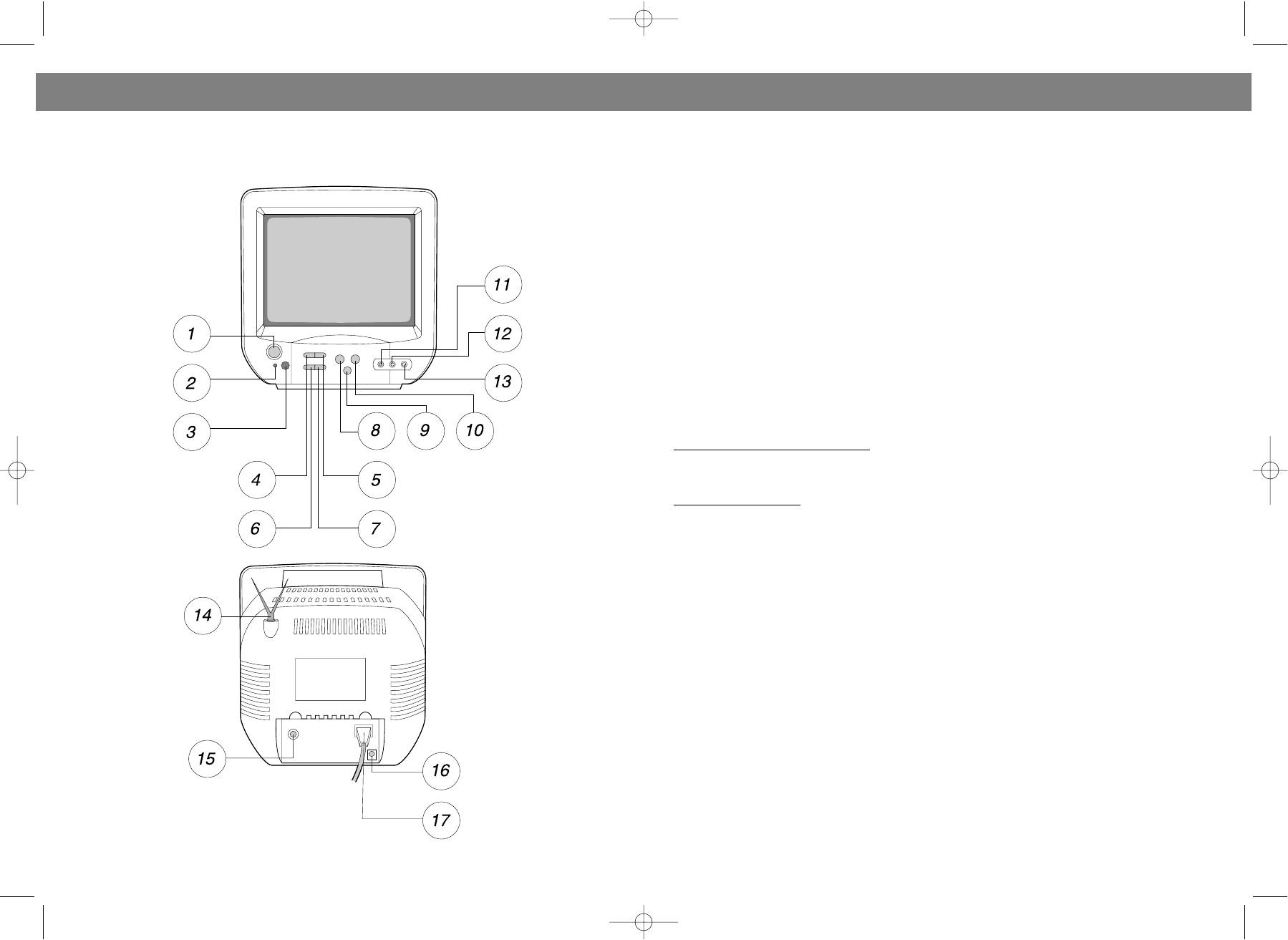
Vitek VT-1011: РАСПОЛОЖЕНИЕ ОРГАНОВ УПРАВЛЕНИЯ (ПЕРЕДНЯЯ И ЗАДНЯЯ ПАНЕЛИ)
РАСПОЛОЖЕНИЕ ОРГАНОВ УПРАВЛЕНИЯ (ПЕРЕДНЯЯ И ЗАДНЯЯ ПАНЕЛИ): Vitek VT-1011
Оглавление
- ИНСТРУКЦИЯ ПО ЭКСПЛУАТАЦИИ
- РУССКИЙ
- ПРОЧИЕ ФУНКЦИИ ОТОБРАЖЕНИЕ ДОПОЛНИТЕЛЬНОЙ ИНФОРМАЦИИ НА ЭКРАНЕ ТЕЛЕВИЗОРА УСТРАНЕНИЕ НЕИСПРАВНОСТЕЙ
- ПРЕДВАРИТЕЛЬНАЯ НАСТРОЙКА КАНАЛОВ ДОПОЛНИТЕЛЬНЫЕ ФУНКЦИИ
- КНОПКА МЕНЮ НАСТРОЙКА ИЗОБРАЖЕНИЯ TV ВЫКЛЮЧЕНИЕ СИСТЕМЫ TV УСТАНОВКА ТАЙМЕРА
- ВЫБОР РЕЖИМА TV/AV РЕГУЛЯТОР ЗВУКА
- ПИТАНИЕ ОТ ИСТОЧНИКА ПОСТОЯННОГО ТОКА ПИТАНИЕ ОТ ДРУГИХ ИСТОЧНИКОВ ПОСТОЯННОГО ТОКА ВЫБОР КАНАЛОВ ВЫБОР РЕЖИМА TV/CATV (возможность приема кабельного телевидения)
- КНОПКИ НАЗНАЧЕНИЯ ПУЛЬТ ДИСТАНЦИОННОГО УПРАВЛЕНИЯ
- РАСПОЛОЖЕНИЕ ОРГАНОВ УПРАВЛЕНИЯ (ПЕРЕДНЯЯ И ЗАДНЯЯ ПАНЕЛИ)
- ОПИСАНИЕ ГРАФИЧЕСКИХ СИМВОЛОВ: МЕРЫ БЕЗОПАСНОСТИ
РУССКИЙ
ENGLISH
larly: China TV > USA TV > USA CATV > Europe TV > Germany CATV > France CATV > Italy CATV >
РАСПОЛОЖЕНИЕ ОРГАНОВ УПРАВЛЕНИЯ
Russian CATV > England CATV > Australia CATV.
(ПЕРЕДНЯЯ И ЗАДНЯЯ ПАНЕЛИ)
Note: The unit is set up according to local television network before leaving factory.
4. When AUTO PROGRAM is selected, press VOL+ key to enable autoscan for channels. Green
Channel No.s will be displayed on screen. When one channel is found and saved, the green Channel
No. will turn red.
EXTRA FUNCTIONS
Under TV or AV mode, select EXTRA in menu by pressing CH+ or CH key. Press VOL+ or VOL key to
enter submenu. Then press CH+ or CH key to select as follows:
CC > BLUE BACK
1. Closed Caption Display ( CCD ) mode function is only available in USA. This function is not applicable
for other countries.
2. When submenu BLUE BACK is selected, press VOL+ and VOL key to select BLUE BACK ON or BLUE
BACK OFF.
3. When BLUE BACK ON is selected, screen will turn blue and be muted while there is no TV or AV signal
input. If there is TV or AV signal input, unit will display picture automatically. Under TV status, when blue
back is on screen for 10 minutes, unit will enter standby mode.
OTHER FUNCTIONS
1. Pictur
e Display Mode Selection
Press Picture Key on the remote control to select SOFT,PERSONAL or DYNAMIC 3 different picture dis
play mode.
2. Sleep Timer Setting
Pressing Sleep key on remote control can preset the TV OFF time. After certain period of time, TV will
turn off automatically and enter Power Standby mode.
1. When you press SLEEP key once, the screen will display the remainder time from now to sleep.
2. When you press SLEEP key again, the screen will display the sleep time to be set: TIMER 30. Every
time pressing SLEEP key will add 30 minute. But the maximum is 180 minutes. After 180 minutes, it will
back to 0 minute. See below.
0Min > 30Mins > 60Mins > 90Mins > 120Mins > 150Mins > 180Mins
3. When there is only 5 minutes left from now to sleep time, the remainder time will be on screen every
1 minutes and last for 5 seconds.
4. When there is only 3 seconds left from now to sleep time, the remainder time will be displayed on
screen in red until unit is turned off and enters Power Standby mode.
5. Pressing Power key will cancel the Sleep Timer Setting.
6. Pressing Sleep key on remote will change the Sleep Timer setting.
ON SCREEN DISPLAY
There are two mode of DISPLAY key, one is ON, the other one is OFF. It will display present TV mode
about following :
1. Channel No.
2. TV NETWORK NAME
3. PROGRAM TITLE
4. CLOCK
5. SLEEP TIMER
6. COLOR SYSTEM
7. SOUND SYSTEM
12
9
VT-1011.qxd 30.10.03 14:48 Page 18


