
Vitek VT-1011: КНОПКИ НАЗНАЧЕНИЯ ПУЛЬТ ДИСТАНЦИОННОГО УПРАВЛЕНИЯ
КНОПКИ НАЗНАЧЕНИЯ ПУЛЬТ ДИСТАНЦИОННОГО УПРАВЛЕНИЯ: Vitek VT-1011
Оглавление
- ИНСТРУКЦИЯ ПО ЭКСПЛУАТАЦИИ
- РУССКИЙ
- ПРОЧИЕ ФУНКЦИИ ОТОБРАЖЕНИЕ ДОПОЛНИТЕЛЬНОЙ ИНФОРМАЦИИ НА ЭКРАНЕ ТЕЛЕВИЗОРА УСТРАНЕНИЕ НЕИСПРАВНОСТЕЙ
- ПРЕДВАРИТЕЛЬНАЯ НАСТРОЙКА КАНАЛОВ ДОПОЛНИТЕЛЬНЫЕ ФУНКЦИИ
- КНОПКА МЕНЮ НАСТРОЙКА ИЗОБРАЖЕНИЯ TV ВЫКЛЮЧЕНИЕ СИСТЕМЫ TV УСТАНОВКА ТАЙМЕРА
- ВЫБОР РЕЖИМА TV/AV РЕГУЛЯТОР ЗВУКА
- ПИТАНИЕ ОТ ИСТОЧНИКА ПОСТОЯННОГО ТОКА ПИТАНИЕ ОТ ДРУГИХ ИСТОЧНИКОВ ПОСТОЯННОГО ТОКА ВЫБОР КАНАЛОВ ВЫБОР РЕЖИМА TV/CATV (возможность приема кабельного телевидения)
- КНОПКИ НАЗНАЧЕНИЯ ПУЛЬТ ДИСТАНЦИОННОГО УПРАВЛЕНИЯ
- РАСПОЛОЖЕНИЕ ОРГАНОВ УПРАВЛЕНИЯ (ПЕРЕДНЯЯ И ЗАДНЯЯ ПАНЕЛИ)
- ОПИСАНИЕ ГРАФИЧЕСКИХ СИМВОЛОВ: МЕРЫ БЕЗОПАСНОСТИ
РУССКИЙENGLISH
ADJUST TV PICTURE
КНОПКИ НАЗНАЧЕНИЯ
8. Кнопка выхода в "Меню".
Press Menu key on unit or remote control. Menu will be displayed on screen. Press VOL+ or VOL to
1. Кнопка "Вкл./Выкл".
9. Кнопка переключения в режим ожидания.
enter PICTURE submenu. Then press CH+ or CH key to select submenu.
2. ЖК индикатор питания.
10. Переключатель TV/AV (ТВ/Аудиовидео).
3. Сенсор сигнала ДУ.
11. Гнездо подключения наушников.
CONTRAST > BRIGHT > COLOR > TINT > SHARPNESS
4. Кнопка переключения на предыдущий канал
12. Гнездо входа видеосигнала.
(CH).
13. Гнездо входа звукового сигнала.
When you select one of the above submenu , press VOL+ or VOL key to change its setting. Pressing
5. Кнопка переключения на следующий канал
14. Антенна.
VOL+ will increase the setting and green bar will move to right. Pressing VOL will decrease the setting
(CH+).
15. Гнездо подключения внешней антенны.
and green bar will move to left.
6. Снизить громкость (VOL).
16. Входное гнездо постоянного тока.
Press Picture key on remote control to enter standard TV picture setting menu:
7. Прибавить громкость (VOL+).
17. Входное гнездо переменного тока.
SOFT > PERSONAL > DYNAMIC
SWITCH OF TV SYSTEM
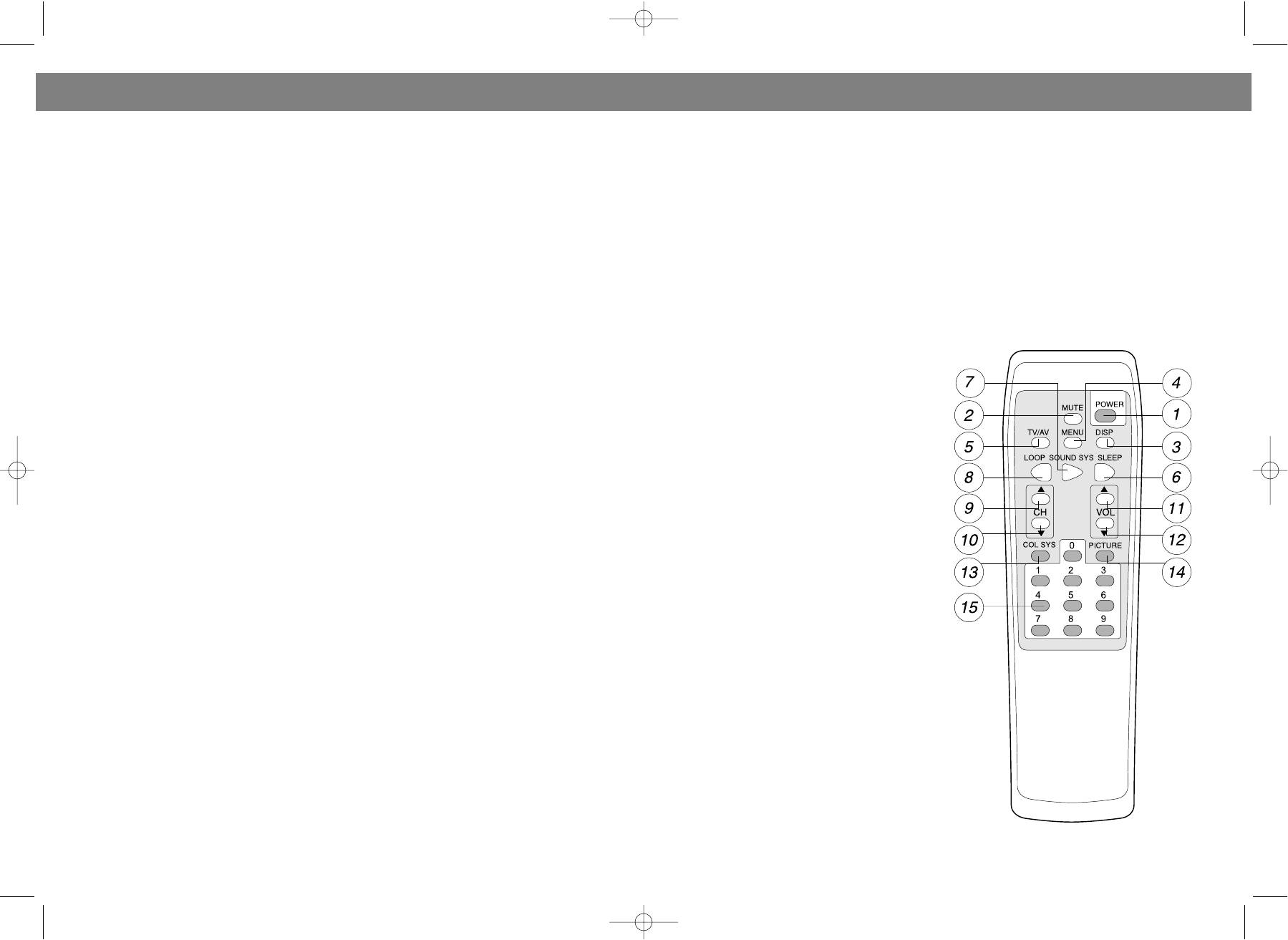
ПУЛЬТ ДИСТАНЦИОННОГО УПРАВЛЕНИЯ
Press CH+ or CH key on remote control to select SYSTEM in menu. Press VOL+ or VOL to enter the
submenu. Then press CH+ or CH key to select COLOR SYSTEM and SOUND SYSTEM. Note: When TV
is in AV mode, only COLOR SYSTEM can be selected. Pressing COL SYS key and SOUND SYS key locat
ed on remote control will directly enter COLOR SYSTEM and SOUND SYSTEM setting menu.
1. Press CH+ or CH to select submenu COLOR SYSTEM. Press VOL+ or VOL key to select the TV sig
nal system: PAL > NTSC358 > NTSC443 > AUTO. When AUTO is selected, the unit will automatically
select the COLOR SYSTEM and display the correct picture.
2. Press CH+ or CH key to select submenu SOUND SYSTEM. Press VOL+ or VOL key to select TV
Расположение кнопок
SOUND SYSTEM: BG > DK > I > M > BGSUB. Only when you select the correct SOUND SYSTEM, the
1. Кнопка "Вкл./Выкл" (Power).
sound will be clear without any noise.
2. Приглушение звука.
3. Кнопка "Display".
TIMER SETTING
4. Кнопка выхода в "Меню".
Press CH+ or CH key to enter TIMER setting . Press VOL+ or VOL key to enter submenu. Then press
5. Переключатель режима TV/AV.
CH+ or CH key to select following:
6. Таймер сна.
7. Кнопка выбора звуковой системы.
CLOCK > ON CH. > ON TIMER
8. Кнопка функции "Loop".
9. Следующий канал (CH+).
1. Select submenu CLOCK and press VOL+ to enter AM/FM setting. Press the number keys on remote
10. Предыдущий канал (CH).
control to input time. The turn of inputting is as follows:
11. Прибавить громкость (VOL+).
Hour 10digit > Hour 1digit > Min.10digit > Min.1digit > Set Completion
12. Снизить громкость (VOL).
2. After selecting submenu ON CH, press the number keys to input Channel No.. Pressing VOL+ or
13. Кнопка выбора системы цветов.
VOL will select Channel No. setting in turn.
14. Настройка картинки.
3. After the selection of submenu ON TIMER, press VOL+ to enter AM/FM setting. Press number
15. Номерные кнопки.
keys on remote control to input time as follows:
Hour 10digit > Hour 1digit > Min.10digit > Min.1digit > Set Completion
4. When power is cutoff or the unit is turned off, the above time setting will be invalid. When the unit
is standby, the above setting is valid.
CHANNEL PRESET
Select PRESET under main menu by pressing CH+ or CH key. Press VOL+ or VOL to enter submenu.
Then press CH+ or CH key to select the item under submenu as follows:
AUTO PROGRAM > AREA > SKIP CH > CH NO.
1. After the selection of submenu CH NO., press number keys on remote control to input Channel No..
Or simply press VOL+/VOL to select channel.
2. When you want to delete one channel, you can select the Channel No. and press VOL+ or VOL key to
select SKIP CH/ SKIP. After that, this channel will not be shown when you use PR+/PR or CH+/CH to
select channel.
3. When you select submenu AREA, you may press VOL+ or VOL key to choose local TV network circu
8 13
VT-1011.qxd 30.10.03 14:48 Page 16


