
Vitek VT-4021: ЗАДНЯЯ ПАНЕЛЬ
ЗАДНЯЯ ПАНЕЛЬ: Vitek VT-4021
Оглавление
- СПЕЦИФИКАЦИЯ ДИНАМИК САБВУФЕР УСИЛИТЕЛЬ САБВУФЕР ПОТРЕБЛЯЕМАЯ МОЩНОСТЬ
- Отключение звука и режим ожидания УСТРАНЕНИЕ НЕИСПРАВНОСТЕЙ
- РАБОТА АППАРАТА Регулировка тона и громкости
- Соединение контактов: + к +, ' к ' РАССТАНОВКА ДИНАМИКОВ
- ПОДСОЕДИНЕНИЕ Соединители ПОДКЛЮЧЕНИЕ ДИНАМИКОВ Терминалы динамиков Терминалы:
- ПУЛЬТ ДИСТАНЦИОННОГО УПРАВЛЕНИЯ
- ЗАДНЯЯ ПАНЕЛЬ
- Перед подключением шнура питания к сети КОМПЛЕКТНОСТЬ ПЕРЕДНЯЯ ПАНЕЛЬ
- ПРЕДОСТЕРЕЖЕНИЕ РАСПАКОВКА И УСТАНОВКА МЕРЫ БЕЗОПАСНОСТИ РЕМОНТ И ОБСЛУЖИВАНИЕ
РУССКИЙENGLISH
OPERATION
ЗАДНЯЯ ПАНЕЛЬ
Power'On
(Be sure to check the connections before you power on your system)
1. Plug the AC cord to AC socket.
2. Press ON/OFF switch to power on the system.
3. STANDBY LED lights on.
4. Press VOL + button on the remote control to Operation.
Volume and Tone Control
1. Master volume is for controlling the sound level. (Down) Low and (Up) High
2. Front volume is for controlling the front channel sound level, () Low and (+) High.
3. Center volume is for controlling the center channel sound level. () Low and (+) High
4. Surround volume is for controlling the surround sound level. () Low and (+) High
5. Subwoofer volume is for controlling the active subwoofer sound level () Low and (+) High
6. The Bass, Treble controller is for tone controlling of the front channel. ( Low and + high)
Mute and standby
When you press the MUTE button, the speaker will stop producing sound. Press the MUTE
button again, then the sound will come back immediately. When you press the STANDBY but
ton, the unit will be turned off. Press the STANDBY Button again, and then the system will be
turned on again.
TROUBLESHOOTING GUIDE
Problem Possible Cause and Remedy
No sound and display. Poor connection from power plug and socket.
The Power button is set "off" or standby.
Check the amplifier fuse.
No sound but with display The Volume knob is set to Min.
Check RCA cable.
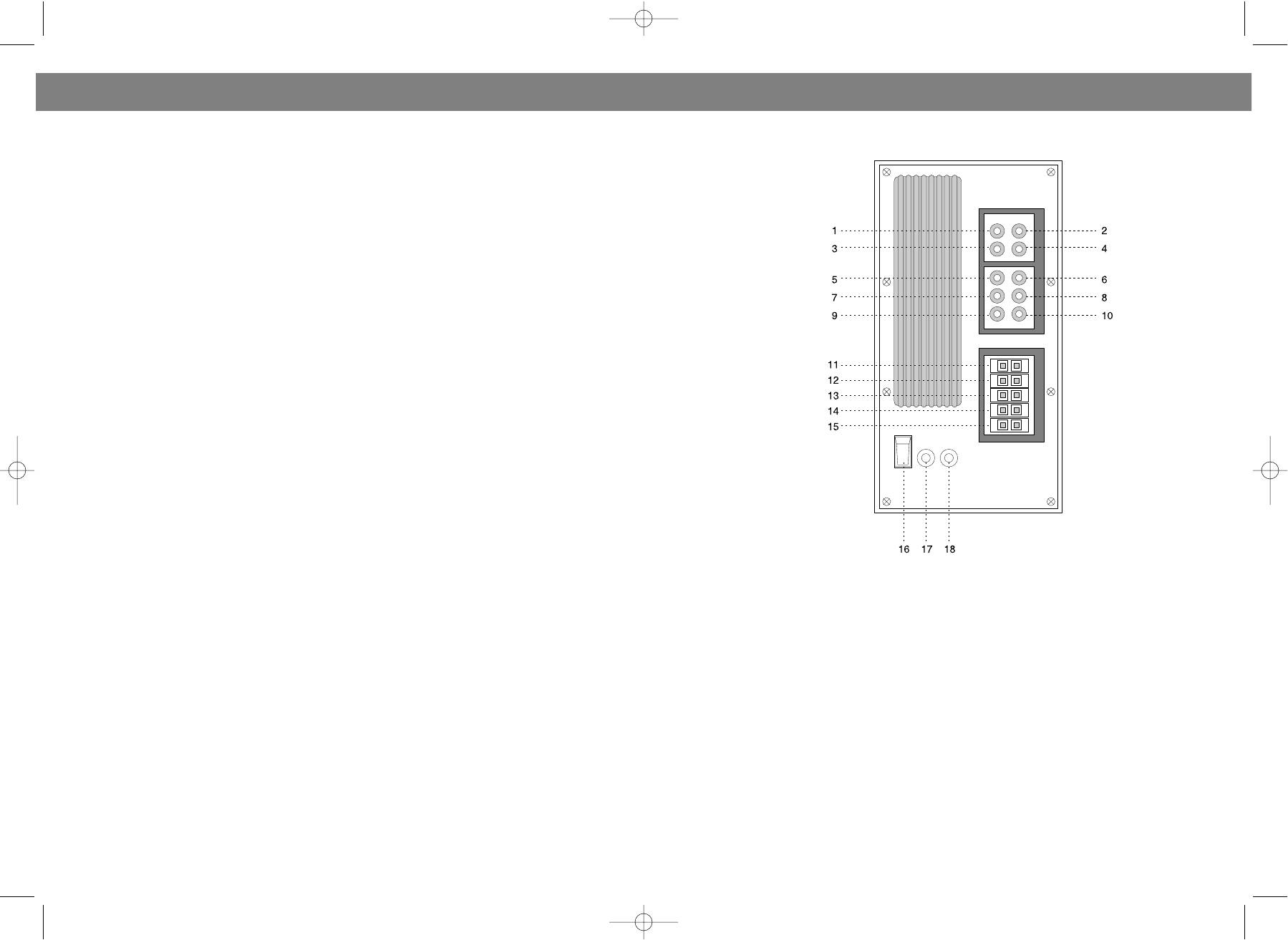
1. ПРАВОЕ ГНЕЗДО ДЛЯ 1го ДОПОЛНИТЕЛЬНОГО ИСТОЧНИКА
2. ЛЕВОЕ ГНЕЗДО ДЛЯ 1го ДОПОЛНИТЕЛЬНОГО ИСТОЧНИКА
No sound from the front Poor connection or speaker cable (positive & negative)
3. ПРАВОЕ ГНЕЗДО ДЛЯ 2го ДОПОЛНИТЕЛЬНОГО ИСТОЧНИКА
speakers is connected to one point.
4. ЛЕВОЕ ГНЕЗДО ДЛЯ 2го ДОПОЛНИТЕЛЬНОГО ИСТОЧНИКА
Check RCA cable for loose connection.
5. ГНЕЗДО ДЛЯ ПРАВОГО 5.1 CH ДИНАМИКА ФРОНТАЛЬНОГО ЗВУКА
6. ГНЕЗДО ДЛЯ ЛЕВОГО 5.1 CH ДИНАМИКА ФРОНТАЛЬНОГО ЗВУКА
No sound from the center MODE is not set correctly. Reset correctly.
7. ГНЕЗДО ДЛЯ ПРАВОГО 5.1 CH ДИНАМИКА ОБЪЕМНОГО ЗВУКА
speaker Center Volume is set to Min.
8. ГНЕЗДО ДЛЯ ЛЕВОГО 5.1 CH ДИНАМИКА ОБЪЕМНОГО ЗВУКА
The speaker cable (positive & negative) is connected to
9. ГНЕЗДО ДЛЯ 5.1 CH САБВУФЕРА
one point.
10. ГНЕЗДО ДЛЯ 5.1 CH ДИНАМИКА ЦЕНТРАЛЬНОГО ЗВУКА
11. ВЫХОД ЛЕВОГО ДИНАМИКА ФРОНТАЛЬНОГО ЗВУКА
No sound from the center MODE is not set correctly. Reset correctly.
12. ВЫХОД ПРАВОГО ДИНАМИКА ФРОНТАЛЬНОГО ЗВУКА
speaker Surround Volume is set to Min.
13. ВЫХОД ДИНАМИКА ЦЕНТРАЛЬНОГО ЗВУКА
The speaker cable (positive & negative) is connected to
14. ВЫХОД ЛЕВОГО ДИНАМИКА ОБЪЕМНОГО ЗВУКА
one point.
15. ВЫХОД ПРАВОГО ДИНАМИКА ОБЪЕМНОГО ЗВУКА
16. КНОПКА ВКЛЮЧЕНИЯ/ВЫКЛЮЧЕНИЯ ("СЕТЬ")
No surround effects The MODE is wrongly selected. The speaker cable (pos
17. ГНЕЗДО ПРЕДОХРАНИТЕЛЯ
itive & negative) is connected to one point.
18. ШНУР ПИТАНИЯ
8 13
VT-4021.qxd 05.11.03 17:12 Page 16




