
Pioneer MVH-09UB: Settings
Settings: Pioneer MVH-09UB
H:\PDF-OUT\127075007251\020Chapter_EN.fm
En
7
MVH-09UB/MVH-09UBG
127075007251
English
_127075007251_artwork.book Page 7 Thursday, November 24, 2016 10:34 AM
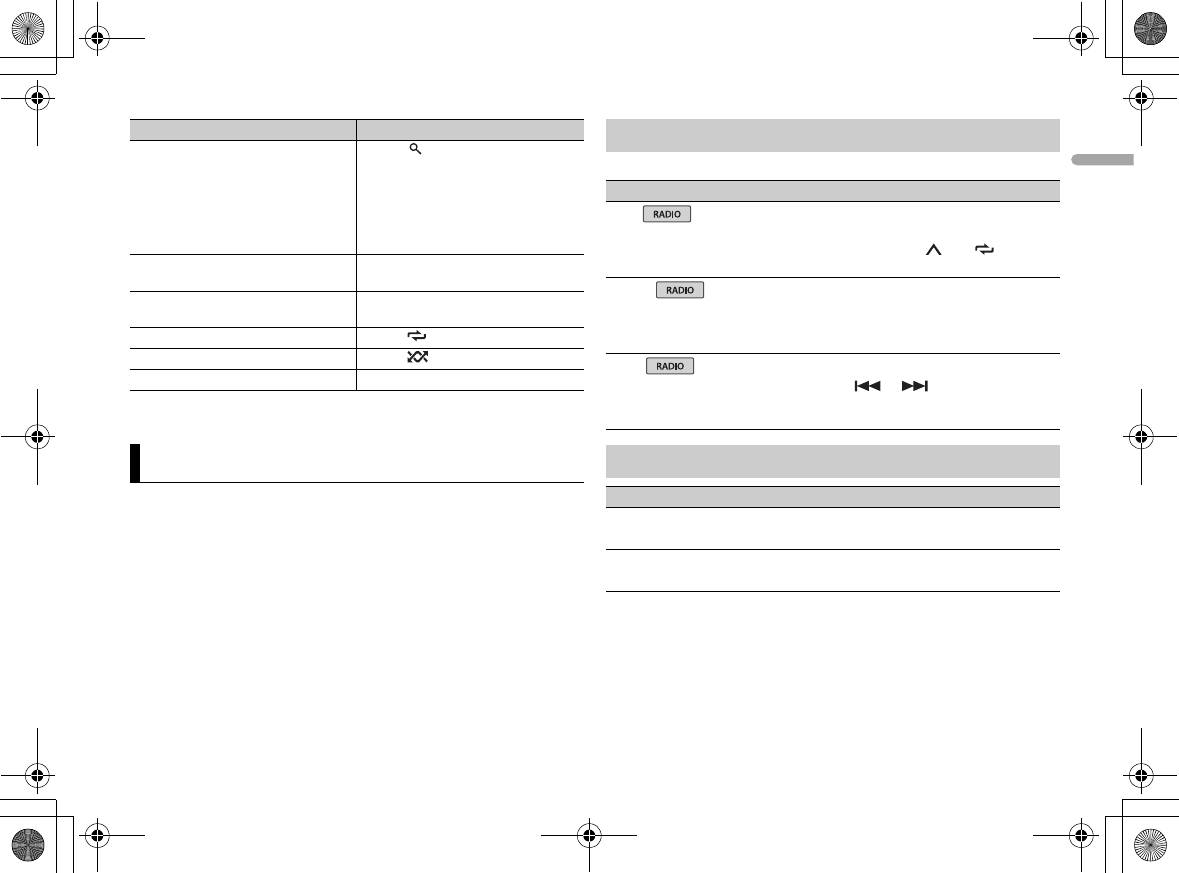
Purpose Operation
FUNCTION settings
Search for a file from a list 1 Press to display the list.
2 Turn the M.C. dial to select the
The menu items vary according to the source.
desired file (folder) name or
Menu Item Description
category, then press to confirm.
3 Turn the M.C. dial to select the
BSM
desired file, then press to confirm.
Store the six strongest stations on the
Playback starts.
number buttons (1/ to 6/)
View a list of the files in the selected
Press the M.C. dial when a folder/
automatically.
folder/category*
category is selected.
LOCAL
Play a song in the selected folder/
Press and hold the M.C. dial when a
category*
folder/category is selected.
F1/FM: [OFF], [LV1], [LV2],
Restrict the tuning station according to the
[LV3], [LV4]
signal strength.
Repeat play Press 6/.
MW/LW: [OFF], [LV1], [LV2]
Random/shuffle play Press 5/.
SEEK
Pause/resume playback Press 4/PAUSE.
[MAN], [PCH] Assign or buttons to seek the
* Compressed audio files only
stations one by one (manual tuning) or
select a station from the preset channels.
Settings
AUDIO settings
You can adjust various settings in the main menu.
Menu Item Description
FADER*1
1 Press the M.C. dial to display the main menu.
Adjust the front and rear speaker balance.
2 Turn the M.C. dial to select one of the categories below, then press to
BALANCE
confirm.
Adjust the left and right speaker balance.
• FUNCTION settings (page 7)
• AUDIO settings (page 7)
• SYSTEM settings (page 8)
3 Turn the M.C. dial to select the options, then press to confirm.
H:\PDF-OUT\127075007251\020Chapter_EN.fm
_127075007251_artwork.book Page 8 Thursday, November 24, 2016 10:34 AM
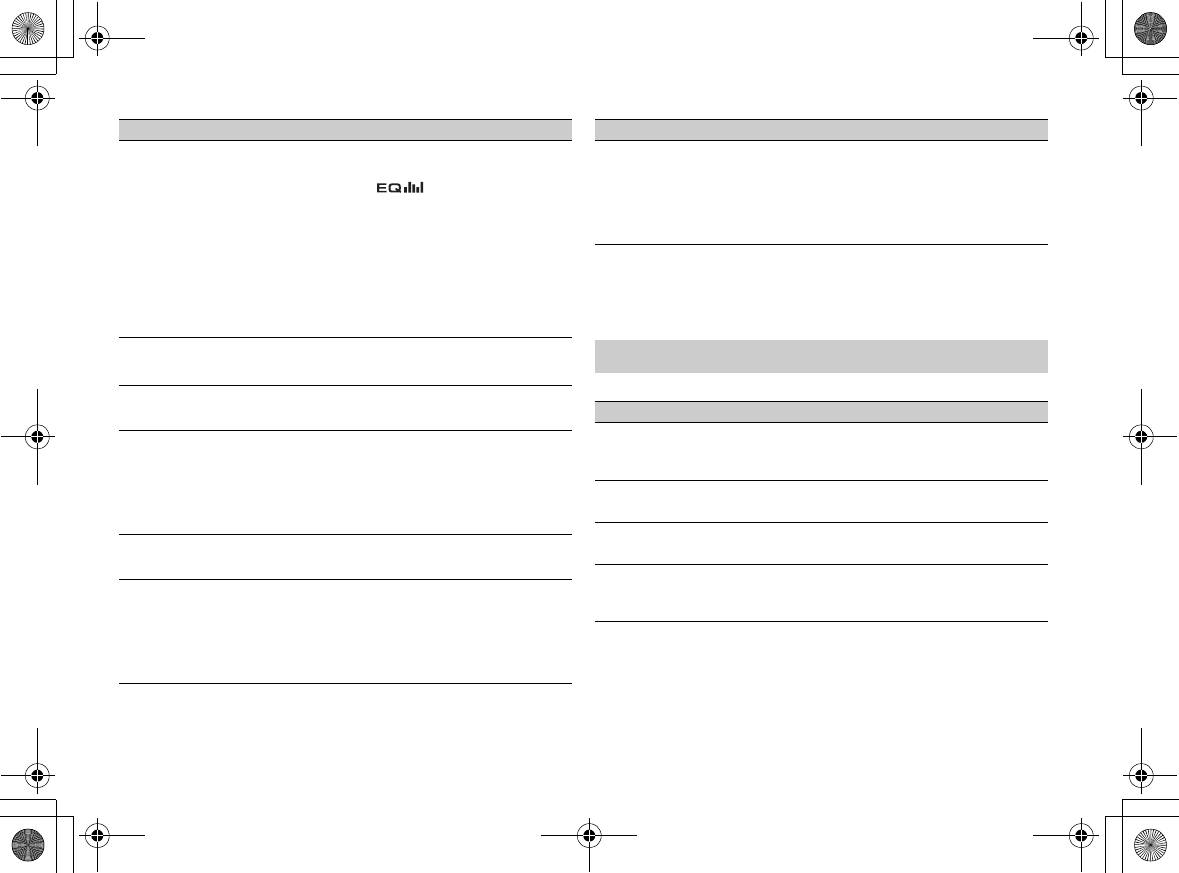
Menu Item Description
Menu Item Description
EQ SETTING
SLA
[SUPER BASS], [POWERFUL],
You can also switch the equalizer by
[+4] to [–4] Adjust the volume level for each source
[NATURAL], [VOCAL],
pressing repeatedly.
except RADIO.
[CUSTOM1], [CUSTOM2],
Each of the below combinations are set to
[FLAT]
the same setting automatically.
• USB, APP (Android)
Select an equalizer band and
*1 Not available when [SUB.W/SUB.W] is selected in [SP-P/O MODE] in the INITIAL settings
level for further customizing.
(page 5).
Equalizer band: [80HZ],
*2 Not available when [REAR/REAR] is selected in [SP-P/O MODE] in the INITIAL settings
[250HZ], [800HZ], [2.5KHZ],
(page 5).
[8KHZ]
*3 Not available when [OFF] is selected in [SUB.W].
Equalizer level: [+6] to [–6]
LOUDNESS
SYSTEM settings
[OFF], [LOW], [MID], [HI] Compensate for clear sound at low volume.
You can also access to these menus when the unit is turned off.
SUB.W*2
[NOR], [REV], [OFF] Select the subwoofer phase.
Menu Item Description
LANGUAGE
SUB.W CTRL*2*3
[ENG](English),
Select the language to display the text
Cut-off frequency: [50HZ],
Only frequencies lower than those in the
[РУС](Russian), [TUR](Turkish)
information from a compressed audio file.
[63HZ], [80HZ], [100HZ],
selected range are output from the
[125HZ], [160HZ], [200HZ]
subwoofer.
CLOCK SET
Output level: [–24] to [+6]
Set the clock (page 4).
Slope level: [–12], [–24]
12H/24H
BASS BOOST
[12H], [24H] Select the time notation.
[0] to [+6] Select the bass boost level.
AUX
HPF SETTING
[ON], [OFF] Set to [ON] when using an auxiliary device
Cut-off frequency: [OFF],
Only frequencies higher than the high-pass
connected to the unit.
[50HZ], [63HZ], [80HZ],
filter (HPF) cutoff are output from the
[100HZ], [125HZ], [160HZ],
speakers.
[200HZ]
Slope level: [–12], [–24]
8
En
MVH-09UB/MVH-09UBG
127075007251


