
LG 42LB731V: Русский ПРИМЕЧАНИЕ
Русский ПРИМЕЧАНИЕ: LG 42LB731V
Оглавление
- ПРИМЕЧАНИЕ
- Русский
- ПРИМЕЧАНИЕ
- Русский
- ПРИМЕЧАНИЕ
- ПРИМЕЧАНИЕ
- Русский
- ПРИМЕЧАНИЕ
- Подключение цифрового оптического аудиоустройства
- ПРИМЕЧАНИЕ
- ПРИМЕЧАНИЕ
- Русский ПРИМЕЧАНИЕ
- Русский ПРИМЕЧАНИЕ
- СОДЕРЖАНИЕ
- ЛИЦЕНЗИИ
- ПРАВИЛА ПО ТЕХНИКЕ БЕЗОПАСНОСТИ
- ПРАВИЛА ПО ТЕХНИКЕ БЕЗОПАСНОСТИ
- ПРАВИЛА ПО ТЕХНИКЕ БЕЗОПАСНОСТИ
- ПРАВИЛА ПО ТЕХНИКЕ БЕЗОПАСНОСТИ
- ПРАВИЛА ПО ТЕХНИКЕ БЕЗОПАСНОСТИ
- ПРАВИЛА ПО ТЕХНИКЕ БЕЗОПАСНОСТИ
- ПРАВИЛА ПО ТЕХНИКЕ БЕЗОПАСНОСТИ ПРЕДУПРЕЖДЕНИЕ!
- ПРАВИЛА ПО ТЕХНИКЕ БЕЗОПАСНОСТИ ВНИМАНИЕ!
- УСТАНОВКА СБОРКА И ПОДГОТОВКА К РАБОТЕ
- Пульт ДУ и батареи (AAA) Руководство пользователя
- СБОРКА И ПОДГОТОВКА К РАБОТЕ
- СБОРКА И ПОДГОТОВКА К РАБОТЕ
- Принадлежности, приобретаемые отдельно
- Элементы и кнопки
- СБОРКА И ПОДГОТОВКА К РАБОТЕ
- Использование кнопки-джойстика
- Поднятие и перемещение
- Установка на столе
- Крепление на стене
- Использование встроенной камеры
- Подготовка встроенной камеры
- ПУЛЬТ ДИСТАНЦИОННОГО УПРАВЛЕНИЯ (ПУЛЬТ ДУ)
- ПУЛЬТ ДИСТАНЦИОННОГО УПРАВЛЕНИЯ (ПУЛЬТ ДУ)
- ФУНКЦИИ ПУЛЬТА ДУ MAGIC
- ФУНКЦИИ ПУЛЬТА ДУ MAGIC
- ИСПОЛЬЗОВАНИЕ РУКОВОДСТВА ПОЛЬЗОВАТЕЛЯ
- ОБСЛУЖИВАНИЕ
- ТЕХНИЧЕСКИЕ ХАРАКТЕРИСТИКИ
MAKING CONNECTIONS
A-57
Русский
English
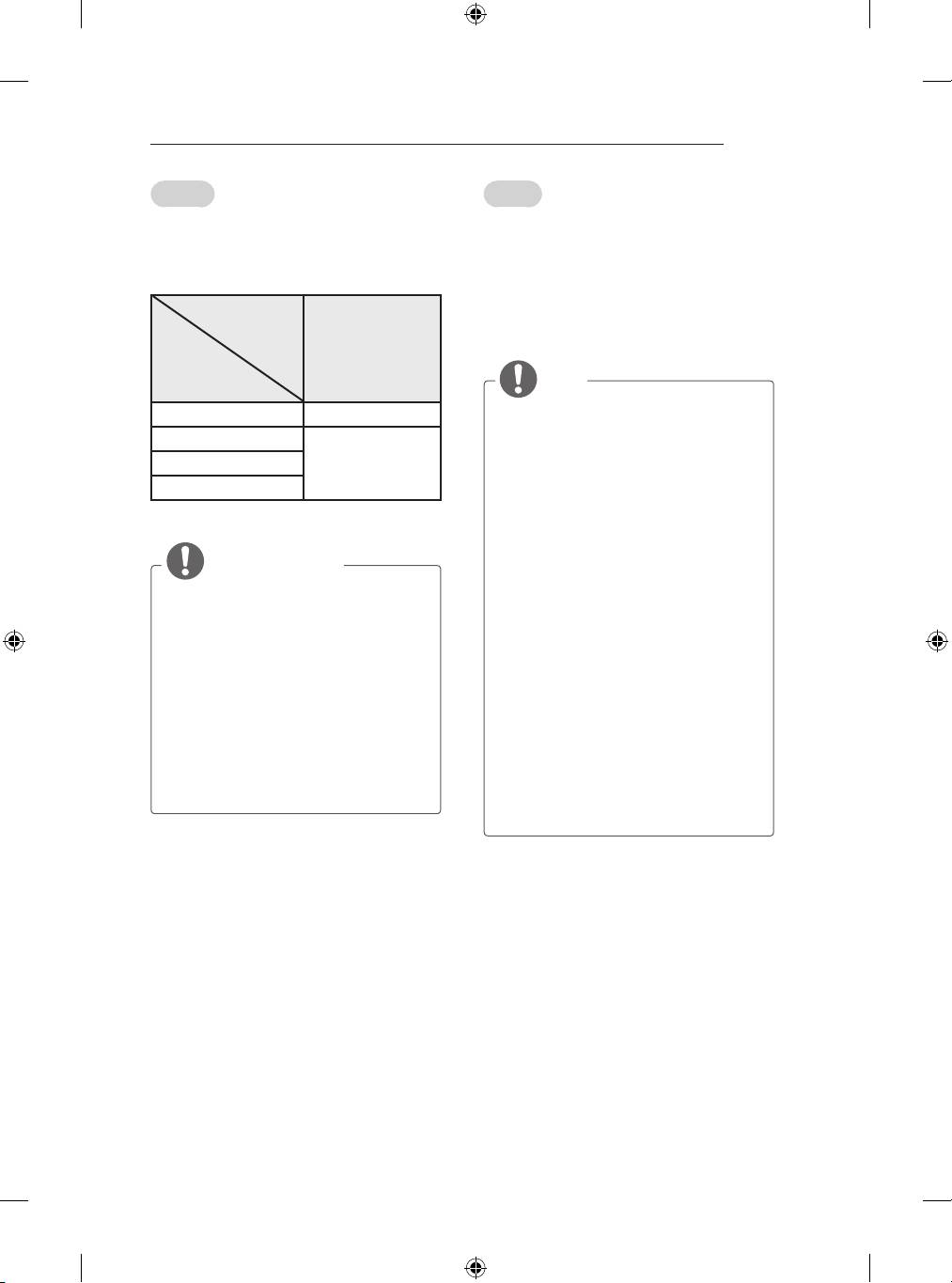
Для передачи аналоговых видео- и
Connect various external devices to the TV
аудиосигналов от внешнего устройства на
and switch input modes to select an external
телевизор подключите внешнее устройство к
device. For more information of external device’s
телевизору с помощью кабеля Euro Scart, как
connection, refer to the manual provided with
показано на следующем рисунке.
each device.
Available external devices are: HD receivers,
Тип выхода
DVD players, VCRs, audio systems, USB storage
devices, PC, gaming devices, and other external
AV1
devices.
Текущий
1
(ТВ-выход
)
режим
NOTE
ввода
y
The external device connection may differ
Цифровое ТВ Цифровое ТВ
from the model.
Аналоговое ТВ, AV
y
Connect external devices to the TV
regardless of the order of the TV port.
Аналоговое ТВКомпонентный
y
If you record a TV program on a DVD
HDMI
recorder or VCR, make sure to connect
the TV signal input cable to the TV
1 ТВ-выход: Вывод аналогового или
through a DVD recorder or VCR. For
цифрового ТВ-сигнала.
more information of recording, refer to
the manual provided with the connected
ПРИМЕЧАНИЕ
device.
y
Refer to the external equipment’s manual
y
Используемый кабель Scart Euro
for operating instructions.
должен иметь защиту сигнала.
y
If you connect a gaming device to the TV,
y
При просмотре цифрового ТВ в режиме
use the cable supplied with the gaming
3D-изображения только выходные
device.
сигналы 2D могут выводиться через
y
In PC mode, there may be noise
кабель SCART. (Только для моделей с
associated with the resolution, vertical
поддержкой 3D)
pattern, contrast or brightness. If noise is
y
Если установить режим 3D во время
present, change the PC output to another
выполнения запланированной записи
resolution, change the refresh rate to
с цифрового ТВ, выходные сигналы
another rate or adjust the brightness and
монитора не будут выводиться через
contrast on the PICTURE menu until the
кабель SCART и запись не удастся
picture is clear.
выполнить. (Только для моделей с
y
In PC mode, some resolution settings
поддержкой 3D)
may not work properly depending on the
graphics card.
