
LG DC379: Connections (Continued) Connecting to Optional Equipment
Connections (Continued) Connecting to Optional Equipment: LG DC379
Connections (Continued)
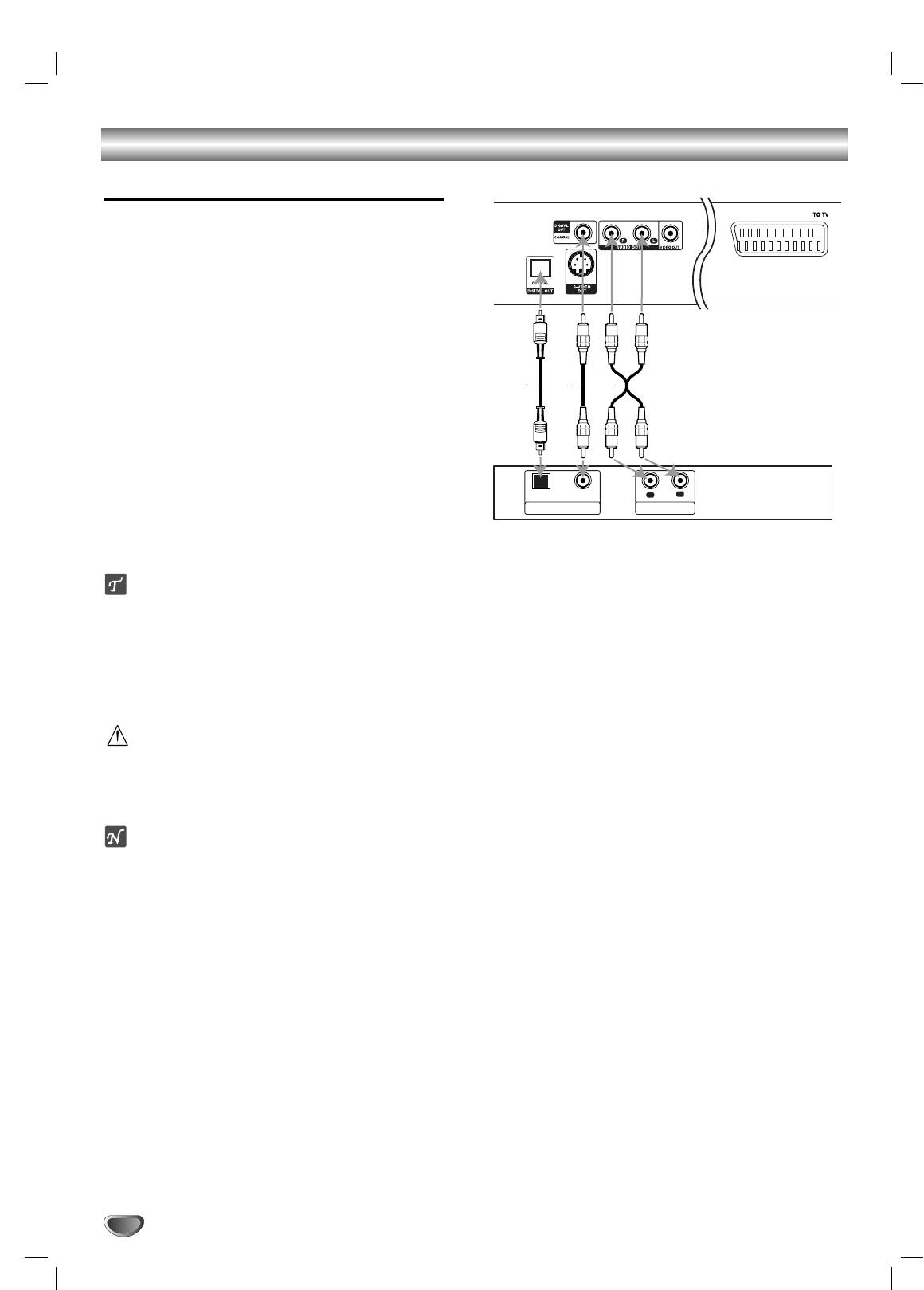
Connecting to Optional Equipment
Connecting to an amplifier equipped with two
channel analog stereo or Dolby Pro Logic ll/
Pro Logic
Connect the Left and Right AUDIO OUT jacks on the
DVD Player to the audio left and right in jacks on your
amplifier, receiver, or stereo system, using the audio
cables (A).
Connecting to an amplifier equipped with two
channel digital stereo (PCM) or to an Audio/
Video receiver equipped with a multi-channel
decoder (Dolby Digital™, MPEG 2, or DTS)
Connect one of the DVD Player’s DIGITAL AUDIO
11
OUT jacks (OPTICAL O or COAXIAL X) to the
corresponding in jack on your amplifier. Use an
optional digital (optical O or coaxial X) audio cable.
You will need to activate the player’s digital output.
22
(See “Digital Audio Output” on page 13).
Digital Multi-channel sound
A digital multi-channel connection provides the best
sound quality. For this you need a multi-channel
Audio/Video receiver that supports one or more of the
audio formats supported by your DVD Player (MPEG 2,
Dolby Digital and DTS). Check the receiver manual and
the logos on the front of the receiver.
Caution:
Due to the DTS Licensing agreement, the digital output
will be in DTS digital out when DTS audio stream is
selected.
Notes
–
If the audio format of the digital output does not match
the capabilities of your receiver, the receiver will
produce a strong, distorted sound or no sound at all.
– Six Channel Digital Surround Sound via digital con-
nection can only be obtained if your receiver is
equipped with a Digital Multi-channel decoder.
– To see the audio format of the current DVD in the on-
screen display, press AUDIO.
10
Rear of DVD player
AXO
OPTICAL COAXIAL
R
L
AUDIO INPUTDIGITAL INPUT
Amplifier (Receiver)
Оглавление
- åÂ˚ Ô‰ÓÒÚÓÓÊÌÓÒÚË
- ëÓ‰ÂʇÌËÂ
- è‰ ̇˜‡ÎÓÏ ‡·ÓÚ˚
- è‰ ̇˜‡ÎÓÏ ‡·ÓÚ˚ (ÔÓ‰ÓÎÊÂÌËÂ)
- è‰Ìflfl Ô‡ÌÂθ/ÑËÒÔÎÂÈ
- èÛÎ¸Ú ‰ËÒڇ̈ËÓÌÌÓ„Ó ÛÔ‡‚ÎÂÌËfl
- ᇉÌflfl Ô‡ÌÂθ
- èÓ‰Íβ˜ÂÌËÂ
- èÓ‰Íβ˜ÂÌË (ÔÓ‰ÓÎÊÂÌËÂ) èÓ‰Íβ˜ÂÌËÂ Í ‰Û„ÓÏÛ Ó·ÓÛ‰Ó‚‡Ì˲
- èÖêÖÑ çÄóÄãéå êÄÅéíõ
- èÖêÖÑ çÄóÄãéå êÄÅéíõ (ÔÓ‰ÓÎÊÂÌËÂ)
- àÒÔÓθÁÓ‚‡ÌË DVD Ë Video CD ÇÓÒÔÓËÁ‚‰ÂÌË DVD Ë Video CD éÒÌÓ‚Ì˚ ‚ÓÁÏÓÊÌÓÒÚË
- àÒÔÓθÁÓ‚‡ÌË DVD Ë Video CD
- àÒÔÓθÁÓ‚‡ÌË DVD Ë Video CD éÒÌÓ‚Ì˚ ‚ÓÁÏÓÊÌÓÒÚË (ÔÓ‰ÓÎÊÂÌËÂ) ÑÛ„Ë ÙÛÌ͈ËË DVD
- àÒÔÓθÁÓ‚‡ÌË Audio CD Ë ‰ËÒÍÓ‚ MP3/WMA ÇÓÒÔÓËÁ‚‰ÂÌË Audio CD Ë MP3/WMA
- àÒÔÓθÁÓ‚‡ÌË Audio CD Ë ‰ËÒÍÓ‚ MP3/WMA (èÓ‰ÓÎÊÂÌËÂ)
- ꇷÓÚ‡ Ò ‰ËÒ͇ÏË JPEG
- ÇÓÒÔÓËÁ‚‰ÂÌË ÔÓ ÔÓ„‡ÏÏÂ
- ÑÎfl ÔÓ‰„ÓÚÓ‚ÎÂÌÌÓ„Ó ÔÓθÁÓ‚‡ÚÂÎfl
- ìÒÚ‡ÌÂÌË ‚ÓÁÏÓÊÌ˚ı ÌÂËÒÔ‡‚ÌÓÒÚÂÈ
- ëÔËÒÓÍ ÍÓ‰Ó‚ flÁ˚ÍÓ‚
- ëÔËÒÓÍ ÍÓ‰Ó‚ ÒÚ‡Ì
- íÂıÌ˘ÂÒÍË ı‡‡ÍÚÂËÒÚËÍË
- Safety Precautions
- Table of Contents
- Before Use
- Before Use (Continued)
- Front Panel and Display Window
- Remote Control
- Rear Panel
- Connections
- Connections (Continued) Connecting to Optional Equipment
- Before Operation
- Before Operation (Continued)
- Operation with DVD and Video CD Playing a DVD and Video CD General Features
- Operation with DVD and Video CD
- Operation with DVD and Video CD General Features (continued) Special DVD Features
- Operation with Audio CD and MP3/WMA Disc Playing an Audio CD and MP3/WMA Disc
- Operation with Audio and MP3/WMA Disc (Continued)
- Operation with JPEG Disc
- Programmed Playback
- Additional Information
- Troubleshooting
- Language Code List
- Country Code List
- Specifications


