
LG B2000: Display Information
Display Information: LG B2000
Display Information
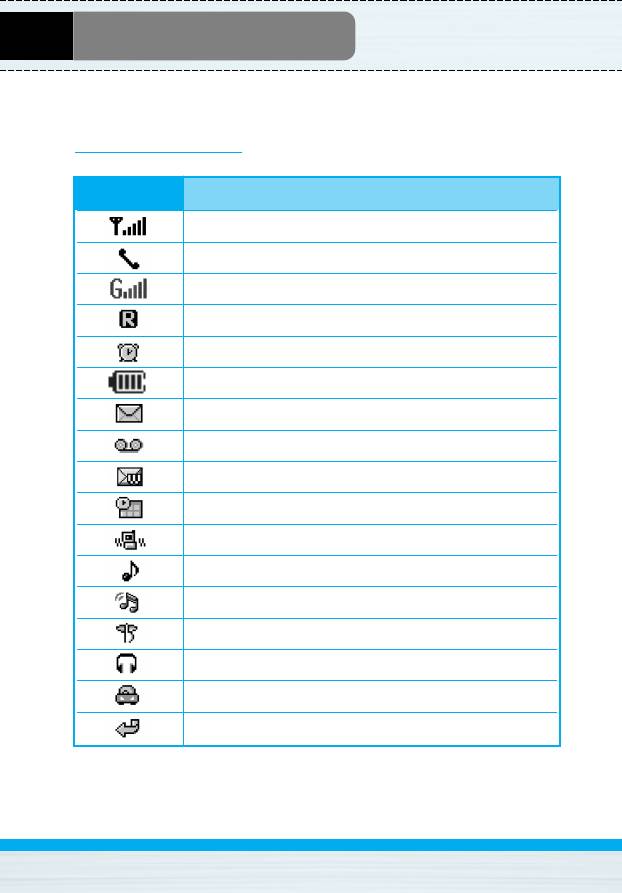
The screen displays several icons. There are described below.
On-Screen Icons
Icon/Indicator
Description
Tells you the strength of the network signal.
Call is connected.
You can use GPRS service.
Shows that you are using a roaming service.
The alarm has been set and is on.
Tells you the status of the battery.
You have received a text message.
You have received a voice message.
You have received a push message.
You can view your schedule.
All audible signals are turned off.
General menu in profile.
Loud menu in profile.
Silent menu in profile.
Headset menu in profile.
Car menu in profile.
You can divert a call.
B2000
User Guide
17
Оглавление
- BB22000000
- ǂ‰ÂÌËÂ
- ó‡ÒÚË íÂÎÂÙÓ̇
- éÔËÒ‡ÌË ä·‚˯
- àÌÙÓχˆËfl ̇ ÑËÒÔÎÂÂ
- ìÒÚ‡ÌÓ‚ÍË
- åÂÌ˛ ‚ ıӉ ‚˚ÁÓ‚‡
- äÓ‰˚ ‰ÓÒÚÛÔ‡
- ëıÂχ ÏÂÌ˛
- ëÓÓ·˘ÂÌËfl [åÂÌ˛ 1]
- Ç˚ÁÓ‚˚ [åÂÌ˛ 2]
- èÓÙËÎË [åÂÌ˛ 3]
- ç‡ÒÚÓÈÍË [åÂÌ˛ 4]
- 鄇̇ÈÁ [åÂÌ˛ 5]
- ꇉËÓ FM [åÂÌ˛ 6]
- ÄÍÒÂÒÒÛ‡˚ [åÂÌ˛ 7]
- àÌÚÂÌÂÚ [åÂÌ˛ 8]
- åÂÌ˛ ÓÌ-·ÈÌ
- èËÎÓÊÂÌËfl [åÂÌ˛ 9]
- ÄÍÒÂÒÒÛ‡˚
- ìıÓ‰ Ë íÂıÌ˘ÂÒÍÓ ӷÒÎÛÊË‚‡ÌËÂ
- èÓËÒÍ Ë ÛÒÚ‡ÌÂÌË ÌÂËÒÔ‡‚ÌÓÒÚÂÈ
- íÂıÌ˘ÂÒÍË ÍÚÂËÒÚËÍË
- Introduction
- Parts of the Phone
- Key Description
- Display Information
- Installation
- Making and Answering Calls
- In call Menu
- Access Codes
- Menu Tree
- Messages [Menu 1]
- Call register [Menu 2]
- Profiles [Menu 3]
- Settings [Menu 4]
- Organiser [Menu 5]
- FM Radio [Menu 6]
- Fun & Tools [Menu 7]
- Internet [Menu 8]
- On browsing menu
- Java [Menu 9]
- Accessories
- Care and Maintenance
- Trouble Shooting
- Technical Data
Топ 10 инструкций
100.00
MB QUART DSG 21399.98
Skil 0790 RA99.98
Bosch KGN39VW2199.97
Sony CDX-CA750X RU99.97
Braun 310 Series 399.96
Asus P3-PE599.96
Siemens MQ 5 N 29899.96
YUKON EXTEND LRS-1000

