
Asus WL-169gE: Conguring with the WLAN utility (Ad Hoc)
Conguring with the WLAN utility (Ad Hoc): Asus WL-169gE
Table of contents
- Installation Procedures Installing the WLAN utilities and driver Reading the WLAN status indicators
- One Touch Wizard
- Conguring with the WLAN utility (Infrastructure)
- Conguring with the WLAN utility (Ad Hoc)
- ASUS WLAN Control Center
- Quick Start Guide
- ASUS Wireless Settings Utility Status - Status
- Quick Start Guide
- Quick Start Guide Status - Connection
- Status - IP Cong Status - Ping
- Cong - Basic
- Cong - Advanced
- Quick Start Guide
- Cong - Encryption
- Quick Start Guide Data encryption
- Cong - Authentication
- Survey - Site Survey
- Link State
- Windows XP Wireless Options
- Quick Start Guide
Quick Start Guide
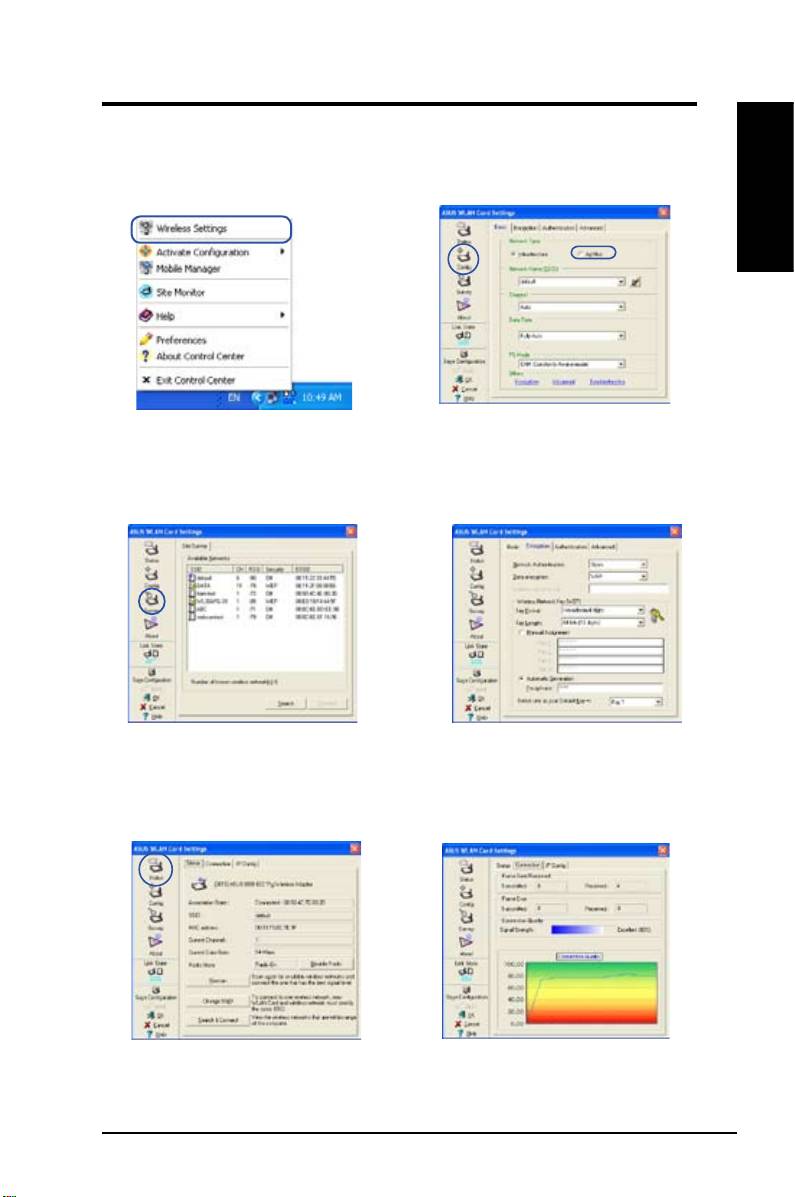
Conguring with the WLAN utility (Ad Hoc)
The WLAN card supports Ad Hoc mode which allows communication between
wireless stations without an AP.
English
1. Right-click the wireless connection icon
2. Click the
Config
button to set the WLAN
and select
Wireless Settings.
Card to
Ad Hoc
connection mode, Set the
SSID
to that of the target Ad Hoc node,
then select a
Channel
on which the Ad Hoc
nodes are to communicate.
3. Click the
Survey
button to scan for the Ad
4. If the encryption settings of your WLAN
Hoc nodes. Select the node you want to
Card are different from those of the other
communicate with and press
Connect
.
Ad Hoc nodes, you are prompted to make
the encryption of the two nodes identical.
Click
Apply
to activate the settings.
5. Check the
Status
page to see the association
6. Check the
Connection
tab to see the
state. If connection is established, the box
signal strength. Click
OK
to exit the utility.
shows “Connected - xx:xx:xx:xx:xx:xx”.
ASUS WLAN Card 5
