
Asus NC1: instruction
Class: Computer Accessories
Type:
Manual for Asus NC1
Table of contents
- 1. English .................................................................................1
Index
1. English .................................................................................1
2. FrançaisFrançais ...............................................................................6
3.
Deutsch
................................................................................10
4. Italiano................................................................................14
5.
Русский
................................................................................18
6. Čeština ...............................................................................22
7. Dansk .................................................................................26
8. Nederlands .........................................................................30
9. Suomi .................................................................................34
10. Ελληνικά ...........................................................................38
11. Magyar ...............................................................................42
12.
Norsk
...................................................................................46
13. Polski ..................................................................................50
14. Português ...........................................................................54
15.
Română
.............................................................................58
16. Slovenščina ........................................................................62
17. Español ..............................................................................66
18. Svenska .............................................................................70
19. Українська ........................................................................74
20. Türkçe ................................................................................78
U7445_NC1_QSG_V2.indb 1 5/23/12 2:21:06 PM
E6239
Package contents
- 1 x ASUS NC1 headphone
- 1 x Dual-pin airline headset adapter
- 1 x Protective carrying case
Getting to know your headphone
NC1
Portable Active Noise-Canceling
Headphone
Quick Start Guide
Battery compartment
The illustrations are for reference only. Illustrations 1, 2, and 3 refer to the same
headphone control drawn from different angles.
ASUS NC1
U7445_NC1_QSG_V2.indb 2 5/23/12 2:21:06 PM
E6239
Package contents
English
- 1 x ASUS NC1 headphone
- 1 x Dual-pin airline headset adapter
- 1 x Protective carrying case
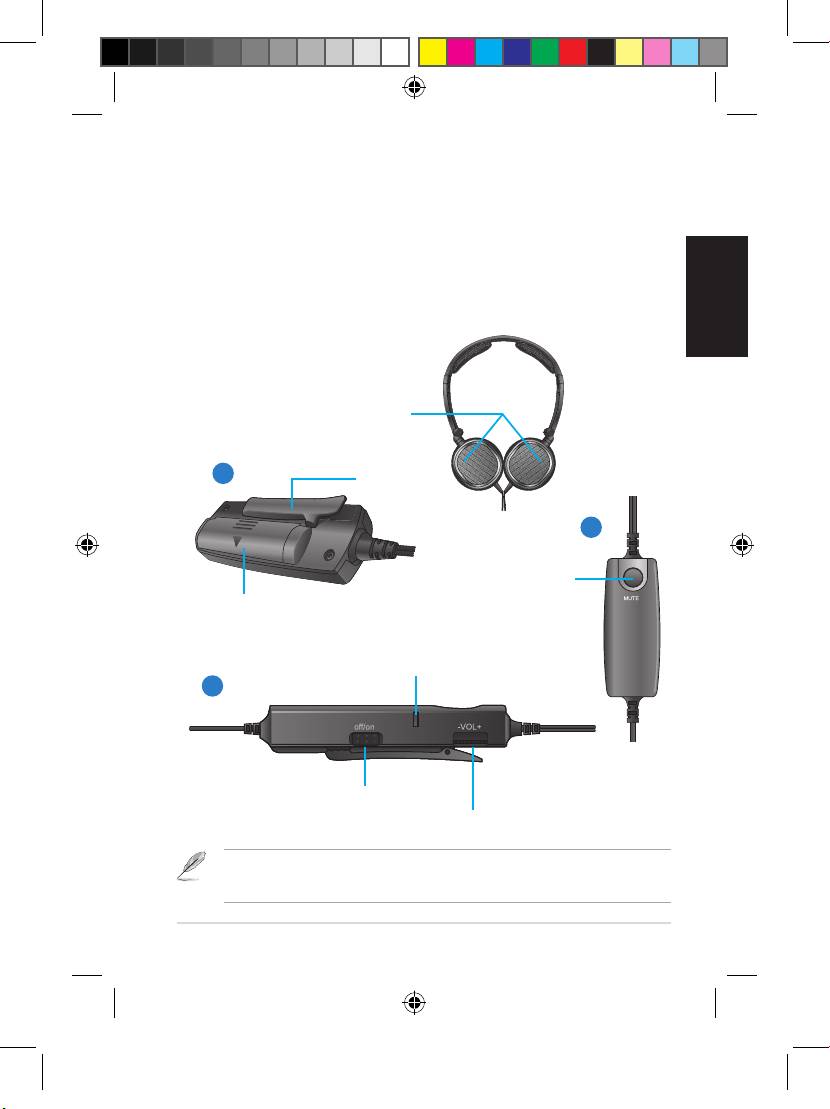
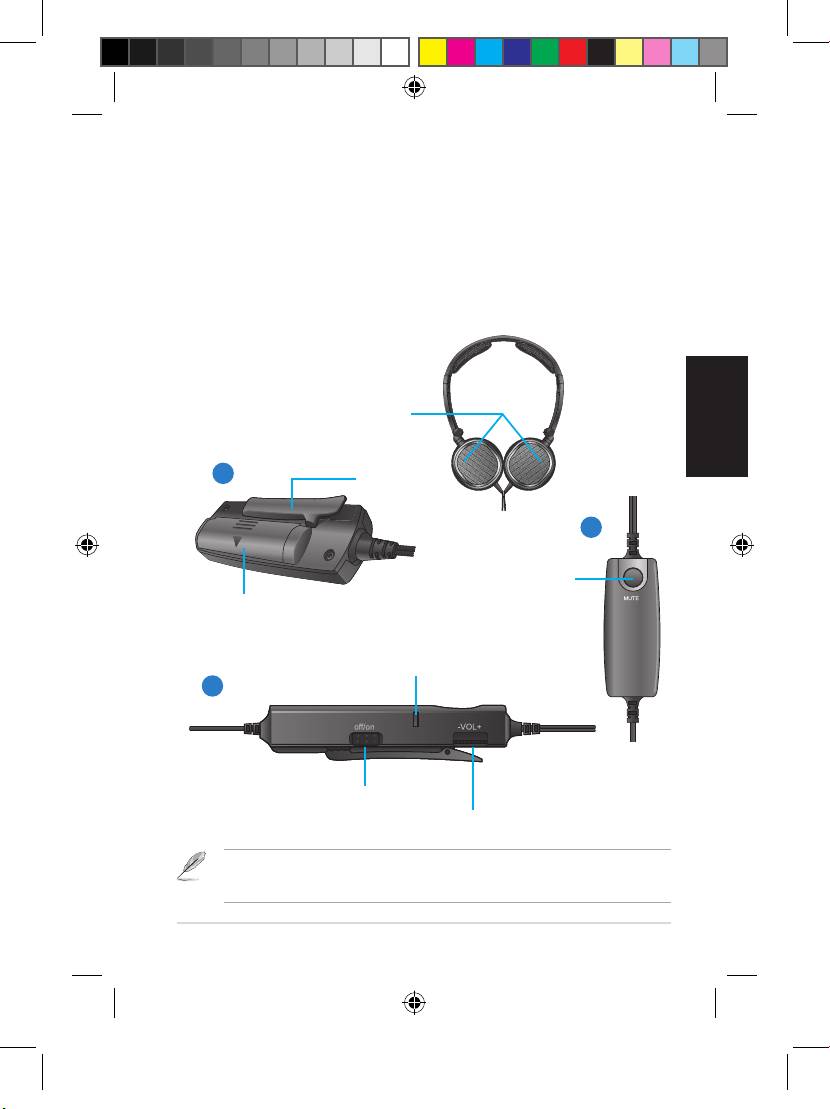
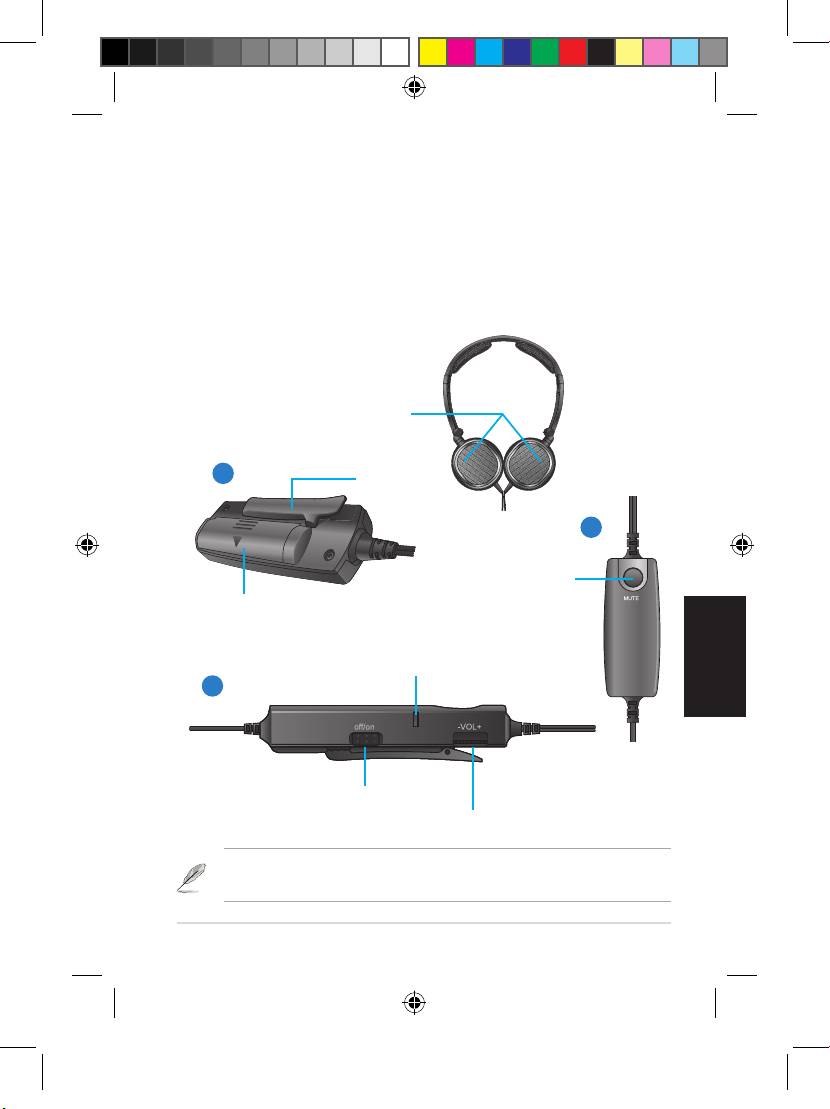
Getting to know your headphone
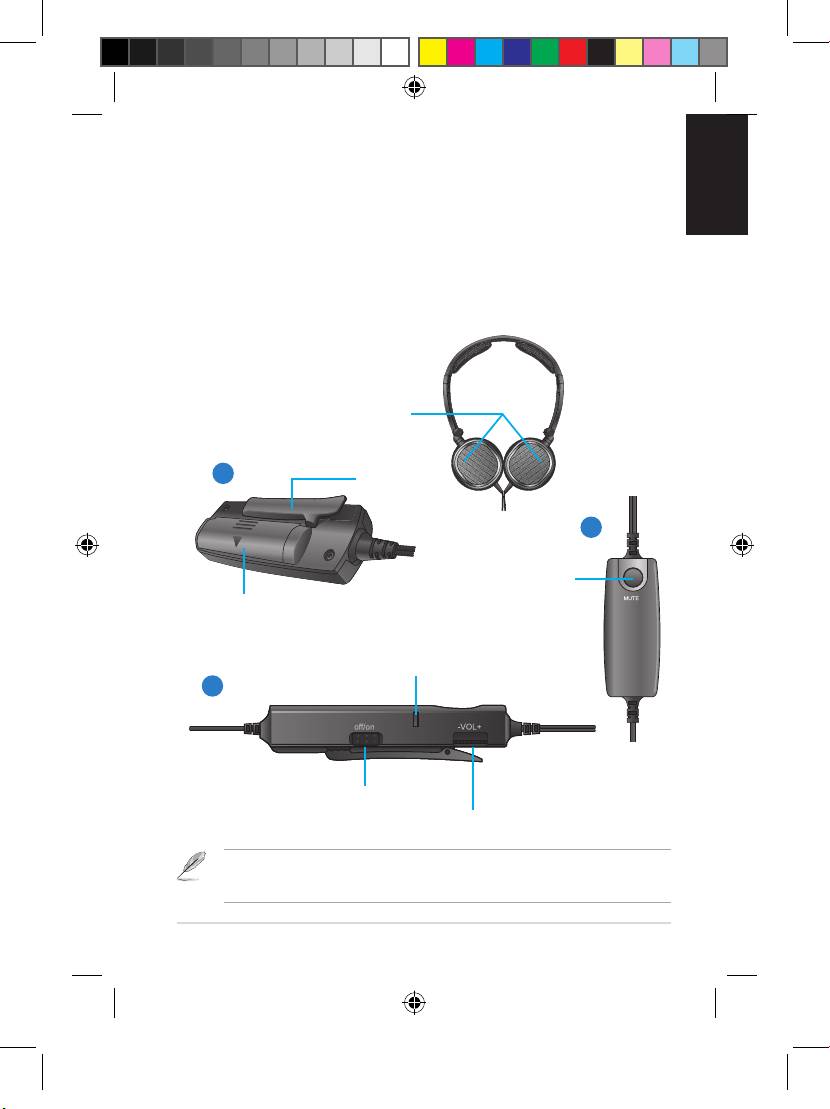
Ear cups
NC1
1
Clip
Portable Active Noise-Canceling
2
Headphone
Mute button
Quick Start Guide
Battery compartment
Activity LED
3
Noise-canceling switch
Volume control
The illustrations are for reference only. Illustrations 1, 2, and 3 refer to the same
headphone control drawn from different angles.
ASUS NC1 3
U7445_NC1_QSG_V2.indb 3 5/23/12 2:21:09 PM
English
Quick Start Guide4
ASUS NC1
Wearing your headphone
This dual-pin airline headset adapter does not fit all airlines. The audio jacks vary in
different airlines.
There are R and L markings on the ear cups.
To use the dual-pin airline headset adapter
To wear your headphone
1. Insert the audio cable into the dual-pin airline headset adapter.
• Adjust the headphone straps so it fits snugly on your head.
2. Insert the dual-pin airline headset adapter into the airplane’s
• Adjust the ear cups so it fits comfortably around your ears.
audio jack.
• Move the volume control to the right /left to increase/decrease
the volume.
Storing your Headphone
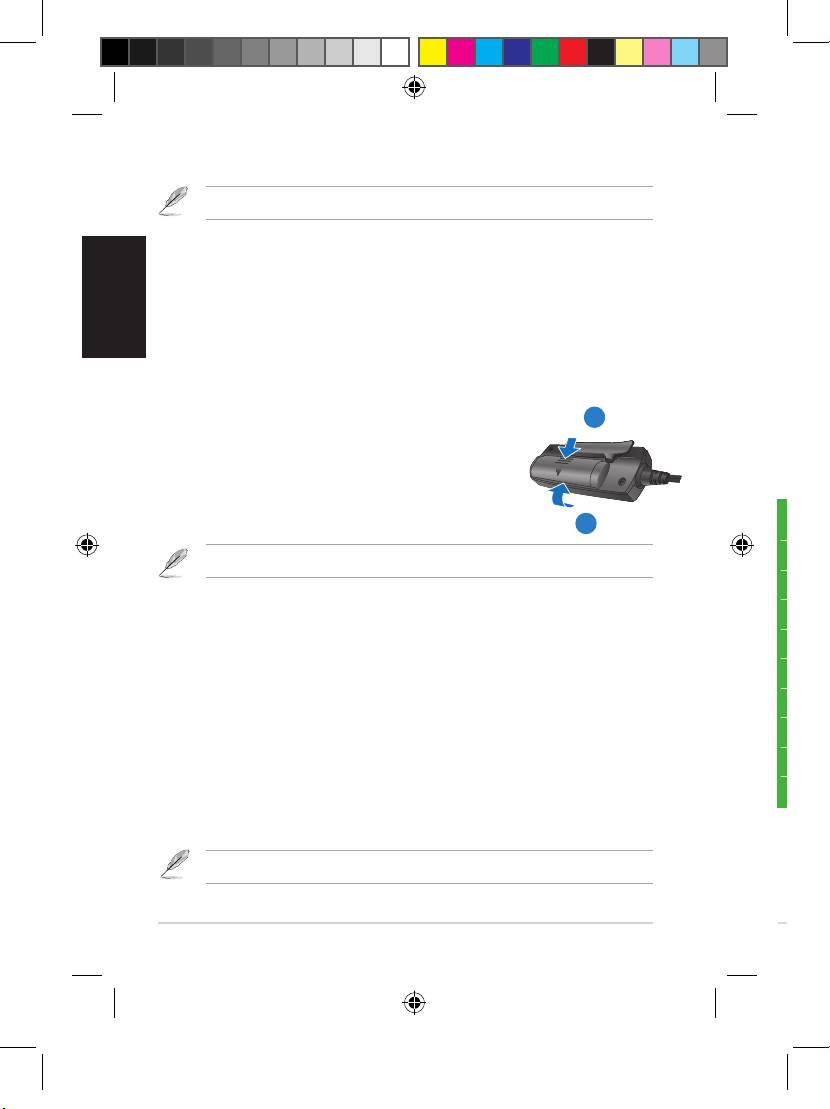
Installing the battery
To store your headphone
To install the battery
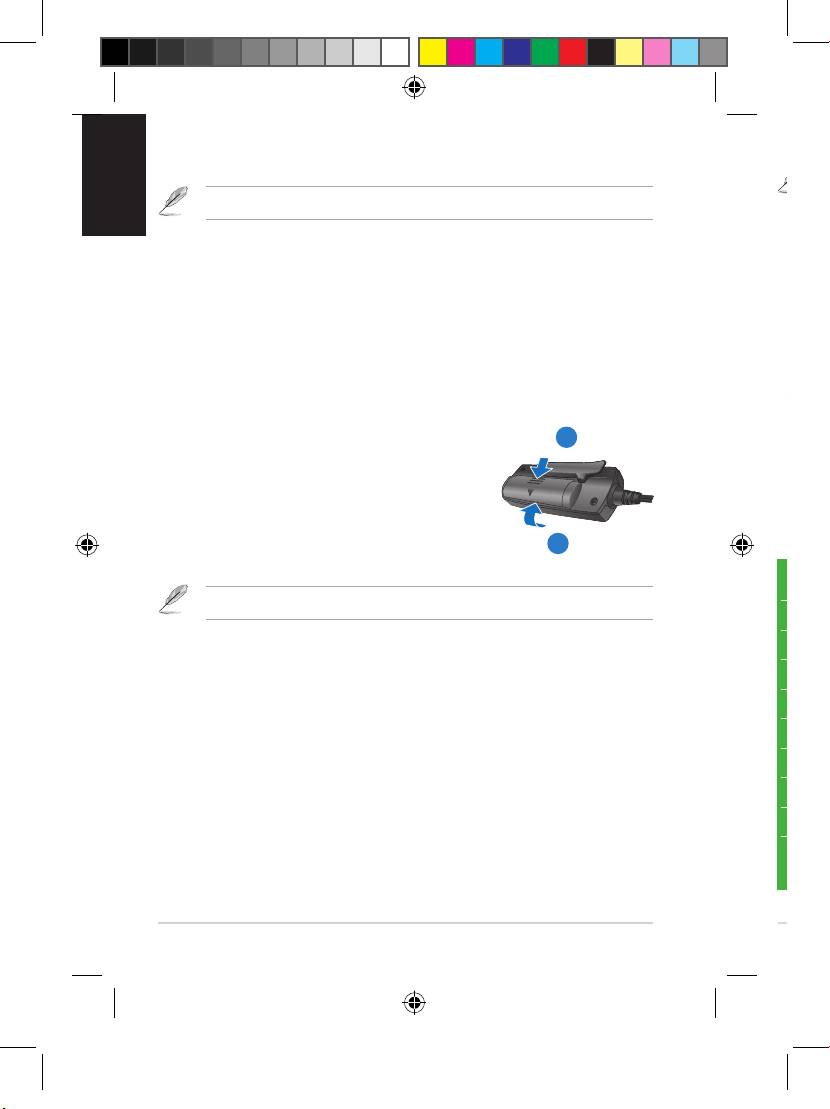
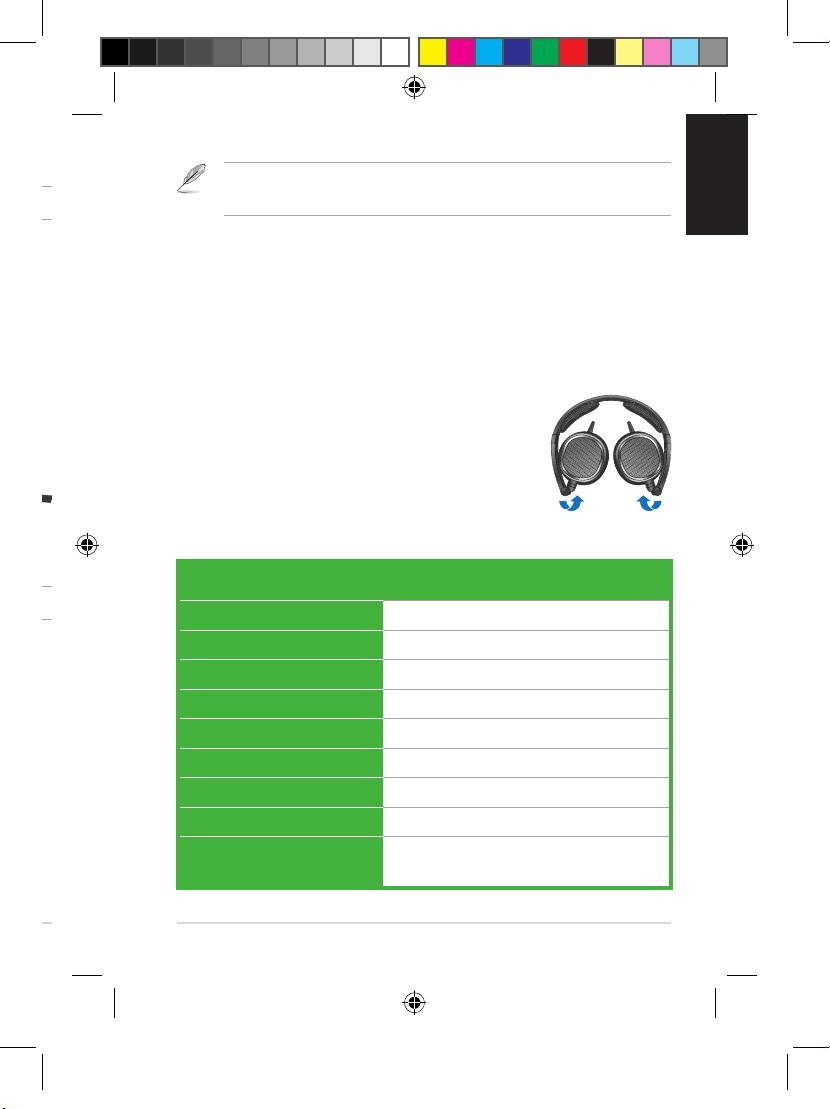
1. Fold the ear cups inward to the direction of
1
the arrow.
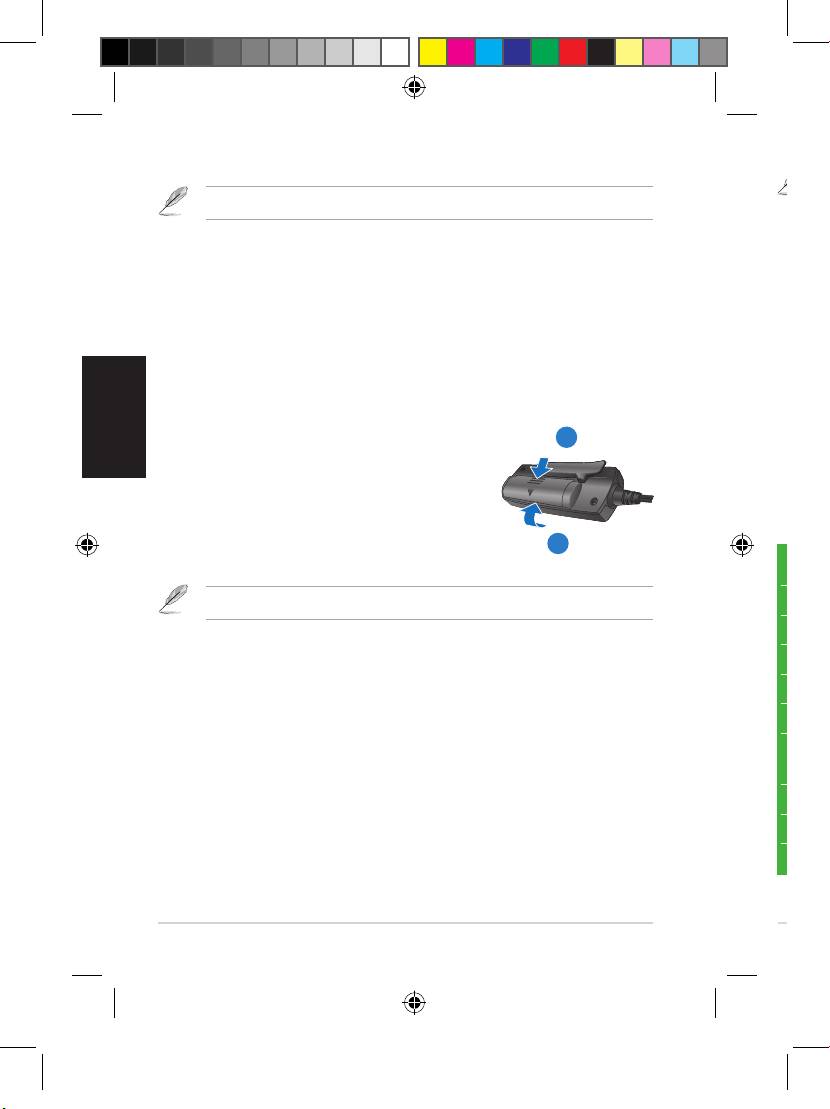
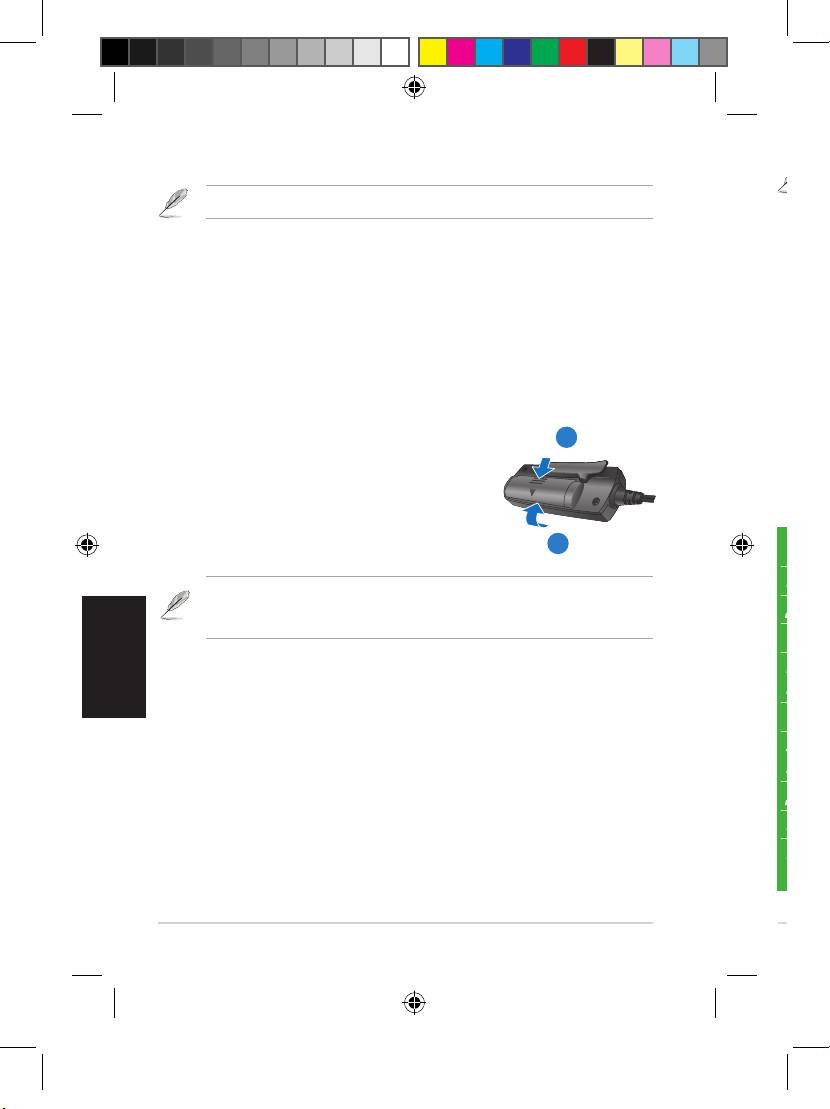
1. Push the battery cover to the direction
2. Put your headphone in the bundled
of the arrow.
protective carrying case.
2. Install one AAA battery in the battery
compartment.
3
3. Replace the battery cover.
Specifications
Remove the battery if you are not going to use your headphone for a long time.
Power 1
x AAA battery
Driver 40mm (neodymium magnet)
Activating the noise-canceling function
Impedance 32 ohms +/- 4 ohms
The noise-canceling function removes ambient noise such as
Max input power 100mW
background noise for a clearer sound quality.
Frequency range 16Hz~22 Khz
To activate the noise-canceling function
Active noise cancellation >= 18dB
Turn the noise-cancelling switch to ON. The activity LED turns red.
Battery life 100 hours (at 10 mW)
Dimension (mm) 175mm x135mm x28mm
Using the dual-pin airline headset adapter
Weight 135g excluding accessories and
The dual-pin airline headset adapter allows you to use your own
battery
headphone onboard an airline.
U7445_NC1_QSG_V2.indb 4 5/23/12 2:21:11 PM
Quick Start Guide
English
ASUS NC1 5
Wearing your headphone
This dual-pin airline headset adapter does not fit all airlines. The audio jacks vary in
different airlines.
There are R and L markings on the ear cups.
To use the dual-pin airline headset adapter
To wear your headphone
1. Insert the audio cable into the dual-pin airline headset adapter.
• Adjust the headphone straps so it fits snugly on your head.
2. Insert the dual-pin airline headset adapter into the airplane’s
• Adjust the ear cups so it fits comfortably around your ears.
audio jack.
• Move the volume control to the right /left to increase/decrease
the volume.
Storing your Headphone
Installing the battery
To store your headphone
To install the battery
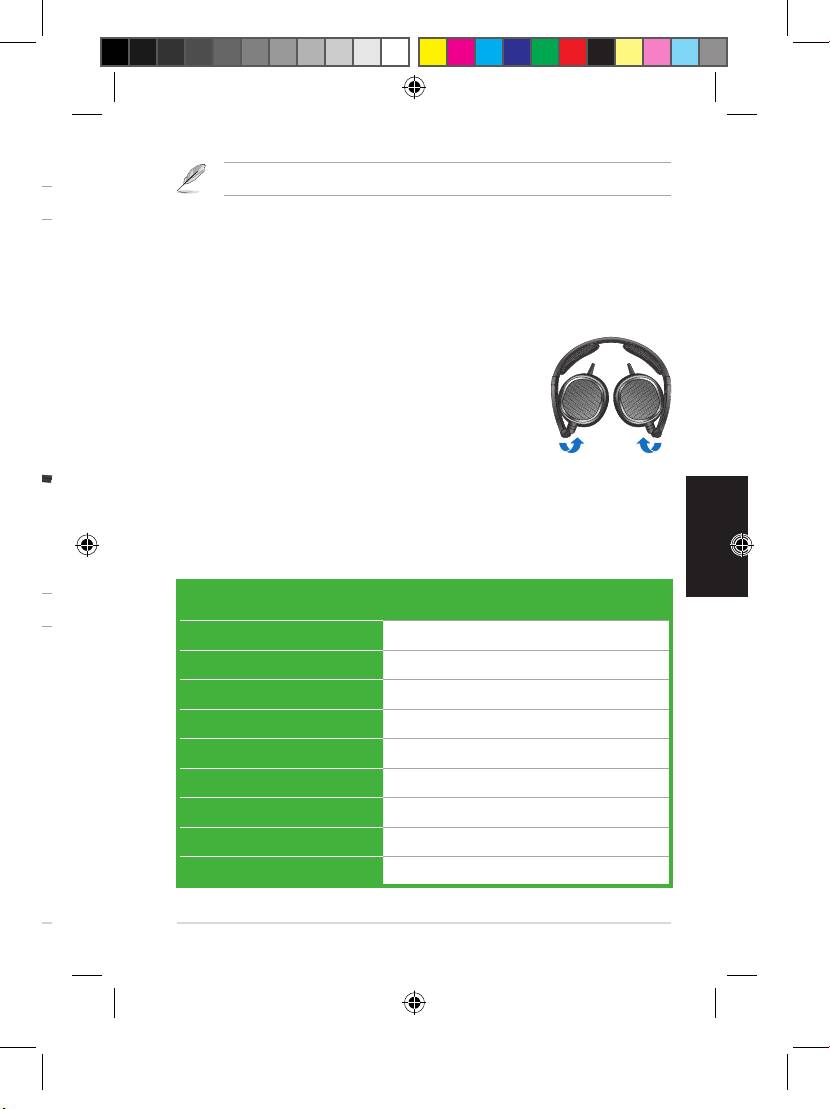
1. Fold the ear cups inward to the direction of
the arrow.
1. Push the battery cover to the direction
2. Put your headphone in the bundled
of the arrow.
protective carrying case.
2. Install one AAA battery in the battery
compartment.
3. Replace the battery cover.
Specifications
Remove the battery if you are not going to use your headphone for a long time.
Power 1
x AAA battery
Driver 40mm (neodymium magnet)
Activating the noise-canceling function
Impedance 32 ohms +/- 4 ohms
The noise-canceling function removes ambient noise such as
Max input power 100mW
background noise for a clearer sound quality.
Frequency range 16Hz~22 Khz
To activate the noise-canceling function
Active noise cancellation >= 18dB
Turn the noise-cancelling switch to ON. The activity LED turns red.
Battery life 100 hours (at 10 mW)
Dimension (mm) 175mm x135mm x28mm
Using the dual-pin airline headset adapter
Weight 135g excluding accessories and
The dual-pin airline headset adapter allows you to use your own
battery
headphone onboard an airline.
U7445_NC1_QSG_V2.indb 5 5/23/12 2:21:12 PM
F6239
Contenu de la boîte
- 1 x casque ASUS NC1
- 1 x adaptateur pour siège d’avion
- 1 x housse de transport
Faire connaissance avec votre casque
NC1
Casque audio à réduction de bruit
Guide de démarrage rapide
Compartiment à pile
Les illustrations sont uniquement données à titre indicatif. Les illustrations 1, 2 et 3 se
réfèrent au même objet sous des angles différents.
ASUS NC1
U7445_NC1_QSG_V2.indb 6 5/23/12 2:21:13 PM
F6239
Contenu de la boîte
- 1 x casque ASUS NC1
- 1 x adaptateur pour siège d’avion
- 1 x housse de transport
Faire connaissance avec votre casque
Français
Oreillettes
NC1
1
Pince
Casque audio à réduction de bruit
2
Bouton de mise
Guide de démarrage rapide
Compartiment à pile
en sourdine
Voyant d’activité
3
Interrupteur de réduction du
bruit
Contrôle du volume
Les illustrations sont uniquement données à titre indicatif. Les illustrations 1, 2 et 3 se
réfèrent au même objet sous des angles différents.
ASUS NC1 7
U7445_NC1_QSG_V2.indb 7 5/23/12 2:21:16 PM
Français
Guide de démarrage rapide8
ASUS NC1
Utiliser votre casque
Pour utiliser l’adaptateur pour siège d’avion :
Les oreillettes incluent les mentions R (pour l’oreille droite) et L (pour l’oreille gauche).
1. Insérez la câble du casque dans l’adaptateur pour siège d’avion.
2. Insérez l’adaptateur dans la prise audio de votre siège d’avion.
Pour utiliser votre casque :
• Ajustez l’arceau jusqu’à ce que le casque s’adapte à votre tête.
Ranger votre casque
• Ajustez les oreillettes pour garantir un meilleur confort d’écoute.
• Déplacez la molette de contrôle du volume vers la droite ou la
Pour ranger votre casque :
gauche pour augmenter ou baisser le volume.
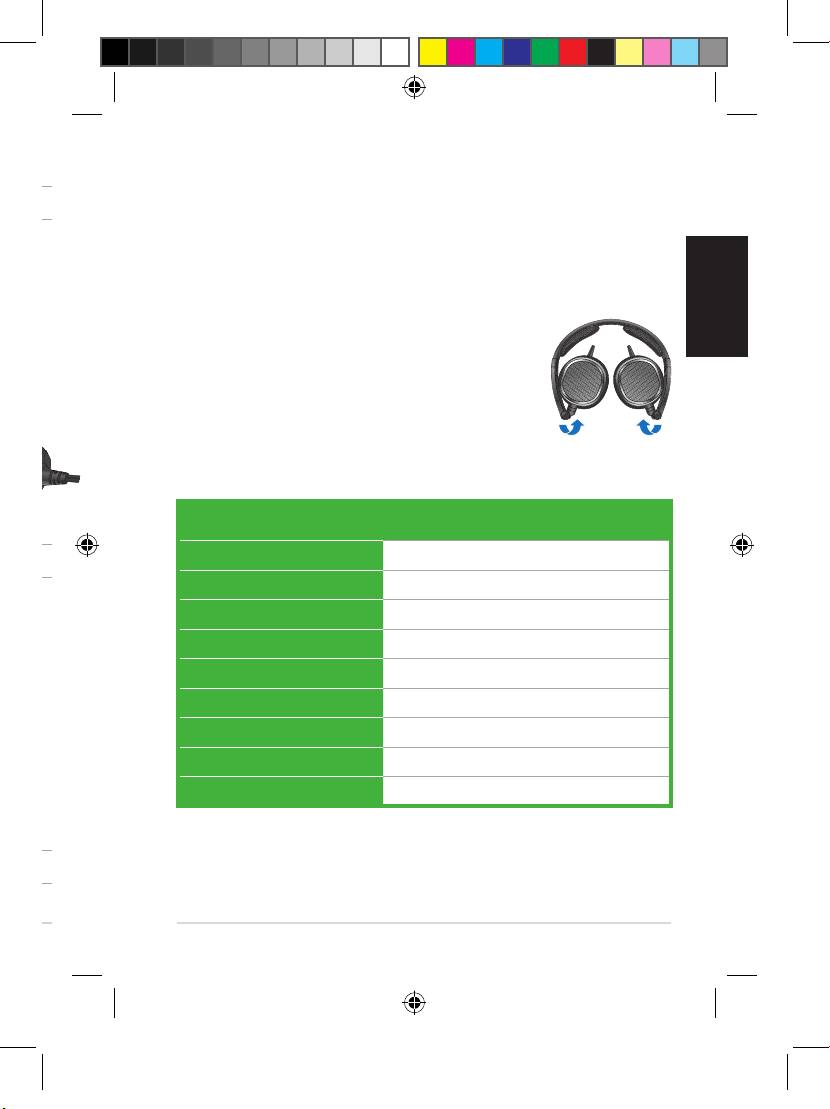
1. Pliez les oreillettes dans la direction de la
flèche comme illustré ci-contre.
Installer la pile
2. Placez votre casque dans sa housse de
Pour installer la pile :
1
transport.
1. Déplacez le couvercle du compartiment à pile
dans le sens indiqué par la flèche ci-contre.
2. Insérez une pile AAA.
3. Replacez le couvercle du compartiment à pile.
Spécifications
3
Alimentation 1
x pile AAA
Retirez la pile lors d’une période d’inutilisation prolongée du casque.
Pilote 40mm (aimant néodyme)
Activer la fonction de réduction du bruit
Impédance 32 ohms +/- 4 ohms
La fonction de réduction du bruit permet d’atténuer les nuisances
Puissance d’entrée max. 100mW
sonores environnantes pour obtenir une meilleure qualité de son.
Plage de fréquence 16Hz~22 Khz
Pour activer la fonction de réduction du bruit :
Suppression du bruit >= 18dB
Déplacez l’interrupteur de réduction du bruit sur ON. Le voyant
Durée de vie de la pile 100 heures (à 10 mW)
d’activité s’allume.
Dimensions (mm) 175mm x135mm x28mm
Poids 135g (sans accessoires ni pile)
Utiliser l’adaptateur pour siège d’avion
Cet adaptateur permet d’utiliser votre casque à bord d’un avion.
Le type de prise audio pour siège d’avion varie en fonction des compagnies aériennes.
U7445_NC1_QSG_V2.indb 8 5/23/12 2:21:17 PM
Guide de démarrage rapide
Français
ASUS NC1 9
Utiliser votre casque
Pour utiliser l’adaptateur pour siège d’avion :
Les oreillettes incluent les mentions R (pour l’oreille droite) et L (pour l’oreille gauche).
1. Insérez la câble du casque dans l’adaptateur pour siège d’avion.
2. Insérez l’adaptateur dans la prise audio de votre siège d’avion.
Pour utiliser votre casque :
• Ajustez l’arceau jusqu’à ce que le casque s’adapte à votre tête.
Ranger votre casque
• Ajustez les oreillettes pour garantir un meilleur confort d’écoute.
• Déplacez la molette de contrôle du volume vers la droite ou la
Pour ranger votre casque :
gauche pour augmenter ou baisser le volume.
1. Pliez les oreillettes dans la direction de la
flèche comme illustré ci-contre.
Installer la pile
2. Placez votre casque dans sa housse de
Pour installer la pile :
transport.
1. Déplacez le couvercle du compartiment à pile
dans le sens indiqué par la flèche ci-contre.
2. Insérez une pile AAA.
3. Replacez le couvercle du compartiment à pile.
Spécifications
Alimentation 1
x pile AAA
Retirez la pile lors d’une période d’inutilisation prolongée du casque.
Pilote 40mm (aimant néodyme)
Activer la fonction de réduction du bruit
Impédance 32 ohms +/- 4 ohms
La fonction de réduction du bruit permet d’atténuer les nuisances
Puissance d’entrée max. 100mW
sonores environnantes pour obtenir une meilleure qualité de son.
Plage de fréquence 16Hz~22 Khz
Pour activer la fonction de réduction du bruit :
Suppression du bruit >= 18dB
Déplacez l’interrupteur de réduction du bruit sur ON. Le voyant
Durée de vie de la pile 100 heures (à 10 mW)
d’activité s’allume.
Dimensions (mm) 175mm x135mm x28mm
Poids 135g (sans accessoires ni pile)
Utiliser l’adaptateur pour siège d’avion
Cet adaptateur permet d’utiliser votre casque à bord d’un avion.
Le type de prise audio pour siège d’avion varie en fonction des compagnies aériennes.
U7445_NC1_QSG_V2.indb 9 5/23/12 2:21:18 PM
G6239
Verpackungsinhalt
- 1 x ASUS NC1 Kopfhörer
- 1 x Doppelsteckeradapter für Flugzeuge
- 1 x Schutztasche
Kennenlernen ihrer Kopfhörer
Deutsch
NC1
Deutsch
Mobile Kopfhörer mit aktiver
Geräuschunterdrückung
Schnellstartanleitung
Batteriefach
Dies sind Referenzabbildungen. Abbildungen 1, 2 und 3 beziehen sich auf eine
Komponente, jedoch aus unterschiedlichen Betrachtungswinkeln.
ASUS NC1
U7445_NC1_QSG_V2.indb 10 5/23/12 2:21:19 PM
G6239
Verpackungsinhalt
- 1 x ASUS NC1 Kopfhörer
- 1 x Doppelsteckeradapter für Flugzeuge
- 1 x Schutztasche
Kennenlernen ihrer Kopfhörer
Deutsch
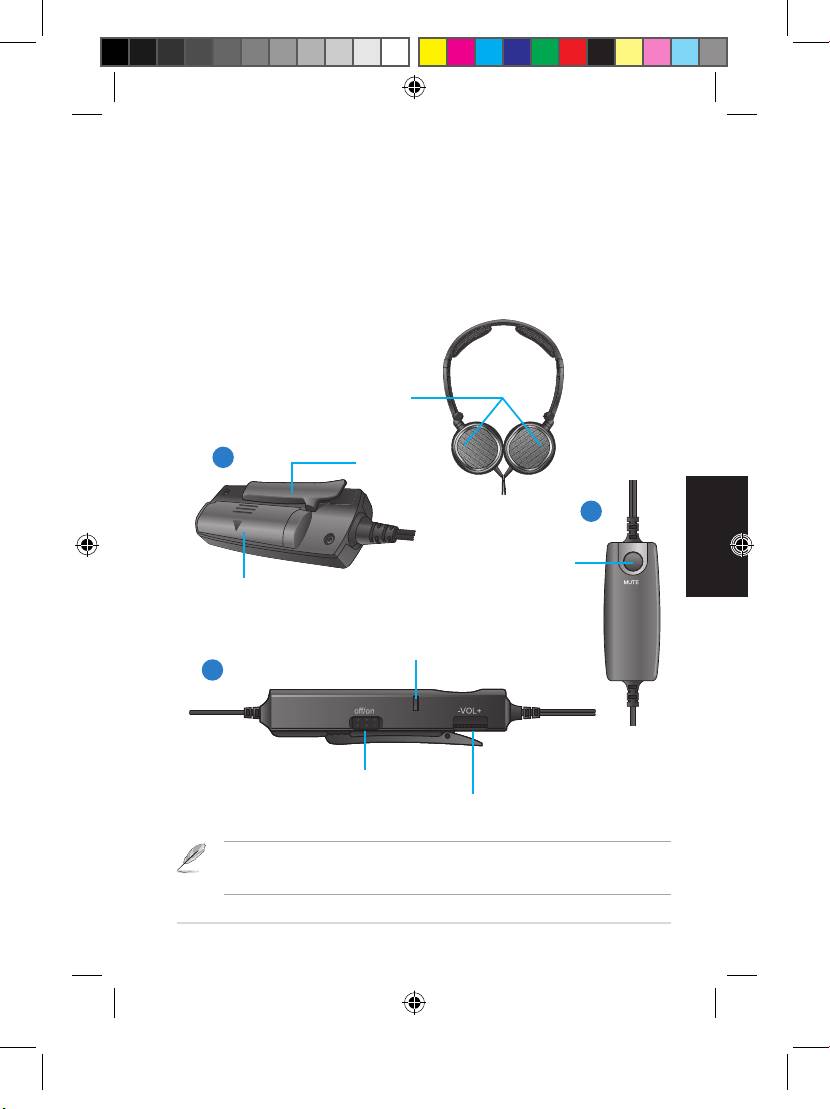
Hörmuscheln
NC1
Deutsch
1
Clip
Mobile Kopfhörer mit aktiver
2
Geräuschunterdrückung
Stummschalttaste
Schnellstartanleitung
Batteriefach
Aktivitäts-LED
3
Geräuschunterdrückungsschalter
Lautstärkeregler
Dies sind Referenzabbildungen. Abbildungen 1, 2 und 3 beziehen sich auf eine
Komponente, jedoch aus unterschiedlichen Betrachtungswinkeln.
ASUS NC1 11
U7445_NC1_QSG_V2.indb 11 5/23/12 2:21:22 PM
Deutsch
Deutsch
12
Schnellstartanleitung
Deutsch
Deutsch
ASUS NC1
Verwenden der Kopfhörer
Der Adapter für Flugzeuge passt möglicherweise nicht in allen Flugzeugen.
Die Hörmuscheln sind mit L für links und R für rechts markiert.
So verwenden Sie den Doppelsteckeradapter
So setzen Sie die Kopfhörer auf
1. Stecken Sie den Kopfhörerstecker in den Doppelsteckeradapter
• Stellen Sie den Bügel so ein, dass er bequem auf Ihrem Kopf sitzt.
für Flugzeuge.
• Stellen Sie die Hörmuscheln so ein, dass diese bequem auf Ihren
2. Stecken Sie den Doppelsteckeradapter für Flugzeuge in die
Ohren sitzen.
Kopfhörerbuchse an Ihrem Sitz.
• Verschieben Sie den Lautstärkeregler nach rechts/links, um die
Verpacken Ihrer Kopfhörer
Lautstärke zu erhöhen oder zu verringern.
So lagern Sie Ihre Kopfhörer
Einlegen der Batterie
1
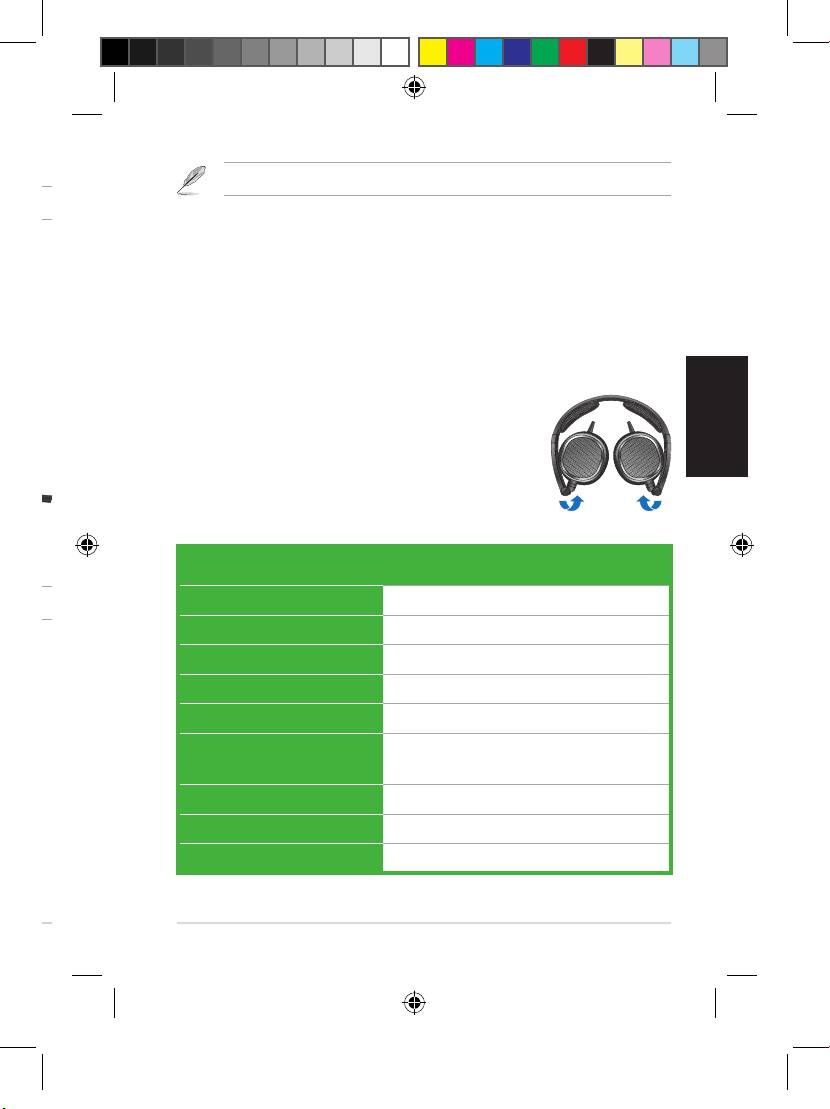
1. Schwenken Sie die Hörmuscheln in
So legen Sie die Batterie ein
Pfeilrichtung nach innen.
1. Schieben Sie den Batteriefachdeckel in
2. Stecken Sie die Kopfhörer in die
Pfeilrichtung.
mitgelieferte Schutztasche.
2. Legen Sie eine AAA-Batterie in das Fach ein.
3
3. Schließen Sie den Batteriefachdeckel.
Spezifikationen
Entfernen Sie die Batterie, wenn Sie die Kopfhörer längere Zeit nicht benutzen.
Stromversorgung 1
x AAA-Batterie
Hörerdurchmesser 40mm (Neodym-Magnet)
Aktivieren der Geräuschunterdrückung
Impedanz 32 Ohm +/- 4 Ohm
Die Rauschunterdrückung reduziert Umgebungsgeräusche, z.B.
Max. Eingangsleistung 100mW
Hintergrundgeräusche, zugunsten einer besseren Tonqualität.
Frequenzbereich 16Hz-22 Khz
So aktivieren Sie die Geräuschunterdrückung
Aktive Geräuschunter-
>= 18dB
Schieben Sie den Geräuschunterdrückungsschalter auf ON. Die
drückung
Aktivitäts-LED leuchtet jetzt rot.
Batterielaufzeit 100 Stunden (bei 10 mW)
Abmessungen (mm) 175mm x 135mm x 28mm
Verwenden des Doppelsteckeradapters
Gewicht 135g ohne Zubehör und Batterie
Der Doppelsteckeradapter für Flugzeuge ermöglicht Ihnen die
Verwendung Ihrer Kopfhörer im Flugzeug.
U7445_NC1_QSG_V2.indb 12 5/23/12 2:21:23 PM
Deutsch
Deutsch
Schnellstartanleitung
Deutsch
Deutsch
ASUS NC1 13
Verwenden der Kopfhörer
Der Adapter für Flugzeuge passt möglicherweise nicht in allen Flugzeugen.
Die Hörmuscheln sind mit L für links und R für rechts markiert.
So verwenden Sie den Doppelsteckeradapter
So setzen Sie die Kopfhörer auf
1. Stecken Sie den Kopfhörerstecker in den Doppelsteckeradapter
• Stellen Sie den Bügel so ein, dass er bequem auf Ihrem Kopf sitzt.
für Flugzeuge.
• Stellen Sie die Hörmuscheln so ein, dass diese bequem auf Ihren
2. Stecken Sie den Doppelsteckeradapter für Flugzeuge in die
Ohren sitzen.
Kopfhörerbuchse an Ihrem Sitz.
• Verschieben Sie den Lautstärkeregler nach rechts/links, um die
Verpacken Ihrer Kopfhörer
Lautstärke zu erhöhen oder zu verringern.
So lagern Sie Ihre Kopfhörer
Einlegen der Batterie
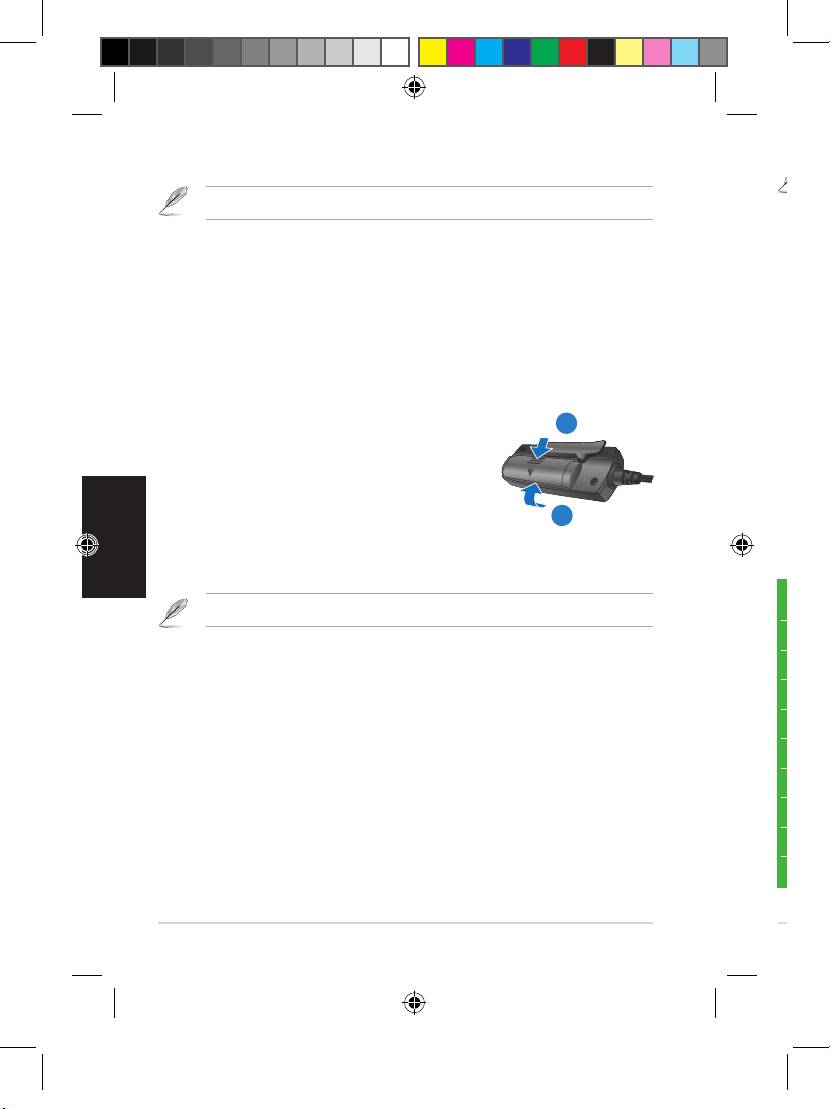
1. Schwenken Sie die Hörmuscheln in
So legen Sie die Batterie ein
Pfeilrichtung nach innen.
1. Schieben Sie den Batteriefachdeckel in
2. Stecken Sie die Kopfhörer in die
Pfeilrichtung.
mitgelieferte Schutztasche.
2. Legen Sie eine AAA-Batterie in das Fach ein.
3. Schließen Sie den Batteriefachdeckel.
Spezifikationen
Entfernen Sie die Batterie, wenn Sie die Kopfhörer längere Zeit nicht benutzen.
Stromversorgung 1
x AAA-Batterie
Hörerdurchmesser 40mm (Neodym-Magnet)
Aktivieren der Geräuschunterdrückung
Impedanz 32 Ohm +/- 4 Ohm
Die Rauschunterdrückung reduziert Umgebungsgeräusche, z.B.
Max. Eingangsleistung 100mW
Hintergrundgeräusche, zugunsten einer besseren Tonqualität.
Frequenzbereich 16Hz-22 Khz
So aktivieren Sie die Geräuschunterdrückung
Aktive Geräuschunter-
>= 18dB
Schieben Sie den Geräuschunterdrückungsschalter auf ON. Die
drückung
Aktivitäts-LED leuchtet jetzt rot.
Batterielaufzeit 100 Stunden (bei 10 mW)
Abmessungen (mm) 175mm x 135mm x 28mm
Verwenden des Doppelsteckeradapters
Gewicht 135g ohne Zubehör und Batterie
Der Doppelsteckeradapter für Flugzeuge ermöglicht Ihnen die
Verwendung Ihrer Kopfhörer im Flugzeug.
U7445_NC1_QSG_V2.indb 13 5/23/12 2:21:25 PM
I6239
Contenuto della confezione
- 1 x Cuffie NC1 ASUS
- 1 x Adattatore a due pin per l’uso delle cuffie in aereo
- 1 x Custodia protettiva per il trasporto
Descrizione delle cuffie
NC1
Cuffie Portatili a Riduzione Attiva
del Rumore
Scomparto batteria
Guida Rapida
Le illustrazioni sono puramente indicative. Le immagini 1, 2 e 3 si riferiscono tutte al
medesimo dispositivo di controllo cuffie, ripreso da diverse angolazioni.
ASUS NC1
U7445_NC1_QSG_V2.indb 14 5/23/12 2:21:25 PM
I6239
Contenuto della confezione
- 1 x Cuffie NC1 ASUS
- 1 x Adattatore a due pin per l’uso delle cuffie in aereo
- 1 x Custodia protettiva per il trasporto
Descrizione delle cuffie
Auricolari
NC1
1
Clip
Cuffie Portatili a Riduzione Attiva
2
del Rumore
Italiano
Pulsante di
Scomparto batteria
silenziamento
Guida Rapida
LED di attività
3
Interruttore di riduzione
del rumore
Controllo volume
Le illustrazioni sono puramente indicative. Le immagini 1, 2 e 3 si riferiscono tutte al
medesimo dispositivo di controllo cuffie, ripreso da diverse angolazioni.
ASUS NC1 15
U7445_NC1_QSG_V2.indb 15 5/23/12 2:21:28 PM
Italiano
Guida Rapida16
ASUS NC1
Come indossare le cuffie
Gli adattatori per aereo variano a seconda degli aeroplani.
L’ auricolare destro e sinistro sono indicati con le lettere R e L.
Per utilizzare l’adattatore a due pin in aereo:
Per indossare le cuffie
1. Inserire il cavo audio nell’adattatore delle cuffie.
• Regolare l’archetto delle cuffie perchè si adatti perfettamente
2. Inserire l’adattatore delle cuffie nel connettore audio dell’aereo.
al capo.
• Regolare gli auricolari in modo che siano ben appoggiati sulle
Come custodire le cuffie
orecchie.
Per custodire le cuffie:
• Ruotare verso destra/sinistra la rotellina di controllo volume
1. Ripiegare gli auricolari verso l’interno, come
per aumentare/ridurre il volume.
mostrato in figura.
1
2. Riporre le cuffie nella custodia protettiva
Come installare la batteria
fornita con il prodotto.
Per installare la batteria
1. Spingere la copertura della batteria nella
3
direzione della freccia.
2. Installare una batteria AAA nell’apposito scomparto.
3. Rimontare la copertura della batteria.
Specifiche tecniche
Rimuovere la batteria se non si usano le cuffie per molto tempo.
Alimentazione 1
x batteria AAA
Come attivare la funzione di riduzione del rumore
Driver 40mm (magnete in neodimio)
La funzione di riduzione del rumore consente di diminuire il
Impedenza 32 ohm +/- 4 ohm
disturbo sonoro di sottofondo, migliorando la qualità dell’audio.
Potenza max ingresso 100mW
Per attivare la funzione di riduzione del rumore
Intervallo di frequenza 16Hz~22 Khz
Spostare l’interruttore di riduzione del rumore in posizione ON. Il
Riduzione attiva rumore >= 18dB
LED di attività si illumina di colore rosso.
Durata della batteria 100 ore (a 10 mW)
Come utilizzare l’adattatore a due pin in aereo
Dimensioni (mm) 175mm x135mm x28mm
L’adattatore a due pin consente di utilizzare le cuffie a bordo di un
Peso 135g (esclusi accessori e batteria)
aeroplano.
U7445_NC1_QSG_V2.indb 16 5/23/12 2:21:30 PM
Guida Rapida
Italiano
ASUS NC1 17
Come indossare le cuffie
Gli adattatori per aereo variano a seconda degli aeroplani.
L’ auricolare destro e sinistro sono indicati con le lettere R e L.
Per utilizzare l’adattatore a due pin in aereo:
Per indossare le cuffie
1. Inserire il cavo audio nell’adattatore delle cuffie.
• Regolare l’archetto delle cuffie perchè si adatti perfettamente
2. Inserire l’adattatore delle cuffie nel connettore audio dell’aereo.
al capo.
• Regolare gli auricolari in modo che siano ben appoggiati sulle
Come custodire le cuffie
orecchie.
Per custodire le cuffie:
• Ruotare verso destra/sinistra la rotellina di controllo volume
1. Ripiegare gli auricolari verso l’interno, come
per aumentare/ridurre il volume.
mostrato in figura.
2. Riporre le cuffie nella custodia protettiva
Come installare la batteria
fornita con il prodotto.
Per installare la batteria
1. Spingere la copertura della batteria nella
direzione della freccia.
2. Installare una batteria AAA nell’apposito scomparto.
3. Rimontare la copertura della batteria.
Specifiche tecniche
Rimuovere la batteria se non si usano le cuffie per molto tempo.
Alimentazione 1
x batteria AAA
Come attivare la funzione di riduzione del rumore
Driver 40mm (magnete in neodimio)
La funzione di riduzione del rumore consente di diminuire il
Impedenza 32 ohm +/- 4 ohm
disturbo sonoro di sottofondo, migliorando la qualità dell’audio.
Potenza max ingresso 100mW
Per attivare la funzione di riduzione del rumore
Intervallo di frequenza 16Hz~22 Khz
Spostare l’interruttore di riduzione del rumore in posizione ON. Il
Riduzione attiva rumore >= 18dB
LED di attività si illumina di colore rosso.
Durata della batteria 100 ore (a 10 mW)
Come utilizzare l’adattatore a due pin in aereo
Dimensioni (mm) 175mm x135mm x28mm
L’adattatore a due pin consente di utilizzare le cuffie a bordo di un
Peso 135g (esclusi accessori e batteria)
aeroplano.
U7445_NC1_QSG_V2.indb 17 5/23/12 2:21:31 PM
R6239
Комплект поставки
- 1 х Наушники ASUS NC1
- 1 х Самолетный адаптер
- 1 х Защитный чехол
Знакомство с наушниками
NC1
Портативные наушники с
активным шумоподавлением
Краткое руководство
Отсек для элемента
питания
Изображения предназначены только для справки. На иллюстрациях 1, 2 и 3 показан
пульт наушников с разных сторон.
ASUS NC1
U7445_NC1_QSG_V2.indb 18 5/23/12 2:21:32 PM
R6239
Комплект поставки
- 1 х Наушники ASUS NC1
- 1 х Самолетный адаптер
- 1 х Защитный чехол
Знакомство с наушниками
Наушники
NC1
1
Клипса
Портативные наушники с
2
активным шумоподавлением
Кнопка
Краткое руководство
Отсек для элемента
отключения
питания
звука
Индикатор
Русский
3
Кнопка шумоподавления
Регулятор громкости
Изображения предназначены только для справки. На иллюстрациях 1, 2 и 3 показан
пульт наушников с разных сторон.
ASUS NC1 19
U7445_NC1_QSG_V2.indb 19 5/23/12 2:21:35 PM
Русский
Краткое руководство20
ASUS NC1
Ношение наушников
Переходник может может отличаться в зависимости от авиакомпании.
На каждом наушнике имеется маркировка 'R' для правого уха и 'L' для левого.
Для использования самолетного адаптера
Для одевания наушников выполните следующее
1. Подключите кабель наушников к адаптеру.
1• Раздвиньте дугу по размеру головы.
2. Вставьте адаптер в разъем для наушников в самолете.
2• Оденьте наушники.
3• Переместите регулятор громкости вправо/влево для
Хранение наушников
увеличения/уменьшения громкости.
Для хранения наушников
1. Поверните чашки наушников внутрь в
Установка элемента питания
показанном стрелками направлении.
Для установки элемента питания
2. Положите наушники в поставляемый в
1
комплекте защитный чехол.
1. Нажмите крышку отсека элемента питания
в направлении, показанном стрелкой.
2. Установите в отсек один элемент
питания типа AAA.
3
Спецификация
3. Установите крышку отсека на место.
Питание 1 Элемент питания типа AAA
Если Вы не планируете использовать наушники длительное время, извлеките элемент
Динамик 40мм (неодимовый магнит)
питания.
Сопротивление 32 Ом +/- 4 Ом
Максимальная
100мВт
Использование функции активного шумоподавления
потребляемая мощность
Функция снижает уровень внешних шумов, например фонового
Частотный диапазон 16Гц~22 КГц
шума при езде в транспорте, что обеспечивает более чисты звук.
Активное
>= 18 дБ
Для активации функции шумоподавления
шумоподавление
Длительность работы 100 часов (при 10 мВт)
Нажмите кнопку шумоподавления. Индикатор загорится красным.
Размеры (мм) 175мм x 135мм x 28мм
Использование самолетного адаптера
Вес 135г без аксессуаров и элемента
питания
Даный адаптеер позволяет подключить данные наушники к
бортовой сети вещания в самолете.
U7445_NC1_QSG_V2.indb 20 5/23/12 2:21:36 PM
