
Asus SP-BT23: instruction
Class: Household, kitchen appliances, electronics and equipment
Type:
Manual for Asus SP-BT23
Table of contents
READ
FIRST
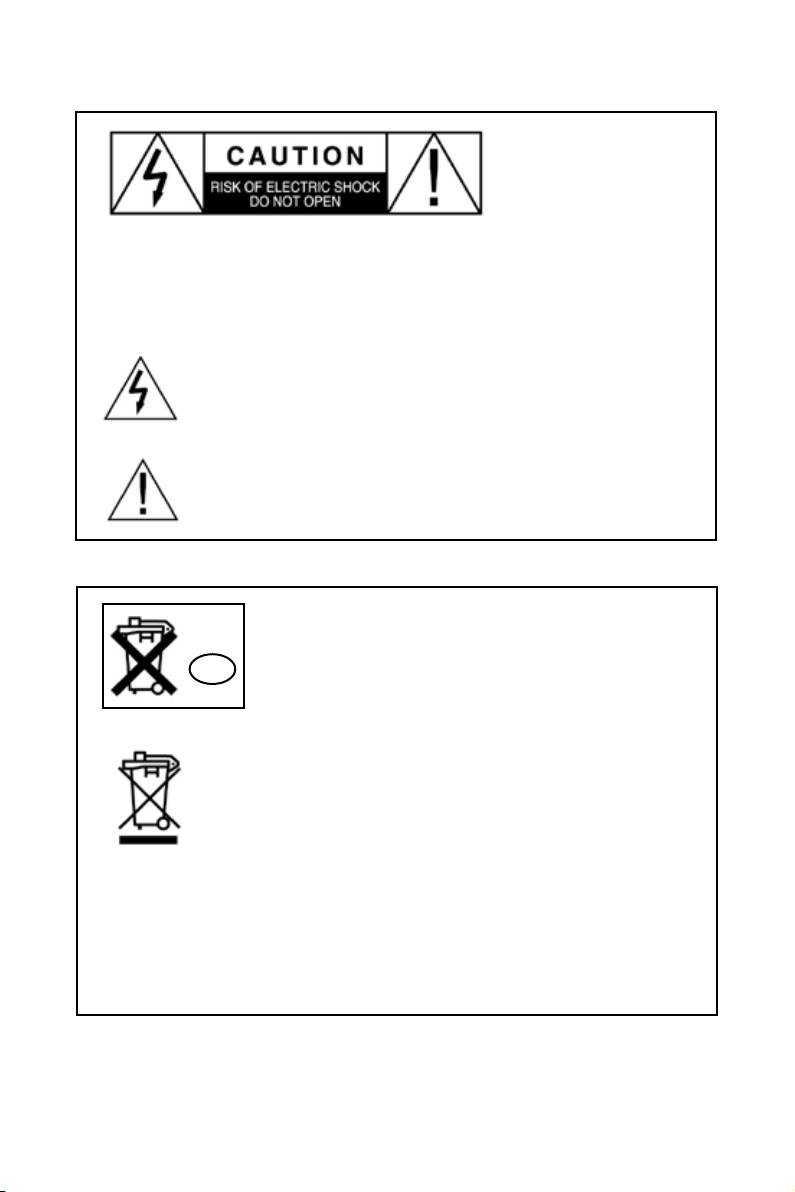
CAUTION: To reduce the risk of electric shock, do not remove the cover. No user
serviceable parts inside. Refer any servicing work to a qualied service technician.
WARNING: To reduce the risk of re or electric shock, do not expose this
appliance to rain or moisture.
The symbol of an arrowhead lightning ash within a triangle, warns
the user to the presence of uninsulated “dangerous voltage” within
the product’s enclosure. This dangerous may be of sufcient
magnitude to constitute a risk of electrical shock to persons.
The symbol of an exclamation point within a triangle warns the user
to the presence of important operating maintenance or servicing
instructions in this device’s user guide.
Do not dispose the battery with your regular household
waste. Take it to a hazardous material collection point.
Disposal of Old Electrical & Electronic Equipment
NL
(Applicable in the European Union and other European
countries with separate collection systems)
The symbol of the crossed out wheeled bin on the product
or on its packaging indicates that the product should not be
placed in municipal waste. Instead, the product should be
taken to a hazardous material collection point for recycling.
By ensuring that this product is properly disposed, you
will help prevent potential negative consequences for the
environment and human health caused by inappropriate
waste handling. The recycling of materials will help to conserve natural resources.
For more detailed information about product recycling, contact your local city ofce,
household waste disposal service or the shop where you purchased the product.

Safety Information
Before turning on the power for the rst time, ensure the power cord is properly installed.
Changes or modications to this device not expressly approved by ASUS will void its
warranty.
• Do not expose your device to moisture or liquids of any kind.
• Do not expose your device to extreme high or low temperatures.
• Do not expose your device to re or heat source.
• Do not drop, throw or try to bend your device as rough treatment could damage it.
• Do not use any other accessories than ASUSTeK Computer Inc. or ASUSTeK originals
intended for use with this product. Use of non-original accessories may result in loss of
performance, damage to the product, re, electric shock or injury. The warranty does not
cover product failures which have been caused by use of non-original accessories.
• Do not keep the product in an area prone to dust and dirt. Only use a soft damp cloth to
clean your product.
• If you will not be using the product for a while, store it in a place that is dry, free from
damp, dust and extreme temperatures.
Do not obstruct the ventilation openings.
Always operate turning controls and switches as instructed in the manual.
For safety reasons, do not remove any covers or attempt to gain access to the inside of the
product. Refer any servicing to qualied personnel.
Do not attempt to remove any screws, or open the casing of the unit.There are no user
serviceable parts inside. Doing so will void your warranty. Refer all servicing to a qualied
service technician.

Troubleshooting
Q. Why is it that I cannot hear any sound from the speaker?
A. Try to reboot the Bluetooth device that you are trying to pair the speaker with, such as
your computer or mobile phone. If this does not solve the issue then delete the pairing
information and try pairing the Bluetooth device and speakers again.
Q. My device says ‘Bluetooth Module not found’ . What can I do?
A. Your Bluetooth device cannot nd its internal Bluetooth chip for some reason. Restarting
your Bluetooth device should x this problem. If it does not, please contact your Bluetooth
device’s manufacturer.
Q. My Bluetooth device would not pair with my phone.
A. You need to ensure that the phone or computer you want to connect your Bluetooth
device to support the A2DP (stereo Bluetooth) prole. The speakers will not support
a mono Bluetooth prole. To ensure compatibility, check with your Bluetooth device’s
manufacturer.
Q. How far can my speaker be from the Bluetooth device and still play audio?
A. The SP-BT23 will remain connected within a range of 10 meters (30 ft). Sound quality
may start to grow weak after about 7 meters depending on your environment.
Q. Can other electrical devices interfer with the Bluetooth device?
A. Bluetooth technology employs a technique called frequency hopping to constantly change
the frequency at which it sends out data, reducing interference with wireless devices
like cordless landline phones. Noise interference can occur if the Bluetooth device is
used in close proximity with a microwave. Check if there are any such devices in the
surroundings, and if so keep the distance between the SP-BT23 and such devices to at
least 5 - 10 meters. Usually any interference will only cause a slight crackling sound. The
frequency of Bluetooth is much higher than that of radio station bands.
Q. Can somebody else take control of my SP-BT23 if they are in range?
A. No, the SP-BT23 can only connect to previous paired devices that have been
authenticated. The pairing procedure creates an encrypted key known only to the two
devices paired.

Declaration of Conformity
We, Manufacturer/Importer
(full address)
ASUS COMPUTER GmbH
HARKORT STR. 25
40880 RATINGEN, BRD. GERMANY
declare that the product
( description of the apparatus, system, installation to which it refers)
Bluetooth Speaker
SP-BT23
is in conformity with
(reference to the specification under which conformity is declared)
in accordance with 2004/108/EC-EMC Directive and 1995/5 EC-R &TTE Directive
EN 55022: 2006
EN 300328-1
Electromagnetic compatibility and Radio Limits and methods of measurement
spectrum Matters (ERM); wideband of radio disturbance characteristics of
transmission equipment operating in information technology equipment
the 2.4GHz ISM band and using spread
spectrum modulation techniques; Part 1:
EN 55024:1998+A1:2001+A2:2003
technical characteristics and test conditions Information Technology
EN 300328-2
Part2: Harmonized EN covering essential equipment-Immunity
requirements under article 3.2 of the R&TTE characteristics-Limits and methods of
measurement
EN 300386
Electromagnetic compatibility and Radio
EN 50360/
the limitation of exposure of
spectrum Matters (ERM);Telecommunication
EN 50361
the general public to electromagneticnetwork
equipment; Electromagnetic fields (0 Hz to 300 GHz) International
Compatibility (EMC) requirements Commission on Non-Ionising
Radiation Protection (1998), Guidelines for
EN 301489
Electromagnetic compatibility and Radio limiting exposure in time-varying electric,
spectrum Matters (ERM); Electromagnetic magnetic, and electromagnetic fields
compatibility(EMC) standard for radio
equipment and services; Part 17: Specific
EN 61000-3-2 :2000+A2:2005
conditions for wideband data and Disturbances in supply systems caused
HIPERLAN equipment
EN 61000-3-3:1995+A1:2001
Disturbances in supply systems caused
EN301511
Global System for Mobile communications(GSM)
EN 55013
Limits and methods of measurement
Harmonized EN for mobile stations in the GSM 900 of radio disturbance characteristics of
And GSM 1800 bans covering essential requirements broadcast receivers and associated
of article 3.2 of article 3.2 of the R&TTE directive(1999/5EC) equipment
EN 55020
Immunity from radio interference of
broadcast receivers and associated
EN 301893
Broadband Radio Access Networks (BRAN); equipment
5 GHz high performance RLAN;
Harmonized EN covering essential requirements
EN 50081-2
Generic emission standard Part 2
of article 3.2 of the R&TTE Directive Industrial environment
EN 50082-2
Generic immunity standard Part 2:
Industrial environment
CE marking
(EC conformity marking)
The manufacturer also declares the conformity of above mentioned product
with the actual required safety standards in accordance with LVD 2006/95 EC
EN 60065
Safety requirements for mains operated
EN 60950-1
Safety for information technology equipment
electronic and related apparatus for including electrical business equipment
household and similar general use
EN 60335
Safety of household and similar
EN 50091-1
General and Safety requirements for
electrical appliances uninterruptible power systems (UPS)
Manufacturer/Importer
(Stamp)
Date : Oct. 30 , 2007

Index
1. English ................................................................................1
2.
Български
............................................................................4
3.
Česky ..................................................................................7
4. Nederlands .......................................................................
10
5. Eesti ..................................................................................
13
6. Suomi ...............................................................................
16
7. Français ............................................................................
19
8. Deutsch ............................................................................
22
9. Ελληνικά .........................................................................
25
10. Magyar ..............................................................................
28
11. Bahasa Indonesia .............................................................
31
12. Italiano ..............................................................................
34
13. Latviski ..............................................................................
37
14. Lietuvių .............................................................................
40
15. Polski ................................................................................
43
16. Português .........................................................................
46
17. Română ............................................................................
49
18.
Русский
.............................................................................52
19. Slovensky .........................................................................
55
20. Español .............................................................................
58
21. Українська .......................................................................
61
22.
ไทย
...................................................................................
64
23. Türkçe ...............................................................................
67
24.
한국어
...............................................................................
70
SP-BT23 Wireless Portable Speaker Quick Start Guide
Getting Started
English
Before you start, check with the compatibility of your Bluetooth device with the ASUS SP-
BT23 wireless portable speakers. The ASUS SP-BT23 wireless portable speakers comply
with the Bluetooth Specication 1.2, that supports Advanced Audio Distribution Prole (A2DP)
1.0.
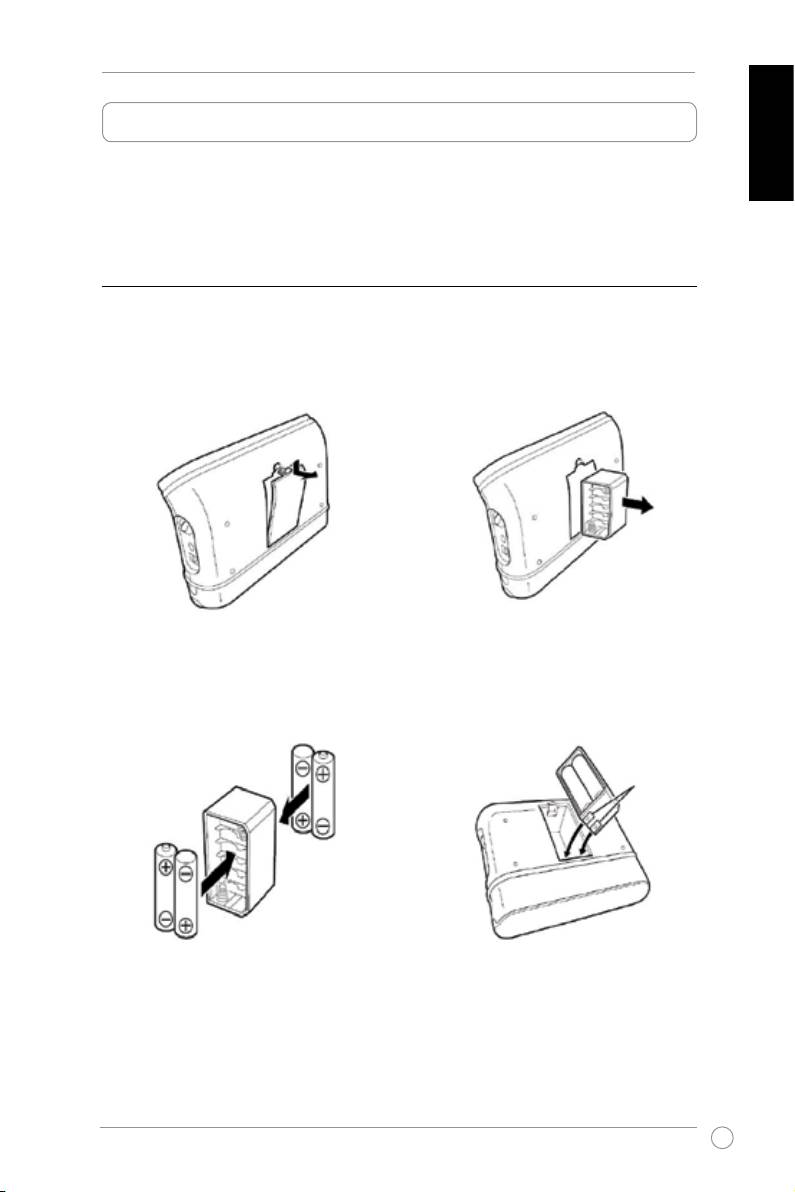
A. Powering your SP-BT23
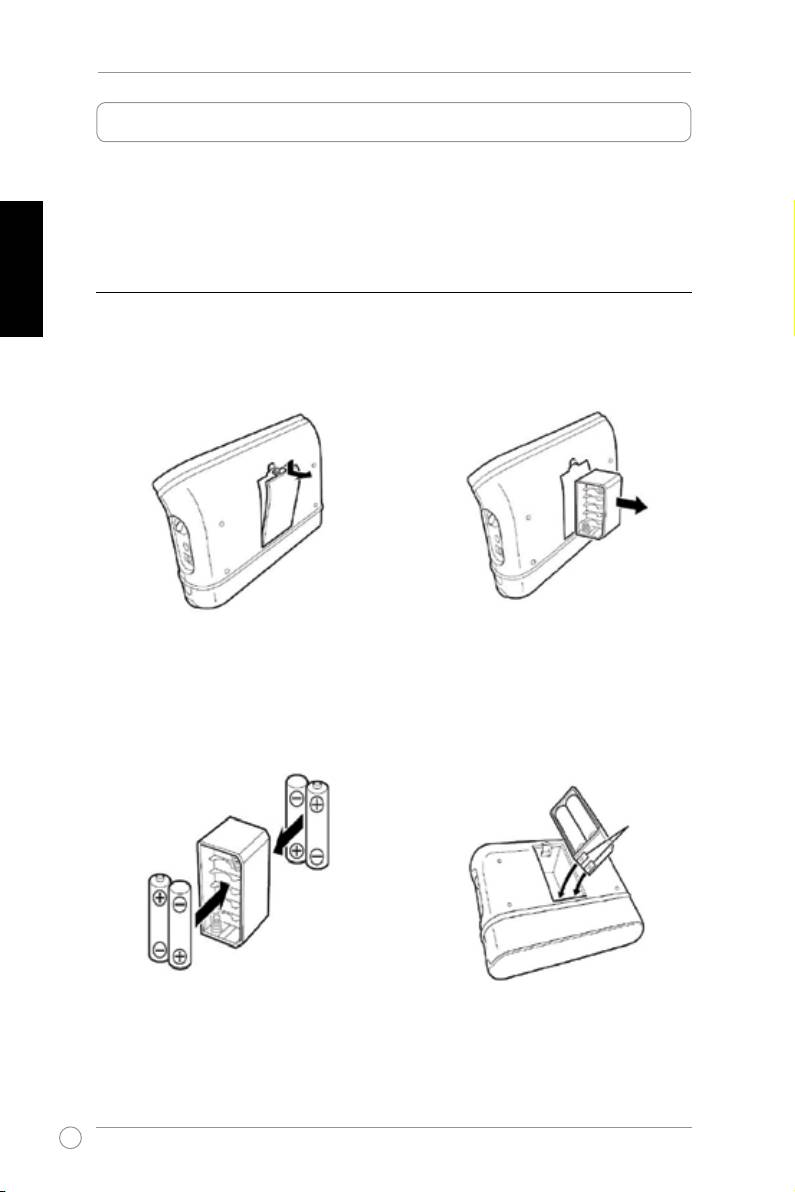
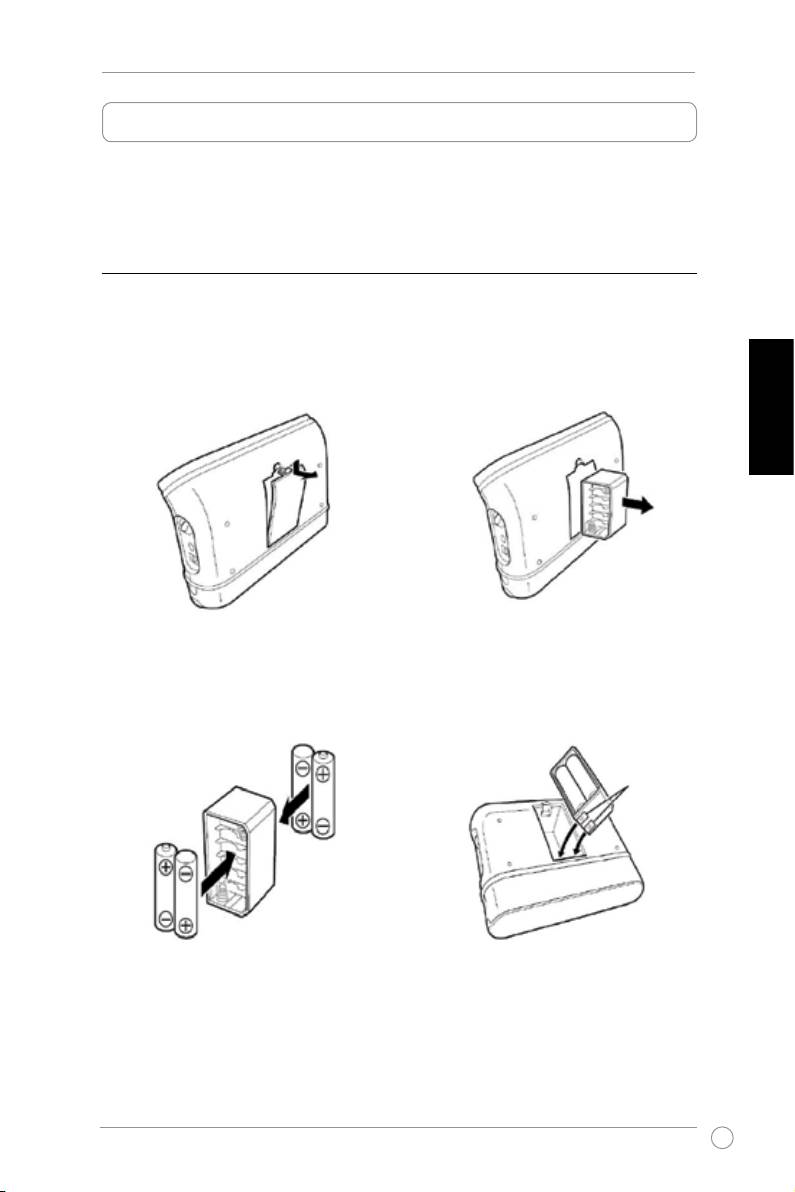
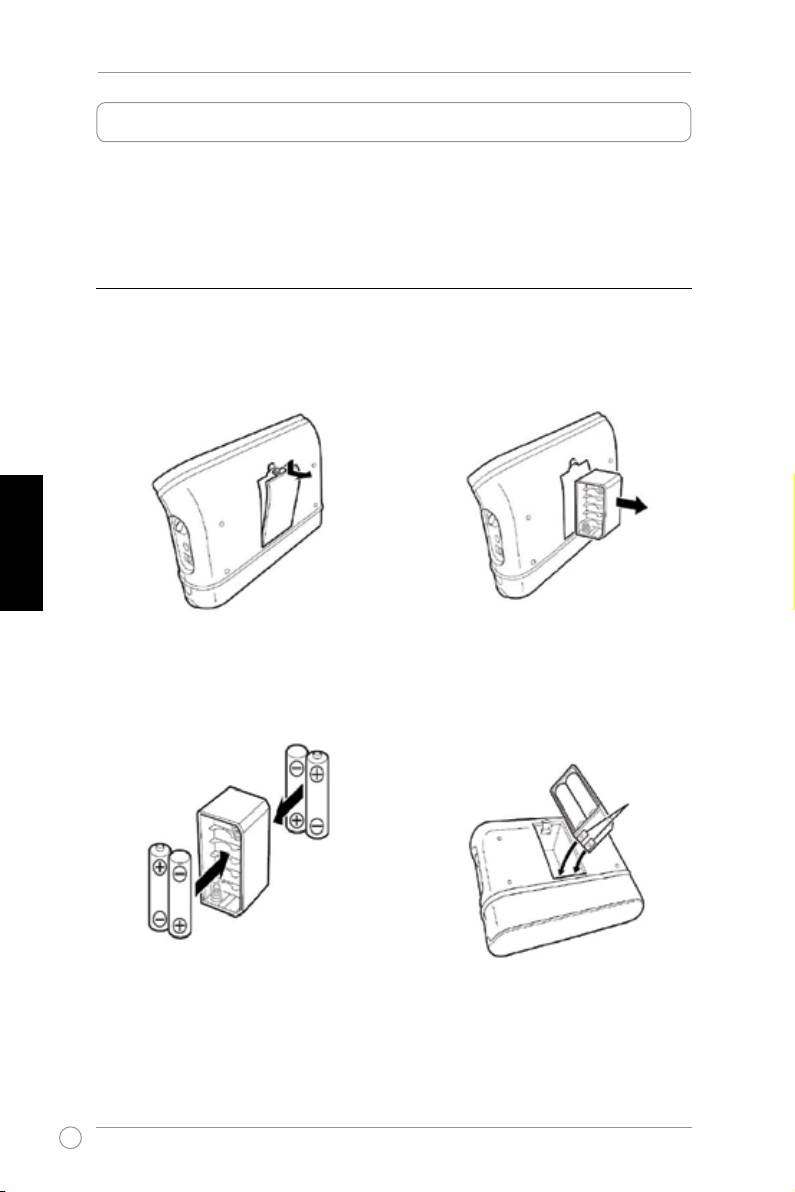
1. Using AA batteries
1.1 Open the battery cover on the back of
1.2 Take out the battery holder.
device.
1.3 Insert four AA batteries into the
1.4 Insert the battery holder back into
battery holder. Ensure the batteries
the battery compartment. Ensure
are installed in the proper placement
that the metal contacts match the
and polarity.
copper conductors at the bottom of
the battery compartment.
Metal contacts
2. Using the Power Charger
Insert the power adapter plug into the power socket (DC IN) on the side of your SP-BT23 and
connect the adapter to a power outlet.
1
SP-BT23 Wireless Portable Speaker Quick Start Guide
English
B. Pairing your SP-BT23 with a Bluetooth device
Before pairing your SP-BT23, locate the jog dial on the right side of your SP-BT23, then
rotate clockwise to turn device on until the LED indicator ashes blue.
Pairing with a Bluetooth mobile phone
Your SP-BT23 can be used with a Bluetooth Mobile Phone equipped with A2DP Bluetooth
stereo.
To pair:
1. Enable Bluetooth on your mobile phone then search for Bluetooth devices. Refer to your
mobile phone’s user guide for details.
2. From the list of Bluetooth devices found, select
SP-BT23.
3. Key in the PIN code
‘0000’ to authenticate pairing.
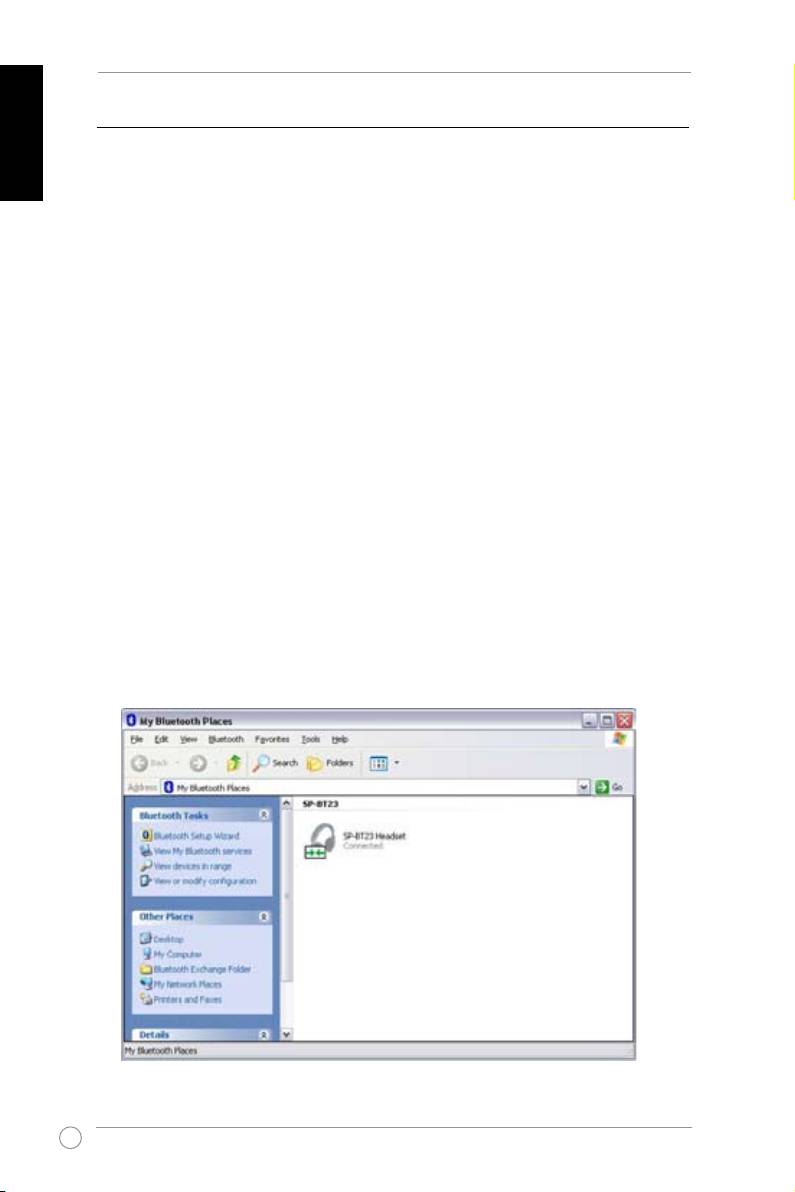
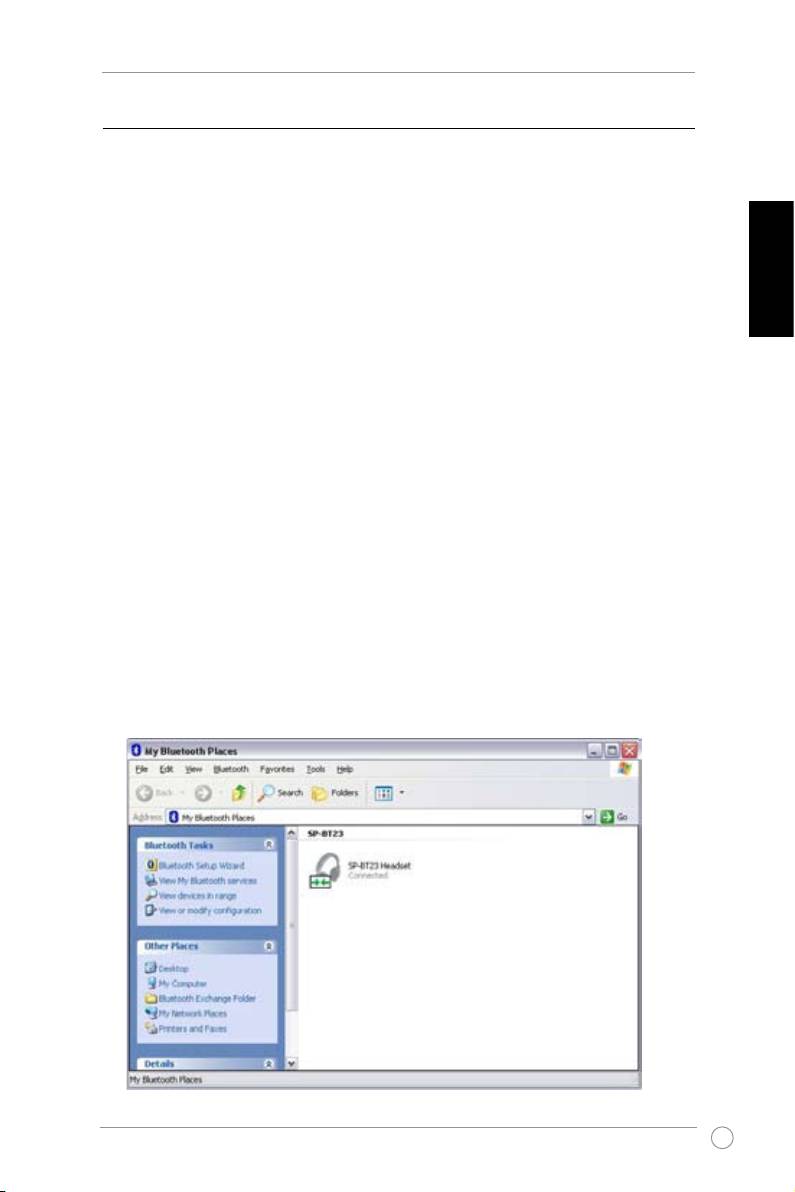
Pairing with your computer
Ensure that your computer comes with a built-in Bluetooth device or controller.
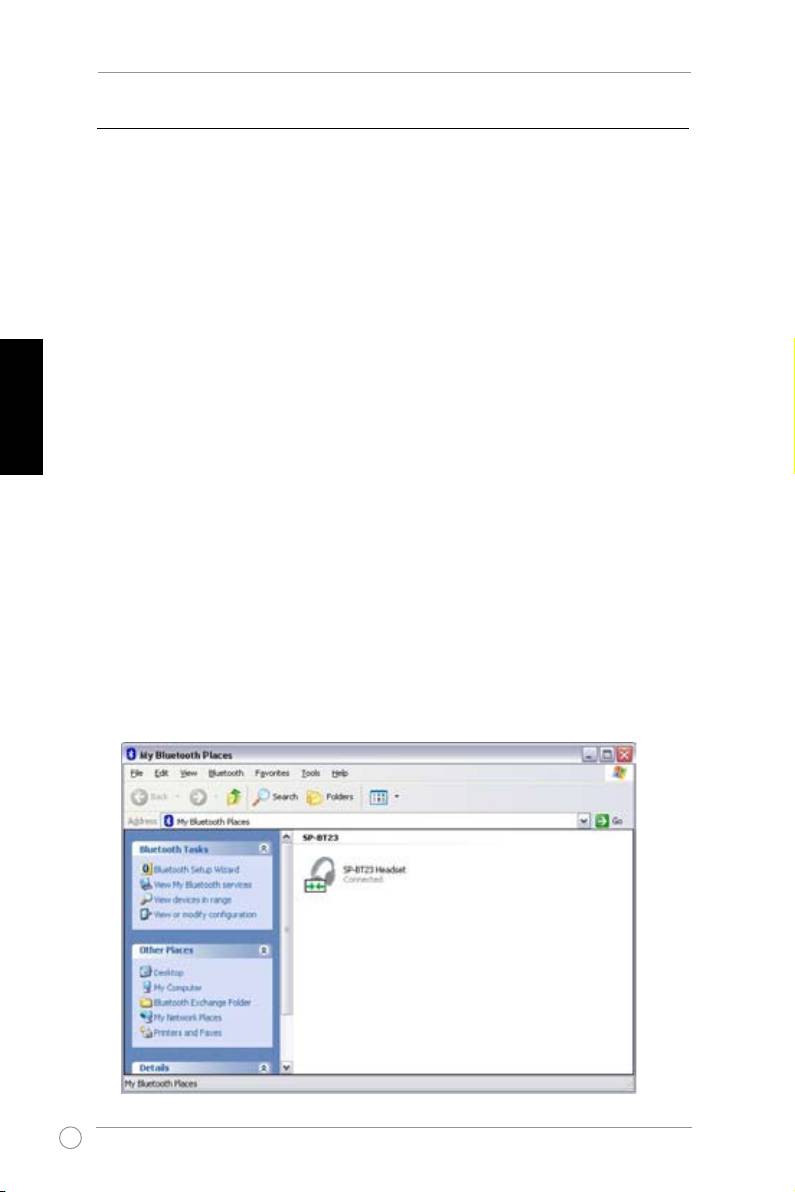
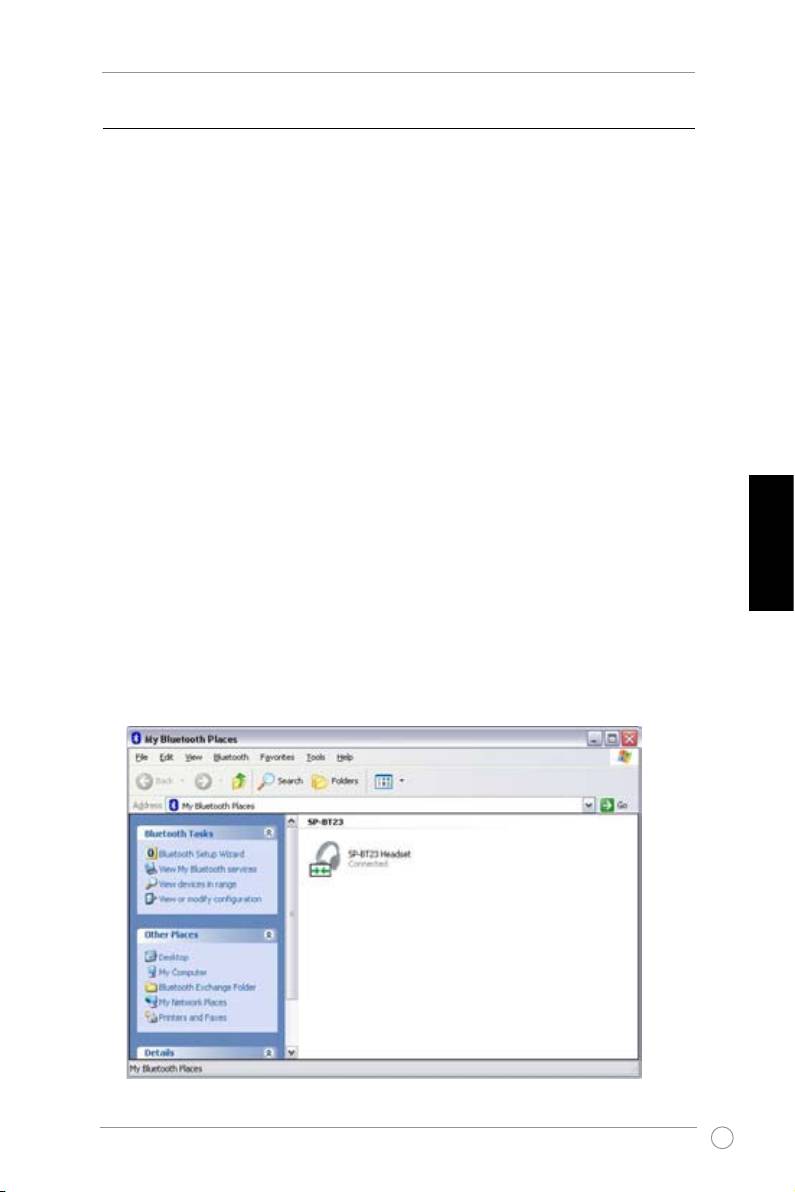
1. Double-click the Bluetooth icon on the taskbar.
2. Search for available devices in range.
3. From the list of available Bluetooth devices, select
SP-BT23
and when prompted, key in
0000
for the PIN code.
2
SP-BT23 Wireless Portable Speaker Quick Start Guide
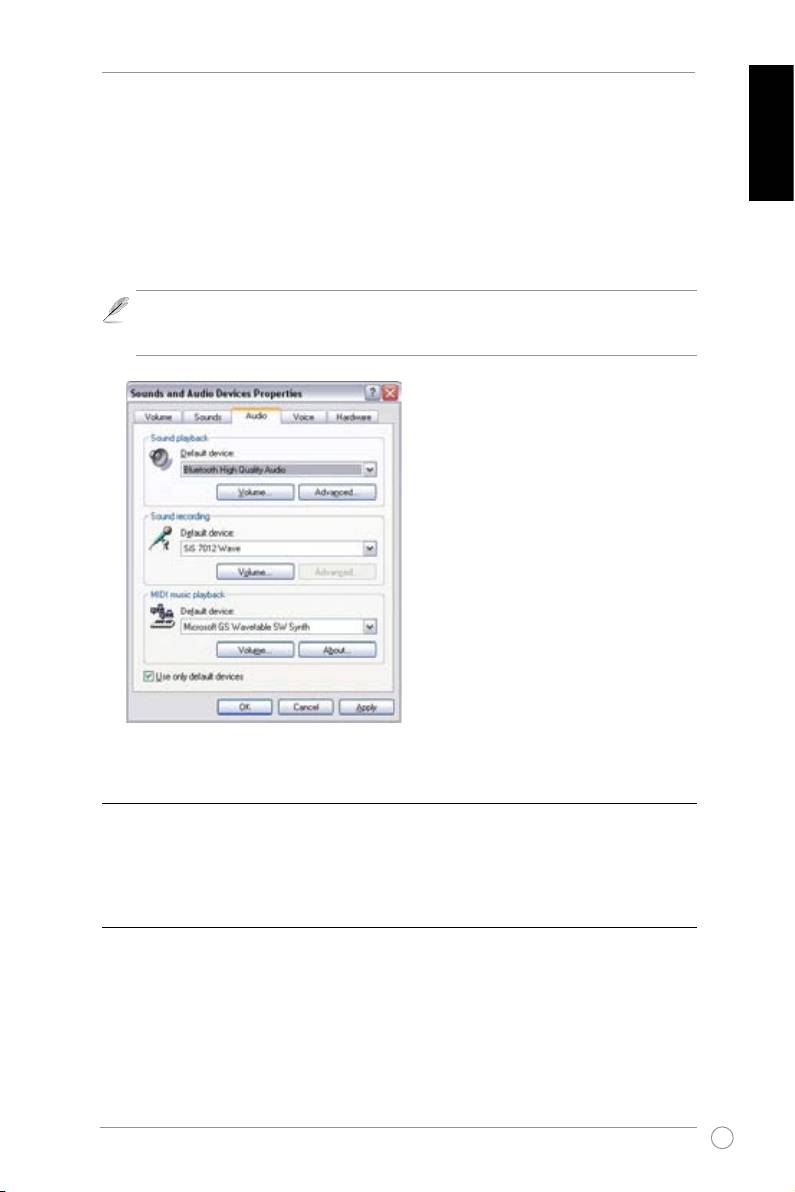
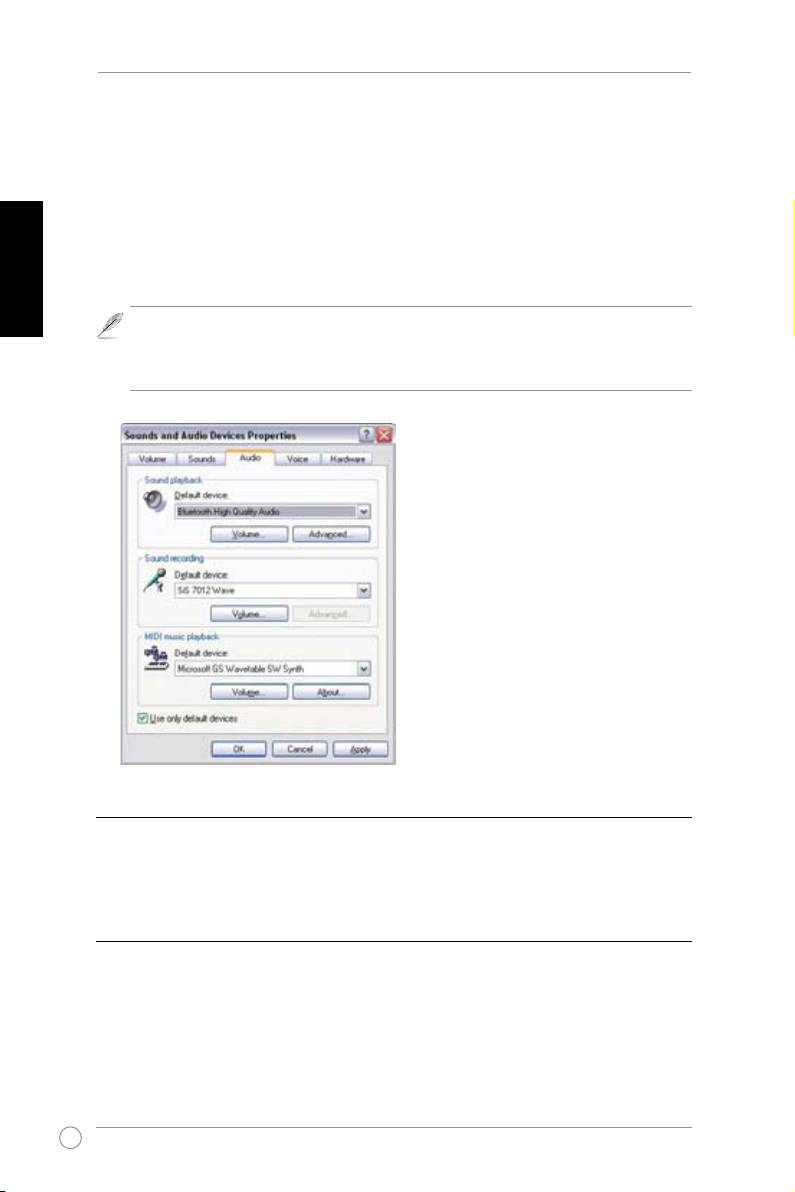
Conguring Windows audio output
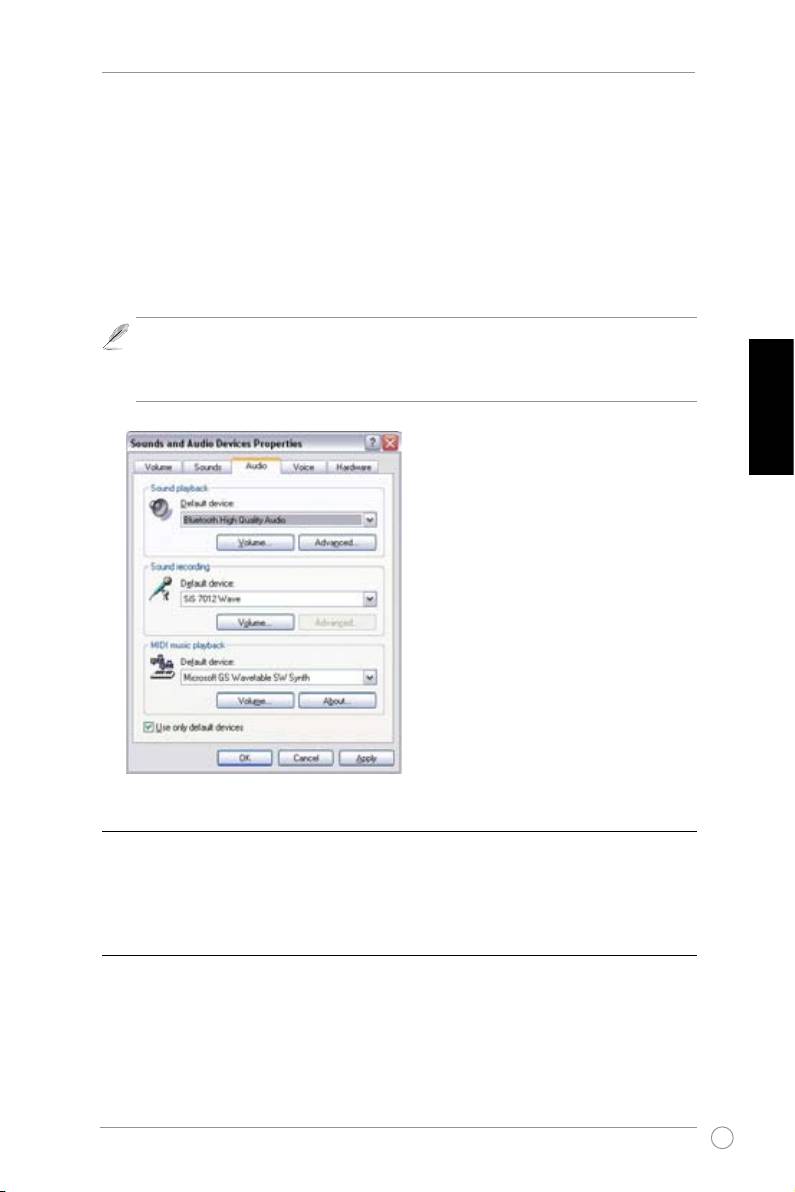
1. Open Control Panel and double click
Sound and Audio devices
.
English
2. Select the
Audio
tab.
3. Set the Sound Playback Default Device to
Bluetooth High Quality Audio
.
4. Click
OK
.
The power/connection LED turns on when the speaker is successfully connected to a
Bluetooth audio source. If no connection is established within three minutes, the LED
will blink and the device goes into idle mode. Try and connect again when necessary.
C. Connecting to a Bluetooth device using a cable
To connect the speakers to a Bluetooth device that has a 3.5mm audio connector, plug the
cable into the line-in port on the side of the speakers and the audio connector on the device.
Switch on the device then play audio.
D. Adjusting the volume
To set the volume of the speakers, rotate the jog dial located on the right side of the speakers.
3
SP-BT23 Безжичен преносим високоговорител. Ръководство за бърз старт
Начало
Преди да започнете, консултирайте се с производителя на Вашето устройство дали
то е съвместимо с ASUS SP-BT23. Безжичният преносим високоговорител ASUS SP-
Български
BT23 съответства на Bluetooth спецификация 1.2, която поддържа профил A2DP
(Advanced Audio Distribution Prole ) 1.0.
А. Включване на SP-BT23
1. Използване на батерии тип АА
1.1 Отворете капака на отделението за
1.2 Извадете поставката за
батерии на гърба на устройството.
батерии.
1.3 Поставете четири батерии тип
1.4 Поставете обратно поставката
АА в поставката за батерии.
за батерии в отделението
Уверете се, че батериите са
за батерии. Уверете се, че
инсталирани по подходящ начин
металните пластини съвпадат с
и с правилните полюси.
медните проводници в долната
част на отделението за батерии.
Метални
пластини
2. Използване на зарядно устройство
Включете адаптера в DC IN входа отстрани на SP-BT23 и свържете адаптера с
електрически контакт.
4
SP-BT23 Безжичен преносим високоговорител. Ръководство за бърз старт
Б. Свързване на SP-BT23 с Bluetooth устройство
Преди да свържете SP-BT23, открийте копчето от дясната страна на устройството
и го завъртете по посока на часовниковата стрелка докато индикаторът не светне
синьо.
Свързване с мобилен телефон с Bluetooth
Вашият SP-BT23 може да се използва с мобилен телефон с Bluetooth с A2DP
Bluetooth стерео.
Български
Свързване:
1. Активирайте Bluetooth на мобилния си телефон и започнете търсене на Bluetooth
устройства. (Вижте инструкциите на мобилния телефон за повече информация)
2. От списъка с Bluetooth устройства, изберете ‘
SP-BT23’ .
3. Въведете PIN кода ‘
0000’, за да потвърдите свързването.
Свързване с компютър
Уверете се, че компютърът Ви е снабден с Bluetooth.
1. Натиснете иконата на Bluetooth на лентата с инструменти.
2. Търсете наличните устройства в обхват.
3. От списъка с налични Bluetooth устройства, натиснете ‘
SP-BT23
’ и когато е
необходимо, въведете PIN кода ‘
0000
’.
5
SP-BT23 Безжичен преносим високоговорител. Ръководство за бърз старт
Конфигуриране за Windows
1. Отворете Control Panel и натиснете два пъти
Sound and Audio devices
(Звуци и
звукови устройства)
2. Изберете прозореца
Audio
(Аудио).
Български
3. За Sound Playback Default Device изберете
Bluetooth High Quality Audio
(Висококачествено аудио по Bluetooth).
4. Натиснете
OK
.
Индикаторът на захранването светва, когато сте се свързали с Bluetooth
звуково устройство. Ако няма връзка в продължение на три минути,
индикаторът ще започне да мига и устройството ще премине в пасивен
режим. Опитайте да възстановите връзката.
В. Свързване на устройството с помощта на кабели
За да свържете високоговорителите с друго устройство, което има 3,5 мм аудио
конектор, свържете кабела с входа отстрани на високоговорителите и с аудио
конектора на устройството. Включете устройството и вече може да го използвате.
Г. Регулиране на силата на звука
За да регулирате силата на звука, завъртете копчето от дясната страна на
високоговорителя.
6
Bezdrátová sluchátka SP-BT23 – stručná příručka
Začínáme
Než začnete, zjistěte u výrobce, zda je vaše zařízení kompatibilní se sluchátky ASUS SP-
BT23. Bezdrátová sluchátka ASUS SP-BT23 splňují specikaci Bluetooth 1.2, která podporuje
prol Advanced Audio Distribution Prole (A2DP) 1.0.
A. Napájení SP-BT23
1. Pomocí baterií AA
1.1 Otevřete víčko přihrádky baterií na zadní
1.2 Vyjměte držák baterií.
části zařízení.
Česky
1.3 Vložte čtyři baterie AA do držáku.
1.4 Zasuňte držák baterií zpět do
Baterie musí být vloženy ve správné
přihrádky baterií. Kovové kontakty
orientaci a polaritě.
musí být zorientovány s měděnými
vodiči na spodní straně přihrádky
baterie.
Kovové kontakty
2. Používání nabíječky
Připojte konektor napájecího adaptéru do zdířky napájení (DC IN) na boční straně zařízení
SP-BT23 a připojte adaptér k elektrické zásuvce.
7
Bezdrátová sluchátka SP-BT23 – stručná příručka
B. Párování zařízení SP-BT23 se zařízením Bluetooth
Před párováním zařízení SP-BT23 vyhledejte kolečko na pravé straně zařízení a potom
otáčením tohoto kolečka po směru hodin zapněte zařízení tak, aby indikátor LED blikal
modře.
Párování s mobilním telefonem Bluetooth
Zařízení SP-BT23 lze používat s mobilním telefonem Bluetooth, který je vybavený
protokolem A2DP Bluetooth stereo.
Pokyny pro párování:
Česky
1. Aktivujte funkci Bluetooth v mobilním telefonu a potom vyhledejte zařízení Bluetooth.
(Podrobné pokyny viz příručka k mobilnímu telefonu.)
2. V seznamu nalezených zařízení Bluetooth vyberte „
SP-BT23“.
3. Zadejte kód PIN
„0000“ pro ověření párování.
Párování s počítačem
Zkontrolujte, zda je počítač vybaven zabudovaným zařízením nebo řadičem Bluetooth.
1. Poklepejte na ikonu Bluetooth na hlavním panelu.
2. Vyhledejte dostupná zařízení v dosahu.
3. V seznamu dostupných zařízení Bluetooth vyberte „
SP-BT23
“ a po vyzvání k zadání
kódu PIN zadejte
„0000
“.
8
Bezdrátová sluchátka SP-BT23 – stručná příručka
Kongurování zvukového výstupu Windows
1. Otevřete Ovládací panely a poklepejte na položku
Sound and Audio devices
(Zvuky a
zvuková zařízení).
2. Vyberte kartu
Audio
(Zvuk).
3. Nastavte položku
Sound Playback Default Device
(Výchozí zařízení pro přehrávání
zvuku) na
Bluetooth High Quality Audio
(Zvuk Bluetooth s vysokou kvalitou).
4. Klepněte na tlačítko
OK.
Po úspěšném připojení sluchátek ke zdroji zvuku Bluetooth se rozsvítí indikátor LED
napájení/připojení. Nebude-li do tří minut navázáno žádné spojení, indikátor LED
začne blikat a zařízení přejde do nečinného režimu. Podle potřeby se pokuste o
připojení znovu.
Česky
C. Připojení zařízení pomocí kabelu
Chcete-li připojit sluchátka k zařízení se zvukovým konektorem 3,5 mm, připojte kabel k portu
linkového vstupu na boční straně sluchátek a ke zvukovému konektoru na zařízení. Zapněte
zařízení a spusťte přehrávání zvuku.
D. Nastavení hlasitosti
Hlasitost sluchátek lze nastavit otáčením kolečka na pravé straně sluchátek.
9
Snelstartgids SP-BT23 Draadloze draagbare luidspreker
Aan de slag
Raadpleeg de fabrikant van uw apparaat voordat u start om te controleren of uw apparaat
compatibel is met de ASUS SP-BT23. De ASUS SP-BT23 draadloze draagbare luidspreker
voldoet aan de Bluetooth-specificatie 1.2 die het A2DP-profiel 1.0 (Advanced Audio
Distribution Prole = geavanceerde audiodistributieproel) ondersteunt.
A. Uw SP-BT23 van stroom voorzien
1. Met AA-batterijen
1.1 Open de batterijklep op de achterkant van
1.2 Verwijder de batterijhouder.
het apparaat.
Nederlands
1.3 Plaats vier AA-batterijen in de
1.4 Stop de batterijhouder terug in het
batterijhouder. Zorg dat de
batterijvak. Zorg dat de metalen
batterijen correct en in de juiste
contacten overeenkomen met de
polariteitsrichting zijn geplaatst.
koperen geleiders onderaan in het
batterijvak.
Metalen
contacten
2. De lader gebruiken
Sluit de stekker van de voedingsadapter aan op de voedingsaansluiting (DC IN
gelijkstroomingang) op de zijkant van de SP-BT23 en sluit de adapter aan op een
stopcontact.
10
Snelstartgids SP-BT23 Draadloze draagbare luidspreker
B. De SP-BT23 koppelen met een Bluetooth-apparaat
Voordat u de SP-BT23 koppelt, zoekt u de instelschakelaar op de rechterzijde van het
apparaat en draait u deze rechtsom om het apparaat in te schakelen tot de LED-indicator
blauw knippert.
Koppelen met een mobiele Bluetooth-telefoon
De SP-BT23 kan met een mobiele Bluetooth-telefoon met A2DP Bluetooth-stereo worden
uitgerust.
Koppelen:
1. Schakel Bluetooth in op uw mobiele telefoon en start vervolgens het zoeken van
Bluetooth-apparaten. (raadpleeg de handleiding van uw mobiele telefoon voor details)
2. Selecteer ‘
SP-BT23’ in de lijst van gevonden Bluetooth-apparaten.
3. Voer de pincode ‘
0000’ in om het koppelen te veriëren.
Koppelen met uw computer
Controleer of uw computer is uitgerust met een ingebouwd Bluetooth-apparaat of een
Bluetooth-controller.
Nederlands
1. Dubbelklik op het Bluetooth-pictogram in de taakbalk.
2. Zoek beschikbare apparaten binnen bereik.
3. Selecteer ‘
SP-BT23’
in de lijst met beschikbare Bluetooth-apparaten en voer, wanneer u
dat wordt gevraagd, de pincode ‘
0000
’ in.
11
Snelstartgids SP-BT23 Draadloze draagbare luidspreker
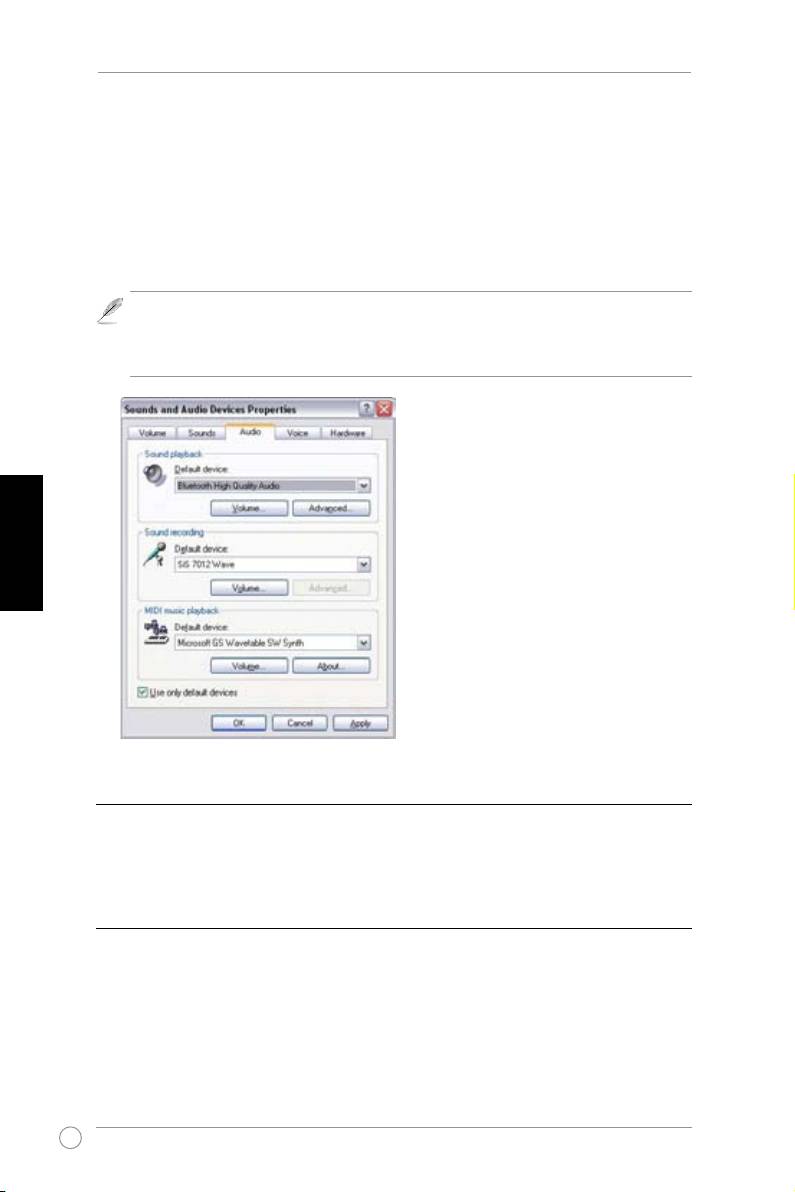
De audio-uitvoer van Windows congureren
1. Open het Conguratiescherm en dubbelklik op Geluiden en audioapparaten.
2. Selecteer het tabblad
Audio
.
3. Stel het Standaardapparaat onder Afspelen van geluid in op
Bluetooth High Quality
Audio
(Hoge audiokwaliteit Bluetooth).
4. Klik op
OK
.
De voedings-/verbindings-LED licht op wanneer de luidspreker met succes is
verbonden met een Bluetooth-audiobron. Als er binnen drie minuten geen verbinding
wordt gemaakt, knippert de LED en gaat het apparaat naar de inactieve modus.
Probeer, indien nodig, de verbinding opnieuw te maken.
Nederlands
C. Het apparaat aansluiten via een kabel
Om de luidspreker aan te sluiten op een apparaat dat een 3,5 mm audio-aansluiting heeft,
sluit u de kabel aan op de lijningang op de zijkant van de luidsprekers en de audio-aansluiting
op het apparaat. Schakel het apparaat in en speel audio af.
D. Het volume regelen
Om het volume van de luidsprekers te regelen, draait u de instelschakelaar op de rechterzijde
van de luidspreker.
12
Traadita kaasaskantava kõlari SP-BT23 lühijuhend
Alustamine
Enne kui alustate, konsulteerige seadme tootjaga, et teha kindlaks, kas teie seade ühildub
seadmega ASUS SP-BT23. ASUS SP-BT23 kaasaskantav traadita kõlar vastab Bluetoothi
spetsikatsioonile 1.2, mis toetab proili Audio Distribution Prole (A2DP) 1.0.
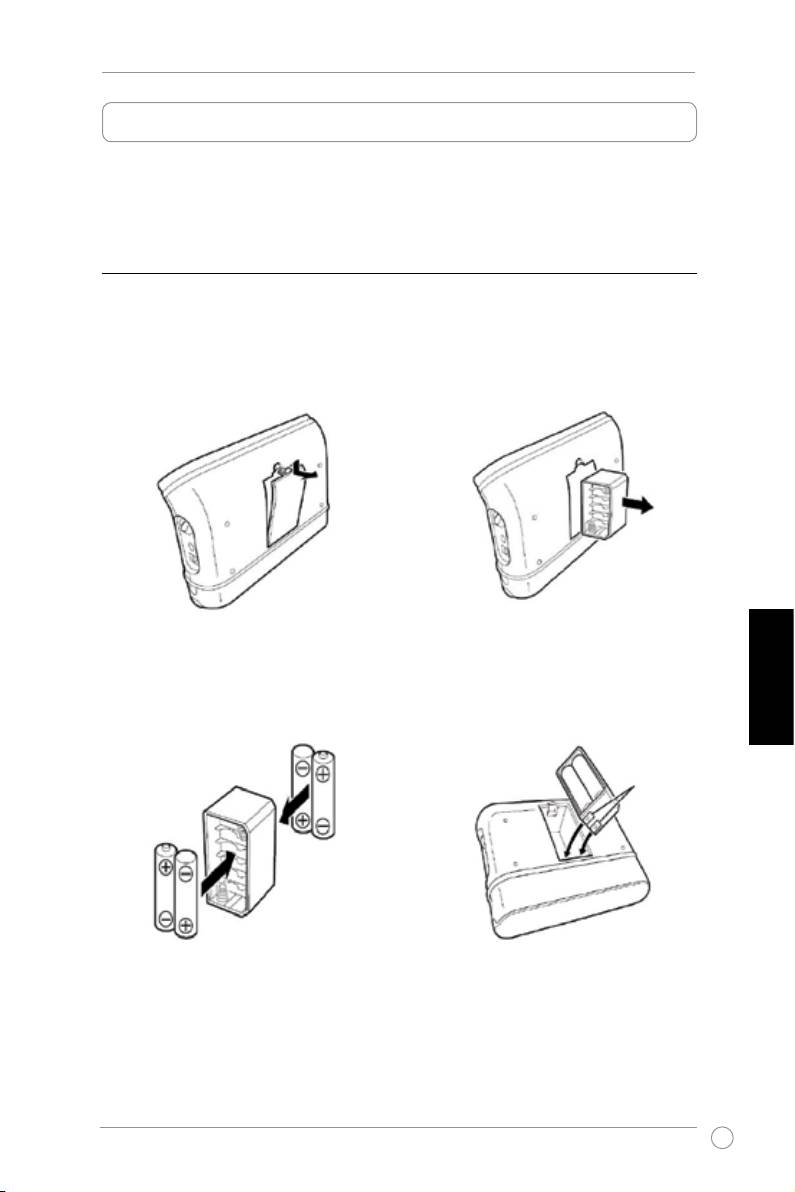
A. Seadme SP-BT23 toide
1. AA patareide kasutamine
1.1 Avage patareisahtli kaas seadme
1.2 Võtke välja patareihoidik.
tagaküljel.
1.3 Sisestage patareihoidikusse neli AA
1.4 Sisestage patareihoidik tagasi oma
patareid. Patareide paigaldamisel
kohale. Veenduge, et metallkontaktid
veenduge, et nende asukoht ja
jäävad kohakuti vaskplaatidega
Eesti
polaarsus on õige.
akusektsiooni põhjal.
Metallkontaktid
2. Toiteadapteri kasutamine
Sisestage toiteadapteri pistik seadme SP-BT23 küljel paiknevasse toitepistikupesasse (DC
IN) ja ühendage adapter toitevõrku.
13
Traadita kaasaskantava kõlari SP-BT23 lühijuhend
B. Seadme SP-BT23 paaritamine Bluetooth-seadmega
Enne seadme SP-BT23 paaritamist tehke kindlaks pöördlüliti asukoht seadme küljel ja
pöörake seda seadme sisselülitamiseks päripäeva, kuni LED indikaator hakkab sinisena
vilkuma.
Paaritamine Bluetooth-mobiiltelefoniga
Seadet SP-BT23 saab kasutada koos Bluetooth-mobiiltelefoniga, mis on varustatud A2DP
Bluetooth stereofunktsiooniga.
Paaritamiseks:
1. Lubage mobiiltelefonis Bluetooth, seejärel teostage mobiiltelefonis Bluetooth-seadmete
osting. (Vt täpsemaid üksikasju mobiiltelefoni kasutusjuhendist)
2. Leitud Bluetooth-seadmete loendist valige üksus ‘
SP-BT23’.
3. Sisestage PIN-kood ‘
0000’, et paaritamist autentida.
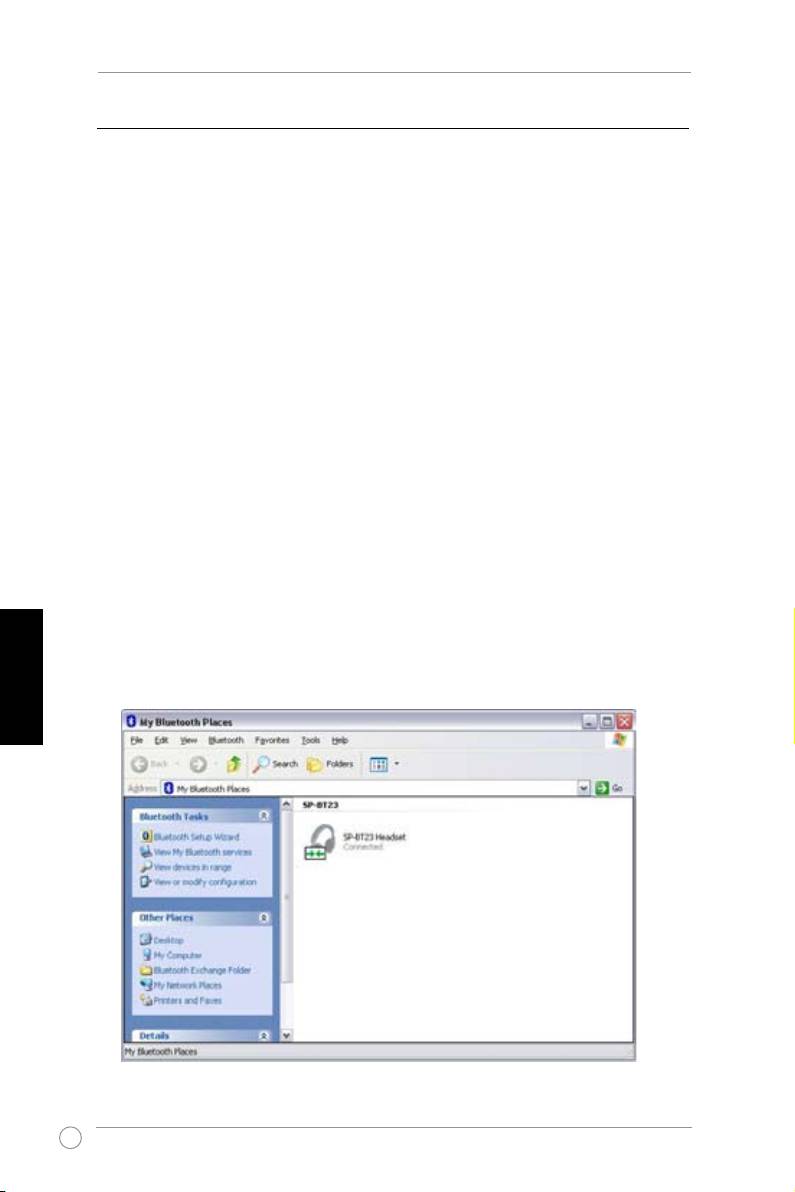
Paaritamine arvutiga
Veenduge, et teie seadmega kaasnes sisseehitatud Bluetooth-seade või juhtseadis.
1. Topeltklõpsake tööriistaribal Bluetoothi ikooni.
2. Teostage tegevuskauguses kättesaadavate seadmete otsing.
3. Saadavalolevate Bluetooth-seadmete loendist valige üksus ‘
SP-BT23
’ ja küsimisel
Eesti
sisestage PIN-kood ‘
0000
’.
14
Traadita kaasaskantava kõlari SP-BT23 lühijuhend
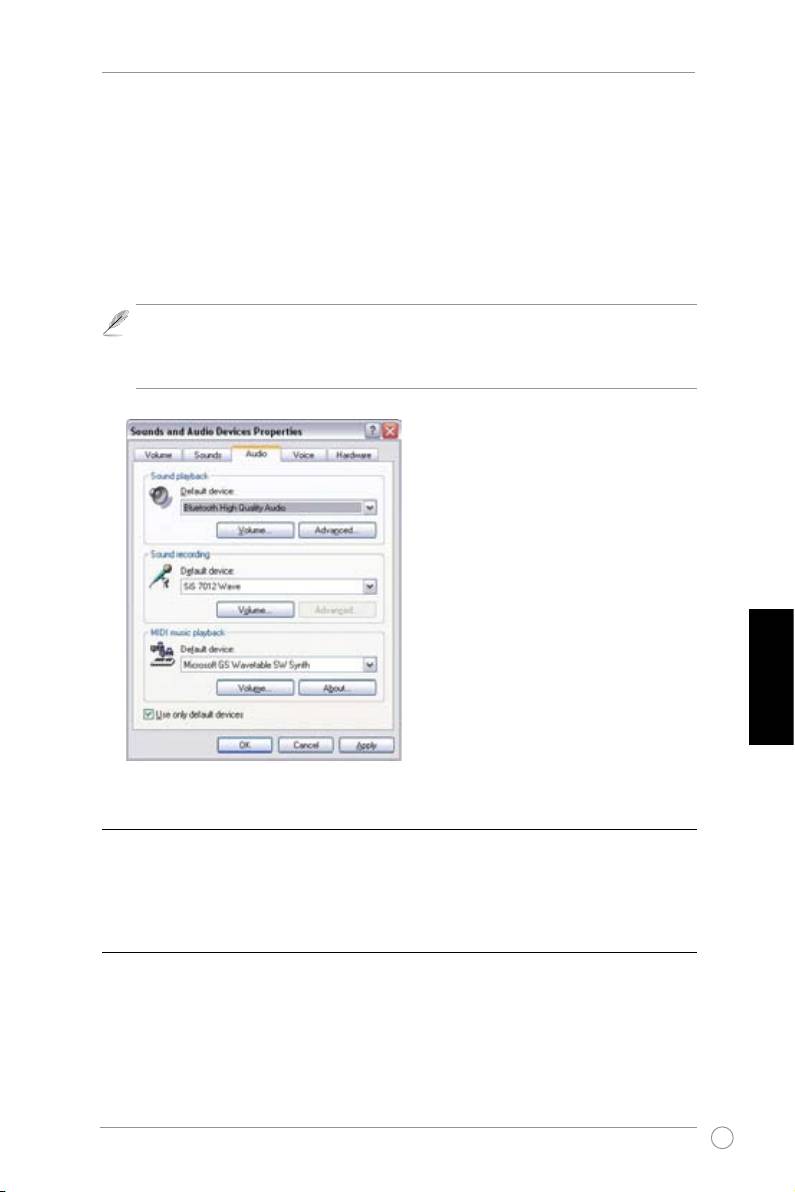
Windowsi audioväljundi kongureerimine
1. Avage juhtpaneel ja topeltklõpsake määrangut
Sound and Audio devices
(Heli ja
heliseadmed).
2. Valige vahekaart
Audio
.
3. Seadke vaikeseadme (Sound Playback Default Device) heliesituse sätteks
Bluetooth
High Quality Audio
.
4. Klõpsake nuppu
OK
.
Toite/Ühenduse LED indikaator lülitub sisse, kui kõlari ühendamine Bluetoothi
heliallikaga õnnestus. Kui ühendust ei õnnestunud luua kolme minuti jooksul, siis
vilgub LED indikaator ja seade läheb jõudeolekusse. Proovige vajaduse korral uuesti
ühendust luua.
Eesti
C. Seadme ühendamine kaabli abil
Selleks, et ühendada kõlareid seadmega, millel on 3,5 mm audiopistik, sisestage kaabel
line-in porti kõlarite küljel ja ühendage audiopistik seadmega. Lülitage seade sisse, seejärel
alustage heliesitust.
D. Helitugevuse reguleerimine
Kõlarite helitugevuse seadmiseks keerake pöördlülitit, mis paikneb kõlari paremal küljel.
15
