
Asus RT-N13: instruction
Class: Household, kitchen appliances, electronics and equipment
Type:
Manual for Asus RT-N13
Table of contents
- Index 1. English ................................................................................1

Index
1. English ................................................................................1
2. Français ............................................................................15
3. Deutsch ............................................................................29
4. Italiano ..............................................................................43
5. Русский .............................................................................57
6. Español .............................................................................71
7. Nederlands .......................................................................85
8. Português .........................................................................99
9. Suomi .............................................................................113
10. Ελληνικά ........................................................................127
11. Українська ........................................................................131
12. Česky ..............................................................................145
13. Magyar ............................................................................159
14. Polski ..............................................................................173
15. Български .........................................................................187
16. Română ..........................................................................201
17. Srpski ..............................................................................215
18. Slovensky .......................................................................229
19. Slovenščina ....................................................................243
20. Eesti ................................................................................257
21. Latviski ............................................................................271
22. Lietuvių ...........................................................................285
23. Bahasa Indonesia ...........................................................299
24. 한국어 .............................................................................213
25. BahasaMalaysia ............................................................227
26. Türkçe .............................................................................241
27. ไทย .................................................................................255
English
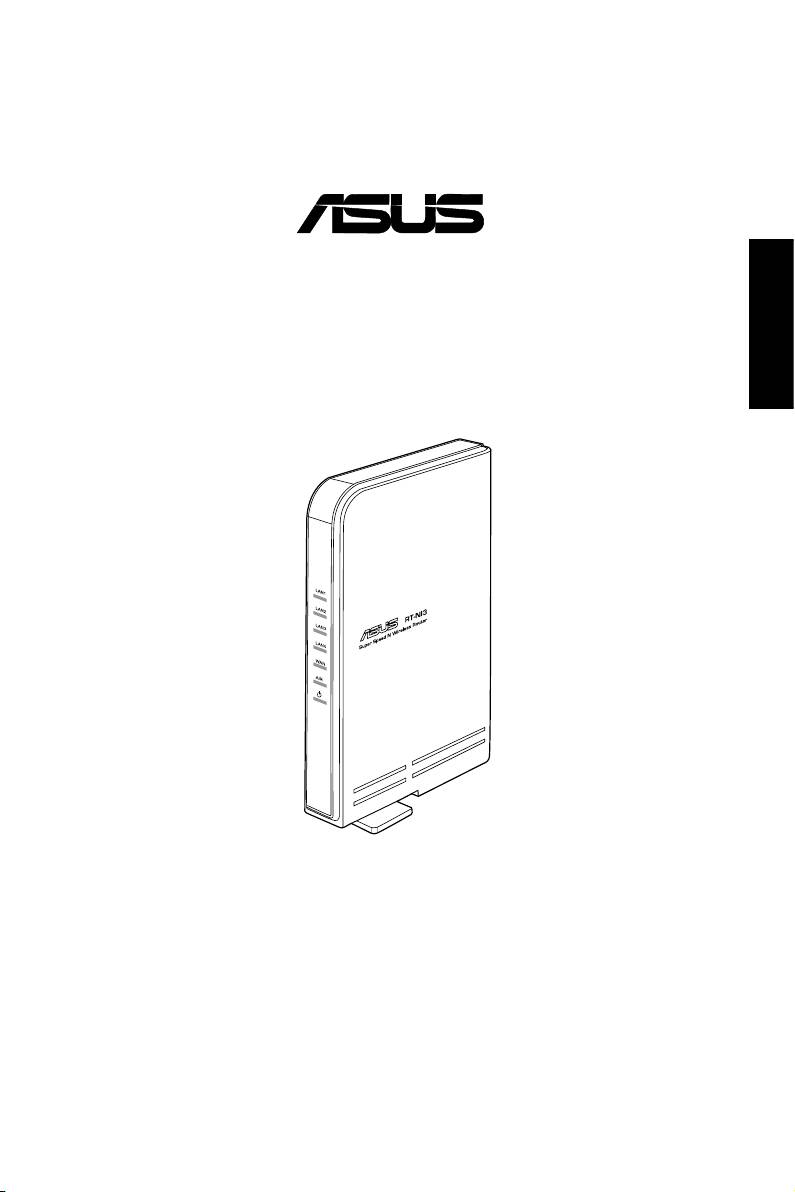
RT-N13 SuperSpeed N
Wireless Router
Quick Start Guide
®
RT-N13 Wireless Router Quick Start Guide
English
2
Declaration of Conformity
We, Manufacturer/Importer
(full address)
ASUS COMPUTER GmbH HARKORT STR. 25
40880 RATINGEN, BRD. GERMANY
declare that the product
( description of the apparatus, system, installation to which it refers)
is in conformity with
(reference to the specification under which conformity is declared)
in accordance with 2004/108/EC-EMC Directive and 1995/5 EC-R &TTE Directive
Product name: ASUS SuperSpeedN Wireless Router
Model name : RT-N13
EN 50392
Generic standard to demonstrate the compliance
EN 61000-3-2*
Disturbances in supply systems caused
of electronic and electrical apparatus with the basic
restrictions related to human exposure to
EN 61000-3-3*
Disturbances in supply systems caused
electromagnetic fields (0 Hz-300GHz)
EN 301893
Broadband Radio Access Networks (BRAN); 5
EN 50360
t
he limitation of exposure of the general public
GHz high performance RLAN; Harmonized EN
EN 50361
to electromagnetic network equipment fields
covering essential requirements of article 3.2 of
(0 Hz to 300 GHz) International Commission on
the R&TTE Directive
Non-Ionizing Radiation Protection (1998),
ʳ
Guidelines for limiting exposure in time-varying
Electromagnetic compatibility and Radio
EN 300328
electric, magnetic ,and electromagnetic fields
spectrum Matters (ERM); wideband
transmission equipment operating in the
2.4GHz ISM band and using spread spectrum
modulation techniques. Harmonized EN
covering essential requirements under article
3.2 of the R&TTE Directive
EN50081-1
Generic emission standard Part 1: Residual,
commercial and light industry
EN300440-1
Electromagnetic compatibility and Radio
EN300440 -2
spectrum Matters (ERM);Short Range Devices
Generic immunity standard Part 2: Industrial
(SRD);Radio equipment to be used in the 1
EN50082-2
environment
GHz to 40 GHz frequency range; Part 1:
Technical characteristics and test methods
Part 2: Harmonized EN under article 3.2 of the
R&TTE Directive
EN 55020
Immunity from radio interference of broadcast
EN 301511
Global System for Mobile communications
receivers and associated equipment
(GSM);Harmonized EN for mobile stations in
the GSM 900 and GSM 1800 bands covering
Limits and methods of measurement of radio
essential requirements under article 3.2 of the
EN 55022
disturbance characteristics of information technology
R&TTE directive (1999/5/EC)
equipment
EN 301 908-1
Electromagnetic compatibility and Radio
EN 55024
Information Technology equipment-Immunity
EN 301 908-2
spectrum Matters (ERM);Base Stations (BS),
characteristics-Limits and methods of measurement
Repeaters and User Equipment (UE) for
IMT-2000 Third-Generation cellular networks;
EN 55013
Limits and methods of measurement of radio
Part 1: Harmonized EN for IMT-2000,
disturbance characteristics of broadcast receivers
introduction and common requirements,
and associated equipment
covering essential requirements of article 3.2 of
the R&TTE Directive
EN 50385
Product standard to demonstrate the compliances or
EN 301489
-1
Electromagnetic compatibility and Radio
radio Base stations and fixed terminal stations for
spectrum Matters (ERM); Electromagnetic
ʳ EN 301489
-17
wireless telecommunication systems with the basic
compatibility(EMC) standard for radio
restriction or the reference level to human exposure
equipment and services; Part 17: Specific
to radio frequency electromagnetic) field (110MHZ-
conditions for wideband data and HIPERLAN
40GHZ) -General public
equipment, Part1: Common technical
requirements
EN 300386
Electromagnetic compatibility and Radio spectrum
Matters (ERM);Telecommunication Electromagnetic
Compatibility (EMC) requirements
CE marking
(EC conformity marking)
The manufacturer also declares the conformity of above mentioned product
with the actual required safety standards in accordance with LVD 2006/95/EC
EN 60065
Safety requirements for mains operated
EN 60950-1
Safety for information technology equipment
electronic and related apparatus for including electrical business equipment
household and similar general use
Manufacturer/Importer
(Stamp)
Date : Aug. 29 , 2008

ASUS Contact Information
ASUSTeK COMPUTER INC. (Asia-Pacic)
English
Companyaddress: 15Li-TeRoad,Beitou,Taipei11259
Telephone: +886-2-2894-3447
Fax: +886-2-2890-7798
E-mail: info@asus.com.tw
Website: www.asus.com.tw
Technical Support
Telephone +86-21-38429911
Online support support.asus.com
ASUS COMPUTER INTERNATIONAL (America)
Companyaddress: 800CorporateWay,Fremont,CA94539,USA
General(fax): +1-510-608-4555
Websiteaddress: usa.asus.com
Technical support
Generalsupport: +1-812-282-2787
Support(fax): +1-812-284-0883
Onlinesupport: support.asus.com
ASUS COMPUTER GmbH (Germany & Austria)
Companyaddress: HarkortStr.21-23,D-40880Ratingen,Germany
General(tel): +49-2102-95990
General(fax): +49-2102-959911
Websiteaddress: www.asus.de
Onlinecontact: www.asus.de/sales
Technical support
Components: +49-01805-010923
Fax: +49-2102-9599-11
Onlinesupport:
support.asus.com

RT-N13 Wireless Router Quick Start Guide
English
1. Package contents
•RT-N13wirelessrouterx1
•Poweradapterx1
•UtilityCDx1
• RJ45 cable x 1
•QuickStartGuidex1
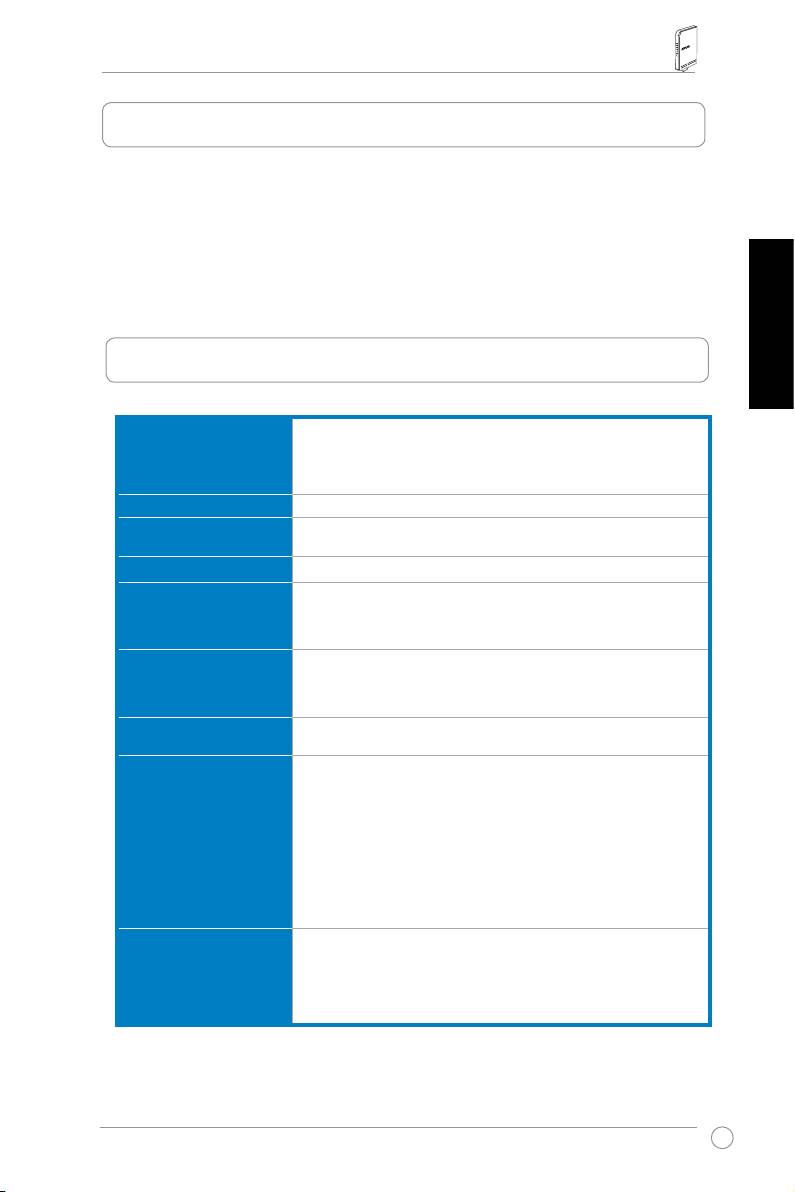
2. Specication summary
Ethernet port
WAN:1xRJ45for10/100BaseT
LAN:4xRJ45for10/100BaseT
SupportEthernetand802.3withmax.bitrate10/100Mbpsand
autocross-overfunction(MDI-X)
Antenna
3 x PCB antenna
Power supply
ACinput:100V~240V(50~60Hz)
DCoutput:+5Vwithmax.2.5Acurrent
Operating frequency
2.4G~2.5GHz
Data rate
802.11n:uptp300Mbps
802.11g:6,9,12,18,24,36,48,54Mbps
802.11b:1,2,5.5,11Mbps
Output power
15.5~16.5dBm(gmode)
15.8~19.5dBm(bmode)
15.8~19.5dBm(nmode)
Encryption/
64/128-bitWEP,WPA,WPA2,TKIP,AES,WPA-PSK,
Authentication
WPA2-PSK,MACaddress,802.1x
Management
BandwidthManagement-Allowsmultiplenetworkactivities
(FTP,Game,P2P...)toworksmoothlyatthesametime.
SmartWizardbrowser-basedadministration
Remote Management
DHCPserver,WANDHCPclient
Save/restorecongurationles
Upgradesviawebbrowser
Firmwarerestoration
Devicediscovery
WAN connection types
Static IP address
DynamicIPaddress(DHCPclient)
PPPoverEthernet(PPPoE)
PPTP
L2TP
4
RT-N13 Wireless Router Quick Start Guide
Security
Firewall:
• NATandSPI(StatefulPacketInspection)
• Intrusion detection including logging
Logging:
English
• Droppedpacket
• Securityevent
• Syslog
Filtering:
• Port
• IPpacket
• URLKeyword
• MACaddress
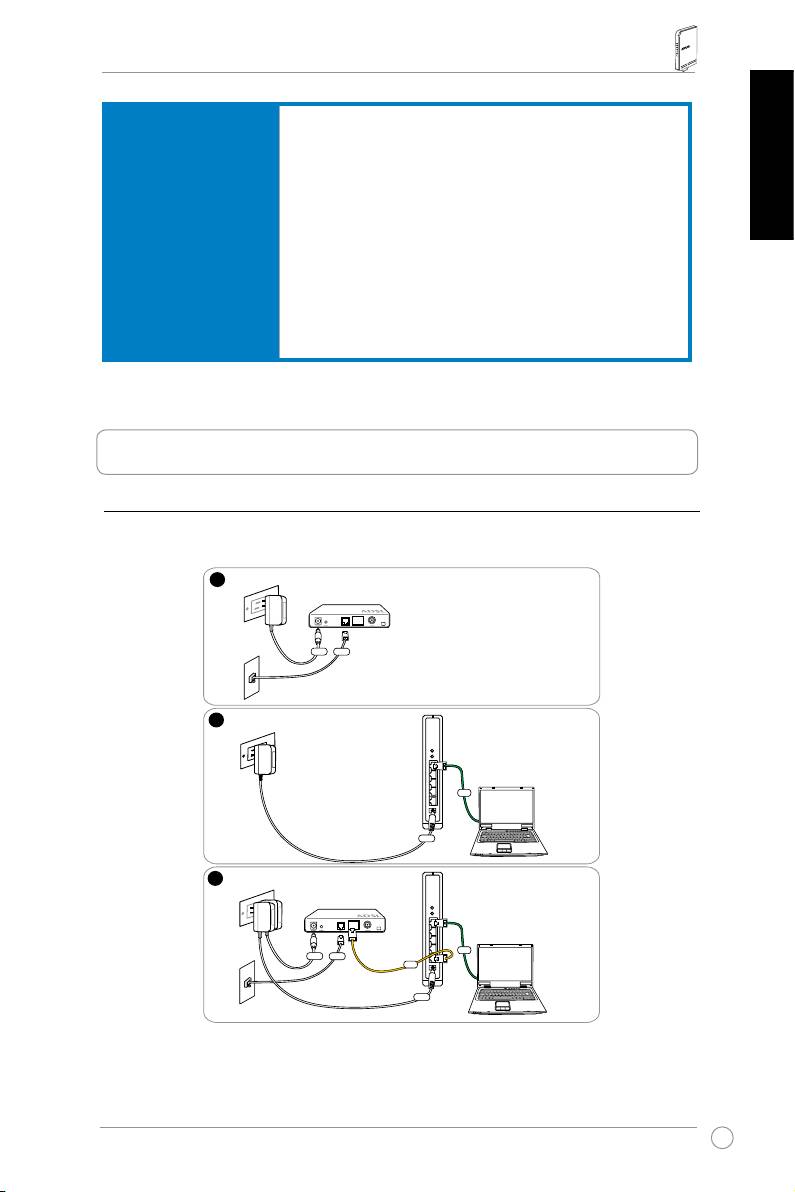
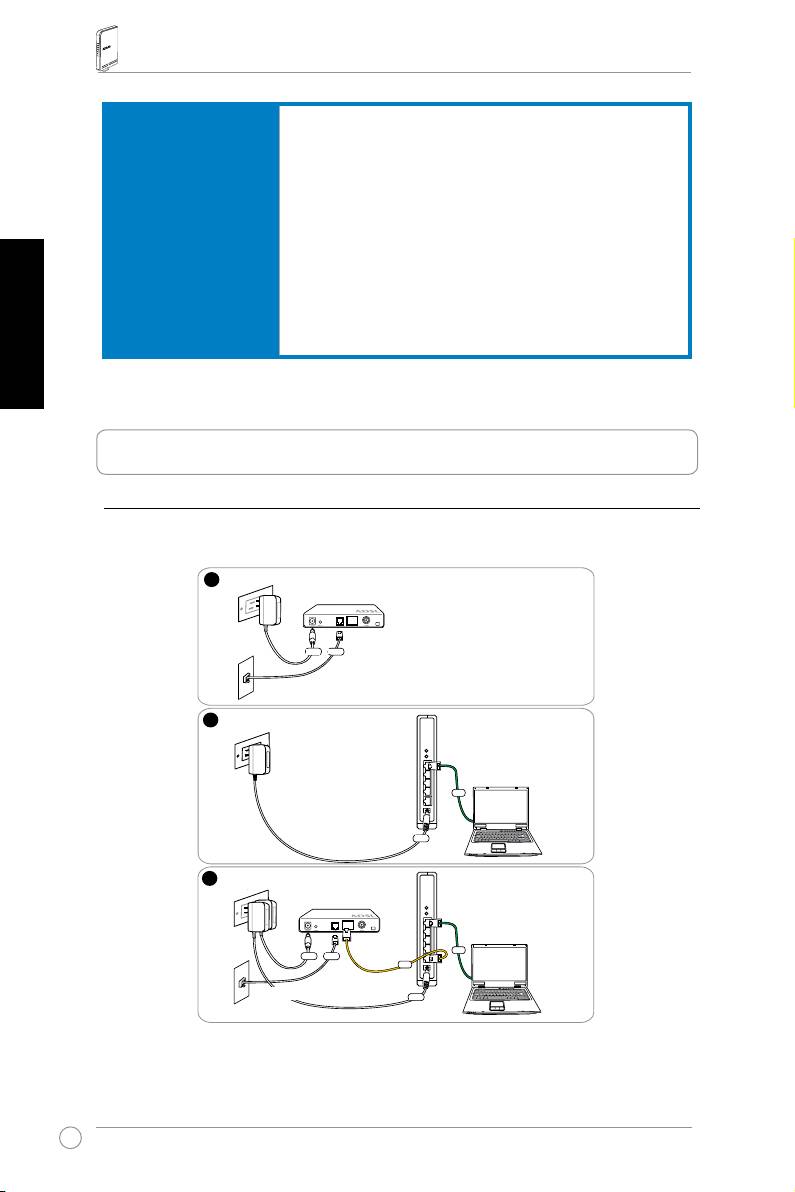
3. Connecting ADSL modem and wireless router
1) Cable connection
5
1
Wallpoweroutlet
Modem
Power
Phone
Wall telephone outlet
2
Wallpoweroutlet
ASUSWirelessRouter
LAN
Power
3
Wallpoweroutlet
Modem
LAN
Power
Phone
WAN
Wall telephone outlet
Power
RT-N13 Wireless Router Quick Start Guide
English
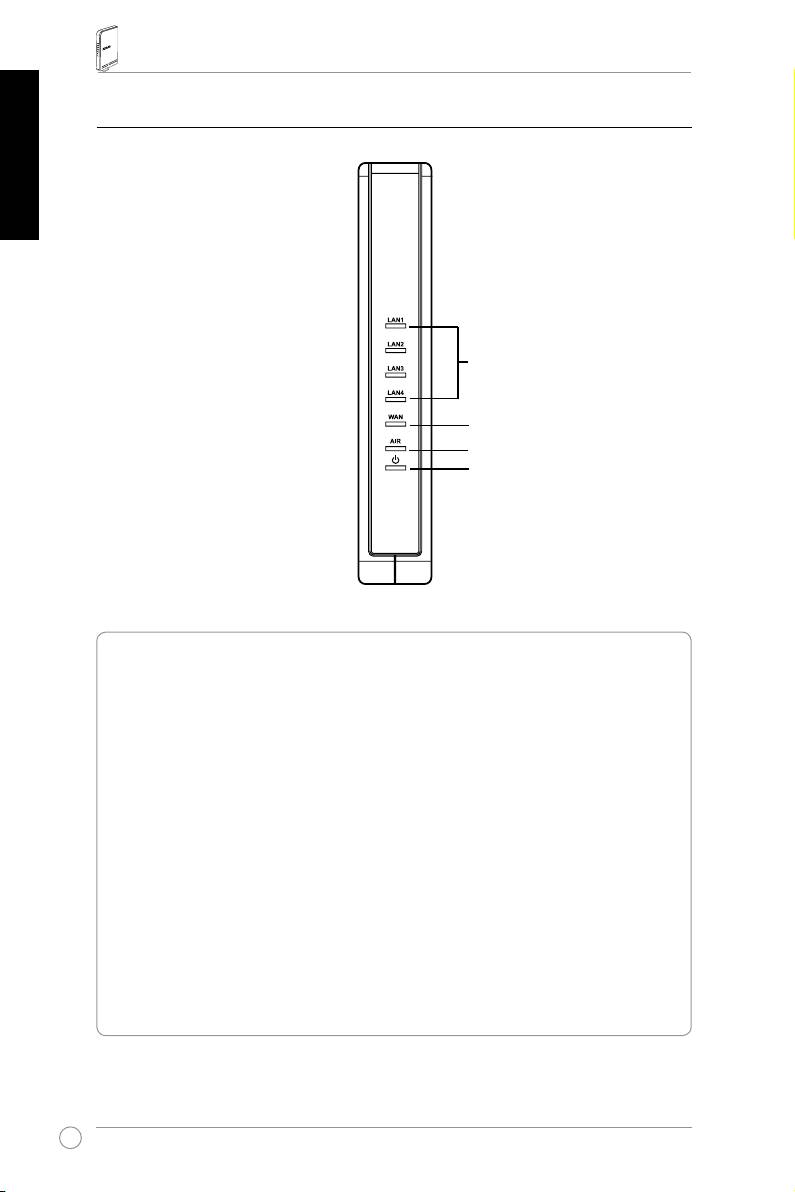
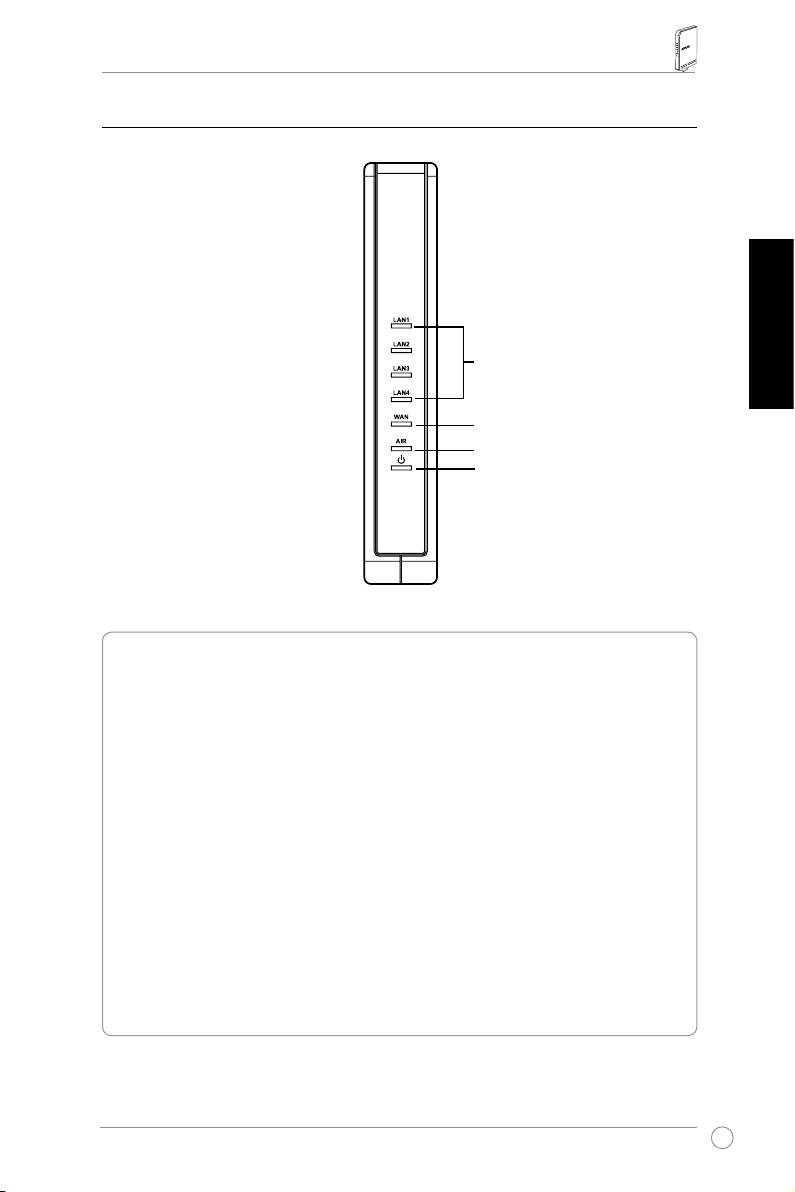
2) Status indicators
LAN
WAN
AIR
PWR
PWR (Power)
Off Nopower
On Systemready
Flashing-slow Resettodefaultmode
Flashing-quick WPSmode
AIR (Wireless Network)
Off Nopower
On Wirelesssystemready
Flashing Transmittingorreceivingdata(wireless)
WAN (Wide Area Network)
Off Nopowerornophysicalconnection
On HasphysicalconnectiontoanEthernetnetwork
Flashing Transmittingorreceivingdata(throughEthernetcable)
LAN 1-4 (Local Area Network)
Off Nopowerornophysicalconnection
On HasphysicalconnectiontoanEthernetnetwork
Flashing Transmittingorreceivingdata(throughEthernetcable)
6

RT-N13 Wireless Router Quick Start Guide
4. Getting started
TheASUSRT-N13WirelessRoutercanmeetvariousworkingscenarioswith
properconguration.Thedefaultsettingsofthewirelessroutermaychangeto
English
meetyourindividualneeds.Thus,beforeusingthewirelessrouter,checkthebasic
settingstoensurethattheyallworkinyourenvironment.
ASUSprovidesautilitynamedWPSforfastwirelessconguration.Ifyouwould
liketouseWPSforyourrouterconguration,refertochapter5ofusermanualin
support CD.
Note:
Wiredconnectionforinitialcongurationisrecommendedtoavoidpossible
setupproblemsduetowirelessuncertainty.
1) Wired connection
TheRT-N13WirelessRouterissuppliedwithanEthernetcableinthepackage.
Thewirelessrouterhasanintegratedauto-crossoverfunction.Thus,youcaneither
useastraight-throughoracrossovercableforwiredconnection.Plugoneendof
thecabletotheLANportontherearpaneloftherouterandtheotherendtothe
EthernetportonyourPC.
2) Wireless connection
Forestablishingwirelessconnection,youneedanIEEE802.11b/g/ncompatible
WLANcard.Refertoyourwirelessadapterusermanualforwirelessconnection
procedures.Bydefault,theSSIDofthewirelessrouteris“default”(inlowercase),
encryptionisdisabledandopensystemauthenticationisused.
3) Setting IP address for wired or wireless client
ToaccesstheRT-N13WirelessRouter,youmusthavethecorrectTCP/IPsettings
onyourwiredorwirelessclients.SettheIPaddressesoftheclientswithinthe
samesubnetofRT-N13.
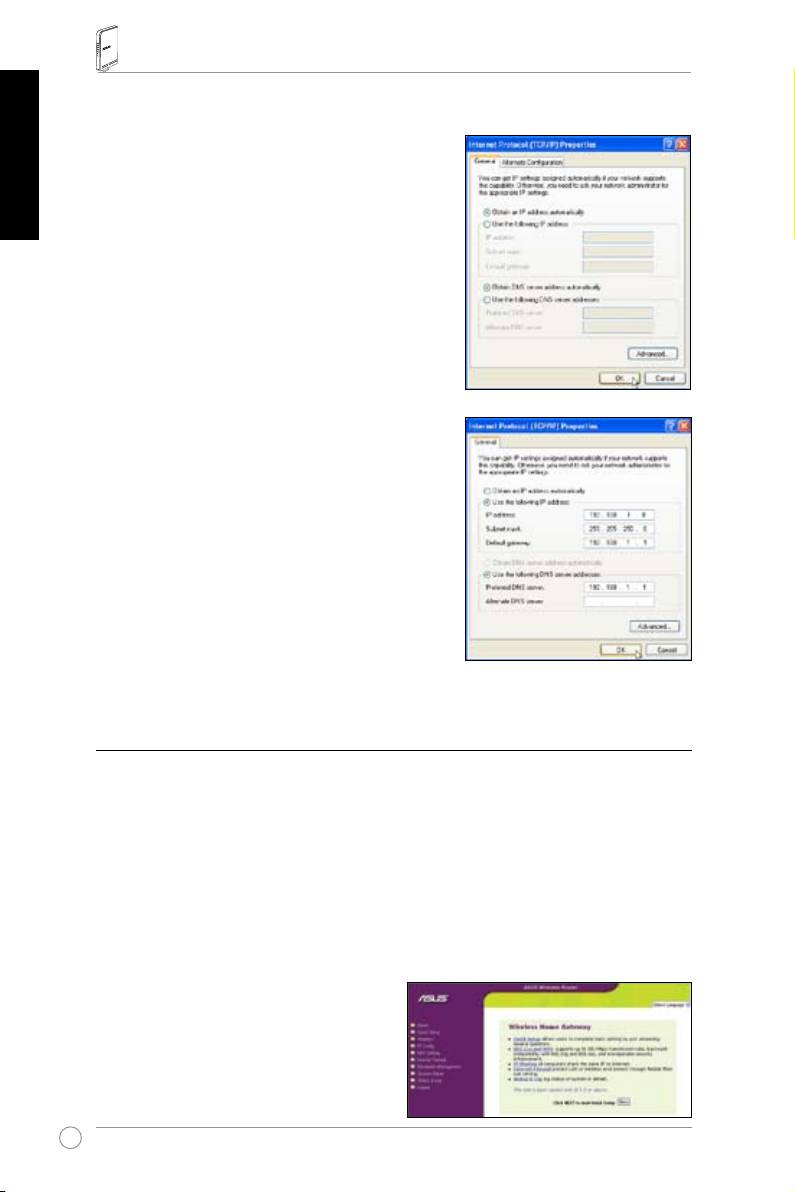
Getting an IP address automatically
TheRT-N13WirelessRouterintegratesDHCPserverfunctions,thus,yourPCgets
anIPaddressautomatically.
Note:
BeforerebootingyourPC,switchONthewirelessrouterandensurethatthe
routerisready.
7
RT-N13 Wireless Router Quick Start Guide
English
Setting up the IP address manually
TomanuallysettheIPaddress,youneedto
knowthedefaultsettingsofthewirelessrouter:
• IP address 192.168.1.1
•SubnetMask255.255.255.0
Tosetuptheconnectionwithamanually
assignedIPaddress,theaddressofyourPC
andthewirelessroutermustbewithinthesame
subnet:
•IPaddress:192.168.1.xxx(xxxcanbeany
numberbetween2and254.Ensurethatthe
IPaddressisnotusedbyotherdevice)
•SubnetMask:255.255.255.0(sameas
RT-N13)
•Gateway:192.168.1.1(IPaddressof
RT-N13)
•DNS:192.168.1.1(
RT-N13),orassignaknownDNSserverinyournetwork.
4) Conguring the wireless router
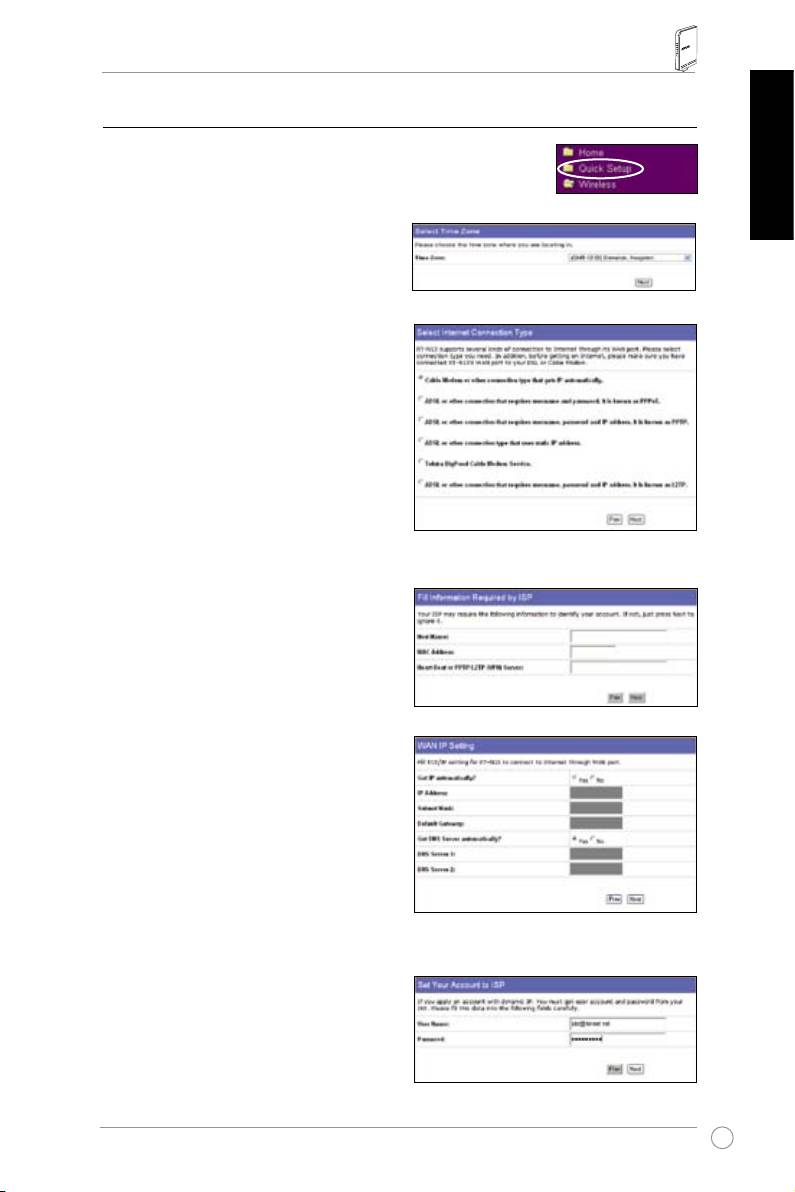
FollowthestepsbelowtoentertheWebcongurationinterfaceofRT-N13.
1. Keyinthefollowingaddressinyourwebbrowser:http://192.168.1.1.
2. Keyinthedefaultusernameandpasswordintheloginpop-upwindow,then
click
OK
.Foryourreference,thefollowingarethedefaultlogininformationof
yourdevice.
•Username:admin
•Password:admin
Afterloggingin,youcanseetheASUS
Wireless Router home page.
Thehomepagedisplaysquicklinks
tocongurethemainfeaturesofthe
wirelessrouter.
8
RT-N13 Wireless Router Quick Start Guide
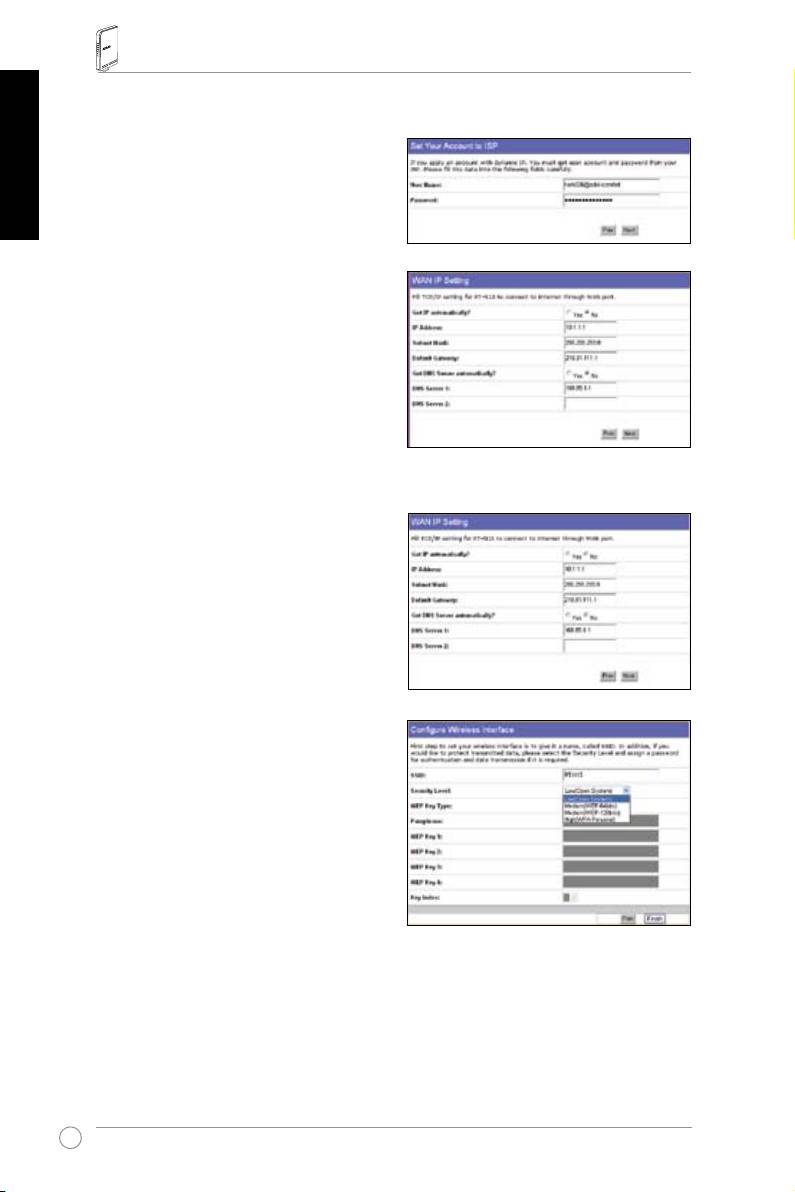
5) Quick setup
Tostartquicksetup,click
Next
toenterthe“QuickSetup
”page.FollowtheinstructionstosetuptheASUSWireless
Router.
English
1. Selectyourtimezoneandclick
Next
.
2. ASUSwirelessroutersupportsve
typesofISPservices:cable,PPPoE,
PPTP,staticWANIP,andTelstra
BigPond.Selectyourconnectiontype
andclick
Next
to continue.
Cable or dynamic IP user
Ifyouareusingservicesprovidedby
cableISP,select
Cable Modem or other
connection that gets IP automatically
.
IfyourISPprovidesyouwiththe
hostname,theMACaddress,andthe
heartbeatserveraddress,llthese
informationintotheboxesonthesetting
page;ifnot,click
Next
toskipthisstep.
PPPoE user
IfyouareusingPPPoEservices,select
ADSL connection that requires
username and password.
Itisknownas
PPPoE. You need to input the username
andpasswordprovidedbyyourISP.Click
Next
to continue.
9
RT-N13 Wireless Router Quick Start Guide
English
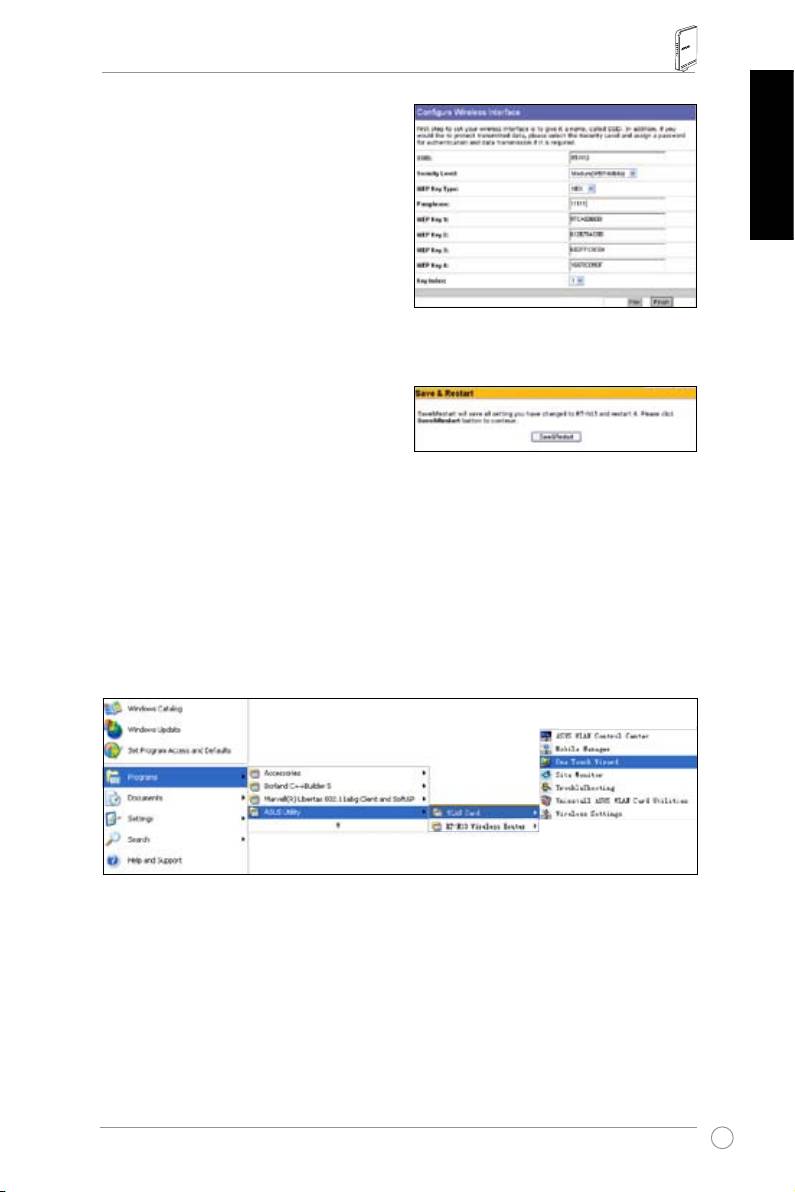
PPTP user
IfyouareusingPPTPservices,select
ADSL connection that requires
username, password and IP address.
Fill
intheusername,passwordandIPaddress
providedbyyourISPintotheelds.Click
Next
to continue.
Static IP user
IfyouareusingADSLorotherconnection
typethatusesstaticIPaddress,select
ADSL or other connection type that
uses static IP address
. Input the IP
address,subnetmask,anddefault
gatewayprovidedbyyourISP.You
canspecifyDNSservers,orgetDNS
informationautomatically.
3. Tosetupyourwirelessinterface,specify
anSSID(ServiceSetIdentier),which
isauniqueidentierattachedtopackets
sentoverWLAN.Thisidentieremulates
apasswordwhenadeviceattemptsto
communicatewithyourwirelessrouter
viaWLAN.
Ifyouwanttoprotecttransmitteddata,
select a
Security Level
to enable
encryptionmethods.
Medium:
OnlyuserswiththesameWEPkeysettingscanconnecttoyourwireless
routerandtransmitdatausing64bitsor128bitsWEPkeyencryption.
High:
OnlyuserswiththesameWPApre-sharedkeysettingscanconnecttoyour
wirelessrouterandtransmitdatausingTKIPencryption.
10
RT-N13 Wireless Router Quick Start Guide
4. InputfoursetsofWEPkeysintheWEP
Keyelds(10hexadecimaldigitsfor
WEP64bits,26hexadecimaldigits
forWEP128bits).Youcanalsoletthe
systemgeneratethekeysbyinputting
English
a Passphrase. Record the Passphrase
andtheWEPkeysinyournotebook,
thenclick
Finish
.
Forexample,ifweselectWEP64bits
encryptionmodeandinput11111as
thePassphrase,theWEPKeysare
generatedautomatically.
5. Click
Save&Restart
to restart the
wirelessrouterandactivatethenew
settings.
6. Toconnectthewirelessrouterfroma
®
wirelessclient,youcanuseWindows
WirelessZeroCongurationserviceto
setuptheconnection.IfyouuseASUSWirelessCardonyourcomputer,you
canusetheOneTouchWizardutilitysuppliedinWLANCardsupportCDfor
wirelessconnection.
Conguring ASUS WLAN Card with One Touch Wizard
IfyouhaveinstalledASUSwirelesscardtogetherwithitsutilitiesanddriversonyour
PC,click
Start -> All Programs -> ASUS Utility-> WLAN Card -> One Touch Wizard
tolaunchtheOneTouchWizardutility.
11
RT-N13 Wireless Router Quick Start Guide
English
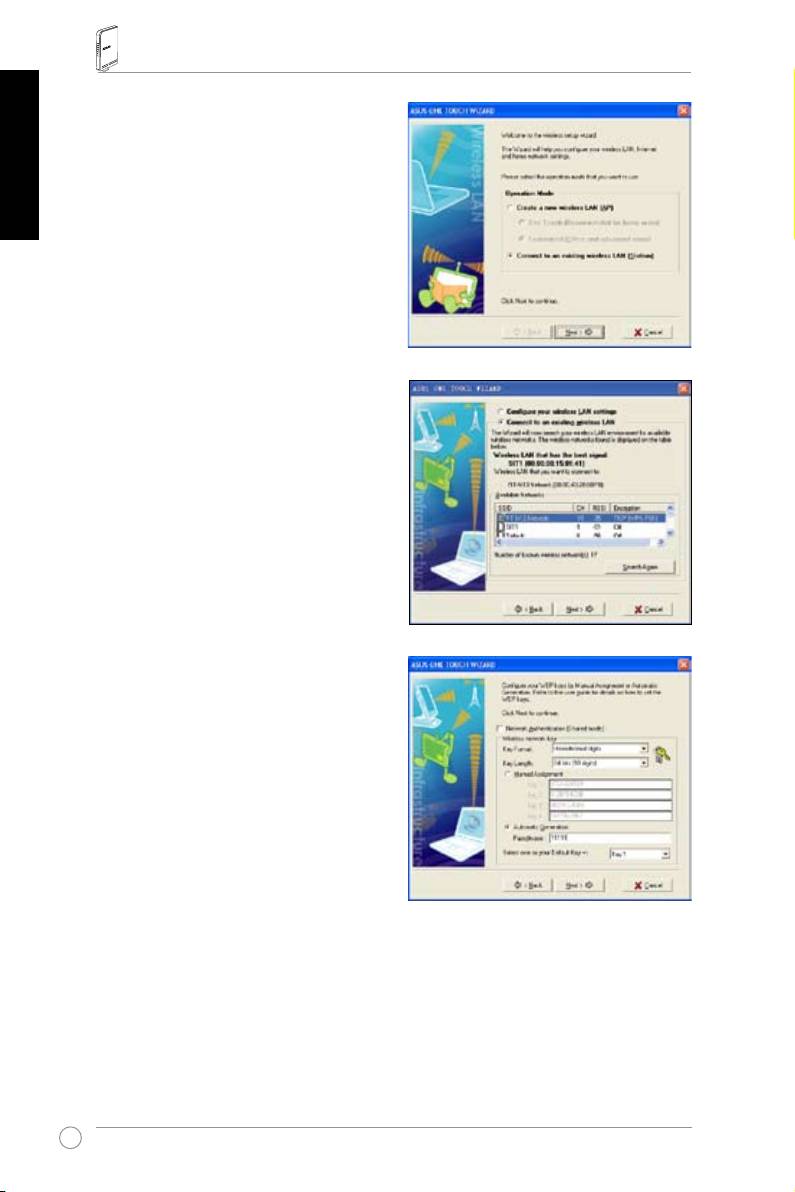
1)Select
Connect to an existing wireless
LAN (Station)
radiobuttonandclick
Next
to continue
.
2)OneTouchWizardsearchesanddisplays
theavailableAPsinthe
Available Networks
list.SelectRT-N13andpress
Next
to
continue.
3)Settheauthenticationandencryptionofyour
WLANcardthesamewiththoseatRT-N13.
In the previous steps the
Key Length
is
64
bits
,andthe
Passphrase
is11111.Click
Next
to continue.
12
RT-N13 Wireless Router Quick Start Guide
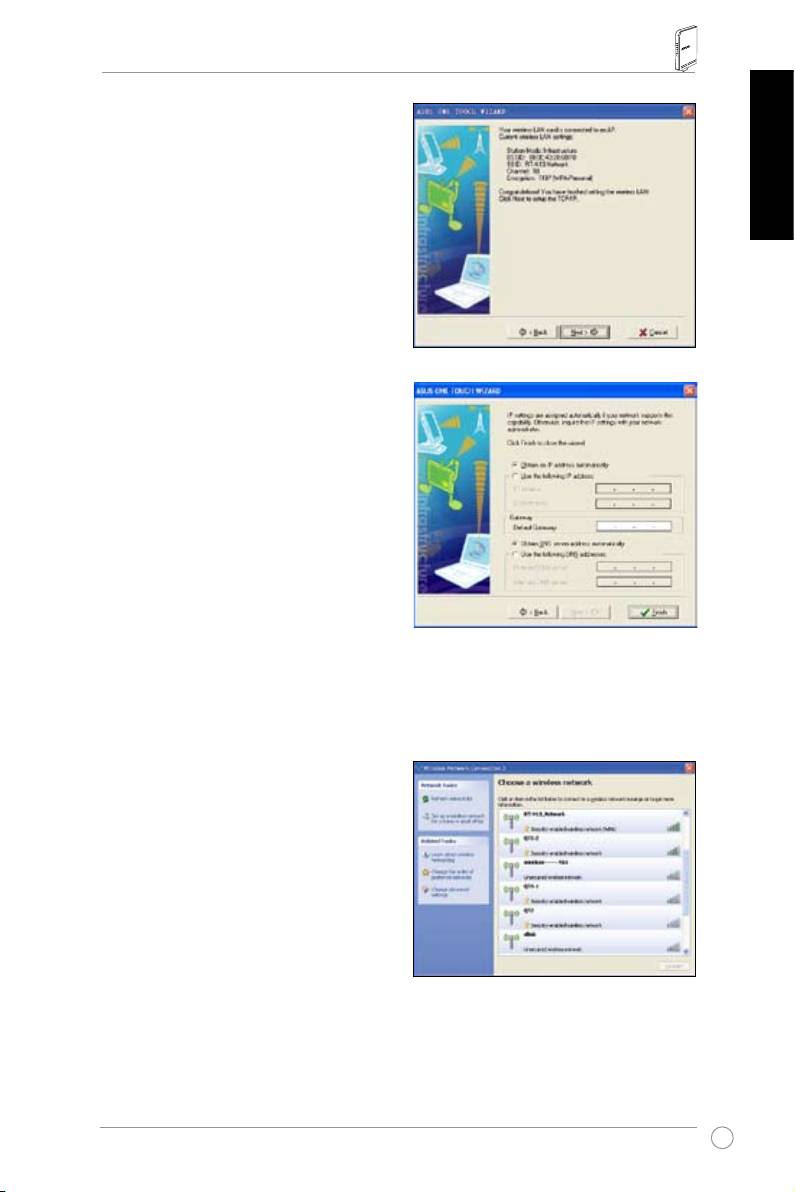
4)Ittakesseveralsecondsforthewirelesscard
toassociatewithRT-N13.Press
Next
to
setupTCP/IPforyourWLANCard.
English
5)SetuptheIPaddressoftheWLANCard
accordingtoyournetworkcondition.After
thesetupiscomplete,click
Finish to exit
the One Touch Wizard
.
®
Conguring WLAN card with Windows
WZC service
Ifyouusenon-ASUSwirelesscard,youcansetupthewirelessconnectionwith
®
Windows
WirelessZeroConguration(WZC)service.
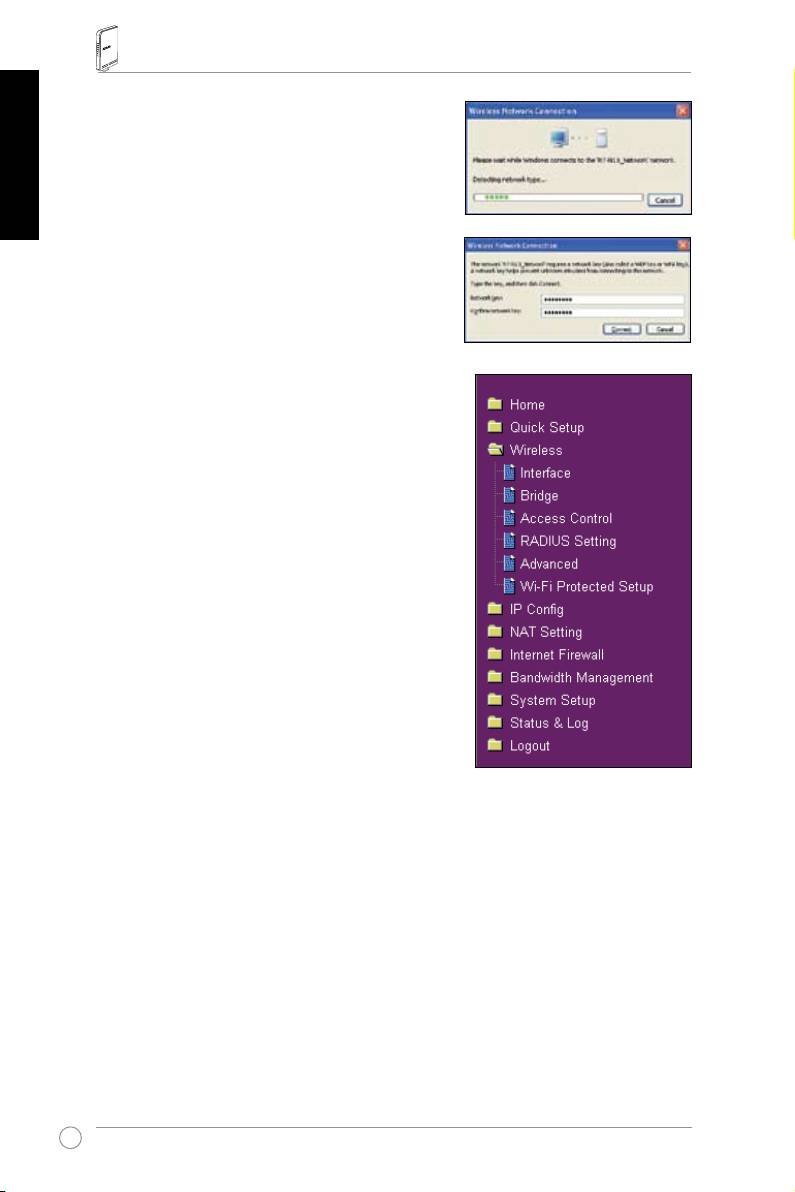
1) Double-clickthewirelessnetwork
icononthetaskbartoviewavailable
networks.Selectyourwirelessrouterand
click
Connect
.
13
RT-N13 Wireless Router Quick Start Guide
English
2) Inputthe10-digitkeysyouhavesetonthe
wirelessrouterandclick
Connect
. The
connectioniscompletewithinseveralseconds.
7. Congure-advancedfeatures
Toviewandadjustothersettingsofthewireless
router,entertheWebcongurationpageof
RT-N13.Clickonitemsonthemenutoopena
submenuandfollowtheinstructionstosetupthe
router.Tipsshowupwhenyoumoveyourcursor
overeachitem.Refertousermanualinsupport
CDfordetailedinformation.
14
RT-N13 SuperSpeed N
Routeur sans l
Français
Guide de démarrage rapide
®

Contacts constructeur
ASUSTeK COMPUTER INC. (Asie-Pacique)
Adresse:15Li-TeRoad,Beitou,Taipei11259
Général(tél):+886-2-2894-3447
Général(fax):+886-2-2894-7798
Français
Email:info@asus.com.tw
SiteWeb:http//www.asus.com.tw
ASUS COMPUTER INTERNATIONAL (Amériques)
Adresse:800CorporateWay,Fremont,CA94539,USA
Général(fax):+1-510-608-4555 SiteWeb:usa.asus.com
Support technique
SupportGénéral:+1-502-995-0883 Support(fax):+1-502-933-8713
Supportenligne:http://vip.asus.com/eservice/techserv.aspx
ASUS FRANCE
Adresse:27AlbertEinstein,77420Champs-sur-Marne,FRANCE
Fax:+33(0)1.64.73.30.40
Courriel:commercial@asus.fr(requêtescommercialesuniquement)
Support technique
Composants:+33(0)1.64.73.30.45(Notebook)
Courriel:savmb@asus.fr(Composants)
Fax:+33(0)164.73.30.41
SiteWeb:france.asus.com
Routeur sans l RT-N13 Guide de démarrage rapide
1. Contenu de la boîte
•RouteursansfilRT-N13x1
•Adaptateursecteurx1
• CD d'utilitaires x 1
• Câble RJ45 x 1
• Guide de démarrage rapide x 1
2. Sommaire des caractéristiques
Français
Port Ethernet
WAN:1xcâbleRJ45pouruneconnexion10/100BaseT
LAN:4xcâblesRJ45pouruneconnexion10/100BaseT
SupportEthernetet802.3àundébitmax.de10/100Mbpsavec
lafonctionautoMDI-X
Antenne
3 x antennes PCB
Alimentation
EntréeAC:100V~240V(50~60Hz)
SortieDC:+5Vavecuncourantmax.de2.5A
Fréquence d'opération
2.4G~2.5GHz
Taux de transfert
802.11n:jusqu'à300Mbps
802.11g:6,9,12,18,24,36,48,54Mbps
802.11b:1,2,5.5,11Mbps
Output power
15,5~16,5dBm(modeg)
15.8~19.5dBm(modeb)
15.8~19.5dBm(moden)
Cryptage/
WEP64/128bits,WPA,WPA2,TKIP,AES,WPA-PSK,
Authentication
WPA2-PSK,adresseMAC,802.1x
Gestion
Gestiondelalargeurdebande-Permetderéaliserde
multiplesactivitésréseau(FTP,Jeu,P2P...)toutentravaillant.
Administrationviaunassistantbasésurlenavigateurweb
Gestion à distance
ServeurDHCP,clientDHCPWAN
Sauvegarde/restaurationdeschiersdeconguration
MisesàjourvialenavigateurInternet
Restaurationdurmware
Devicediscovery
Types de connexion
AdresseIPstatique
WAN
AdresseIPdynamique(clientDHCP)
PPPoverEthernet(PPPoE)
PPTP
L2TP
17
Routeur sans l RT-N13 Guide de démarrage rapide
Français
18
1
Wallpoweroutlet
Modem
Power
Phone
Wall telephone outlet
2
Wallpoweroutlet
ASUSWirelessRouter
LAN
Power
3
Wallpoweroutlet
Modem
LAN
Power
Phone
WAN
Wall telephone outlet
Power
Securité
Pare-feu:
• NATetSPI(StatefulPacketInspection)
• Détection des intrus incluant la connexion
Connexion:
• Droppedpacket
• Evènement de sécurité
• Syslog
Filtrage:
• Single port and port range
• PaquetIP
• ClavierURL
• AdresseMAC
3. Connecter un modem ADSL et un routeur sans l
1) Connexion des câbles
Prise secteur murale
Modem
Alim. Tél.
Prisetéléphoniquemurale
Prise secteur murale
RouteursanslASUS
Alim.
Prise secteur murale
Modem
Alim.
Tél.
Prisetéléphoniquemurale
Alim.
Routeur sans l RT-N13 Guide de démarrage rapide
2) Indicateurs d'état
LAN
Français
WAN
AIR
PWR
PWR (Alim)
Eteint Pas d’alimentation
Allumé Systèmeprêt
Clignotementlent Restaurationdesparamètrespardéfaut
Clignotement rapide Mode WPS
AIR (Réseau sans l)
Eteint Pas d’alimentation
Allumé Systèmesanslprêt
Clignotement Transmission ou réception de données en cours
(vialeréseausansl)
WAN (Wide Area Network)
Eteint Pasd’alimentationoudeconnexionphysique
Allumé ConnexionphysiqueàunréseauEthernet
Clignotement Transmission ou réception de données en cours
(vialecâbleEthernet)
LAN 1-4 (Local Area Network)
Eteint Pasd'alimentationoudeconnexionphysique
Allumé ConnexionphysiqueavecunréseauEthernet
Clignotement Transmission ou réception de données en cours
(vialecâbleEthernet)
19
