
Asus WL-520gU: instruction
Class: Networks, communications, telecommunications, internet, security
Type:
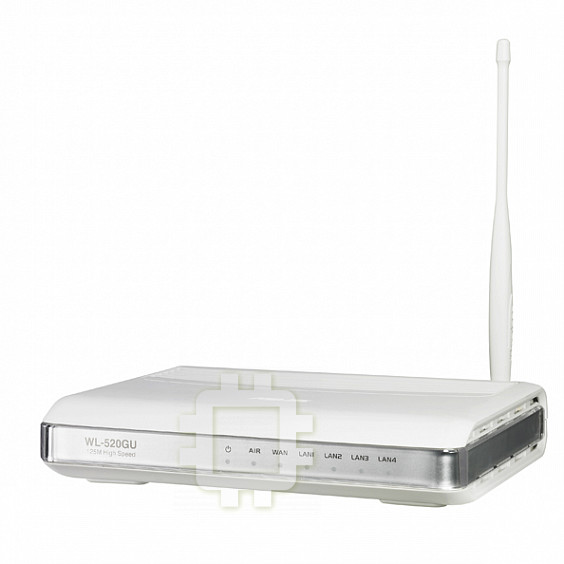
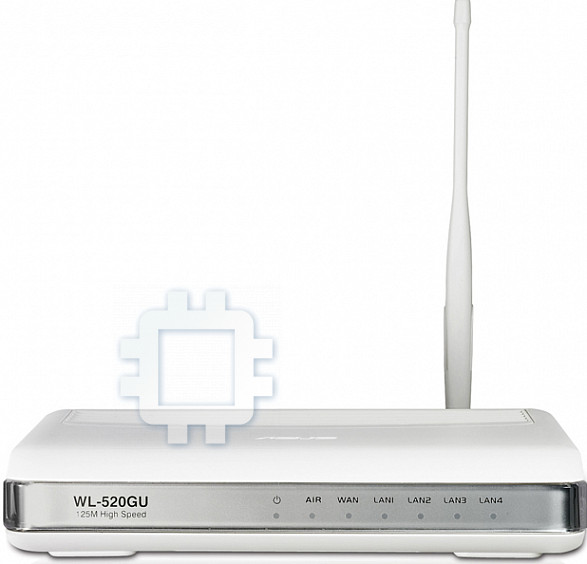
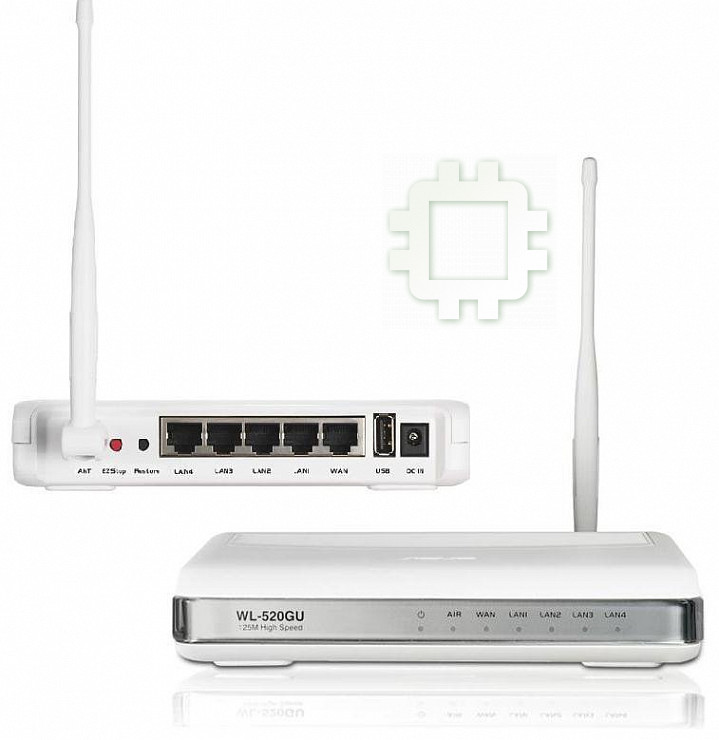
Manual for Asus WL-520gU
Table of contents
- English ................................................................................................................ 1
- FCC Warning Statement Prohibition of Co-location Safety Information
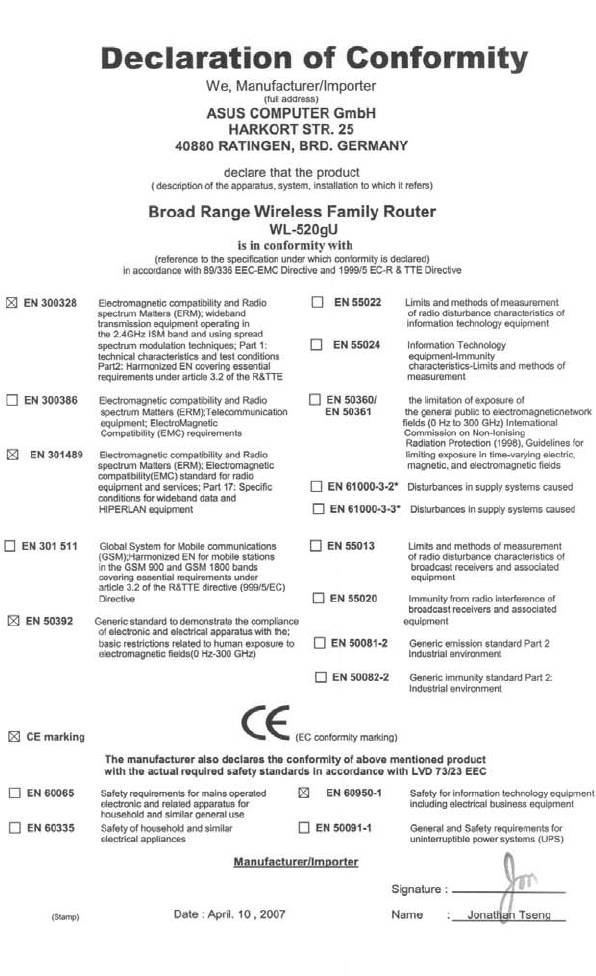
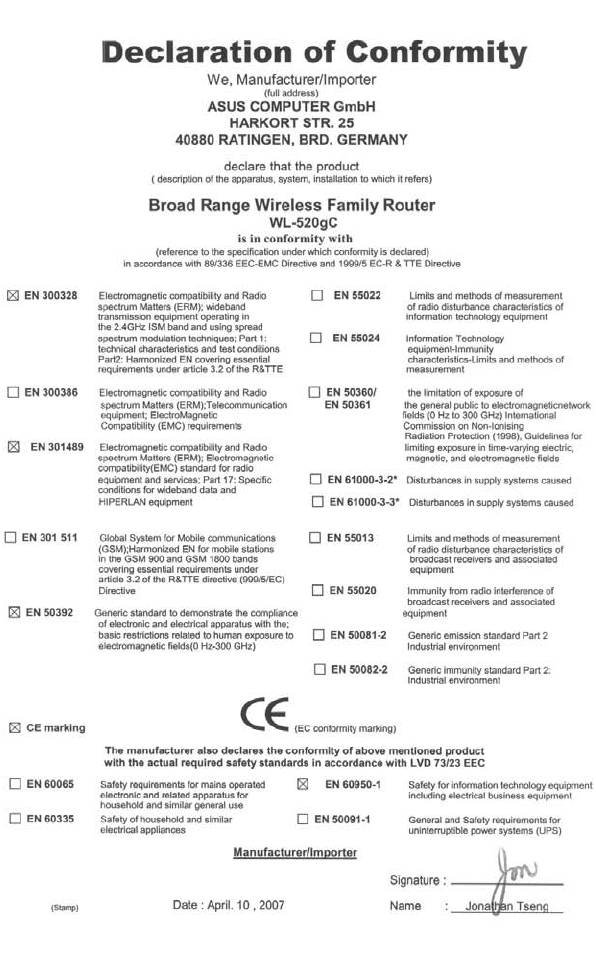
- Declaration of Conformity for R&TTE directive 1999/5/EC
- 1. Package Contents 2. Specication summary
- 2) Status indicators 3) Mounting options
- 4. EZ Setup
- English

Content
English ................................................................................................................ 1
Česky.................................................................................................................. 6
Deutsch .............................................................................................................11
Français ............................................................................................................ 16
Italiano .............................................................................................................. 21
Español............................................................................................................. 26
Hollands............................................................................................................ 31
Polski ................................................................................................................ 36
Português ......................................................................................................... 41
Pусский ............................................................................................................. 46
Magyar.............................................................................................................. 51
Türkçe............................................................................................................... 56
Bahasa Indonesian ........................................................................................... 61
Български
........................................................................................................... 66
Eesti.................................................................................................................. 71
Suomi ............................................................................................................... 76
.......................................................................................................... 81
Română ............................................................................................................ 86
Slovensky ........................................................................................................ 91
ไทย
................................................................................................................... 96
Українська
........................................................................................................ 101
FCC Warning Statement
This device complies with Part 15 of the FCC Rules. Operation is subject to the following two
conditions:
1. this device may not cause harmful interference, and
2. this device must accept any interference received, including interference that may cause
undesired operation.
This equipment has been tested and found to comply with the limits for a class B digital
device, pursuant to part 15 of the FCC Rules. These limits are designed to provide reasonable
protection against harmful interference in a residential installation.
This equipment generates, uses and can radiate radio frequency energy and, if not installed
and used in accordance with the instructions, may cause harmful interference to radio
communications. However, there is no guarantee that interference will not occur in a particular
installation. If this equipment does cause harmful interference to radio or television reception,
which can be determined by turning the equipment off and on, the user is encouraged to try to
correct the interference by one or more of the following measures:
- Reorient or relocate the receiving antenna.
- Increase the separation between the equipment and receiver.
- Connect the equipment into an outlet on a circuit different from that to which the receiver
is connected.
- Consult the dealer or an experienced radio/TV technician for help.
CAUTION
Any changes or modications not expressly approved by the party responsible for compliance
could void the user’s authority to operate the equipment.
Prohibition of Co-location
This device and its antenna(s) must not be co-located or operating in conjunction with any other
antenna or transmitter.
Safety Information
To maintain compliance with FCC’s RF exposure guidelines, this equipment should beinstalled
and operated with minimum distance 20cm between the radiator and your body. Use on the
supplied antenna.
Declaration of Conformity for R&TTE directive 1999/5/EC
Essential requirements – Article 3
Protection requirements for health and safety – Article 3.1a
Testing for electric safety according to EN 60950-1 has been conducted. These are
considered relevant and sufcient.
Protection requirements for electromagnetic compatibility – Article 3.1b
Testing for electromagnetic compatibility according to EN 301 489-1 and EN 301 489-17 has
been conducted. These are considered relevant and sufcient.
Effective use of the radio spectrum – Article 3.2
Testing for radio test suites according to EN 300 328- 2 has been conducted. These are
considered relevant and sufcient.
CE Mark Warning
This is a Class B product, in a domestic environment, this product may cause radio
interference, in which case the user may be required to take adequate measures.
DGT 警語
經型式認證合格之低功率射頻電機,非經許可,公司、商號或使用者均不得擅自變更頻率、
加大功率或變更原設計之特性及功能。
低功率射頻電機之使用不得影響飛航安全及干擾合法通信;經發現有干擾現象時,應立即
停用,並改善至無干擾時方得繼續使用。
前項合法通信,指依電信法規定作業之無線電通信。
低功率射頻電機須忍受合法通信或工業、科學及醫療用電波輻射性電機設備之干擾。
WL-520GU/GC Broad Range Wireless Family Router Quick Start Guide
1
R
1. Package Contents
• WL-520GU/GC wireless router x 1
• Power adapter x 1
English
• Utility CD x 1
• RJ45 cable x 1
• Quick Start Guide x 1
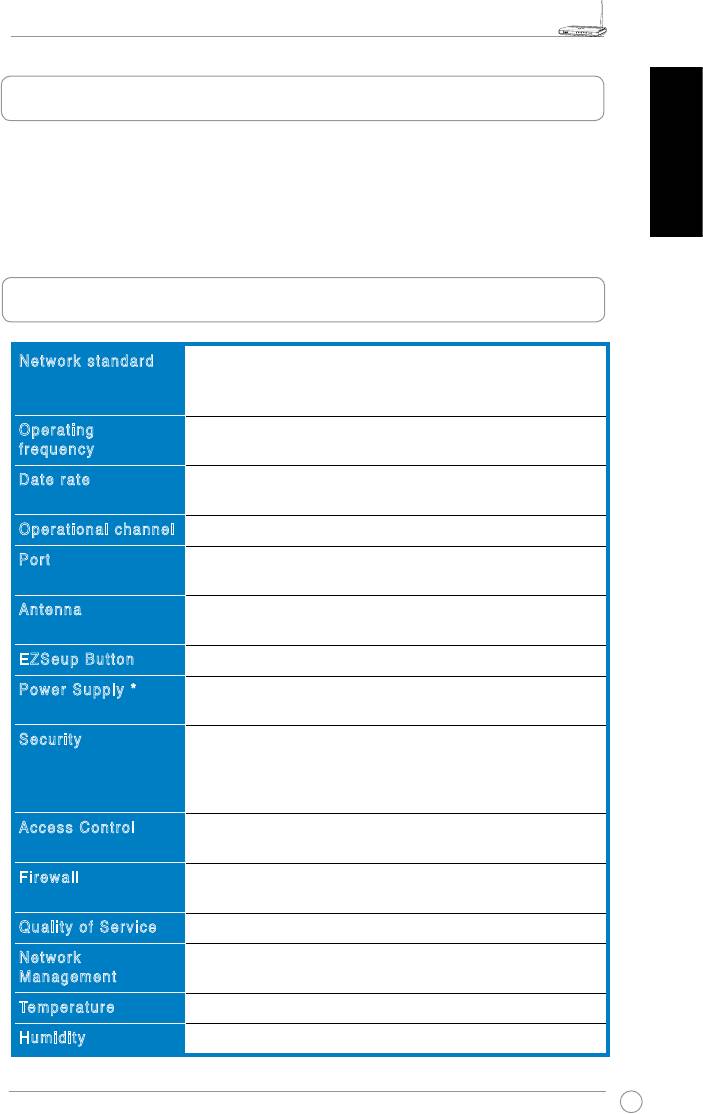
2. Specication summary
Network standard
IEEE 802.11b, IEEE 802.11g, IEEE 802.3, IEEE802.3x, IEEE
802.3u, IEEE 802.1x, IEEE 802.11i, IPv4, IPv6, CSMA/CA,
CSMA/CD, ICMP
Operating
2.4G ~ 2.5GHz
frequency
Date rate
802.11g: 6, 9, 12, 18, 24, 36, 48, 54Mbps
802.11b: 1, 2, 5.5, 11Mbps
Operational channel
11 for N. America, 14 Japan, 13 Europe (ETSI)
Port
WAN x 1, LAN x 4 RJ45 for 10/100 BaseT, 1 x USB2.0 for
printer sharing(
WL-520GU only
)
Antenna
Support Antenna Diversity, 1 x Reverse-SMA antenna
connector
EZSeup Button
Automatically SSID and WEP or WPA conguration
Power Supply *
WL-520GU: DC: +5V with max. 2A current
WL-520GC: DC EU/UK: +9V/1A; TW/US: +9V/800mA
Security
WEP-64bits, WEP-128bits, WPA-Personal, WPA2-Personal,
WPA-Auto-Personal (TKIP. AES. TKIP+AES), WPA-Enterprise,
WPA2-Enterprise, WPA-Auto-Enterprise (TKIP. AES.
TKIP+AES), Radius with 802.1x
Access Control
MAC-level Access Control, Inbound/Outbound IP Filter,
Domain Access Control
Firewall
NAT Firewall, SPI (Stateful Package Inspection) Firewall, WAN
ping control
Quality of Service
BOD (
WL-520GU only
), WMM
Network
Support UPnP, DHCP Server, DNS Proxy, NTP Client, DDNS,
Management
Port Trigger, Virtual Server, Virtual DMZ, VPN Pass-Through
o
o
Temperature
Operating: 0~40
C Storage: -30~50
C
Humidity
Operating: 50~90% Storage: 20~90%
* Use only the adapter included in the package.
WL-520GU/GC Broad Range Wireless Family Router Quick Start Guide
2
R
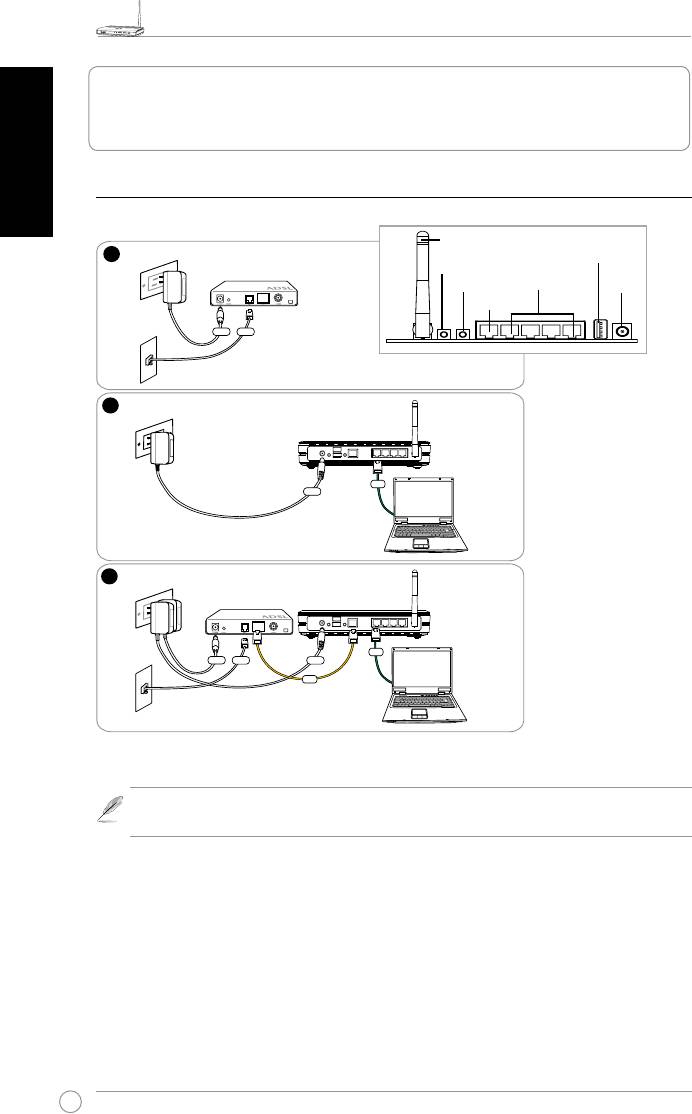
3. Connecting Wireless Router to Cable/DSL/
English
Satellite Modem
1) Cable connection
Note:
Use only the adapter included in the package. Using other adapters may
damage the device.
1
Wall Power Outlet
Modem
Power
Phone
Wall Telephone Outlet
2
Wall Power Outlet
ASUS Wireless Router
LAN
Power
3
Wall Power Outlet
Modem
ASUS Wireless Router
LAN
Power
Phone
Power
WAN
Wall Telephone Outlet
Antenna
USB
EZ Setup
Reset
LAN
Power
WAN
Rear Panel
WL-520GU/GC Broad Range Wireless Family Router Quick Start Guide
3
R
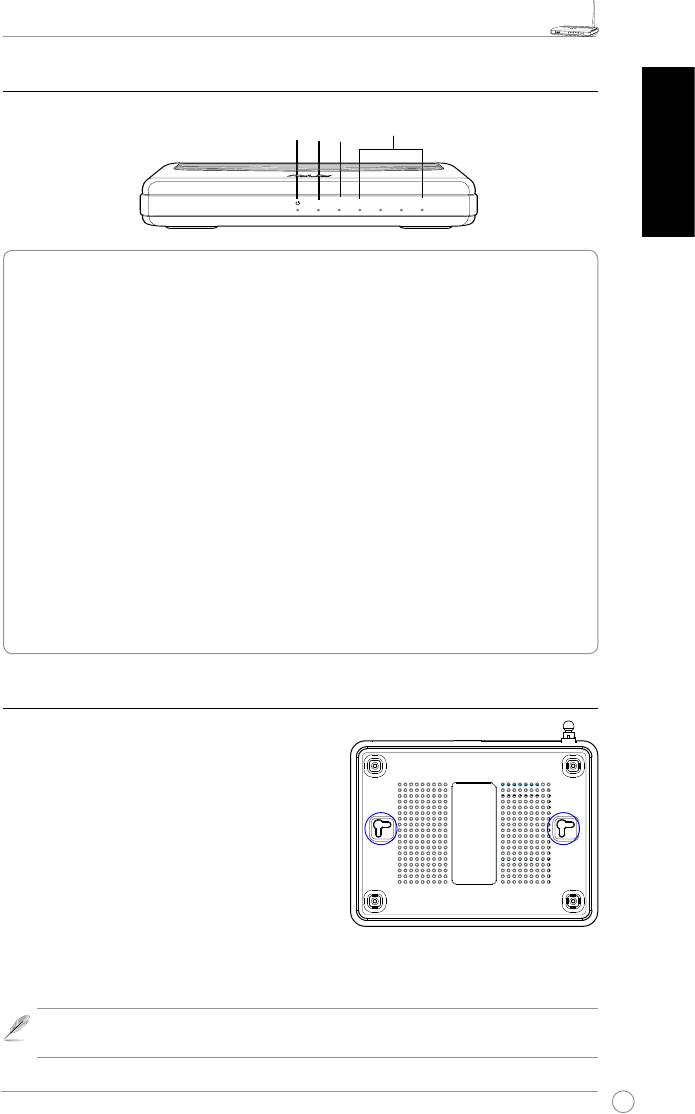
2) Status indicators
LAN
PWR
AIR
WAN
English
PWR (Power)
Off No power
On System ready
Flashing-slow Firmware upgrade failed
Flashing-quick EZsetup processing
AIR (Wireless Network)
Off No power
On Wireless system ready
Flashing Transmitting or receiving data (wireless)
WAN (Wide Area Network)
Off No power or no physical connection
On Has physical connection to an Ethernet network
Flashing Transmitting or receiving data (through Ethernet cable)
LAN 1-4 (Local Area Network)
Off No power or no physical connection
On Has physical connection to an Ethernet network
Flashing Transmitting or receiving data (through Ethernet cable)
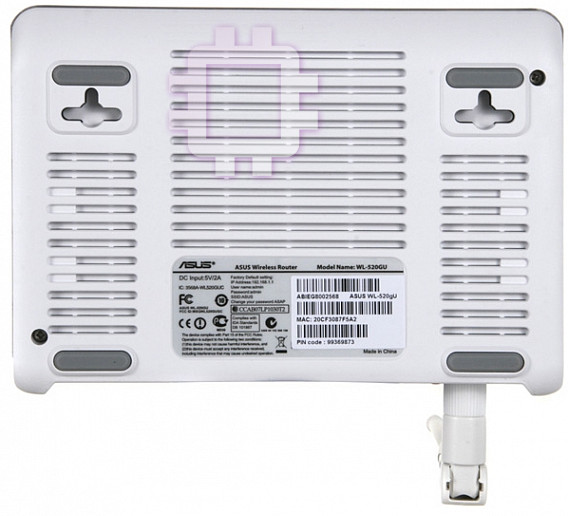
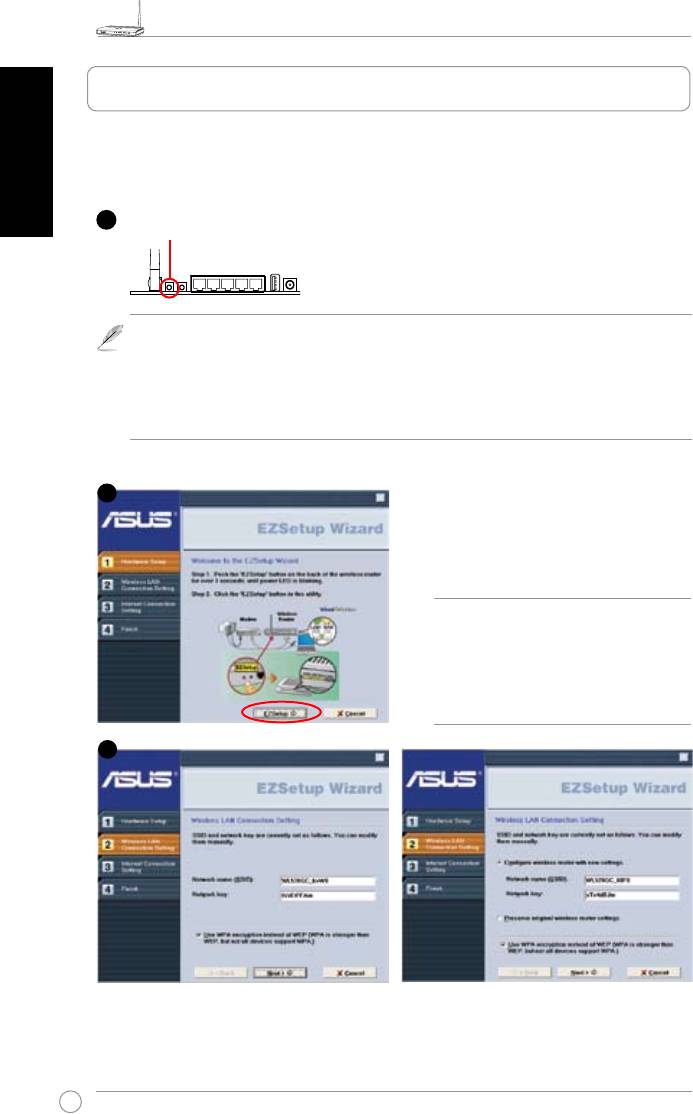
3) Mounting options
Out of the box, the ASUS WL-520GU/GC Broad
Range Wireless Router is designed to sit on a
raised at surface like a le cabinet or a book shelf.
The unit may also be converted for mounting to a
wall or ceiling.
To mount the ASUS WL-520GU/GC
1 Look on the underside for the two mounting
hooks.
2. Mark two upper holes on a wall or on a raised at
surface.
3. Tighten two screws until only 1/4'' is showing.
4. Latch the hooks of the ASUS WL520GU/GC onto the screws
.
Note:
Re-adjust the screws if you cannot latch the ASUS Wireless Router onto the
screws or if it is too loose.
R
WL-520GU
AIR WAN LAN1 LAN2 LAN3 LAN4
125M High Speed
WL-520GU/GC Broad Range Wireless Family Router Quick Start Guide
4
R
English
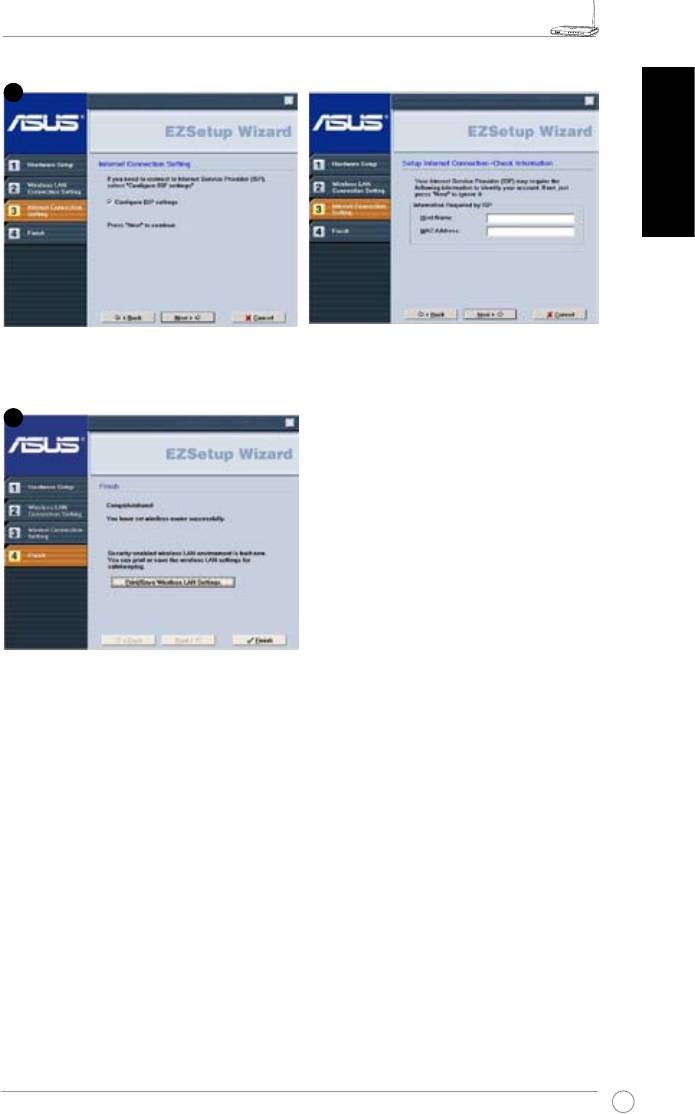
The EZSetup utility enables you to easily complete the wireless LAN setup in just two steps.
First, launch the
EZSetup
from the
Start
menu, then push the EZSetup button, located at the
rear panel, for three seconds.
1) If the setup button is pushed without running the EZsetup wizard utility, the PWR
indicator will ash and Internet connections will pause for a short period but will then
return to normal operation without change.
2) To use EZSetup, we recommend using an ASUS wireless adapter such as WL-106gM,
WL-100gE, and WL-169gE.
Insert the Utility CD into your PC’s CD drive,
and run Install ASUS Wireless Router
Utilities.
After installing the ASUS Wireless Router
Utilities, run the EZSetup Wizard from
[Startup] -> All Utilities [ASUS Utility] ->
[WL-520GU/GC Wireless Router].
Note:
Use EZSetup Wizard with one
wireless client at a time. If the wireless
client computer cannot discover the
wireless router while in EZSetup
mode, shorten the distance between
the client and the router.
Wireless settings, including network name and network keys, are generated automatically.
You can modify these settings manually. Note if your wireless router is congured before,
select
Preserve original wireless router settings
to use the current value. Click
Next
to
continue.
1
Push EZSetup over
3 sec. and release.
2
3
4. EZ Setup
WL-520GU/GC Broad Range Wireless Family Router Quick Start Guide
5
R
English
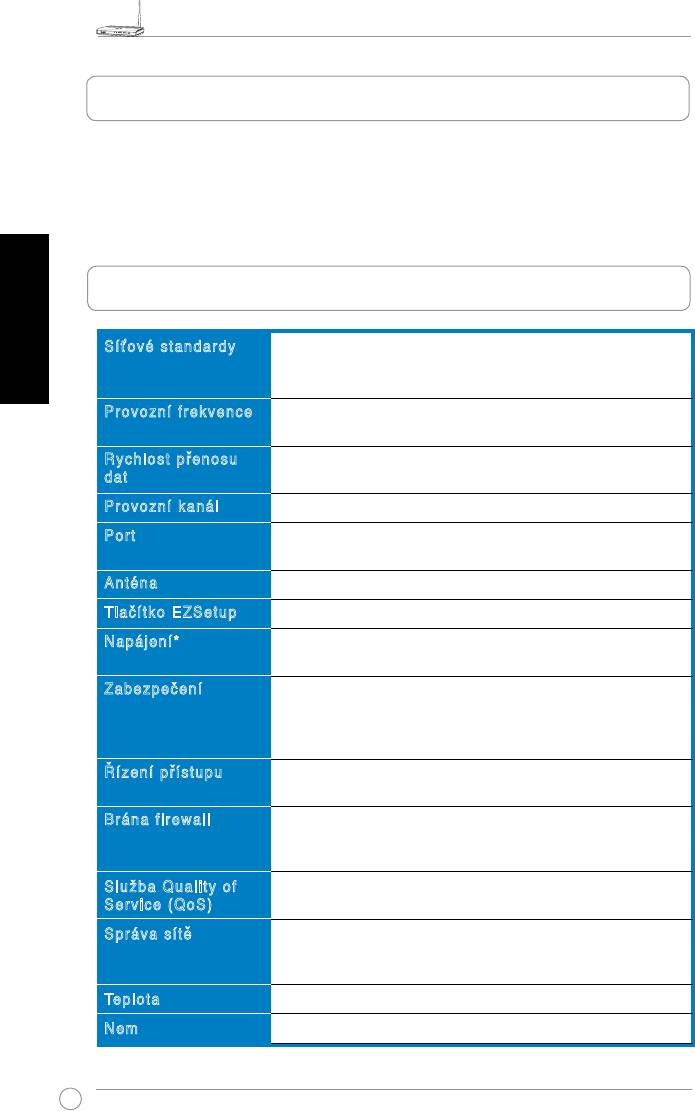
If you need to congure the ISP settings for your wireless router, select
Congure ISP
settings
, click
Next
and follow the instructions to complete the settings.
Setup is completed. Press
Print/Save
Wireless LAN Settings
button for future
reference. Click
Finish
to exit the EZSetup
utility.
4
5
Širokopásmový bezdrátový směrovač WL-520GU/GC – stručná příručka
6
R
1. Obsah balení
• Bezdrátový směrovač WL-520GU/GC x 1
• Napájecí adaptér x 1
• Disk CD s nástroji x 1
• Kabel RJ45 x 1
• Stručná příručka x 1
Česky
2. Přehled specikací
Síťové standardy
IEEE 802.11b, IEEE 802.11g, IEEE 802.3, IEEE802.3x, IEEE
802.3u, IEEE 802.1x, IEEE 802.11i, IPv4, IPv6, CSMA/CA,
CSMA/CD, ICMP
Provozní frekvence
2.4G ~ 2.5GHz
Rychlost přenosu
802.11g: 6, 9, 12, 18, 24, 36, 48, 54Mbps
dat
802.11b: 1, 2, 5.5, 11Mbps
Provozní kanál
11 pro severní Ameriku, 14 pro Japonsko, 13 pro Evropu (ETSI)
Port
WAN x 1, LAN x 4 RJ45 pro 10/100 BaseT, 1 x USB2.0 pro
sdílení tiskárny (
pouze WL-520GU
)
Anténa
Podpora diverzity antény, 1 x reverzní SMA antenní konektor
Tlačítko EZSetup
Automatická kongurace SSID a WEP nebo WPA
Napájení*
WL-520GU: stejnosměrné: +5 V s max. proudem 2 A
WL-520GC: DC EU/UK: +9V/1A; TW/US: +9V/800mA
Zabezpečení
WEP-64bits, WEP-128bits, WPA-Personal, WPA2-Personal,
WPA-Auto-Personal (TKIP. AES. TKIP+AES), WPA-Enterprise,
WPA2-Enterprise, WPA-Auto-Enterprise (TKIP. AES.
TKIP+AES), Radius with 802.1x
Řízení přístupu
Řízení přístupu na úrovni MAC, ltr příchozích/odchozích
adres IP, doménové řízení přístupu
Brána firewall
Brána rewall s překládáním adres (NAT), brána rewal s
kontrolou paketů SPI (Stateful Package Inspection), kontrola
WAN pomocí příkazu ping
Služba Quality of
BOD (
pouze
WL-520GU
), WMM
Service (QoS)
Správa sítě
Podporuje UPnP, server DHCP, server proxy DNS, klient
NTP, DDNS, spouštěč portů, virtuální server, virtuální DMZ,
předávání VPN
o
o
Teplota
Provozní: 0~40
C Skladovací: -30~50
C
Nem
Provozní: 50~90% Skladovací: 20~90%
* Používejte pouze adaptér dodaný v krabici.
Širokopásmový bezdrátový směrovač WL-520GU/GC – stručná příručka
7
R
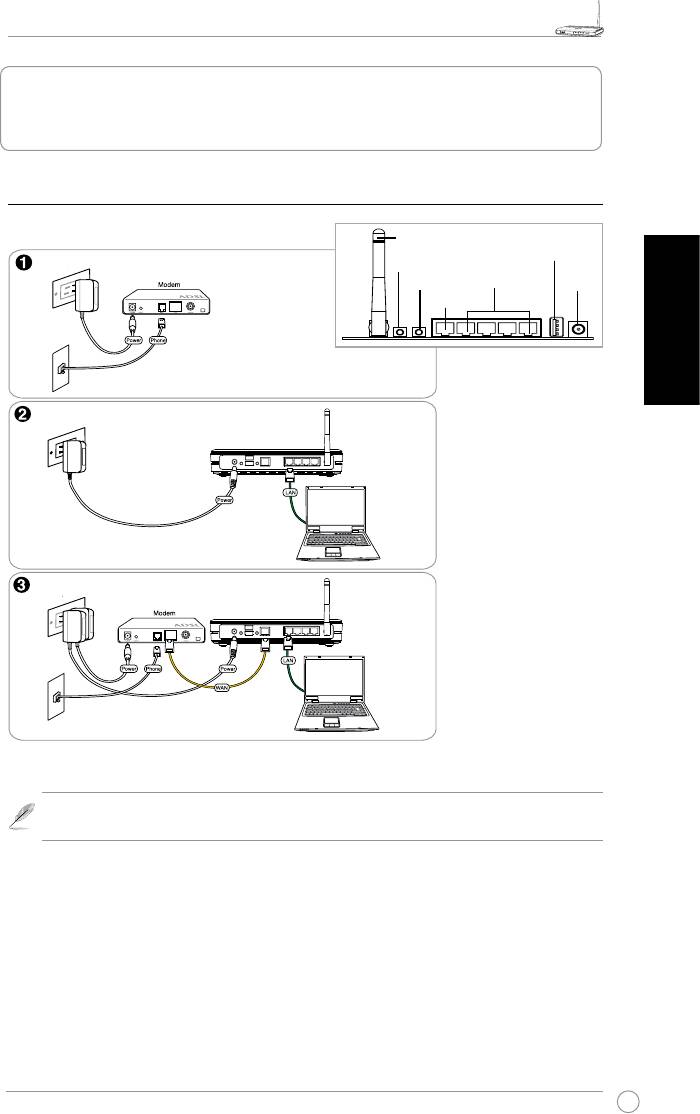
3. Připojení bezdrátového směrovače ke
kabelovému/DSL/satelitnímu modemu
1) Zapojení kabelů
Anténa
USB
Elektrická zásuvka
Nastavení EZ
Resetování
LAN
Napájení
WAN
Česky
Zadní strana
Telefonní zásuvka
Elektrická zásuvka
Bezdrátový směrovač ASUS
Elektrická zásuvka
Bezdrátový směrovač ASUS
Telefonní zásuvka
Poznámka:
Používejte pouze adaptér dodaný v krabici. Používání jiných adaptérů
může poškodit zařízení.
Širokopásmový bezdrátový směrovač WL-520GU/GC – stručná příručka
8
R
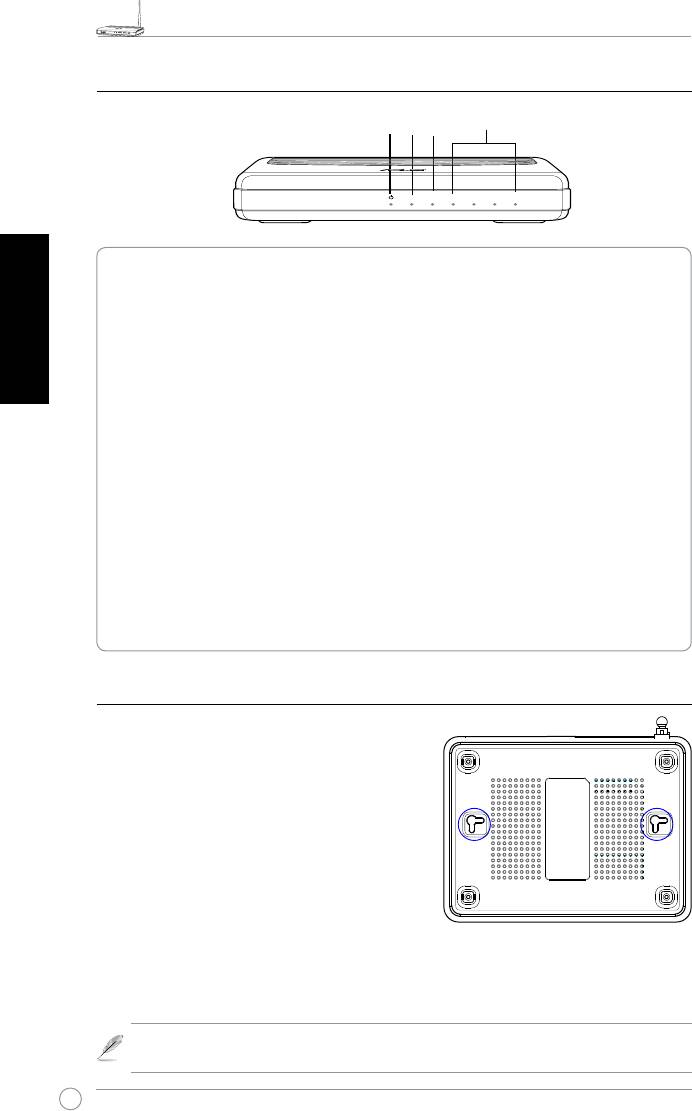
2) Stavové indikátory
LAN
PWR
AIR
WAN
PWR (napájení)
Česky
Nesvítí Není napájení
Svítí Systém připraven
Bliká pomalu Chyba upgradu rmwaru
Bliká rychle Zpracovávání EZsetup
AIR (bezdrátová síť)
Nesvítí Není napájení
Svítí Bezdrátový systém připraven
Bliká Vysílání nebo přijímání dat (prostřednictvím bezdrátového připojení)
WAN (síť širokého dosahu)
Nesvítí Vypnuto nebo žádné fyzické připojení
Svítí Fyzické připojení k síti Ethernet
Bliká Vysílání nebo přijímání dat (prostřednictvím kabelu Ethernet)
LAN 1-4 (místní síť)
Nesvítí Vypnuto nebo žádné fyzické připojení
Svítí Fyzické připojení k síti Ethernet
Bliká Vysílání nebo přijímání dat (prostřednictvím kabelu Ethernet)
3) Možnosti montáže
Širokopásmový bezdrátový směrovač ASUS WL-
520GU/GC, který je po vybalení připraven ihned k
používání, je určen pro umístění na zvýšené rovné
ploše, například na kartotéce nebo na poličce.
Zařízení lze rovněž upravit pro montáž na stěnu
nebo na strop.
Montáž zařízení ASUS WL-520GU/GC
1. Vyhledejte dva montážní otvory na spodní
straně.
2. Přeneste dva horní otvory na stěnu nebo na
zvýšenou rovnou plochu.
3. Zašroubujte dva šrouby tak, aby vyčnívaly pouze 0,5 cm nad povrch.
4. Nasaďte otvory zařízení ASUS WL520GU/GC na šrouby.
Poznámka:
Pokud nelze bezdrátový směrovač ASUS zajistit na šrouby nebo pokud
jsou šrouby příliš utažené, upravte je.
R
WL-520GU
AIR WAN LAN1 LAN2 LAN3 LAN4
125M High Speed
Širokopásmový bezdrátový směrovač WL-520GU/GC – stručná příručka
9
R
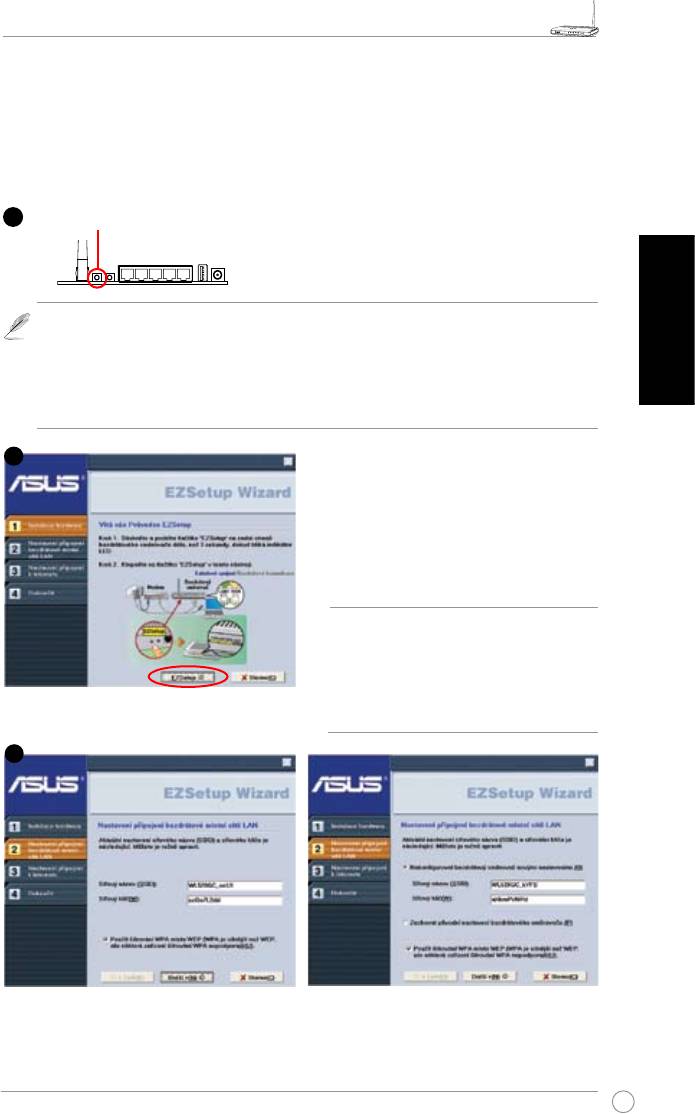
4. EZSetup
Nástroj EZSetup umožňuje snadno vytvořit bezdrátovou místní síť v pouhých dvou
krocích. Nejdříve spusťte nástroj
EZSetup
z nabídky
Start
, a potom stiskněte a
podržte tlačítko EZSetup, které se nachází na zadním panelu, po dobu tří sekund.
1) Stiskněte-li instalační tlačítko, aniž by byl spuštěn průvodce nástroje EZsetup,
indikátor PWR začne blikat a připojení k Internetu budou krátce pozastavena, ale
Česky
poté budou beze změny obnovena.
2) Chcete-li používat nástroj EZSetup, doporučujeme použít některý bezdrátový adaptér
ASUS, například WL-106gM, WL-100gE a WL-169gE.
Vložte disk CD s nástroji do jednotky CD v
počítači a spusťte volbu Instalovat nástroje
bezdrátového směrovače ASUS (Install
ASUS Wireless Router Utilities).
Po nainstalování nástrojů bezdrátového
směrovače ASUS spusťte průvodce nástroje
EZSetup z umístění [Startup] -> ASUS Utility
[All Utilities] -> [WL-520GU/GC Wireless
Router].
Poznámka
: Používejte průvodce
nástroje EZSetup s jedním bezdrátovým
klientem najednou. Pokud počítač s
bezdrátovým klientem nemůže v režimu
EZSetup vyhledat bezdrátový směrovač,
zkraťte vzdálenost mezi klientem a
směrovačem.
Nastavení bezdrátové spojení, včetně síťového názvu a klíče sítě, jsou vygenerována
automaticky. Tato nastavení lze upravit ručně. Pokud byl bezdrátový směrovač již dříve
nakongurován, zaškrtnutím možnosti Zachovat původní nastavení bezdrátového směrovače
bude použita aktuální hodnota. Pokračujte klepnutím na tlačítko Další.
1
Stiskněte a podržte tlačítko EZSetup po dobu 3 s. a potom uvolněte.
2
3
Širokopásmový bezdrátový směrovač WL-520GU/GC – stručná příručka
10
R
Česky
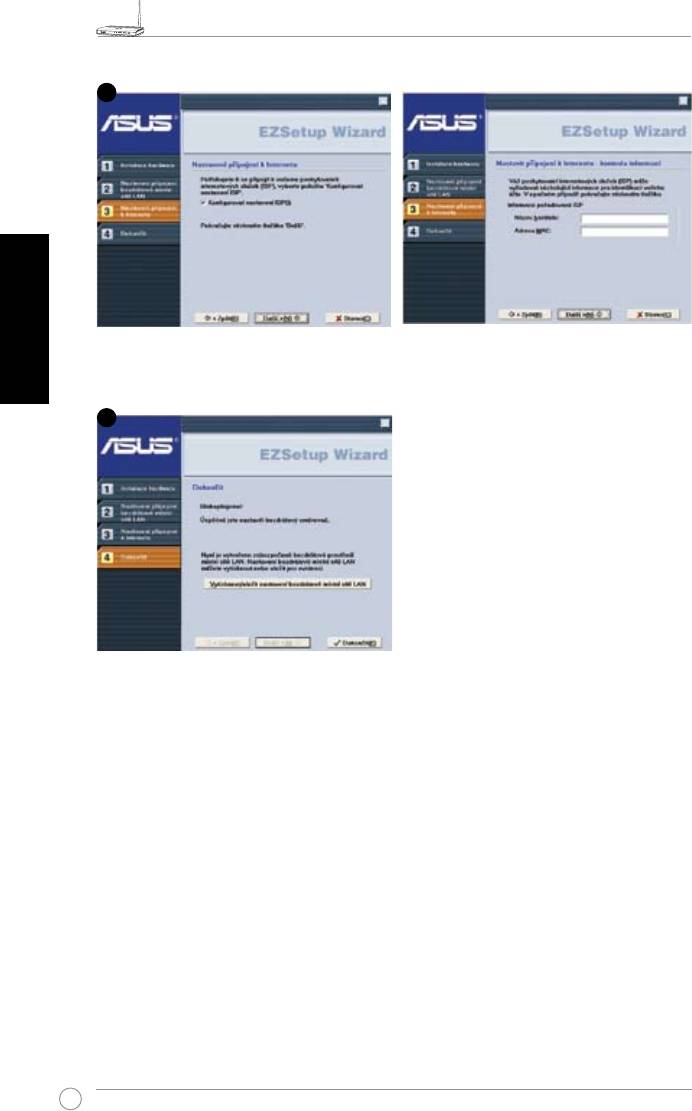
Je-li třeba nakongurovat nastavení ISP bezdrátového směrovače, zaškrtněte možnost
Kongurovat nastavení ISP
, klepněte na tlačítko
Další
a proveďte nastavení podle pokynů.
Instalace je dokončena. Stisknutím tlačítka
Vytisknout/uložit nastavení bezdrátové
místní sítě LAN
vytisknete/uložíte nastavení
pro budoucí použití. Klepnutím na tlačítko
Dokončit
ukončete nástroj EZSetup.
4
5
WL-520GU/GC Broad Range Wireless Family Router Schnellstartanleitung
11
R
1. Paketinhalt
• WL-520GU/GC Wireless Router x 1
• Netzteil x1
• Anwendungs-CD x1
• RJ45-Kabel x1
• Schnellstartanleitung x1
2. Spezikationsübersicht
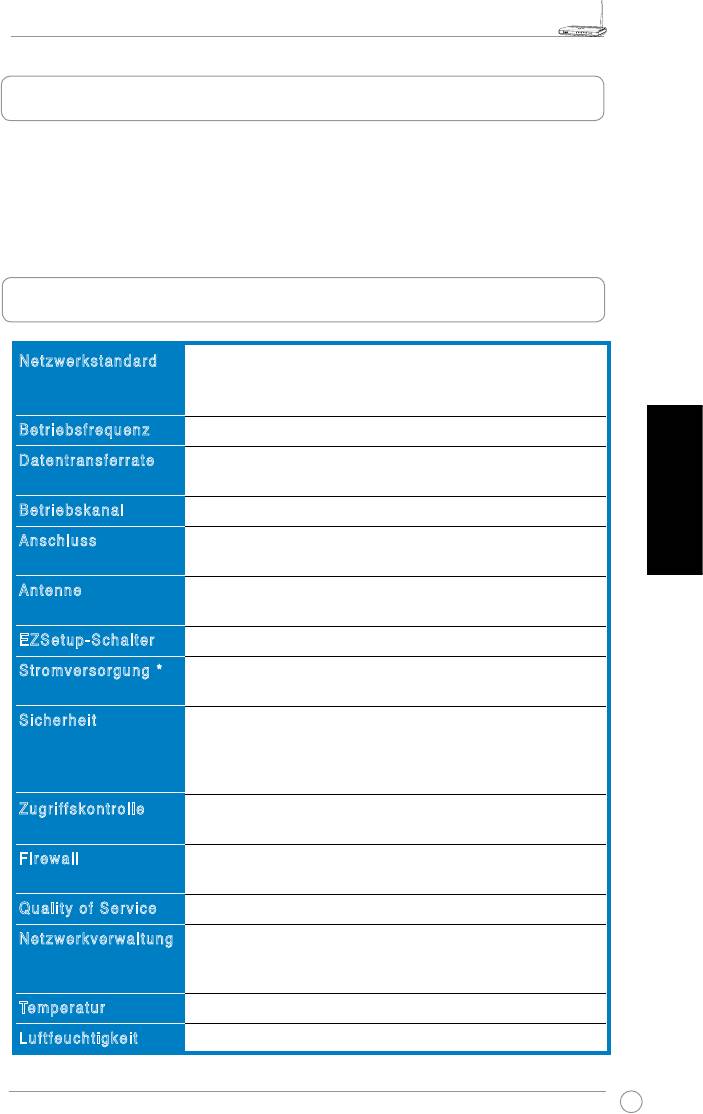
Netzwerkstandard
IEEE 802.11b, IEEE 802.11g, IEEE 802.3, IEEE802.3x, IEEE
802.3u, IEEE 802.1x, IEEE 802.11i, IPv4, IPv6, CSMA/CA,
CSMA/CD, ICMP
Betriebsfrequenz
2,4G - 2,5GHz
Datentransferrate
802.11g: 6, 9, 12, 18, 24, 36, 48, 54Mbps
802.11b: 1, 2, 5.5, 11Mbps
Betriebskanal
11 für USA, 14 für Japan, 13 für Europa (ETSI)
Deutsch
Anschluss
WAN x 1, LAN x 4 RJ45 für 10/100 BaseT, 1 x USB2.0 für
gemeinsame Druckernutzung (
nur WL-520GU
)
Antenne
Unterstützt verschiedene Antennen, 1 x Reverse-SMA
Antennenanschluss
EZSetup-Schalter
Automatische SSID- und WEP- oder WPA-Konguration
Stromversorgung *
WL-520GU: Gleichspannung: +5V mit max. 2A-Stromstärke
WL-520GC: DC EU/UK: +9V/1A; TW/US: +9V/800mA
Sicherheit
WEP-64bits, WEP-128bits, WPA-Personal, WPA2-Personal,
WPA-Auto-Personal (TKIP. AES. TKIP+AES), WPA-Enterprise,
WPA2-Enterprise, WPA-Auto-Enterprise (TKIP. AES.
TKIP+AES), Radius with 802.1x
Zugriffskontrolle
MAC-Level Zugriffskontrolle, Eingangs-/Ausgangs-IP-Filter,
Domain-Zugriffskontrolle
Firewall
NAT Firewall, SPI (Stateful Package Inspection) Firewall,
WAN Ping-Kontrolle
Quality of Service
BOD (
nur WL-520GU
), WMM
Netzwerkverwaltung
Unterstützt UPnP, DHCP Server, DNS Proxy, NTP Client,
DDNS, Port Trigger, Virtual Server, Virtual DMZ, VPN Pass-
Through
o
o
Temperatur
Betrieb: 0 - 40
C Lagerung: -30 - 50
C
Luftfeuchtigkeit
Betrieb: 50 - 90% Lagerung: 20 - 90%
* Bitte verwenden Sie ausschließlich das mitgelieferte Netzteil
WL-520GU/GC Broad Range Wireless Family Router Schnellstartanleitung
12
R
3. Anschluss des Wireless Routers an ein
Kabel-/DSL-/Satellitenmodem
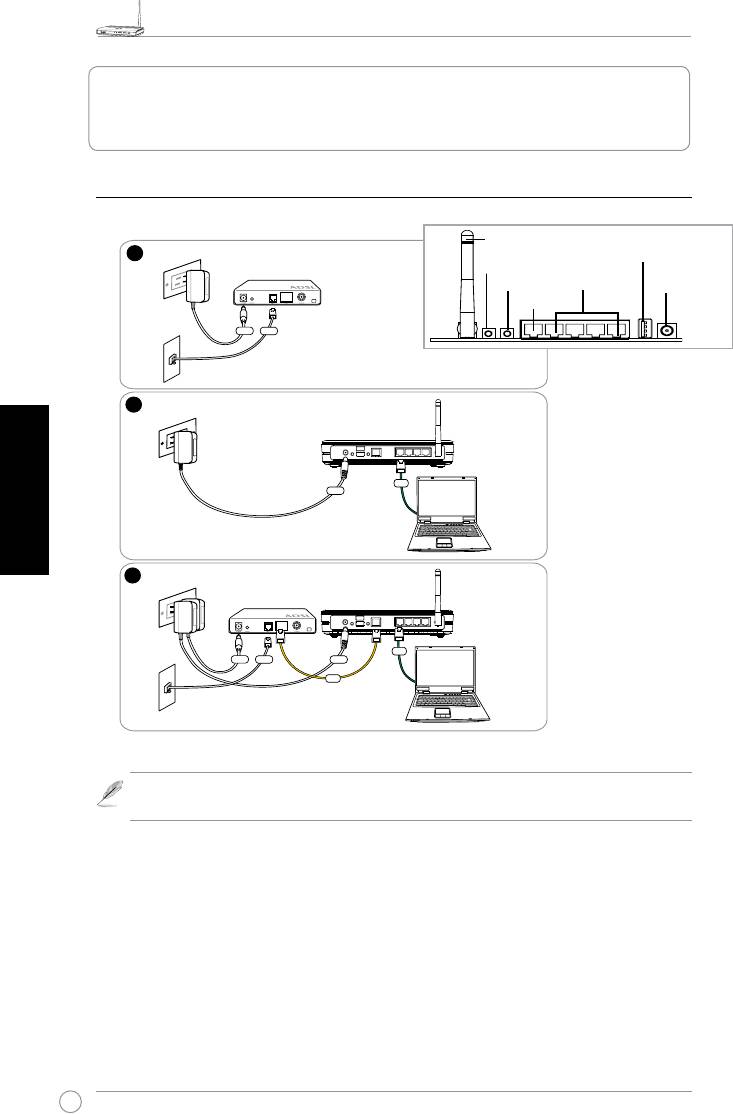
1) Kabelanschluss
Deutsch
Hinweis:
Verwenden Sie ausschließlich den mitgelieferten Adapter. Die Benutzung
anderer Adapter kann das Gerät beschädigen.
1
Wall Power Outlet
Modem
Power
Phone
Wall Telephone Outlet
2
Wall Power Outlet
ASUS Wireless Router
LAN
Power
3
Wall Power Outlet
Modem
ASUS Wireless Router
LAN
Power
Phone
Power
WAN
Wall Telephone Outlet
Antenne
USB
EZ-Setup
Reset
LAN
Stromversorgung
WAN
Rückseite
WL-520GU/GC Broad Range Wireless Family Router Schnellstartanleitung
13
R
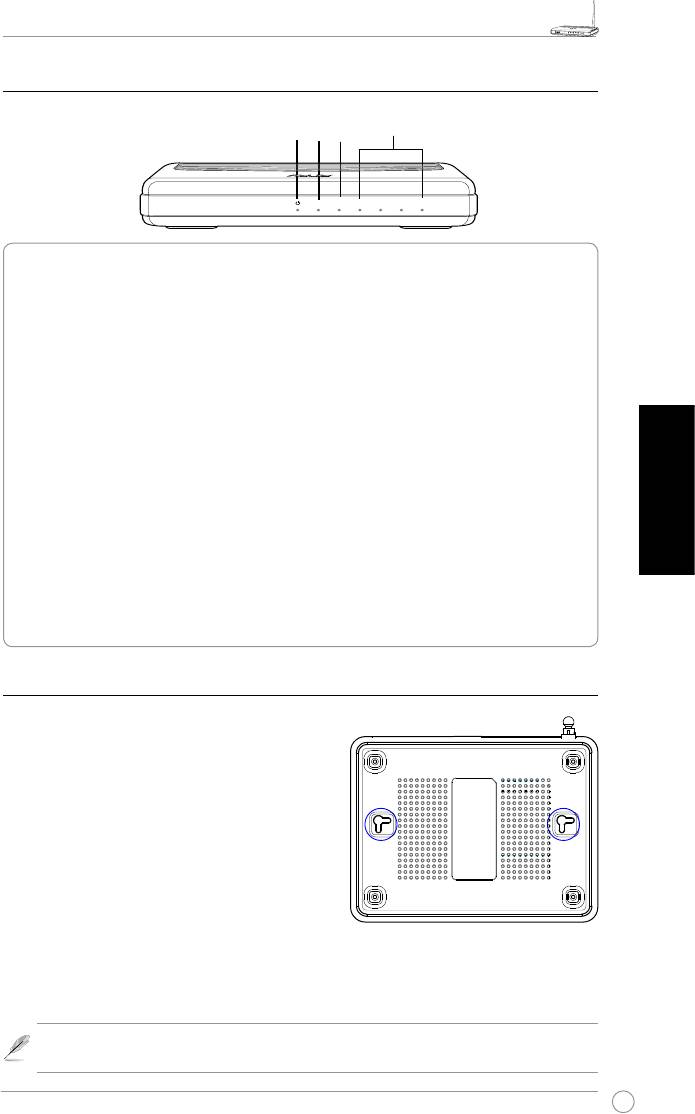
2) Statusanzeigen
LAN
PWR
AIR
WAN
PWR (Strom)
Aus Kein Strom
An System bereit
Langsames Blinken Firmware-Aktualisierung fehlgeschlagen
Schnelles Blinken EZSetup in Betrieb
AIR (Wireless-Netzwerk)
Aus Kein Strom
An Wireless-System bereit
Blinken Übertragen oder Empfang von Daten (Wireless)
WAN (Wide Area Network)
Aus Kein Strom oder kein Netzwerkanschluss
An Anschluss an ein Ethernet-Netzwerk
Deutsch
Blinken Übertragen oder Empfang von Daten (über das Ethernetkabel)
LAN 1-4 (Local Area Network)
Aus Kein Strom oder kein Netzwerkanschluss
An Anschluss an ein Ethernet-Netzwerk
Blinken Übertragen oder Empfang von Daten (über das Ethernetkabel)
3) Befestigungsmöglichkeiten
Der ASUS WL-520GU/GC Broad Range Wireless
Router wurde dazu entworfen, auf einer ebenen
Oberäche, z.B. einem Regal oder einem Schrank
aufgestellt zu werden. Der Router kann allerdings
auch an der Wand oder der Decke angebracht
werden.
So wird der ASUS WL-520GU/GC aufgehängt:
1. Suchen Sie auf der Unterseite die zwei
Anbringungshaken.
2. Markieren Sie zwei Löcher an der Wand oder
einer erhöhten ebenen Oberäche.
3. Drehen Sie zwei Schrauben ein, bis diese nur noch ca. 1/2 cm hervorstehen.
4. Haken Sie die Haken des ASUS WL520GU/GC an die Schrauben
.
Hinweis:
Drehen Sie die Schrauben weiter in die Oberfläche oder lösen Sie sie
leicht, falls sich der ASUS Wireless Router nicht richtig anbringen lässt.
R
WL-520GU
AIR WAN LAN1 LAN2 LAN3 LAN4
125M High Speed
WL-520GU/GC Broad Range Wireless Family Router Schnellstartanleitung
14
R
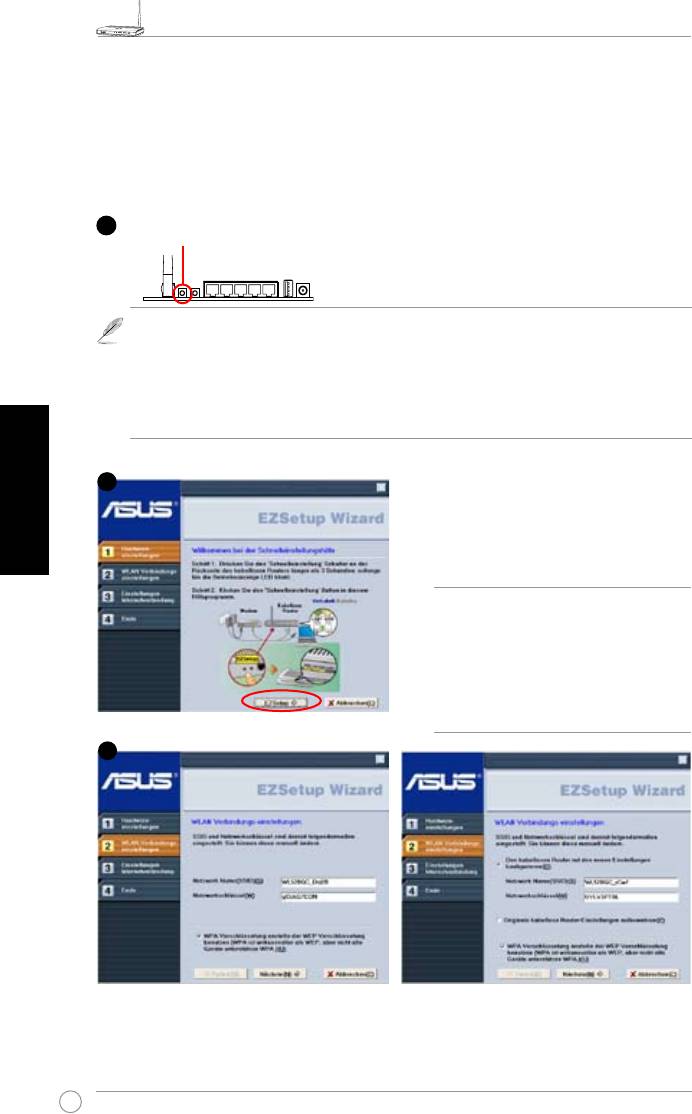
4. EZSetup
Mit dem EZSetup-Programm können Sie die Wireless-Lan-Einstellung in nur
wenigen Schritten fertigstellen. Öffnen Sie
EZSetup
zuerst aus dem
Start
-Menü
und drücken Sie dann den EZSetup-Schalter auf der Rückseite des Routers für
mind. drei Sekunden.
1) Falls die Schaltäche gedrückt wird und das EZSetup-Programm währenddessen
noch nicht ausgeführt wird, leuchtet die PWR-Anzeige auf und die
Internetverbindung wird für kurze Zeit unterbrochen und kehrt dann wieder in den
Normalzustand zurück.
2) Zur Benutzung mit EZSetup empfehlen wir einen ASUS Wireless Adapter wie
WL-106gM, WL-100gE und WL-169gE.
Deutsch
Legen Sie die Anwendungs-CD ins CD-
Laufwerk und wählen Sie Install ASUS
Wireless Router Utilities.
Starten Sie nach der Installation der ASUS
Wireless Router-Programme den EZSetup
Wizard über [Startup] -> All Utilities [ASUS
Utility] -> [WL-520GU/GC Wireless Router].
Hinweis:
Benutzen Sie den EZSetup
Wizard mit einem Wireless Client
zur Zeit. Wenn der Wireless Client
Computer den Wireless Router
im EZSetup-Modus nicht erkennt,
verringern Sie den Abstand zwischen
Client und Router.
Die Wireless-Einstellungen, einschließlich Netzwerkname und Netzwerkschlüssel, werden
automatisch erstellt. Sie können diese Einstellungen manuell verändern. Falls Ihr Wireless
Router bereits konguriert wurde, wählen Sie
Original kabellose Routereinstellungen
aufbewahren
, um die aktuellen Werte zu benutzen. Klicken Sie dann auf
Nächste
.
1
Drücken Sie die EZSetup-Schaltäche 3
Sekunden und lassen Sie sie wieder los.
2
3
WL-520GU/GC Broad Range Wireless Family Router Schnellstartanleitung
15
R
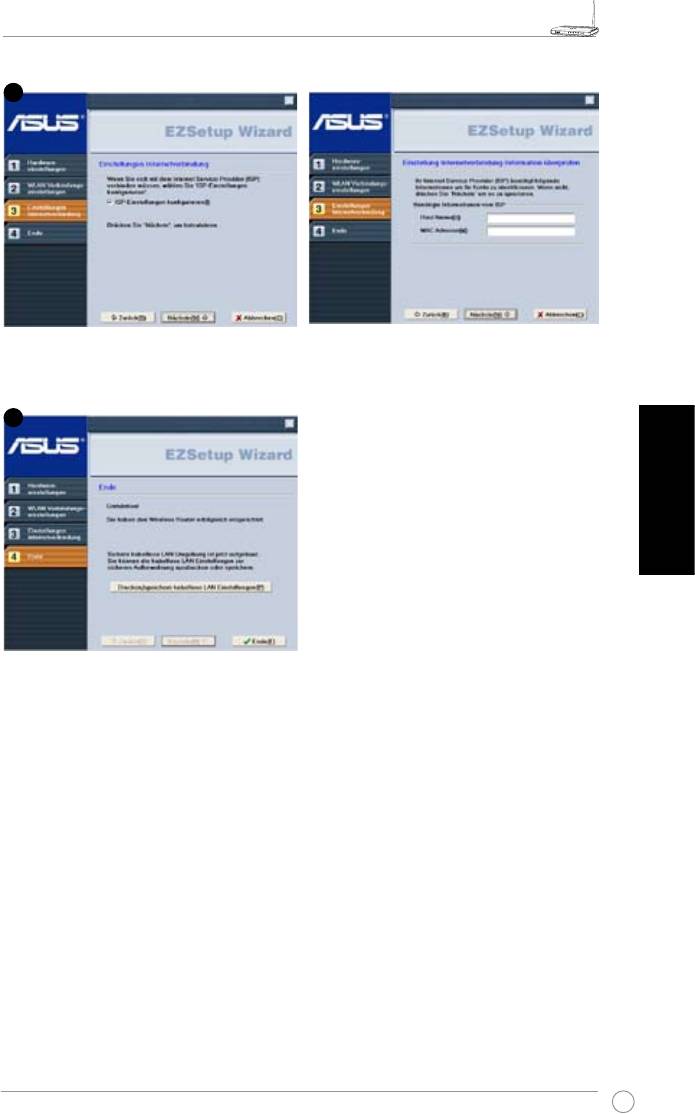
Falls Sie die ISP-Einstellungen für Ihren Wireless-Router verändern müssen, wählen
Sie
Einstellungen Internetverbindung
, klicken Sie auf
Nächste
und folgen Sie den
Anweisungen, um die Einstellungen nach Ihren Wünschen zu ändern.
Deutsch
Die Einrichtung ist fertiggestellt. Klicken Sie
auf
Kabellose LAN-Einstellungen drucken/
speichern
, um die Einstellungen für spätere
Verwendung auszudrucken. Klicken Sie
auf
Ende
, um das EZSetup-Programm zu
verlassen.
4
5


