
Asus WL-520gU: 2) Status indicators 3) Mounting options
2) Status indicators 3) Mounting options: Asus WL-520gU
Table of contents
- English ................................................................................................................ 1
- FCC Warning Statement Prohibition of Co-location Safety Information
- Declaration of Conformity for R&TTE directive 1999/5/EC
- 1. Package Contents 2. Specication summary
- 2) Status indicators 3) Mounting options
- 4. EZ Setup
- English
WL-520GU/GC Broad Range Wireless Family Router Quick Start Guide
3
R
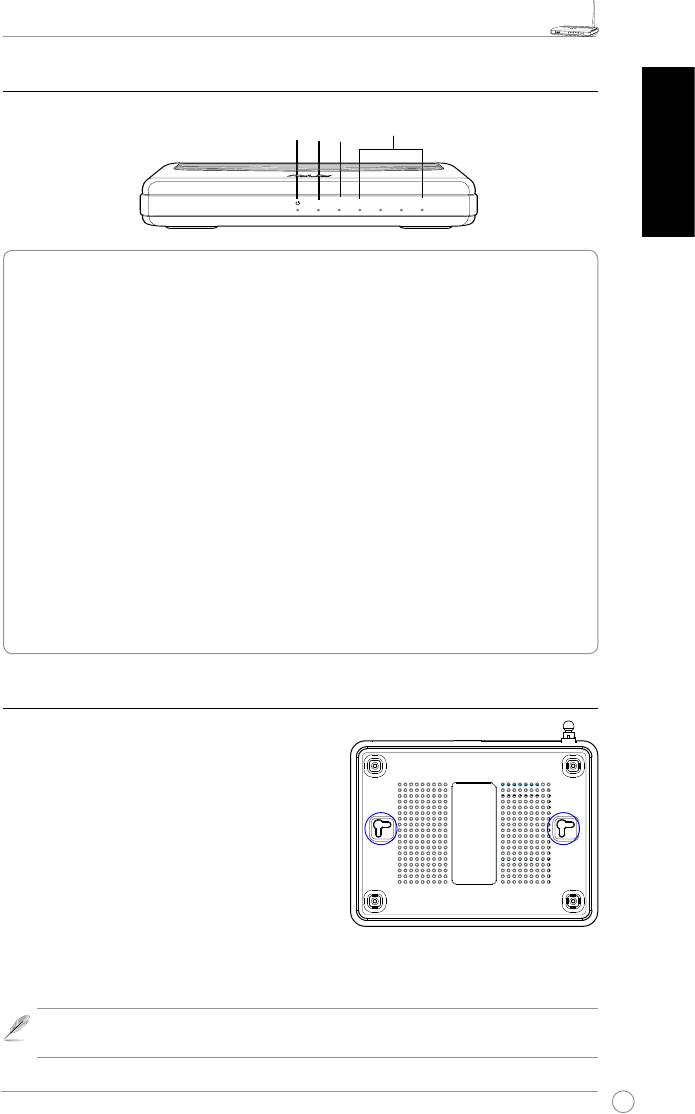
2) Status indicators
LAN
PWR
AIR
WAN
English
PWR (Power)
Off No power
On System ready
Flashing-slow Firmware upgrade failed
Flashing-quick EZsetup processing
AIR (Wireless Network)
Off No power
On Wireless system ready
Flashing Transmitting or receiving data (wireless)
WAN (Wide Area Network)
Off No power or no physical connection
On Has physical connection to an Ethernet network
Flashing Transmitting or receiving data (through Ethernet cable)
LAN 1-4 (Local Area Network)
Off No power or no physical connection
On Has physical connection to an Ethernet network
Flashing Transmitting or receiving data (through Ethernet cable)
3) Mounting options
Out of the box, the ASUS WL-520GU/GC Broad
Range Wireless Router is designed to sit on a
raised at surface like a le cabinet or a book shelf.
The unit may also be converted for mounting to a
wall or ceiling.
To mount the ASUS WL-520GU/GC
1 Look on the underside for the two mounting
hooks.
2. Mark two upper holes on a wall or on a raised at
surface.
3. Tighten two screws until only 1/4'' is showing.
4. Latch the hooks of the ASUS WL520GU/GC onto the screws
.
Note:
Re-adjust the screws if you cannot latch the ASUS Wireless Router onto the
screws or if it is too loose.
R
WL-520GU
AIR WAN LAN1 LAN2 LAN3 LAN4
125M High Speed


