
Asus GigaX1116B: instruction
Class: Networks, communications, telecommunications, internet, security
Type:
Manual for Asus GigaX1116B
Table of contents

Content
English .............................................................................. 1
Français ............................................................................ 9
Español ...........................................................................17
Deutsch ..........................................................................25
Русский ...........................................................................33
Italiano ............................................................................41
Türkçe .............................................................................49
Nederlands .....................................................................57
简体中文
..........................................................................65
한국어
..............................................................................73
日本語
..............................................................................81
繁體中文
..........................................................................89

English
GigaX1116B
GigaX1124B
Quick Start Guide
Copyright © 2006 ASUSTeK COMPUTER INC. All Rights Reserved.
1

Introduction
Thank you for purchasing the ASUS GigaX1116B/1124B rack mountable
switch! The GigaX1116B/1124B provides non-blocking, wire-speed
English
performance to meet your intensive network demands. It features auto-sensing,
and auto MDI/MDIX Ethernet ports for simple connectivity and enhance your
network performance with ow control and QoS ability.
Features
• 16/24 10/100/1000 Mbps RJ-45 ports
• Plug and play with your networks – auto MDI/MDIX, and auto-sensing for
speed and duplex mode on all ports
• Place on a at surface, or mounts on a rack
• Flow control (802.3x in full-duplex mode) schemes to support zero loss
under temporary network congestion
• Backpressure support for 10/100 Mbps half duplex.
• Support Jumbo frames of up to 9K bytes.
• 10K MAC addresses with automatic address learning and aging.
• Up to 1Gbps for all ports in full-duplex mode
• Easy to read LEDs providing �uick overview of link status, activities, speedproviding �uick overview of link status, activities, speed
and duplex mode on all ports
Package contents
Before installing the GigaX1116B/ GigaX1124B switch, check your package for
the following items.
• ASUS GigaX1116B or GigaX1124B Switch
• AC Power cord x 1
• Quick Start Guide
• Mounting kit containing 2 brackets and 6 screws.
NOTE
. Contact your retailer if any of the items is damaged or missing.
2 Quick Start Guide

Technical specications
Physical Dimensions
43.5mm(H) X 444 mm(W) X 200mm(D)
Environmental Ranges
English
Operating temperature 0ºC ~ 40ºC (32ºF to 104ºF)
Storage temperature -40ºC ~ 70ºC (-40ºF to 158ºF)
Operating humidity 5% to 95%
Storage humidity 5% to 95%
Operating altitude: up to 15,000ft (3,000m)
Storage altitude: up to 40,000 ft (12,000m)
Power
Input 90V ~ 240V AC/50-60Hz
Power Consumption 50 Watts
Certication
FCC Class A, CE, CCC
Quick Start Guide 3
Hardware
Front panel
English
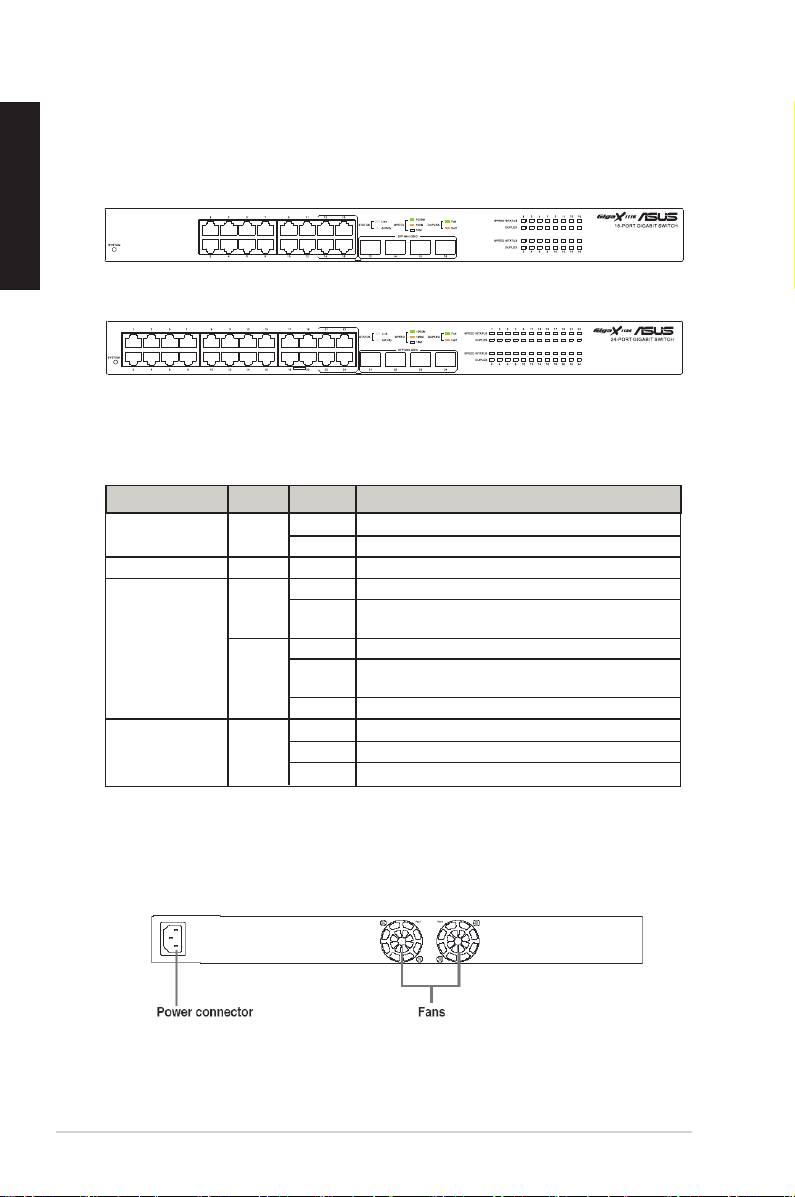
The front panels of GigaX1116B and GigaX1124B include LED indicators that
show the working condition of the switch.
Figure 1. Front panel (GigaX1116B)
Figure 2. Front panel (GigaX1124B)
Table 1 LED indicators
Label Color Status Description
SYSTEM Green On Unit is powered on and in normal operation.
Off Unit is powered off.
1 – 16/24 This number identies the port number.
STATUS/SPEED Green On Port is enabled for1000Mbps
Blinking Receiving or transmitting packets on this port for
1000Mbps
Amber On Port is enabled for10/100 Mbps
Blinking Receiving or transmitting packets on this port for
10/100Mbps
Off Link down
DUPLEX Green On Switch is operating in full-duplex mode.
Blinking Collision happens
Off Switch is operating in half-duplex mode
Rear panel
The rear panel of GigaX1116B/GigaX1124B contains two fans and a power
connector.
Figure 3. Rear panel (GigaX1116B/ GigaX 1124B)
4 Quick Start Guide
B
B
Connecting network devices
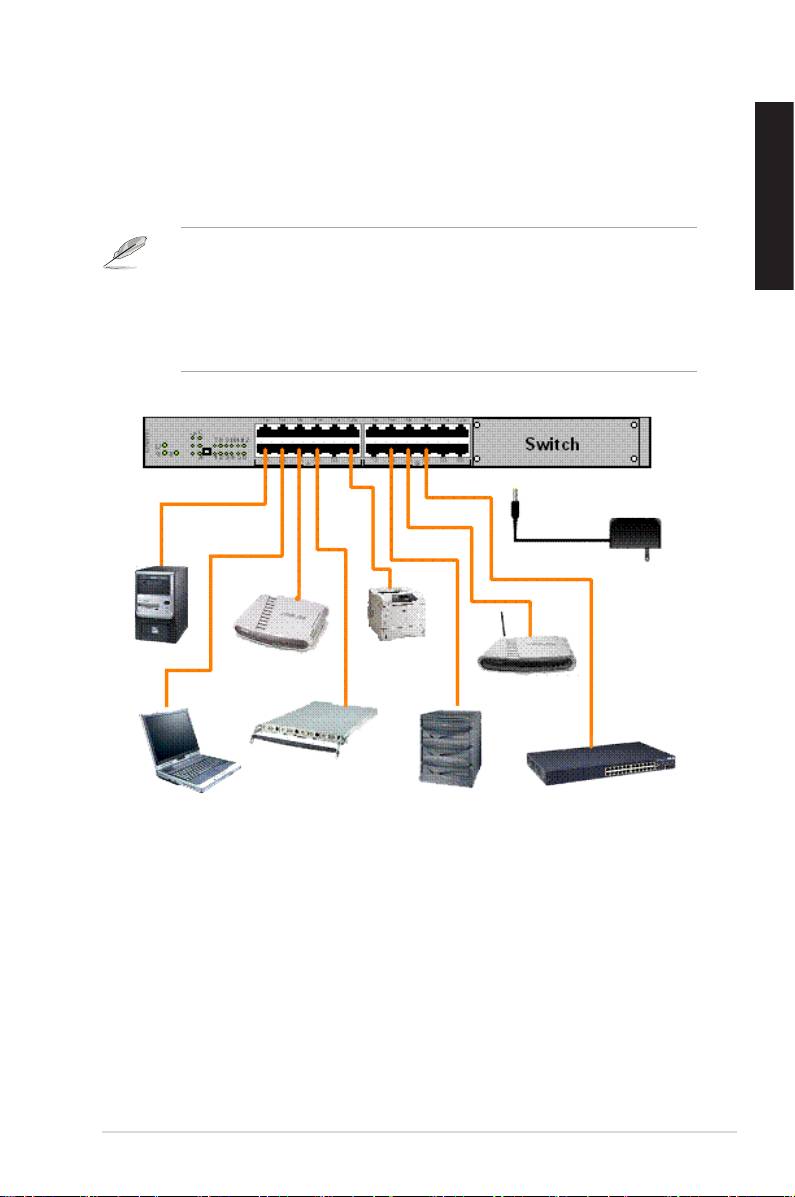
To connect network devices to the GigaX1116B or GigaX1124B switch:
1. Connect one end of the Ethernet cable to an Ethernet port on the switch
rear panel. Connect the other end to the Ethernet port of the network
device. Repeat this step to connect additional network devices.
English
NOTES
• Use Category 5 straight-through Ethernet cables for wiring so as to
ensure connection speed between the switch and the network devices.
• You can use either corssover or straight-through cable to connect other
network devices such as bridges, switches, hubs and PCs.
AC Adapter
Desktop
Printer
Router
Server
Wireless
AP
Server
Notebook
NAS
Switch/Hub
Figure 4. Network Device Connctions
2. Plug one end of the power cable to the power connector on the switch rear
panel, then plug the other end to a power outlet.
3. The Power LED indicator and the LAN LED indicators of active Ethernet
ports light up when the switch is powered on, and active nodes are
connected to the LAN ports. Refer to the front panel illustrations and LED
table in page 4 for the meaning of LED indicators.
Quick Start Guide 5

Placement Options
Flat Surface Placement
English
You may place GigaX1116B/1124B on any at surface. Make sure the place
meets the operation environment specication and the UTP Category 5 cable
length is within 100 meters (328 feet).
Install the switch on a at surface that can support the weight of the switches
and their accessories. Attach four rubber pads on the marked location on the
bottom of the switch.
Rack Mount Instructions
On each side of the switch, there are three screw holes and two post holes
for the mounting bracket. After screwing the mounting brackets to the switch,
put the switch into a 19-inch rack and fix it with the rack mounting screws
(purchased separately).
6 Quick Start Guide

Troubleshooting
This section provides solutions to some common problems which you may
encounter when installing or using the ASUS GigaX1116B or GigaX1124B
switch. Contact the ASUS technical support if problem still exists after you have
performed the troubleshooting solutions.
English
Problem Solution
The POWER LED does not light
Check if the power cable is properly
up.
connected to the switch and to an
power outlet.
The LAN LED does not light up
• Check if the Ethernet cable is
even after a network device is
properly connected to the switch
connected to the port
and to the network device.
• Make sure the switch and your
network device are powered ON.
• Check if the Ethernet cable meet
your network re�uirements. To
connect gigabit switch port, you
need Category 5 cable to get
gigabit transfer speed.
The Collision/DUPLEX LED
• Check if the UTP Category 5
keeps blinking.
cable is in a good condition.
• Check if the cable length is within
100m(328 feet).
Quick Start Guide 7

Glossary
10BASE-T
10 Mbps Ethernet over twisted pair cable (Category 3).
English
100BASE-T
100 Mbps Ethernet over twisted pair cable (Category 5)
1000BASE-T
1000 Mbps Ethernet over twisted pair cable (Category 5)
Auto MDI/MDIX
Allows network connections using either straight or crossAllows network connections using either straight or cross
cable.
Ethernet
The most commonly installed computer network technology,
usually using twisted pair wiring. Ethernet data rates are 10
Mbps, 100 Mbps, and 1000 Mbps.
Mbps
Abbreviation for Megabits per second, or one million bits per
second. Network data rates are often expressed in Mbps.
network
A group of computers that are connected together to
communicate with each other and share resources, such as
software, les, etc. A network can be small, such as a LAN,
or very large, such as the Internet.
8 Quick Start Guide

GigaX1116B
Français
GigaX1124B
Guide de démarrage rapide
Copyright © 2006 ASUSTeK COMPUTER INC. Tous droits réservés.
9

Français
10 Guide de démarrage rapide
Introduction
Merci pour votre achat d'un switch ASUS GigaX1116B/1124B ! Le
GigaX1116B/1124B fournit une performance de commutation nonfournit une performance de commutation non
bloquante et de haute vitesse pour satisfaire à tous vos besoins réseau. Le Le
switch intègre la fonctin auto-sensing, et des possibilités d'auto MDI/MDIX
et l'amélioration de
Fonctions
• 16/24 ports 10/100/1000 Mbps RJ-45
• Plug and play – auto MDI/MDIX, et auto-sensing pour vitesse et mode
• Options de placement sur bureau ou sur rack
perte en congestion réseau temporaire
• Support de trames Jumbo jusqu’à 9Ko
• Adressage MAC 10K avec learning et aging automatiques
Contenu de la boîte
contient bien les éléments suivants.
• Switch ASUS GigaX1116B ou GigaX1124B
• Guide de démarrage rapide
NOTE
. Si l’un des éléments ci-dessus était manquant ou endommagé,

Spécications techniques
Dimensions physiques
Plages environmentales
Français
Alimentation
Consommation 50 Watts
Certications
Guide de démarrage rapide 11
Français
12 Guide de démarrage rapide
Matériel
Panneau avant
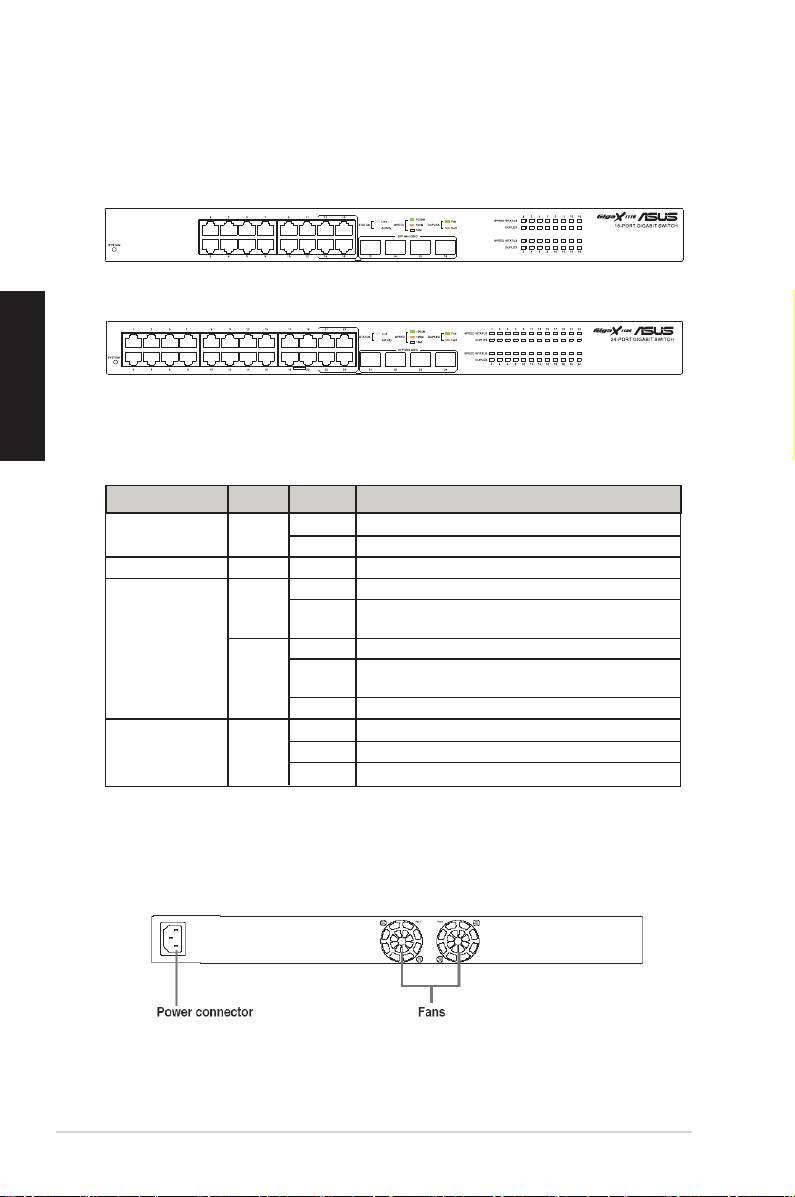
Le panneau avant du GigaX1116B/GigaX1124B intègre des indicateurs
Figure 1. Panneau avant (GigaX1116B)
Figure 2. Panneau avant (GigaX1124B)
Tableau 1 Indicateurs LED
Voyant Couleur Statut Description
SYSTEM Vert Allumé Unité alimentée et prête à fonctionner.
Eteint Unité éteinte.
STATUS/SPEED Vert Allumé Port activé à 1000Mbps
Clignotant Réception ou transmission de paquets sur ce port à
1000Mbps
Ambré Allumé Port activé à 10/100 Mbps
Clignotant Réception ou transmission de paquets sur ce port à
10/100Mbps
Eteint Lien perdu
Clignotant Collision de paquets
Panneau arrière
et un connecteur d'alimentation.
Figure 3. Panneau arrière (GigaX1116B/ GigaX 1124B)
B
B
Connecter des périphériques réseau
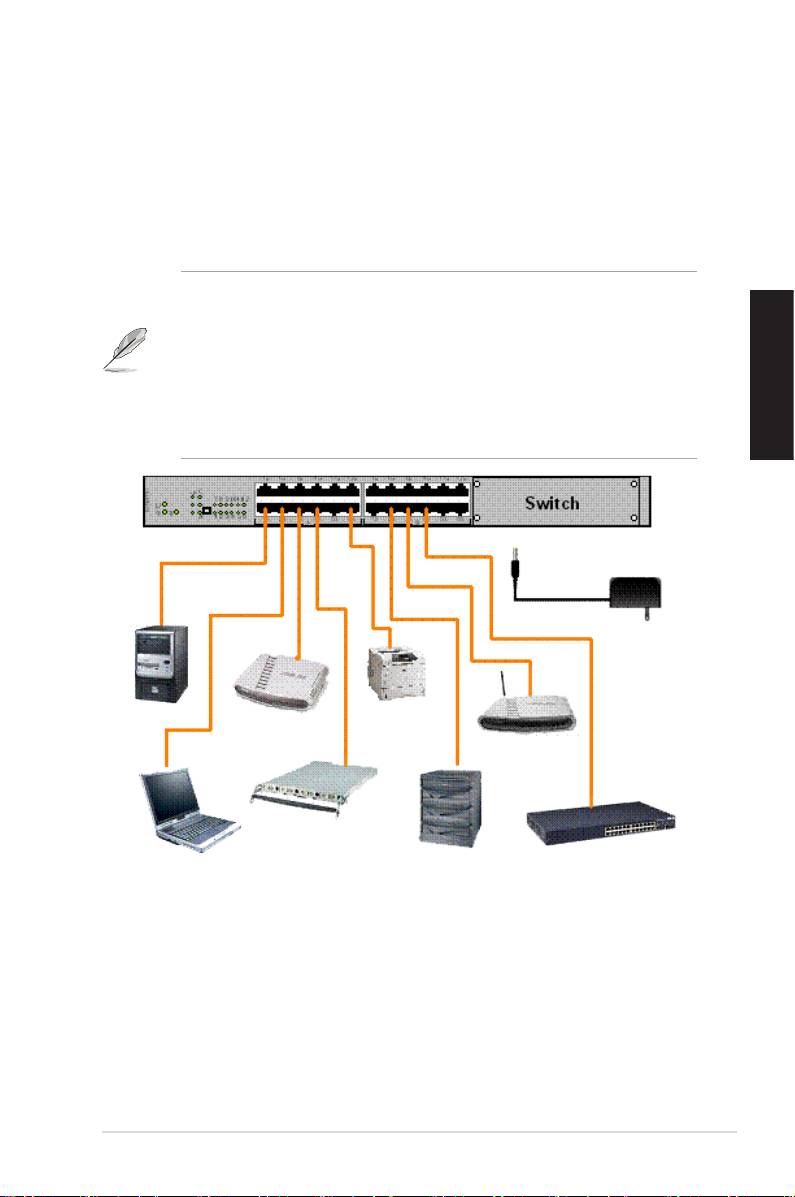
Pour connecter des périphériques réseau au switch GigaX1116B ou
GigaX1124B:
périphériques réseau additionnels.
NOTES
• Il est recommandé d’utiliser des câbles Ethernet droits de catégorie
périphériques réseau.
Français
d’autres périphériques réseau tels que des ponts, switches, hubs
et PC.
Adaptateur secteur
PC
Imprimante
Routeur
serveur
Point d’accès
Serveur
NAS
PC portable
Figure 4. Connexion de périphériques réseau
pour indiquer que l’appareil est en état de fonctionnement, et que
indicateurs LED page 4 pour plus d’informations.
Guide de démarrage rapide 13

Français
14 Guide de démarrage rapide
Options de placement
Disposition du switch sur une surface plane
l’environnement d’opération et que la longueur du câble UTP de Categorie
les emplacements réservés à cet effet sous le switch.
Montage du switch dans un rack
quatre vis de montage de rack.
NOTE.
fournies.

Troubleshooting
Cette section fournit des réponses à certains problèmes que vous
section.
Problème Solution
La LED POWER ne s’allume
pas.
est correctement connecté au switch
et à une source d’alimentation avec
Français
le voltage approprié.
La LED LAN ne s’allume pas
même lorsqu’un périphérique
est correctement connecté
réseau est connecté au port
au switch et au périphérique
Ethernet.
réseau.
votre périphérique réseau sont
bien alimentés.
cor r espon d à vos b e soin s
catégorie 5.
La LED Collision/DUPLEX ne
sârrête pas de clignoter.
d e ca t é g o r i e 5 n ’ e s t pa s
Guide de démarrage rapide 15

Glossaire
10BASE-T
100BASE-T
1000BASE-T
Ethernet 1000 Mbps via un câble à paires torsadées
Auto MDI/MDIX
droits ou croisés.
Ethernet
Technologie réseau la plus répandue, utilisant
Français
de débit de données Ethernet sont 10 Mbps, 100 Mbps,
et 1000 Mbps.
Mbps
Abréviation de Megabits per second, ou un million de
Réseau
Groupe d’ordinateurs connectés ensemble, permettant
comme Internet.
16 Guide de démarrage rapide

GigaX1116B
GigaX1124B
Español
Guía de Instalación Rápida
Copyright © 2006 ASUSTeK COMPUTER INC. Todos los Derechos Reservados
17

Español
18 Guía de Instalación Rápida
Introducción
¡Gracias por adquirir el Switch instalable en Rack ASUS GigaX1116B/1124B!
GigaX1116B/1124B proporciona un rendimiento sin bloqueos y de velocidad
máxima para ajustarse a sus necesidades de red. Con funciones de auto-
sensing, y puertos Ethernet con auto MDI/MDIX, el Switch proporciona una
fácil conectividad para mejorar el rendimiento de red, incluyendo control del
ujo y Calidad de Servicio (QoS).
Características
• 16/24 puertos RJ-45 a 10/100/1000 Mbps
• Conexión instantánea a sus redes – auto MDI/MDIX, y auto-sensing para
velocidad y modo duplex en todos los puertos
• Puede ser colocado en supercies planas, o montado en un Rack
• Esquemas de control de ujo (802.3x en modo full-duplex) para soportar
que no haya pérdidas en congestiones temporales de red
• Soporte Backpressure para half duplex a 10/100 Mbps.
• Soporte para Jumbo frames de hasta 9K bytes.
• 10K de direcciones MAC con capacidades de aprendizaje y envejecimiento
de direcciones (address learning and aging).
• Hasta 1Gbps para todos los puertos en modo full-duplex.
• LEDs indicadores que proporcionan una rápida lectura del estado del
enlace, actividades, velocidad y modo duplex en todos los puertos.
Contenidos
Antes de instalar el Switch GigaX1116B o GigaX1124B, compruebe que los
siguientes elementos están incluidos:
• Switch GigaX1116B o GigaX1124B.
• Cable de alimentación.
• Manual del usuario.
• Kit de montaje (2 soportes y 6 tornillos).
NOTA. Contacte con su punto de venta si alguno de estos elementos ha sido
dañado o no esta presente.

Especicaciones técnicas
Dimensiones Físicas
43.5mm (Altura) x 444mm (Ancho) x 200mm (Profundidad)
Rangos Ambientales
Temperatura de operación: 0ºC ~ 40ºC (32ºF a 104ºF)
Temperatura de almacenamiento: -40ºC ~ 70ºC (-40ºF a 158ºF)
Humedad en operación: 5% a 95%
Humedad en almacenamiento: 5% a 95%
Altitud en operación: Hasta 15,000ft (3,000m)
Altitud en almacenamiento: Hasta 40,000ft (12,000m)
Alimentación
Entrada: 90V ~ 240V AC/50-60Hz
Consumo: 50 Vatios
Certicaciones
FCC Clase A, CE, CCC
Español
Guía de Instalación Rápida 19
