
Asus GigaX1116B: Hardware Front panel Table 1 LED indicators Rear panel
Hardware Front panel Table 1 LED indicators Rear panel: Asus GigaX1116B
Table of contents
- Introduction Features Package contents
- Technical specications
- Hardware Front panel Table 1 LED indicators Rear panel
- Connecting network devices
- Placement Options
- Troubleshooting
- Glossary
Hardware
Front panel
English
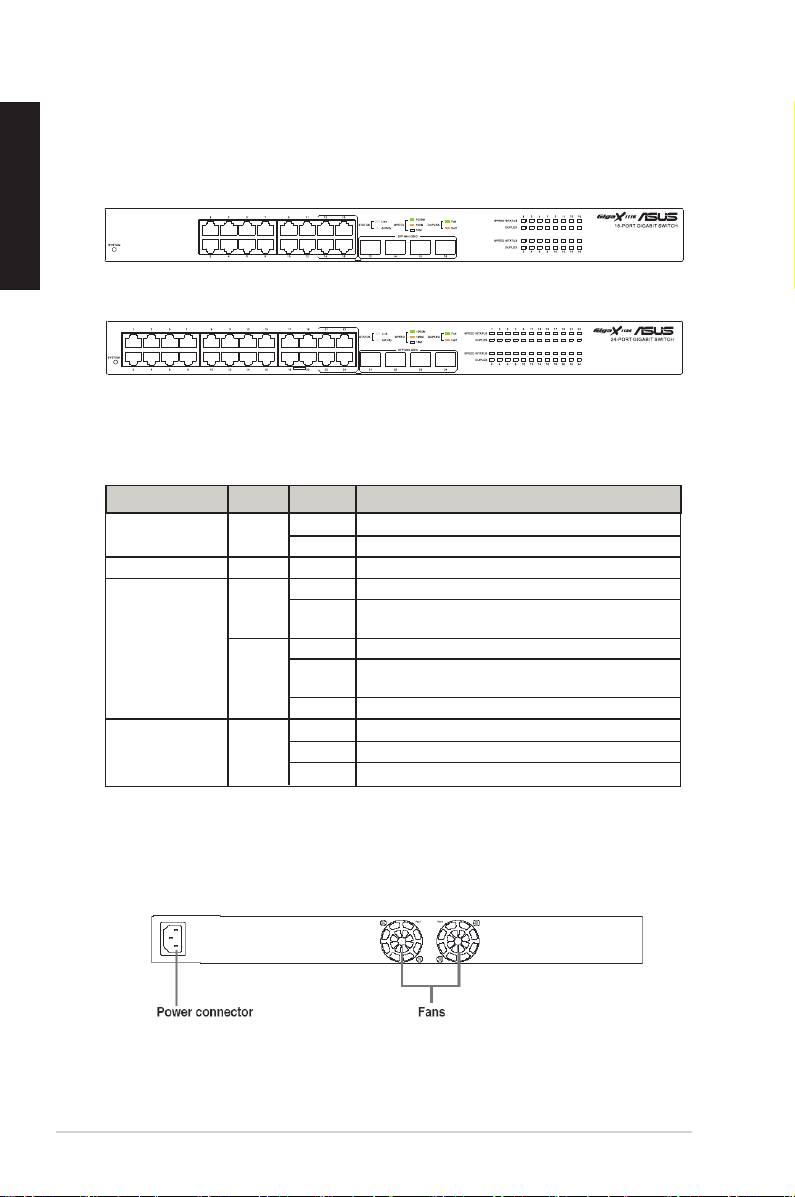
The front panels of GigaX1116B and GigaX1124B include LED indicators that
show the working condition of the switch.
Figure 1. Front panel (GigaX1116B)
Figure 2. Front panel (GigaX1124B)
Table 1 LED indicators
Label Color Status Description
SYSTEM Green On Unit is powered on and in normal operation.
Off Unit is powered off.
1 – 16/24 This number identies the port number.
STATUS/SPEED Green On Port is enabled for1000Mbps
Blinking Receiving or transmitting packets on this port for
1000Mbps
Amber On Port is enabled for10/100 Mbps
Blinking Receiving or transmitting packets on this port for
10/100Mbps
Off Link down
DUPLEX Green On Switch is operating in full-duplex mode.
Blinking Collision happens
Off Switch is operating in half-duplex mode
Rear panel
The rear panel of GigaX1116B/GigaX1124B contains two fans and a power
connector.
Figure 3. Rear panel (GigaX1116B/ GigaX 1124B)
4 Quick Start Guide
B
B
