
Asus WL-160W: ASUS WLAN Control Center
ASUS WLAN Control Center: Asus WL-160W
Table of contents
- Installation Procedures Installing the WLAN utilities and driver Reading the WLAN status indicators
- One Touch Wizard
- Conguring with the WLAN utility (Infrastructure)
- Conguring with the WLAN utility (Ad Hoc)
- ASUS WLAN Control Center
- Taskbar icon - Right-click menu Taskbar icon - Left-click menu Taskbar Icon - Launch Wireless Settings
- ASUS Wireless Settings Utility Starting Wireless Settings Status - Status
- Buttons
- Save Conguration Activate Conguration Status - Connection
- Status - IP Cong Status - Ping
- Cong - Basic
- Cong - Advanced
- Cong - Encryption
- Quick Start Guide Data encryption
- Quick Start Guide
Quick Start Guide
English
ASUS WLAN Control Center
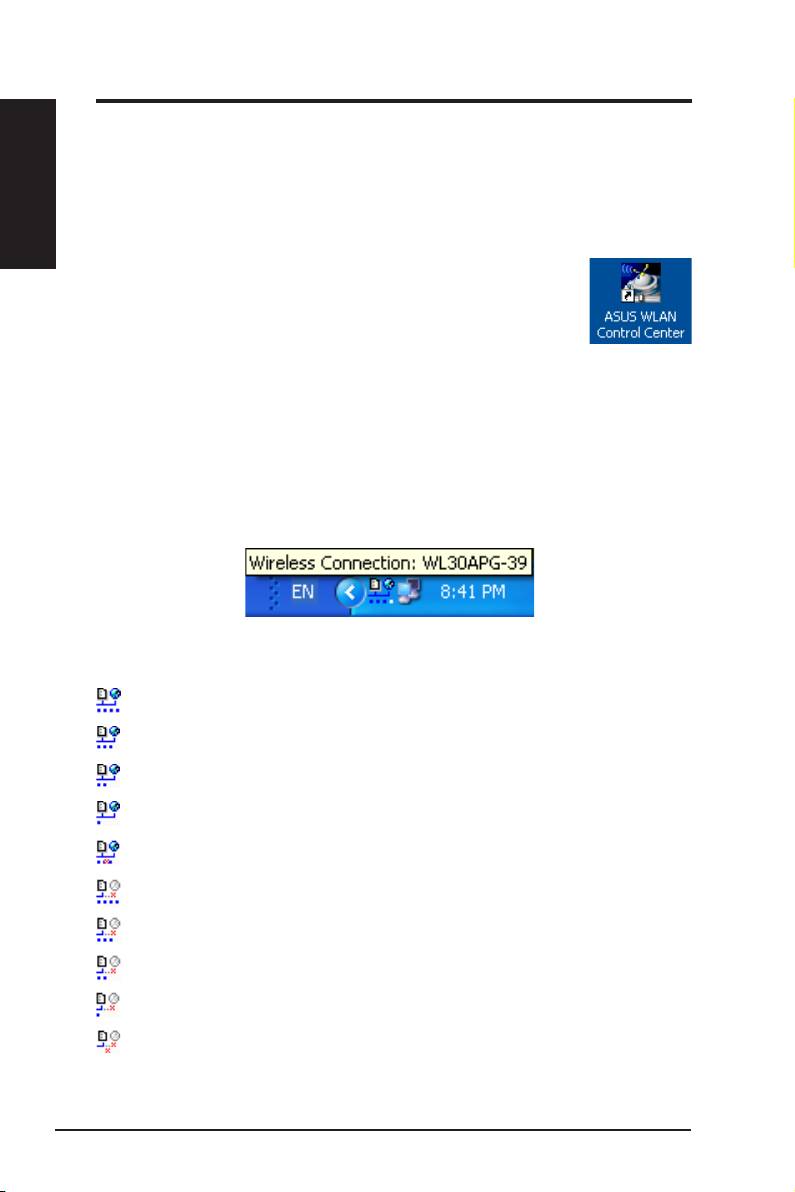
ASUS WLAN Control Center is an application which makes it easier to launch
WLAN applications and activate network location settings. The WLAN Control
Center starts automatically when system boots. When WLAN Control Center is
running, you can see a Control Center icon on the Windows taskbar.
Starting the Control Center
• Select
ASUS WLAN Control Center
in Windows Start
menu, or
• Double-click the
ASUS WLAN Control Center
icon on the desktop.
Using the Control Center
The Control Center taskbar icon displays the following information:
• Link quality of the WLAN Adapter (Excellent, Good, Fair, Poor, Not
Linked)
• Whether the WLAN Adapter is connected to a network (Blue:
Connected, Gray: Not Connected)
Taskbar Icon and Status
Wireless Status Icons (on the taskbar)
Excellent
link quality and
connected to Internet
(Infrastructure)
Good
link quality and
connected to Internet
(Infrastructure)
Fair
link quality and
connected to Internet
(Infrastructure)
Poor
link quality and
connected to Internet
(Infrastructure)
Not linked
but
connected to Internet
(Infrastructure)
Excellent
link quality but
not connected to Internet
(Infrastructure)
Good
link quality but
not connected to Internet
(Infrastructure)
Fair
link quality but
not connected to Internet
(Infrastructure)
Poor
link quality but
not connected to Internet
(Infrastructure)
Not linked
and
not connected to Internet
(Infrastructure)
6 ASUS WLAN Adapter
