
Asus MK221H: Safety information Monitor introduction
Safety information Monitor introduction: Asus MK221H
Table of contents
- Safety information Monitor introduction
- Connecting the cables
- Built-in webcam with Mic Array support LifeFrame 2 software
- Troubleshooting (FAQ)
- Supported operating modes
Safety information
• Before setting up the monitor, carefully read all the documentation that came
English
with the package.
• Topreventreorshockhazard,neverexposethemonitortorainormoisture.
• The monitor should be operated only from the type of power source indicated
on the label. If you are not sure of the type of power supplied to your home,
consult your dealer or local power company.
• Use the appropriate power plug which complies with your local power standard.
• To ensure satisfactory operation, use the monitor only with UL listed computers
whichhaveappropriateconguredreceptaclesmarkedbetween100-240VAC.
• Ifyouencountertechnicalproblemswiththemonitor,contactaqualiedservice
technician or your retailer.
Monitor introduction
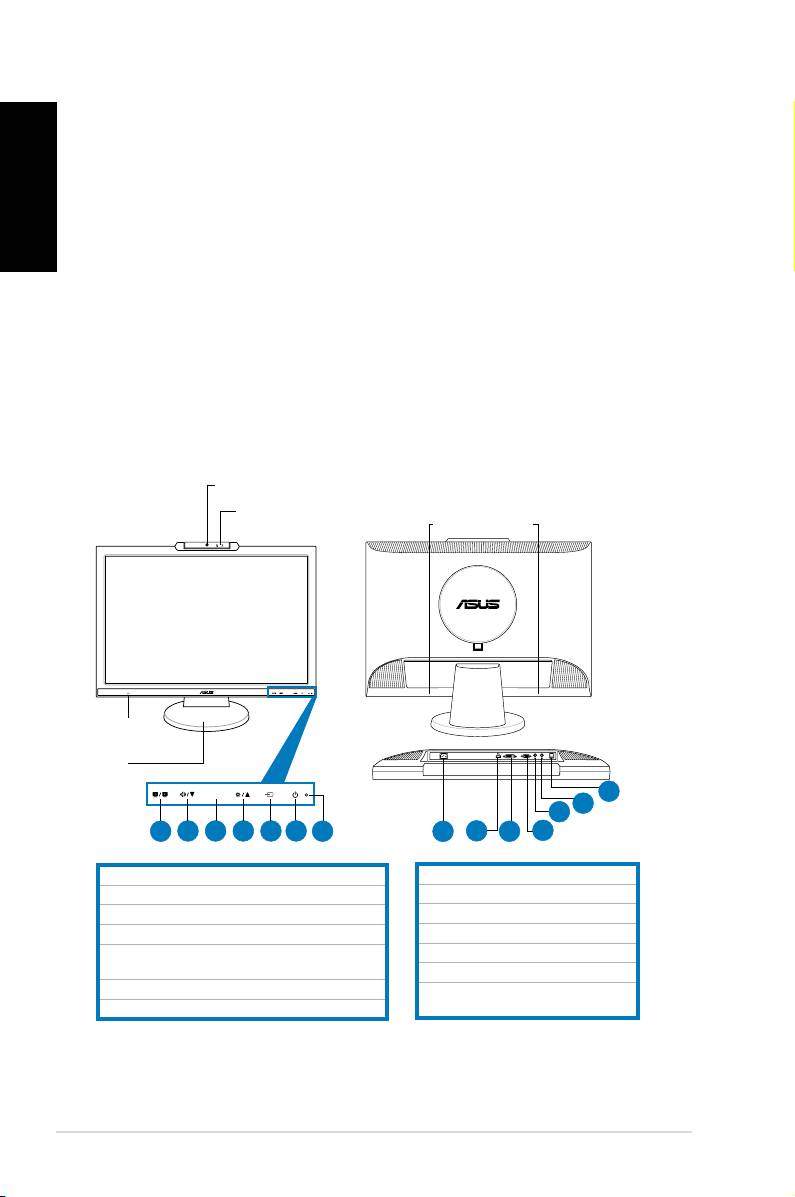
Front view Rear view
1.3 megapixel webcam
1.SPLENDID™*/Auto-adjust**/ExitMENUbutton
8.AC-inport
2.Volumehotkey/Decreasebutton
9.HDMIport(MK221Honly)
3.MENU/Enter/Selectionbutton
10.DVIport(MK221Honly)
4.Brightnesshotkey/Increasebutton
11.VGAport
5.Inputselectswitchbutton(MK221H)
12.Audiooutport
Auto-adjustbutton(MK221S)
13.Audioinport
6.Powerbutton
14.USB2.0port(upstream,for
7.LEDindicator
webcamandmicrophones)
* Hotkey for 5 video preset mode selection.
** Adjusts the image automatically by pressing the button for 2–3 seconds (MK221H only).
2 Quick Start Guide
MIC ARRAY
MENU
MEN U
Mic Array
Stereo speakers
(microphone x2)
(2Wx2)
Headphone
jack
Base
14
13
12
1
2 3 4 5 6
7
8
9
10
11
