
Asus MK221H: Connecting the cables
Connecting the cables: Asus MK221H
Table of contents
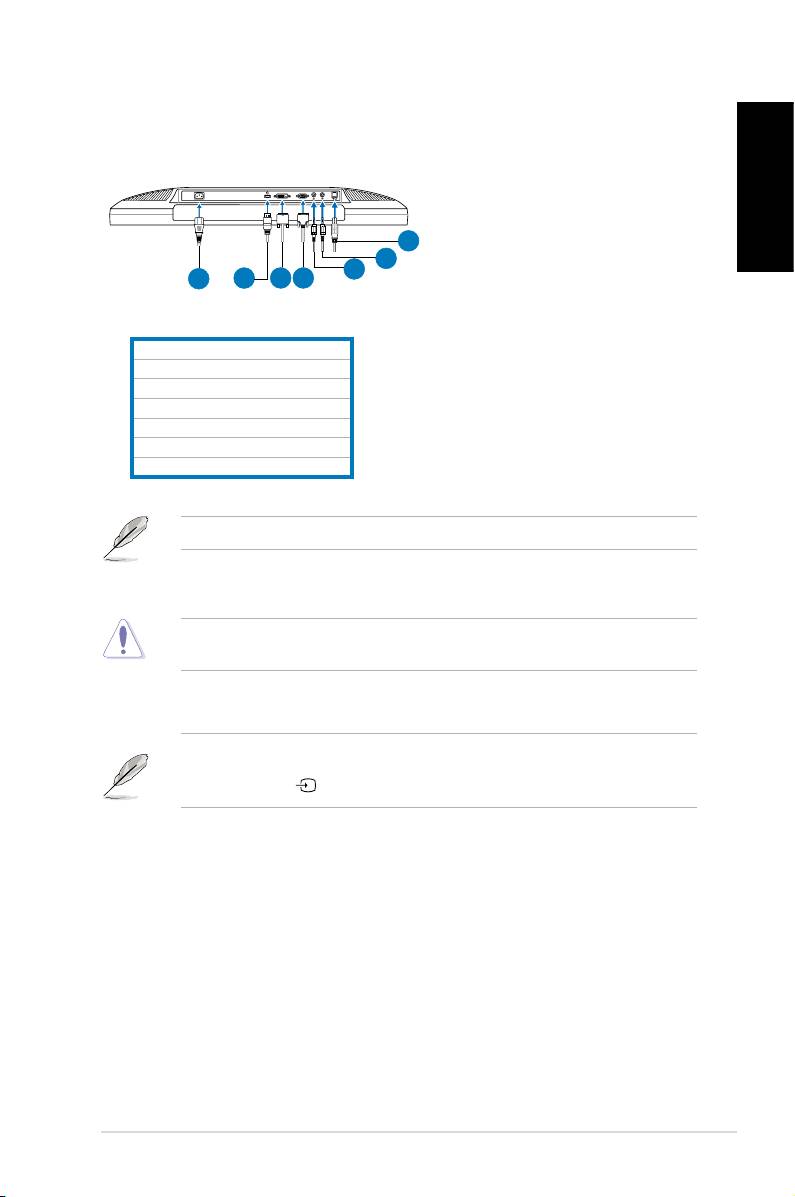
Connecting the cables
Connectthecablesasshown:
English
7
6
5
1
2
3
4
1.Powercord
2.HDMIsignalcable(MK221Honly)
3.DVIsignalcable(MK221Honly)
4.VGAsignal cablesignal cablecable
5.Audio-outcable
6.Audio-incable
7.USB2.0cable
TheHDMIcableandaudio-outcablearepurchasedseparately.
•
To connect the power cord:
connect one end of the power cord
securelytothemonitor’sACinputport,theotherendtoapoweroutlet.
Beforeyouconnectthecables,ensurethatyourPCisswitchedofforthepower
cord is unpluged from the wall socket.
•
To connect the signal cables
:connectoneendofthesignalcable(s)to
the monitor, the other end to your computer or any other video device.
WhentheHDMI,DVI,andVGAcablesareconnectedsimultaneously,youcan
switch the input source from the
Input Select
itemoftheOSDfunctions,orby
using the hotkey onthefrontpanel(MK221Honly).
••
To connect the audio cable
:connecttheaudiocablefromthemonitor’s
audio-inporttothecomputer'saudio-outport.
•
To connect to speakers:
Connectanaudio-outcablefromtheaudio-out
portoftheLCDmonitortotheaudio-inportofyourspeakers.
3 Quick Start Guide
