
Pioneer KRL-46V: Selecting a programme using EPG
Selecting a programme using EPG: Pioneer KRL-46V
Table of contents
- Contents
- Important Safety Precautions
- Remote control unit
- Controlling other equipment using the supplied remote control unit Presetting manufacture codes Manufacture codes STB DVD
- DVR VCR BD VCR
- Using with other equipment (STB) Using with other equipment (VCR)
- Using with other equipment (DVD/DVR)
- Trademarks
- TV (Front view) TV (Rear view)
- Preparation Supplied accessories Attaching the stand unit
- Preparation Inserting the batteries Using the remote control unit
- Installation precautions
- Quick guide Initial installation overview
- Before turning on the power
- Initial auto installation
- Watching TV Daily operation
- EPG (Electronic Programme Guide) EPG Overview Useful settings for using EPG
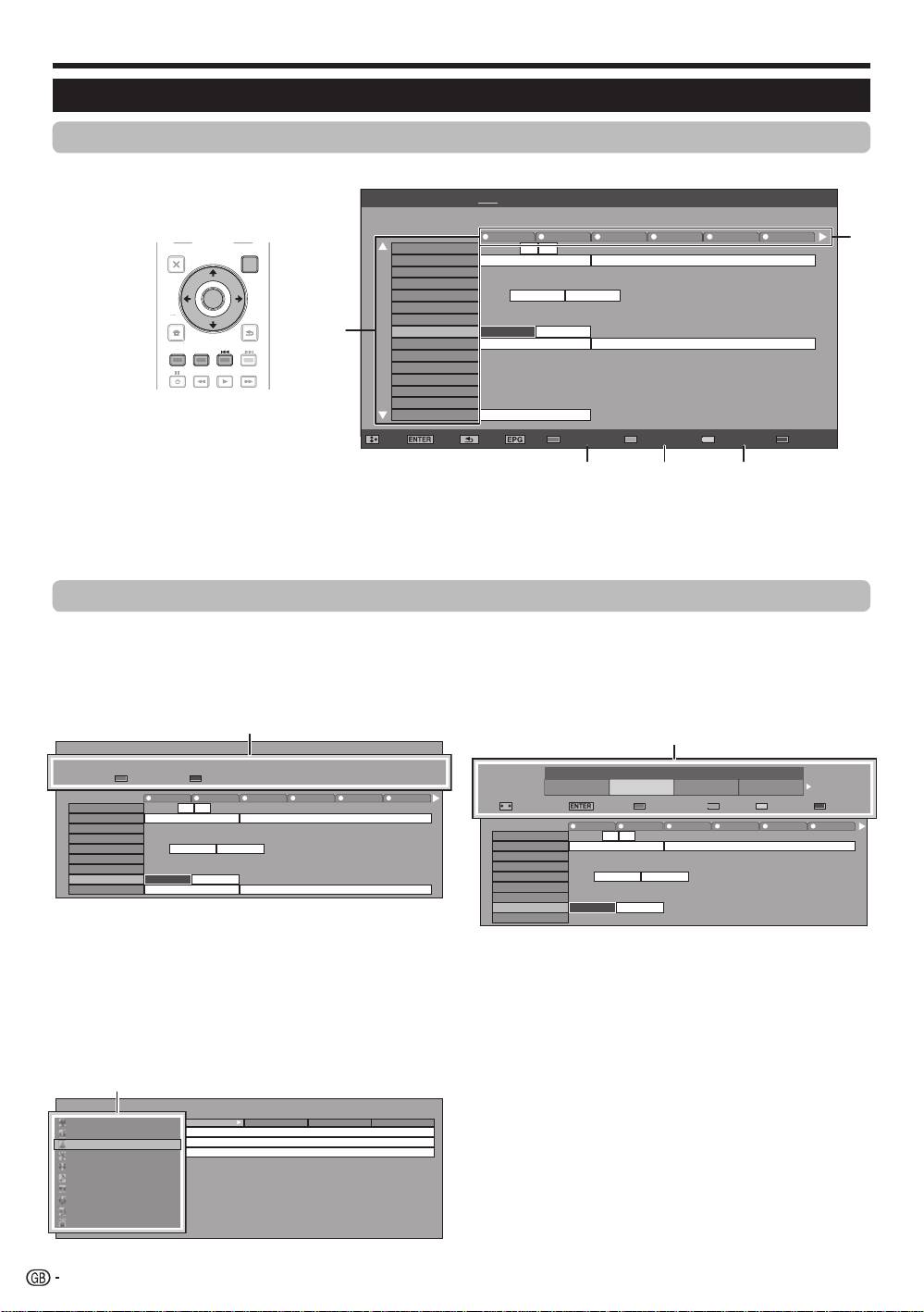
- Selecting a programme using EPG
- Timer recording using EPG Cancelling the timer recording
- Teletext Using the MHEG-5 application (UK only)
- Connecting external devices Introduction to connections
- HDMI connection Component connection S-VIDEO/VIDEO connection
- SCART connection Controlling devices with SCART using i/o link.A
- Speaker/amplifier connection
- Inserting a smart card
- HDMI CONTROL Controlling HDMI devices using HDMI CONTROL
- HDMI CONTROL connection HDMI CONTROL Setup
- Operating an HDMI CONTROL device
- Menu operation What is the HOME MENU?
- Basic adjustment Picture Settings
- Sound Settings Power Save Settings
- Channel Settings
- Analogue channel settings
- Password/Parental lock settings Language Settings (language, subtitle, multi audio)
- Useful Viewing functions Selecting the picture size
- Other picture and audio settings
- Display Settings
- Other useful features Setting when using external devices Additional features
- Connecting a PC Connecting a PC Displaying a PC image on the screen
- Selecting input resolution
- RS-232C port specifications
- PC compatibility chart RS-232C command list
- Appendix Troubleshooting
- Updating your TV via DVB-T Reset Identification
- Specifications
- End of life disposal
Check programme information
Press a/b/c/d to select the programme you
want to check.
Press Red button.
040
BBC News 24 BBC News
10 : 00AM - 1 : 00 AM
Programme Info.
The BBC’s rolling news service with headlines every 15 minutes.
R
Back to EPG
B
Next
10 AM 11 0 PM 1 2 3
BBC TWO 002
BBC THREE 007
This is BBC THREE
This is BBC THREE
BBC FOUR 010
BBC FIVE 012
CBBC Channel 030
BBC NEWS BBC NEWS
BBC 1 061
BB22 062
BBC NEWS 24 340
BBC NEWS BBC NEWS
BBCi 351
BBCi BBCi
Press ENTER to tune to the selected programme.
Search a programme in a category
Press Green button.
Press a/b to select the desired genre, and
then press ENTER.
Press a/b to select a programme you want to
watch, and then press ENTER.
[Today] 0-12 [Today] 12-0 [Tue] 20 0-12 [Tue] 20 12-0
Movie/Drama
10 : 50 AM - 11 : 05 AMMon 19/05CBBC Cahnnel 030 time
News/Current affairs
10 : 50 AM - 11 : 10 AMMon 19/05BBC TWO 002 School is Lock
Show/Game show
11 : 05 AM - 11 : 20 AMMon 19/05CBBC Cahnnel 030 Words and Pictures
Sports
Children’s/Youth programmes
Music/Ballet/Dance
Arts/Culture (without music)
Social/Political Issues/Economics
Education/Science/Factual Topics
Leisure hobbies
3
Search for a programme by date/time
1
Press Yellow button.
Press c/d to select the desired time span, and
2
then press ENTER.
3
4
1
2
3
•
Refer to page 17 for the genre setting.
Search by Time
Today
0 AM -
6 AM -
0 PM -
6 PM -
6 AM
0 PM
6 PM
0 AM
Next
: Select Time
OK
: Enter
R
Back to EPG
G
Enter
Y
+1 Week
B
Next
10 AM 11 0 PM 1 2 3
BBC TWO 002
BBC THREE 007
This is BBC THREE
This is BBC THREE
BBC FOUR 010
BBC FIVE 012
CBBC Channel 030
BBC NEWS BBC NEWS
BBC 1 061
BB22 062
BBC NEWS 24 340
BBC NEWS BBC NEWS
SIT 1 994
Watching TV
Selecting a programme using EPG
Basic Operation
The illustrations on this page are explained using three digit services.
E
Display/Close the EPG screen
Press EPG.
E
Select a programme
1
Select the time span
Press c/d to select the time span you want to search.
•
Continue to press d to display programmes in the next time span.
2
Select the desired programme
Press a/b to select the desired programme.
•
If a or b are displayed on the left of the services, continue to press a/b to display next or previous screen.
Selecting a programme
5
1
2
3
Press a/b to select the desired programme,
and then press ENTER.
NOTE
•
When you select a programme outside of the current time
span, the timer setting screen is displayed (Page 19).
18
EPG [Mon]16/04 10:57 AM[DTV-TV] Today (Tue)20 (Wed)21 (Thu)22 (Fri)23 (Sat)24 (Sun)25 (Mon)26
040
BBC News 24 BBC News
10 : 00AM - 1 : 00 AM
10 AM 11 0 PM 1 2 3
BBC TWO 002
BBC THREE 007
This is BBC THREE
This is BBC THREE
BBC FOUR 010
BBC FIVE 012
CBBC Channel 030
BBC NEWS BBC NEWS
BBC 1 061
BB22 062
BBC NEWS 24 340
BBC NEWS BBC NEWS
BBCi 351
BBCi BBCi
SIT 1 994
SIT 2 995
SIT 3 996
SIT 4 997
SIT 5 998
BBC ONE 999
This is BBC THREE
: Select : Enter : Back : Exit Programme info. Search By Genre Search By Date Timer List
1
2
3 4 5
TV
INPUT
1 2 3 4
5 6 7 8
TV DTV
RADIO
1 2 3
4 5 6
7 8 9
INFO
0
P.INFO
CH RETURN
P
DVD TOPMENU/
EXIT
GUIDE
EPG
ENTER
HOME
MENU
RETURN
MENU
CM SKIP
SOURCE
HDMI REC STOP
CTRL
TV
TOOLS
STB DVR VCR
DVD
SCREEN
DVD
SIZE
SELEC TION
SELECT
HDD
AV
TV
D
TV
RADI
O
1
2
3
4
5
6
7
8
TV
I
N
P
U
T
4
5
6
7
8
9
1
2
3
0
P
.INFO
I
NF
O
P
C
H RET
U
R
N
EXIT
HOME
MEN
U
MEN
U
RETURN
C
TRL
H
DM
I
RE
C
S
T
OP
HDD
AV
S
ELE
C
TI
O
N
C
M
S
KI
P
D
V
D
TOO
L
S
SC
REE
N
S
IZ
E
SOU
R
CE
TV
ST
B
DVR
V
C
R
D
V
D
SELECT
Programme Information
Search by Time
Today
0 - 6 6 -12 12 - 18 18 - 0
Next
: Select Time
: Enter
Back to EPG
Enter +1 Week
Next
Programme Info.
The BBC’s rolling news service with headlines every 15 minutes.
Back to EPG
Next
Movie/Drama
News/Current affairs
Show/Game show
Sports
Children’s/Youth programmes
Music/Ballet/Dance
Arts/Culture (without music)
Social/Political Issues/Economics
Education/Science/Factual Topics
Leisure hobbies
Date/Time
Genre
KRL46V_GB.indd 18 2008/07/09 14:08:49
