
Pioneer PDK-TS35A: instruction
Class: Household, kitchen appliances, electronics and equipment
Type: Home Theater System
Manual for Pioneer PDK-TS35A
Table of contents
- Contents
- Checking the Standard Accessories
- Assembly Procedure Assembling the Stand
- Attaching the Light-blocking Shield Attachment Procedure
- Attaching the Cushion Attachment Procedure
- Attaching the Pioneer Display and Television Installing the Product on a Rack etc.
- Preventing Equipment from Falling Over Stabilizing on a rack etc. Using a wall for stabilization Specifications
- Dimensions Diagram When the side speakers are installed When the under speaker is installed Without speakers
2
Ja
このたびは、パイオニアの製品をお買い求めいただきまし
てまことにありがとうございます。お使いになる前には取扱
説明書をよくお読みになり、安全に正しくご使用ください。
また、お読みになったあとも、この取扱説明書は大切に保
管してください。
「据え付け」について
お客様がご自身で本機の取り付けを困難だと思われ
る場合は、販売店にご相談ください。
なお、据え付け、取り付けの不備、誤使用、改造、
天災などによる事故損傷については、弊社は一切責
任を負いません。
もくじ
取扱上の注意 ...............................................................2
同梱された部品の確認 ..................................................3
スタンドの組み立て ......................................................4
クッションの取り付け ..................................................5
プラズマテレビの取り付け方 ......................................6
ラックなどに設置する場合 ..........................................6
転倒防止 .........................................................................7
仕 様 .............................................................................8
寸法図 .............................................................................8
取扱上の注意
ご注意
安全上の絵表示について
取扱説明書および製品に記されている注意事項には、損害
のレベルや内容を示す絵表示が付けられていることがあり
ます。それら絵表示の意味は以下のとおりです。
本製品は弊社製プラズマテレビ KRP-600A/KRP-600M
専用のテーブルトップスタンドです。
その他の機器への取り付けには対応しておりません。詳し
くは、お買い求めの販売店にご相談ください。
注意
指定外のプラズマテレビへの取り付け、改造およ
び他の用途での使用はしないでください。
設置場所について
設置場所にはスタンドとプラズマテレビの質量に十
分耐えられる強度をもつ場所を選定してください。
必ず平坦で安定した場所に設置してください。
屋外や温泉、海辺などの水場には設置しないでく
ださい。
振動や衝撃の加わるような場所には設置しないで
ください。
組み立て・設置について
組み立ての手順を守り、指定の箇所はすべて確実
にネジ留めしてください。
指定を守らないとプラズマテレビ取り付け後に、
破損や転倒など思わぬ事故の原因となることがあ
ります。
プラズマテレビの取り付け作業は安全のため、必
ず 2 人以上で行ってください。
作業の際には、プラズマテレビと周辺機器の電源
を切り、電源プラグをコンセントから抜いてくだ
さい。
地震などでの製品の転倒・落下によるけがなどの
危害を軽減するために、必ず転倒・落下防止対策
を行ってください(7 ページ参照)。
プラズマテレビを取り付けた状態でスタンドより
も小さい台車、パレットに載せて輸送しないでく
ださい。スタンドが変形する原因となります。
スタンドより小さい台の上に設置しないでくださ
い。
警告
注意
人がけがをしたり財産に損害を受
ける恐れがある内容を示します。
人が死亡または重傷を負う恐れが
ある内容を示します。
警告・注意
(気をつけること)
禁止
(やってはいけないこと)
指示・強制
(しなければならないこと)
3
Ja
日本語 日本語
同梱された部品の確認
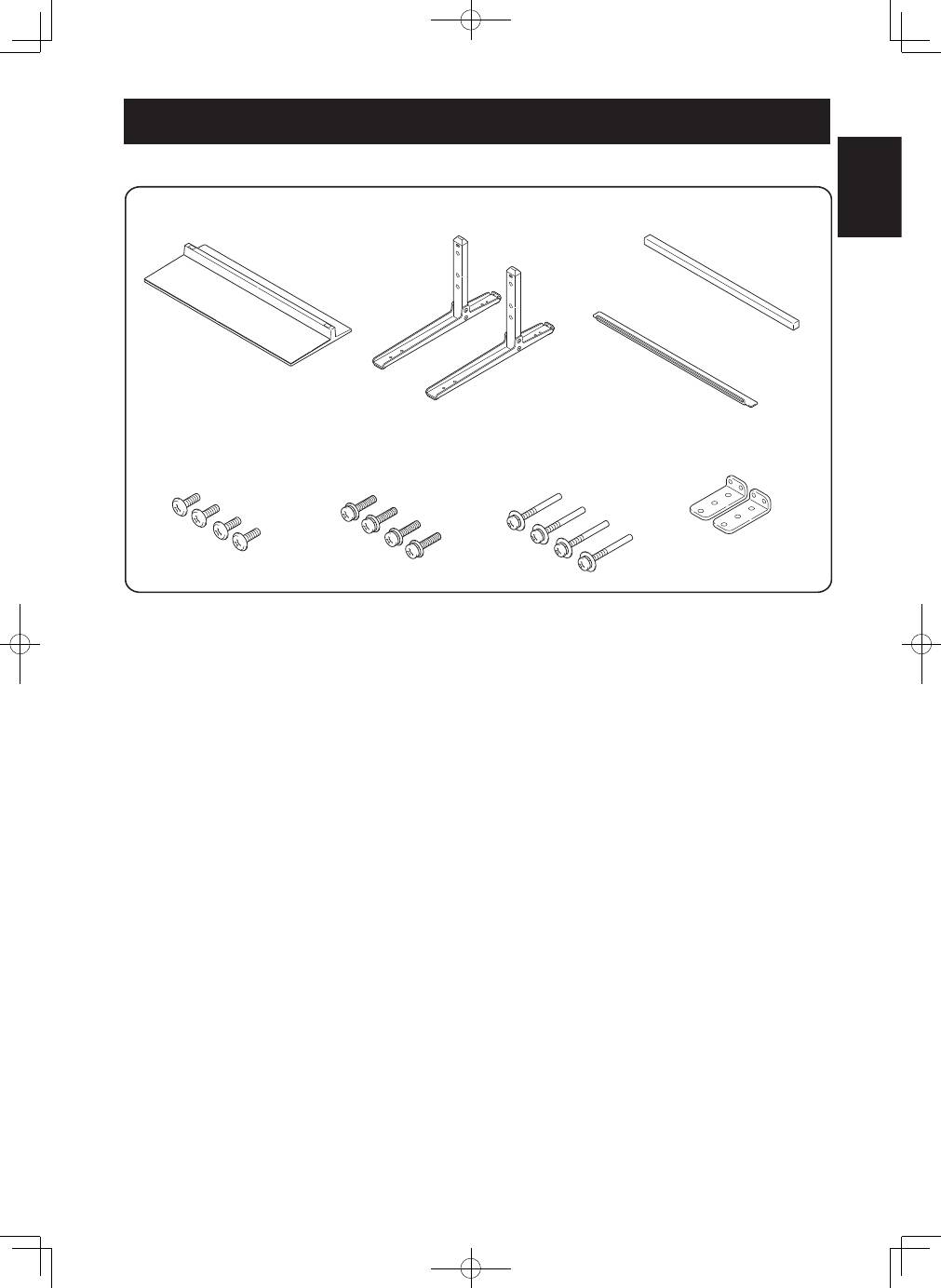
組み立て・設置の前に同梱された部品を確認してください。
ベースカバー ×1
ネジ ①
(4×10 mm:シルバー)×4
取付ネジ ③ (転倒防止金具用)
(M4×35 mm:黒)×4
取扱説明書(本書)×1
取付ネジ ②
(M6×20 mm:黒)×4
スタンドパイプ ×2
クッション ×1
遮光板 * ×1
転倒防止金具 ×2
* KRP-600A/KRP-600M では使用しません。
4
Ja
スタンドの組み立て
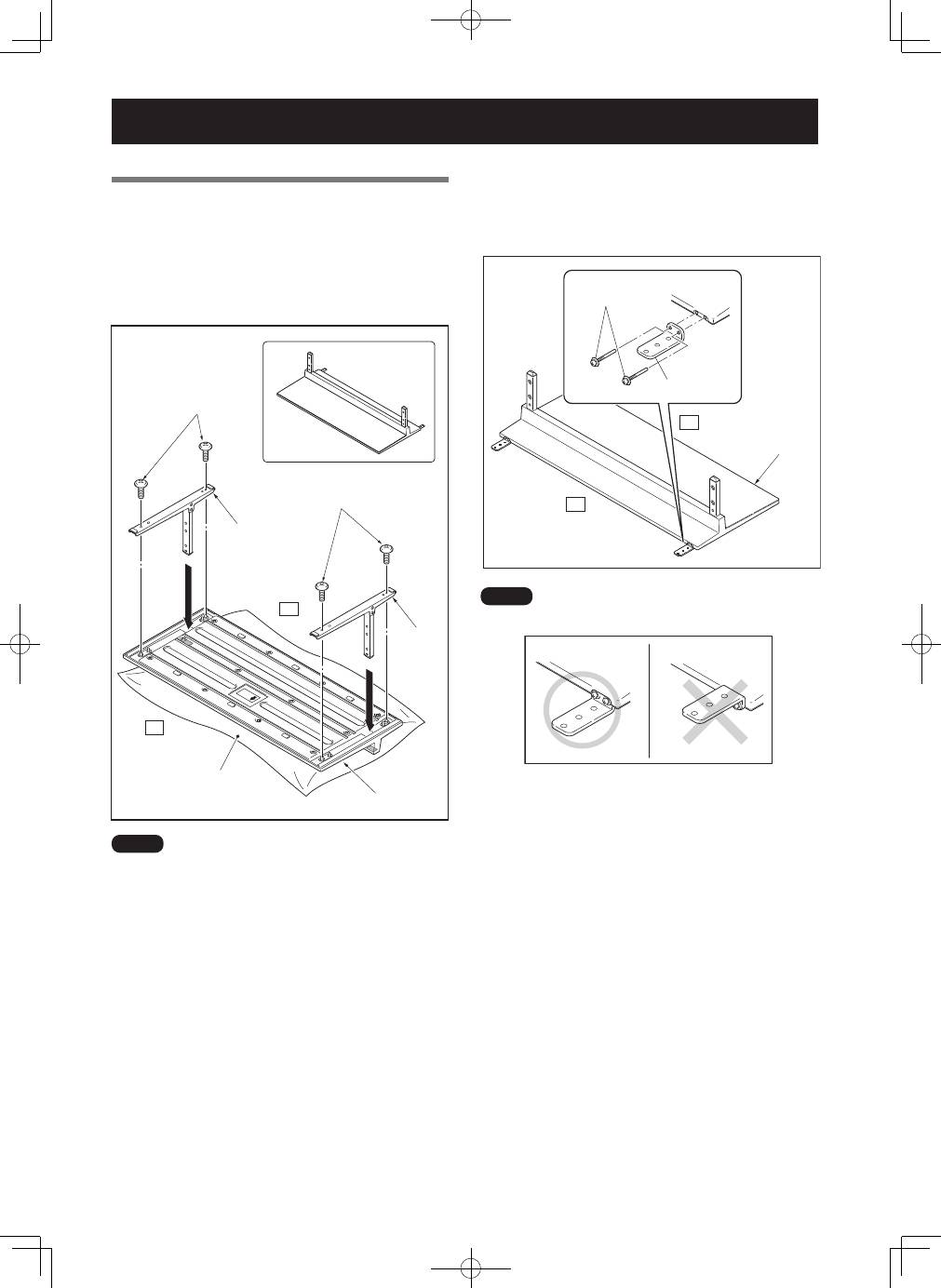
組み立て手順
1
ベースカバーを裏側にする
2
スタンドパイプをベースカバーに挿入する
3
ネジ ①(4 × 10 mm:シルバー)でスタ
ンドパイプをベースカバーに固定する
シート
ベースカバー
テーブルトップ
スタンド完成図
ネジ ①
(4×10 mm:シルバー)
ネジ ①
(4×10 mm:シルバー)
スタンドパイプ
スタンド
パイプ
前
後
ご注意
スタンドを組み立てる際は、ベースカバーの下に柔らかいシート
などを敷いて組み立ててください。
シートを敷いて組み立てを行わないと、ベースカバーの表面をキ
ズつける恐れがあります。
4
スタンドの組み立て後、転倒防止金具を取付
ネジ③(M4 × 35 mm:黒)で取り付ける
前
後
ベースカバー
取付ネジ ③
(M4×35 mm:黒)
転倒防止金具
ご注意
転倒防止金具は逆向きに取り付けないようにご注意ください。
<正しい取り付け方>
<誤った取り付け方>
5
Ja
日本語 日本語
クッションの取り付け
製品背面に接続したケーブル類のベースカバーへの映り込
みを防止する部品です。
ご注意
平坦で安定した場所にベースカバーを固定してから、取り付けを
行ってください。
前
後
クッション
ベースカバー
取り付け手順
クッションの両面テープのはくり紙をはがし、
ベースカバーの下図の位置に貼る
前
後
ご注意
パイプ差込口にクッションがかからないようにしてください。
すき間がないように固定してください。
すき間があると、クッションがはがれる可能性があります。
6
Ja
ラックなどに設置する場合
ラックなどに設置する場
合 は、 必 ず 2 人 以 上 で
プラズマテレビを持って
ください。
スピーカー部、およびス
タンドは持たないでくだ
さい。破損の原因となり
ます。
注意
2
取付ネジ ②(M6 × 20 mm:黒)でプラズ
マテレビを固定する
プラスドライバーを使用して固定してください。
取付ネジ ②
(M6×20 mm:黒)
前
後
ご注意
取り付け後は、プラズマテレビを起こしてください。
プラズマテレビの取り付け方
注意
プラズマテレビは質量が約 50 kg あり、奥行きがなく
不安定なため、取り付けおよび設置は必ず 2 人以上で
行ってください。
ご注意
必ず平坦で安定した場所で取り付けをしてください。
ネジは穴に対して垂直に挿入し、確実に締めてください。
ディスプレイにキズおよび破損が生じないように、シートなど
を敷いてください。
ネジを手で 2、3 回軽く締めてからドライバーで締めつけてく
ださい。
取り付け手順
1
プラズマテレビにスタンドを取り付ける
プラズマテレビを寝かせた状態にして、プラズマテレ
ビのスタンド挿入部にスタンドの支柱を合わせ、水平
にゆっくり挿入してください。 スタンドの支柱をプラ
ズマテレビのスタンド挿入口以外の部分に当てないよ
うに注意してください。 本体裏面や端子にキズをつけ
たり、変形させる恐れがあります。
前
後
ご注意
プラズマテレビを寝かせるときは、ディスプレイにキズおよび破
損が生じないようにご注意ください。
プラズマテレビの上部と
取っ手を持ってください。
スピーカーは持たないで
ください。
スタンドは持たないでく
ださい。
7
Ja
日本語 日本語
転倒防止
(設置後は転倒防止の備えを必ず行ってください)
壁を利用する方法
1
プラズマテレビに転倒防止用ボルトを取り付
ける(2 カ所)
転倒防止用ボルトは、プラズマテレビに付属していま
す。
2
壁、柱などの頑丈な部分に、丈夫なひもでしっ
かりと固定する
左右対称に同様の作業を行ってください。
ご注意
ひも、取付具は本製品およびプラズマテレビには付属していませ
ん。市販品をご使用ください。
�
転倒防止用ボルト
(プラズマテレビ付属品)
�
ひも
取付具
設置後の転倒・落下防止のお願い
地震などでの製品の転倒・落下によるけがなどの危害を軽減す
るために、必ず転倒・落下防止対策を行ってください。
ご注意:
転倒・落下防止器具を取り付ける壁や台の強度によっては、転
倒・落下防止効果が大幅に減少します。その場合は適当な補強
を施してください。
また転倒・落下防止対策は、けがなどの危害の軽減を意図した
ものですが、すべての地震に対してその効果を保障するもので
はありません。
ラックなどに固定する方法
ネジ(市販品)を使って、図のように固定してください。
ご注意
ラックなどに固定する際のネジは、
呼び径 4 mm、長さ 20 mm 以上
のものを使用してください。
ネジ(市販品)
転倒防止金具
ラック天板に下穴をあけてから、市販のネジで
ネジ留めしてください。
20 mm以上
4 mm
8 mm
〜
15 mm
プラズマテレビはラックと壁面の両方に固定してください。
8
Ja
仕 様
外形寸法
KRP-TS01 .............. 922 mm ( 幅 ) × 222.4 mm ( 高さ ) × 430 mm ( 奥行 )
質量
KRP-TS01 .............. 5.8 kg
・上記の仕様および外観は、改良のため予告なく変更することがあります。
寸法図
サイドスピーカー取り付け時
KRP-TS01
単位:mm
124.5
60
1677
1465
922
430
876
76
152
64
スピーカーなしの時
KRP-TS01
単位:mm
124.5
60
1465
876
76
922
430
152
64
©2008 パイオニア株式会社 禁無断転載
9
En
English
Thank you for buying Pioneer’s product.
Please read through the Operating Instructions to learn how
to operate your model safely and properly.
Please be advised to keep the Operating Instructions in
your place for future reference.
Installation
• Consult your dealer if you encounter any difficulties
with this installation.
• Pioneer is not liable for any damage resulting from
improper installation, improper use, modification, or
natural disasters.
Contents
Cautions .................................................................. 9
Checking the Standard Accessories ...................... 10
Assembling the Stand ........................................... 11
Attaching the Light-blocking Shield .................... 12
Attaching the Cushion .......................................... 13
Attaching the Pioneer Display and
Television .... 14
Installing the Product on a Rack etc. .................... 14
Preventing Equipment from Falling Over ............ 15
Specifications ......................................................... 15
Dimensions Diagram ............................................. 16
Cautions
This product is a table top stand exclusively designed
for Pioneer displays and televisions (PDP-LX6090 / PDP-
LX6090H / PDP-LX609A / KRP-600P / KRP-600M).
Use with other model is capable of resulting in instability
causing possible injury. For further information, please
contact the store where you purchased your display.
Do not install or modify the product other than specified.
Do not use this stand for a Pioneer display and television
other than those designated and do not modify it or use it for
other purposes.
Installation Location
• Select a location that is strong enough to support the
weight of the stand and the displays.
• Make sure to place it in a level and stable location.
• Do not install it outdoors or in a wet place such as at a
hot spring or near a beach.
• Do not install the stand where it may be subjected to
vibration or shock.
Assembling and Installation
• Assemble the stand in accordance with the assembly
instructions and securely attach all screws at the
designated locations.
There have been cases where unforeseen accidents
such as the equipment breaking or falling over
occurred after the installation of the display because
the stand was not installed as instructed.
• The display must always be installed by two or more
people to assure it is installed safely.
• Before installation, turn off the power for the display
and peripheral devices then remove the power cord
plug from the power outlet.
Prevent accidents caused by the product falling over, by
taking reliable measures to prevent it from falling over (see
page 15).
Do not handle an attached Pioneer display and television on
a wagon or pallet that is smaller that its stand. The stand will
bend.
Do not install on a table smaller than the stand.
10
En
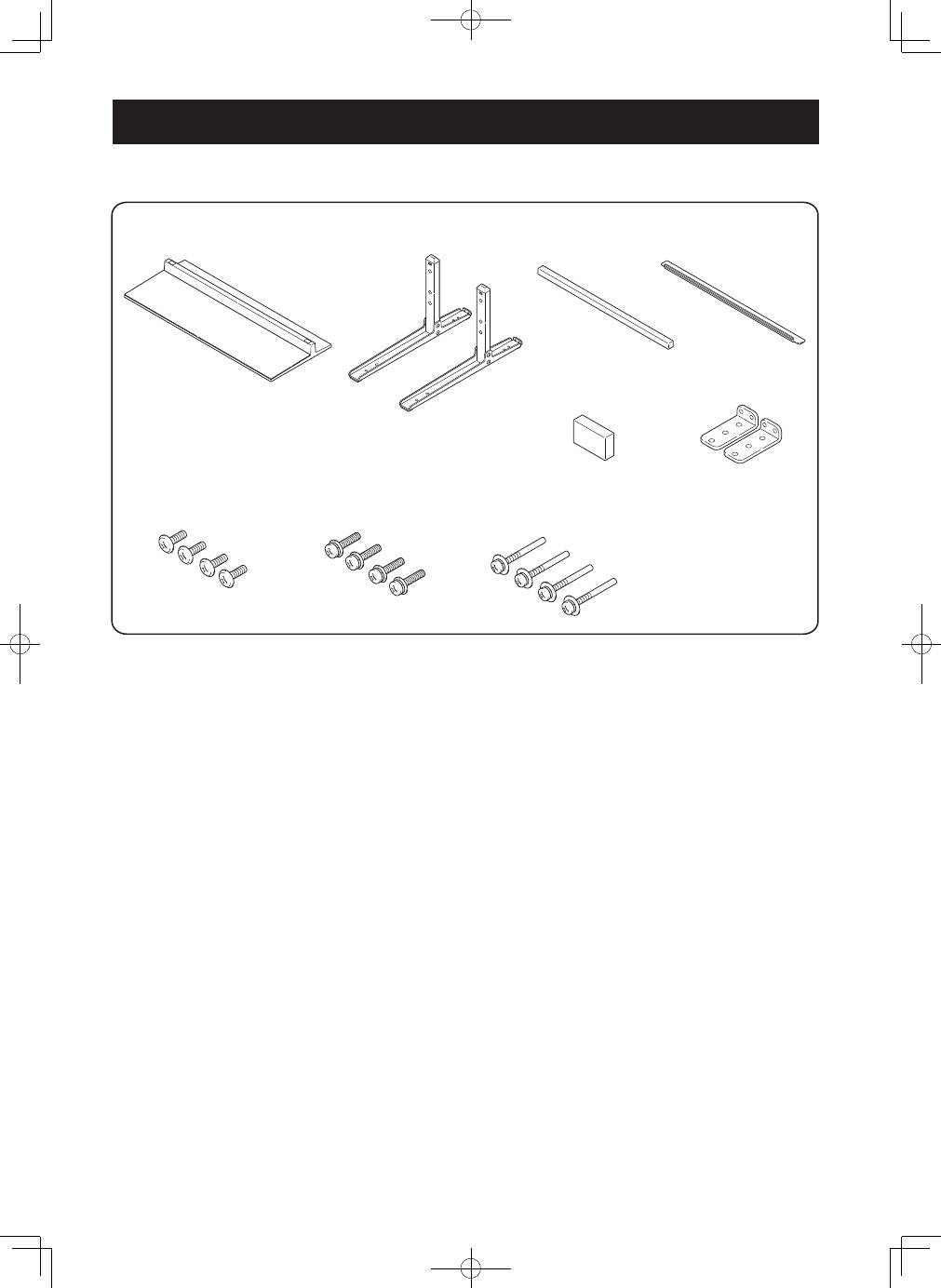
Checking the Standard Accessories
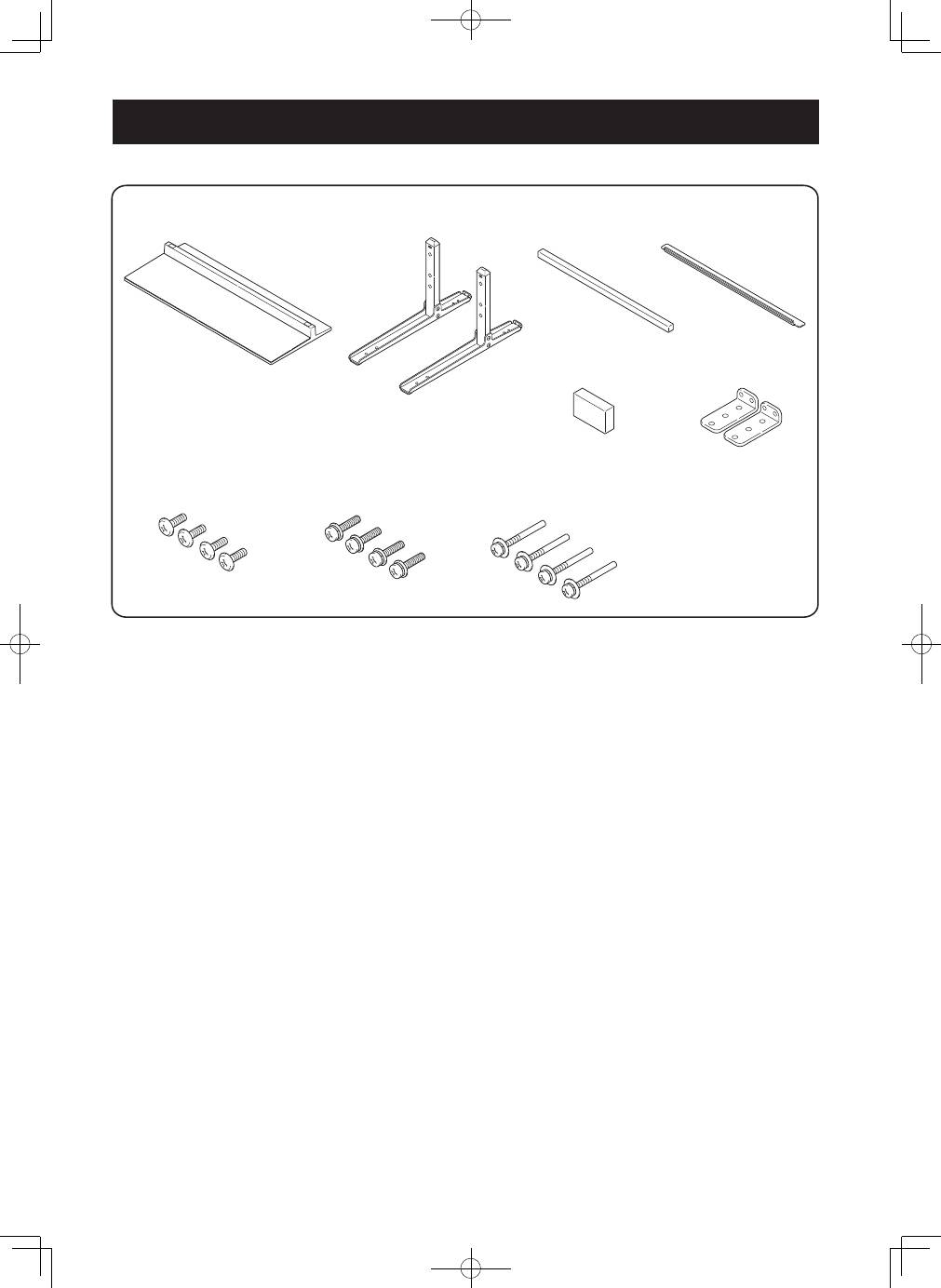
Check to make sure that you have all the standard accessories before assembly and installation.
�� �������������
�� ������
�
�
� �������������������������
�� �������������������
�
�
� ����������������������
� ��������������������������������������
�� ����������������������
� ������������������
�� �������������������
�
�
� ����������������������
�� �������������
�� ��������
�
���
�� ����������������������
�
���
� ���������������
�� ������������������
� ����������������
�� �������������������
�
���
� ����������������
��������������������������������������������������������������������������������������������������������������������������
����������������������������������������������������������������������������������
���������������������������������������������������������������������
11
En
English
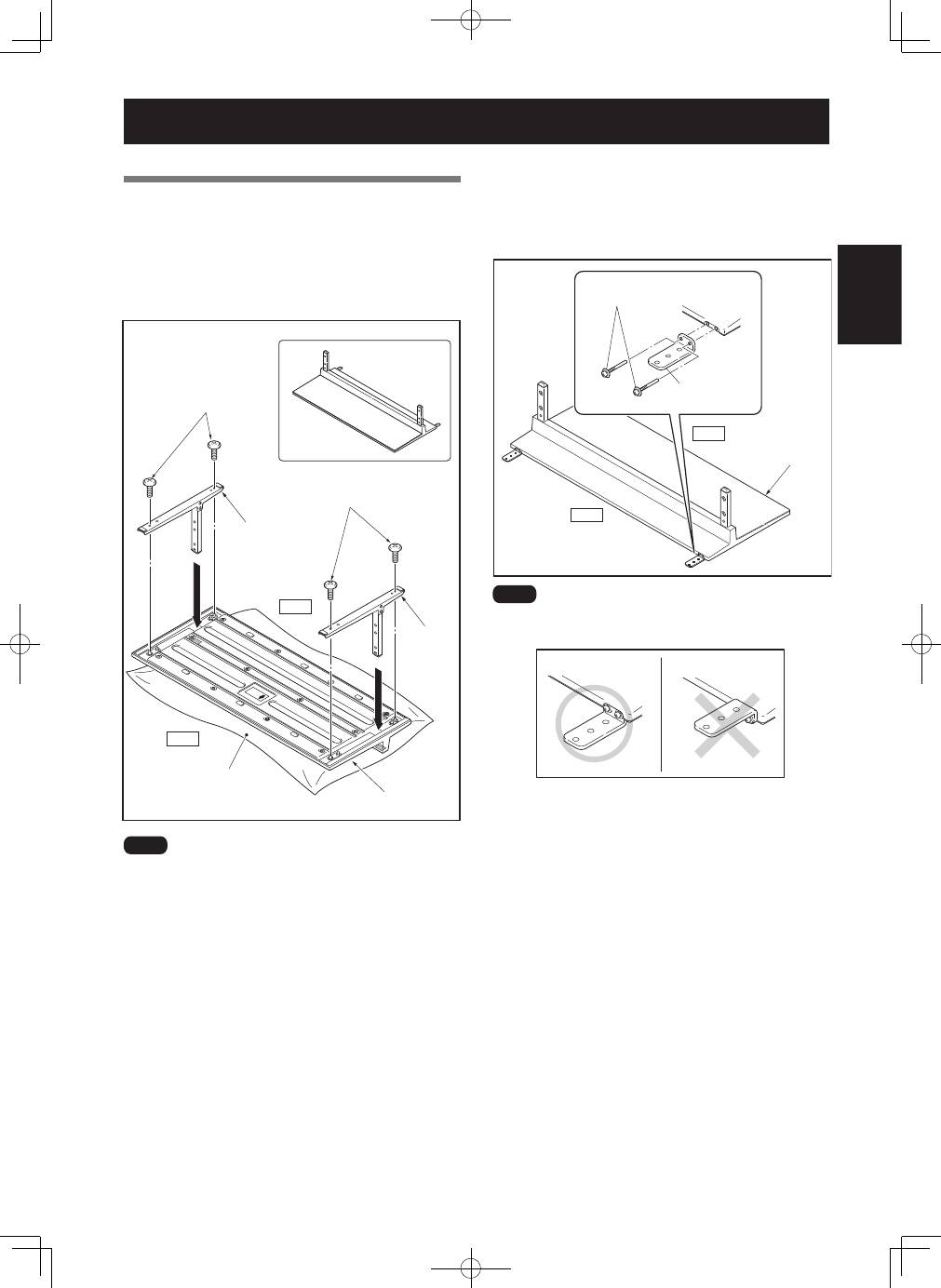
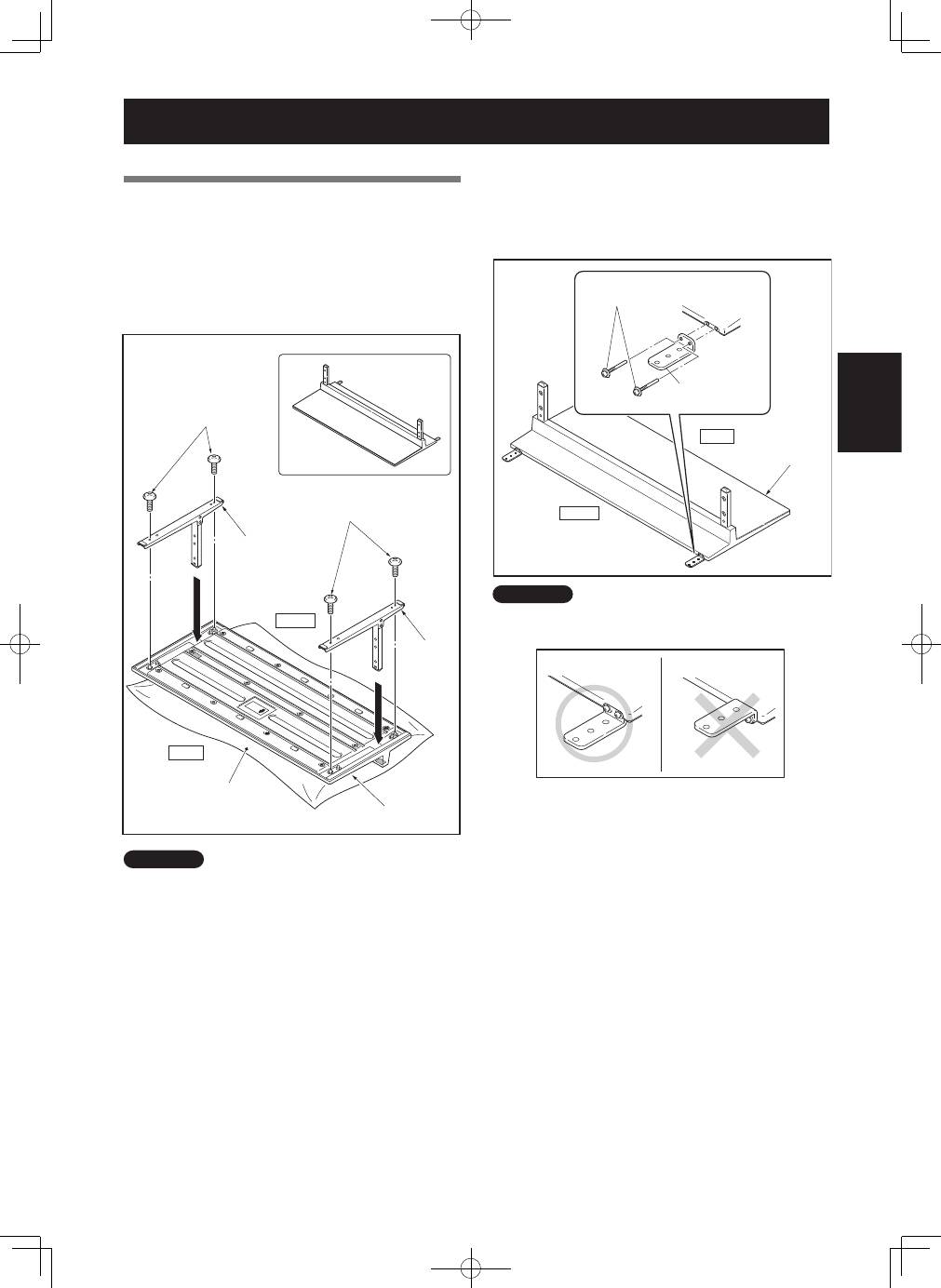
Assembly Procedure
1
Turn the base cover over so the underside is
facing up.
2
Insert the stand pipes into the base cover.
3
Tighten the screws
➀
(4 mm × 10 mm: silver)
to stabilize the stand pipes.
����������
����������
�����
�����
�������
�
�
����������������������
����������
����
����������
���������������
�������
�
�
����������������������
����
Assemble the stand with a soft sheet placed under the base
cover. If a sheet is not laid before assembly, the front surface
of the base cover may be scratched.
Assembling the Stand
4
After assembling the stand, attach the falling
prevention metal fittings with the installation
screws
➂
(M4 × 35 mm: black).
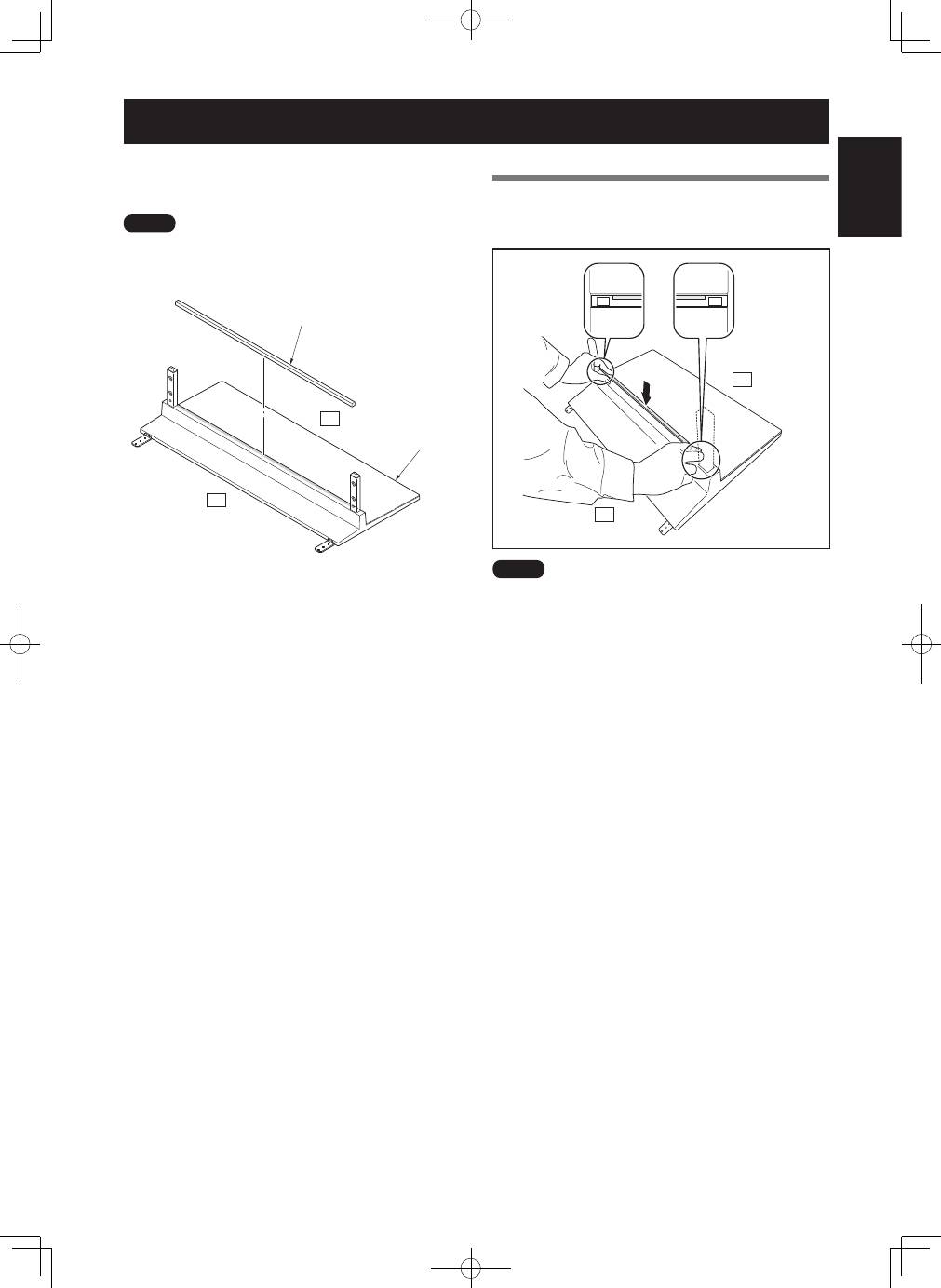
����������
��������������������
�
�
�������������������
�������������������
�������������
�����
����
����
Be sure not to attach the falling prevention metal fittings in the
reverse position.
���������������������
�������������������
12
En
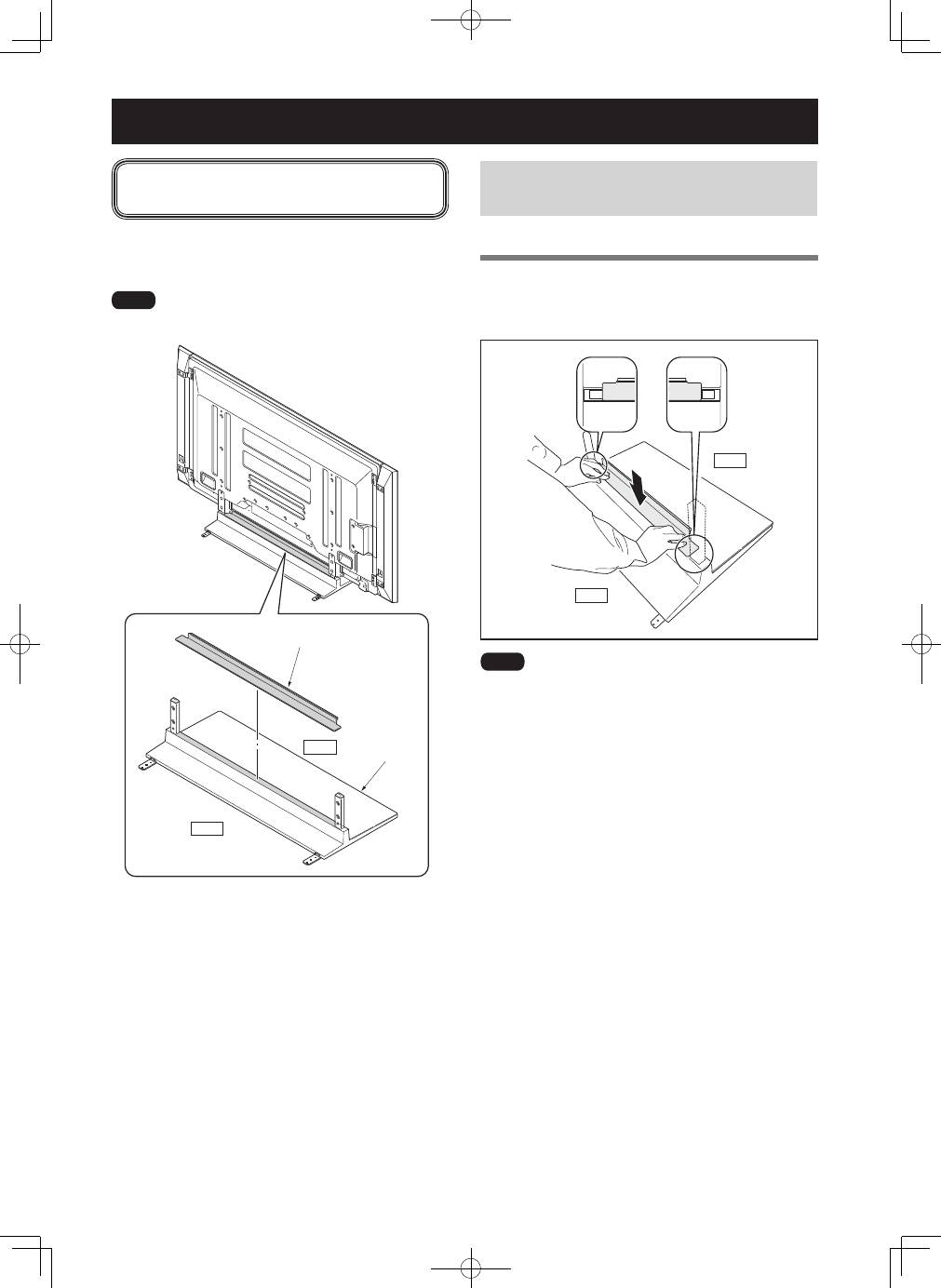
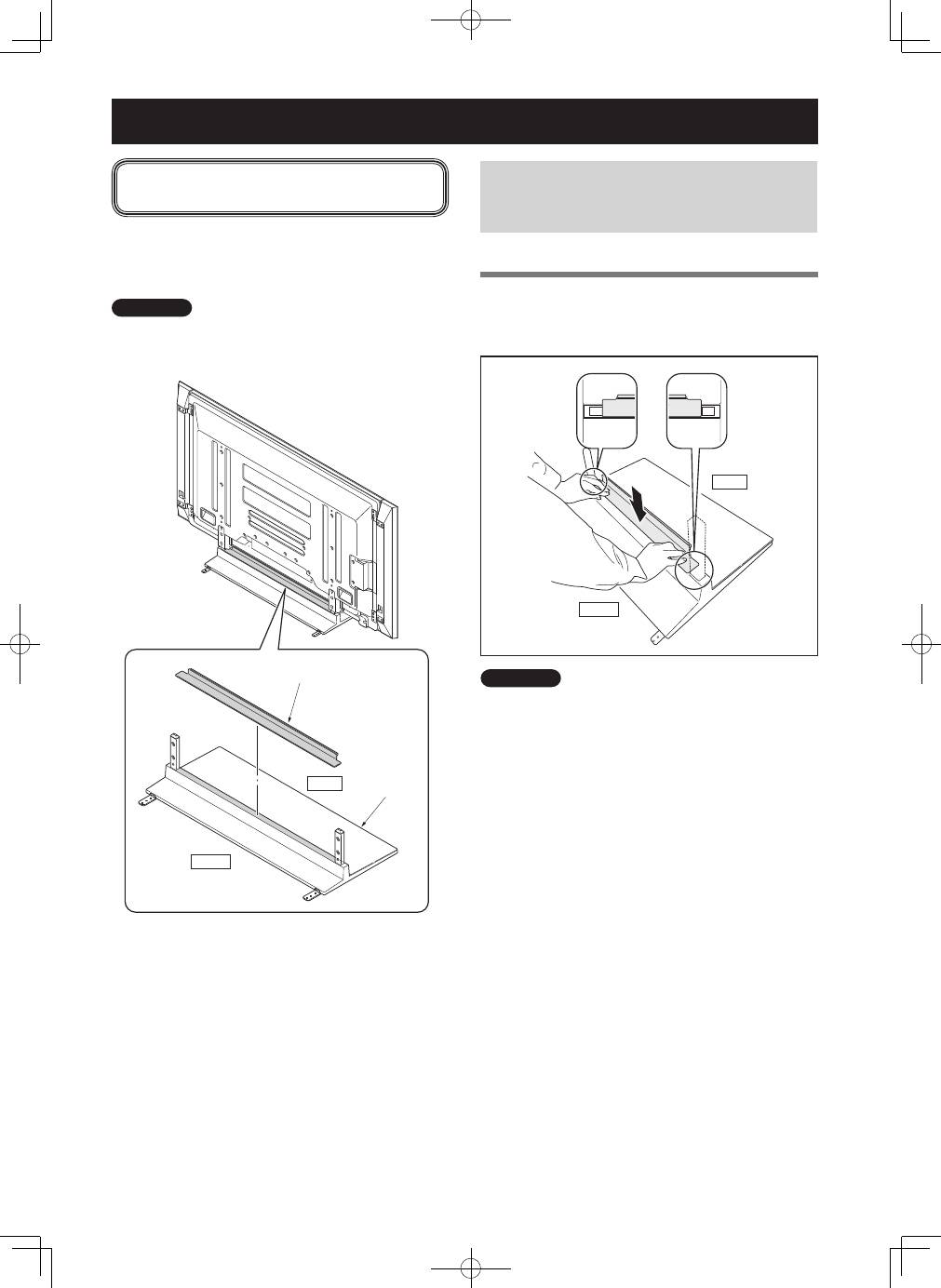
Conduct after attaching the Pioneer television
onto the stand.
This part prevents reflection of the cables connected to the
back of the Pioneer television on the base cover.
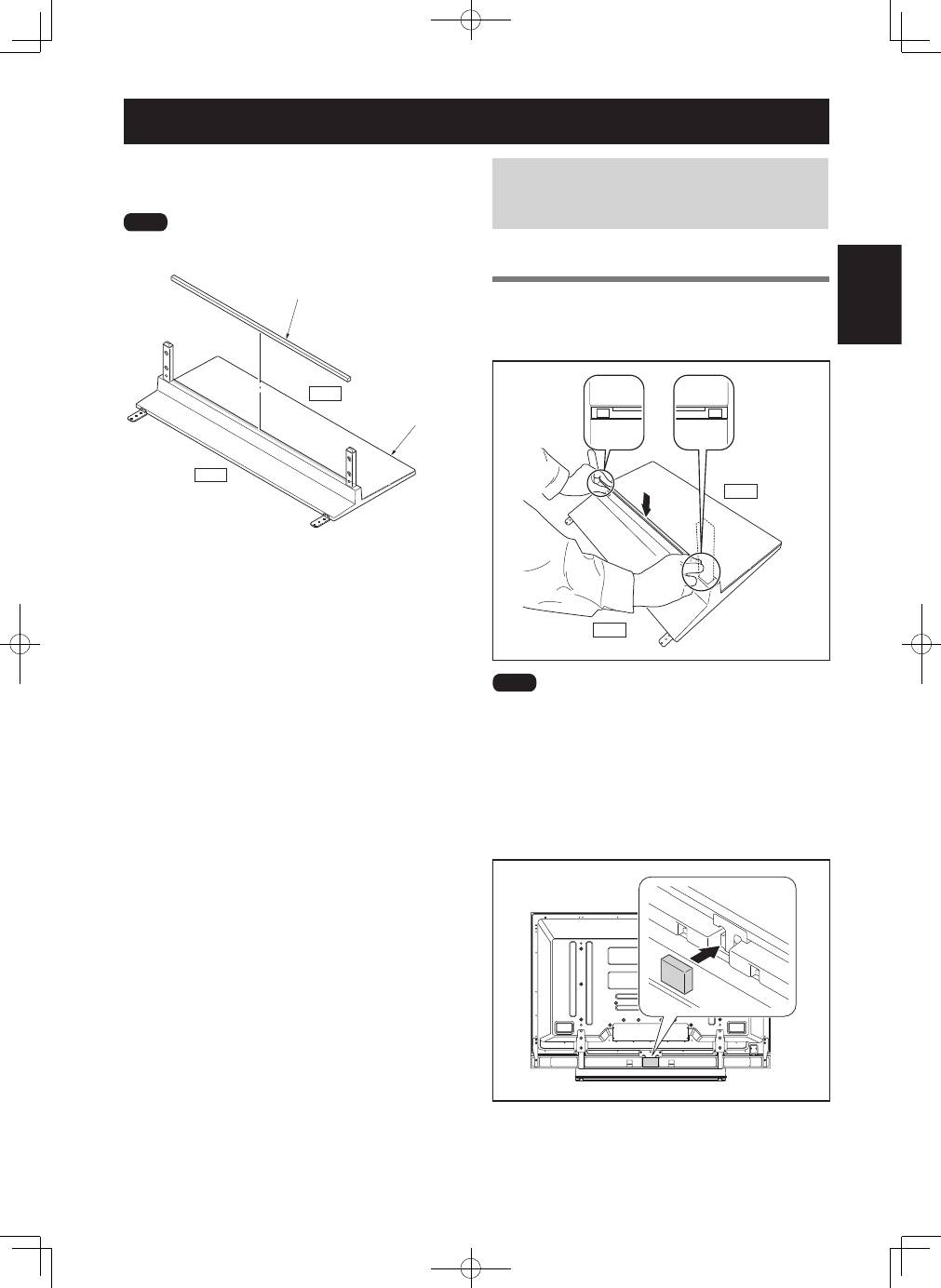
����
Attach it after anchoring the base cover on a flat stable place.
����������
�����
����
���������������������
Attaching the Light-blocking Shield
In case of PDP-LX6090 / PDP-LX6090H /
PDP-LX609A (with side speakers installed)
Attachment Procedure
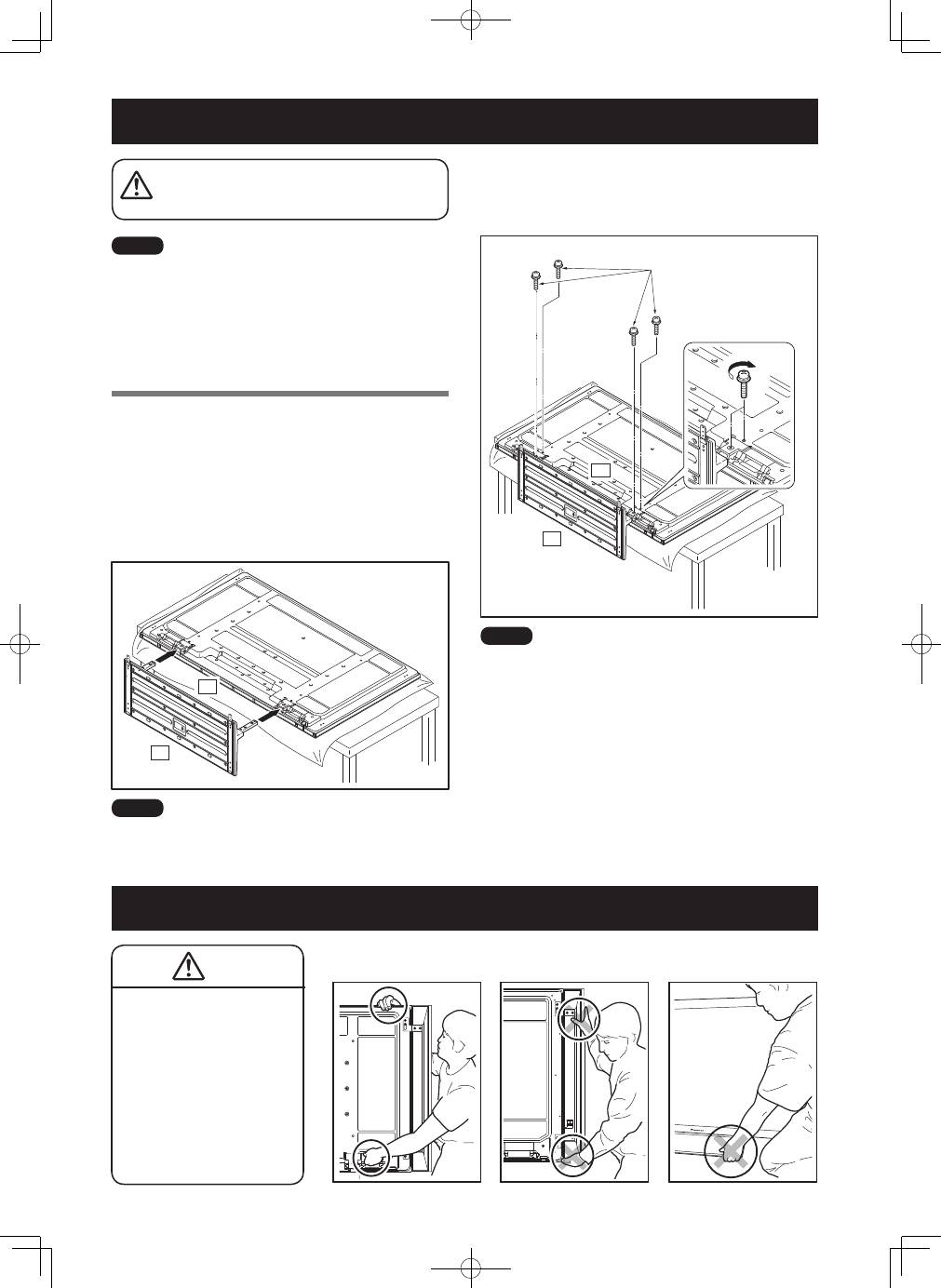
Peel off one side of the double-stick tape on the
light-blocking shield and attach the light-blocking
shield onto the base cover.
�����
����
����
• Be careful that the light-blocking shield does not catch on
the pipe insertion holes.
• Anchor it in place so that there are no gaps. If there is a gap,
the light-blocking shield may peel off.
13
En
English
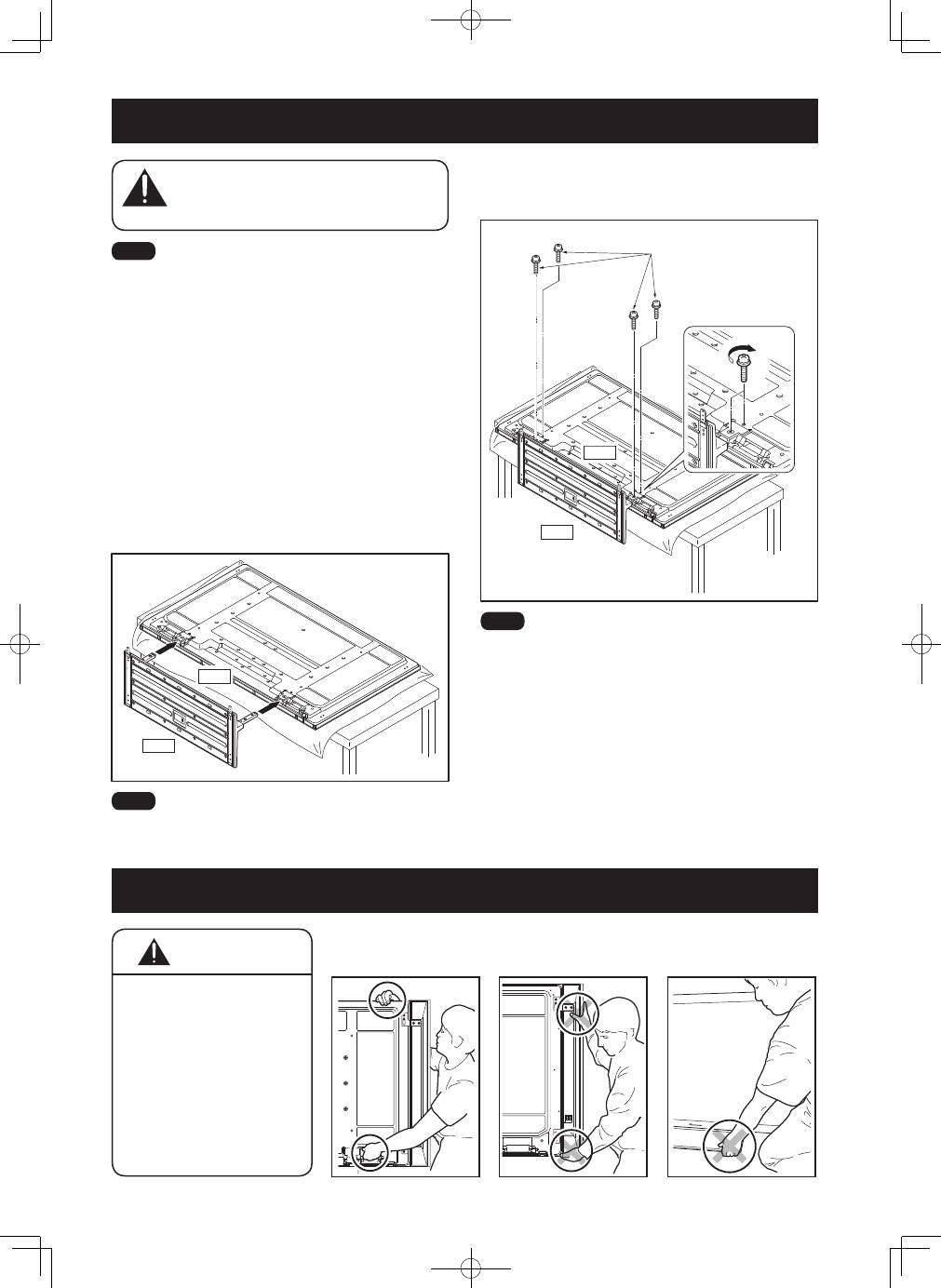
This part prevents reflection of the cables connected to the
back of the Pioneer display and television on the base cover.
����
Attach it after anchoring the base cover on a flat stable place.
����������
�����
����
�������
Attaching the Cushion
In case of KRP-600P / KRP-600M (with side
speakers installed) / PDP-LX6090 / PDP-
LX6090H (with under speaker installed)
Attachment Procedure
1
Peel off one side of the double-stick tape on
the cushion and attach the cushion onto the
position in the bottom diagram.
�����
����
����
• Be careful that the cushion does not catch on the pipe
insertion holes.
• Anchor it in place so that there are no gaps. If there is a gap,
the cushion may peel off.
2
After attaching the Pioneer television onto the
stand, attach the light-blocking pad onto the
position in the bottom diagram (PDP-LX6090 /
PDP-LX6090H only).
14
En
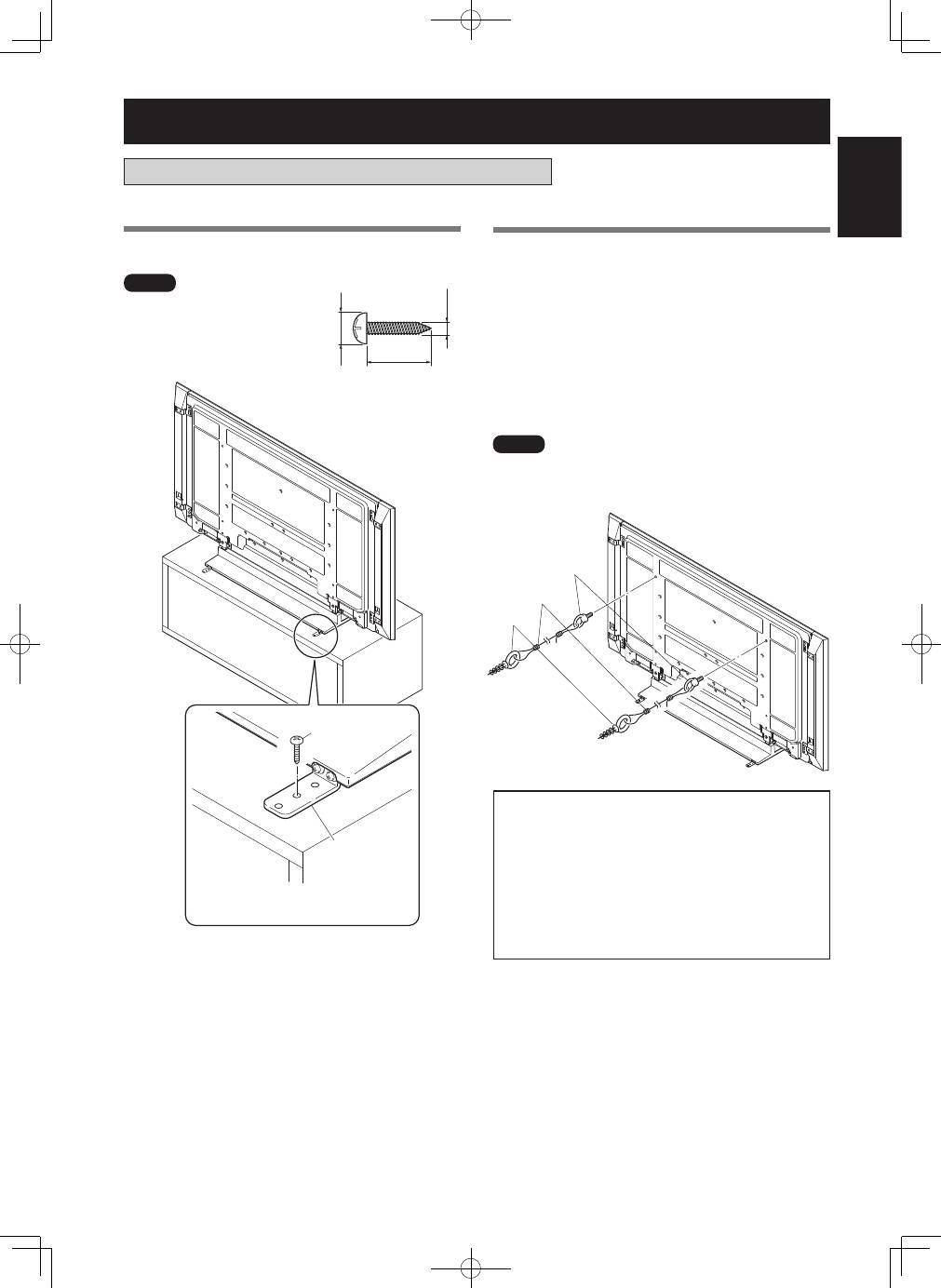
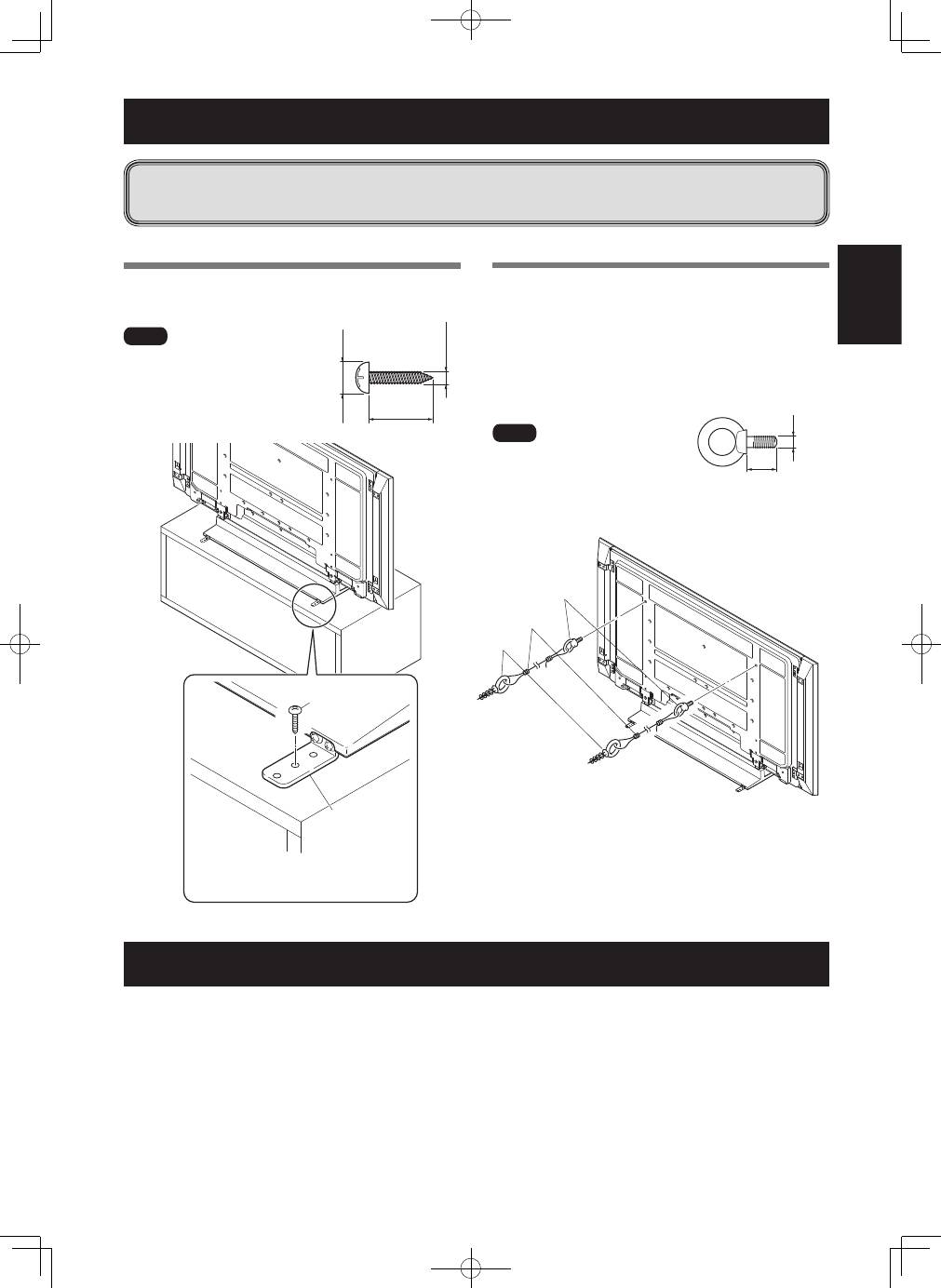
2
Securing the Pioneer display and television
with Installation screws
➁
(M6 × 20 mm: black).
Please tighten the screws with a Phillips screwdriver.
�������������������
�
�
�������������������
�����
����
����
Please stand the Pioneer display and television upright after
installing the stand.
The weight of a Pioneer display and television is
about 50 kg (110 lbs), they have no depth, and
are unstable. Therefore, at least two people must
assemble and install them.
����
• Be sure to install it on a flat stable location.
• Insert the screws in the holes vertically and securely tighten.
• Place a sheet or other material under the display to prevent
scratches or damage to it.
• After manually turning the screw lightly two or three times,
tighten it with a screw-driver.
1
Attaching the Pioneer display and television to
the stand.
Lay the Pioneer display and television down flat. Align the
stand supports with the Pioneer display and television
stand slots, and slowly insert the supports horizontally.
Please ensure that the stand supports do not come into
contact with anything other than the Pioneer display and
television stand slots. Contact with any other area may
result in scratching or deformation of the display’s rear
side or terminals.
�����
����
����
When laying down the Pioneer display and television, be
careful so as to not scratch or damage it.
Attaching the Pioneer Display and Television
�������
Installing the Product on a Rack etc.
• When installing on a rack
etc., please be sure that
the Pioneer display and
television is held by two
or more people.
• Please do not hold the
Pioneer display and
television by the speakers
or stand. Doing so may
damage the product.
�������
�������������������������
����������������������
�������������������������
������������������������
��������������������������
�������������
������������������������
��������������������������
����������
15
En
English
Preventing Equipment from Falling Over
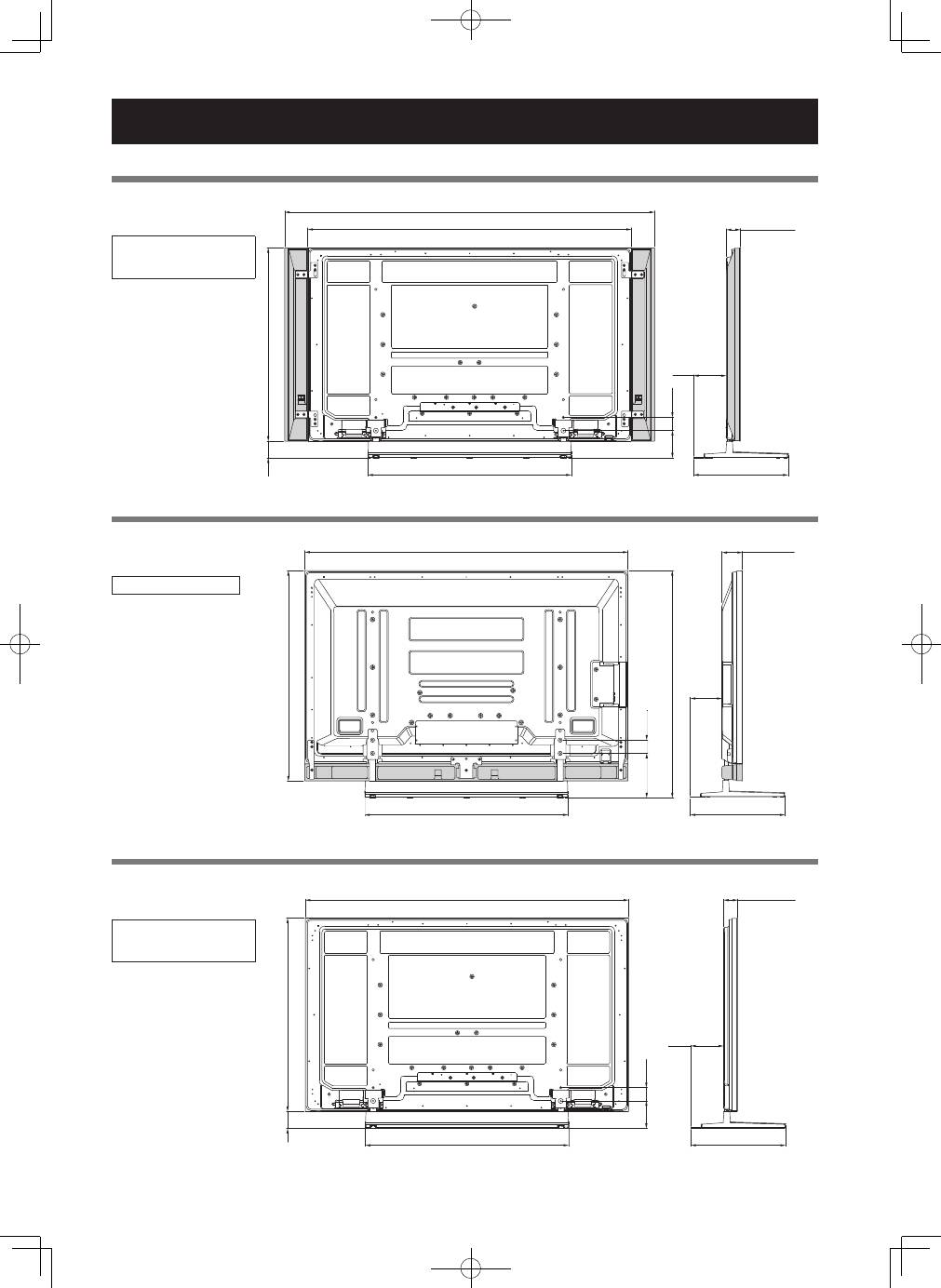
Stabilizing on a rack etc.
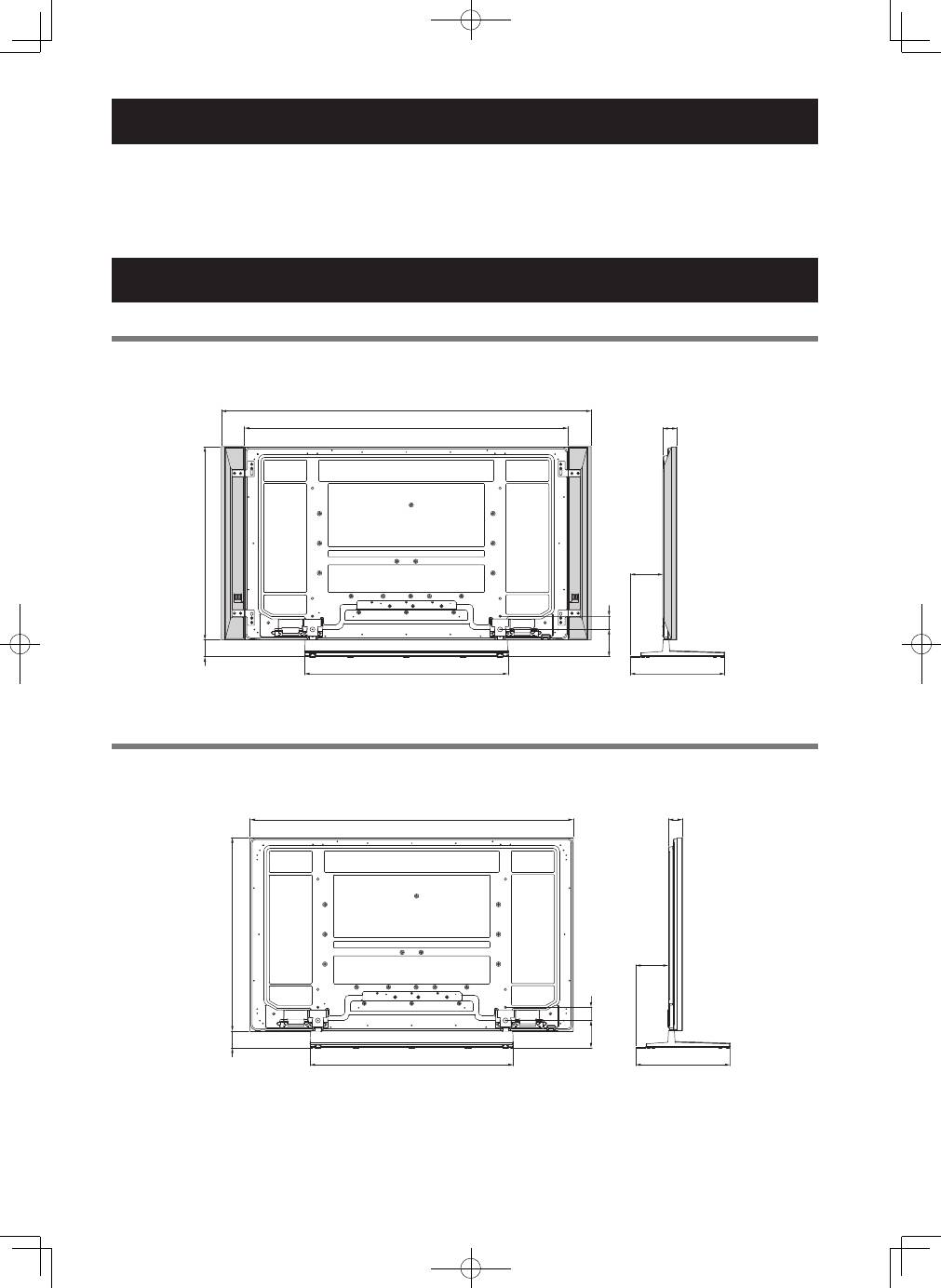
Use screws (those available on the market) to fix the Pioneer
display and television like shown in the diagram.
����
To stabilize the equipment on
a table, use screws that have a
nominal diameter of 4 mm (5/32
inch) and that are at least 20 mm
(13/16 inch) long.
���������������������������������������������
��������������������������������������������
������
�����
��������������������
�����������
������������������
�������������
����������
������������
���� �����������
�������������
����������������������
Using a wall for stabilization
1
Attaching falling prevention bolts (hooks)
to the Pioneer display and television.
2
Using strong cords to firmly stabilize it
appropriately and firmly to a wall, pillar,
or other sturdy element.
Perform this work in the same way on the left and right
sides.
����
Use hooks, cords, and fittings that
are available on the market.
Recommended hook:
Nominal diameter M8
Length 12 mm to 15 mm (1/2 inch to 5/8 inch)
�
����
�
����
�������
��
��������������
����������������������
Specifications
External dimensions:
KRP-TS01 ............. 922 mm (W) × 222.4 mm (H) × 430 mm (D) (36-5/16 in. (W) × 8-3/4 in. (H) × 16-15/16 in. (D))
PDK-TS35A .......... 922 mm (W) × 298.9 mm (H) × 430 mm (D) (36-5/16 in. (W) × 11-25/32 in. (H) × 16-15/16 in. (D))
Weight
:
KRP-TS01 ............. 5.8 kg (12.8 lbs)
PDK-TS35A .......... 6.0 kg (13.3 lbs)
• The above specifications and exterior may be modified without prior notice to improve the product.
• After installing the stand, be sure to take special care to ensure that the equipment will not fall over.
• Secure the plasma television to both the rack and the wall surface.
16
En
Dimensions Diagram
Published by Pioneer Corporation.
Copyright © 2008 Pioneer Corporation.
All rights reserved.
1465 (57-11/16)
876 (34-1/2)
76 (3)
922 (36-5/16)
430 (16-15/16)
152
(5-31/32)*
1
147
(5-25/32)*
2
124.5
(4-29/32)
60
(2-3/8)
64 (2-17/32)*
1
93 (3-21/32)*
2
152
(5-31/32)*
1
147
(5-25/32)*
2
124.5
(4-29/32)
60
(2-3/8)
1677 (66-1/32)
1465 (57-11/16)
922 (36-5/16)
430 (16-15/16)
876 (
3
4
-1
/2
)
76 (
3
)
64 (2-17/32)*
1
93 (3-21/32)*
2
147
(5-25/32)
1465 (57-11/16)
922 (36-5/16)
430 (16-15/16)
956 (37-5/8)
1030 (40-9/16)
201
(7-29/32)
60
(2-3/8)
93 (3-21/32)
When the side speakers are installed
KRP-TS01
Unit: mm (inch)
When the under speaker is installed
PDK-TS35A
Unit: mm (inch)
Without speakers
KRP-TS01
Unit: mm (inch)
*
1
KRP-600P / KRP-600M
*
2
PDP-LX6090 / PDP-LX6090H /
PDP-LX609A
PDP-LX6090 / PDP-LX6090H
*
1
KRP-600P / KRP-600M
*
2
PDP-LX6090 / PDP-LX6090H /
PDP-LX609A
17
Fr
Français
Nous vous remercions d’avoir choisi un produit Pioneer.
Veuillez lire attentivement ce mode d’emploi pour savoir
comment utiliser votre pied de table correctement et en toute
sécurité. Nous vous conseillons de conserver soigneusement
ce mode d’emploi à portée de main et dans un endroit sûr
afin de pouvoir vous y référer le cas échéant.
Installation
• En cas de difficultés, veuillez consulter votre revendeur.
• Pioneer ne saurait être tenu responsable d’aucun
dommage résultant d’une installation ou d’une
utilisation incorrecte de ce produit, de sa modification
ou encore de catastrophes naturelles.
Table des matières
Avertissements ...................................................... 17
Vérification des pièces fournies .......................... 18
Montage du pied de table .................................... 19
Mise en place de l’écran occultant ....................... 20
Fixation de la bande anti-reflet ............................ 21
Installation du moniteur et téléviseur Pioneer ... 22
Installation du produit sur une étagère, etc. ...... 22
Prévenir toute chute de l’équipement ................. 23
Caractéristiques techniques .................................. 23
Schéma de dimensions .......................................... 24
Avertissements
Ce produit est un pied de table conçu exclusivement pour
les moniteurs et téléviseurs Pioneer (modèles PDP-LX6090 /
PDP-LX6090H / PDP-LX609A / KRP-600P / KRP-600M).
L’utilisation de ce produit avec un autre modèle peut être
à l’origine d’un manque de stabilité pouvant provoquer
une blessure. Pour de plus amples informations, veuillez
contacter le magasin où vous avez acheté votre écran.
Ne procédez à l’installation ou à la modification du produit
qu’en respectant les indications fournies.
N’utilisez pas ce pied de table pour un moniteur et téléviseur
Pioneer autre que ceux spécifiés et ne le modifiez pas ou ne
l’utilisez pas à des fins autres que celles pour lesquelles il a
été conçu.
Lieu d’installation
• Sélectionnez un emplacement assez solide pour supporter
le poids du pied de table et de l’écran.
• Assurez-vous de placer le produit sur une surface plane et
stable.
• N’installez pas le pied de table à l’extérieur ou dans un lieu
humide, par exemple à proximité d’une source chaude ou d’
une plage.
• N’installez pas le support à un endroit où il pourrait être
soumis à des chocs ou à des vibrations.
Montage et installation
• Montez le pied de table en suivant les instructions et
vissez solidement toutes les vis aux endroits prévus à
cet effet.
Des accidents ont été constatés (casse, chute
du matériel, etc.) suite à l’installation de l’écran
parce que le pied de table n’avait pas été installé
conformément aux instructions.
• Pour une bonne installation, l’écran doit toujours être
installé par au moins deux personnes.
• Avant de procéder à l’installation, mettez l’écran ainsi
que les équipements périphériques hors tension en
coupant l’alimentation, puis retirez la prise du câble
d’alimentation de la prise murale.
Prévenez les accidents causés par la chute du produit
en prenant des mesures fiables visant à éviter toute chute (voir
Page 23).
Ne placez pas un téléviseur Pioneer fixé sur un chariot ou
une palette de taille inférieure à celle de son pied de table,
car sinon ce dernier sera déformé.
Ne pas installer sur une table de plus petite dimension que le
pied.
18
Fr
Vérification des pièces fournies
Veuillez vous assurer que vous possédez bien toutes les pièces nécessaires avant de procéder au montage et à l’installation du
pied de table.
�� ����������������������
�� ����
�
�
� ��������������������������
�����������������������
�
����������������������������
�������������������������������������������
����������������
�� ���������������������
�� ������������������
�
���
�� �����������������
�
���
� ���������������������
����������������������
��������������������������
�� �����������������
�
���
� ������������������
����������������
��������������������������������������������������������������������������������������������������������������������������������������������
�������
���������������������������������������������������������������������������������������������������
��������������������������������������������������������������������������������������������������
����������������������
�
���
�����������������������
����������������
��������������������
19
Fr
Français
Procédure de montage
1
Tournez la couverture de table de façon à ce
que l’envers regarde vers le haut.
2
Insérez les colonnes de support dans la
couverture de table.
3
Serrez les vis
➀
(4 mm × 10 mm : argent) afin
de stabiliser les colonnes de support.
����������
�������
����������
�������
����
�����
����
�
�
�����������������������
�������������������
�������
��������������
�����
����
�
�
�����������������������
��������
Avant de monter le pied de table, glissez un drap doux sous la
couverture de table. Sans ce drap, vous risqueriez d’érafler la
surface de la couverture de table.
Montage du pied de table
4
Après avoir monté le pied de table, fixez les
pièces métalliques anti-chute à l’aide des vis
d’installation
➂
(M4 × 35 mm : noires).
��������������������
�������������������
�����
�����������
��������
�������
�������������������
�
���������������������
��������
Veillez à fixer les pièces métalliques anti-chute dans le bon
sens.
���������������������
�������������������
20
Fr
Procédure à suivre après avoir fixé le
téléviseur Pioneer sur le pied de table.
Cette pièce sert à empêcher que les câbles branchés à
l’arrière du téléviseur Pioneer ne se reflètent sur la
couverture de table.
��������
Installez-le une fois que vous avez fixé la couverture de table
sur une surface plane et stable.
���������������
�����
�����������
��������
�������
Mise en place de l’écran occultant
Pour les modèles PDP-LX6090 / PDP-
LX6090H / PDP-LX609A (avec enceintes
latérales)
Procédure d’installation
Décollez un côté du ruban adhésif double face
placé sur l’écran occultant et posez celui-ci sur la
couverture de table.
�����
�������
��������
• Veillez à ce que l’écran occultant ne déborde pas sur les trous
d’insertion.
• Mettez l’écran occultant en place de façon à ce qu’il n’y ait
pas d’espace libre. S’il y avait un espace libre, il pourrait se
décoller.
