
Pioneer PDK-TS35A: Attaching the Pioneer Display and Television Installing the Product on a Rack etc.
Attaching the Pioneer Display and Television Installing the Product on a Rack etc.: Pioneer PDK-TS35A
Table of contents
- Contents
- Checking the Standard Accessories
- Assembly Procedure Assembling the Stand
- Attaching the Light-blocking Shield Attachment Procedure
- Attaching the Cushion Attachment Procedure
- Attaching the Pioneer Display and Television Installing the Product on a Rack etc.
- Preventing Equipment from Falling Over Stabilizing on a rack etc. Using a wall for stabilization Specifications
- Dimensions Diagram When the side speakers are installed When the under speaker is installed Without speakers
14
En
2
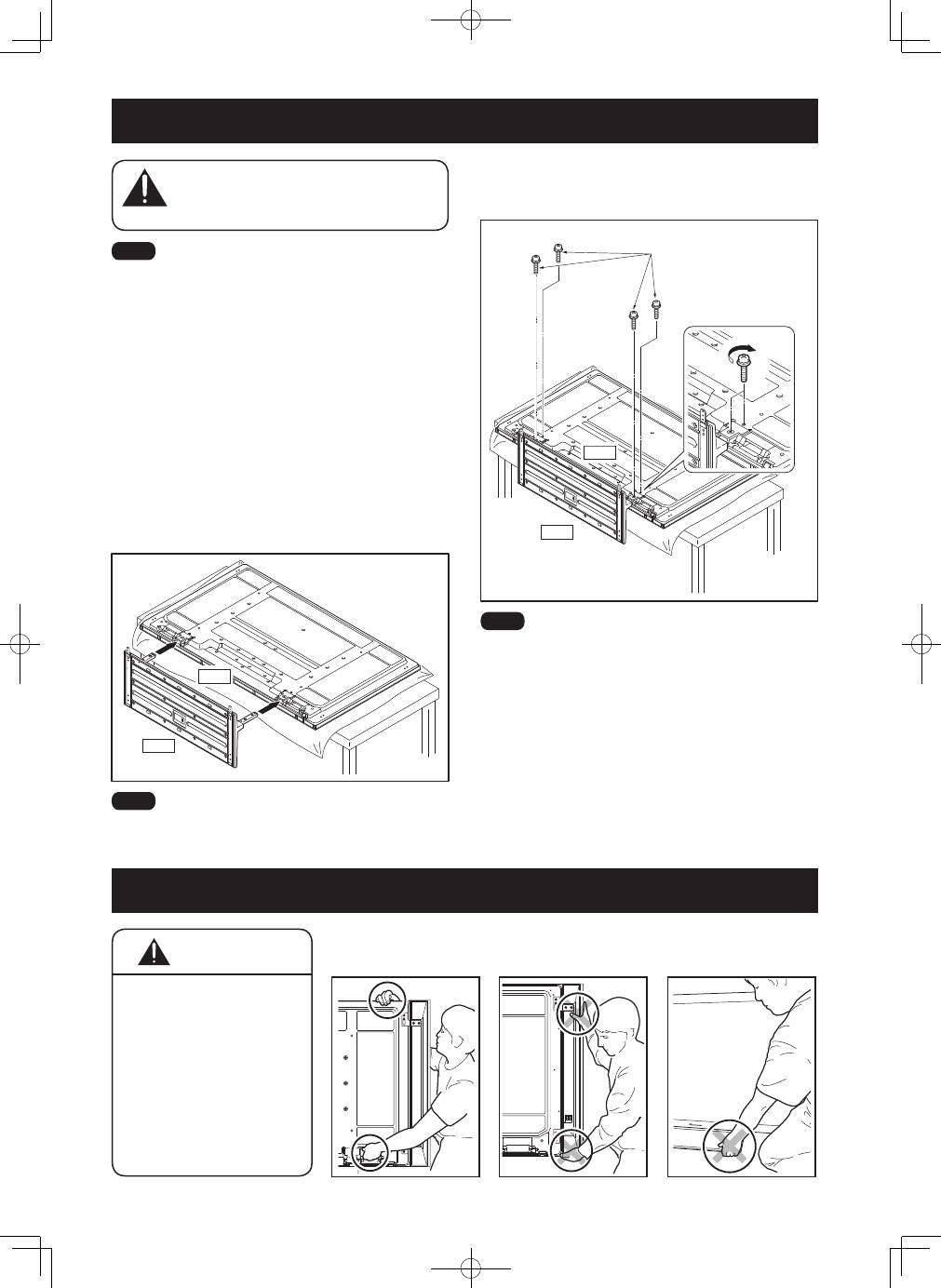
Securing the Pioneer display and television
with Installation screws
➁
(M6 × 20 mm: black).
Please tighten the screws with a Phillips screwdriver.
�������������������
�
�
�������������������
�����
����
����
Please stand the Pioneer display and television upright after
installing the stand.
The weight of a Pioneer display and television is
about 50 kg (110 lbs), they have no depth, and
are unstable. Therefore, at least two people must
assemble and install them.
����
• Be sure to install it on a flat stable location.
• Insert the screws in the holes vertically and securely tighten.
• Place a sheet or other material under the display to prevent
scratches or damage to it.
• After manually turning the screw lightly two or three times,
tighten it with a screw-driver.
1
Attaching the Pioneer display and television to
the stand.
Lay the Pioneer display and television down flat. Align the
stand supports with the Pioneer display and television
stand slots, and slowly insert the supports horizontally.
Please ensure that the stand supports do not come into
contact with anything other than the Pioneer display and
television stand slots. Contact with any other area may
result in scratching or deformation of the display’s rear
side or terminals.
�����
����
����
When laying down the Pioneer display and television, be
careful so as to not scratch or damage it.
Attaching the Pioneer Display and Television
�������
Installing the Product on a Rack etc.
• When installing on a rack
etc., please be sure that
the Pioneer display and
television is held by two
or more people.
• Please do not hold the
Pioneer display and
television by the speakers
or stand. Doing so may
damage the product.
�������
�������������������������
����������������������
�������������������������
������������������������
��������������������������
�������������
������������������������
��������������������������
����������
