
Pioneer VSX-S500-S: instruction
Class: Household, kitchen appliances, electronics and equipment
Type:
Manual for Pioneer VSX-S500-S
Table of contents
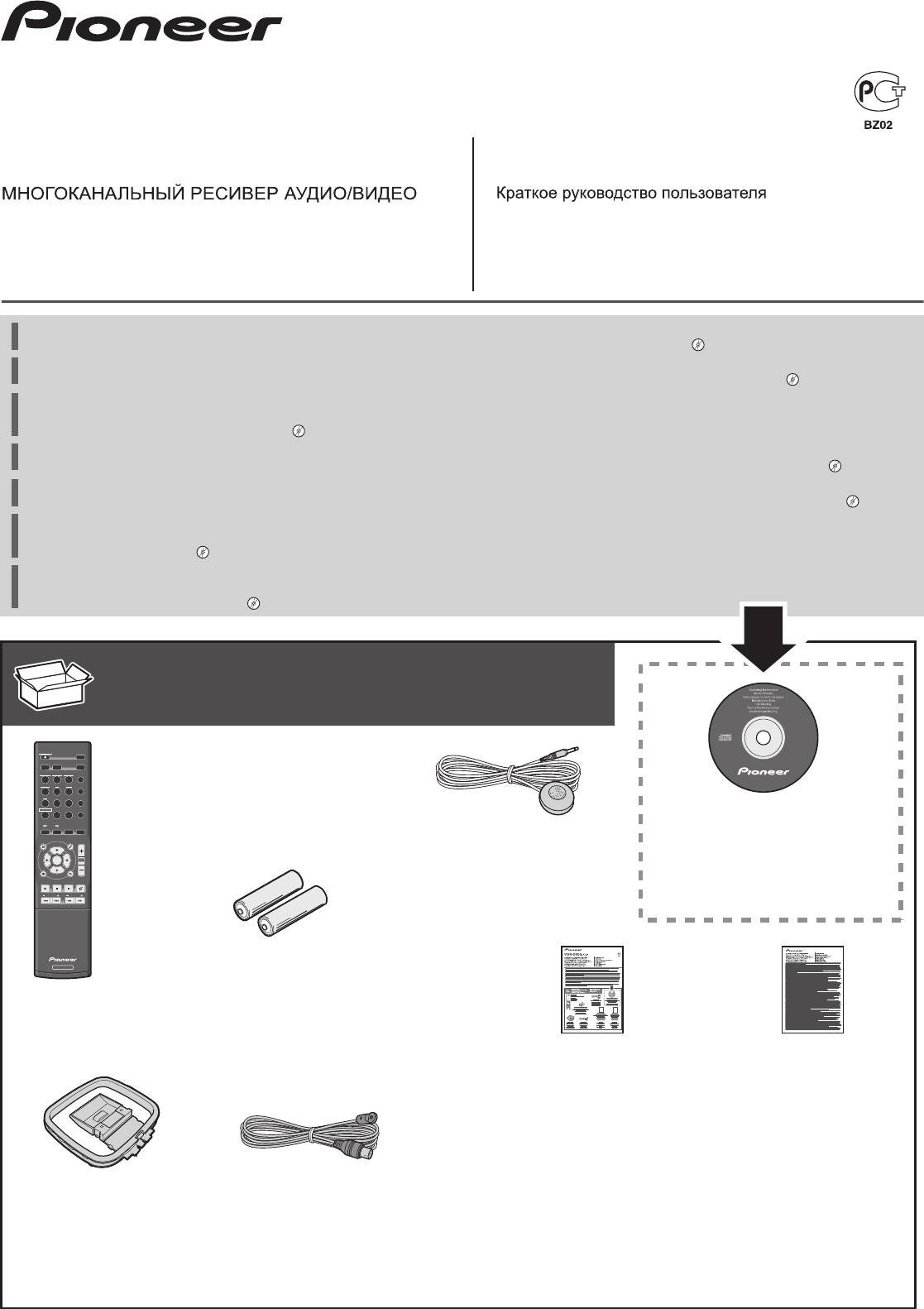
- AUDIO/VIDEO MULTI-CHANNEL RECEIVER What’s in the box
- Flow of settings on the receiver Connecting the speakers
- Connecting a TV and playback component Plugging the receiver
- Basic setup
- Basic playback
VSX-S500-K/-S
AUDIO/VIDEO MULTI-CHANNEL RECEIVER
Quick Start Guide
RECEPTEUR AUDIOVISUEL MULTICANAL
Guide rapide
SINTOAMPLIFICATORE AUDIO/VIDEO MULTICANALE
Guida di avvio rapido
AUDIO/VIDEO MULTIKANAALS RECEIVER
Snelstartgids
RECEPTOR AUDIO-VIDEO MULTICANAL
Guía de inicio rápido
AUDIO-/VIDEO- MEHRKANAL-RECEIVER
Kurzanleitung
Thank you for buying this Pioneer product. This Quick Start Guide includes instructions for basic connections and operations to allow simple use of the
receiver. For detailed descriptions of the receiver, see the “Operating Instructions” provided on the included CD-ROM ( ).
Merci pour l’achat de ce produit Pioneer. Ce guide rapide contient les instructions relatives aux raccordements et opérations de base permettant une
utilisation simple de ce récepteur. Pour des descriptions plus détaillées du récepteur, référez-vous au “Mode d’emploi” sur le CD-ROM ( ) fourni.
Благодарим вас за приобретение данного изделия Pioneer. В данном Кратком руководстве пользователя содержатся инструкции по основным
подключениям и операциям для упрощенного использования ресивера. Подробное описание ресивера см. в «Инструкции по эксплуатации»,
содержащихся на поставляемом CD-ROM ( ).
Vi ringraziamo per avere acquistato questo prodotto Pioneer. Questa Guida di avvio rapido comprende istruzioni per i collegamenti fondamentali e per le
operazioni essenziali di questo ricevitore. Per una descrizione dettagliata del ricevitore, vedere le “Istruzioni per l’uso” contenute nel CD-ROM ( ) accluso.
Hartelijk dank voor de aanschaf van dit Pioneer product. In deze snelstartgids vindt u de instructies voor de basisaansluitingen en de basisbediening voor een
eenvoudig gebruik van de receiver. Voor meer gedetailleerde informatie wordt u verwezen naar de “Handleiding” die op de bijgeleverde CD-ROM ( ) staat.
Muchas gracias por haber adquirido este producto de Pioneer. Esta Guía de inicio rápido incluye instrucciones para hacer las conexiones y operaciones
básicas que le permitirán hacer un uso sencillo del receptor. Para conocer una descripción detallada del receptor, consulte el “Manual de instrucciones”
suministrado con el CD-ROM ( ) incluido.
Vielen Dank, dass Sie sich für dieses Pioneer-Produkt entschieden haben. Die Kurzanleitung enthält Anweisungen für grundlegende Verbindungen und
Bedienvorgänge, um eine einfache Bedienung des Receivers zu ermöglichen. Detaillierte Beschreibungen des Receivers finden Sie in der „Bedienungsanlei-
tung“ auf der mitgelieferten CD-ROM ( ).
What’s in the box
Inhoud van de doos
Contenu du carton d’emballage
Contenido de la caja
Комплект поставки
Lieferumfang
Contenuto della confezione
VSX-S500
STANDBY/ON
Remote Control
ECO
D AUX A AUX
S.RTRV
Télécommande
iPod
USB
NETWORK
ADAPTER
AUTO
DIRECT
/
TUNER BD DVD
STANDARD
ALC
/
Пульт дистанционного управления
CD
STB GAME
SURR
ADV
Telecomando
RECEIVER
TV
PORTABLE
SOUND
WING
Afstandsbediening
CD-ROM (Operating instructions)
SLEEP SP-AB
DIMMER
AUDIO
STATUS
DISP
Mando a distancia
CD-ROM (Mode d’emploi)
Setup microphone
MENU
TOP
MENU
TOOLS
VOL
Fernbedienung
CD-ROM (Инструкции по эксплуатации)
Microphone de configuration
ENTER
CD-ROM (Istruzioni per l’uso)
Установочный микрофон
CTRL
iPod
CD-ROM (Handleiding)
HOME MENU
PTY
RETURN
BAND MUTE
Impostazione microfono
CD-ROM (Manual de instrucciones)
PRESET
TUNE
Microfoon voor instellen
CD-ROM (Bedienungsanleitung)
Micrófono de configuración
Mikrofon für die Einstellung
AAA size IEC R03 dry cell batteries x2
RECEIVER
Piles à anode sèche AAA IEC R03 x 2
Сухие батарейки размера AAA IEC R03, 2 шт.
Pile a secco AAA IEC R03 x2
AAA/IEC/R03 drogecelbatterijen x2
Pilas secas AAA, IEC R03 x 2
AAA/IEC/R03 Trockenbatterien x2
These quick start guide
Safety Brochure
Le présent Guide de démarrage
Instructions de sécurité
Это краткое руководство пользователя
Брошюра по технике безопасности
Guida per l’avvio rapido
Istruzioni per la sicurezza
Deze Quick Start-gids
Folder veiligheid
Esta guía de inicio rápido
Folleto de seguridad
Diese Kurzanleitung
Sicherheitsbroschüre
AM loop antenna
FM wire antenna
Power cord
Warranty card
Antenne cadre AM
Antenne filaire FM
Cordon d’alimentation
Carte de garantie
Рамочная антенна АМ
Проволочная антенна FM
Кабель питания
Гарантийный сертификат
Antenna AM a telaio
Antenna FM a filo
Cavo di alimentazione
Documento di garanzia
AM-raamantenne
FM-draadantenne
Netsnoer
Garantiebewijs
Antena de cuadro de AM
Antena de hilos de FM
Cable de alimentación
Tarjeta de garantía
MW-Rahmenantenne
UKW-Drahtantenne
Netzkabel
Garantiekarte
VSX-S500SYXCNQSG設変book.indb1VSX-S500SYXCNQSG設変book.indb1 2012/04/2314:39:382012/04/2314:39:38
English
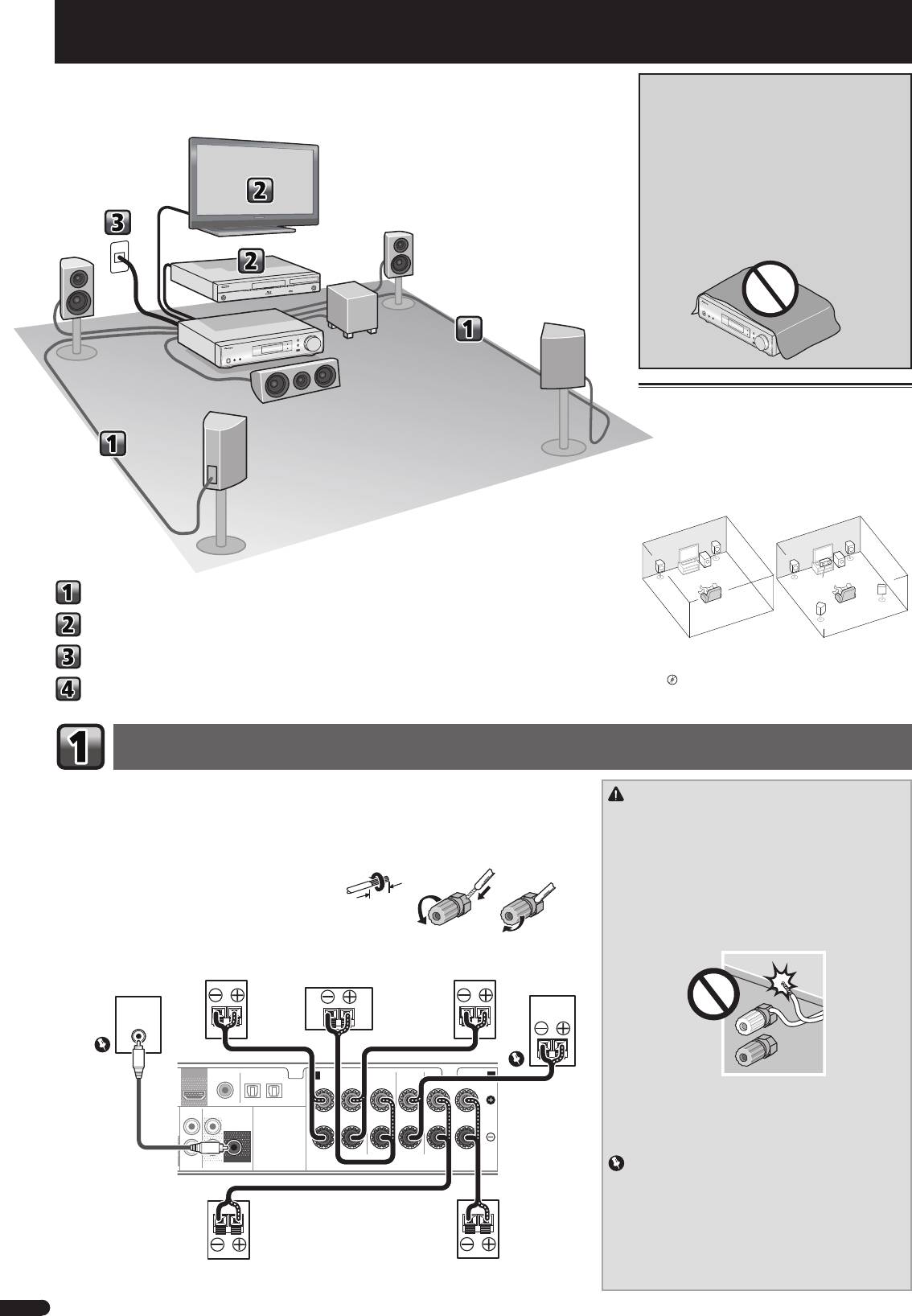
Flow of settings on the receiver
VENTILATION CAUTION
When installing this unit, make sure to leave space
around the unit for ventilation to improve heat radiation
(at least 10 cm at top, 5 cm at rear, and 5 cm at each
side).
WARNING
Slots and openings in the cabinet are provided for
ventilation to ensure reliable operation of the product,
and to protect it from overheating. To prevent fire
hazard, the openings should never be blocked or
covered with items (such as newspapers, table-cloths,
curtains) or by operating the equipment on thick carpet
or a bed.
D3-4-2-1-7b*_A1_En
Placing the speakers
The receiver will work with just two stereo speakers (the
front speakers in the diagram) but using at least three
speakers is recommended, and a complete setup is
best for surround sound.
To achieve the best possible surround sound, install
your speakers as shown below.
2.1 channel surorund system: 5.1 channel surorund system:
R
R
L
L
SW
SW
C
Connecting the speakers
SR
SL
Connecting a TV and playback component
• In addition, surround back speakers, front height
Plugging the receiver
speakers or Speaker B can also be connected.
"Connect the surround back or front height
Basic setup
speakers"
Connecting the speakers
Make sure you connect the speaker on the right to the right (R) terminal and the speaker on the left to the
left (L) terminal. Also make sure the positive and negative (+/–) terminals on the receiver match those on
CAUTION
the speakers.
• These speaker terminals carry
HAZARDOUS LIVE
voltage.
You can use speakers with a normal impedance between 4
Ω
and 16
Ω
.
To prevent the risk of electric shock when connecting or
disconnecting the speaker cables, disconnect the power
Bare wire connections
cord before touching any uninsulated parts.
12 3
1
Twist exposed wire strands together.
• Make sure that all the bare speaker wire is twisted
together and inserted fully into the speaker terminal. If
2
Loosen terminal and insert exposed wire.
any of the bare speaker wire touches the back panel it
3
Tighten terminal.
may cause the power to cut off as a safety measure.
• Do not allow the speaker cable core to come into contact
with the receiver body.
OUT
OPTICAL
– If the speaker cable core comes into contact with any
ANALOG
SURR BACK/
metal portion of the receiver’s body, it may damage the
AUX
FRONT HEIGHT
AUDIO
L
speakers and cause smoke and fire.
(
Single
)
Insert speaker cables securely into the terminals and
check that the cable does not come out of easily.
IN
R
SUBWOOFER
PRE OUT
SPEAKERS
Important
• SPEAKERS SUBWOOFER terminals are Pioneer’s passive
subwoofer S-SLW500 connection terminals. If using
another model of subwoofer, be sure to use a model with
built-in amp and connect to the PREOUT SUBWOOFER
terminal.
• Please connect either passive or powered subwoofers,
as connecting both makes it impossible to achieve the
correct sound effect.
2
En
G
The unit is a full-fledged AV receiver equipped with an
abundance of functions and terminals. It can be used
TV
easily after following the procedure below to make the
connections and settings.
L
Front left
Blu-ray Disc player R
Front right
SW
Subwoofer
This receiver
C
Center
SR
Surround right
SL
Surround left
10 mm
Powerd
Front Right
Center
Front Left
Subwoofer
Subwoofer
S-SLW500
LINE LEVEL
INPUT
COAXIAL
A
FRONT
CENTER
SUBWOOFER/
SURROUND
/
SURR BACK
B
RL
RL
CD IN TV IN
DIGITAL AUX IN
R Bi-Amp L
Be sure to complete
all connections before
connecting this unit to
the AC power source.
Surround
Surround
Right
Left
VSX-S500SYXCNQSG設変book.indb2VSX-S500SYXCNQSG設変book.indb2 2012/04/2314:39:572012/04/2314:39:57
English
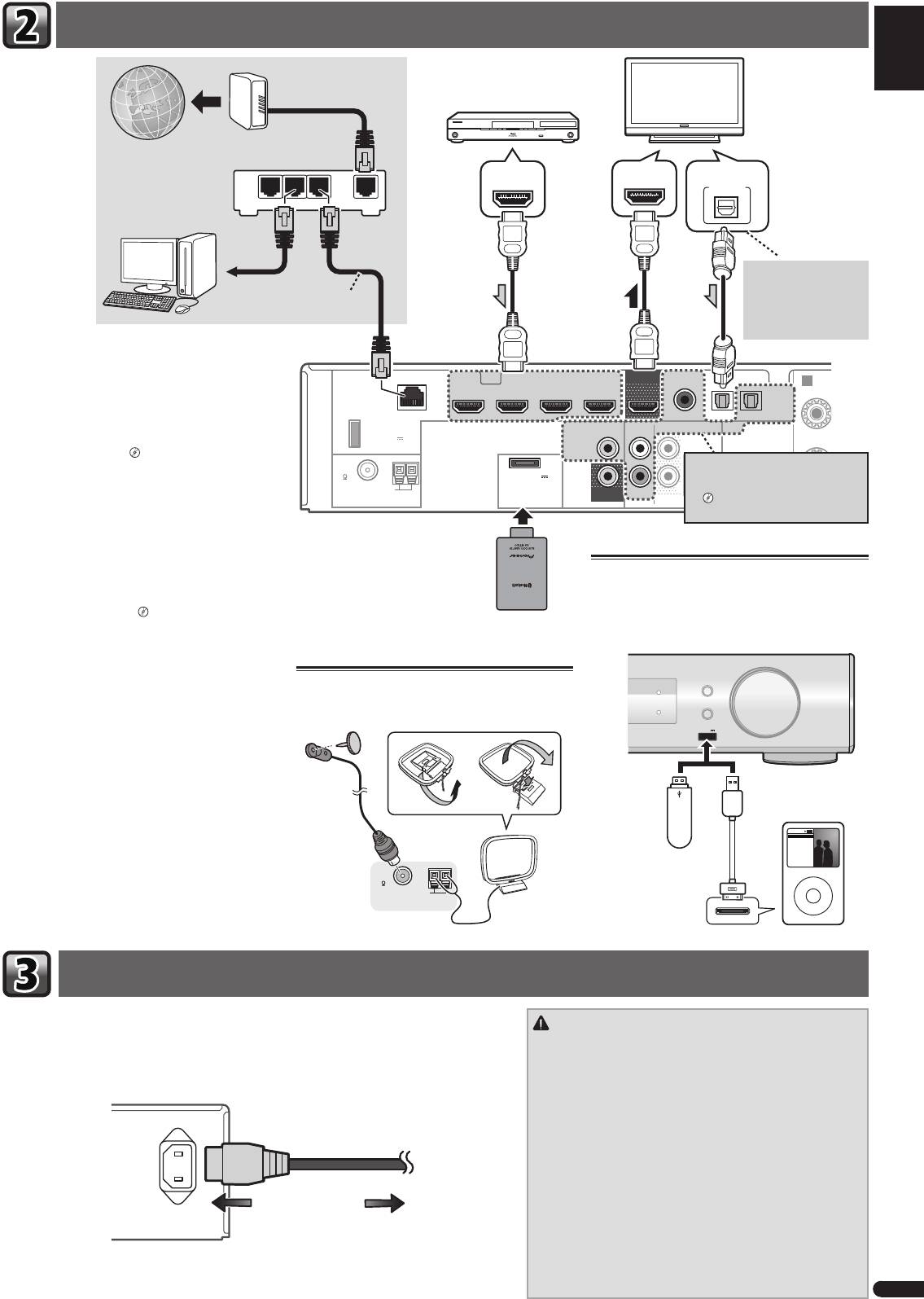
Connecting a TV and playback component
Français
Italiano
LAN
(
10/100
)
STB IN GAME INBD/BDR IN
DVD / DVR IN
OUT
COAXIAL
F
OPTICAL
Nederlands
HDMI
CD IN
TV IN
DIGITAL AUX IN
DC OUTPUT
for WIRELESS LAN
VIDEO
(
ANALOG
ANALOG
SURR BACK/
)
AUDIO
AUX
AUX
FRONT HEIGHT
(
OUTPUT 5 V
ASSIGNABLE
0.6 A MAX
)
L
IN
(
Single
)
FM
UNBAL
75
(
OUTPUT 5 V
0.1 A MAX
)
AM LOOP
MONITOR
R
IN
SUBWOOFER
ADAPTER PORT
OUT
PRE OUT
Español
Deutsch
Plugging the receiver
3
En
R
Modem
HDMI/DVI-compatible components
(Blu-ray Disc player, etc.)
HDMI/DVI-compatible TV
Internet
HDMI OUT
HDMI IN
DIGITAL AUDIO OUT
OPTICAL
LAN
Router
321
WAN
If the TV does not support
the HDMI Audio Return
to LAN port
Channel function, this
LAN cable
connection is required to
(sold separately)
listen to the TV sound over
the receiver.
If you have an HDMI or DVI (with HDCP) equipped
component (Blu-ray Disc player, etc.), you can connect
A
it to this receiver using a commercially available HDMI
R
cable.
If the TV and playback components support the Control
with HDMI feature, the convenient Control with HDMI
functions can be used.
"Control with HDMI
function"
If the device you wish to connect does
not have an HDMI output terminal, it
• The following connection/setting is required to listen
can be connected via these terminals.
to the sound of the TV over this receiver.
"Connecting your DVD player with
– If the TV does not support the HDMI Audio Return
no HDMI output"
Channel function, connect the receiver and TV
with audio cables (as shown).
– If the TV supports the HDMI Audio Return Channel
function, the sound of the TV is input to the
Bluetooth® ADAPTER
Connecting your iPod/iPhone or USB
receiver via the HDMI terminal, so there is no need
AS-BT100 or AS-BT200
device
to connect an audio cable. In this case, set
ARC
at
(sold separately)
HDMI Setup to ON.
Switch the receiver into standby, and then connect your
"HDMI Setup"
iPod/iPhone or USB device to the iPod iPhone USB
terminal on the front panel.
AUDIO/ VIDEO MULTI-CHANNEL RECEIVER
VSX
-S500
Refer to the Operating Instructions in CD-ROM for
INPUT SELECTOR
Connecting antennas
MCACC
instructions on how to connect and setup the Bluetooth
MASTER
ADAPTER and how to play music.
Connect FM wire antenna and the the AM loop antenna
DIRECT CONTROL
iPod iPhone
HDMI
VOLUME
as shown below.
iPod iPhone
USB
5 V
1
A
USB mass
iPod/iPhone
storage device
Music
Playlists
Genius >
Artists
The Bluetooth® word mark and logos are registered
Songs
Albums
Audiobooks
Composers
Genres
Radio
trademarks owned by Bluetooth SIG, Inc. and any use
FM
of such marks by PIONEER CORPORATION is under
UNBAL
USB cable (for iPod
MENU
75
AM LOOP
connection)
license. Other trademarks and trade names are those of
ANTENNA
their respective owners.
Only plug in after you have connected all your components to this receiver, including the speakers.
CAUTION
1
Plug the supplied power cord into the AC IN socket on the back of the receiver.
• Handle the power cord by the plug part. Do not pull out the
2
Plug the other end into a power outlet.
plug by tugging the cord, and never touch the power cord
when your hands are wet, as this could cause a short circuit
or electric shock. Do not place the unit, a piece of furniture, or
other object on the power cord or pinch the cord in any other
way. Never make a knot in the cord or tie it with other cables.
AC IN
The power cords should be routed so that they are not likely to
be stepped on. A damaged power cord can cause a fire or give
you an electric shock. Check the power cord once in a while.
If you find it damaged, ask your nearest Pioneer authorized
independent service company for a replacement.
• Do not use any power cord other than the one supplied with
this unit.
To power outlet
• Do not use the supplied power cord for any purpose other than
that described below.
• The receiver should be disconnected by removing the mains
plug from the wall socket when not in regular use, e.g., when
on vacation.
VSX-S500SYXCNQSG設変book.indb3VSX-S500SYXCNQSG設変book.indb3 2012/04/2314:39:592012/04/2314:39:59
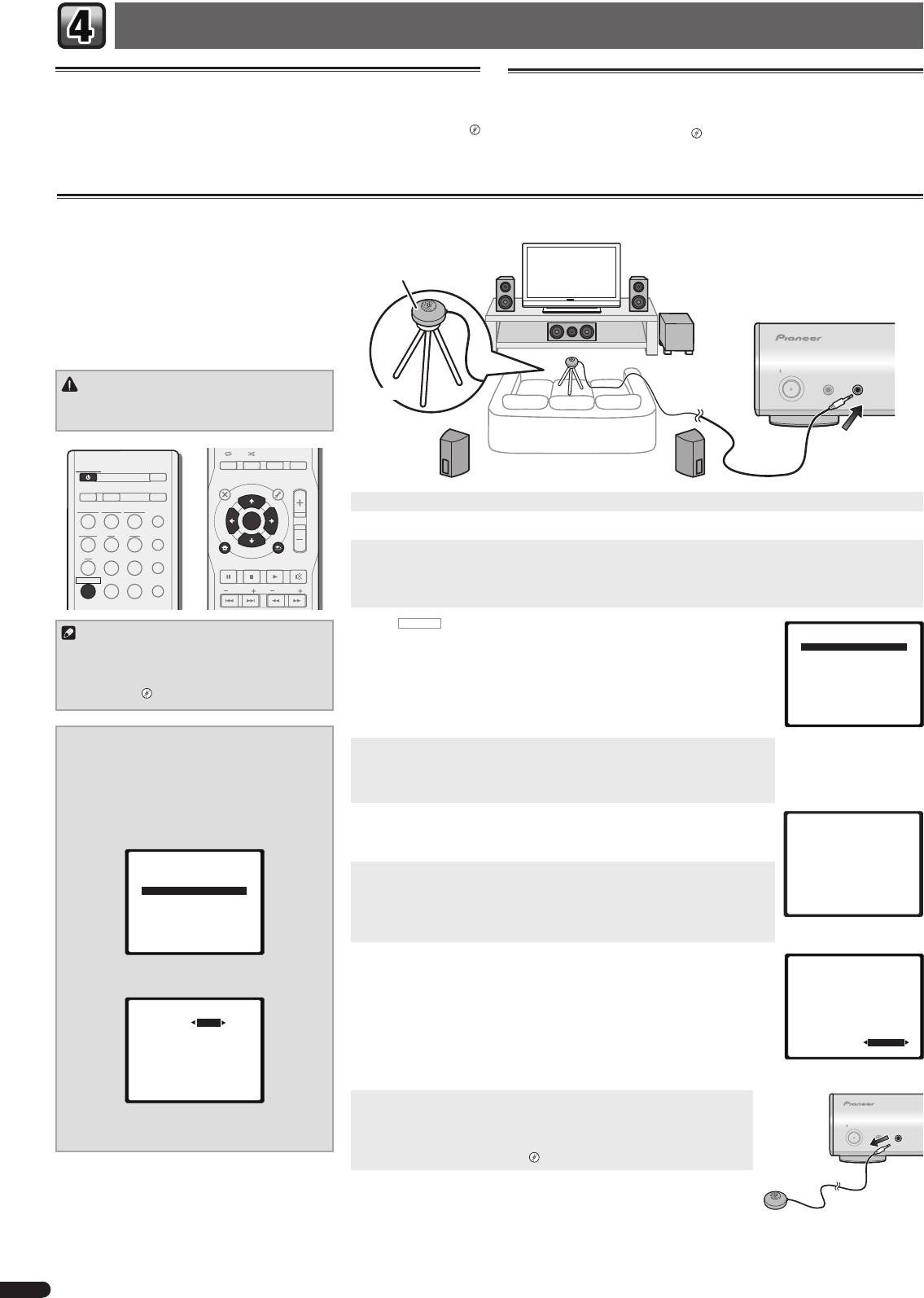
Basic setup
Canceling the Auto Power Down
Canceling the demo display
When this receiver is not used over a period of several hours, it will power down
The display on the front panel shows various information (demo displays) when the
automatically. The automatic power-off timer is set to six hours under factory settings,
receiver is not operating.
and the timing can be changed or the power-off function switched off altogether.
You can turn off the demo display.
"The FL Demo Mode menu"
"The Auto Power Down menu"
• The demo mode is canceled automatically when the Auto MCACC setup is
performed (see below).
Automatically setting up for surround sound (MCACC)
The Auto Multi-Channel Acoustic Calibration (MCACC)
setup measures the acoustic characteristics of your
listening area, taking into account ambient noise,
Microphone
speaker size and distance, and tests for both channel
delay and channel level. After you have set up the
microphone provided with your system, the receiver
uses the information from a series of test tones to
optimize the speaker settings and equalization for your
particular room.
STANDBY/ON
MCACC
PORTABLE
SETUP
/
MICPHONES
CAUTION
Tripod
• The test tones used in the Auto MCACC setup are
output at high volume.
AUDIO DISP
SLEEP SP-AB
DIMMER
STATUS
STANDBY/ON
ECO
TOP
MENU
MENU
TOOLS
VOL
D AUX A AUX
S.RTRV
1
Switch on the receiver and your TV.
iPod
USB
NETWORK
ADAPTER
AUTO
/
DIRECT
ENTER
TUNER BD DVD
ALC
/
2
Switch the TV input so that it connects to the receiver.
STANDARD
iPod
CTRL
3
Connect the microphone to the MCACC SETUP MIC jack on the front panel.
CD
STB GAME
ADV
SURR
HOME MENU
RETURN
PTY
BAND MUTE
Make sure there are no obstacles between the speakers and the microphone.
RECEIVER
TV
PORTABLE
SOUND
WING
If you have a tripod, use it to place the microphone so that it’s about ear level at your normal listening position.
PRESET
TUNE
Otherwise, place the microphone at ear level using a table or a chair.
4
Press
RECEIVER
on the remote control, then press the HOME MENU button.
Note
Home Menu
The Home Menu appears on your TV. Use
and
ENTER
on the remote
1.Auto MCACC
• The subwoofer distance setting may be farther
control to navigate through the screens and select menu items. Press
RETURN
to exit
2.Manual SP Setup
than the actual distance from the listening
3.Pre Out Setting
the current menu.
4.Input Assign
position. If this is the case, perform settings
5.Video Parameter
• Since the S-HV600B/S-HV500-LR/S-SL100-LR/S-SL100CR are designed as compact
6.HDMI Setup
manually.
"Speaker Distance"
satellite speakers, it is recommended that they be used in combination with a
7.Auto Power Down
8.FL Demo Mode
subwoofer to provide full base sound. In this case, set the
X.OVER
to 200 Hz here
(see "Change the X.OVER setting" on this page).
Change the X.OVER setting
5
Select ’Auto MCACC’ from the Home Menu, then press ENTER.
For S-HV600B/S-HV500-LR/S-SL100-LR/S-SL100CR
•
Mic In!
blinks when the microphone is not connected to MCACC SETUP MIC jack.
speakers
Try to be as quiet as possible after pressing
ENTER
. The system outputs a series of
1
Select ‘Manual SP Setup’ from the
test tones to establish the ambient noise level.
Home Menu, then press ENTER.
2
Select ‘X.OVER’ from the Manual SP Setup
6
Follow the instructions on-screen.
1.Auto MCACC
menu, then press ENTER.
• When using a powered subwoofer, make sure the subwoofer is on and the volume
Now Analyzing
is turned up.
Environment Check
2.Manual SP Setup
Ambient Noise
7
Speaker YES/NO
a.Speaker System
Wait for the test tones to fi nish.
b.Speaker Setting
A progress report is displayed on-screen while the receiver outputs test tones to
c.X.OVER
d.Channel Level
determine the speakers present in your setup. Try to be as quiet as possible while it’s
Return
e.Speaker Distance
doing this.
• For correct speaker settings, do not adjust the volume during the test tones.
Return
8
Confi rm the speaker confi guration.
1.Auto MCACC
3
Choose ‘200 Hz’ for the frequency cutoff
The configuration shown on-screen should reflect the actual speakers you have.
Check!
point.
• With error messages (such as
Too much ambient noise
) select
RETRY
after
Front
[ YES ]
Center
[ YES ]
2c.X.OVER
checking for ambient noise.
Surr
[ YES ]
Surr. Back
[
---
]
Frequency 200Hz
If the speaker configuration displayed isn’t correct, use
to select the speaker and
Subwoofer
[ YES ]
to change the setting. When you’re finished, go to the next step.
OK
If you see an error message (
ERR
) in the right side column, there may be a problem
10:Next
Return
with the speaker connection. If selecting
RETRY
doesn’t fix the problem, turn off the
power and check the speaker connections.
Return
9
The Auto MCACC setup has fi nished! You return to the Home Menu.
Make sure the setup microphone is disconnected.
4
When you’re fi nished, press RETURN twice.
STANDBY/ON
The settings made in the Auto MCACC setup should give you excellent surround
MCACC
PORTABLE
SETUP
MICPHONES
/
You return to the Home Menu.
sound from your system, but it is also possible to adjust these settings manually
using the Manual speaker setup.
"Manual speaker setup"
4
En
VSX-S500SYXCNQSG設変book.indb4VSX-S500SYXCNQSG設変book.indb4 2012/04/2314:40:002012/04/2314:40:00
English
Basic playback
Here are the basic instructions for playing a source (such as a Blu-ray Disc) with your home theater system.
1
Switch on your system components and receiver.
Start by switching on the playback component (for example a Blu-ray Disc player), your TV and subwoofer (if you have
STANDBY/ON
Français
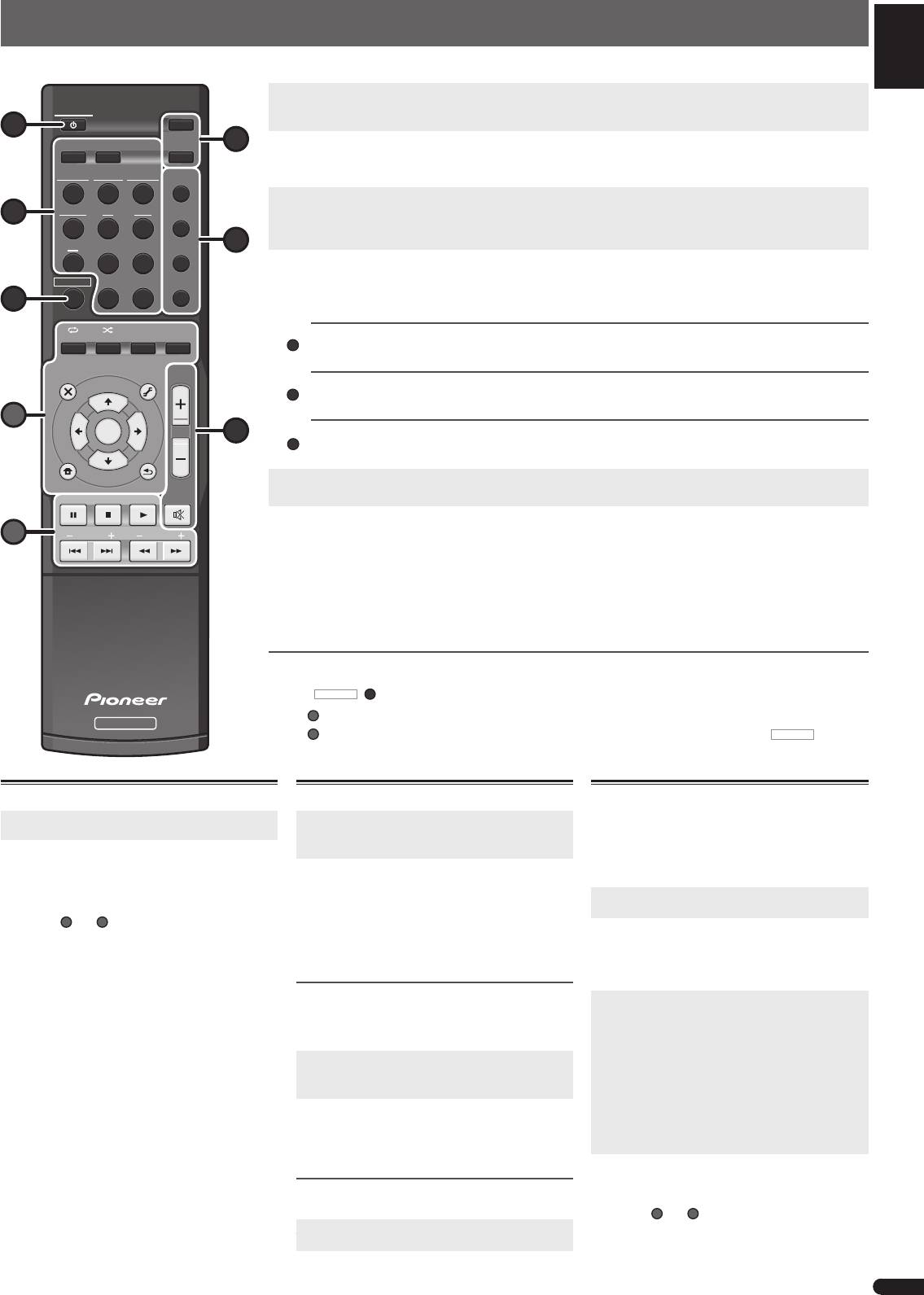
one), then the receiver (press
STANDBY/ON
1
ECO
).
D AUX A AUX
S.RTRV
6
2
Switch the TV input to the input that connects this receiver.
For example, if you connected this receiver to the
VIDEO
jacks on your TV, make sure that the
VIDEO
input is now
iPod
USB
NETWORK
ADAPTER
AUTO
/
selected.
DIRECT
3
Press input function buttons to select the input function you want to play.
TUNER BD DVD
ALC
/
• The input of the receiver will switch over, and you will be able to operate other components using the remote control.
3
STANDARD
• The input source can also be selected by using the front panel
INPUT SELECTOR
button. In this case, the remote
ADV
control won’t switch operational modes.
CD
STB GAME
4
SURR
4
Press AUTO/DIRECT to select ’AUTO SURR’ and start playback of the source.
RECEIVER
TV
PORTABLE
SOUND
WING
If you’re playing a Dolby Digital or DTS surround sound Blu-ray/DVD disc, with a digital audio connection, you should
hear surround sound. If you’re playing a stereo source or if the connection is an analog audio connection, you will only
7
hear sound from the front left/right speakers in the default listening mode.
Italiano
AUDIO
DISP
ALC
/
SLEEP SP-AB
DIMMER
STATUS
STANDAR
Listening in Standard surround sound
This receiver provide basic surround sound for stereo and multichannel sources.
TOP
MENU
MENU
TOOLS
VOL
Listening in Advanced surround sound
The Advanced surround effects can be used for a variety of additional surround sound effects.
Nederlands
A
ENTER
5
Listening in Sound Wing mode
HVT speakers make it possible to enjoy a broader-ranging sound.
iPod
CTRL
5
Use VOL +/– to adjust the volume level.
HOME MENU
RETURN
• Sound can be switched off by pressing
MUTE
button.
PTY
BAND MUTE
Español
6
Enjoy a variety of sounds.
B
PRESET
TUNE
Press ECO to select the Ecology mode.
• Select the Ecology mode for Stereo (max. 2.1 ch) playback to enable the reduction of power consumption to a
maximum of half normal levels.
Press S.RTRV to switch the Sound Retriever feature ON or OFF.
• When audio data is removed during the compression process, sound quality often suffers from an uneven sound
Deutsch
image. The Sound Retriever feature employs new DSP technology that helps bring CD quality sound back to
compressed 2-channel audio by restoring sound pressure and smoothing jagged artifacts left over after compression.
Other remote control functions
• Switch to one of the underlined devices to use the remote control to operate that device. To operate the receiver, first
press
RECEIVER
(
7
)
, then press the appropriate button to operate.
Use
A
buttons to adjust the settings of this receiver and operate other devices.
RECEIVER
Use
B
buttons to operate other devices. Operations are still possible even after pressing
RECEIVER
button.
Playing iPod or USB device
Listening to the radio
1
Switch the TV input to the input that connects
1
Press TUNER to select the tuner.
this receiver.
If necessary, press
BAND
to change the band (FM or
AM),
2
Press iPod USB to select the iPod USB input.
PLEASE WAIT CONNECTING
appears as this receiver
2
Press
TUNE+/–
(or
) to tune to a station.
starts recognizing the iPod/iPhone or USB device
• Press and hold
TUNE+/–
(or
) for about a
connected.
second. The receiver will start searching for the next
•
Some of
A
and
B
buttons can be used for basic
station.
playback of files stored on iPod/iPhone or USB
If you’re listening to an FM station but the reception
devices.
is weak, press
BAND
to select
FM MONO
and set the
receiver to the mono reception mode.
Saving station presets
If you often listen to a particular radio station, it’s
convenient to have the receiver store the frequency for
easy recall whenever you want to listen to that station.
1
Press TOOLS while receiving a signal from the
station you want to store.
The preset number is blinking.
2
Press PRESET+/– (or
) to select the station
preset you want
,
then press ENTER.
The preset number stop blinking and the receiver stores
the station.
Listening to station presets
You will need to have some presets stored to do this.
Press PRESET+/– (or
) to select the station
this.
preset you want.
© 2012 PIONEER CORPORATION.
All rights reserved.
5
En
D
ADV
SURR
SOUN
D
WING
Playback with NETWORK feature
This receiver is equipped with the LAN terminal and
you can enjoy the following features by connecting your
components to these terminals.
• Listening to Internet radio stations
• Playback the music files stored in PCs
1
Switch the TV input to the input that connects
this receiver.
2
Press NETWORK to select the NETWORK input.
It may take several seconds for this receiver to access
the network. The Main Menu appears when the
NETWORK
is selected as the input function.
3
Use
to select the category you want to
play back, and then press ENTER.
Select a category from the following list:
•
Now Playing
– Display the Current status and
station information.
•
Internet Radio
– Listening the SHOUTCast internet
radio via Network.
•
Music Library
– Playback the music files stored in
PCs.
•
Favorites
– Favorite songs currently being
registered.
4
Use
to select the folder, music fi les or
Internet radio station to play back, and then
press ENTER.
•
Some of
A
and
B
buttons can be used for basic
playback of music files stored on components on
the network.
VSX-S500SYXCNQSG設変book.indb5VSX-S500SYXCNQSG設変book.indb5 2012/04/2314:40:022012/04/2314:40:02
Français
Organigramme des réglages sur le récep-
PRÉCAUTION DE VENTILATION
Lors de l’installation de l’appareil, veillez à laisser un
teur
espace suffisant autour de ses parois de manière à
améliorer la dissipation de chaleur (au moins 10 cm sur
le dessus, 5 cm à l’arrière et 5 cm de chaque côté).
AVERTISSEMENT
Les fentes et ouvertures du coffret sont prévues pour la
ventilation, pour assurer un fonctionnement stable de
l’appareil et pour éviter sa surchauffe. Pour éviter les
risques d’incendie, ne bouchez jamais les ouvertures et
ne les recouvrez pas d’objets, tels que journaux, nappes
ou rideaux, et n’utilisez pas l’appareil posé sur un tapis
épais ou un lit.
D3-4-2-1-7b*_A1_Fr
Installation des enceintes
Le récepteur fonctionnera avec seulement deux en-
ceintes stéréo (les enceintes avant sur le schéma), mais
il est recommandé d’en utiliser au moins trois ; une
configuration complète de huit enceintes est cependant
idéale pour la production du son surround.
Pour obtenir le meilleur son surround possible, installez
vos enceintes conformément à l’illustration ci-dessous.
Système surround à 2.1 canaux : Système surround à 5.1 canaux :
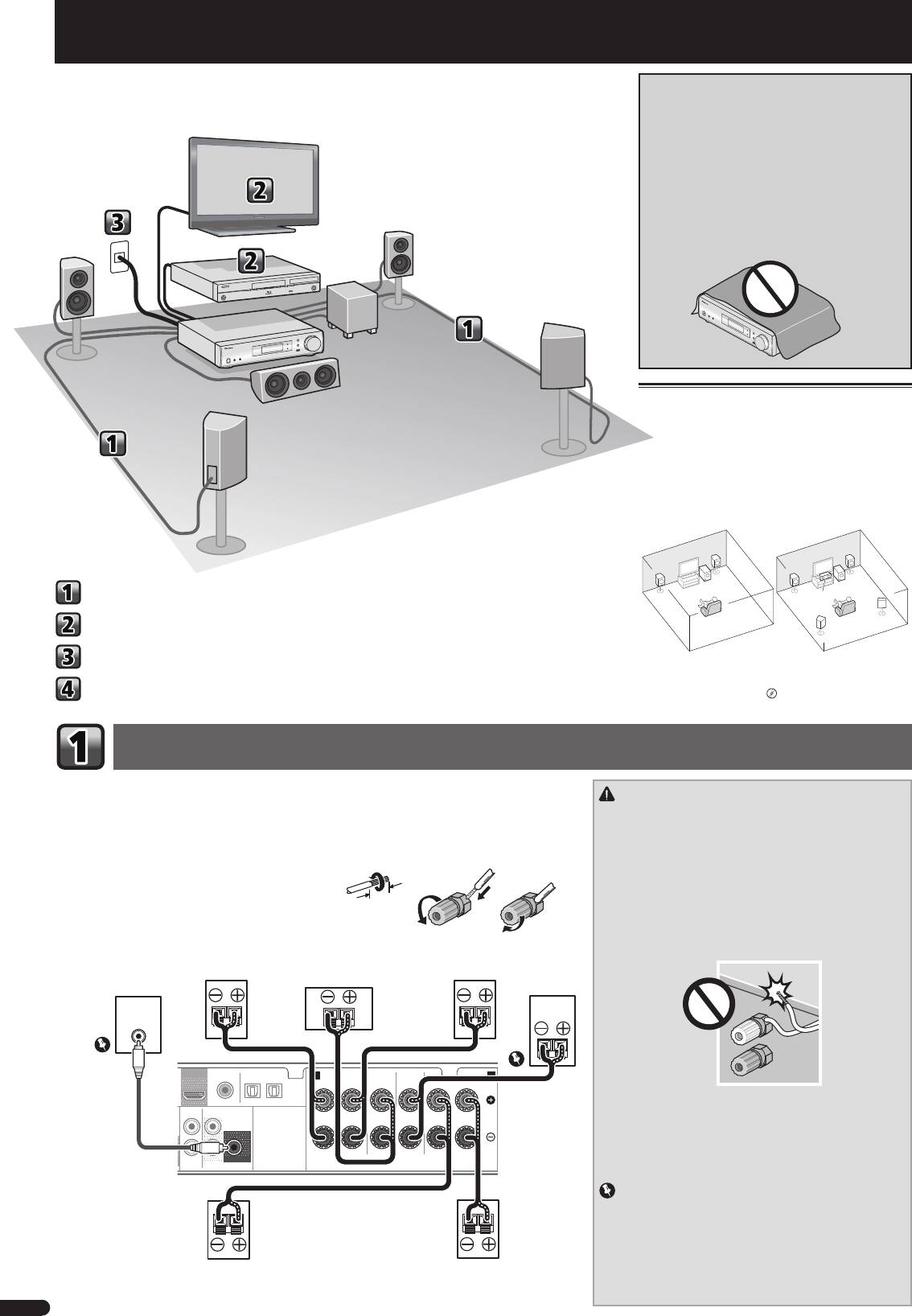
R
R
L
L
SW
SW
Raccordement des enceintes
C
SR
Raccordement d’un téléviseur et de périphériques de lecture
SL
Branchement du récepteur
• De plus, il est possible de connecter des enceinte
surround arrière, des enceintes surround avant-haut,
Confi guration de base
ou des enceintes B.
“Connectez les enceintes
surround arrière ou surround avant-haut”
Raccordement des enceintes
Vérifiez que l’enceinte droite est raccordée à la borne droite (R) et que l’enceinte gauche est raccordée à
la borne gauche (L). Assurez-vous également que les bornes positive et négative (+/–) du récepteur sont
ATTENTION
reliées aux bornes positive et négative des enceintes.
• Les bornes des haut-parleurs sont sous une tension
DAN-
GEREUSE
. Pour éviter tout risque de décharge électrique
Vous pouvez utiliser des enceintes ayant une impédance normale comprise entre 4
Ω
et 16
Ω
.
lors du branchement et du débranchement des câbles de
Branchement des fi ls nus
haut-parleur, débranchez le cordon d’alimentation avant de
12 3
toucher des parties non isolées.
1
Torsadez ensemble les brins de fi l dénudés.
• Assurez-vous que tous les brins de fil dénudés du câble
2
Libérez la borne de l’enceinte et insérez-y le fi l.
d’enceinte sont torsadés ensemble et insérés complè-
tement dans la borne de l’enceinte. Si une partie du fil
3
Refermez la borne.
d’enceinte exposé entre en contact avec le panneau arrière,
l’alimentation peut être coupée par mesure de sécurité.
• Ne laissez pas l’âme des câbles d’enceintes venir en
contact avec le boîtier du récepteur.
OUT
OPTICAL
– Si l’âme des câbles d’enceintes entraient en contact
ANALOG
SURR BACK/
AUX
FRONT HEIGHT
AUDIO
avec une partie métallique du boîtier du récepteur, cela
L
(
Single
)
créerait un court-circuit qui pourrait endommager les
enceintes et provoquer un départ de feu.
Insérez correctement les câbles d’enceintes dans les
IN
R
SUBWOOFER
PRE OUT
SPEAKERS
bornes et vérifiez que les câbles ne peuvent pas se déta-
cher facilement.
Important
• Les bornes SPEAKERS SUBWOOFER sont des bornes de
connexion pour caisson de basse passif Pioneer S-SLW500.
Si vous utilisez un autre modèle de caisson de basse,
veillez à utiliser un modèle avec amplificateur intégré et
connectez-le à la borne PREOUT SUBWOOFER.
• Connectez soit un caisson de basse passif soit un caisson
de basse actif, car le fait de connecter les deux types simul-
tanément empêche d’obtenir un effet sonore correct.
2
Fr
G
Cet appareil est un récepteur AV à part entière présen-
Téléviseur
tant un grand nombre de fonctions et de prises. Il peut
être utilisé facilement lorsque les raccordements et les
réglages mentionnés ci-dessous ont été effectués.
L
Avant gauche
Lecteur de Blu-ray Disc R
Avant droite
SW
Caisson de basses
Ce récepteur
c.
Centrale
SR
Surround droite
SL
Surround gauche
10 mm
Caisson de
Subwoofer
Avant droite
Centrale
Avant gauche
basses
amplifié
S-SLW500
LINE LEVEL
INPUT
COAXIAL
A
FRONT
CENTER
SUBWOOFER/
SURROUND
/
SURR BACK
B
RL
RL
CD IN TV IN
DIGITAL AUX IN
R Bi-Amp L
Assurez-vous que tous
les branchements ont
été effectués correcte-
ment avant de raccorder
Surround
cet appareil au secteur.
Surround
droite
gauche
VSX-S500SYXCNQSG設変book.indb2VSX-S500SYXCNQSG設変book.indb2 2012/04/2314:40:032012/04/2314:40:03
English
Raccordement d’un téléviseur et de périphériques de lecture
Français
Italiano
LAN
(
10/100
)
STB IN GAME INBD/BDR IN
DVD / DVR IN
OUT
COAXIAL
F
OPTICAL
Nederlands
HDMI
CD IN
TV IN
DIGITAL AUX IN
DC OUTPUT
for WIRELESS LAN
VIDEO
(
ANALOG
ANALOG
SURR BACK/
)
AUDIO
AUX
AUX
FRONT HEIGHT
(
OUTPUT 5 V
ASSIGNABLE
0.6 A MAX
)
L
IN
(
Single
)
FM
UNBAL
75
(
OUTPUT 5 V
0.1 A MAX
)
AM LOOP
MONITOR
R
IN
SUBWOOFER
ADAPTER PORT
OUT
PRE OUT
Español
Deutsch
Branchement du récepteur
3
Fr
R
Modem
Équipements compatibles HDMI/DVI
(Lecteur de Blu-ray Disc, etc.)
Téléviseur compatible
HDMI/DVI
Internet
HDMI OUT
HDMI IN
DIGITAL AUDIO OUT
OPTICAL
LAN
Routeur
321
WAN
Si le téléviseur ne prend
pas en charge la fonction
au port LAN
HDMI Audio Return Chan-
Câble LAN
nel, cette connexion est
(vendu séparément)
nécessaire pour écouter le
son du téléviseur par l’in-
termédiaire du récepteur.
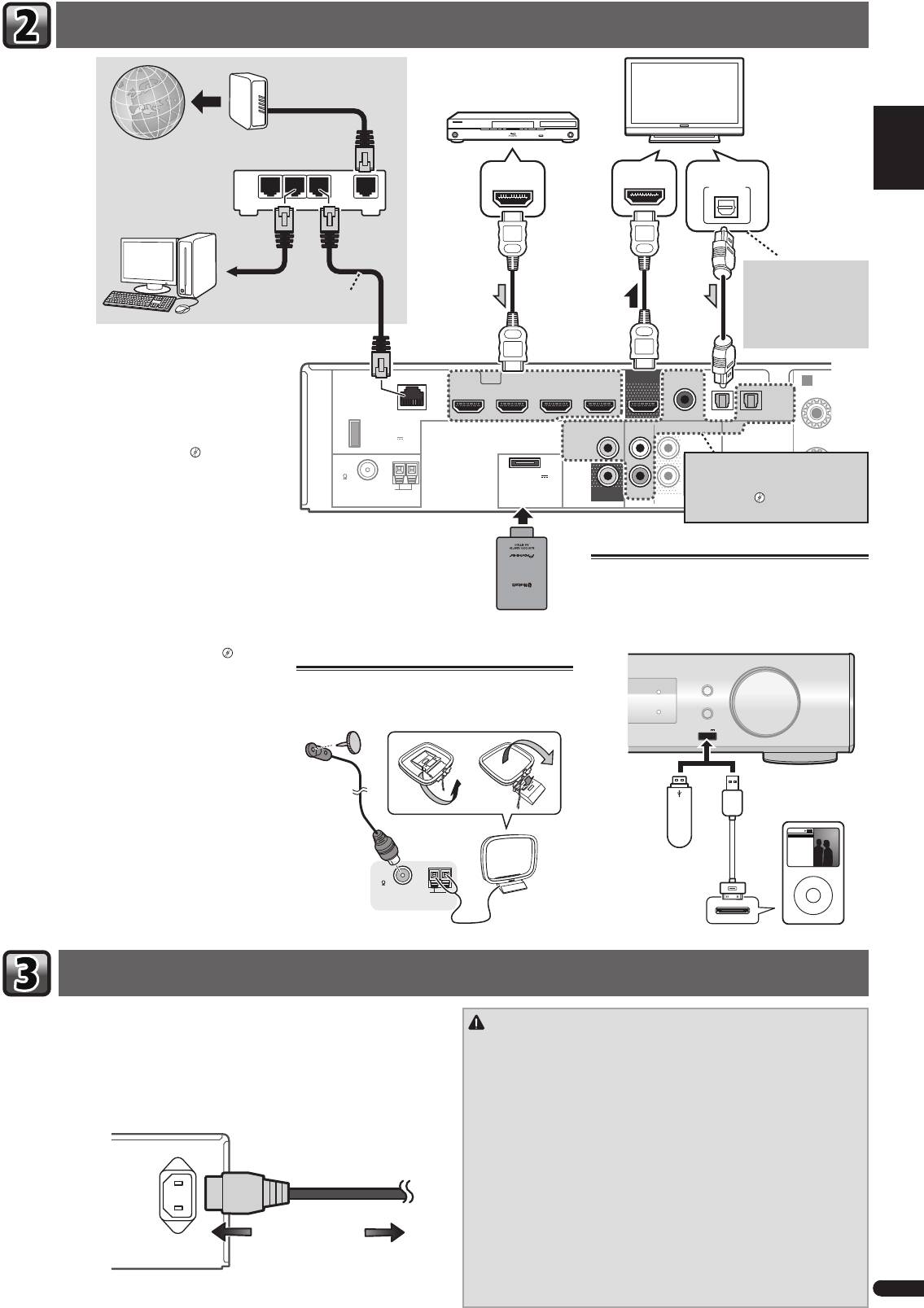
Si vous avez un composant équipé d’une prise HDMI
ou DVI (avec HDCP) (Lecteur Blu-ray Disc, etc.), vous
A
pouvez le raccorder à ce récepteur à l’aide d’un câble
R
HDMI disponible dans le commerce.
Si le téléviseur et les équipements de lecture connectés
prennent en charge la fonction d’Control HDMI, cette
fonction pratique peut être utilisée.
“Fonction
Control HDMI”
Si l’ équipement que vous souhaitez
connecter ne possède pas de prise de
• La connexion et/ou le réglage suivant est nécessaire
sortie HDMI, il peut être connecté via
pour écouter le son du téléviseur par l’intermédiaire
ces bornes.
“Raccordement d’un
du récepteur.
lecteur DVD sans sortie HDMI”
– Si le téléviseur ne prend pas en charge la fonc-
tion HDMI Audio Return Channel, connectez le
récepteur et le téléviseur à l’aide de câbles audio
(comme indiqué).
Clé Bluetooth®
Connexion d’un iPod/iPhone ou d’un
– Si le téléviseur prend en charge la fonction HDMI
ADAPTER AS-BT100 ou
périphérique USB
Audio Return Channel, le son du téléviseur est
AS-BT200 (vendue séparé-
envoyé vers le récepteur via la prise HDMI et il n’est
ment)
Mettez le récepteur en mode veille, puis raccordez votre
alors pas nécessaire de connecter un câble audio.
iPod/iPhone ou votre périphérique USB à la prise USB
Dans ce cas, réglez l’option
ARC
sur ON dans le
iPod iPhone située sur le panneau.
menu de configuration HDMI Setup.
“Menu
AUDIO/ VIDEO MULTI-CHANNEL RECEIVER
VSX
-S500
HDMI Setup”
INPUT SELECTOR
Raccordement des antennes
MCACC
Raccordez l’antenne filaire FM et l’antenne cadre AM
DIRECT CONTROL
iPod iPhone
HDMI
VOLUME
MASTER
comme indiqué ci-dessous.
iPod iPhone
Pour plus d’informations sur la connexion et la confi-
USB
5 V
1
A
guration de la clé Bluetooth ADAPTER et sur la lecture
audio à l’aide de cette clé, veuillez consulter le Mode
d’emploi sur le CD-ROM.
Périphérique
iPod/iPhone
de stockage de
masse USB
Music
Genius >
Artists
Playlists
Songs
Albums
La marque de mot et les logos Bluetooth® sont des
Audiobooks
Composers
Genres
Radio
marques déposées appartenant à Bluetooth SIG, Inc. et
FM
toute utilisation de ces marques par PIONEER COR-
UNBAL
Câble USB (pour la
MENU
75
connexion d’un iPod)
PORATION est faite sous licence. Les autres marques
AM LOOP
ANTENNA
commerciales et noms commerciaux appartiennent à
leurs propriétaires respectifs.
Ne raccordez le récepteur au secteur qu’après y avoir connecté tous les composants,
ATTENTION
y compris les haut-parleurs.
• Tenez le cordon d’alimentation par sa prise lorsque vous le manipulez. Ne
1
Enfi chez le cordon d’alimentation fourni dans la prise AC IN à l’arrière du
débranchez pas l’appareil en tirant sur le cordon et ne touchez jamais le
récepteur.
cordon d’alimentation avec les mains mouillées ; vous pourriez provoquer
2
Enfi chez l’autre extrémité dans une prise électrique.
un court-circuit ou prendre un choc électrique. Ne placez pas l’appareil,
un meuble ou tout autre objet sur le cordon d’alimentation, et évitez de le
pincer de toute autre manière. Ne faites jamais de nœud dans le cordon et
ne le liez jamais avec d’autres câbles. Les cordons d’alimentation doivent
être acheminés de façon à ce qu’on ne puisse pas marcher dessus. Un
AC IN
cordon d’alimentation endommagé peut provoquer un incendie ou un
choc électrique. Vérifiez l’état du cordon de temps à autre. Si le cordon est
endommagé, demandez-en le remplacement auprès du service après-vente
agréé Pioneer le plus proche.
• N’utilisez aucun autre cordon d’alimentation que celui fourni avec cet appa-
reil.
• N’utilisez pas le cordon d’alimentation fourni à d’autres fins que celles
Vers la prise secteur
décrites ci-après.
• Lorsque le récepteur n’est pas utilisé durant une longue période (par ex.
pendant les vacances), il est recommandé de le débrancher, en retirant le
connecteur d’alimentation de la prise murale.
VSX-S500SYXCNQSG設変book.indb3VSX-S500SYXCNQSG設変book.indb3 2012/04/2314:40:052012/04/2314:40:05
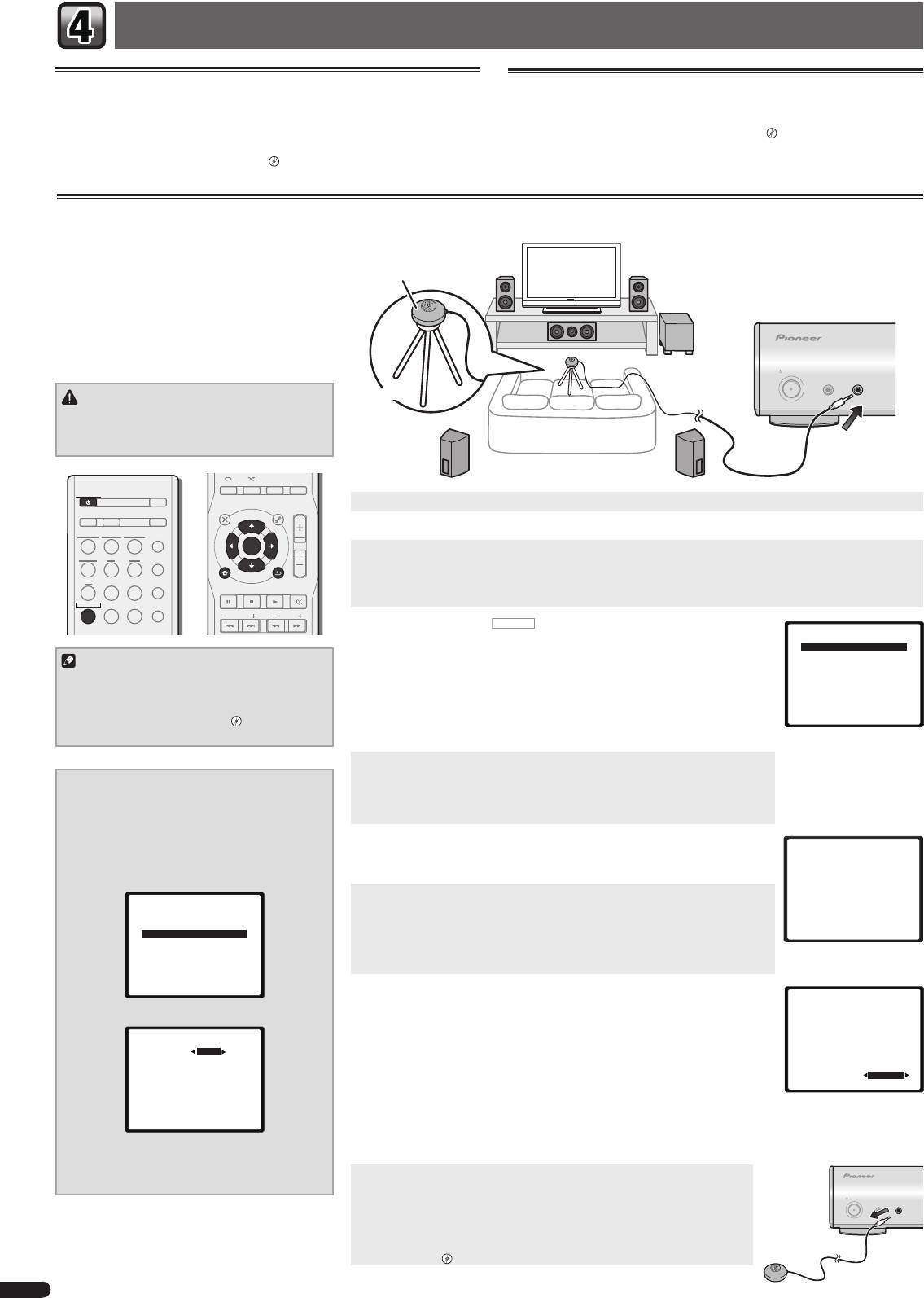
Confi guration de base
Annulation de la fonction d’arrêt automatique Auto Power
Désactivation du mode d’affi chage de démonstration
Down
Diverses informations (de démonstration) s’affichent sur le panneau avant lorsque
Lorsque ce récepteur n’est pas utilisé pendant une période de plusieurs heures, il se
le récepteur ne fonctionne pas.
met automatiquement hors tension. La minuterie d’arrêt automatique est réglée en
Il est possible de désactiver ce mode d’affichage.
“Le menu FL Demo Mode”
usine sur une durée six heures. Cette durée peut être modifiée et la fonction d’arrêt
• Le mode démo est annulé automatiquement lorsque la configuration Auto
automatique peut aussi être désactivée.
“Le menu Auto Power Down”
MCACC est effectué (voir ci-dessous).
Confi guration automatique du son surround (MCACC)
Le système de calibrage acoustique multicanaux (Multi-
Channel Acoustic Calibration, MCACC) mesure les
caractéristiques acoustiques de votre position d’écoute
Microphone
en tenant compte du bruit ambiant, de la taille et de
la distance des enceintes et des tests sur le retard et
le niveau de canal. Une fois que vous avez installé le mi-
crophone fourni avec votre système, le récepteur utilise
les informations provenant d’une série de tonalités de
test afin d’optimiser les réglages d’enceinte et l’égalisa-
tion pour une pièce spécifique.
STANDBY/ON
MCACC
PORTABLE
SETUP
/
MICPHONES
ATTENTION
Trépied
• Les tonalités de test utilisées dans la configuration
MCACC automatique sont générées à un volume
élevé.
AUDIO DISP
SLEEP SP-AB
DIMMER
STATUS
STANDBY/ON
ECO
TOP
MENU
1
Allumez le récepteur et votre téléviseur.
MENU
TOOLS
VOL
D AUX A AUX
S.RTRV
iPod
ADAPTER
AUTO
/
2
Sélectionnez l’entrée TV de sorte que le téléviseur se connecte à l’appareil.
USB
NETWORK
DIRECT
ENTER
3
Connectez le microphone à la prise MCACC SETUP MIC sur le panneau avant.
TUNER BD DVD
ALC
/
STANDARD
iPod
Assurez-vous qu’il n’y a pas d’obstacles entre les enceintes et le microphone.
CTRL
CD
STB GAME
ADV
SURR
HOME MENU
RETURN
Si vous avez un trépied, utilisez-le pour y placer le microphone afin qu’il soit au niveau des oreilles à votre position
PTY
BAND MUTE
d’écoute normale. Sinon, placez le microphone au niveau des oreilles en utilisant une table ou une chaise.
RECEIVER
TV
PORTABLE
SOUND
WING
PRESET
TUNE
4
Appuyez sur la touche
RECEIVER
de la télécommande, puis sur la touche
Home Menu
HOME MENU.
1.Auto MCACC
L’affichage revient à l’écran d’accueil Home Menu. Utilisez les touches
et
2.Manual SP Setup
Remarque
3.Pre Out Setting
ENTER
de la télécommande pour naviguer dans les écrans et sélectionner des options
4.Input Assign
• Il peut arriver que le réglage de la distance du
de menu. Appuyez sur la touche
RETURN
pour sortir du menu actuel.
5.Video Parameter
6.HDMI Setup
subwoofer soit supérieur à la distance réelle
• Étant donné que les enceintes S-HV600B/S-HV500-LR/S-SL100-LR/S-SL100CR sont
7.Auto Power Down
8.FL Demo Mode
de la position d’écoute. Dans ce cas, effectuez
des enceintes satellites compactes, il est recommandé de les utiliser conjointe-
les réglages manuellement.
“Distance des
ment avec un caisson de grave pour restituer toute la richesse du son. Dans ce
enceintes”
cas, réglez le paramètre
X.OVER
sur 200 Hz (voir “Pour modifier le paramètre X.OVER” sur cette page).
5
Sélectionnez ‘Auto MCACC’ dans le Home Menu, puis appuyez sur ENTER.
•
Mic In!
clignote lorsque le microphone n’est pas raccordé à la prise
Pour modifi er le paramètre X.OVER
MCACC SETUP MIC.
Pour les enceintes S-HV600B/S-HV500-LR/S-SL100-LR/
Veillez à faire le moins de bruit possible après avoir appuyé sur
ENTER
. Le système
S-SL100CR
émet une série de tonalités de test pour établir le niveau de bruit ambiant.
1
Sélectionnez ‘Manual SP Setup’ dans le
Home Menu, puis appuyez sur ENTER.
6
Suivez les instructions à l’écran.
1.Auto MCACC
• En cas d’utilisation d’un caisson de basse actif, vérifiez que le caisson de basse est
Now Analyzing
2
Sélectionnez ‘X.OVER’ dans le
sous tension et que vous avez monté le volume.
Environment Check
Manual SP Setup, puis appuyez sur ENTER.
Ambient Noise
7
Attendez que les tonalités de test ne retentissent plus.
Speaker YES/NO
2.Manual SP Setup
Un rapport de progression est affiché à l’écran pendant que le récepteur émet des
a.Speaker System
tonalités de test afin de déterminer la présence des enceintes dans votre configura-
b.Speaker Setting
Return
c.X.OVER
tion. Essayez de rester aussi silencieux que possible pendant cette opération.
d.Channel Level
e.Speaker Distance
• Pour régler correctement vos enceintes, ne réglez pas le volume pendant que les
tonalités de test sont générées.
Return
8
Confi rmez la confi guration des enceintes.
1.Auto MCACC
La configuration affichée à l’écran doit indiquer les enceintes que vous avez réelle-
Check!
3
Réglez la fréquence de coupure sur ‘200 Hz’.
ment installées.
Front
[ YES ]
Center
[ YES ]
2c.X.OVER
• Si un message d’erreur (tel que
Too much ambient noise
) s’affiche, sélectionnez
Surr
[ YES ]
Frequency 200Hz
RETRY
après avoir vérifié le bruit ambiant.
Surr. Back
[
---
]
Subwoofer
[ YES ]
Si la configuration des enceintes affichée n’est pas correcte, utilisez
pour
OK
sélectionner l’enceinte et
modifier la configuration. Lorsque vous avez terminé,
10:Next
Return
passez à l’étape suivante.
Si un message d’erreur (
ERR
) s’affiche dans la colonne de droite, il est possible que
Return
vous ayez mal raccordé vos enceintes. Si le fait de sélectionner la touche
RETRY
ne
corrige pas le problème, arrêtez le récepteur et vérifiez les raccordements des en-
4
Lorsque vous avez terminé, appuyez deux
ceintes.
fois sur RETURN.
9
La confi guration Auto MCACC est terminée ! L’affi chage revient à
Retournez au menu d’accueil (Home).
l’écran d’accueil Home Menu.
STANDBY/ON
Assurez-vous de débrancher le microphone de configuration.
MCACC
PORTABLE
SETUP
/
MICPHONES
Les réglages effectués en utilisant la configuration Auto MCACC doivent per-
mettre à votre système de restituer une excellente qualité de son surround. Il est
également possible d’ajuster ces réglages manuellement via le menu Manual
Speaker Setup.
“Réglage manuel des enceintes”
4
Fr
VSX-S500SYXCNQSG設変book.indb4VSX-S500SYXCNQSG設変book.indb4 2012/04/2314:40:062012/04/2314:40:06
English
Lecture de base
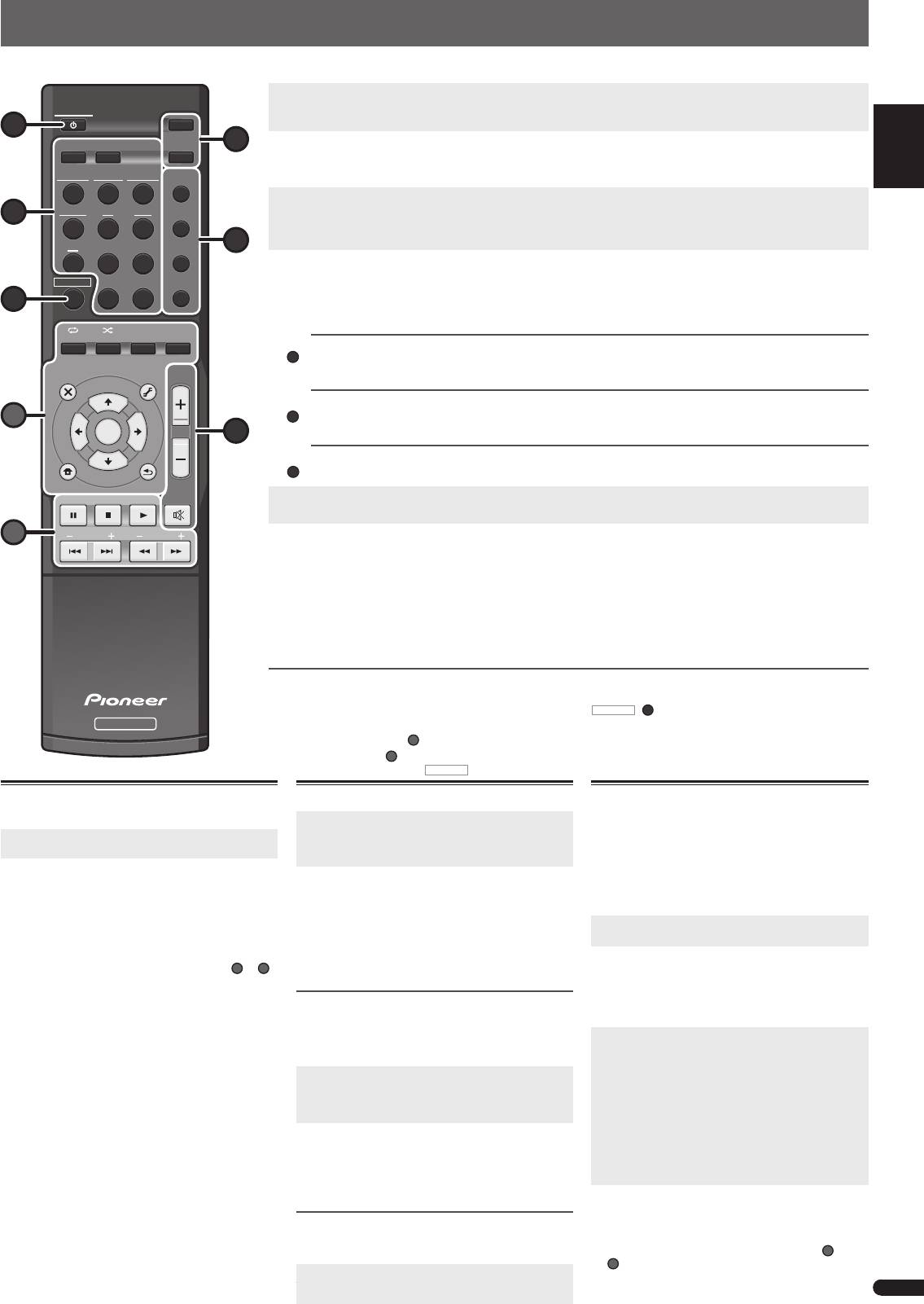
Voici les instructions de base pour lire une source (telle qu’un Blu-ray Disc) avec votre système home cinéma.
1
Allumez les composants de votre système et votre récepteur.
Allumez en premier lieu l’équipement de lecture (par exemple, un lecteur Blu-ray Disc), votre téléviseur et le caisson de
STANDBY/ON
Français
STANDBY/ON
1
ECO
graves (si vous en avez un), puis le récepteur (appuyez sur
).
D AUX A AUX
S.RTRV
6
2
Commutez l’entrée TV sur l’entrée qui est connectée à ce récepteur.
Par exemple, si vous connectez ce récepteur aux prise
VIDEO
de votre téléviseur, veillez à ce que l’entrée sélectionnée
iPod
USB
NETWORK
ADAPTER
AUTO
/
soit
VIDEO
.
DIRECT
3
Utilisez les touches de fonctions d’entrée pour sélectionner la fonction d’entrée souhaitée.
TUNER BD DVD
ALC
/
• L’entrée du récepteur commute et vous pourrez alors utiliser d’autres composants via la télécommande.
3
STANDARD
• La source d’entrée peut aussi être sélectionnée à l’aide du bouton
INPUT SELECTOR
. Dans ce cas, la télécommande
ADV
4
ne permutera pas les modes de fonctionnement.
CD
STB GAME
SURR
4
Appuyez sur AUTO/DIRECT pour sélectionner “AUTO SURR”, puis lancez la lecture de la source.
RECEIVER
TV
PORTABLE
SOUND
WING
Si vous lisez un disque Blu-ray/DVD enregistré en Dolby Digital ou DTS surround, l’utilisation d’une connexion audio-
numérique doit vous permettre de profiter du son surround. Si vous lisez à partir d’une source stéréo ou si la connexion
7
audio est une connexion analogique, le son ne sera émis que par les enceintes avant gauche et droite en mode d’écoute
Italiano
par défaut.
AUDIO
DISP
SLEEP SP-AB
DIMMER
STATUS
ALC
/
STANDAR
Écoute en mode surround standard
Ce récepteur permet d’obtenir, sans réglage particulier, un son surround de base pour les sources stéréo et
TOP
MENU
MENU
TOOLS
VOL
multicanaux.
Écoute en mode surround avancé
Nederlands
A
Les effets Advanced surround peuvent être utilisés pour une large gamme d’effets sonores surround supplé-
ENTER
5
mentaires.
Écoute en mode Sound Wing
iPod
CTRL
Les enceintes HVT permettent de profiter d’un son de plus large envergure.
HOME MENU
RETURN
5
Utilisez le bouton rotatif VOL +/– pour régler le volume sonore.
PTY
BAND MUTE
• Pour couper le son, appuyez sur la touche
MUTE
.
Español
B
PRESET
TUNE
6
Profi tez de toute une variété de sons.
Appuyez sur la touche ECO pour sélectionner le mode correspondant.
• Lorsque vous sélectionnez le mode Ecology, le son est restitué en stéréo (2.1 canaux maximum) afin de réduire la
consommation du système jusqu’à la moitié de la consommation normale.
Appuyez sur la touche S.RTRV pour activer ou désactiver la fonction Sound Retriever.
Deutsch
• Lorsque des données audio sont supprimées lors de la compression, la qualité du son est souvent amoindrie du fait
de l’inégalité de l’image sonore. La fonction Sound Retriever a recours à une nouvelle technologie DSP pour restaurer
un son de qualité CD vers des sources audio compressées à 2 canaux en rétablissant la pression sonore et en lissant
les artéfacts dentelés restants après la compression.
Autres fonctions de la télécommande
• Sélectionnez l’un des équipements soulignés pour commander cet équipement à l’aide de la télécommande. Pour
faire commander ce récepteur, appuyez d’abord sur la touche
RECEIVER
(
7
)
de la télécommande, puis appuyez sur la
RECEIVER
touche souhaitée.
Use Utilisez les touches
A
pour ajuster les réglages de ce récepteur et pour commander d’autres équipements.
Utilisez les touches
B
pour commander d’autres équipements. Les commandes restent utilisables même après
avoir appuyé sur la touche
RECEIVER
.
Lecture à partir d’un iPod ou d’un péri-
Ecoute de la radio
phérique USB
1
Appuyez sur TUNER pour sélectionner le synto-
niseur.
1
Commutez l’entrée TV sur l’entrée qui est
connectée à ce récepteur.
Appuyez sur la touche
BAND
pour changer de bande
de fréquences (FM ou AM), si nécessaire.
2
Appuyez sur la touche iPod USB pour sélection-
2
Pour rechercher une station de radio, utilisez
ner l’entrée correspondante.
les touches
TUNE+/–
(ou
).
Le message
PLEASE WAIT CONNECTING
s’affiche
• Appuyez sur une des touches
TUNE+/–
(ou
)
à l’écran lorsque ce récepteur commence la recon-
sans la relâcher pendant environ une seconde. Le
récepteur lance la recherche de la station suivante
naissance de l’iPod/iPhone ou du périphérique USB
dans la direction correspondant à la touche.
raccordé.
Si la réception du signal radio FM est faible, appuyez
•
Certaines touches des groupes de touches
A
et
B
sur la touche
BAND
pour sélectionner
FM MONO
, et
de la télécommande peuvent être utilisées pour les
réglez le récepteur en mode de réception mono.
opérations de lecture de base de fichiers stockés sur
Mémorisation de stations préréglées
un iPod/iPhone ou un périphérique USB.
Si vous écoutez souvent une station de radio, il peut
être pratique d’enregistrer sa fréquence dans le récep-
teur afin de pouvoir y accéder facilement lorsque vous
le souhaitez.
1
Pour mémoriser une station de radio que vous
êtes en train d’écouter, appuyez d’abord sur la
touche TOOLS.
Le numéro de préréglage clignote.
2
Utilisez les touches PRESET+/– (ou
) pour
sélectionner le numéro de préréglage que
vous souhaitez attribuer à cette station, puis
appuyez sur ENTER.
Le numéro préréglé cesse de clignoter et le récepteur
mémorise la station.
Écoute des stations préréglées
Vous devez mémoriser des stations préréglées pour
avoir accès à cette fonction.
© 2012 PIONEER CORPORATION.
Appuyez sur la touche PRESET+/– (ou
)
Tous droits de reproduction et de traduction réservés.
this.
pour sélectionner la station préréglée que vous
5
désirez.
Fr
D
ADV
SURR
SOUN
D
WING
Utilisation de la fonction de lecture
réseau (NETWORK)
Ce récepteur est pourvu d’une borne LAN, et en raccor-
dant vos composants à cette borne vous pourrez utiliser
les fonctions suivantes.
• Ecoute des stations radio Internet
• Lecture de fichiers de musique enregistrés sur un
ordinateur
1
Commutez l’entrée TV sur l’entrée qui est
connectée à ce récepteur.
2
Appuyez sur la touche NETWORK pour sélec-
tionner l’entrée NETWORK.
Il faut quelques secondes au récepteur pour accéder au
réseau. Le menu principal apparaît lorsque la fonction
d’entrée
NETWORK
est sélectionnée.
3
Utilisez
pour sélectionner la catégorie que
vous voulez lire, puis appuyez sur ENTER.
Sélectionnez une catégorie dans la liste suivante :
•
Now Playing
– Pour afficher la station actuelle ainsi
que des informations sur cette station.
•
Internet Radio
– Pour écouter une station de radio
Internet SHOUTcast via le réseau.
•
Music Library
– Lecture de fichiers de musique
enregistrés sur un ordinateur.
•
Favorites
– Morceaux favoris en cours d’enregistre-
ment.
4
Utilisez
pour sélectionner le dossier, les
fi chiers de musique ou la station radio Internet
que vous voulez écouter, puis appuyez sur
ENTER.
• Certaines touches des groupes de touches
A
et
B
de la télécommande peuvent être utilisées pour
les opérations de lecture de base de fichiers de
musique stockés sur un équipement connecté au
réseau.
VSX-S500SYXCNQSG設変book.indb5VSX-S500SYXCNQSG設変book.indb5 2012/04/2314:40:082012/04/2314:40:08
Русский
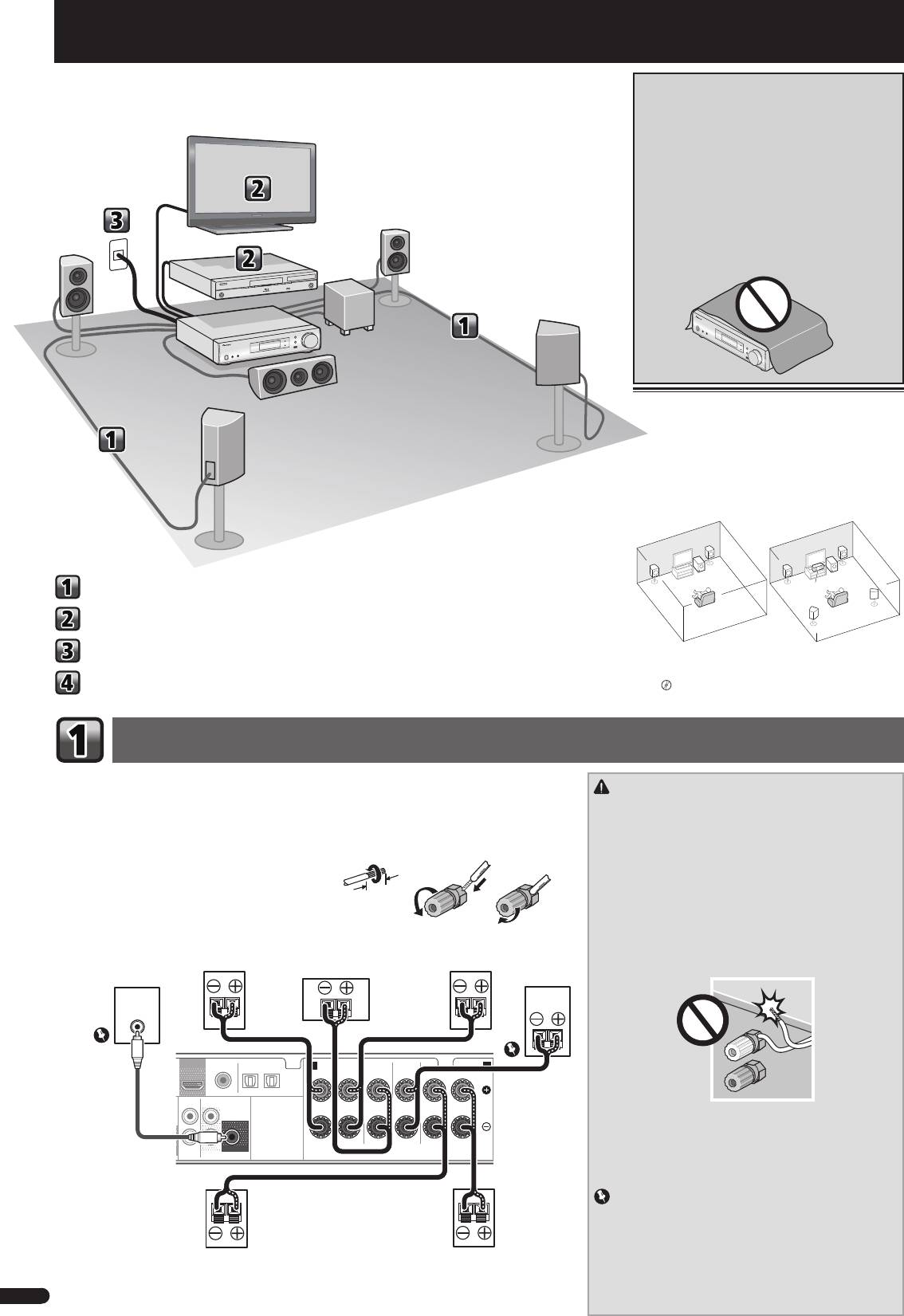
ОБЯЗАТЕЛЬНАЯ ВЕНТИЛЯЦИЯ
Порядок выполнения настроек на ресивере
При установке устройства обеспечьте достаточное
пространство для вентиляции во избежание
повышения температуры внутри устройства (не
менее 10 см сверху, 5 см сзади и по 5 см слева и
справа).
ПРЕДУПРЕЖДЕНИЕ
В корпусе устройства имеются щели и отверстия
для вентиляции, обеспечивающие надежную
работу изделия и защищающие его от перегрева.
Во избежание пожара эти отверстия ни в коем
случае не следует закрывать или заслонять
другими предметами (газетами, скатертями и
шторами) или устанавливать оборудование на
толстом ковре или постели.
D3-4-2-1-7b*_A1_Ru
Размещение громкоговорителей
Ресивер может работать с двумя стерео
громкоговорителями (передние громкоговорители на
рисунке), тем не менее, рекомендуется использовать
по крайней мере три, а полный комплект обеспечивает
наилучшее объемное звучание.
Для получения наилучшего качества объемного звучания
установите громкоговорители, как показано ниже.
Акустическая система 2.1: Акустическая система 5.1:
R
R
L
L
SW
SW
Подключение громкоговорителей
C
SR
Подключение телевизора и компонентов воспроизведения
SL
Подключение ресивера к электророзетке
•
В дополнение, можно также подключить
громкоговорители объемного звучания, передние
верхние громкоговорители или громкоговорители B.
Основная настройка
«Подключение задних громкоговорителей
объемного звучания или передних верхних
громкоговорителей»
Подключение громкоговорителей
Убедитесь, что правый громкоговоритель подключен к правому (R) разъему, а левый громкоговоритель
– к левому (L) разъему. Также убедитесь, что положительный и отрицательный (+/–) разъемы ресивера
ПРЕДУПРЕЖДЕНИЕ
совпадают с соответствующими разъемами громкоговорителей.
•
На контактах громкоговорителей имеется
ОПАСНОЕ ДЛЯ
Можно использовать громкоговорители с нормальным импедансом мощностью от 4
Ω
до 16
Ω
.
ЖИЗНИ
напряжение. Во избежание опасности поражения
электрическим током при подключении или отключении
Подключение проводов
кабелей громкоговорителей отсоединяйте кабель питания,
12 3
1
Скрутите оголенные жилы провода.
прежде чем прикасаться к любым неизолированным
деталям.
2
Ослабьте зажим контакта и вставьте
•
Оголенные концы провода громкоговорителя
оголенный провод.
должны быть обязательно скручены и вставлены в
контакт громкоговорителя до конца. Если любой из
3
Зажмите контакт.
неиз
олированных пров
одов громкоговорителя коснется
задней панели, это может вызвать отключение питания в
целях безопасности.
•
Не допускайте контакта сердечника кабеля
громкоговорителя с корпусом ресивера.
OUT
OPTICAL
ANALOG
SURR BACK/
AUX
FRONT HEIGHT
AUDIO
L
(
Single
)
–
Если произойдет контакт оголенного кабеля
громкоговорителя с любой металлической частью корпуса
ресивера, это может повредить громкоговоритель и стать
IN
R
SUBWOOFER
PRE OUT
SPEAKERS
причиной задымления и возгорания.
Надежно вставьте кабели громкоговорителей в зажимы и
убедитесь, что кабель не выпадает из зажима.
Важное предупреждение
•
Терминалы SPEAKERS SUBWOOFER - это терминалы
для подключения пассивного сабвуфера S-SLW500 Pioneer.
При использовании другой модели сабвуфера убедитесь,
что используется модель со встроенным усилителем и
подключается к терминалу PREOUT SUBWOOFER.
•
Подключить или пассивные или активные сабвуферы,
так как подключение сразу обоих делает невозможным
2
достижение нужного звукового эффекта.
Ru
G
Аппарат является полноценным аудио-видео ресивером,
оборудованным множеством функций и терминалов. Он
Телевизор
может без проблем использоваться после выполнения
процедуры подключений и настроек, описанных ниже.
L
Передний левый
Проигрыватель
Blu-ray Disc
R
Передний
правый
Низкоч. громк.
Низкочастотный
громкоговоритель
Данный ресивер
C
Центральный
SR
Правый объемного
звучания
SL
Левый объемного
звучания
10 мм
Низкочастотный
Активный
Передний правый
Центральный
Передний левый
громкоговоритель
сабвуфер
S-SLW500
LINE LEVEL
INPUT
COAXIAL
A
FRONT
CENTER
SUBWOOFER/
SURROUND
/
SURR BACK
B
RL
RL
CD IN TV IN
DIGITAL AUX IN
R Bi-Amp L
Подключайте
устройство к сети
переменного тока
только после
Правый объемного
Левый объемного
завершения всех
звучания
звучания
соединений.
VSX-S500SYXCNQSG設変book.indb2VSX-S500SYXCNQSG設変book.indb2 2012/04/2314:40:092012/04/2314:40:09
English
Подключение телевизора и компонентов воспроизведения
Français
Italiano
LAN
(
10/100
)
STB IN GAME INBD/BDR IN
DVD / DVR IN
OUT
COAXIAL
F
OPTICAL
Nederlands
HDMI
CD IN
TV IN
DIGITAL AUX IN
DC OUTPUT
for WIRELESS LAN
VIDEO
(
ANALOG
ANALOG
SURR BACK/
)
AUDIO
AUX
AUX
FRONT HEIGHT
(
OUTPUT 5 V
ASSIGNABLE
0.6 A MAX
)
L
IN
(
Single
)
FM
UNBAL
75
(
OUTPUT 5 V
0.1 A MAX
)
AM LOOP
MONITOR
R
IN
SUBWOOFER
ADAPTER PORT
OUT
PRE OUT
Español
Deutsch
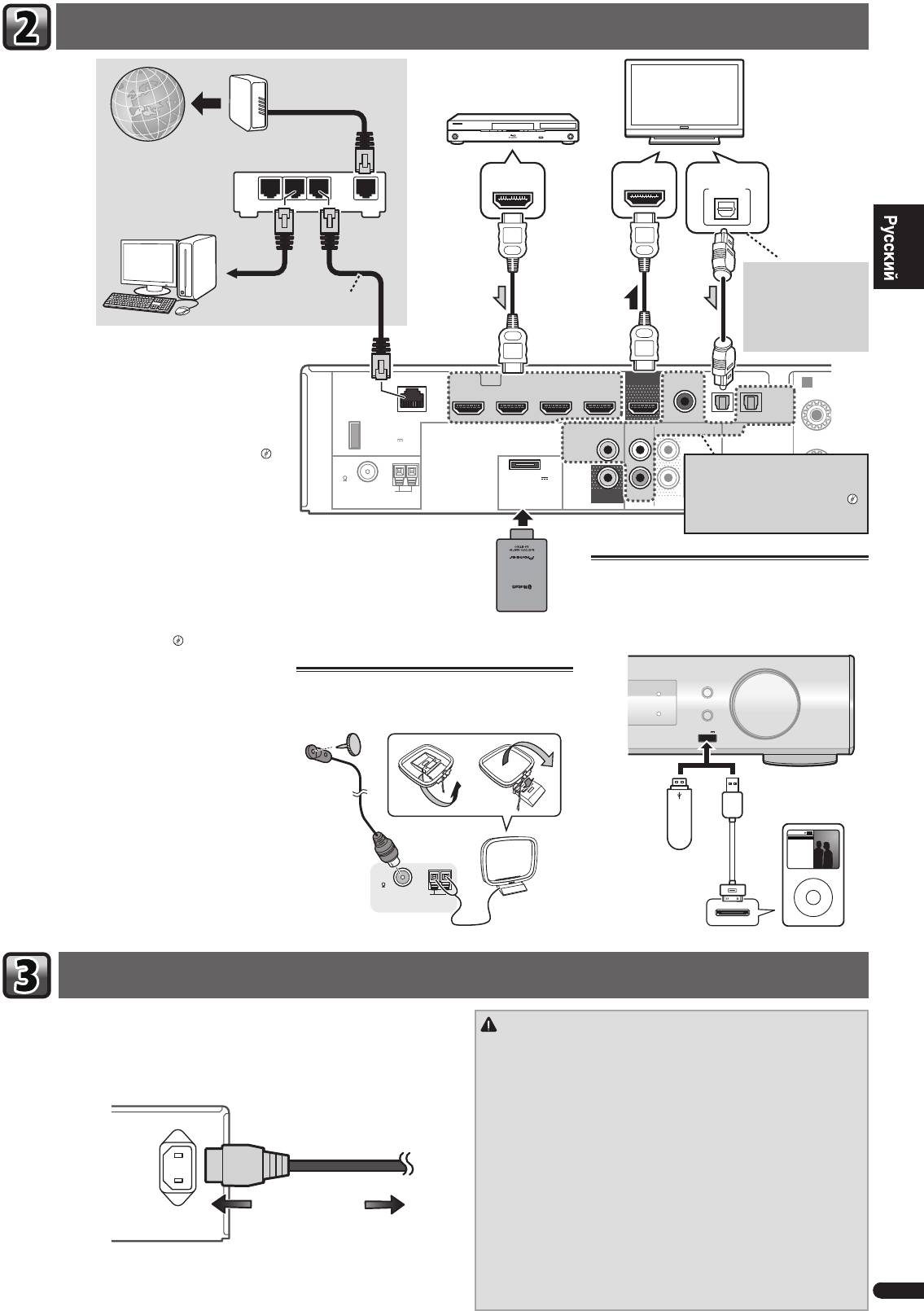
Подключение ресивера к электророзетке
3
Ru
R
Модем
Компоненты, совместимые с HDMI/DVI
(Проигрыватель Blu-ray Disc, и др.)
Телевизор, совместимый с
HDMI/DVI
Интернет
HDMI OUT
HDMI IN
DIGITAL AUDIO OUT
OPTICAL
LAN
Маршрутизатор
321
WAN
Если телевизор не
поддерживает функцию
к порту LAN
возвратного аудиоканала
LAN кабель
через HDMI, данное
(продается отдельно)
подключение требуется для
прослушивания звучания
телевизора через ресивер.
При наличии компонента с интерфейсом HDMI или
DVI (с HDCP) (проигрыватель Blu-ray Disc, и др.), его
A
можно подключить к данному ресиверу с помощью
R
имеющегося в продаже кабеля HDMI.
Если телевизор и компоненты воспроизведения
поддерживают функцию Control по HDMI, можно
использовать обычные функции Control по HDMI.
«Управление по HDMI»
Если устройство, которое необходимо
подключить, не имеет выходного
•
Следующее подключение/настройка требуется для
терминала HDMI, его можно
прослушивания звучания телевизора через ресивер.
подключить через эти терминалы.
–
Если телевизор не поддерживает функцию
«Подключение проигрывателя DVD без
выхода HDMI»
возвратного аудиоканала через HDMI, подключите
ресивер и телевизор через аудиокабели (как
показано).
–
Если телевизор поддерживает функцию
АДАПТЕР Bluetooth®
Подключение iPod/iPhone или устройства
возвратного аудиоканала через HDMI, звук с
для модели AS-BT100
USB
телевизора вводится в ресивер через терминал
или AS-BT200 (продается
отдельно)
Переключите ресивер в режим ожидания и затем
HDMI, поэтому нет необходимости подсоединять
подключите iPod/iPhone или устройство USB к разъему
а
удиокабель. В
таком случае, установите параметр
iPod iPhone USB на передней панели.
ARC
в HDMI Setup на ON.
«HDMI Setup»
AUDIO/ VIDEO MULTI-CHANNEL RECEIVER
VSX
-S500
Подключение антенн
INPUT SELECTOR
MCACC
Подключите проволочную антенну FM и рамочную
DIRECT CONTROL
iPod iPhone
MASTER
Обратитесь к Инструкции по эксплуатации на диске CD-
HDMI
VOLUME
ROM для получения инструкций по подключению и
антенну АМ, как показано ниже.
USB
iPod iPhone
настройке АДАПТЕРА Bluetooth и по воспроизведению
5 V
1
A
музыки.
Запоминающее
iPod/iPhone
устройство
большой
Music
Genius >
Bluetooth® (слово и логотипы) является
Playlists
емкости USB
Artists
Albums
Songs
зарегистрированным товарным знаком и принадлежит
Radio
Genres
Audiobooks
Composers
компании Bluetooth SIG, Inc.; использование PIONEER
FM
UNBAL
CORPORATION этих товарных знаков разрешено
Кабель USB (для
MENU
75
соответствующей лицензией. Прочие товарные знаки и
AM LOOP
подключения iPod)
ANTENNA
торговые наименования принадлежат соответствующим
владельцам.
Включайте вилку в сеть только после подключения к ресиверу всех устройств (включая
ПРЕДУПРЕЖДЕНИЕ
громкоговорители).
•
Держите кабель питания за вилку. Вынимая вилку из электророзетки,
1
Вставьте разъем кабеля питания, входящего в комплект поставки, в гнездо
никогда не тяните за сам кабель, никогда не дотрагивайтесь до кабеля
AC IN на задней панели ресивера.
питания влажными руками, так как это может стать причиной короткого
2
Вилку кабеля питания вставьте в розетку электросети.
замыкания и поражения электрическим током. Не ставьте на кабель
питания устройство, мебель или другие предметы и не зажимайте его
к
аким-либо иным
образом. Запрещается завязывать узлы на кабеле
AC IN
питания или связывать его с другими кабелями. Кабели питания следует
прокладывать в таких местах, где возможность наступить на них будет
маловероятной. Поврежденный кабель питания может стать причиной
возгорания или поражения электрическим током. Периодически
проверяйте кабель питания. Если кабель питания поврежден, обратитесь
за сменным к
абелем в б
лижайший уполномоченный независимый сервис-
центр Pioneer.
К сетевой розетке
•
Используйте только кабель питания, входящий в комплект поставки
данного устройства.
•
Используйте прилагаемый кабель питания только по его прямому
назначению, как описано ниже.
•
Когда ресивер не используется (например, во время отпуска), его следует
отключать от питания, вынув вилку из розетки электросети.
VSX-S500SYXCNQSG設変book.indb3VSX-S500SYXCNQSG設変book.indb3 2012/04/2314:40:112012/04/2314:40:11
Основная настройка
Отмена функции Auto Power Down (автоматическое отключение
Отмена режима демонстрации дисплея
питания)
Когда ресивер не работает, дисплей на передней панели показывает различную
Если данный ресивер не используется в течение нескольких часов, произойдет
информацию (режим демонстрации дисплея).
автоматическое отключение питания. Таймер автоматического отключения питания
Вы можете отключить режим демонстрации дисплея.
«Меню FL Demo Mode
по заводским настройкам установлен на шесть часов, и настройку времени можно
(режим демонстрации)»
изменить или можно совсем выключить функцию отключения питания.
«Меню
•
Режим демонстрации отменяется автоматически, когда выполняется
Auto Power Down (автоматическое отключение питания)»
автоматическая настройка MCACC (см. ниже).
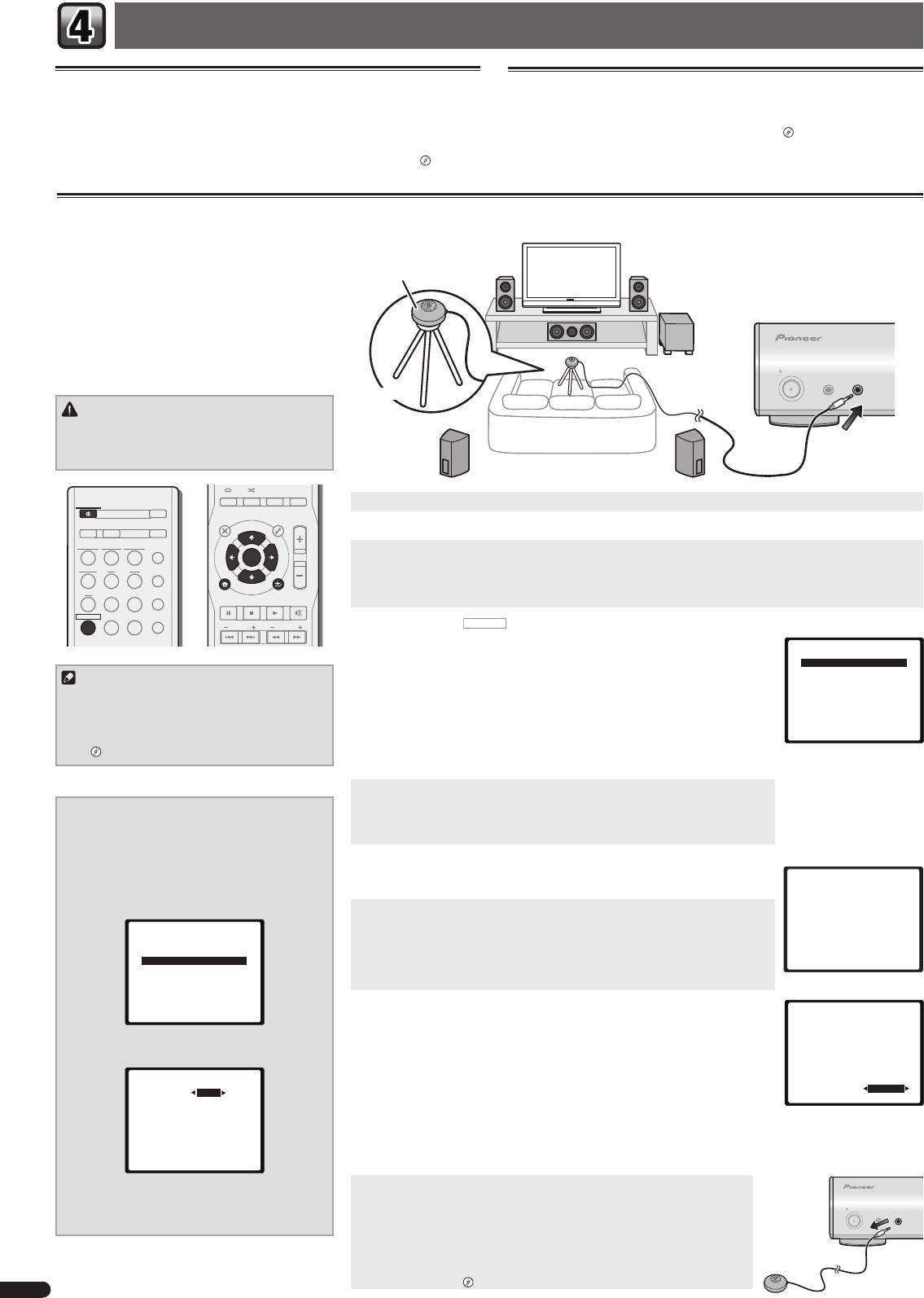
Автоматическая настройка объемного звучания (MCACC)
Автоматическая настройка многоканальной
акустической калибровки (MCACC) определяет
акустические характеристики помещения,
Микрофон
предназначенного для прослушивания, с учетом
внешних шумов, размера громкоговорителей и
расстояния до них и измеряет как задержку, так и
уровень сигнала в канале. С ее помощью ресивер
по
лучает информацию от ряда тестовых звуковых
сигналов и на ее основе выбирает оптимальные
параметры громкоговорителей и коррекции сигнала,
STANDBY/ON
наиболее подходящие для конкретного помещения.
MCACC
PORTABLE
SETUP
/
MICPHONES
Штатив
ПРЕДУПРЕЖДЕНИЕ
•
Тестовые сигналы, издаваемые системой
автоматической настройки MCACC, имеют
высокую громкость.
AUDIO DISP
SLEEP SP-AB
DIMMER
STATUS
1
Включите ресивер и используемый телевизор.
STANDBY/ON
ECO
TOP
MENU
MENU
TOOLS
VOL
D AUX A AUX
S.RTRV
2
Переключите вход телевизора таким образом, чтобы он подключался к ресиверу.
iPod
USB
NETWORK
ADAPTER
AUTO
/
DIRECT
3
Подключите микрофон в гнездо MCACC SETUP MIC на передней панели.
ENTER
Проверьте, нет ли препятствий между громкоговорителями и микрофоном.
TUNER BD DVD
ALC
/
STANDARD
iPod
Если у вас есть штатив, используйте его для установки микрофона приблизительно на уровне уха в обычной точке
CTRL
CD
STB GAME
ADV
SURR
HOME MENU
RETURN
прослушивания. Иначе установите микрофон на уровне уха, используя стол или стул.
PTY
BAND MUTE
RECEIVER
TV
PORTABLE
SOUND
WING
PRESET
TUNE
4
Нажмите кнопку
RECEIVER
(РЕСИВЕР) на пульте дистанционного управления, после чего нажмите
кнопку HOME MENU.
Home Menu
На телевизоре появляется Home Menu (главное меню). Для перехода между экранами
1.Auto MCACC
и выделения пунктов меню используйте кнопки
и
ENTER
на пульте
2.Manual SP Setup
Примечание
дистанционного управления. Нажмите кнопку
RETURN
(ВОЗВРАТ) для выхода из
3.Pre Out Setting
4.Input Assign
•
Настройка расстояния до низкочастотного
текущего меню.
5.Video Parameter
6.HDMI Setup
громкоговорителя может быть больше
•
Так как громкоговорители S-HV600B/S-HV500-LR/S-SL100-LR/S-SL100CR
7.Auto Power Down
8.FL Demo Mode
фактического расстояния от точки прослушивания.
сконструированы как компактные сателлитные громкоговорители, то для получения
В этом случае выполните настройки вручную.
полного низкого звука рекомендуется их использовать в сочетании с низк
очастотным
«Расстояние до громкоговорителей»
громкоговорителем
. В этом случае установите значение
X.OVER
на 200 Hz (см.
«Изменение настройки X.OVER» на этой странице).
5
Выберите «Auto MCACC» в Home Menu, затем нажмите ENTER.
•
Mic In!
мигает, если микрофон не подключен к гнезду MCACC SETUP MIC.
Изменение настройки X.OVER
После нажатия кнопки
ENTER
старайтесь соблюдать тишину. Система сгенерирует
Для громкоговорителей S-HV600B/S-HV500-LR/
ряд тестовых звуковых сигналов, чтобы определить уровень внешних шумов.
S-SL100-LR/S-SL100CR
1
Выберите «Manual SP Setup» в Home Menu,
6
Следуйте инструкциям, отображаемым на экране.
затем нажмите ENTER.
•
При использовании активного низкочастотного громкоговорителя проверьте, что
1.Auto MCACC
сабвуфер включен и что громкость звука включена.
Now Analyzing
2
Выберите «X.OVER» в Manual SP Setup,
затем нажмите ENTER.
7
Для завершения дождитесь тестовых звуковых сигналов.
Environment Check
Ambient Noise
Когда ресивер издает тестовые звуковые сигналы, чтобы определить, какие
Speaker YES/NO
2.Manual SP Setup
громкоговорители установлены в системе, на экране отображается сообщение о
a.Speaker System
b.Speaker Setting
состоянии. Во время звучания этих сигналов старайтесь соблюдать тишину.
Return
c.X.OVER
d.Channel Level
•
Для обеспечения правильности настроек громкоговорителей не регулируйте
e.Speaker Distance
громкость во время тестовых звуковых сигналов.
8
Подтвердите конфигурацию громкоговоритеей.
1.Auto MCACC
Return
Конфигурация, показанная на экране, должна соответствовать фактическому набору
Check!
громкоговорителей.
Front
[ YES ]
3
Выберите значение «200 Hz» для частоты
•
В случае появления сообщений об ошибках (таких как
Too much ambient noise
Center
[ YES ]
среза.
Surr
[ YES ]
(Слишком высокий уровень фонового шума)), выберите
RETRY
после проверки
Surr. Back
[
---
]
Subwoofer
[ YES ]
2c.X.OVER
фонового шума.
Frequency 200Hz
Если конфигурация громкоговорителей отображается неправильно, используйте кнопки
OK
10:Next
Return
, чтобы выбрать громкоговоритель, и
, чтобы изменить настройку. По
окончании перейдите к следующему пункту.
Возникновение сообщения об ошибке (
ERR
) в правом столбце может означать неполадку в подключении
громкоговорителя. Если неполадка не устраняется при выборе пункта
RETRY
, отключите питание и проверьте
Return
подключение громкоговорителей.
9
Автоматическая настройка многоканальной акустической
4
По завершении нажмите два раза RETURN
калибровки (MCACC) завершена! Вы возвращаетесь в Home Menu
(ВОЗВРАТ).
(главное меню).
STANDBY/ON
MCACC
PORTABLE
SETUP
/
MICPHONES
Вы возвращаетесь в «Home Menu» (главное меню).
Убедитесь, что установочный микрофон отсоединен.
Параметры, настроенные с помощью Auto MCACC (автоматической настройки
MCACC), должны обеспечивать превосходное объемное звучание системы, но
эти параметры также можно настроить вручную с помощью ручной настройки
громкоговорителей.
«Ручная настройка громкоговорителей»
4
Ru
VSX-S500SYXCNQSG設変book.indb4VSX-S500SYXCNQSG設変book.indb4 2012/04/2314:40:122012/04/2314:40:12
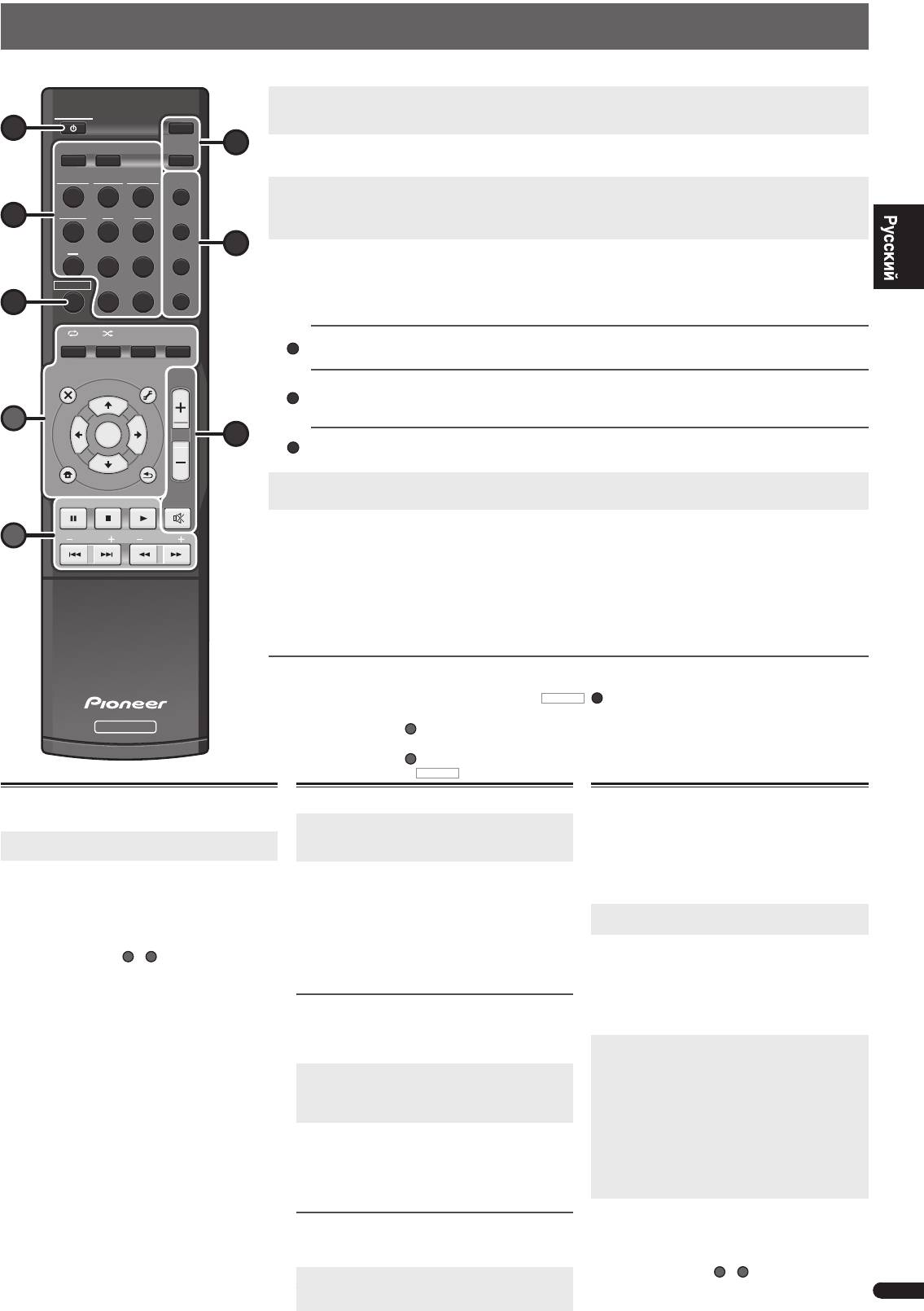
English
Основные операции воспроизведения
В данном разделе приведены основные инструкции по воспроизведению источника (например, Blu-ray Disc) с помощью системы домашнего кинотеатра.
1
Включите компоненты системы и ресивер.
Сначала включите аппаратуру для воспроизведения (например, Проигрыватель Blu-ray Disc), используемый телевизор и
STANDBY/ON
Français
низкочастотный громкоговоритель (если имеется), затем - ресивер (нажмите
STANDBY/ON
).
1
ECO
D AUX A AUX
S.RTRV
6
2
Переключите вход телевизора на вход для подключения к данному ресиверу.
Например, при подключении данного ресивера к гнездам
VIDEO
на телевизоре, убедитесь, что выбран вход
VIDEO
.
iPod
USB
NETWORK
ADAPTER
AUTO
/
DIRECT
3
Нажмите кнопки функций входа для выбора функции входа, которую требуется воспроизвести.
•
Вход ресивера будет переключаться, и можно будет работать с другими компонентами с помощью пульта ДУ.
TUNER BD DVD
ALC
/
3
STANDARD
•
Входной источник можно также выбрать с помощью кнопки
INPUT SELECTOR
на передней панели. В таком случае,
с помощью пульта ДУ невозможно переключать рабочие режимы.
CD
STB GAME
ADV
4
SURR
4
Нажмите AUTO/DIRECT для выбора пункта «AUTO SURR» и начните воспроизведение источника.
Если воспроизводится диск Blu-ray/DVD с объемным звучанием в формате Dolby Digital или DTS, с цифровым
RECEIVER
TV
PORTABLE
SOUND
WING
аудиоподключением, звучание должно быть объемным. Если воспроизводится стереофонический источник, или если
выполняется подключение аналогового аудио, в режиме прослушивания по умолчанию звучание будет воспроизводиться
7
через передние правый и левый громкоговорители.
Italiano
AUDIO
DISP
ALC
/
SLEEP SP-AB
DIMMER
STATUS
STANDAR
Прослушивание в режиме стандартного объемного звучания
Данный ресивер обеспечивает базовое объемное звучание для стерео и многоканальных источников.
TOP
MENU
MENU
TOOLS
VOL
Прослушивание в режиме расширенного объемного звучания
Эффекты дополнительного объемного звучания можно использовать для получения дополнительных эффектов
Nederlands
объемного звучания.
A
ENTER
5
Прослушивание в режиме Sound Wing
Громкоговорители HVT позволяют насладиться звучанием в более широком диапазоне.
iPod
CTRL
5
Для регулировки уровня громкости используйте регулятор VOL +/–.
HOME MENU
RETURN
•
Звук можно отключить, нажав кнопку
MUTE
.
PTY
BAND MUTE
Español
6
Наслаждайтесь разнообразием звуков.
B
PRESET
TUNE
Нажмите ECO для выбора режима Ecology.
•
Выберите режим Ecology для стереофонического воспроизведения (макс. 2.1-канального), чтобы обеспечить снижение
потребляемой мощности максимум до половины нормального уровня.
Нажмите кнопку S.RTRV для включения или выключения функции восстановления звучания.
•
Если аудиоданные были удалены во время процесса сжатия, качество звука часто отличается неравномерностью
Deutsch
звукового поля. В функции Sound Retriever (Восстановление звучания) используется новая технология DSP, которая
помогает восстановить качество звучания диска CD для 2-канального звука путем восстановления сжатого звука и
сглаживания искажений, сохранившихся после сжатия.
Другие функции пульта дистанционного управления
•
Переключитесь на одно из подчеркнутых устройств, чтобы использовать пульт ДУ для работы на этом устройстве.
Для управления ресивером сначала нажмите кнопку
RECEIVER
(
7
)
, затем нажмите соответствующую кнопку для
управления.
RECEIVER
Используйте кнопки
A
для регулирования настроек данного ресивера и управления другими
устройствами.
Используйте кнопки
B
для управления другими устройствами. Операции еще возможны даже
после нажатия кнопки
RECEIVER
.
Воспроизведение iPod или устройства
Прослушивание радиопередач
USB
1
Нажмите TUNER для выбора тюнера.
1
Переключите вход телевизора на вход для
При необходимости, нажмите кнопку
BAND
для
подключения к данному ресиверу.
изменения диапазона (FM или AM),
2
Нажмите iPod USB для выбора входа iPod
2
Нажмите кнопки
TUNE+/–
(или
) для
USB.
настройки на радиостанцию.
•
Нажмите и удерживайте кнопки
TUNE+/–
(или
)
Отображается
PLEASE WAIT CONNECTING
, когда
в течение примерно секунды. Ресивер начнет поиск
данный ресивер начинает распознавание подключенного
следующей радиостанции.
iPod/iPhone или устройства USB.
Если вы слушаете FM-радиостанцию, но принимаемый
•
Некоторые из кнопок
A
и
B
можно использовать для
сигнал слаб, нажмите
BAND
, чтобы выбрать
FM MONO
,
основного воспроизведения файлов, сохраненных на
и переключите ресивер в режим монофонического приема.
iPod/iPhone или устройствах USB.
Сохранение запрограммированных радиостанций
Если Вы хотите слушать конкретную радиостанцию, то
удобно, чтобы ресивер сохранил частоту для быстрого
поиска в любое необходимое время.
1
Нажмите кнопку TOOLS во время приема
сигнала от радиостанции, которую требуется
занести в память.
Мигает заданное число.
2
Нажмите кнопки PRESET+/– (или
)
для выбора нужной предустановленной
радиостанции, затем нажмите ENTER.
Запрограммированный номер перестает мигать, и
ресивер сохраняет данные радиостанции.
Прослушивание предустановленных станций
Для этого в ресивере должно быть сохранено несколько
запрограммированных станций.
©PIONEER CORPORATION, 2012.
Нажимайте кнопки PRESET+/– (или
)
Все права защищены.
this.
для выбора нужной запрограммированной
5
радиостанции.
Ru
D
ADV
SURR
SOUN
D
WING
Воспроизведение с функцией NETWORK
Данный ресивер оборудован терминалом LAN и,
подключив компоненты к данным терминалам, можно
воспользоваться следующими функциями.
•
Прослушивание Интернет-радиостанций
•
Воспроизведение музыкальных файлов, сохраненных
на компьютере
1
Переключите вход телевизора на вход для
подключения к данному ресиверу.
2
Нажмите NETWORK для выбора входа
NETWORK.
До доступа к сети, данному ресиверу может
потребоваться несколько секунд. Появляется главное
меню, когда в качестве функции входа выбирается
NETWORK
.
3
С помощью
, выберите категорию для
воспроизведения, и затем нажмите ENTER.
Выберите категорию из следующего списка:
•
Now Playing
– Отображение текущего статуса и
информации о радиостанции.
•
Internet Radio
– Прослушивание Интернет-
радиостанций SHOUTcast через сеть.
•
Music Library
– Воспроизведение музыкальных
файлов, сохраненных на компьютере.
•
Favorites
– Любимые песни, зарегистрированные в
данный момент
4
С помощью
, выберите папку,
музыкальные файлы или Интернет-
радиостанцию для воспроизведения, и
затем нажмите ENTER.
•
Некоторые из кнопок
A
и
B
можно использовать
для основного воспроизведения музыкальных
файлов, сохраненных на компонентах в сети.
VSX-S500SYXCNQSG設変book.indb5VSX-S500SYXCNQSG設変book.indb5 2012/04/2314:40:142012/04/2314:40:14
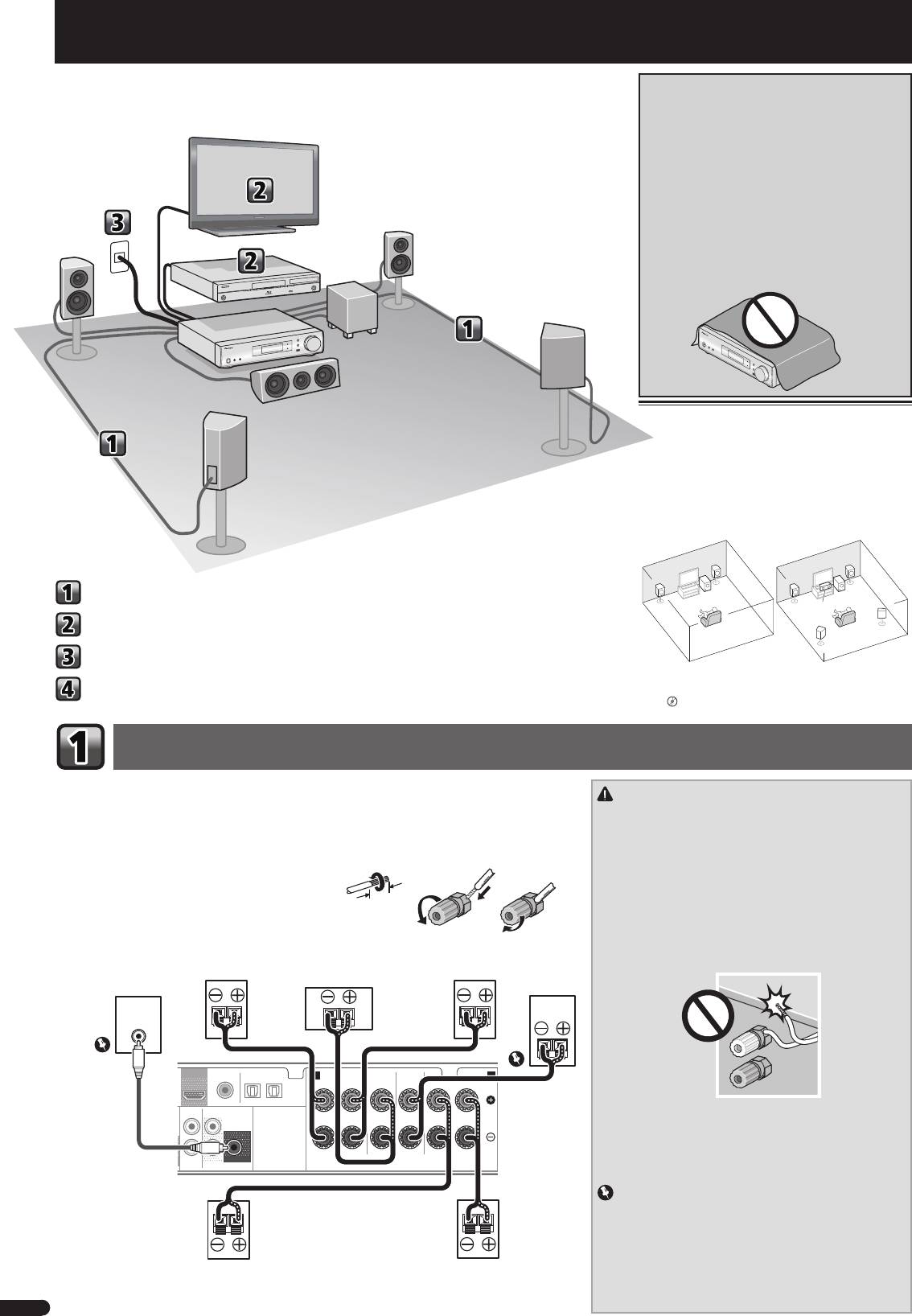
Italiano
Flusso delle impostazioni del ricevitore
AVVERTENZA PER LA VENTILAZIONE
Installare l’apparecchio avendo cura di lasciare un
certo spazio all’intorno dello stesso per consentire una
adeguata circolazione dell’aria e migliorare la
dispersione del calore (almeno 10 cm sulla parte
superiore, 5 cm sul retro, e 5 cm su ciascuno dei lati).
ATTENZIONE
L’apparecchio è dotato di un certo numero di fessure e
di aperture per la ventilazione, allo scopo di garantirne
un funzionamento affidabile, e per proteggerlo dal
surriscaldamento. Per prevenire possibili pericoli di
incendi le aperture non devono mai venire bloccate o
coperte con oggetti vari (quali giornali, tovaglie, tende o
tendaggi, ecc.), e l’apparecchio non deve essere
utilizzato appoggiandolo su tappeti spessi o sul letto.
D3-4-2-1-7b*_A1_It
Posizionamento degli altoparlanti
Il ricevitore funziona anche con due soli altoparlanti
stereo (gli altoparlanti anteriori dello schema); si con-
siglia tuttavia di utilizzare almeno tre altoparlanti. Una
configurazione completa risulta ottimale per il suono
surround.
Per ottenere il miglior suono surround possibile, instal-
lare gli altoparlanti come segue.
Sistema surround a 2.1 canali: Sistema surround a 5.1 canali:
R
R
L
L
Collegamento degli altoparlanti
SW
SW
C
Connettere una TV e componenti playback
SR
SL
Collegamento del ricevitore
• Inoltre, è possibile connettere gli altoparlanti sur-
Impostazioni di base
round posteriori, quelli alti e gli altoparlanti B.
“Connettete l’altoparlante surround o posteriore
o l’alto anteriore”
Collegamento degli altoparlanti
Assicuratevi di connettere l’altoparlante a destra al terminale destro (R) e quello a sinistra al terminale si-
nistro (L). Inoltre, assicurarsi che i terminali positivo e negativo (+/–) del ricevitore corrispondano a quelli
ATTENZIONE
degli altoparlanti.
• I terminali degli altoparlanti sono sotto tensione, la stessa
PERICOLOSA
tensione della corrente di rete. Per prevenire
È possibile utilizzare altoparlanti con una normale impedenza compresa tra 4
Ω
e 16
Ω
.
rischi di folgorazioni nel corso delle operazioni di collega-
Collegamenti a fi li nudi
mento o di distacco dei cavi degli altoparlanti, staccare il
12 3
cavo di alimentazione principale prima di toccare qualsiasi
1
Attorcigliare i trefoli esposti.
parte non isolata.
2
Allentare il terminale e inserire il fi lo esposto.
• Assicurarsi che il filo nudo dell’altoparlante sia attorcigliato
e inserito completamente nel terminale dell’altoparlante.
3
Serrare il terminale.
Se la parte scoperta di un cavo dovesse entrare in contatto
con il pannello posteriore, può prodursi un’interruzione di
corrente per l’attivazione dell’interruttore differenziale.
• Evitate il contatto tra la parte centrale del cavo dell’altopar-
lante e il corpo del ricevitore.
OUT
OPTICAL
ANALOG
SURR BACK/
– Se la parte centrale del cavo dell’altoparlante entra in
AUX
FRONT HEIGHT
AUDIO
contatto con qualsiasi parte metallica del corpo del ricevi-
L
(
Single
)
tore potrebbe danneggiare gli altoparlanti e causare fumo
o incendiarsi.
Inserite i cavi dell’altoparlante in modo sicuro nei termina-
IN
R
SUBWOOFER
PRE OUT
SPEAKERS
li e controllate che il cavo non possa fuoriuscire facilmen-
te.
Importante
• I terminali degli SPEAKERS SUBWOOFER sono i terminali
di connessione subwoofer passivi S-SLW500 di Pioneer. Se
usate un altro modello di subwoofer, accertatevi di usare
un modello che comprenda un amplificatore incorporato e
connettetelo al terminale PREOUT SUBWOOFER.
• Si prega di connettere subwoofer passivi o amplificati, poi-
ché se sono entrambi connessi sarà impossibile ottenere il
giusto effetto sonoro.
2
It
G
Questa unità è un potente ricevitore AV dotato di molte
funzioni e molti terminali. Può venire usato senza diffi-
TV
coltà dopo aver eseguito la procedura seguente per fare
i collegamenti e le impostazioni.
L
Sinistro anteriore
Lettore Blu-ray Disc R
Destro anteriore
SW
Subwoofer
Questo ricevitore
C
Centro
SR
Destro surround
SL
Sinistro surround
10 mm
Subwoofer
Destro anteriore
Centro
Sinistro anteriore
Subwoofer
alimentato
S-SLW500
LINE LEVEL
INPUT
COAXIAL
A
FRONT
CENTER
SUBWOOFER/
SURROUND
/
SURR BACK
B
RL
RL
CD IN TV IN
DIGITAL AUX IN
R Bi-Amp L
Completate tutti i
collegamenti prima di
collegare quest’unità
alla presa d’alimenta-
Destro
zione CA.
Sinistro
surround
surround
VSX-S500SYXCNQSG設変book.indb2VSX-S500SYXCNQSG設変book.indb2 2012/04/2314:40:162012/04/2314:40:16
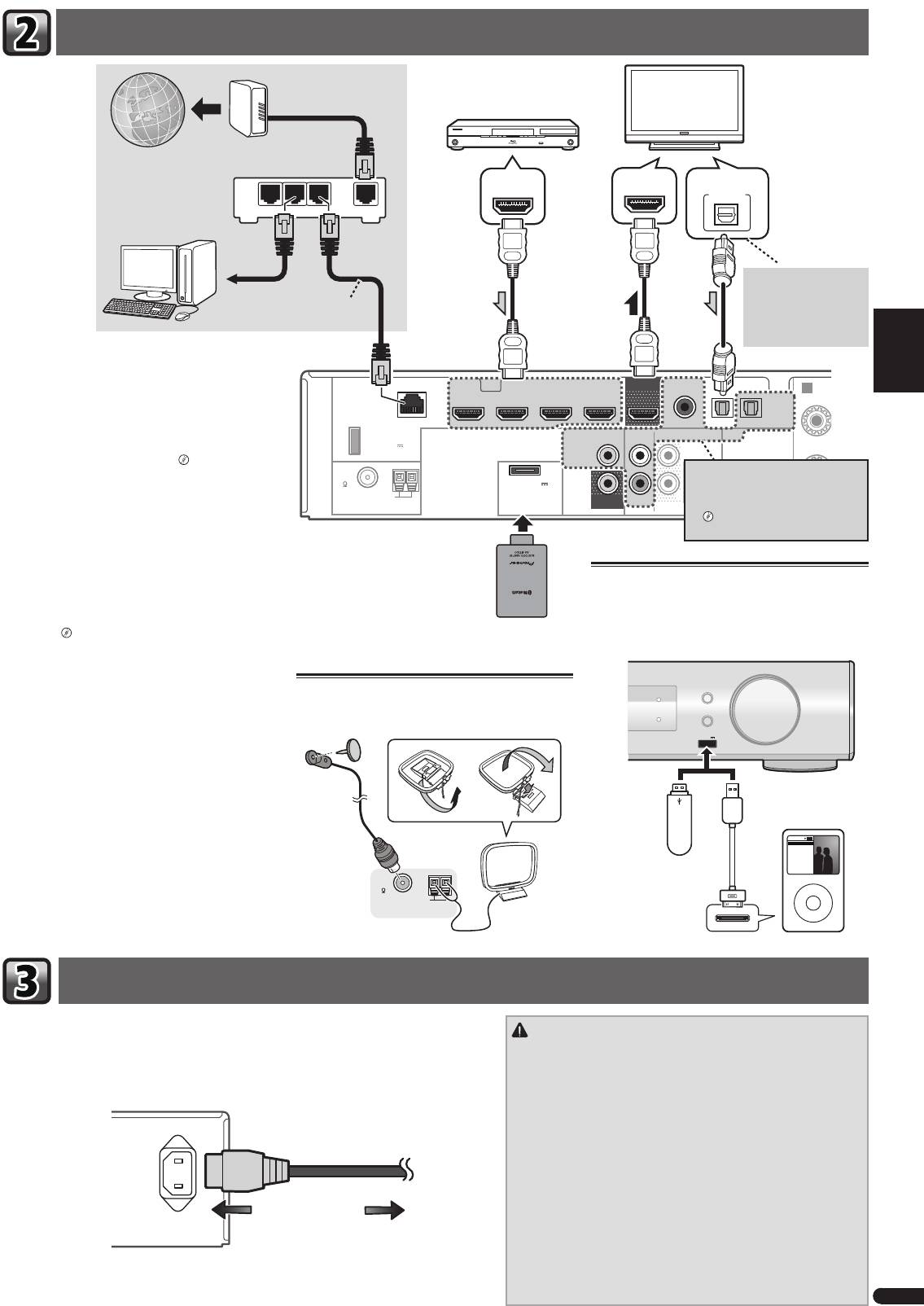
English
Connettere una TV e componenti playback
Français
Italiano
LAN
(
10/100
)
STB IN GAME INBD/BDR IN
DVD / DVR IN
OUT
COAXIAL
F
OPTICAL
Nederlands
HDMI
CD IN
TV IN
DIGITAL AUX IN
DC OUTPUT
for WIRELESS LAN
VIDEO
(
ANALOG
ANALOG
SURR BACK/
)
AUDIO
AUX
AUX
FRONT HEIGHT
(
OUTPUT 5 V
ASSIGNABLE
0.6 A MAX
)
L
IN
(
Single
)
FM
UNBAL
75
(
OUTPUT 5 V
0.1 A MAX
)
AM LOOP
MONITOR
R
IN
SUBWOOFER
ADAPTER PORT
OUT
PRE OUT
Español
Deutsch
Collegamento del ricevitore
3
It
R
Modem
Componenti compatibili HDMI/DVI
(Blu-ray Disc, ecc.)
TV compatibile HDMI/DVI
Internet
HDMI OUT
HDMI IN
DIGITAL AUDIO OUT
OPTICAL
LAN
Router
321
WAN
Se la TV non supporta
la funzione HDMI Audio
ad una porta
Cavo LAN
Return Channel, questa
LAN
(venduto
connessione è indispensa-
separatamente)
bile per ascoltare il suono
della TV dal ricevitore.
Se si dispone di un componente dotato di funzionalità
HDMI o DVI (con HDCP) (lettore di Blu-ray Disc o altro),
A
sarà possibile collegarlo a questo ricevitore utilizzando
R
un cavo HDMI reperibile in commercio.
Se le componenti della TV e di riproduzione supporta-
no il Control con funzioni HDMI, il Control adatto con
funzioni HDMI può essere usato.
“Control con la
funzione HDMI”
Se l’apparecchio che desiderate
collegare non possiede un terminale di
• La seguente connessione/impostazione è richiesta
uscita HDMI, la connessione può essere
per ascoltare il suono della TV da questo ricevitore.
eseguita attraverso questi terminali.
– Se la TV non supporta la funzione HDMI Audio
“Collegamento di un lettore DVD
privo di ingressi HDMI”
Return Channel, connettete il ricevitore e la TV ai
cavi audio (come mostrato).
– Se la TV supporta la funzione HDMI Audio Return
Channel, il suono della TV viene immesso al rice-
Bluetooth®
Connettere l’iPod/iPhone con un disposi-
vitore attraverso il terminale HDMI, in modo che
ADAPTER AS-BT100 e
tivo USB
non sia necessario connettersi a un cavo audio. In
AS-BT200 (venduti separa-
questo caso, impostate
ARC
nel HDMI Setup su
tamente)
Commutare il ricevitore in stand-by, poi connettere
ON.
l’iPod/iPhone o il dispositivo USB al terminale del pan-
“HDMI Setup”
nello frontale.
AUDIO/ VIDEO MULTI-CHANNEL RECEIVER
VSX
-S500
INPUT SELECTOR
Collegamento delle antenne
MCACC
Vedi le Istruzioni per l’uso in CD-ROM per come con-
Connettete un’antenna FM a cavo e la loop antenna AM
iPod iPhone
MASTER
nettere e impostare il Bluetooth ADAPTER e per come
HDMI
DIRECT CONTROL
VOLUME
riprodurre la musica.
come mostrato qui sotto.
USB
iPod iPhone
5 V
1
A
Dispositivo di
iPod/iPhone
memorizzazione
di massa USB
Music
Genius >
Artists
Playlists
Il marchio nominale e il logo Bluetooth® sono marchi
Songs
Albums
Radio
Genres
Audiobooks
Composers
registrati di proprietà di Bluetooth SIG, Inc. e sono utiliz-
FM
zati in licenza da PIONEER CORPORATION. Tutti gli altri
UNBAL
Cavo USB (per connes-
MENU
75
AM LOOP
sione iPod)
marchi registrati e marchi nominali sono marchi dei
ANTENNA
rispettivi proprietari.
Procedere al collegamento solo dopo aver connesso al ricevitore tutti i componenti, ivi compre-
ATTENZIONE
si gli altoparlanti.
• Maneggiare il cavo di alimentazione dal lato della spina. Non estrar-
1
Collegare il cavo di alimentazione fornito alla presa AC IN sul retro del ricevitore.
re la spina tirando il cavo e non toccare mai il cavo d’alimentazione
2
Inserire l’altra estremità in una presa di corrente.
con le mani bagnate, altrimenti si può verificare un corto circuito
o scosse elettriche. Non appoggiare l’apparecchio, mobili o altri
oggetti sul cavo di alimentazione, né comprimerlo in alcun modo.
Non fare mai nodi al cavo, né legarlo ad altri cavi. Far passare i
AC IN
cavi d’alimentazione in modo tale che non sia possibile calpestarli.
Un cavo d’alimentazione danneggiato può causare un incendio o
folgorazione. Controllare il cavo d’alimentazione ogni tanto. Se si
dovesse trovare il cavo danneggiato, rivolgersi al più vicino centro
di assistenza autorizzato Pioneer per richiederne la sostituzione.
• Utilizzare solo ed esclusivamente il cavo di alimentazione fornito
con questo apparecchio.
All’uscita di corrente
• Utilizzare il cavo di alimentazione fornito solo ed esclusivamente al
fine descritto qui di seguito.
• Quando si prevede di non utilizzare il ricevitore per un certo tempo,
ad esempio se si va in vacanza, staccare la spina dalla presa a
muro.
VSX-S500SYXCNQSG設変book.indb3VSX-S500SYXCNQSG設変book.indb3 2012/04/2314:40:182012/04/2314:40:18
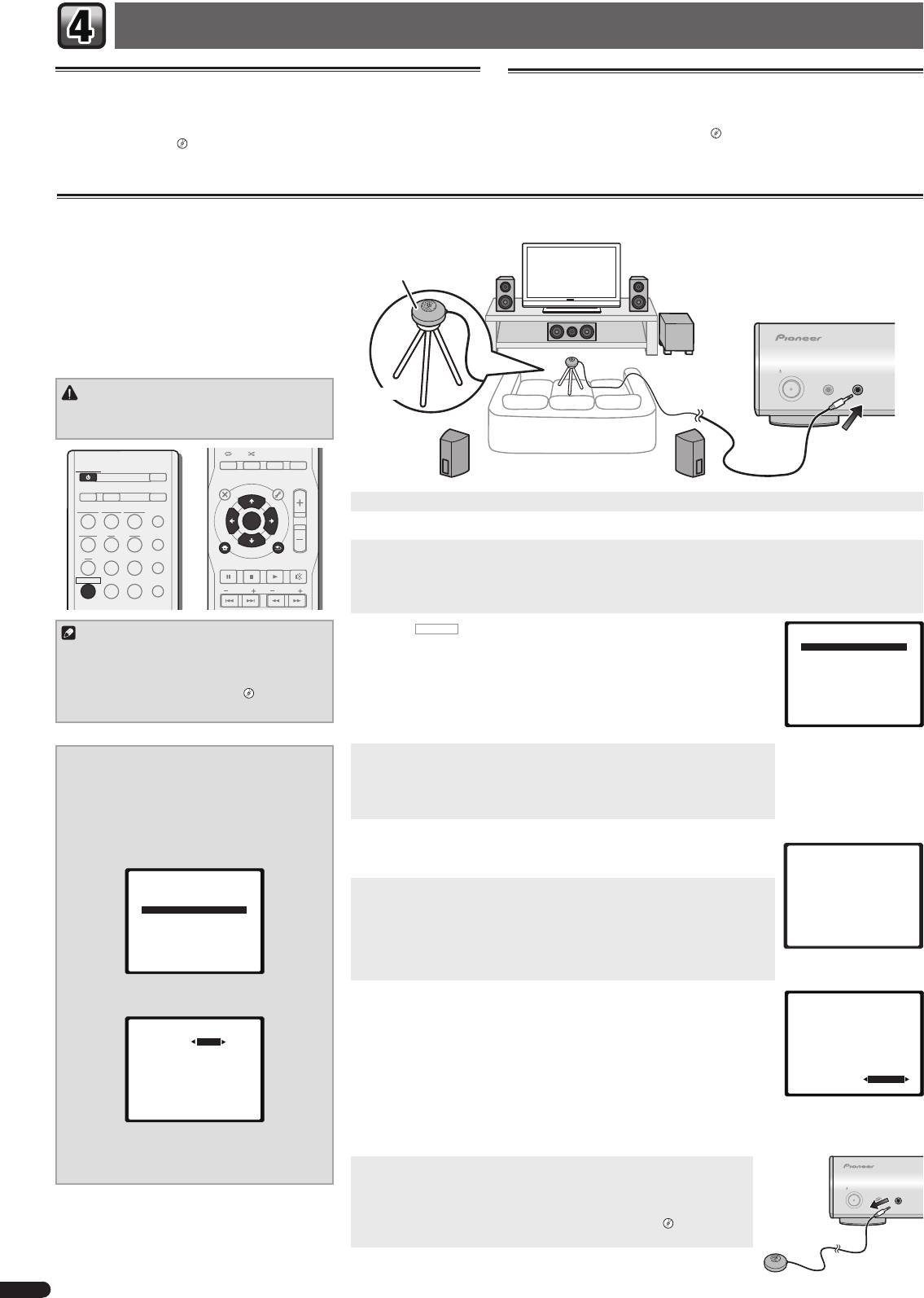
Impostazioni di base
Annullare lo Spegnimento Automatico
Annullare la schermata demo
Se il ricevitore non viene usato per diverse ore, si spegnerà automaticamente. Il timer
Lo schermo sul pannello frontale mostra diverse informazioni (schermata demo) se
di spegnimento automatico è fissato su sei ore secondo le impostazioni di fabbrica e
il ricevitore non è in funzione.
il periodo può essere cambiato oppure la funzione di spegnimento può essere elimi-
Si può disattivare la schermata demo.
“Il menù Modalità Demo FL”
nata completamente.
“Il menù Spegnimento Automatico”
• La modalità demo viene annullata automaticamente quando si esegue l’impo-
stazione Auto MCACC (vedi qui sotto).
Impostazione automatica del suono surround (MCACC)
L’impostazione del sistema automatico di calibratura
acustica multicanale (MCACC) misura le caratteristiche
acustiche dell’area di ascolto, prendendo in considera-
Microfoni
zione il rumore ambientale, la dimensione e la distanza
degli altoparlanti e i test per il ritardo e il livello dei
canali. Dopo aver impostato il microfono in dotazione
con il sistema, il ricevitore utilizza le informazioni di
una serie di toni di prova per ottimizzare le impostazioni
degli altoparlanti e l’equalizzazione per la stanza in
questione.
STANDBY/ON
MCACC
PORTABLE
SETUP
/
MICPHONES
ATTENZIONE
Treppiede
• I toni di prova utilizzati nell’impostazione Auto
MCACC vengono emessi a volume elevato.
AUDIO DISP
SLEEP SP-AB
DIMMER
STATUS
STANDBY/ON
ECO
TOP
MENU
MENU
TOOLS
VOL
D AUX A AUX
S.RTRV
1
Accendere il ricevitore e il televisore.
iPod
USB
NETWORK
ADAPTER
AUTO
/
DIRECT
ENTER
TUNER BD DVD
ALC
/
2
Commutate l’entrata della TV in modo che sia connessa al ricevitore.
STANDARD
iPod
CTRL
3
Collegare il microfono alla presa MCACC SETUP MIC sul pannello anteriore.
CD
STB GAME
ADV
SURR
HOME MENU
RETURN
PTY
BAND MUTE
Assicurarsi che non ci siano ostacoli tra gli altoparlanti ed il microfono.
RECEIVER
TV
PORTABLE
SOUND
WING
Se avete un treppiedi a disposizione, usatelo per posizionare il microfono in modo tale che sia all’altezza delle orec-
PRESET
TUNE
chie nella vostra normale posizione d’ascolto. Altrimenti, posizionare il microfono al livello dell’orecchio usando un
tavolo o una sedia.
Nota
4
Premere
RECEIVER
sul telecomando, poi premere il tasto HOME MENU.
Home Menu
L’Home Menu appare sulla vostra TV. Usare i tasti
e
ENTER
sul telecoman-
1.Auto MCACC
• Le impostazioni di distanza del subwoofer potreb-
2.Manual SP Setup
do per navigare attraverso le schermate e per selezionare le voci di menù. Premere
bero essere maggiori della distanza vera e propria
3.Pre Out Setting
RETURN
per uscire dal menu corrente.
4.Input Assign
dalla posizione di ascolto. In questo caso, eseguite
5.Video Parameter
• Poiché S-HV600B/S-HV500-LR/S-SL100-LR/S-SL100CR sono stati progettati con alto-
6.HDMI Setup
le impostazioni manualmente.
“Distanza
7.Auto Power Down
degli diffusori”
parlanti satellitari compatti, si consiglia di usarli in combinazione con un subwoo-
8.FL Demo Mode
fer per ottenere un suono pieno. In tal caso, impostate
X.OVER
su 200 Hz (vedere
“Cambiare le impostazioni di X.OVER” su questa pagina).
5
Scegliere ‘Auto MCACC’ da Home Menu, poi premere ENTER.
Cambiare le impostazioni di X.OVER
•
Mic In!
lampeggia se il microfono non è connesso a una presa jack
Per altoparlanti S-HV600B/S-HV500-LR/S-SL100-LR/S-
MCACC SETUP MIC.
SL100CR
Cercare di stare il più possibile in silenzio dopo aver premuto
ENTER
. Il sistema emet-
1
Scegliere ‘Manual SP Setup’ da Home Menu,
te una serie di test di prova per stabilire il livello di rumore ambientale.
poi premere ENTER.
6
Seguire le istruzioni visualizzate.
2
Scegliere ‘X.OVER’ da Manual SP Setup, poi
• Se state usando un subwoofer amplificato, accertatevi che il subwoofer e il volume
1.Auto MCACC
premere ENTER.
siano entrambi attivati.
Now Analyzing
2.Manual SP Setup
7
Attendere il completamento dell’emissione dei toni di prova.
Environment Check
a.Speaker System
Ambient Noise
b.Speaker Setting
Mentre il ricevitore emette i toni di prova per determinare gli altoparlanti presenti
Speaker YES/NO
c.X.OVER
d.Channel Level
nella configurazione in uso, sullo schermo viene visualizzato un rapporto sull’avanza-
e.Speaker Distance
mento delle operazioni. Mentre il sistema esegue queste attività, cercare di rimanere
Return
il più possibile in silenzio.
• Per una corretta impostazione degli altoparlanti, non regolare il volume durante
Return
l’emissione dei toni di prova.
3
Scegliere ‘200 Hz’ per il punto di frequenza
8
Confermare la confi gurazione degli altoparlanti.
1.Auto MCACC
limite massimo.
La configurazione visualizzata sullo schermo dovrebbe rispecchiare la configurazione
Check!
2c.X.OVER
effettiva degli altoparlanti in uso.
Front
[ YES ]
Center
[ YES ]
Frequency 200Hz
• In caso di messaggi di errore (come
Too much ambient noise
) selezionate
RETRY
Surr
[ YES ]
Surr. Back
[
---
]
dopo aver controllato il rumore ambientale.
Subwoofer
[ YES ]
Se la configurazione degli altoparlanti visualizzata non è corretta, usare
per
OK
selezionare l’altoparlante e
per modificare l’impostazione. Al termine, procedere
10:Next
Return
al punto successivo.
Return
Se viene visualizzato un messaggio di errore (
ERR
) nella colonna di destra, potrebbe trattarsi di un problema di
connessione dell’altoparlante. Se l’opzione
RETRY
non risolve il problema, spegnere l’alimentazione e verificare i
4
Quando avete terminato, premere due volte
collegamenti degli altoparlanti.
RETURN.
9
L’impostazione Auto MCACC è terminata! Ritornate all’Home Menu.
Ritornate all’Home Menu.
Assicurarsi di avere scollegato il microfono utilizzato per l’impostazione.
STANDBY/ON
MCACC
PORTABLE
Le impostazioni eseguite in Auto MCACC potrebbero fornire un eccellente suono
SETUP
/
MICPHONES
surround dal vostro impianto, ma è possibile anche eseguire le regolazioni
manualmente usando le impostazioni altoparlante Manuale.
“Configurazione
manuale degli altoparlanti”
4
It
VSX-S500SYXCNQSG設変book.indb4VSX-S500SYXCNQSG設変book.indb4 2012/04/2314:40:192012/04/2314:40:19
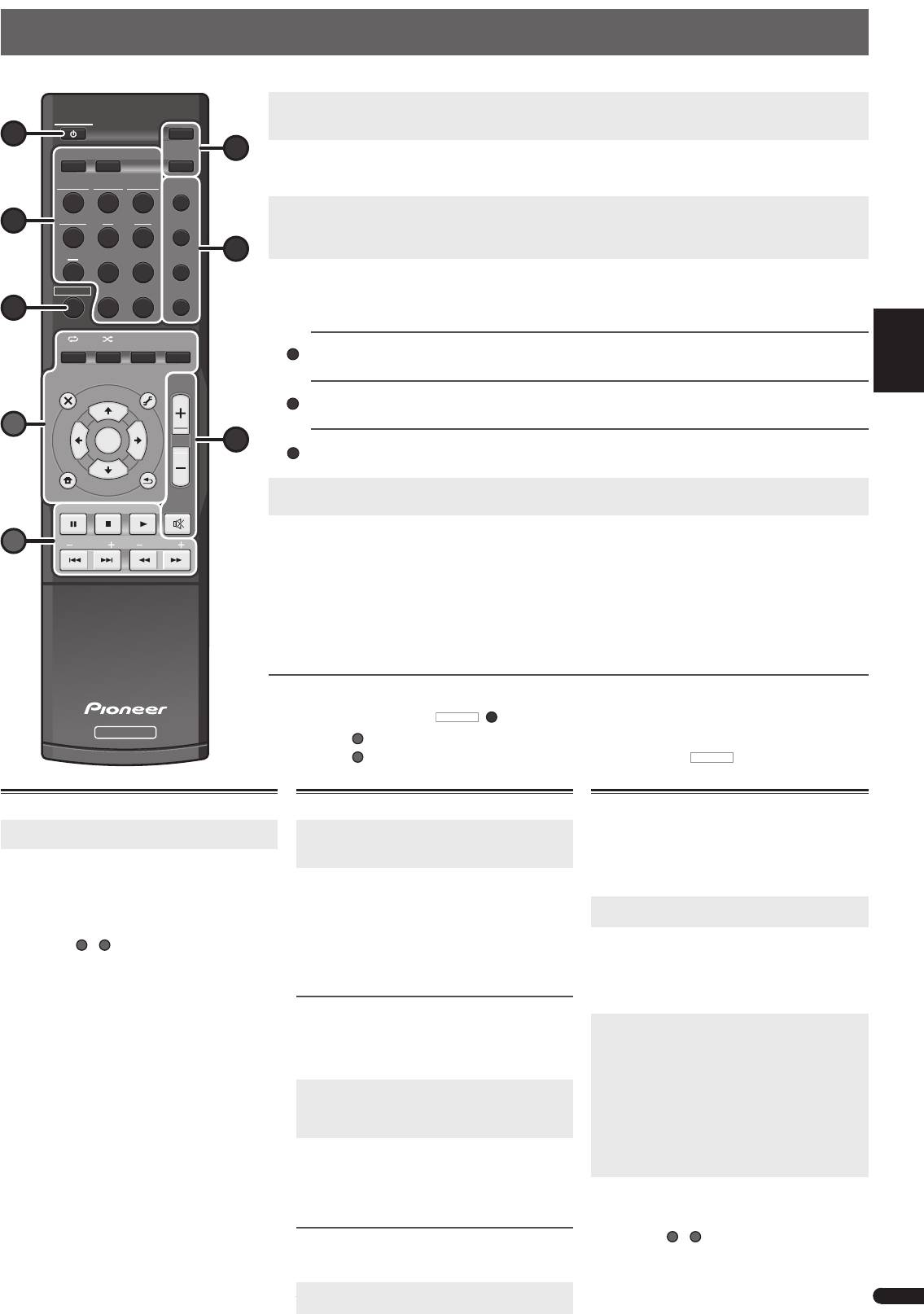
English
Riproduzione di base
Di seguito sono riportate le istruzioni di base per riprodurre una sorgente (ad esempio un Blu-ray Disc) con il sistema home theater.
1
Accendere i componenti del sistema e il ricevitore.
Iniziare dal componente utilizzato per la riproduzione (ad esempio un lettore Blu-ray Disc), accendere quindi il televisore
STANDBY/ON
Français
e il subwoofer, se installato, infine accendere il ricevitore premendo
STANDBY/ON
1
ECO
.
D AUX A AUX
S.RTRV
6
2
Commutate l’entrata della TV su quella che connette questo ricevitore.
Per esempio, se avete connesso questo ricevitore alle prese jack
VIDEO
sulla vostra TV, assicuratevi che l’entrata
VIDEO
iPod
USB
NETWORK
ADAPTER
AUTO
/
sia stata selezionata.
DIRECT
3
Premete i tasti di entrata funzione per selezionare la funzione d’entrata che volete attivare.
TUNER BD DVD
ALC
/
• L’entrata del ricevitore si attiverà e sarete in grado di mettere in funzione altre componenti attraverso il telecomando.
3
STANDARD
• La sorgente di entrata può essere selezionata anche usando il tasto
INPUT SELECTOR
sul pannello frontale. In tal
ADV
caso, il telecomando non commuterà sulle modalità operative.
CD
STB GAME
4
SURR
4
Premere AUTO/DIRECT per scegliere ‘AUTO SURR’ e riprendere la riproduzione della sorgente.
RECEIVER
TV
PORTABLE
SOUND
WING
Se state riproducendo un suono surround Dolby Digital o DTS di un disco Blu-ray/DVD, con una connessione audio-digi-
tale, dovreste ascoltare un suono surround. Se state riproducendo da una sorgente stereo o se la connessione è audio-
7
analogica, ascolterete solo suono proveniente dagli altoparlanti anteriori, sinistro e destro in modalità di ascolto default.
Italiano
AUDIO
DISP
ALC
/
SLEEP SP-AB
DIMMER
STATUS
STANDAR
Ascoltare in suono surround standard
Questo ricevitore fornisce suono surround base per sorgenti stereo e multicanale.
TOP
MENU
MENU
TOOLS
VOL
Ascoltare in suono surround avanzato
Gli effetti surround avanzati possono essere utilizzati per numerosi effetti surround aggiuntivi.
Nederlands
A
ENTER
5
Ascoltare in modalità Sound Wing
Con gli altoparlanti HVT è impossibile avvalersi di un suono di gamma più ampia.
iPod
CTRL
5
Usate VOL +/– per regolare il livello del volume.
HOME MENU
RETURN
• Il suono può essere disattivato premendo il tasto
MUTE
.
PTY
BAND MUTE
Español
6
Gustate il piacere di una varietà di suoni.
B
PRESET
TUNE
Premete ECO per selezionare la modalità Ecologia.
• Selezionate la modalità Ecologia per il playback Stereo (max. 2.1 can.) in modo da consentire una riduzione di consu-
mo di corrente fino a massimo la metà dei livelli normali.
Premete S.RTRV per commutare l’impostazione del Sound Retriever su ON o su OFF.
• Quando si rimuovono dati audio durante il processo di compressione, la qualità del suono spesso si riduce a causa
Deutsch
della mancanza di uniformità di immagine dei suoni. La funzione Sound Retriever impiega l’innovativa tecnologia
DSP, che consente di ripristinare un suono di qualità CD per il suono a 2 canali compresso, ripristinando la pressione
sonora e livellando i picchi causati dalla compressione.
Altre funzioni del telecomando
• Commutate su uno degli apparecchi indicati per usare il telecomando con questo apparecchio. Per mettere in funzio-
ne il ricevitore, prima premete
RECEIVER
(
7
)
, poi premete il tasto adatto per operare.
RECEIVER
Usate i tasti
A
per regolare le impostazioni di questo ricevitore e operare su altri apparecchi.
Usate i tasti
B
per operare su altri apparecchi. Dopo aver premuto il tasto
RECEIVER
è ancora possibile ope-
rare.
Riprodurre l’iPod o un dispositivo USB
Ascolto della radio
1
Commutate l’entrata della TV su quella che con-
1
Per scegliere il sintonizzatore, premere TUNER.
nette questo ricevitore.
Se necessario, premete
BAND
per cambiare banda (FM
o AM),
2
Premere iPod USB per selezionare l’entrata iPod
USB.
2
Premete
TUNE+/–
(o
) per sintonizzarvi su
Quando il ricevitore si avvia, comparirà
una stazione.
PLEASE WAIT CONNECTING
che ha riconosciuto il
• Premete e tenete premuto
TUNE+/–
(o
) per
dispositivo iPod/iPhone o USB connesso.
circa un secondo. Il ricevitore inizierà a cercare la
•
Alcuni tasti
A
prossima stazione.
e
B
possono essere usati per il
playback di base dei file salvati su dispositivi iPod/
Se si sta ascoltando una stazione FM, ma la ricezione
è debole, premere
BAND
per selezionare
FM MONO
e
iPhone or USB.
impostare il ricevitore in modalità di ricezione mono.
Come salvare le stazioni di preselezione
Se si ascolta spesso una particolare stazione radio, è
comodo memorizzare la frequenza della stessa per un
facile richiamo ogni qualvolta si desidera ascoltare la
stazione in questione.
1
Premete TOOLS mentre state ricevendo il
segnale di una stazione che intendete memoriz-
zare.
Il numero preimpostato lampeggia.
2
Premete PRESET+/– (o
) per selezionare la
stazione preimpostata che volete, poi premete
ENTER.
Il numero pre-impostato cessa di lampeggiare e il ricevi-
tore memorizza la stazione.
Ascolto delle stazioni memorizzate
È necessario aver memorizzato delle stazioni per poterle
ascoltare.
© 2011 PIONEER CORPORATION.
Tutti i diritti sono riservati.
Premere PRESET+/– (o
) per selezionare la
this.
5
stazione di preselezione desiderata.
It
D
ADV
SURR
SOUN
D
WING
Playback con caratteristica NETWORK
Questo ricevitore possiede un terminale LAN e di con-
seguenza permette le seguenti funzioni quando ad esso
sono collegati dei componenti.
• Ascolto di stazioni radio da Internet
• Riproduzione di file musicali salvati in PC
1
Commutate l’entrata della TV su quella che con-
nette questo ricevitore.
2
Premere NETWORK per selezionare l’entrata
NETWORK.
Il ricevitore può richiedere qualche secondo per avere
accesso alla rete. Apparirà il Menù Principale se si
seleziona
NETWORK
come funzione di entrata.
3
Usare
per scegliere la categoria da ripro-
durre e poi premere ENTER.
Scegliere una categoria dalla lista seguente:
•
Now Playing
– Visualizzare lo stato corrente e le
informazioni sulla stazione.
•
Internet Radio
– Ascoltare la radio internet
SHOUTCast dal Network.
•
Music Library
– Riproduzione di file musicali salvati
in PC.
•
Favorites
– Brani preferiti al momento in fase di
registrazione.
4
Usare
per scegliere la cartella, il fi le musi-
cale o la stazione radio da Internet da riprodur-
re e poi premere ENTER.
•
Alcuni tasti
A
e
B
possono essere usati per il play-
back di base di file musicali, salvati su componenti
del network.
VSX-S500SYXCNQSG設変book.indb5VSX-S500SYXCNQSG設変book.indb5 2012/04/2314:40:202012/04/2314:40:20
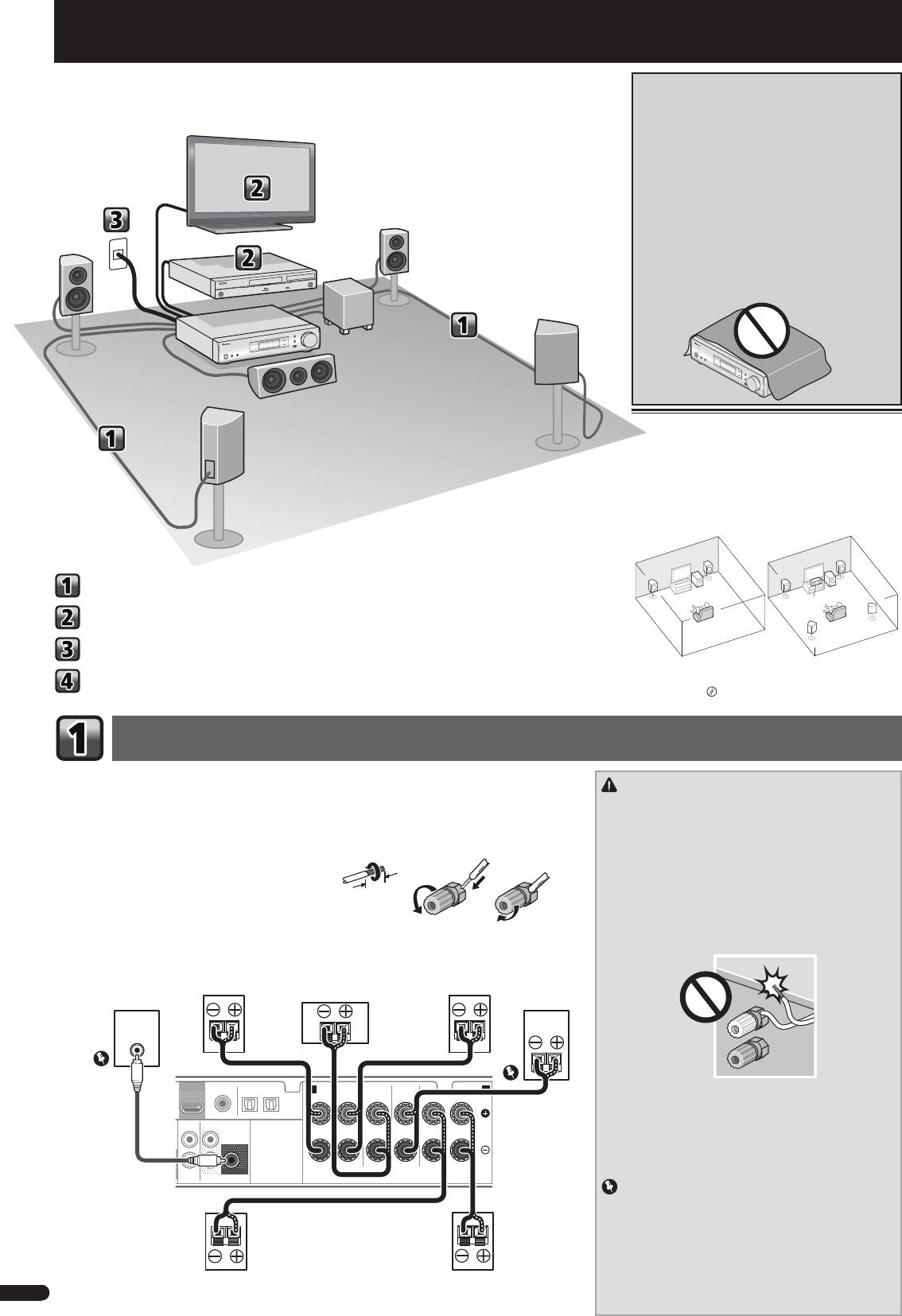
Nederlands
Stroomschema voor de instellingen op de
BELANGRIJKE INFORMATIE BETREFFENDE
receiver
DE VENTILATIE
Let er bij het installeren van het apparaat op dat er
voldoende vrije ruimte rondom het apparaat is om een
goede doorstroming van lucht te waarborgen
(tenminste 10 cm boven, 5 cm achter en 5 cm aan de
zijkanten van het apparaat).
WAARSCHUWING
De gleuven en openingen in de behuizing van het
apparaat zijn aangebracht voor de ventilatie, zodat een
betrouwbare werking van het apparaat wordt verkregen
en oververhitting wordt voorkomen. Om brand te
voorkomen, moet u ervoor zorgen dat deze openingen
nooit geblokkeerd worden of dat ze afgedekt worden
door voorwerpen (kranten, tafelkleed, gordijn e.d.) of
door gebruik van het apparaat op een dik tapijt of een
bed.
D3-4-2-1-7b*_A1_Nl
De luidsprekers opstellen
De receiver werkt al met twee stereoluidsprekers (de
voorluidsprekers in de afbeelding). Het verdient echter
aanbeveling ten minste drie luidsprekers te gebruiken
en een complete opstelling is het beste voor surround-
geluid.
Stel uw luidsprekers op zoals hieronder getoond om
een optimaal surroundgeluid te verkrijgen.
2.1-kanaals surroundsysteem: 5.1-kanaals surroundsysteem:
R
R
L
L
De luidsprekers aansluiten
SW
SW
C
Aansluiting van uw TV en weergave-apparatuur
SR
SL
De receiver aansluiten op het stopcontact
• Daarnaast kunnen tevens surroundback-speakers,
Front Height-speakers of Speaker B worden aan-
Basisinstellingen
gesloten.
“Sluit de surround-achter- of Front
Heightluidsprekers aan”
De luidsprekers aansluiten
Zorg ervoor dat de luidspreker aan de rechterzijde op het rechteraansluitpunt (R), en de luidspreker aan
de linkerzijde op het linkeraansluitpunt (L) wordt aangesloten. Ook moeten de positieve en negatieve (+/–)
WAARSCHUWING
aansluitingen op de receiver overeenkomen met die op de luidsprekers.
• Op deze luidsprekeraansluitingen staat een
GEVAAR-
U kunt luidsprekers met een normale impedantie tussen 4
Ω
en 16
Ω
gebruiken.
LIJKE
spanning. Om een elektrische schok te voorkomen
bij het aansluiten en losmaken van de luidsprekerkabels,
Basisbedradingsaansluitingen
moet u de stekker uit het stopcontact halen voordat u niet
12 3
geïsoleerde onderdelen aanraakt.
1
Draai de ontblote draaduiteinden in elkaar.
• Zorg dat de ontblote draaduiteinden van de luidspre-
2
Maak de aansluiting wat los en steek de blote
kerkabel stevig in elkaar zijn gedraaid en volledig in de
draad er in.
luidsprekeraansluiting steken. Wanneer kale luidspreker-
draad contact maakt met het achterpaneel, kan hierdoor
3
Draai de aansluiting vast.
het apparaat worden uitgeschakeld als veiligheidsmaat-
regel.
• Zorg ervoor dat de kabelkern van de speaker niet in con-
tact komt met de behuizing van de receiver.
OUT
– Als de kabelkern van de speaker in contact komt met
OPTICAL
een metalen gedeelte van de behuizing van de receiver,
ANALOG
SURR BACK/
AUX
FRONT HEIGHT
AUDIO
kan deze schade toebrengen aan de speakers, wat kan
L
leiden tot rook en brand.
(
Single
)
Steek de speakerkabels stevig in de aansluitpunten
en controleer dat de kabel er niet gemakkelijk uit kan
IN
R
SUBWOOFER
komen.
PRE OUT
SPEAKERS
Belangrijk
• De aansluitpunten van de SPEAKERS SUBWOOFER zijn
de aansluitpunten van de Passive subwoofer S-SLW500
van Pioneer. Als u gebruik maakt van een ander model
subwoofer, gebruik dan een model met een ingebouwde
versterker en sluit deze aan op het aansluitpunt van de
PRE-OUT SUBWOOFER.
• Sluit één van de twee sufwoofers aan, de Passive óf
2
Powered, omdat door aansluiting van beide de juiste
Nl
geluidsweergave niet wordt verkregen.
G
Dit apparaat is een multifunctionele AV-receiver die is
uitgerust met talloze voorzieningen en aansluitingen.
TV
Het apparaat kan gemakkelijk worden gebruikt door de
onderstaande aanwijzingen te volgen voor het maken
van de aansluitingen en instellingen.
L
Voor-links
Blu-ray Disc-apparaat R
Voor-rechts
Subwoofer
Subwoofer
Deze receiver
C
Midden
SR
Surround-rechts
SL
Surround-links
10 mm
Aangestuurde
Voor-rechts
Midden
Voor-links
Subwoofer
subwoofer
S-SLW500
LINE LEVEL
INPUT
COAXIAL
A
FRONT
CENTER
SUBWOOFER/
SURROUND
/
SURR BACK
B
RL
RL
CD IN TV IN
DIGITAL AUX IN
R Bi-Amp L
Zorg ervoor dat alle
aansluitingen tot stand
zijn gebracht voordat u
de stekker van dit toe-
Surround-
stel in het stopcontact
Surround-
rechts
links
steekt.
VSX-S500SYXCNQSG設変book.indb2VSX-S500SYXCNQSG設変book.indb2 2012/04/2314:40:222012/04/2314:40:22
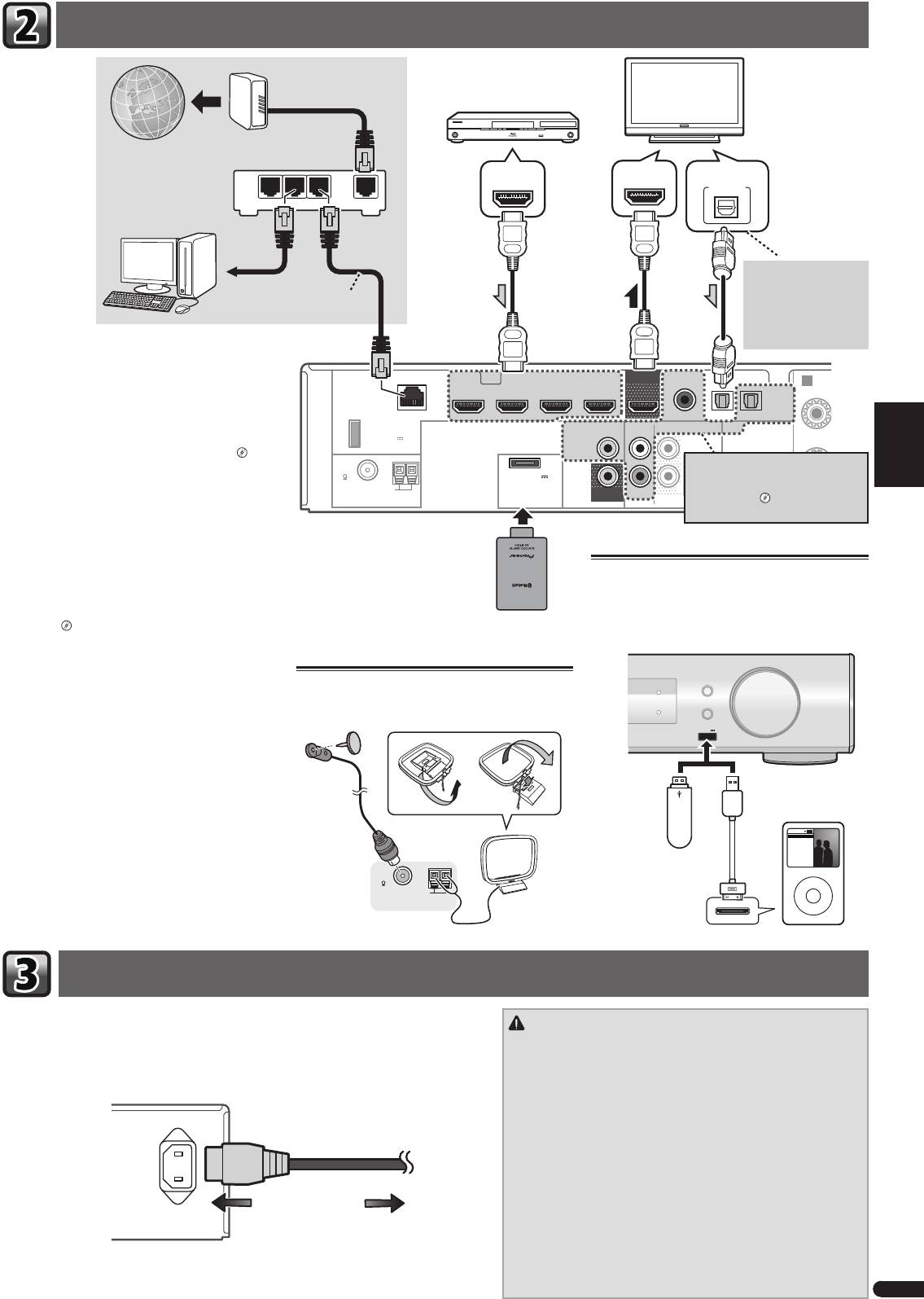
English
Aansluiting van uw TV en weergave-apparatuur
Français
Italiano
LAN
(
10/100
)
STB IN GAME INBD/BDR IN
DVD / DVR IN
OUT
COAXIAL
F
OPTICAL
Nederlands
HDMI
CD IN
TV IN
DIGITAL AUX IN
DC OUTPUT
for WIRELESS LAN
VIDEO
(
ANALOG
ANALOG
SURR BACK/
)
AUDIO
AUX
AUX
FRONT HEIGHT
(
OUTPUT 5 V
ASSIGNABLE
0.6 A MAX
)
L
IN
(
Single
)
FM
UNBAL
75
(
OUTPUT 5 V
0.1 A MAX
)
AM LOOP
MONITOR
R
IN
SUBWOOFER
ADAPTER PORT
OUT
PRE OUT
Español
Deutsch
De receiver aansluiten op het stopcontact
3
Nl
R
Modem
HDMI/DVI-compatible componenten
(Blu-ray Disc-apparaat,enz.)
HDMI/DVI-compatible TV
Internet
HDMI OUT
HDMI IN
DIGITAL AUDIO OUT
OPTICAL
LAN
Router
321
WAN
Als de TV de HDMI Audio
Return Channel-functie
naar LAN-
niet ondersteunt, dan moet
poort
LAN-kabel
deze aansluiting worden
(los verkrijgbaar)
uitgevoerd om naar TV-
geluid via de receiver te
luisteren.
Als u een apparaat hebt dat is uitgerust met HDMI of
DVI (met HDCP) (zoals een Blu-ray Disc-speler enz.),
A
kunt u dit aansluiten op de receiver met een algemeen
R
verkrijgbare HDMI-kabel.
Indien de TV- en weergavecomponenten de Control met
HDMI-functie ondersteunen, dan kunnen de handige
Control met HDMI-functies worden gebruikt.
“Con-
trol met HDMI-functie”
Als het apparaat dat u wilt aansluiten
geen HDMI-uitgangaansluitpunt heeft,
• De volgende aansluiting/instelling is vereist om naar
kan het via deze aansluitpunten worden
geluid van de TV via deze receiver te luisteren.
aangesloten.
“Een DVD-speler
– Als de TV de HDMI Audio Return Channel-functie
zonder HDMI-uitgang aansluiten”
niet ondersteunt, sluit dan de receiver en de TV
met audiokabels aan (zoals getoond).
– Als de TV de HDMI Audio Return Channel-functie
ondersteunt, dan wordt het geluid van de TV via
Bluetooth®
Aansluiting van de iPod/iPhone of het
het HDMI-aansluitpunt op de receiver weerge-
ADAPTER AS-BT100 of
USB-apparaat
geven, zodat aansluiting van een audiokabel niet
AS-BT200 (afzonderlijk
nodig is. Zet in dat geval
ARC
bij HDMI Setup op
verkrijgbaar)
Zet de receiver op stand-by en sluit de iPod/iPhone of
ON.
het USB-apparaat daarna aan op het aansluitpunt iPod
“HDMI Setup”
iPhone USB van het voorpaneel.
AUDIO/ VIDEO MULTI-CHANNEL RECEIVER
VSX
-S500
INPUT SELECTOR
Antennes aansluiten
MCACC
Zie de Handleiding op de CD-ROM voor aanwijzingen
Sluit de FM-draadantenne en de AM-lusantenne aan
iPod iPhone
MASTER
over de aansluiting en set-up van de Bluetooth ADAP-
HDMI
DIRECT CONTROL
VOLUME
TER en over het afspelen van muziek.
zoals hieronder aangegeven.
USB
iPod iPhone
5 V
1
A
USB-massaop-
iPod/iPhone
slagapparaat
Music
Playlists
Genius >
Albums
Artists
Het merk Bluetooth® en de logo’s daarvan zijn
Songs
Radio
Composers
Genres
gedeponeerde handelsmerken van Bluetooth SIG, Inc.
Audiobooks
FM
PIONEER CORPORATION gebruikt deze onder licentie
UNBAL
USB-kabel (voor iPod-
MENU
75
AM LOOP
aansluiting).
Andere handelsmerken en handelsnamen zijn eigen-
ANTENNA
dom van de respectieve eigenaren.
Sluit de receiver pas aan, nadat u al uw componenten op deze receiver hebt aangesloten, waar-
WAARSCHUWING
onder de luidsprekers.
• Pak het netsnoer alleen bij het stekkerdeel beet. Trek de stekker niet
1
Steek het meegeleverde netsnoer in de AC IN-aansluiting aan de achterzijde van de
uit door aan het snoer te rukken en raak het netsnoer nooit met
receiver.
natte handen aan; dit kan een kortsluiting of elektrische schok tot
2
Steek de stekker van het netsnoer in het stopcontact.
gevolg hebben. Plaats het apparaat, een meubelstuk of enig ander
voorwerp niet op het netsnoer en knel het netsnoer op geen enkele
manier af. Maak nooit een knoop in het netsnoer of knoop deze
AC IN
samen met andere kabels. Leid de netsnoeren zodanig dat de kans
klein is dat er iemand op trapt. Een beschadigd netsnoer kan brand
of een elektrische schok veroorzaken. Controleer regelmatig de staat
van het netsnoer. Wanneer u beschadigingen aantreft, vraagt u uw
dichtstbijzijnde Pioneer-erkende, onafhankelijke servicecentrum om
het netsnoer te vervangen.
• Gebruik uitsluitend het netsnoer dat bij dit apparaat is meegeleverd.
Naar het stopcontact
• Gebruik het netsnoer uitsluitend voor het doel dat hieronder staat
beschreven.
• Wanneer de receiver niet geregeld wordt gebruikt, bijv. tijdens va-
kanties, moet hij losgekoppeld zijn door de stekker van het netsnoer
uit het stopcontact te trekken.
VSX-S500SYXCNQSG設変book.indb3VSX-S500SYXCNQSG設変book.indb3 2012/04/2314:40:242012/04/2314:40:24
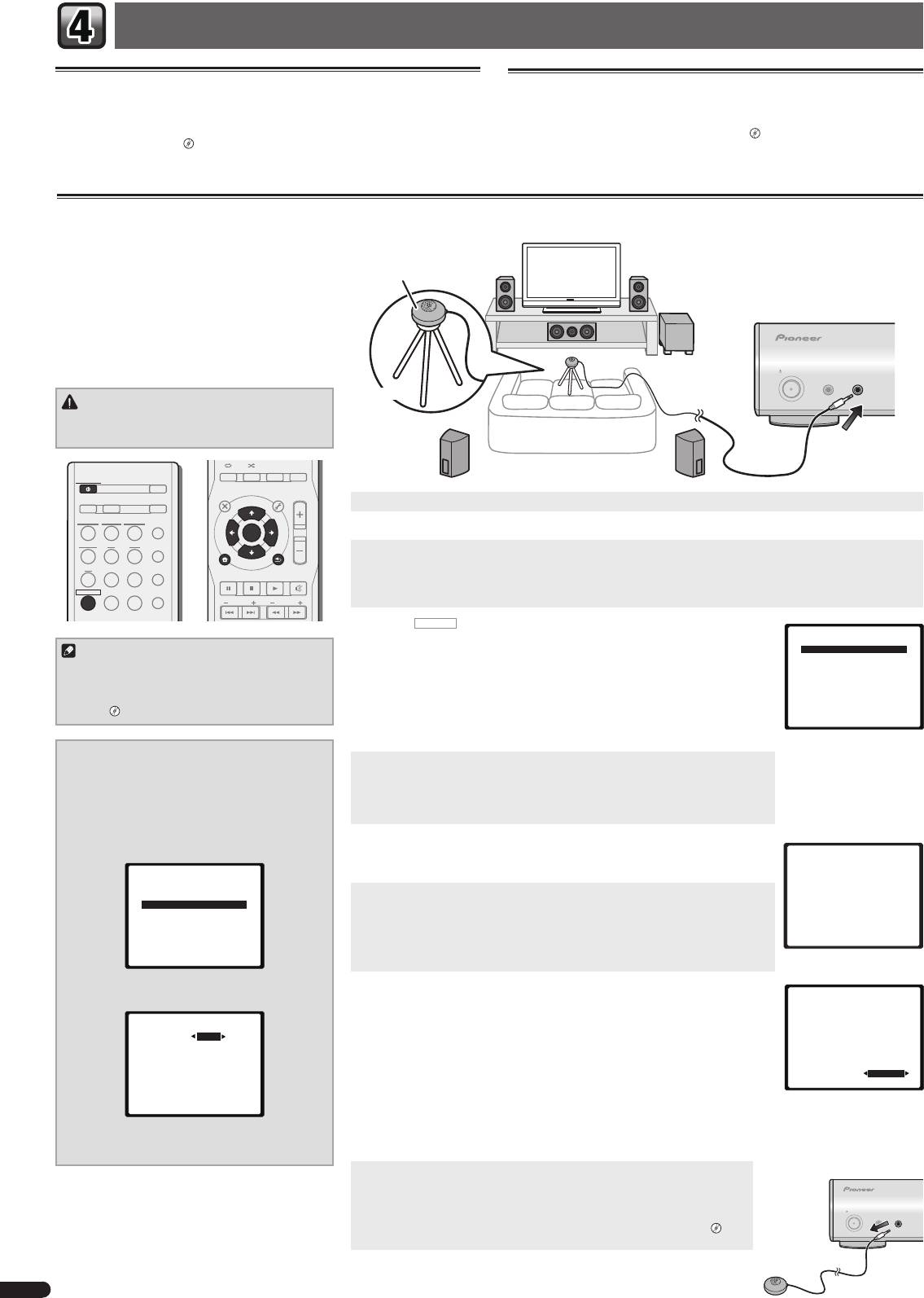
Basisinstellingen
Uitschakelen van de Auto Power Down
Uitschakelen van de demodisplay
Als deze receiver enkele uren lang niet wordt gebruikt, schakelt hij automatisch uit.
De display op het voorpaneel toont verschillende soorten informatie (demodisplays)
De automatische Power Off-timer is ingesteld op zes uren volgens de fabrieksinstel-
wanneer de receiver niet in werking is.
lingen, en deze timing kan worden gewijzigd of de Power Off-functie kan helemaal
Deze demodisplay kan worden uitgeschakeld.
“Het FL Demo Mode-menu”
worden uitgeschakeld.
“Het Auto Power Down-menu”
• De demomodus wordt automatisch uitgeschakeld wanneer de Auto MCACC-
setup wordt uitgevoerd (zie hieronder).
Automatische instelling van surroundgeluid (MCACC)
De automatische meerkanaals akoestische calibratie
(MCACC, voor ‘Auto Multi-Channel Acoustic Calibra-
tion’) meet de akoestische karakteristieken van uw
Microfoon
luisterruimte, waarbij rekening wordt gehouden met
omgevingsgeluid, luidsprekergrootte en –afstand; ook
worden kanaalgalm en kanaalvolume getest. Nadat u
de microfoon heeft ingesteld die bij uw systeem wordt
geleverd, kiest de receiver op basis van de informatie
van een reeks testtonen de optimale luidsprekerinstel-
lingen en egalisatie voor uw luisterruimte.
STANDBY/ON
MCACC
PORTABLE
SETUP
/
MICPHONES
Statief
WAARSCHUWING
• De testtonen die worden voortgebracht tijdens de
Auto MCACC-instelling klinken erg hard.
AUDIO DISP
SLEEP SP-AB
DIMMER
STATUS
STANDBY/ON
ECO
TOP
MENU
MENU
TOOLS
VOL
D AUX A AUX
S.RTRV
1
Zet de receiver en de TV aan.
iPod
USB
NETWORK
ADAPTER
AUTO
/
DIRECT
ENTER
2
Schakel de TV-ingang in zodat de TV op de receiver kan aansluiten.
TUNER BD DVD
ALC
/
STANDARD
3
Sluit de microfoon aan op de aansluiting MCACC SETUP MIC op het voorpaneel.
iPod
CTRL
CD
STB GAME
ADV
Controleer of er zich geen obstakels tussen de luidsprekers en de microfoon bevinden.
SURR
HOME MENU
RETURN
PTY
BAND MUTE
Als u een statief heeft, kunt u dit gebruiken om de microfoon ongeveer op oorhoogte te plaatsen op uw normale
RECEIVER
TV
PORTABLE
SOUND
WING
luisterpositie. U kunt de microfoon ook op oorhoogte plaatsen met behulp van een tafel of een stoel.
PRESET
TUNE
4
Druk op
RECEIVER
op de afstandsbediening en druk vervolgens op de toets
Home Menu
HOME MENU.
Opmerking
1.Auto MCACC
Het Home Menu verschijnt op de TV. Gebruik
en
ENTER
op de afstandsbe-
2.Manual SP Setup
diening om door de schermen te navigeren en menu-onderdelen te selecteren. Druk
3.Pre Out Setting
• De instelling van de subwooferafstand is mogelijk
4.Input Assign
verder dan de feitelijke afstand vanaf de luisterpo-
op
RETURN
om het huidige menu af te sluiten.
5.Video Parameter
6.HDMI Setup
sitie. Voer de instellingen in dat geval handmatig
• Aangezien de S-HV600B/S-HV500-LR/S-SL100-LR/S-SL100CR zijn uitgevoerd als
7.Auto Power Down
8.FL Demo Mode
uit.
“Luidsprekerafstand”
compacte satellietspeakers, verdient het aanbeveling deze te gebruiken in combi-
natie met een subwoofer om een vol basisgeluid te verkrijgen. Zet in dat geval de
X.OVER
op 200 Hz (zie “Wijzig de X.OVER-instelling” op deze pagina).
Wijzig de X.OVER-instelling
5
Selecteer ‘Auto MCACC’ in het Home Menu en druk hierna op ENTER.
Voor S-HV600B/S-HV500-LR/S-SL100-LR/S-SL100CR-
•
Mic In!
knippert wanneer de microfoon niet op het contactpunt
speakers
MCACC SETUP MIC is aangesloten.
1
Selecteer ‘Manual SP Setup’ in het
Maak zo min mogelijk geluid nadat u op
ENTER
hebt gedrukt. Het systeem produceert
Home Menu en druk hierna op ENTER.
een reeks testtonen om het omgevingsgeluidsniveau vast te stellen.
2
Selecteer ‘X.OVER’ in het Manual SP Setup en
6
Volg de instructies op het scherm.
druk hierna op ENTER.
1.Auto MCACC
• Als u gebruik maakt van een Powered subwoofer, zorg er dan voor dat de subwoo-
fer is ingeschakeld en het volume omhoog is gedraaid.
Now Analyzing
2.Manual SP Setup
Environment Check
a.Speaker System
7
Wacht tot de testtonen beëindigd zijn.
Ambient Noise
b.Speaker Setting
Speaker YES/NO
c.X.OVER
Er wordt een voortgangsrapport weergegeven op het scherm terwijl de receiver test-
d.Channel Level
e.Speaker Distance
tonen weergeeft om de aanwezigheid van de luidsprekers in uw opstelling te bepalen.
Probeer zo stil mogelijk te zijn wanneer dit plaatsvindt.
Return
• Voor de juiste luidsprekerinstellingen dient u het volume niet in te stellen tijdens
Return
de testtonen.
3
Kies ‘200 Hz’ als grenswaarde van de fre-
8
Bevestig de luidsprekerconfi guratie.
1.Auto MCACC
quentie.
De configuratie die op het scherm wordt weergegeven, dient overeen te komen met de
Check!
2c.X.OVER
feitelijke luidsprekers die u hebt.
Front
[ YES ]
• Bij foutmeldingen (zoals
Too much ambient noise
(Te veel omgevingsruis)) kies
Center
[ YES ]
Frequency 200Hz
Surr
[ YES ]
RETRY
nadat u de omgevingsruis heeft gecontroleerd.
Surr. Back
[
---
]
Subwoofer
[ YES ]
Als de weergegeven luidsprekerconfiguratie niet correct is, gebruikt u
om de
OK
luidspreker te selecteren en
om de instelling te wijzigen. Wanneer u klaar bent,
10:Next
Return
gaat u door naar de volgende stap.
Return
Wanneer u een foutbericht (
ERR
) in de kolom aan de rechter zijkant ziet, kan er een
probleem zijn met de luidsprekeraansluiting. Wanneer door het selecteren van
RETRY
4
Druk tweemaal op RETURN als u klaar bent.
het probleem niet’ wordt opgelost, schakelt u het apparaat uit en controleert u de
U keert terug naar het Home Menu.
luidsprekeraansluitingen.
9
De Auto MCACC-setup is gereed! U keert terug naar het Home Menu.
Zorg ervoor dat de instelmicrofoon niet is aangesloten.
Met de instellingen die in de Auto MCACC-setup zijn gedaan wordt een weerga-
STANDBY/ON
loos geluid uit uw systeem verkregen, maar het is tevens mogelijk deze instel-
MCACC
PORTABLE
SETUP
MICPHONES
/
lingen handmatig te doen met gebruik van de Manual Speaker Setup.
“Handmatige luidsprekerinstelling”
4
Nl
VSX-S500SYXCNQSG設変book.indb4VSX-S500SYXCNQSG設変book.indb4 2012/04/2314:40:252012/04/2314:40:25
- 1
- 2
