
Pioneer A-10-K: instruction
Class: Video Audio Photo Equipment
Type:
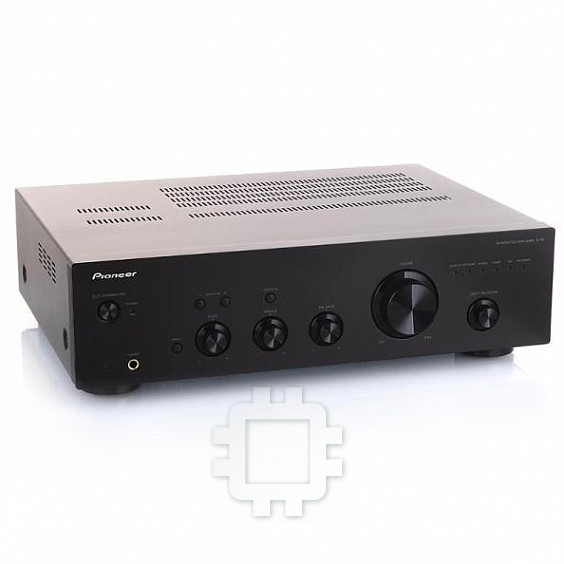
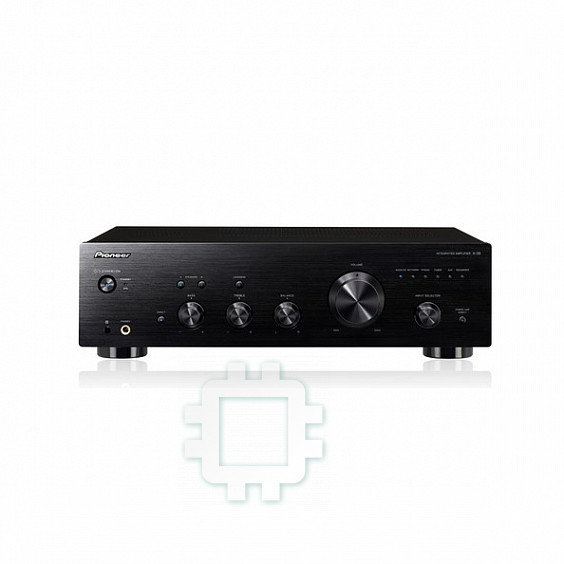
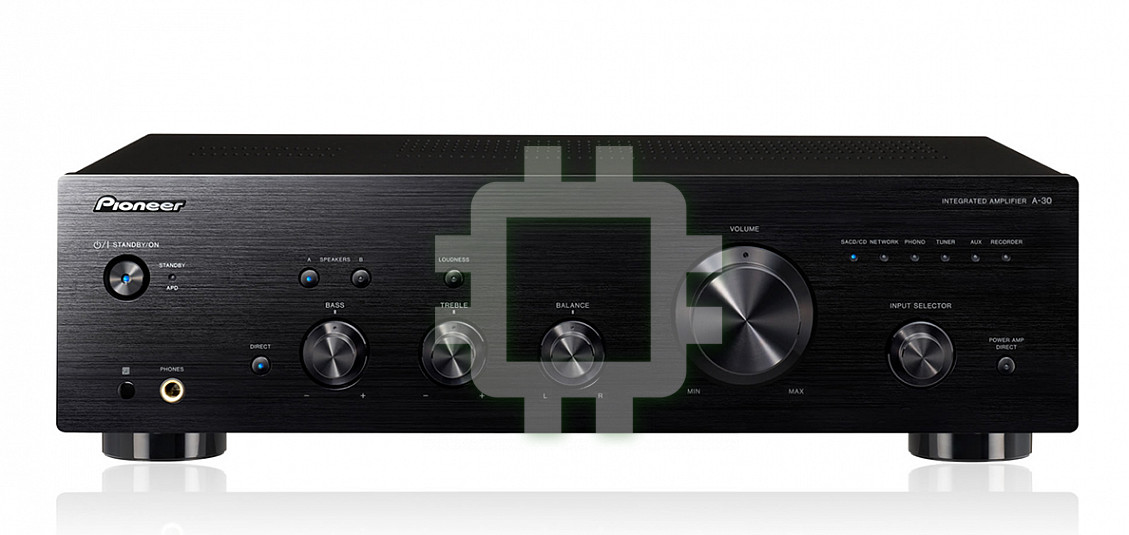
Manual for Pioneer A-10-K
Table of contents

A30_SYXE8_cover_anki.fm 1 ページ 2012年2月21日 火曜日 午後1時42分
Operating Instructions | Mode d’emploi | Bedienungsanleitung |
Istruzioni per I’uso | Handleiding | Manual de instrucciones |
Инструкции по эксплуатации
A-
30-K/-S
ME06
A-20-K/-S
Integrated Amplifier | Amplificateur Intégré |
Eingebauter Verstärker | Amplificatore Integrato |
Geïntegreerde versterker | Amplificador integrado |
A-
10 -K/-S
A30_SYXE8.book 2 ページ 2012年2月16日 木曜日 午前8時58分
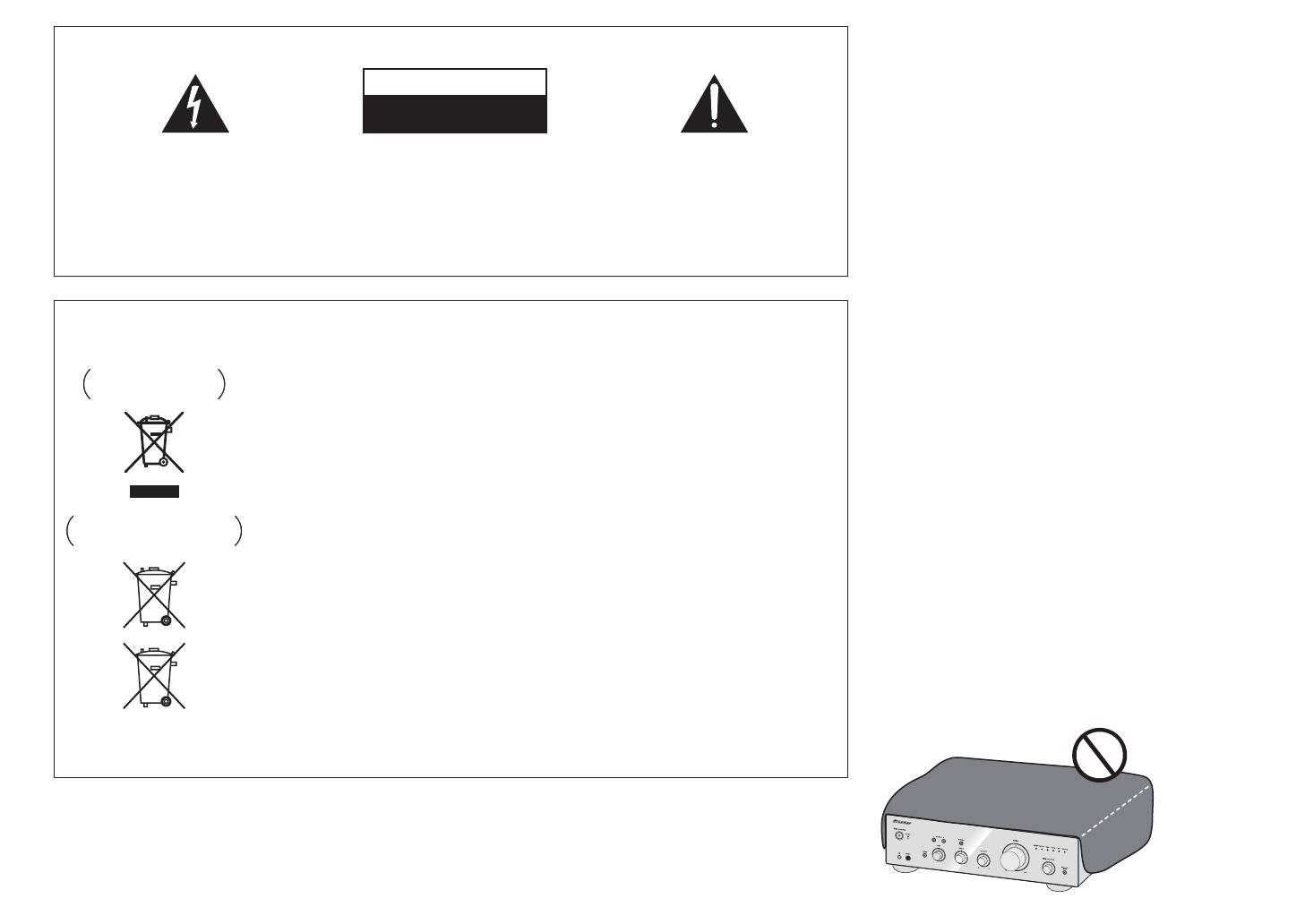
WARNING
IMPORTANT
This equipment is not waterproof. To prevent a fire or
shock hazard, do not place any container filled with
CAUTION
liquid near this equipment (such as a vase or flower
RISK OF ELECTRIC SHOCK
pot) or expose it to dripping, splashing, rain or
DO NOT OPEN
moisture.
D3-4-2-1-3_A1_En
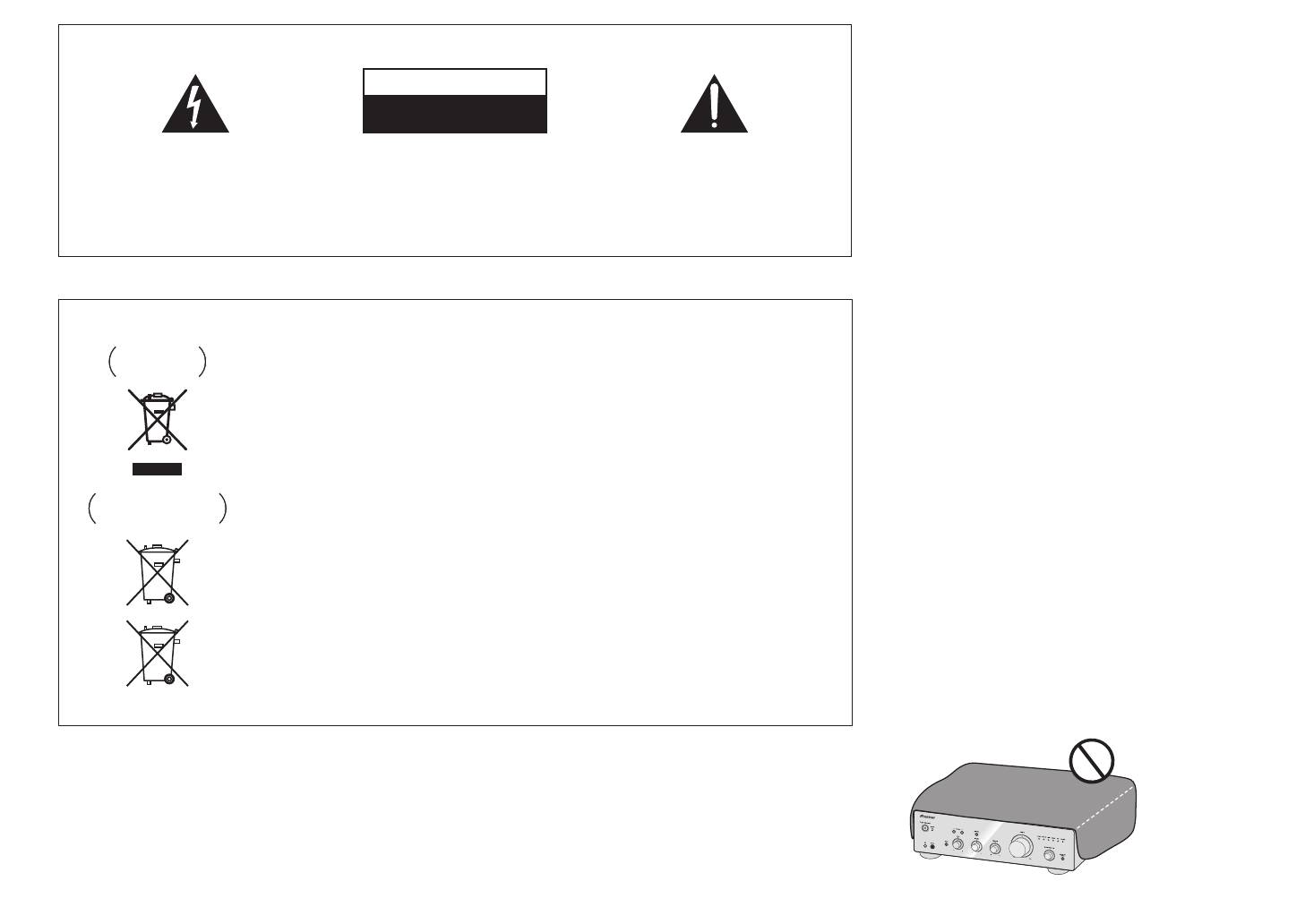
The lightning flash with arrowhead symbol,
CAUTION:
The exclamation point within an equilateral
within an equilateral triangle, is intended to
TO PREVENT THE RISK OF ELECTRIC
triangle is intended to alert the user to the
alert the user to the presence of uninsulated
SHOCK, DO NOT REMOVE COVER (OR
presence of important operating and
WARNING
“dangerous voltage” within the product’s
BACK). NO USER-SERVICEABLE PARTS
maintenance (servicing) instructions in the
Before plugging in for the first time, read the following
enclosure that may be of sufficient
INSIDE. REFER SERVICING TO QUALIFIED
literature accompanying the appliance.
magnitude to constitute a risk of electric
SERVICE PERSONNEL.
section carefully.
shock to persons.
D3-4-2-1-1_A1_En
The voltage of the available power supply differs
according to country or region. Be sure that the
power supply voltage of the area where this unit
European model only
will be used meets the required voltage (e.g., 230 V
or 120 V) written on the rear panel.
Information for users on collection and disposal of old equipment and used batteries
D3-4-2-1-4*_A1_En
Symbol for
These symbols on the products, packaging, and/or accompanying documents mean
equipment
that used electrical and electronic products and batteries should not be mixed with
WARNING
general household waste.
To prevent a fire hazard, do not place any naked flame
For proper treatment, recovery and recycling of old products and used batteries,
sources (such as a lighted candle) on the equipment.
please take them to applicable collection points in accordance with your national
D3-4-2-1-7a_A1_En
legislation.
By disposing of these products and batteries correctly, you will help to save valuable
VENTILATION CAUTION
Symbol examples
resources and prevent any potential negative effects on human health and the
When installing this unit, make sure to leave space
for batteries
environment which could otherwise arise from inappropriate waste handling.
around the unit for ventilation to improve heat radiation
For more information about collection and recycling of old products and batteries,
(at least 30 cm at top, 10 cm at rear, and 10 cm at each
please contact your local municipality, your waste disposal service or the point of sale
side).
where you purchased the items.
WARNING
These symbols are only valid in the European Union.
Slots and openings in the cabinet are provided for
For countries outside the European Union:
ventilation to ensure reliable operation of the product,
and to protect it from overheating. To prevent fire
If you wish to discard these items, please contact your local authorities or dealer and
hazard, the openings should never be blocked or
ask for the correct method of disposal.
covered with items (such as newspapers, table-cloths,
Pb
K058a_A1_En
curtains) or by operating the equipment on thick carpet
or a bed.
D3-4-2-1-7b*_A1_En
A30_SYXE8.book 3 ページ 2012年2月16日 木曜日 午前8時58分
Operating Environment
Thank you for buying this Pioneer
This product is for general household purposes. Any
Operating environment temperature and humidity:
product.
failure due to use for other than household purposes
+5 °C to +35 °C (+41 °F to +95 °F); less than 85 %RH
Please read through these operating instructions so that
(such as long-term use for business purposes in a
you will know how to operate your model properly. After
(cooling vents not blocked)
restaurant or use in a car or ship) and which requires
you have finished reading the instructions, put them in a
Do not install this unit in a poorly ventilated area, or in
repair will be charged for even during the warranty
safe place for future reference.
locations exposed to high humidity or direct sunlight (or
period.
strong artificial light)
K041_A1_En
D3-4-2-1-7c*_A1_En
Contents
If the AC plug of this unit does not match the AC
POWER-CORD CAUTION
Handle the power cord by the plug. Do not pull out the
01 Before you start
outlet you want to use, the plug must be removed
What’s in the box. . . . . . . . . . . . . . . . . . . . . . . . . .4
and appropriate one fitted. Replacement and
plug by tugging the cord and never touch the power
mounting of an AC plug on the power supply cord of
cord when your hands are wet as this could cause a
Loading the batteries in the remote control
(Except A-10) . . . . . . . . . . . . . . . . . . . . . . . . . . . . .4
this unit should be performed only by qualified
short circuit or electric shock. Do not place the unit, a
Using the remote control. . . . . . . . . . . . . . . . . . . . .4
service personnel. If connected to an AC outlet, the
piece of furniture, etc., on the power cord, or pinch the
Installing the amplifier. . . . . . . . . . . . . . . . . . . . . . 4
cut-off plug can cause severe electrical shock. Make
cord. Never make a knot in the cord or tie it with other
02 Connecting up
sure it is properly disposed of after removal.
cords. The power cords should be routed such that they
Making cable connections. . . . . . . . . . . . . . . . . . .5
The equipment should be disconnected by removing
are not likely to be stepped on. A damaged power cord
About “Bi-wiring” . . . . . . . . . . . . . . . . . . . . . . . . . .5
the mains plug from the wall socket when left unused
can cause a fire or give you an electrical shock. Check
Connecting speaker cables . . . . . . . . . . . . . . . . . .6
for a long period of time (for example, when on
the power cord once in a while. When you find it
Connecting audio cables . . . . . . . . . . . . . . . . . . . .6
vacation).
damaged, ask your nearest PIONEER authorized
Using centralized control with other Pioneer
D3-4-2-2-1a_A1_En
service center or your dealer for a replacement.
components (Except A-10) . . . . . . . . . . . . . . . . . . . 6
S002*_A1_En
Plugging in . . . . . . . . . . . . . . . . . . . . . . . . . . . . . .6
03 Controls and displays
CAUTION
(A-30 only)
Front panel . . . . . . . . . . . . . . . . . . . . . . . . . . . . . .7
The /I STANDBY/ON switch on this unit will not
CAUTION:
Rear panel . . . . . . . . . . . . . . . . . . . . . . . . . . . . . . .8
completely shut off all power from the AC outlet.
HOT SURFACE. DO NOT TOUCH.
Remote control (Except A-10) . . . . . . . . . . . . . . . .9
Since the power cord serves as the main disconnect
The top surface over the internal
04 Operation
device for the unit, you will need to unplug it from the
heatsink may become hot when
AC outlet to shut down all power. Therefore, make
Playback . . . . . . . . . . . . . . . . . . . . . . . . . . . . . . .10
operating this product continuously.
Set the power to Standby. . . . . . . . . . . . . . . . . . . .10
sure the unit has been installed so that the power
When using the unit as a power amplifier
cord can be easily unplugged from the AC outlet in
(A-30 only) . . . . . . . . . . . . . . . . . . . . . . . . . . . . . . .10
case of an accident. To avoid fire hazard, the power
Making an audio recording . . . . . . . . . . . . . . . . .11
cord should also be unplugged from the AC outlet
To set for automatic standby status
when left unused for a long period of time (for
(Auto Power Down) . . . . . . . . . . . . . . . . . . . . . . .11
Restoring all the settings to the factory default
example, when on vacation).
D3-4-2-2-2a*_A1_En
settings . . . . . . . . . . . . . . . . . . . . . . . . . . . . . . . .11
05 Additional information
Troubleshooting. . . . . . . . . . . . . . . . . . . . . . . . . .12
Cleaning the unit . . . . . . . . . . . . . . . . . . . . . . . . .12
Specifications . . . . . . . . . . . . . . . . . . . . . . . . . . . 13
3
01 Before you start
Chapter 1:
• Do not use any batteries other than the ones
specified. Also, do not use a new battery together
with an old one.
Installing the amplifier
Before you start
• When loading the batteries into the remote control,
When installing this unit, make sure to put it on a level
set them in the proper direction, as indicated by the
and stable surface.
polarity marks ( and ).
• Don’t install it on the following places:
• Do not heat batteries, disassemble them, or throw
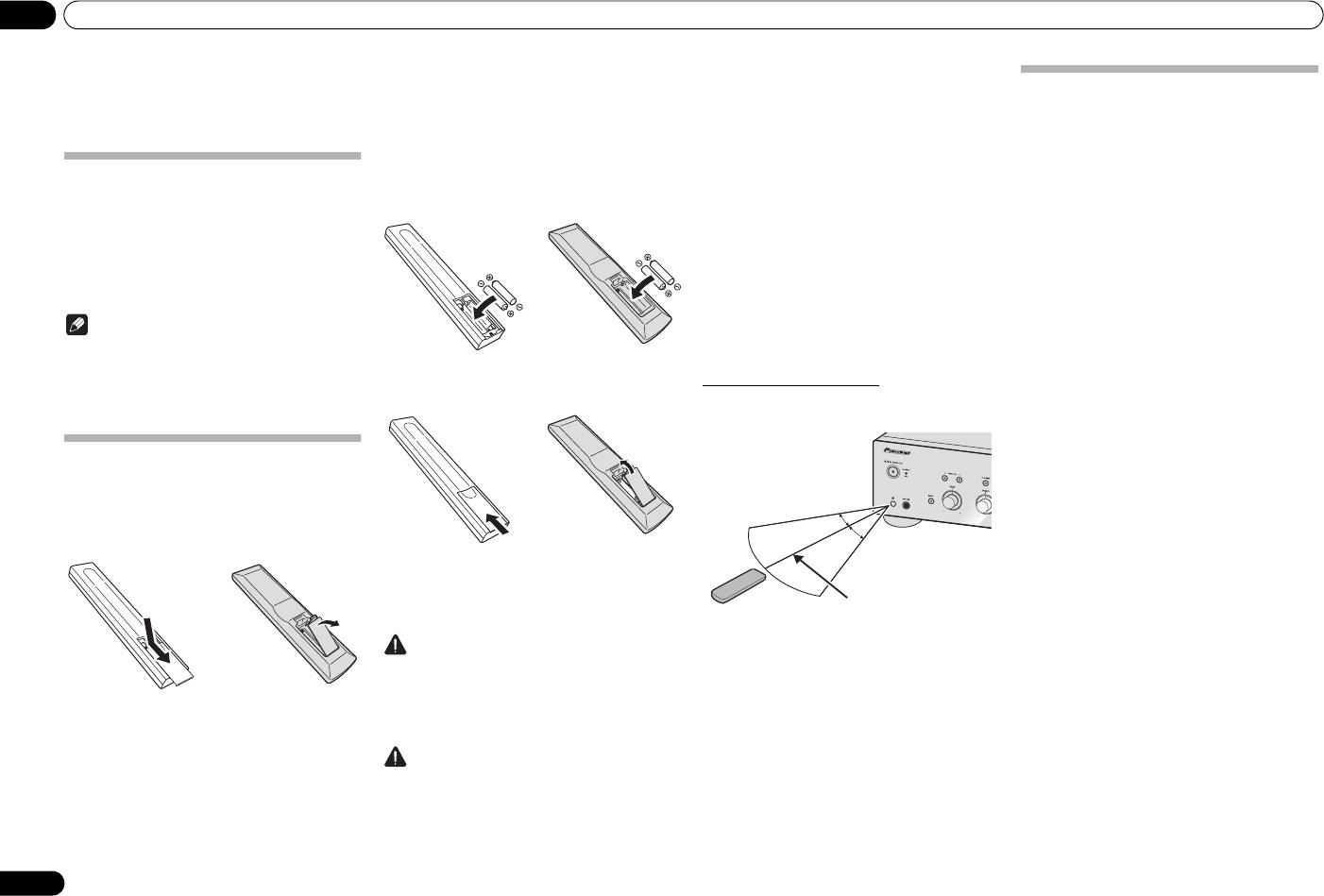
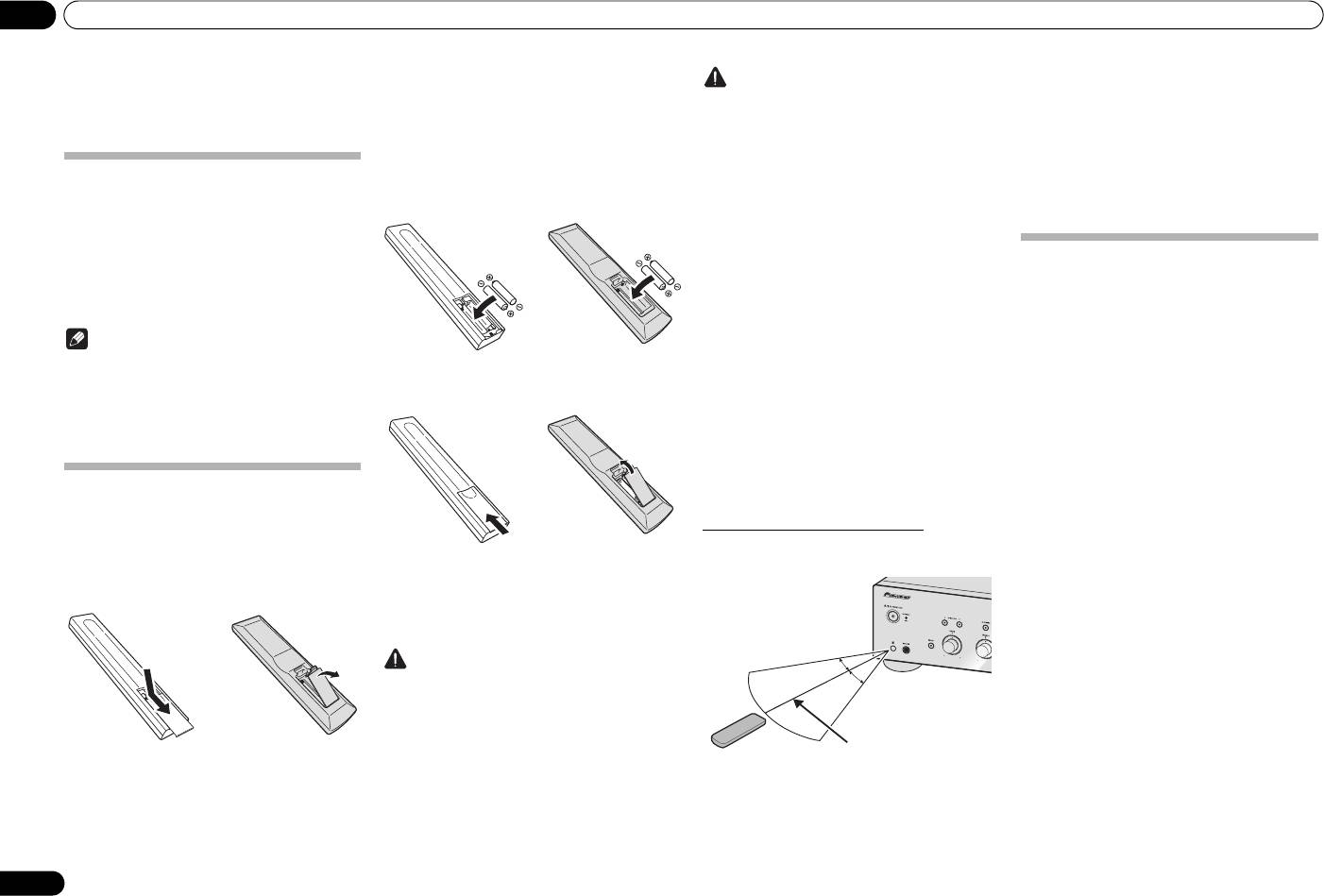
2 Insert the new batteries, matching the
– on a color TV (the screen may distort)
them into flames or water.
– near a cassette deck (or close to a device that
What’s in the box
polarities as indicated inside the case.
• Batteries may have different voltages, even if they
gives off a magnetic field). This may interfere with
Please confirm that the following accessories are in the
are the same size and shape. Do not use different
the sound.
box when you open it.
A-30
A-20
types of batteries together.
– in direct sunlight
• To prevent leakage of battery fluid, remove the
• Remote control (Except A-10)
batteries if you do not plan to use the remote
– in damp or wet areas
• AAA/IEC R03 dry cell batteries x2 (Except A-10)
control for a long period of time (1 month or more).
– in extremely hot or cold areas
•Power cord
If the fluid should leak, wipe it carefully off the
– in places where there is vibration or other
• Warranty card
inside of the case, then insert new batteries. If a
movement
battery should leak and the fluid should get on your
– in places that are very dusty
• Operating instructions (This document)
skin, flush it off with large quantities of water.
– in places that have hot fumes or oils (such as a
• When disposing of used batteries, please comply
kitchen)
Note
with governmental regulations or environmental
• Do not mount the unit on a sofa or other object or
public institution’s rules that apply in your country/
material with absorbent qualities, since sound
• Illustrations featured in the Operating Instructions
area.
quality may be adversely affected.
may have been modified or simplified for ease of
explanation, and may therefore differ from the
3 Close the rear lid.
Using the remote control
actual product appearance.
A-30
A-20
The remote has a range of about 7 m at an angle of about
• The illustrations used here are mainly of the A-30.
30º from the remote sensor.
Loading the batteries in the remote
control (Except A-10)
1 Open the rear lid.
A-30
A-20
The batteries included with the unit have been provided
to allow you check product operation and may not last
long. We recommend using alkaline batteries that have
a longer life.
Keep in mind the following when using the remote
WARNING
control:
• Do not use or store batteries in direct sunlight or
• Make sure that there are no obstacles between the
other excessively hot place, such as inside a car or
remote and the remote sensor on the unit.
near a heater. This can cause batteries to leak,
• Remote operation may become unreliable if strong
overheat, explode or catch fire. It can also reduce
sunlight or fluorescent light is shining on the unit’s
the life or performance of batteries.
remote sensor.
• Remote controllers for different devices can
interfere with each other. Avoid using remotes for
Caution
other equipment located close to this unit.
Incorrect use of batteries may result in such hazards as
• Replace the batteries when you notice a fall off in
leakage and bursting. Observe the following
the operating range of the remote.
precautions:
• When inserting the batteries, make sure not to
damage the springs on the battery’s terminals.
4
En
30 °
30 °
7 m
A30_SYXE8.book 4 ページ 2012年2月16日 木曜日 午前8時58分
Connecting up 02
English
Chapter 2:
Connecting up
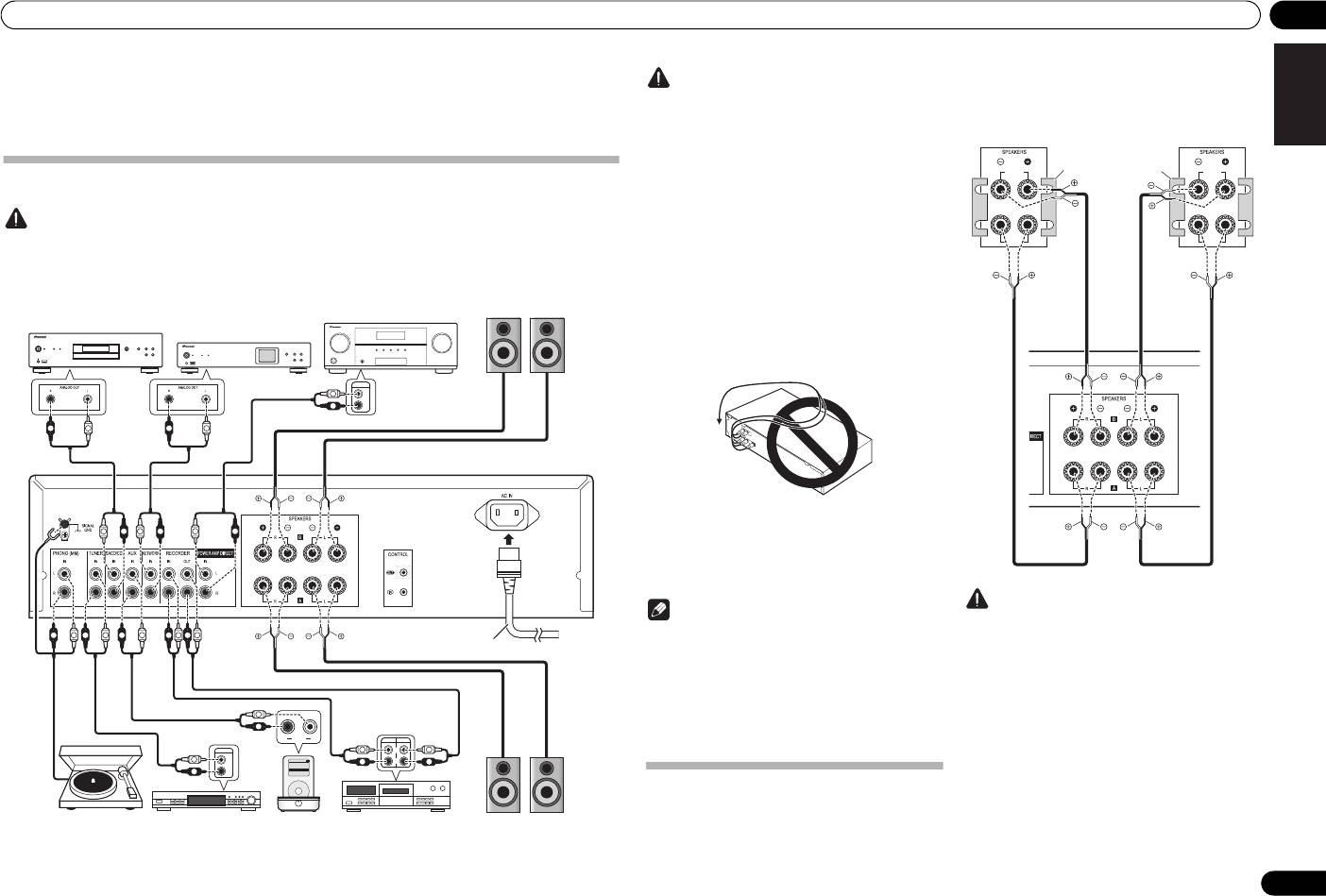
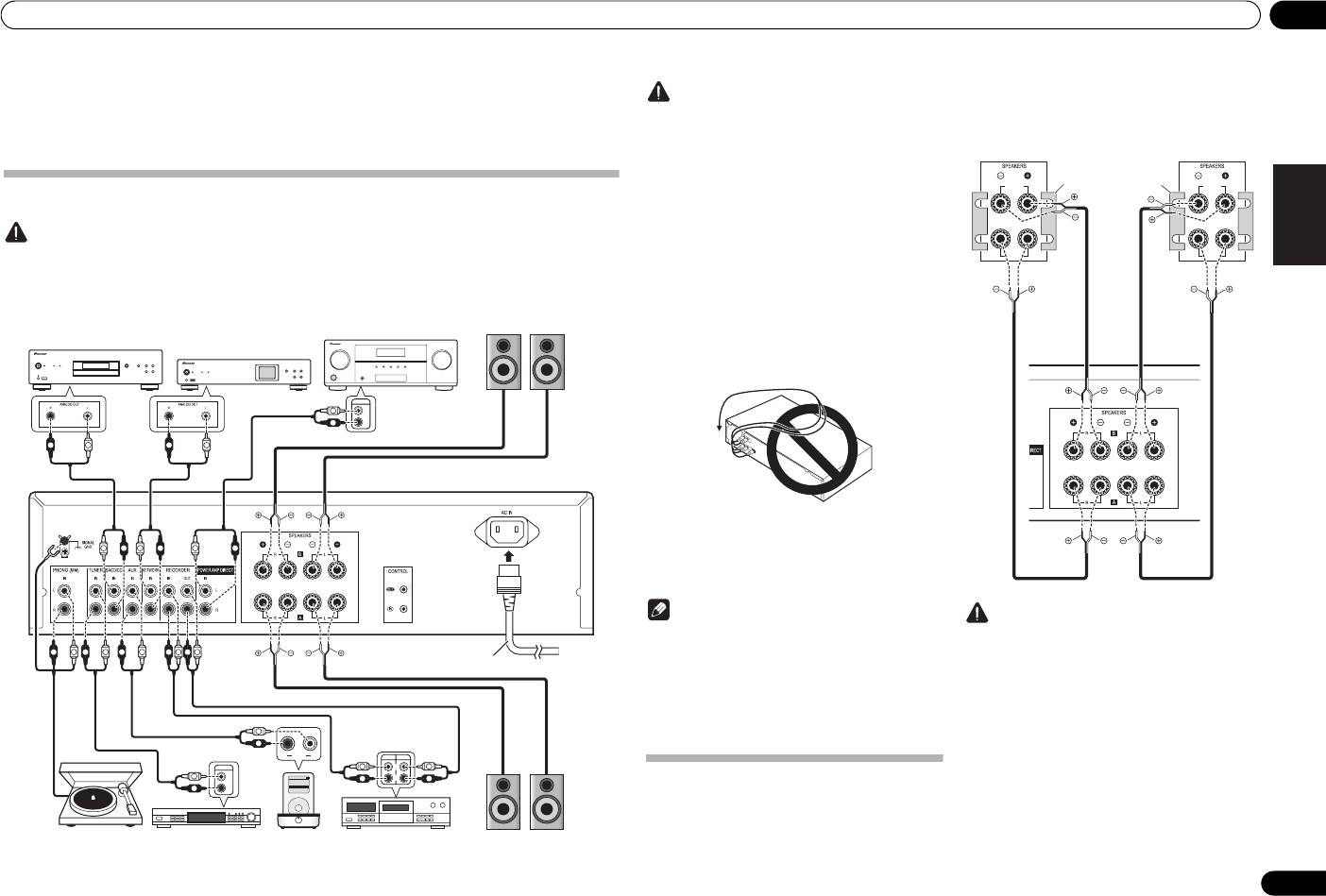
Making cable connections
Caution
• Before making or changing the connections, switch off the power and disconnect the power cord from the AC
outlet.
• Connect the power cord after all the connections between devices have been completed.
DeutschFrançais
Italiano Español Русский
Nederlands
5
En
PRE OUT
L
L
R
R
R
L
R
L
L
R
L
R
L
R
R
L
R
L
R
L
R
L
R
L
L
R
RL
OUTPUT
AUDIO
PLAY
REC
OUTPUT
L
L
L
L
L
iPod
Settings>
Extras>
Music>
R
R
R
R
R
Shuffle Songs
Backlight
MENU
PRE OUT jacks on pre-
Speaker system B
amplifier or AV amplifier
Right
Left
SACD/CD player
Network audio player
A-30 only
A-30’s rear panel
Power cord
(included)
Turntable
Tuner
iPod dock, etc
CD recorder or
Right
Left
tape deck
Speaker system A
• During playback, be sure that both the SPEAKERS
Caution
A button and SPEAKERS B button are set to ON
•The SIGNAL GND terminal is provided to reduce
(page 7).
noise when connecting the unit to components
such as an analog turntable.
• Do not connect the PHONO (MM) terminals to any
component other than a turntable; also, do not
connect to a turntable equipped with built-in
equalizer. An excessively high sound output may be
produced, resulting in damage to your speakers or
other devices.
• The unit’s PHONO (MM) terminals are designed to
be used with turntables equipped with MM
(moving-magnet) type cartridges. Turntables
equipped with MC (moving-coil) cartridges cannot
be used.
• Make sure not to bend the cables over the top of
this unit (as shown in the illustration). If this
happens, the magnetic field produced by the
transformers in this unit may cause a humming
noise from the speakers.
• The unit’s POWER AMP DIRECT terminals should
never be connected to any other component’s
connectors except PRE-AMP OUT.
• If your turntable has a grounding wire, secure it to
the ground terminal on this amplifier.
Caution
Note
• When using bi-wiring to connect speakers, avoid
• When connecting a tape cassette deck, playback
adverse affects on the amplifier by being sure to
noise may be heard, depending on the installation
remove the HIGH and LOW short bars provided
location. This noise is caused by leakage flux from
with the speakers. For detailed information, consult
the amplifier’s transformer. In this event, change
the instructions provided with the speakers.
the installation location, or move the deck farther
• When using speakers with removable network
from the amplifier.
circuits, note that if the network is removed, no
• iPod is a trademark of Apple Inc., registered in the
effect will be produced and damage may be caused
U.S. and other countries.
to the speaker.
• Another method of connection is to connect the
SPEAKERS A terminals to HIGH and the
SPEAKERS B terminals to LOW (reverse that shown
About “Bi-wiring”
in the illustration).
This unit can be used with speakers that support bi-
wiring. Be sure to connect the high-frequency and
low-frequency connections correctly.
HIGH
HIGH
LOW
LOW
Speaker system
Speaker system
Right
Remove the shorting
Left
bar between the +
and – terminals.
A-30’s rear
panel
A30_SYXE8.book 5 ページ 2012年2月16日 木曜日 午前8時58分
02 Connecting up
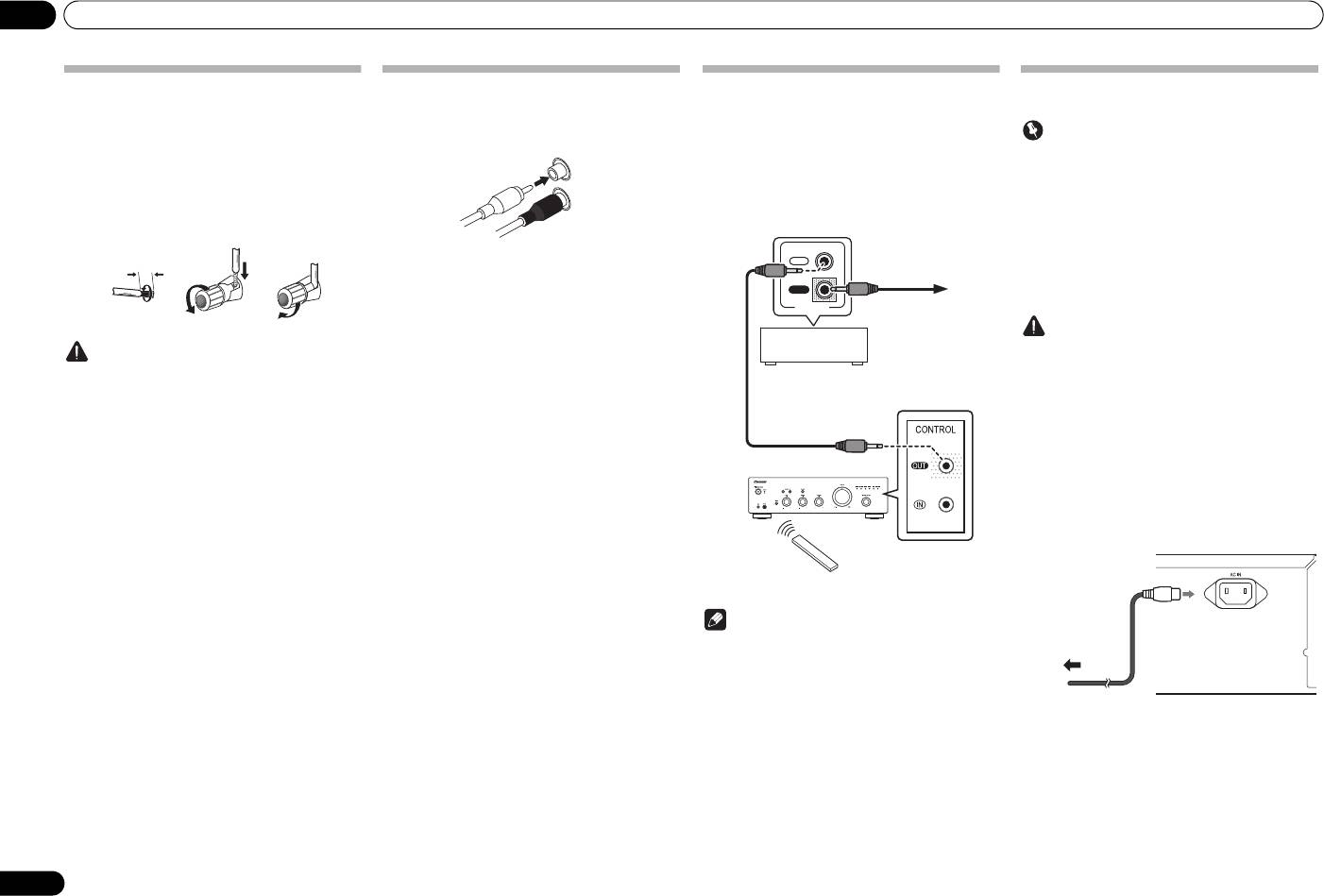
Connecting speaker cables
Connecting audio cables
Connect the white plug to the left (L) jack, and the red
1 Twist the cable cores.
plug to the right (R) jack. Be sure to insert the plugs fully
into the jacks.
2 Loosen the nut on the
SPEAKERS
terminal, and insert the speaker cable into
the exposed hole in the terminal shaft.
3 Retighten the terminal nut.
123
Caution
• When using only one set of speaker terminals
(SPEAKERS A or SPEAKERS B), or when utilizing
bi-wiring connections, the speaker used should
have a nominal impedance between 4 Ω and
16 Ω. When using both sets of terminals, the
connected speakers should have nominal
impedance between 8 Ω and 32 Ω. Consult the
instructions accompanying your speakers for
details regarding the impedance value.
• Make sure the positive and negative (+/–) terminals
on the amplifier match those on the speakers.
• These speaker terminals carry HAZARDOUS live
voltage. To prevent the risk of electric shock when
connecting or disconnecting the speaker cables,
disconnect the power cord before touching any
uninsulated parts.
• Make sure that all the bare speaker wire is twisted
together and inserted fully into the speaker
terminal. If any of the bare speaker wire touches the
back panel it may cause the power to cut off as a
safety measure.
6
En
10 mm
Left (white)
Right (red)
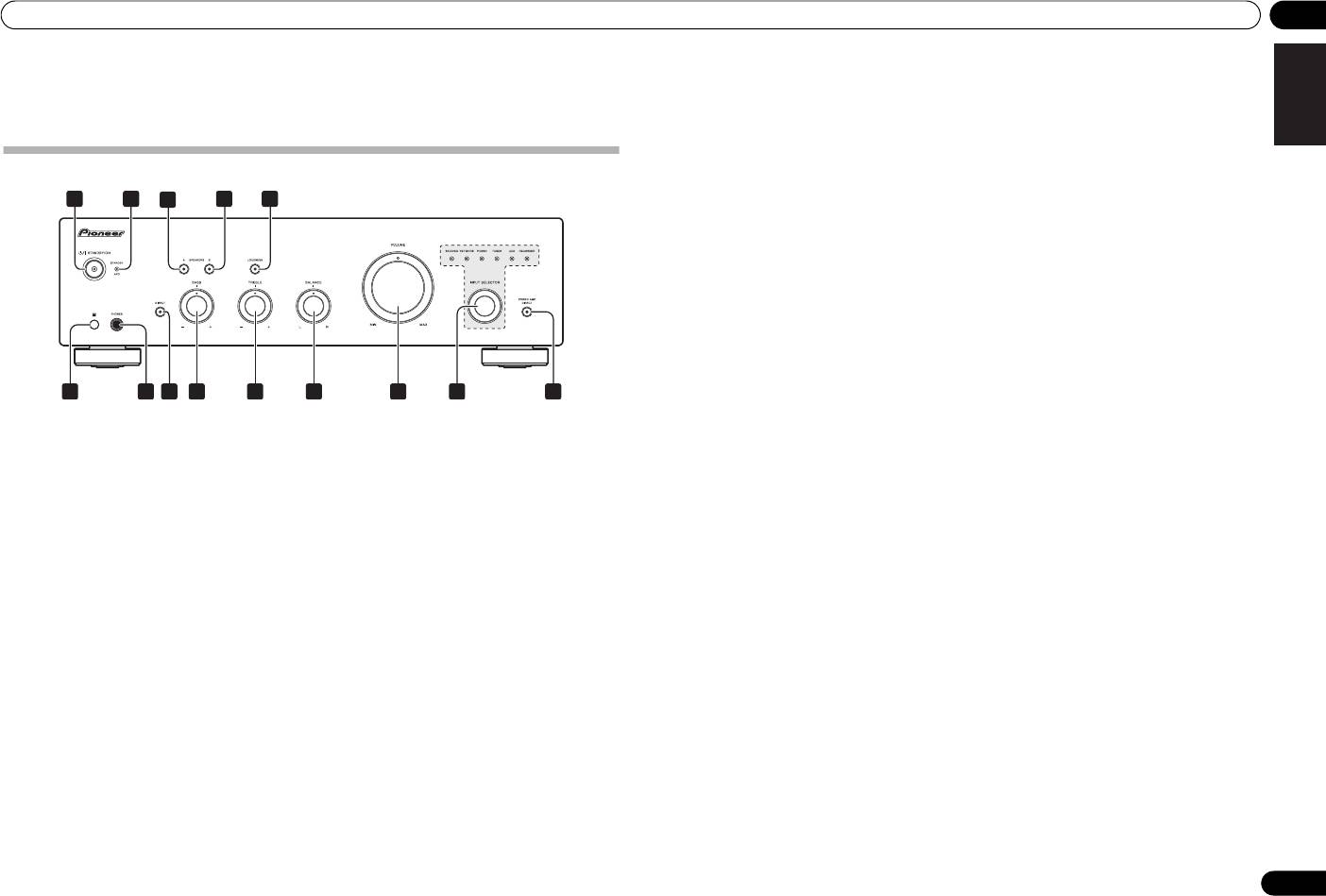
Using centralized control with other
Plugging in
Pioneer components (Except A-10)
Multiple Pioneer components equipped with CONTROL
Important
IN/OUT jacks can be connected to the A-30/A-20 unit,
• When going on a trip or otherwise not using the
allowing centralized control of the components via the
unit for an extended period, always disconnect the
remote sensor on the A-30/A-20. This also allows remote
power cord from its outlet. Note that various
control of components not equipped with a remote
internal settings will not be lost even if the power
sensor, or installed in places where the component’s
cord is disconnected from its outlet for an extended
remote sensor cannot be accessed.
time.
• If it is necessary to detach the power cord, first be
sure to press the
/I
STANDBY/ON button on the
IN
front panel of the unit so the A-30/A-20 is turned
OFF or the A-10 is in standby mode before
OUT
detaching the cord.
CONTROL
Caution
• The use of a power cord other than the one provided
will invalidate the warranty, since Pioneer will not
be responsible for any damage incurred. (The
power cord provided with the model A-30 has a
rated current capacity of 10 A, while the cord
provided with the A-20/A-10 has a rated current
capacity of 2.5 A.)
• Do not use any power cord other than the one
supplied with this unit.
• Do not use the supplied power cord for any purpose
other than that described below.
After you’ve finished making all connections, plug the
unit into an AC outlet.
Note
• For connections use a commercially available
monaural miniplug cord (without resistor).
• When connecting the CONTROL IN/OUT jacks,
commercially available audio cords must also be
used to make analog connections. Merely
connecting the CONTROL IN/OUT jacks alone will
not allow proper system control.
1 Plug the supplied power cord into the
• When a control cord is connected to the A-30/A-
AC IN
socket on the rear panel of the unit.
20’s CONTROL IN jack, the unit cannot be
controlled by pointing the remote control at the A-
2 Plug the other end into an AC outlet.
30/A-20 (the remote sensor is automatically
disabled).
To other Pioneer
component
equipped with
CONTROL IN jack
Other Pioneer
component equipped
with CONTROL IN/
OUT jacks
A-30/A-20
A-30/A-20
Aim remote control
remote
at the sensor on the
control
A-30/A-20.
A-30’s rear panel
To AC outlet
Power cord
02_connecting_up.fm 6 ページ 2012年6月21日 木曜日 午後2時1分
A30_SYXE8.book 7 ページ 2012年2月16日 木曜日 午前8時58分
Controls and displays 03
English
Chapter 3:
6 Remote sensor (Except A-10)
13
INPUT SELECTOR
knob/indicators
Receives the signals from the remote control (page 4).
Turn the knob clockwise or counterclockwise so that the
indicator lights for your desired input source. Turning
Controls and displays
7
PHONES
jack
the knob clockwise causes the lit indicator to right.
Use to connect headphones. No sound is produced
Turning counterclockwise causes it to left. When the
when the POWER AMP DIRECT button is ON.
remote control’s MUTE button is pressed to mute the
sound, the indicator for the input source selected with
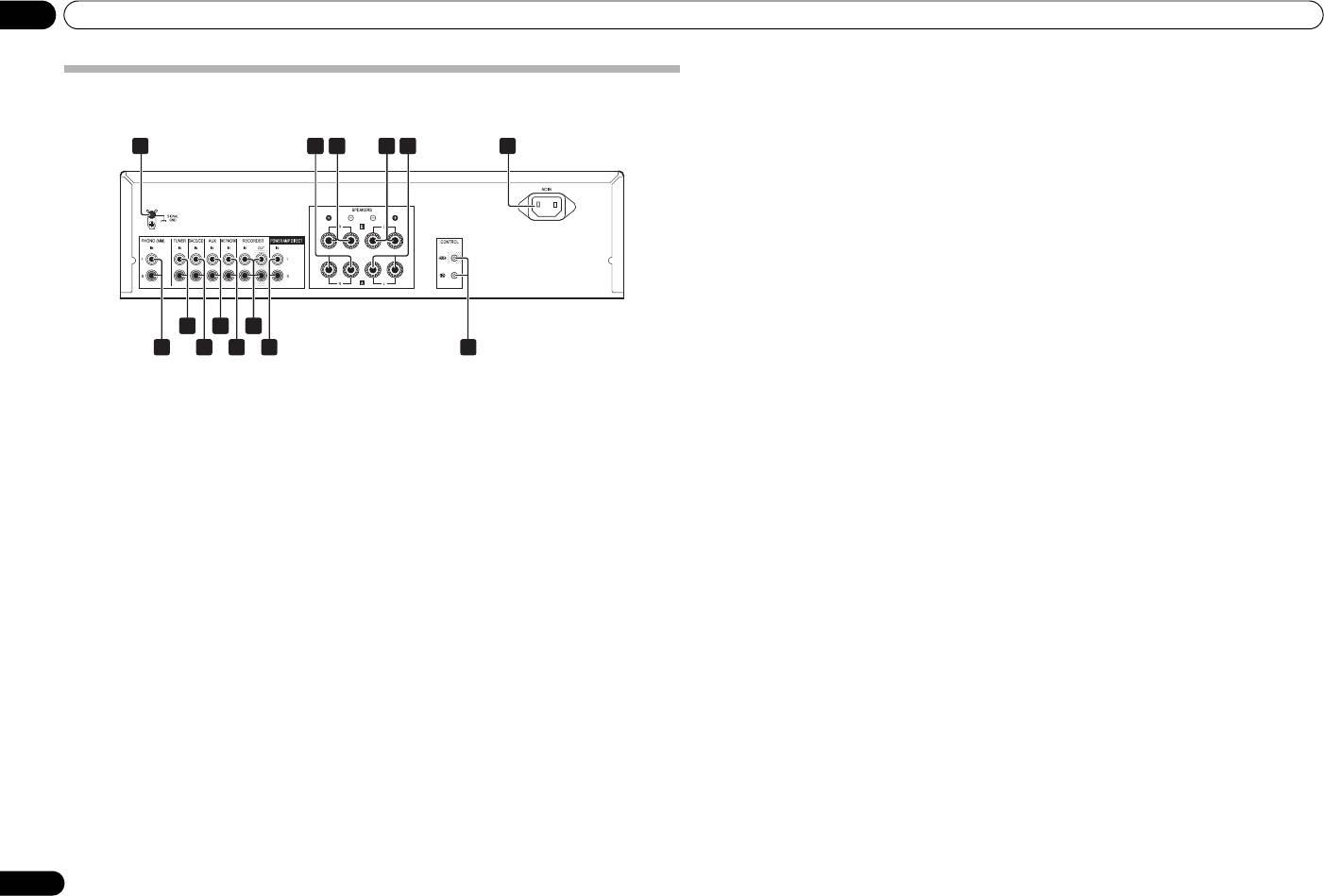
Front panel
8 DIRECT button/indicator
the INPUT SELECTOR knob flashes.
On : The indicator lights: When this button is set to ON,
1
2 54
3
sound signals are output directly, without being passed
14
POWER AMP DIRECT
button/indicator
A-30
through the various adjustment circuits (BASS, TREBLE,
(A-30 only)
BALANCE, LOUDNESS). This allows reproduction of the
Press this button when the A-30 is to be used as a power
signals with greater fidelity, but it disables any settings
amplifier (page 10).
made with the BASS, TREBLE, BALANCE or LOUDNESS
controls.
Off : The indicator goes off: The signal passes through
DeutschFrançais
the various frequency adjusting circuits. When the
indicator is OFF, adjustments can be made with the
BASS, TREBLE, BALANCE, and LOUDNESS controls.
9
BASS
tone control
Use to adjust the low-frequency tone. The center position
is the flat (normal) position. When turned to the right,
6
7
8
9
10 11 12
13 14
low-frequency tones are emphasized; when turned to the
left, low-frequency tones are de-emphasized.
Italiano Español Русский
1
/I
STANDBY/ON
4
SPEAKERS B
button/indicator
• This button does not operate when the DIRECT
Switches the amplifier between off and on.
Use this button to listen to the speaker system
button is in the on position.
When power is turned on, the power indicator in the
connected to SPEAKERS B terminals.
center of the button will light.
On : The indicator lights. Sound is heard from the
10
TREBLE
tone control
• On the A-10 model, this switches the amplifier
speaker system. (Sound will also be produced from the
Use to adjust the high-frequency tone. The center
between standby and on.
PHONES jack.)
position is the flat (normal) position. When turned to the
Off : The indicator goes off. No sound is heard from the
right, high-frequency tones are emphasized; when
Nederlands
2
STANDBY/APD
indicator
speaker system. Set to this position when listening with
turned to the left, high-frequency tones are de-
When power is set to standby, the indicator lights red.
headphones.
emphasized.
When the Auto Power Down (APD) function is on, the
• This button does not operate when the DIRECT
indicator lights green (page 11).
5
LOUDNESS
button/indicator
button is in the on position.
Use when listening at low volume levels.
3
SPEAKERS A
button/indicator
On : The indicator lights: Boosts low and high
11
BALANCE
control
Use this button to listen to the speaker system
frequencies to give added punch to playback even at a
Should normally be left in the center position. Adjust
connected to SPEAKERS A terminals.
low volume level.
balance if the sound is louder from one of the speakers.
On : The indicator lights. Sound is heard from the
If the right side is louder, turn toward the L (left) position
Off : The indicator goes off: Should normally be left in
speaker system. (Sound will also be produced from the
and if the left side is louder, turn toward the R (right)
this position.
PHONES jack.)
position.
• This button does not operate when the DIRECT
Off : The indicator goes off. No sound is heard from the
• This button does not operate when the DIRECT
button is in the on position.
speaker system. Set to this position when listening with
button is in the on position.
headphones.
• When sound volume is raised, the amount of
change produced by the LOUDNESS circuit is
12 VOLUME control
reduced.
Use to adjust the volume level. (Also allows adjustment
of the headphone sound volume.)
7
En
03 Controls and displays
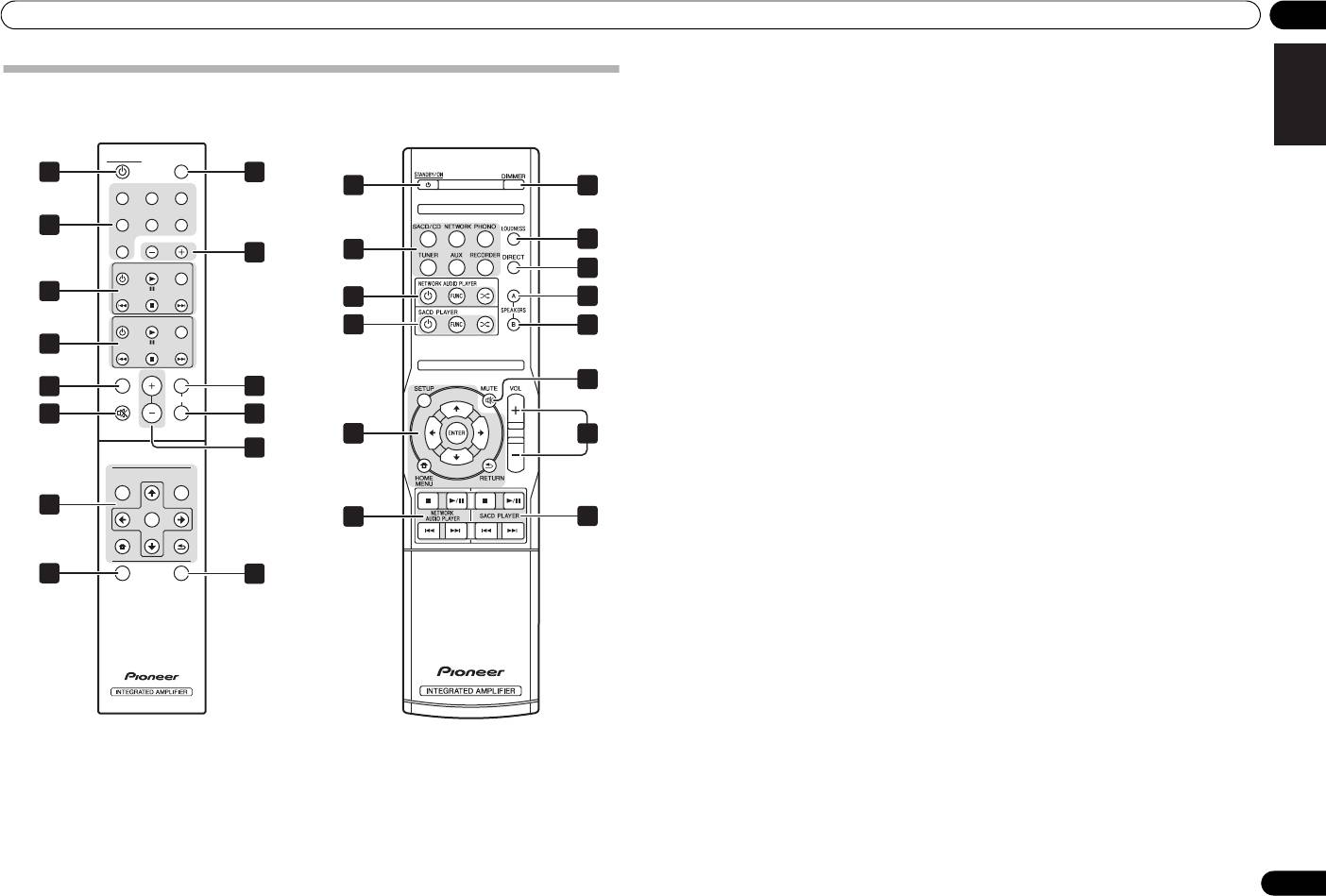
Rear panel
See pages 5-6 for details regarding connections.
1 GND (Turntable ground) terminal
10
AUX
IN
terminals
This ground terminal is designed to help reduce noise
when a turntable is connected. It is not a safety ground.
11
NETWORK
IN
terminals
2
SPEAKERS A
terminals (Right channel)
12
RECORDER IN/OUT
terminals
3
SPEAKERS B
terminals (Right channel)
13
POWER AMP DIRECT
IN
terminals (A-30
only)
4
SPEAKERS B
terminals (Left channel)
When using the A-30 as a power amplifier, connect the
pre-amplifier here (page 10).
5
SPEAKERS A
terminals (Left channel)
14
CONTROL IN/OUT
jack (Except A-10)
6
AC IN
jack
Connect power cord to here and an AC wall socket.
7
PHONO (MM)
IN
terminals
8
TUNER
IN
terminals
9
SACD/CD
IN
terminals
8
En
1 6
2
2 23 24 25
A-30
28 2
10
12
2
7
9
1311
14
A30_SYXE8.book 8 ページ 2012年2月16日 木曜日 午前8時58分
A30_SYXE8.book 9 ページ 2012年3月6日 火曜日 午前11時13分
Controls and displays 03
English
1
STANDBY/ON
Remote control (Except A-10)
Switches the amplifier between standby and on.
2 Input selector buttons
A-30
A-20
Press to select an input source. These select the
component connected to the corresponding input on the
STANDBY/ON DIMMER
rear panel.
1
8
• When the A-30 is connected, the OPTION button is
SACD/CD NETWORK PHONO
1
8
disabled.
TUNER
AUX RECORDER
3 SACD PLAYER control buttons
2
Use to control Pioneer SACD player.
OPTION
5
(Cannot be used to perform playback/pause on the
INPUT
9
2
PD-D6/PD-D6MK2/PD-D9/PD-D9MK2 models.)
SACD PLAYER
FUNC
7
4 NETWORK AUDIO PLAYER control
3
DeutschFrançais
34
10
buttons
NETWORK AUDIO PLAYER
FUNC
Use to control Pioneer network audio player.
3
11
4
5
LOUDNESS
Use to set the loudness circuit ON/OFF (page 7).
LOUDNESS
VOLUME
6
6
MUTE
5
A
10
MUTE
SPEARKERS
Mutes/unmutes the sound.
6
B
11
Italiano Español Русский
7
DIRECT
34
12
Press to access Direct listening (page 7).
12
8
DIMMER
NETWORK AUDIO PLAYER
SOUNDSETUP
This button allows the illumination of the unit's front
panel indicators to be set in three levels (does not affect
4
ENTER
the STANDBY indicator).
34
3
Nederlands
HOME MENU
RETURN
9
INPUT +/–
Use to change the input source. The source changes as
below.
7
DIRECT
APD
13
SACD/CD NETWORK PHONO TUNER
AUX RECORDER Return to the beginning.
10
SPEAKERS A
button/indicator
Use this button to listen to the speaker system
connected to SPEAKERS A terminals.
11
SPEAKERS B
button/indicator
Use this button to listen to the speaker system
connected to SPEAKERS B terminals.
12
VOLUME +/–
Use to set the listening volume.
13
APD
Use to set the Auto Power Down function to ON/OFF
(page 11).
9
En
04 Operation
Chapter 4:
Operation
Playback
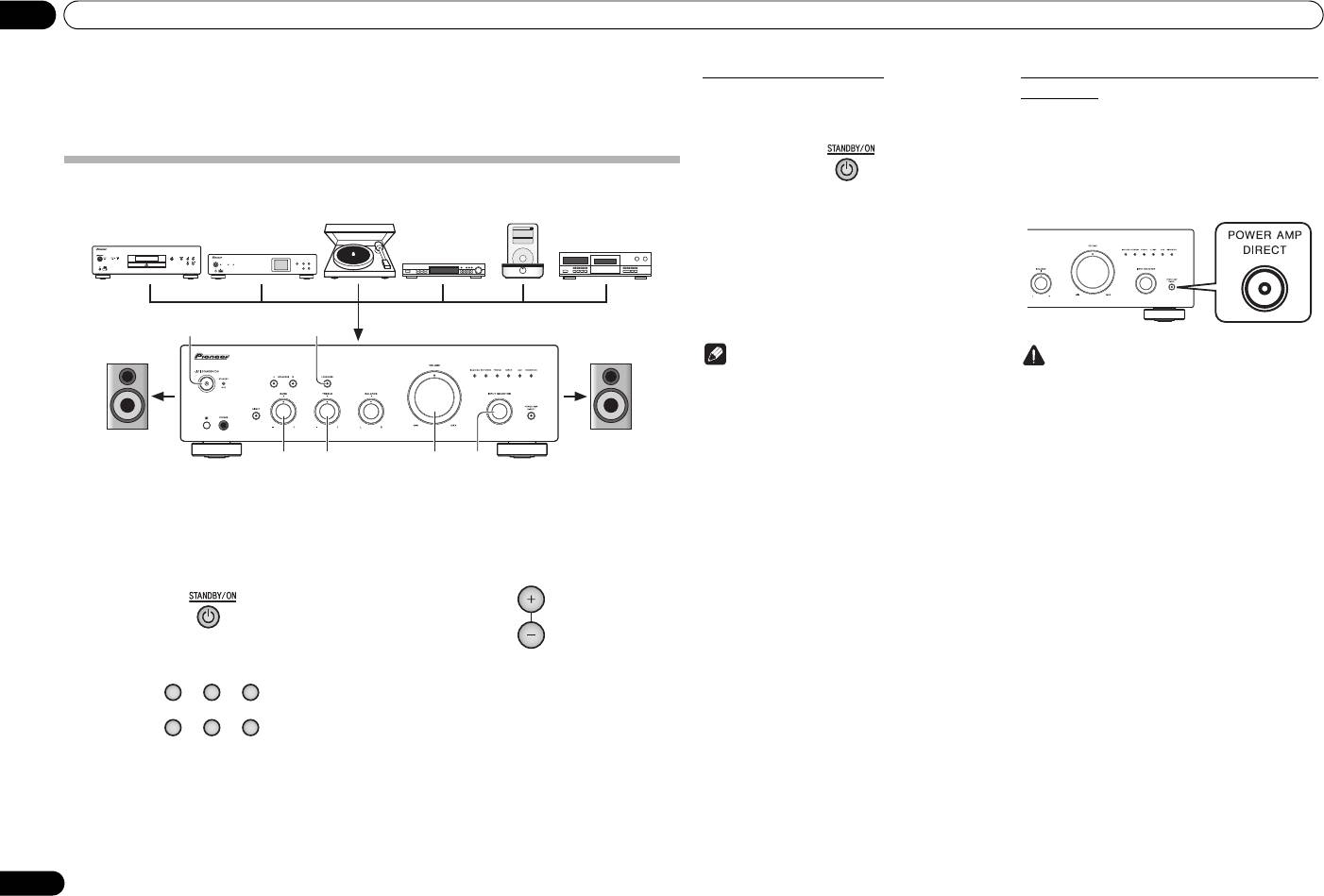
1 Turn on the power of the playback
4 Start playback of the component you
component.
selected in step 1.
2 Turn power ON to the unit.
5 Adjust playback volume with
VOLUME
• If the unit is in the standby mode, press the remote
control.
control’s STANDBY/ON button.
3 Select the source you want to playback.
6 Adjust the tone to your preference using
the
BASS
and
TREBLE
controls, and
LOUDNESS
button.
If the DIRECT button has been set to ON, these controls
are disabled.
Select the playback component.
• When using the A-30’s remote control, the INPUT
+/– button can be used to select the component.
• When using the front panel controls, rotate the
INPUT SELECTOR knob.
10
En
Music>
Extras>
iPod
Settings>
Shuffle Songs
Backlight
MENU
/I STANDBY/ON
FUNCTION
NETWORK AUDIO PLAYER
N-50
iPod/USB
5V 2.1A
STANDBY
PURE AUDIO Hi-Bit 32
62
3566
Turntable
iPod dock, etc
SACD/CD player
CD recorder or
Network audio player
tape deck
Tuner
Playback
Playback
A30_SYXE8.book 10 ページ 2012年2月16日 木曜日 午前8時58分
Set the power to Standby
When using the unit as a power amplifier
(A-30 only)
1 Press the remote control’s
STANDBY/
When a pre-amplifier is connected to the unit’s POWER
ON
button.
AMP DIRECT terminals, the unit can be used as a power
amplifier.
1 Press the
POWER AMP DIRECT
button
on the front panel of the unit.
The next time you wish to turn on the power, press the
The POWER AMP DIRECT indicator will light.
remote control’s STANDBY/ON button.
• In the case of the A-30/A-20, If the front panel’s
STANDBY/ON button is pressed, the power will
be turned off. In this case, if the power is off,
pressing the remote control’s STANDBY/ON
button will not turn on the power. To turn on the
power again, press the front panel’s STANDBY/
ON button.
Note
Caution
• If the power cord is disconnected when the unit is
• When the POWER AMP DIRECT indicator is
in the standby mode the unit will turn off, but when
lighted, operations change as follows:
the cord is then reconnected, the unit will not
– The unit’s front-panel VOLUME, BASS, TREBLE,
automatically turn on. After reconnecting the
and BALANCE controls are disabled. These
power cord, press the remote control’s
adjustments are controlled by the component
STANDBY/ON button to turn the power on.
connected to the unit’s POWER AMP DIRECT
terminals.
– When the POWER AMP DIRECT indicator is
lighted, sound volume from the A-30 will
automatically be fixed at its maximum output.
When using this unit as a power amplifier,
check the output level of the component
connected to the POWER AMP DIRECT
terminals and set it to a low level as appropriate
VOLUME
before turning on the POWER AMP DIRECT
indicator. If the sound volume of the component
connected to the POWER AMP DIRECT
terminals is initially set to a high output level,
loud sound may suddenly be output when the
POWER AMP DIRECT indicator lights.
– Sound is not produced from the PHONES jack
SACD/CD NETWORK PHONO
and RECORDER OUT terminals.
• For more information, consult the operating
TUNER AUX RECORDER
instructions for the component connected to the A-
30’s POWER AMP DIRECT terminals.
Operation 04
English
Making an audio recording
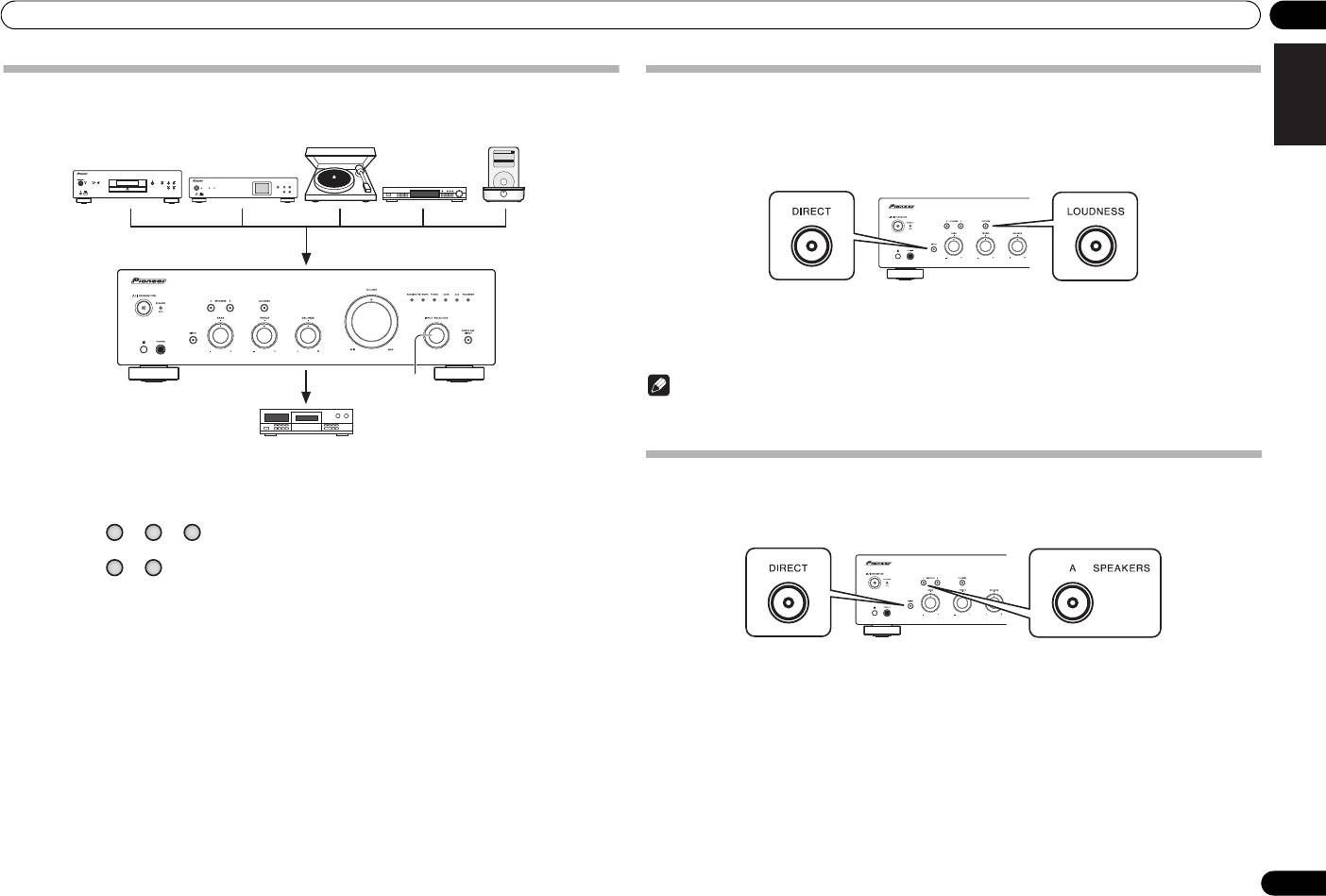
You can make an audio recording from any audio source connected to the amplifier.
Music>
iPod
Backlight
Shuffle Songs
Settings>
Extras>
MENU
/I STANDBY/ON
FUNCTION
NETWORK AUDIO PLAYER
N-50
STANDBY
iPod/USB
5V 2.1A
PURE AUDIO Hi-Bit 32
DeutschFrançais
1
Italiano Español Русский
1 Select the source you want to record.
Nederlands
2 Start recording, then start playback of
the source component.
11
En
Turntable
iPod dock, etc
SACD/CD player
Network audio player
Tuner
Playback
Recording
Audio recording component
(CD recorder, tape deck, etc.)
A30_SYXE8.book 11 ページ 2012年3月6日 火曜日 午前11時13分
To set for automatic standby status (Auto Power Down)
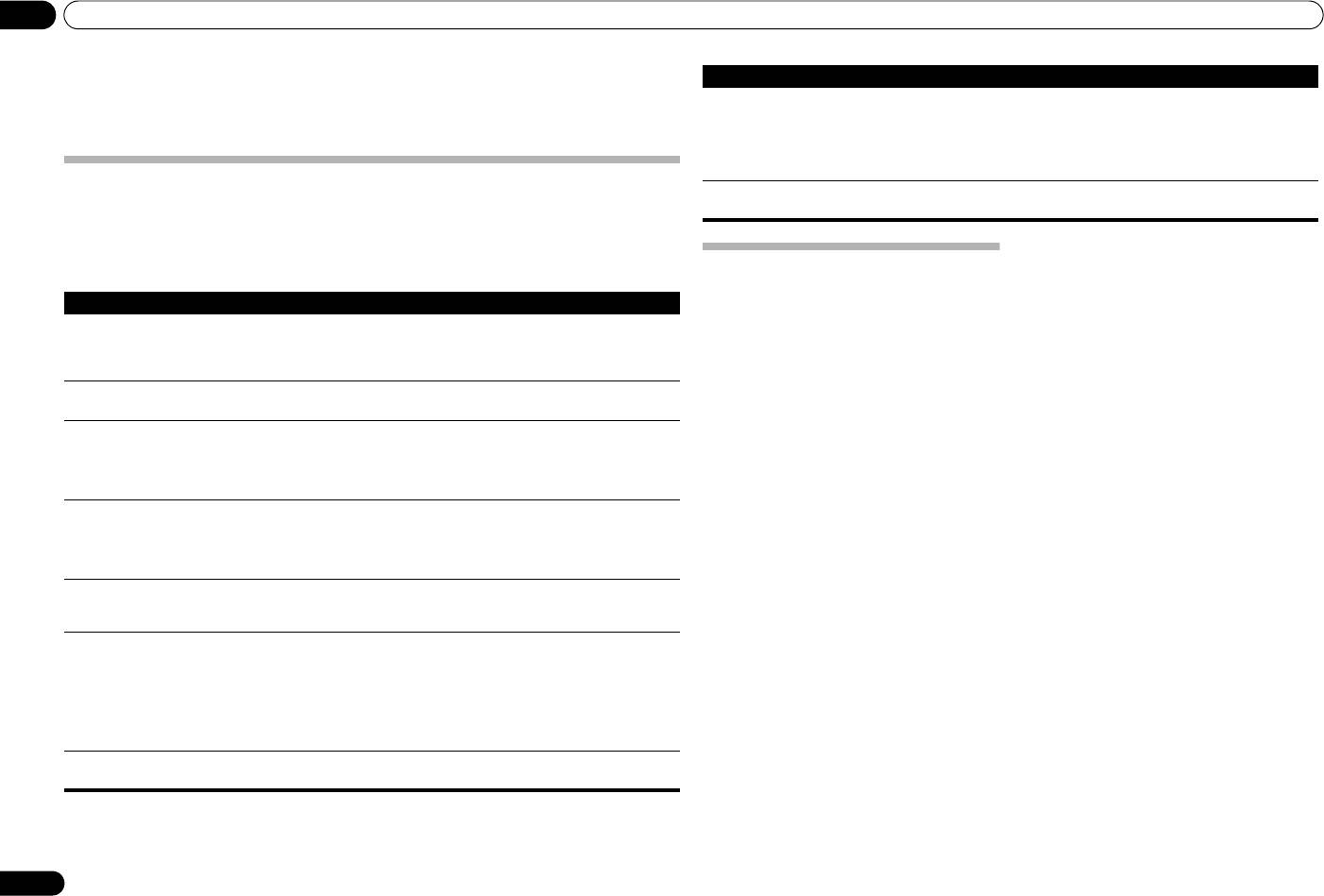
When this condition is set, if no input signal is detected for 30 minutes, the unit will automatically enter standby
status.
1 If the unit’s power is ON, hold the unit’s front-panel
DIRECT
button and
LOUDNESS
button depressed simultaneously for three seconds.
When this condition is set to ON, the STANDBY/APD indicator on the unit’s front panel will light green. Press the
buttons again to disable the setting.
• This condition can also be set by means of the APD button on the A-30’s remote control.
• The factory default setting is ON.
Note
• Depending on the device connected, excessive noise produced by the device may be interpreted as an audio
signal, thus preventing the Automatic Power-Down function from operating.
Restoring all the settings to the factory default settings
1 When power is in standby mode, hold the front-panel’s DIRECT button and
SACD/CD NETWORK PHONO
SPEAKERS A button depressed simultaneously for five seconds.
TUNER AUX
2 Turn power ON to the unit.
A30_SYXE8.book 12 ページ 2012年2月16日 木曜日 午前8時58分
05 Additional information
Chapter 5:
Problem Remedy
Can’t operate the remote
•Replace the battery (page 4).
Additional information
control.
•Operate within 7 m, 30° of the remote sensor on the front panel (page 4).
•Remove the obstacle or operate from another position.
•Avoid exposing the remote sensor on the front panel to direct light.
•Is the control cord for one component connected improperly? Confirm correct
connections (page 6).
Troubleshooting
Can’t change input source on A-30. •Check whether
POWER AMP DIRECT
function is ON. If so, press the front panel’s
Incorrect operations are often mistaken for trouble and malfunctions. If you think that there is something wrong with
POWER AMP DIRECT
button to turn the function OFF (page 10).
this component, check the points below. Sometimes the trouble may lie in another component. Investigate the other
components and electrical appliances being used. If the trouble cannot be rectified even after exercising the checks
listed below, ask your nearest Pioneer authorized service center or your dealer to carry out repair work.
• If the unit does not operate normally due to external effects such as static electricity disconnect the power plug
from the outlet and insert again to return to normal operating conditions.
Cleaning the unit
• Use a polishing cloth or dry cloth to wipe off dust
Problem Remedy
and dirt.
• When the surface is dirty, wipe with a soft cloth
The power does not turn on. • Is the power plug disconnected from the power outlet? Connect the power plug
dipped in some neutral cleanser diluted five or six
correctly to its outlet (page 6).
times with water, and wrung out well, and then
•Is the power cord disconnected from the AC IN connector? Connect the power cord
wipe again with a dry cloth. Do not use furniture
correctly (page 6).
wax or cleansers.
Power turns off. •Is the Auto Power Down function turned ON? If you do not want the power to turn off
• Never use thinners, benzine, insecticide sprays or
automatically, disable the Auto Power Down function (page 11).
other chemicals on or near this unit, since these
will corrode the surface.
During playback, sound stops, and
•The unit’s internal temperature has risen and the safety circuit has operated.
the
STANDBY/APD
indicator flashes
- Turn power OFF, and allow the unit to cool before turning the power ON again.
red at about 1 second intervals.
- Install the unit in a location with better ventilation.
- Confirm that the unit is installed correctly; if the unit is turned on again without
being allowed to cool, the same symptoms may appear (page 4).
During playback, sound stops, and
•Are you using speakers with impedance values not supported by this unit? Confirm
the
STANDBY/APD
indicator flashes
the speaker’s nominal impedance value (page 6).
red at about 2 second intervals.
•Are any speaker cables loose from the
SPEAKERS
terminals and touching other
wires or the surface of the rear panel? Disconnect the power cord and reconnect the
speaker cables correctly (page 6).
When power is turned on, the
•The unit’s circuitry is damaged. Disconnect the power cord and consult your dealer
STANDBY/APD
indicator flashes at
or nearest
Pioneer authorized service center
.
irregular intervals.
No sound is output when a function is
•A connection cable is disconnected or connected improperly. Check your
selected.
connections (page 5).
•Connectors or pin plugs on a cable are dirty. Wipe off any dirt from connectors and
pin plugs.
•Confirm that the unit’s input selector is set to the desired playback component. Set
selector correctly (page 10).
•In the case of the A-30/A-20, press
MUTE
on the remote control to turn muting off
(page 9).
No sound from one speaker. •Are the connection cables or speaker cables disconnected on one side? Reconnect
securely (page 5).
12
En
A30_SYXE8.book 13 ページ 2012年2月16日 木曜日 午前8時58分
Additional information 05
English
Miscellaneous
Specifications
Power requirements
. . . . . . . . . . . . . . . . . . . . . . . . . . AC 220 V to 230 V, 50 Hz
Amplifier section
Power consumption
Power output specification is for when power supply is 230 V.
A-30 . . . . . . . . . . . . . . . . . . . . . . . . . . . . . . . . . . . . . .175 W
A-20/A-10. . . . . . . . . . . . . . . . . . . . . . . . . . . . . . . . . .135 W
• Continuous power output (both
In standby . . . . . . . . . . . . . . . . . . . . . . . . . . . . . . . . . 0.3 W
channels driven at 20 Hz to 20 kHz)
Dimensions
A-30 . . . . . . . . . . . . . . . . . . . . . . . . . . . . . . . . 70 W + 70 W
. . . . . . . . . . . . .435 mm (W) x 128 mm (H) x 360 mm (D)
A-20, A-10 . . . . . . . . . . . . . . . . . . . . . . . . . . . 50 W + 50 W
Weight (without package)
(THD 0.1 %, 4 Ω)
A-30 . . . . . . . . . . . . . . . . . . . . . . . . . . . . . . . . . . . . . . 7.9 kg
A-30 . . . . . . . . . . . . . . . . . . . . . . . . . . . . . . . . . 40 W+40 W
A-20 . . . . . . . . . . . . . . . . . . . . . . . . . . . . . . . . . . . . . . 7.2 kg
A-20, A-10 . . . . . . . . . . . . . . . . . . . . . . . . . . . . 30 W+30 W
A-10 . . . . . . . . . . . . . . . . . . . . . . . . . . . . . . . . . . . . . . 6.7 kg
(THD 0.05 %, 8 Ω)
Accessories
Audio section
Remote control (Except A-10) . . . . . . . . . . . . . . . . . . . . . 1
DeutschFrançais
AAA/IEC R03 dry cell batteries (Except A-10) . . . . . . . . 2
• Input (Sensitivity/Impedance)
Power cord
SACD/CD, NETWORK, TUNER, AUX, RECORDER
Warranty card
. . . . . . . . . . . . . . . . . . . . . . . . . . . . . . . . . . . 200 mV/50 kΩ
Operating instructions (This document)
POWER AMP DIRECT (A-30 only). . . . . . . . . . . 1 V/10 kΩ
PHONO (MM) . . . . . . . . . . . . . . . . . . . . . . . .2.8 mV/50 kΩ
Note
• Output (Level/Impedance)
RECORDER OUT . . . . . . . . . . . . . . . . . . . .200 mV/2.2 kΩ
• Specifications and the design are subject to
Italiano Español Русский
PHONES . . . . . . . . . . . . . . . . . . . . . . . . . . . . 250 mV/32 Ω
possible modifications without notice, due to
improvements.
• Frequency response
• Corporation and product names mentioned herein
SACD/CD, NETWORK, TUNER, AUX, RECORDER
are trademarks or registered trademarks of the
respective corporations.
. . . . . . . . . . . . . . . . . . . . . . . . . . . .5 Hz to 100 kHz dB*
PHONO (MM) . . . . . . . . . . . . . .20 Hz to 20 kHz ±0.5 dB*
* Measured with DIRECT button switched on.
Nederlands
• Tone control
(When VOLUME is set to
-
30 dB)
Bass. . . . . . . . . . . . . . . . . . . . . . . . . . . . .± 10 dB (100 Hz)
Treble. . . . . . . . . . . . . . . . . . . . . . . . . . . .± 10 dB (10 kHz)
• Signal-to-Noise Ratio (IHF SHORTED,
A-NETWORK)
SACD/CD, NETWORK, TUNER, AUX, RECORDER
. . . . . . . . . . . . . . . . . . . . . . . . . . . . . . . . . . . . . . . . 105 dB*
PHONO (MM, 2.8 mV input) . . . . . . . . . . . . . . . . . 77 dB*
* Measured with DIRECT button switched on.
• Speaker load impedance
A, B . . . . . . . . . . . . . . . . . . . . . . . . . . . . . . . . . 4 Ω to 16 Ω
A+B. . . . . . . . . . . . . . . . . . . . . . . . . . . . . . . . . 8 Ω to 32 Ω
Bi-wiring . . . . . . . . . . . . . . . . . . . . . . . . . . . . . 4 Ω to 16 Ω
© 2012 PIONEER CORPORATION.
All rights reserved.
13
En
A30_SYXE8-Fr.book Page 2 Thursday, February 16, 2012 11:51 AM
AVERTISSEMENT
IMPORTANT
Cet appareil n’est pas étanche. Pour éviter les risques
d’incendie et de décharge électrique, ne placez près de
ATTENTION
lui un récipient rempli d’eau, tel qu’un vase ou un pot
DANGER D´ELECTROCUTION
de fleurs, et ne l’exposez pas à des gouttes d’eau, des
NE PAS OUVRIR
éclaboussures, de la pluie ou de l’humidité.
Ce symbole de l’éclair, placé dans un
ATTENTION :
Ce point d’exclamation, placé dans un
D3-4-2-1-3_A1_Fr
triangle équilatéral, a pour but d’attirer
POUR ÉVITER TOUT RISQUE
triangle équilatéral, a pour but d’attirer
l’attention de l’utilisateur sur la présence, à
D’ÉLECTROCUTION, NE PAS ENLEVER LE
l’attention de l’utilisateur sur la présence,
l’intérieur du coffret de l’appareil, de
COUVERCLE (NI LE PANNEAU ARRIÈRE).
AVERTISSEMENT
dans les documents qui accompagnent
“tensions dangereuses” non isolées d’une
AUCUNE PIÈCE RÉPARABLE PAR
l’appareil, d’explications importantes du
Avant de brancher l’appareil pour la première, lisez
grandeur suffisante pour représenter un
L’UTILISATEUR NE SE TROUVE À
point de vue de l’exploitation ou de
attentivement la section suivante.
risque d’électrocution pour les êtres
L’INTÉRIEUR. CONFIER TOUT ENTRETIEN À
l’entretien.
La tension de l’alimentation électrique disponible
humains.
UN PERSONNEL QUALIFIÉ UNIQUEMENT.
varie selon le pays ou la région. Assurez-vous que
D3-4-2-1-1_A1_Fr
la tension du secteur de la région où l’appareil sera
utilisé correspond à la tension requise (par ex. 230
V ou 120 V), indiquée sur le panneau arrière.
Information à destination des utilisateurs sur la collecte et l’élimination des
D3-4-2-1-4*_A1_Fr
équipements et batteries usagés
Marquage pour les
Ces symboles qui figurent sur les produits, les emballages et/ou les documents
AVERTISSEMENT
équipements
d’accompagnement signifient que les équipements électriques et électroniques et
Pour éviter les risques d’incendie, ne placez aucune
batteries usagés ne doivent pas être jetés avec les déchets ménagers et font l’objet
flamme nue (telle qu’une bougie allumée) sur
d’une collecte sélective.
l’appareil.
Pour assurer l’enlèvement et le traitement appropriés des produits et batteries
D3-4-2-1-7a_A1_Fr
usagés, merci de les retourner dans les points de collecte sélective habilités
conformément à la législation locale en vigueur.
PRÉCAUTION DE VENTILATION
Lors de l’installation de l’appareil, veillez à laisser un
Exemples de marquage
En respectant les circuits de collecte sélective mis en place pour ces produits, vous
espace suffisant autour de ses parois de manière à
pour les batteries
contribuerez à économiser des ressources précieuses et à prévenir les impacts
améliorer la dissipation de chaleur (au moins 30 cm sur
négatifs éventuels sur la santé humaine et l’environnement qui pourraient résulter
le dessus, 10 cm à l’arrière et 10 cm de chaque côté).
d’une mauvaise gestion des déchets.
AVERTISSEMENT
Pour plus d’information sur la collecte et le traitement des produits et batteries
Les fentes et ouvertures du coffret sont prévues pour la
usagés, veuillez contacter votre municipalité, votre service de gestion des déchets
ventilation, pour assurer un fonctionnement stable de
ou le point de vente chez qui vous avez acheté ces produits.
l’appareil et pour éviter sa surchauffe. Pour éviter les
Ces symboles ne sont valables que dans les pays de l’Union Européenne.
risques d’incendie, ne bouchez jamais les ouvertures et
Pour les pays n’appartenant pas à l’Union Européenne :
ne les recouvrez pas d’objets, tels que journaux, nappes
ou rideaux, et n’utilisez pas l’appareil posé sur un tapis
Pb
Si vous souhaitez jeter ces articles, veuillez contacter les autorités ou revendeurs
épais ou un lit.
locaux pour connaître les méthodes d’élimination appropriées.
D3-4-2-1-7b*_A1_Fr
K058a_A1_Fr
A30_SYXE8-Fr.book Page 3 Thursday, February 16, 2012 11:51 AM
Milieu de fonctionnement
Merci d’avoir acheté ce produit
Ce produit est destiné à une utilisation domestique
Température et humidité du milieu de fonctionnement :
Pioneer.
générale. Toute panne due à une utilisation autre qu'à
De +5 °C à +35 °C (de +41 °F à +95 °F) ; Humidité
Veuillez lire entièrement ce mode d’emploi afin de
des fins privées (comme une utilisation à des fins
pouvoir faire fonctionner correctement le modèle que
relative inférieure à 85 % (orifices de ventilation non
commerciales dans un restaurant, dans un autocar
vous avez choisi. Après avoir fini la lecture du mode
obstrués)
ou sur un bateau) et qui nécessite une réparation
d’emploi, placez-le dans un endroit sûr afin de pouvoir
N’installez pas l’appareil dans un endroit mal ventilé ou
vous y référer plus tard
.
sera aux frais du client, même pendant la période de
un lieu soumis à une forte humidité ou en plein soleil
garantie.
(ou à une forte lumière artificielle).
K041_A1_Fr
D3-4-2-1-7c*_A1_Fr
Table des
NOTE IMPORTANTE SUR LE CABLE D’ALIMENTATION
matières
Si la fiche d’alimentation secteur de cet appareil ne
Tenir le câble d’alimentation par la fiche. Ne pas
convient pas à la prise secteur à utiliser, la fiche doit
débrancher la prise en tirant sur le câble et ne pas
01 Préparatifs
être remplacée par une appropriée. Ce
toucher le câble avec les mains mouillées. Cela risque de
Contenu de la boîte . . . . . . . . . . . . . . . . . . . . . . . .4
remplacement et la fixation d’une fiche secteur sur le
provoquer un court-circuit ou un choc électrique. Ne pas
Chargement des piles de la télécommande
cordon d’alimentation de cet appareil doivent être
poser l’appareil ou un meuble sur le câble. Ne pas pincer
(à l’exception de l’A-10) . . . . . . . . . . . . . . . . . . . . .4
effectués par un personnel de service qualifié. En cas
Utilisation de la télécommande . . . . . . . . . . . . . . . .4
le câble. Ne pas faire de noeud avec le câble ou l’attacher
de branchement sur une prise secteur, la fiche de
Installation de l’amplificateur . . . . . . . . . . . . . . . .4
à d’autres câbles. Les câbles d’alimentation doivent être
coupure peut provoquer une sérieuse décharge
posés de façon à ne pas être écrasés. Un câble abîmé
02 Raccordement
électrique. Assurez-vous qu’elle est éliminée
peut provoquer un risque d’incendie ou un choc
Raccordements des câbles . . . . . . . . . . . . . . . . . .5
correctement après sa dépose.
électrique. Vérifier le câble d’alimentation de temps en
A propos de “bi-câblage (bi-wiring)”. . . . . . . . . . . .5
L’appareil doit être déconnecté en débranchant sa
temps. Contacter le service après-vente PIONEER le plus
Connexion des câbles d’enceinte. . . . . . . . . . . . . .6
fiche secteur au niveau de la prise murale si vous
proche ou le revendeur pour un remplacement.
Raccordement des câbles audio . . . . . . . . . . . . . . 6
prévoyez une période prolongée de non utilisation
S002*_A1_Fr
Commande centralisée avec d’autres composants
(par exemple avant un départ en vacances).
Pionner (à l’exception de l’A-10) . . . . . . . . . . . . . .6
D3-4-2-2-1a_A1_Fr
Branchement. . . . . . . . . . . . . . . . . . . . . . . . . . . . .6
(A-30 uniquement)
03 Commandes et afficheur
Panneau avant. . . . . . . . . . . . . . . . . . . . . . . . . . . .7
ATTENTION:
Panneau arrière. . . . . . . . . . . . . . . . . . . . . . . . . . .8
ATTENTION
SURFACE CHAUDE. NE PAS TOUCHER.
Télécommande (à l’exception de l’A-10). . . . . . . . .9
L’interrupteur /I STANDBY/ON de cet appareil ne
La surface supérieure du dissipateur de
coupe pas complètement celui-ci de sa prise secteur.
chaleur interne peut devenir très chaude
04 Fonctionnement
Comme le cordon d’alimentation fait office de
lorsque ce produit fonctionne en
Lecture . . . . . . . . . . . . . . . . . . . . . . . . . . . . . . . .10
dispositif de déconnexion du secteur, il devra être
permanence.
Réglage de la puissance sur la mise en veille . . . .10
Lorsque vous utilisez l’unité comme amplificateur
débranché au niveau de la prise secteur pour que
(A-30 uniquement). . . . . . . . . . . . . . . . . . . . . . . . .10
l’appareil soit complètement hors tension. Par
Réalisation d’un enregistrement audio . . . . . . . .11
conséquent, veillez à installer l’appareil de telle
Pour régler un statut de veille automatique
manière que son cordon d’alimentation puisse être
(fonction de mise hors tension automatique). . . .11
facilement débranché de la prise secteur en cas
Pour restaurer tous les réglages sur
les valeurs par défaut. . . . . . . . . . . . . . . . . . . . . .11
d’accident. Pour éviter tout risque d’incendie, le
cordon d’alimentation sera débranché au niveau de
05 Informations supplémentaires
la prise secteur si vous prévoyez une période
Guide de dépannage . . . . . . . . . . . . . . . . . . . . . . 12
prolongée de non utilisation (par exemple avant un
Nettoyage de l’unité. . . . . . . . . . . . . . . . . . . . . . .12
départ en vacances).
Spécifications . . . . . . . . . . . . . . . . . . . . . . . . . . .13
D3-4-2-2-2a*_A1_Fr
3
A30_SYXE8-Fr.book Page 4 Thursday, February 16, 2012 11:51 AM
01 Préparatifs
Chapitre 1 :
• La télécommande risque de ne pas fonctionner
Attention
correctement si la lumière du soleil ou une lampe
Toute utilisation incorrecte des piles peut entraîner des
fluorescente puissante éclaire le capteur de
Préparatifs
accidents, par exemple une fuite ou une explosion.
l’appareil.
Respectez les précautions suivantes :
• Les télécommandes de différents appareils
peuvent interférer entre elles. Evitez d’utiliser des
• Lorsque vous placez les piles, prenez soin de ne pas
télécommandes commandant d’autres
2 Placez les piles neuves, en faisant
endommager les ressorts des bornes des piles .
équipements situés à proximité de cet appareil.
Contenu de la boîte
correspondre la polarité à celle du boîtier.
• Ne pas utiliser de piles autres que celles qui sont
• Remplacez les piles lorsque vous constatez une
indiquées. Ne pas utiliser non plus une pile neuve
Veuillez confirmer que les accessoires suivants sont
diminution de la portée de fonctionnement de la
présents dans la boîte quand vous l’ouvrez.
A-30
A-20
avec une pile usée.
télécommande.
• Lorsque vous installez les piles dans la
• Télécommande (à l’exception de l’A-10)
télécommande, orientez-les batteries dans la
• Piles sèches AAA/IEC R03 x2 (à l’exception de
bonne direction en respectant la polarité ( et ).
l’A-10)
• Ne pas chauffer, ni démonter, ni ne jeter les piles
Installation de l’amplificateur
• Cordon d’alimentation
dans le feu ou l’eau.
Lors de l’installation de l’appareil, assurez-vous que ce
• Carte de garantie
• La tension des piles peut différer l’une de l’autre et
dernier est posé sur une surface plane et stable.
cela même si leur type et forme sont identiques.
• Mode d’emploi (ce document)
Utiliser ensemble uniquement des piles du même
•
N’installez pas l’appareil dans les endroits suivants :
type.
– sur un téléviseur couleur (les images à l’écran
Remarque
• Pour éviter que les piles ne fuient, enlever les piles
pourraient être déformées)
lorsque le produit n’est pas censé être utilisé
– à proximité d’une platine à cassettes (ou d’un
• Les illustrations des instructions opérationnelles
pendant une période prolongée (à savoir 1 mois ou
appareil qui produit un champ magnétique). Le son
peuvent avoir été modifiées ou simplifiées dans le
3 Fermez le couvercle arrière.
plus). Si les piles ont fuit, nettoyer soigneusement
pourrait s’en trouver affecté.
but de clarification et en conséquence peuvent
l’intérieur du compartiment et placer ensuite les
– à la lumière directe du soleil
différer de l’apparence actuelle du produit.
A-30
A-20
piles. Si une pile fuit et que du liquide entre en
– à l’humidité
• Les illustrations utilisées ici représentent
contact avec votre peau, nettoyer à grande quantité
d’eau.
– à des températures extrêmes
principalement l’A-30.
– en présence de vibrations ou autres mouvements
• Lorsque vous jetez des piles usées, veuillez vous
conformer aux normes gouvernementales ou à la
– à la poussière
réglementation des institutions publiques
– à la fumée ou aux émanations graisseuses
environnementales en vigueur dans votre pays ou
(cuisine par ex.)
Chargement des piles de la
région.
• Ne pas installer l’unité sur un divan ou tout autre
télécommande
objet/matériau ayant des caractéristiques
Utilisation de la télécommande
absorbantes sous risque d’affecter la qualité du
(à l’exception de l’A-10)
La télécommande a une portée d’environ 7 m avec un
son.
angle de 30° par rapport au capteur de télécommande.
1 Ouvrez le couvercle arrière.
Les piles incluses avec l’unité ont été fournies pour
permettre de contrôler le fonctionnement du produit et
A-30
A-20
ne dureront pas longtemps. Nous recommandons
d’utiliser des piles alcalines qui ont une durée de vie
utile plus longue.
AVERTISSEMENT
30 °
• N’utilisez ni ne conservez les piles sous la lumière
30 °
directe du soleil ou dans un endroit excessivement
chaud, comme une voiture ou à proximité d’un
appareil de chauffage. Les piles risqueraient de
fuir, de surchauffer, d’exploser ou de s’enflammer.
7 m
Leur durée de vie ou leur performance pourrait
également être réduite.
Gardez à l’esprit ce qui suit lorsque vous utilisez la
télécommande :
• Assurez-vous de l’absence d’obstacles entre la
télécommande et le capteur de l’appareil.
4
Fr
A30_SYXE8-Fr.book Page 5 Thursday, February 16, 2012 11:51 AM
Raccordement 02
English
Chapitre 2 :
• Au cours de la lecture, assurez-vous que les
Attention
boutons SPEAKERS A et SPEAKERS B sont sur
•La borne SIGNAL GND est fournie pour réduire le
Marche (ON) (page 7).
Raccordement
bruit lors de la connexion de l’unité aux
composants, tels que la platine.
Système des
Système des
Gauch
• Ne pas connecter les bornes PHONO (MM) à un
Droite
Enlevez la tige de
autre composant qu’une platine; ne pas connecter
court-circuit entre
non plus une platine dotée d’un égalisateur intégré.
HIGH
les bornes + et –.
HIGH
Raccordements des câbles
Un son émis trop fort peut se produire, ce qui
endommagerait les enceintes ou les autres
appareils.
Attention
• Les bornes de l’unité
PHONO (MM)
ont été conçues
• Avant d’effectuer ou de modifier les raccordements, mettez l’appareil hors tension et débranchez le cordon
pour être utilisées avec des des
platines dotée
s de
LOW
LOW
d’alimentation de la prise secteur.
cartouches de type MM (à aimant mobile). Ne pas
• Connectez le cordon d’alimentation après avoir effectué toutes les connexions entre les appareils.
utiliser les les
platines dotée
s de cartouches MC (à
bobine mobile).
DeutschFrançais
Prises PRE OUT sur le
Système d’enceinte B
• Assurez-vous de ne pas plier les câbles par dessus
pré-amplificateur ou
Droite
Gauch
cette unité (comme indiqué dans l’illustration). Si
Lecteur SACD/CD
amplificateur AV
cela se produit, le champ magnétique produit par
Lecteur audio réseau
Panneau
les transformateurs dans cette unité peut
arrière A-30
provoquer un ronflement des enceintes.
PRE OUT
L
L
Italiano Español Русский
A-30
R
R
R
L
R
L
uniquement
Panneau arrière A-30
• Les bornes de l’unité POWER AMP DIRECT ne
Nederlands
doivent jamais être branchées à des connecteurs
L
R
L
R
L
R
autres que PRE-AMP OUT.
• Si votre platine dispose d’un fil de mise à la terre,
fixez-le à la borne de terre de cet amplificateur.
Remarque
Attention
• Lors de la connexion d’un enregistreur à bande, le
• Lorsque vous utilisez un bi-câblage pour connecter
R
L
R
L
R
L
R
L
R
L
Cordon
bruit de fond peut être perçu, selon l’emplacement
les enceintes, assurez-vous d’enlever les tiges de
d’alimentation
de l’installation. Ce bruit provient d’une fuite du
court-circuit HIGH et LOW fournies avec les
transformateur de l’amplificateur. Dans ce cas,
haut-parleurs pour ne pas créer d’effets adverses
changez l’emplacement de l’installation ou
sur l’amplificateur. Pour de plus amples
distancez davantage la platine de l’amplificateur.
informations, consultez les instructions fournies
• iPod est une marque commerciale d’Apple Inc.,
avec les enceintes.
L
enregistrées aux États-Unis et dans d’autres pays.
R
• Lorsque vous utilisez des enceintes avec des
RL
OUTPUT
AUDIO
PLAY
REC
circuits de réseau amovibles, si le réseau est
OUTPUT
L
L
L
enlevé, aucun effet ne se produira et les enceintes
L
L
Settings>
Extras>
Music>
iPod
R
R
R
A propos de “bi-câblage (bi-wiring)”
peuvent subir des dommages.
R
R
Backlight
Shuffle Songs
MENU
Cette unité peut être utilisée avec des enceintes
• Vous pouvez alternativement connecter les bornes
prenant en charge le bi-câblage. Toujours raccorder
SPEAKERS A sur HIGH et celles sur LOW
correctement la haute fréquence et la basse
SPEAKERS B (à l’inverse de ce qui est illustré).
Platine
Syntoniseur
Station d’accueil
Enregistreur CD
Droite
Gauch
iPod, etc.
ou à bande
fréquence.
Système d’enceinte A
5
Fr

02 Raccordement
Connexion des câbles d’enceinte
Raccordement des câbles audio
Connectez la fiche blanche à la prise gauche (L) et la
1 Entortillez l’âme des câbles.
fiche rouge à la prise droite (R). Assurez-vous de bien
brancher les fiches dans les prises.
2 Desserrez l’écrou sur la borne
SPEAKERS
et introduisez le câble de l’enceinte dans le
trou exposé dans la borne.
3 Resserrez l’écrou de la borne.
123
Attention
• Lorsque vous utilisez uniquement un jeu de
bornes de l’enceinte (SPEAKERS A ou SPEAKERS
B), ou lorsque vous utilisez des connexions
bi-câblage, l’enceinte utilisée doit disposer
d’une impédance nominale entre 4 Ω et 16 Ω.
Lorsque vous utilisez des jeux de bornes, les
enceintes connectées doivent disposer d’une
impédance nominale entre 8 Ω et 32 Ω. Pour de
plus amples informations sur la valeur de
l’impédance, consultez les instructions jointes
aux enceintes.
• Vérifiez que les bornes positive et négative (+/–) sur
l’amplificateur correspondent à celles des
enceintes.
• Les bornes des haut-parleurs sont sous une
tension ACTIVE DANGEREUSE. Pour éviter tout
risque de décharge électrique lors du branchement
et du débranchement des câbles d’enceinte,
débranchez le cordon d’alimentation avant de
toucher des parties non isolées.
• Assurez-vous que tous les fils dénudés d’enceinte
sont entortillés ensemble et totalement introduits
dans la borne de l’enceinte. Si l’un des fils dénudés
entre en contact avec le panneau arrière,
l’alimentation sera automatiquement coupée par
mesure de sécurité.
6
Fr
10 mm
Gauche
(blanche)
Droite (rouge)
Commande centralisée avec d’autres
Branchement
composants Pionner (à l’exception de
l’A-10)
Important
De nombreux composants Pionneer dotés de prises
• Lorsque vous devez vous absenter ou quelle que
CONTROL IN/OUT peuvent être connectés aux unités
A-30/A-20 centralisant la commande des composants
soit la situation où l’unité ne sera pas utilisée
via le télécapteur sur l’A-30/A-20. Cette centralisation
pendant une longue durée, toujours déconnecter le
permet d’utiliser une télécommande dont les
cordon d’alimentation de ses prises. Les réglages
composants ne sont pas munis d’un télécapteur ou sont
internes sont toujours conservés et cela même si le
installés à des emplacements inaccessibles par le
cordon d’alimentation est déconnecté de sa prise
télécapteur.
pendant une longue période.
• Si le cordon d’alimentation doit être déconnecté,
assurez-vous d’appuyer sur le bouton
IN
/I
STANDBY/ON sur le panneau avant de l’unité
de manière à ce que l’A-30/A-20 soit sur Arrêt (OFF)
OUT
ou l’A-10 en mode d’attente avant de retirer le
CONTROL
cordon.
Attention
•
L’utilisation d’un cordon d'alimentation autre que
celui fourni, annule la garantie. En conséquence,
Pionner n
’endosse aucune responsabilité pour les
dommages qui pourraient survenir. (Le courant
nominal du cordon d'alimentation fourni avec le
modèle A-30 est de 10 A alors que le cordon fourni
avec A-20/A-10 est de 2,5 A).
• Ne pas utiliser de cordon d’alimentation autre que
celui fourni avec cette unit.
• Ne pas utiliser le cordon d’alimentation fourni pour
un usage que celui qui est décrit ci-dessous.
Après avoir effectué toutes les connexions, branchez
l’unité dans une prise CA.
Remarque
• Pour établir la connexion, utilisez un cordon mini-
fiche mono en vente dans le commerce (sans
résistance).
•
Lors de la connexion des prises
CONTROL IN/OUT
,
des cordons audio en vente dans le commerce
doivent être utilisés pour établir les connexions
analogiques. La connexion des prises CONTROL
IN/OUT ne suffit pas à à assurer un contrôle
1 Branchez le cordon d’alimentation dans
adéquat du système.
la prise
AC IN
située sur le panneau arrière
• Lorsqu’un cordon de commande est connecté à la
prise de l’A-30/A-20 CONTROL IN, il est impossible
de l’unité.
de contrôler l’unité en pointant la télécommande à
l’A-30/A-20 (le télécapteur est automatiquement
2 Branchez l’autre extrémité dans la prise
désactivé).
CA.
Vers d’autres
composants
Pioneer munis
d’une prise
CONTROL IN
Vers d’autres
composants Pioneer
munis de prises
CONTROL IN/OUT
A-30/A-20
Visez la télécommande
Télécommande
en direction du capteur
A-30/A-20
sur l’A-30/A-20.
Panneau arrière A-30
Vers la prise CA
Cordon d’alimentation
02_connecting_up.fm 6 ページ 2012年6月21日 木曜日 午後2時8分

A30_SYXE8-Fr.book Page 7 Thursday, February 16, 2012 11:51 AM
Commandes et afficheur 03
English
Chapitre 3 :
6 Capteur de télécommande
13 Touche/indicateur
INPUT SELECTOR
(
à l’exception de l’A-10
)
Tournez le bouton dans le sens horaire ou anti-horaire
Reçoit les signaux émis par la télécommande (page 4).
de manière à ce que l’indicateur s’allume pour la source
Commandes et afficheur
d’entrée souhaitée. Tournez le bouton dans le sens
7Prise
PHONES
horaire pour que l’indicateur s’allume sur la droite.
Utilisez pour connecter des écouteurs. Pas de son
Tournez dans le sens anti-horaire pour que l’indicateur
produit lorsque le bouton POWER AMP DIRECT est sur
s’allume sur la gauche. Lorsque vous appuyez sur le
Panneau avant
ON.
bouton de la télécommande MUTE pour mettre le son
en sourdine, l’indicateur de la source d’entrée
1
2 54
3
8 Bouton/indicateur DIRECT
sélectionné avec le bouton INPUT SELECTOR se met à
A-30
On : L’indicateur s’allume : Lorsque ce bouton est sur
clignoter.
ON, les signaux sonores sont émis directement sans
passer par les divers circuits de réglage (BASS, TREBLE,
14 Bouton/indicateur
POWER AMP DIRECT
BALANCE, LOUDNESS). Les signaux sont ainsi
(A-30 uniquement)
reproduits très fidèlement mais les réglages effectués
Appuyez sur ce bouton lorsque l’A-30 sera utilisé
DeutschFrançais
avec les commandes BASS, TREBLE, BALANCE ou
comme amplificateur de la puissance (page 10).
LOUDNESS sont ignorés.
Off : L’indicateur s’éteint: Le signal passe par divers
circuits d’ajustement de fréquence. Lorsque l’indicateur
est sur OFF, les réglages peuvent être effectués avec les
commandes BASS, TREBLE, BALANCE et LOUDNESS.
6
7
8
9
10 11 12
13 14
9 Commande de la tonalité
BASS
Utilisez pour régler la tonalité basse fréquence. La
Italiano Español Русский
position centrale correspond à une position plate
1
/I
STANDBY/ON
4 Bouton/indicateur
SPEAKERS B
(normale). Lorsque vous tournez sur la droite, les
Ce bouton permet de mettre l’amplificateur sous/hors
Ce bouton permet d’écouter le système d’enceinte
tonalités basse fréquence sont accentuées; lorsque
tension.
connecté aux bornes SPEAKERS B.
vous tournez sur la gauche, les tonalités basse
Lors de la mise sous tension, l’indicateur au centre du
On : L’indicateur s’allume. Le son est entendu du
fréquence sont atténuées.
bouton s’allume.
système d’enceinte. (Le son sera également émis de la
• Ce bouton ne fonctionne pas lorsque le bouton
• Sur un modèle A-10, ce bouton permet de mettre
prise PHONES).
DIRECT est en position de marche.
Nederlands
l’amplificateur sous tension et en veille.
Off : L’indicateur s’éteint. Aucun son n’est entendu du
système d’enceinte. Réglez à cette position lorsque vous
10 Commande de la tonalité
TREBLE
2 Indicateur
STANDBY/APD
utilisez des écouteurs.
Utilisez pour régler la tonalité haute fréquence. La
Lorsque l’alimentation est en mode veille, l’indicateur
position centrale correspond à une position plate
s’allume en rouge. Lorsque la fonction de mise hors
5 Bouton/indicateur
LOUDNESS
(normale). Lorsque vous tournez sur la droite, les
tension automatique (APD) est activée, l’indicateur
Utilisez lorsque vous utilisez à des niveaux faibles.
tonalités haute fréquence sont accentuées; lorsque vous
s’allume en vert (page 11).
On : L’indicateur s’allume : Augmente les fréquences
tournez sur la gauche, les tonalités haute fréquence sont
hautes et basses pour donner du punch aux lectures
atténuées.
3 Bouton/indicateur
SPEAKERS A
même à niveau sonore faible.
• Ce bouton ne fonctionne pas lorsque le bouton
Ce bouton permet d’écouter le système d’enceinte
DIRECT est en position de marche.
connecté aux bornes SPEAKERS A.
Off : L’indicateur s’éteint: Doit en principe rester dans
cette position.
On : L’indicateur s’allume. Le son est entendu du
11
Commande
BALANCE
système d’enceinte. (Le son sera également émis de la
• Ce bouton ne fonctionne pas lorsque le bouton
Doit en principe rester au centre. Réglez l’équilibre si le
prise PHONES).
DIRECT est en position de marche.
son est plus fort d’une enceinte que de l’autre. Si le côté
Off : L’indicateur s’éteint. Aucun son n’est entendu du
• Lorsque vous augmentez le son, la quantité de
droit est plus fort, tournez vers la gauche (L) et si le côté
système d’enceinte. Réglez à cette position lorsque vous
changement produit par le circuit LOUDNESS est
gauche est plus fort, tournez vers la droite (R).
utilisez des écouteurs.
réduite.
• Ce bouton ne fonctionne pas lorsque le bouton
DIRECT est en position de marche.
12 Commandes du VOLUME
Utilisez pour régler le niveau du volume. (Permet
également d’effectuer des réglages du volume sonore
des écouteurs.)
7
Fr

A30_SYXE8-Fr.book Page 8 Thursday, February 16, 2012 11:51 AM
03 Commandes et afficheur
Panneau arrière
Pour de plus amples informations sur les connexions, voir les pages 5-6.
1 6
2
2 23 24 25
A-30
28 2
10
12
2
7
9
1311
14
1 Borne GND (mise à la terre de la platine)
10
AUX
IN bornes
Cette borne de terre a été conçue pour réduire le bruit
lorsqu’une platine est branchée. Il ne s’agit pas d’une
11
NETWORK
IN bornes
mise à la terre de sécurité.
12
RECORDER IN/OUT
bornes
2
SPEAKERS A
bornes (canal droit)
13
POWER AMP DIRECT
IN bornes
3
SPEAKERS B
bornes (canal droit)
(A-30 uniquement)
Lorsque vous utilisez l’A-30 comme amplificateur de la
4
SPEAKERS B
bornes (canal gauche)
puissance, connectez le pré-amplificateur ici (page 10).
5
SPEAKERS A
bornes (canal gauche)
14
CONTROL IN/OUT
prise
(à l’exception de l’A-10)
6Prise
AC IN
Connectez le cordon d’alimentation ici et à une prise
murale CA.
7
PHONO (MM)
IN bornes
8
TUNER
IN bornes
9
SACD/CD
IN bornes
8
Fr


