
Pioneer KURO PDP-S65: instruction
Class: Household, kitchen appliances, electronics and equipment
Type:
Manual for Pioneer KURO PDP-S65
Table of contents
- CAUTION CHECKING THE ACCESSORIES Installation
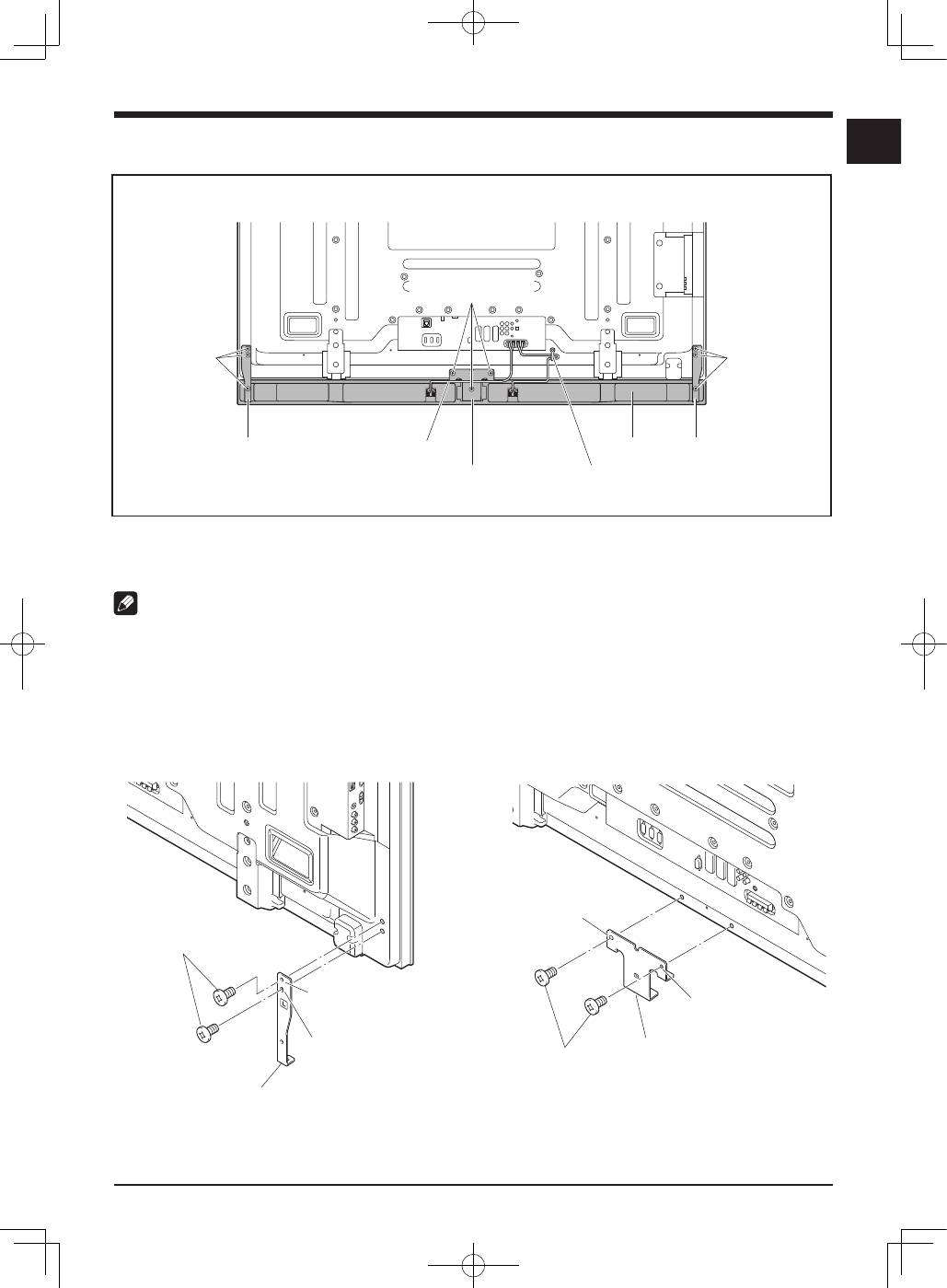
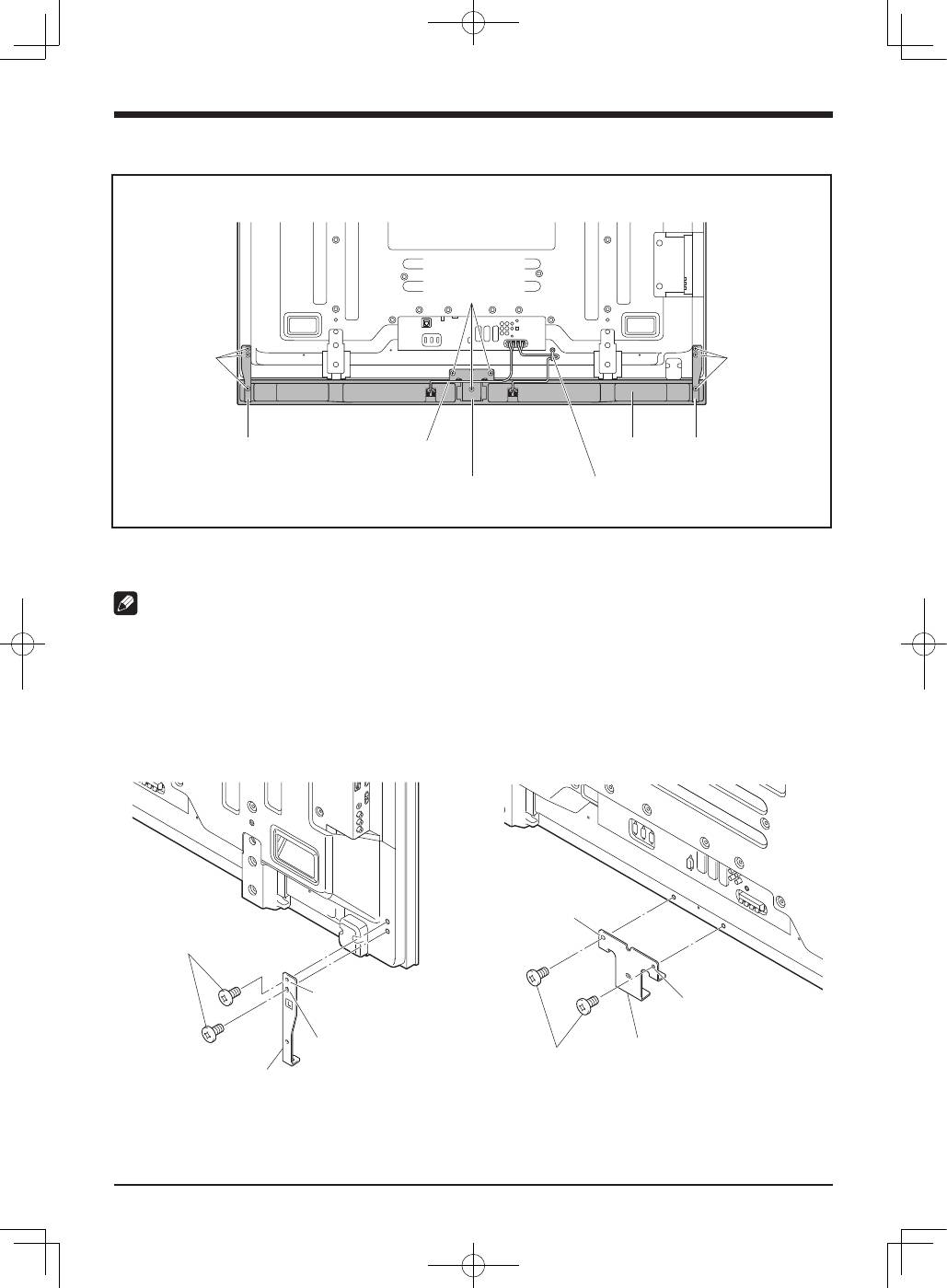
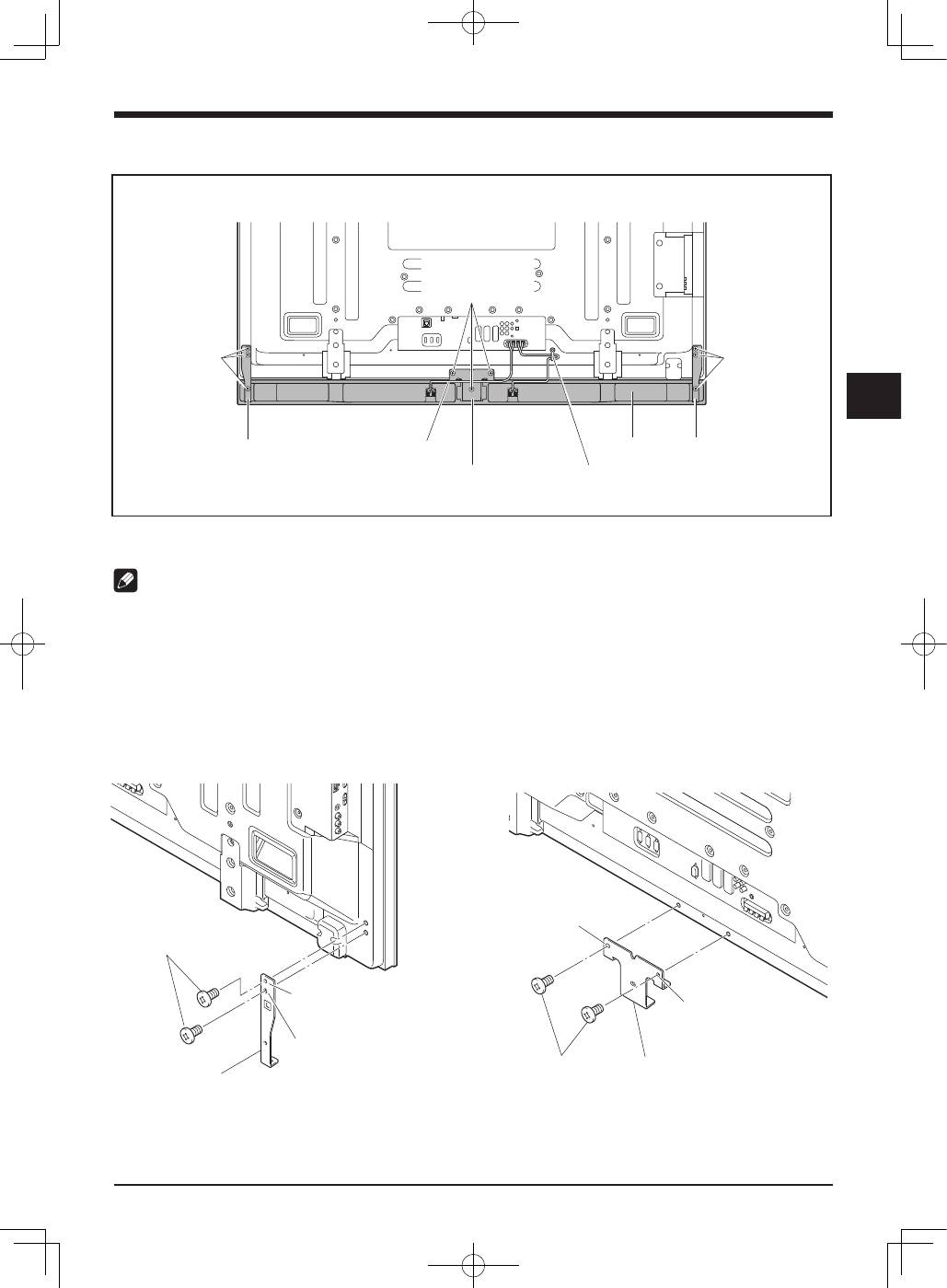
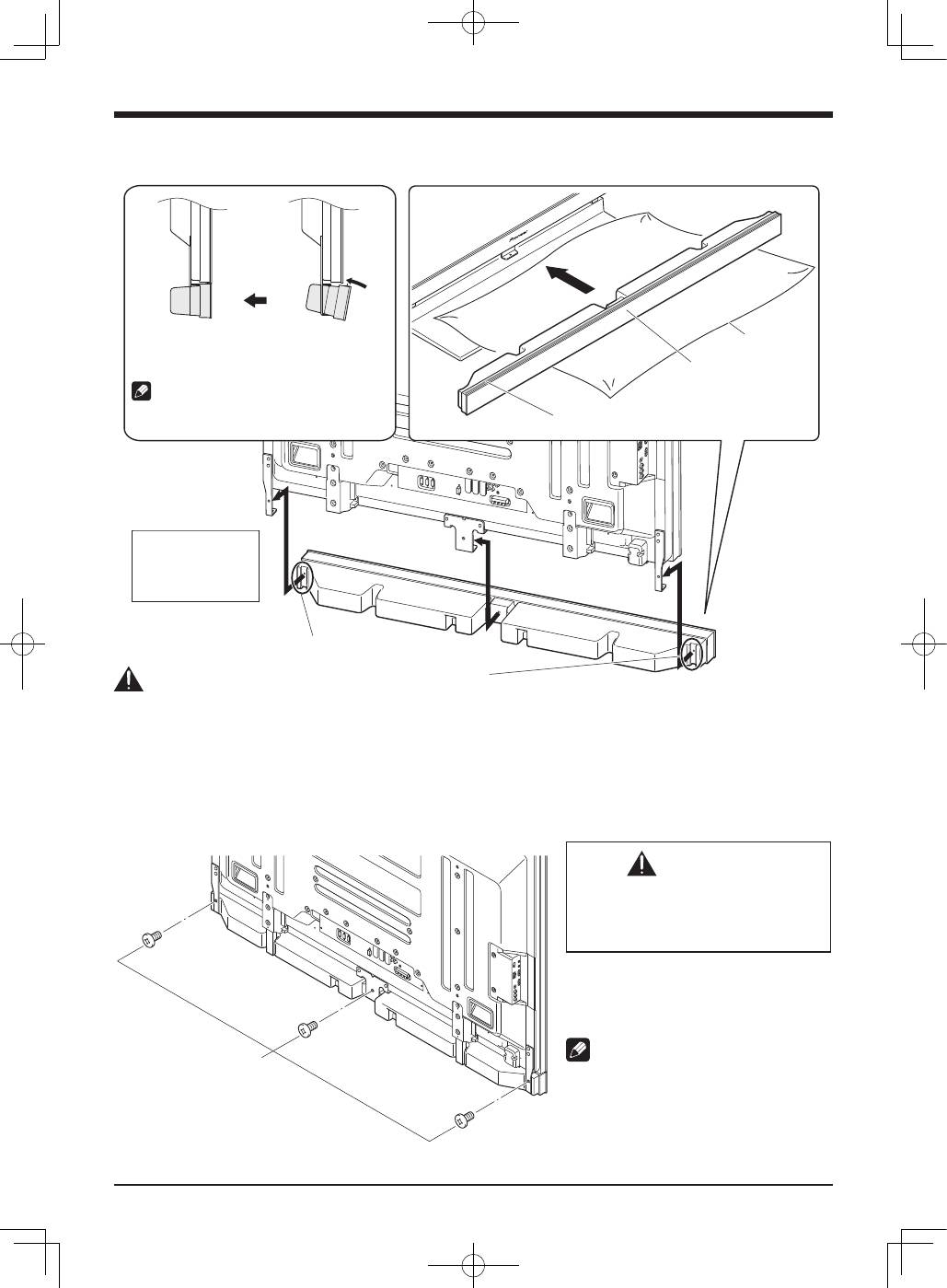
- INSTALLATION ON THE FLAT SCREEN TV When using the table top stand: 1. Attach the speaker brackets to the rear of the flat screen TV.
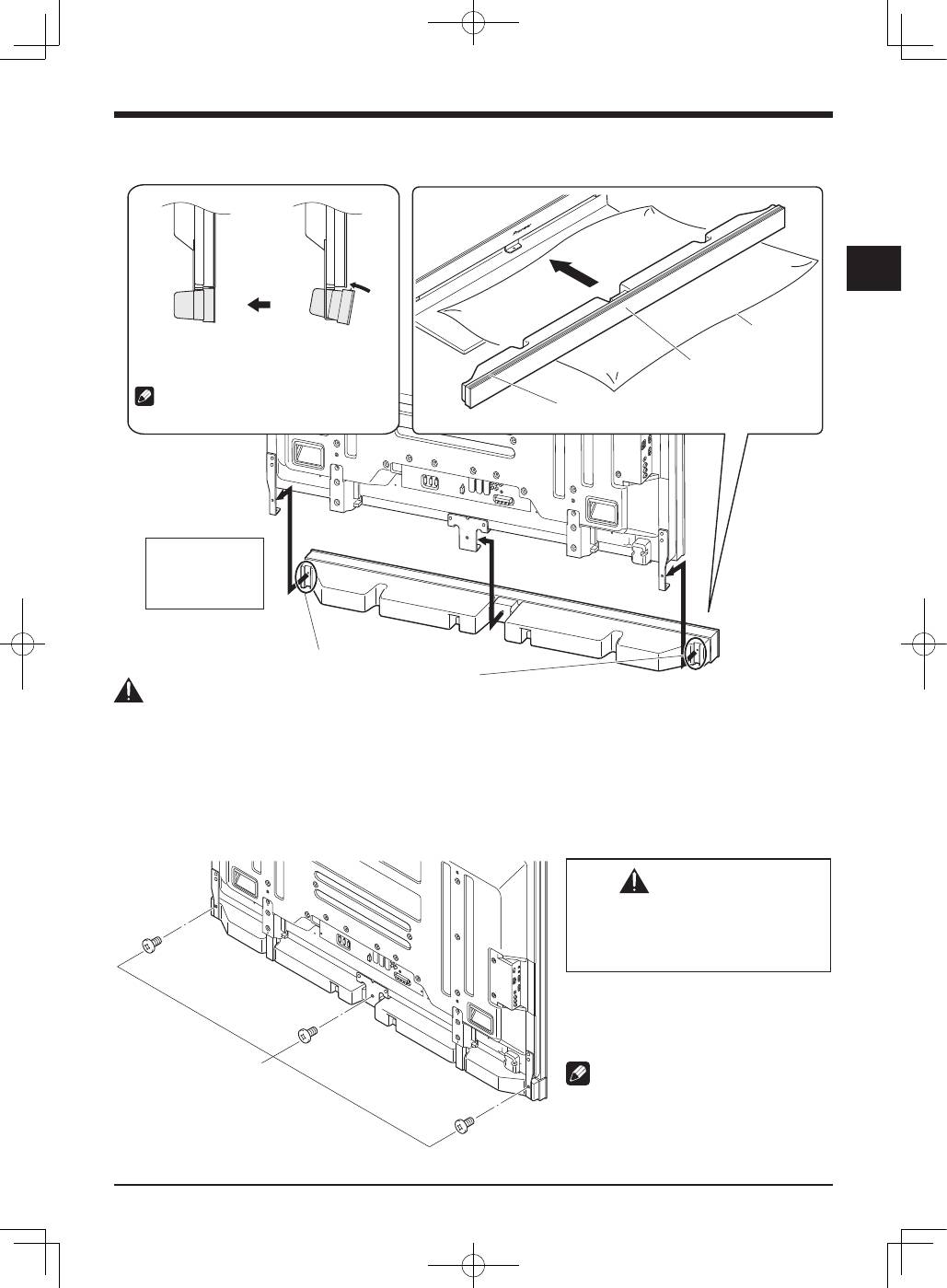
- 2. Fit the speaker to the brackets in the correct direction. 3. Tighten from back using the supplied screws (three locations).
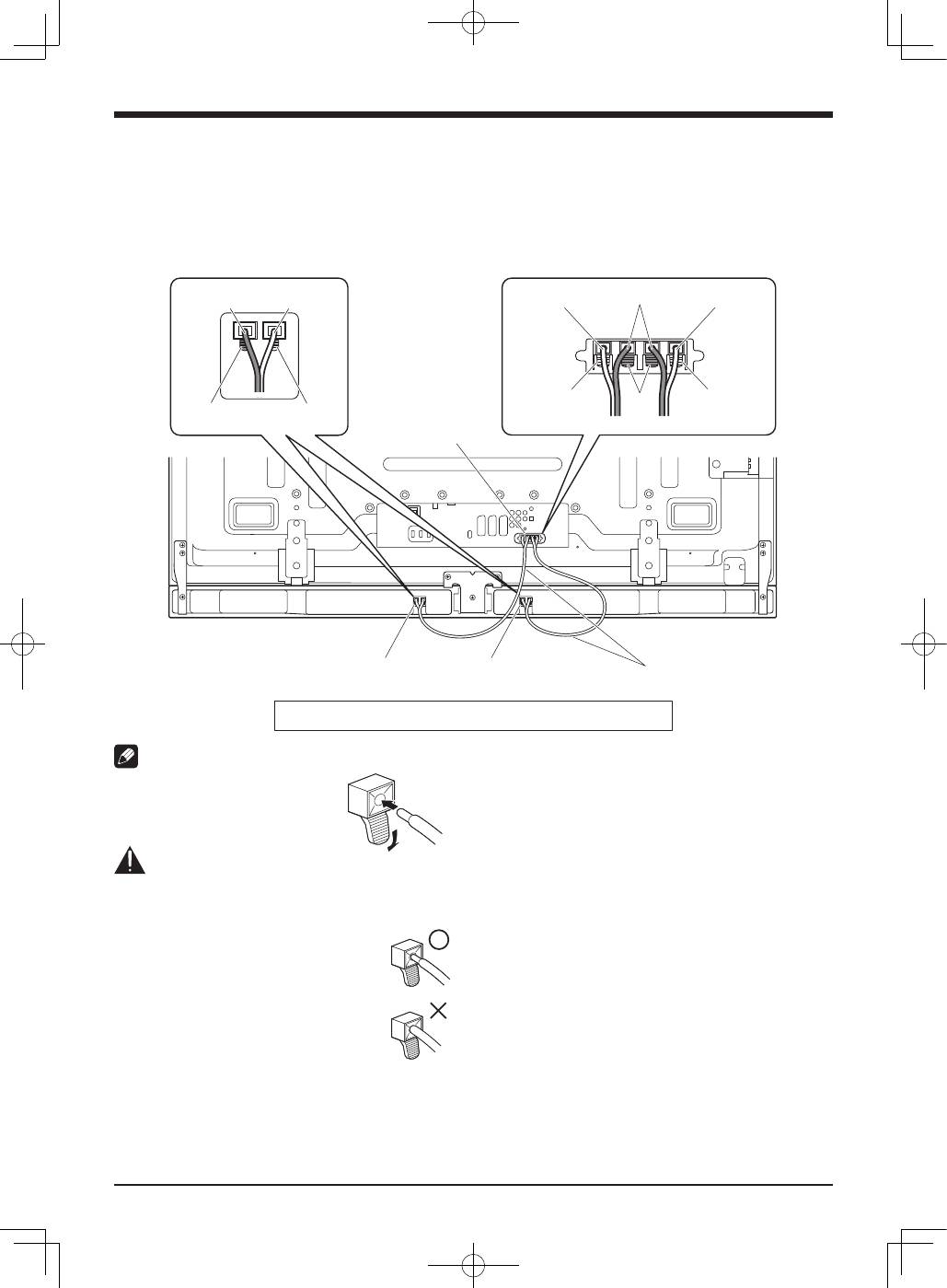
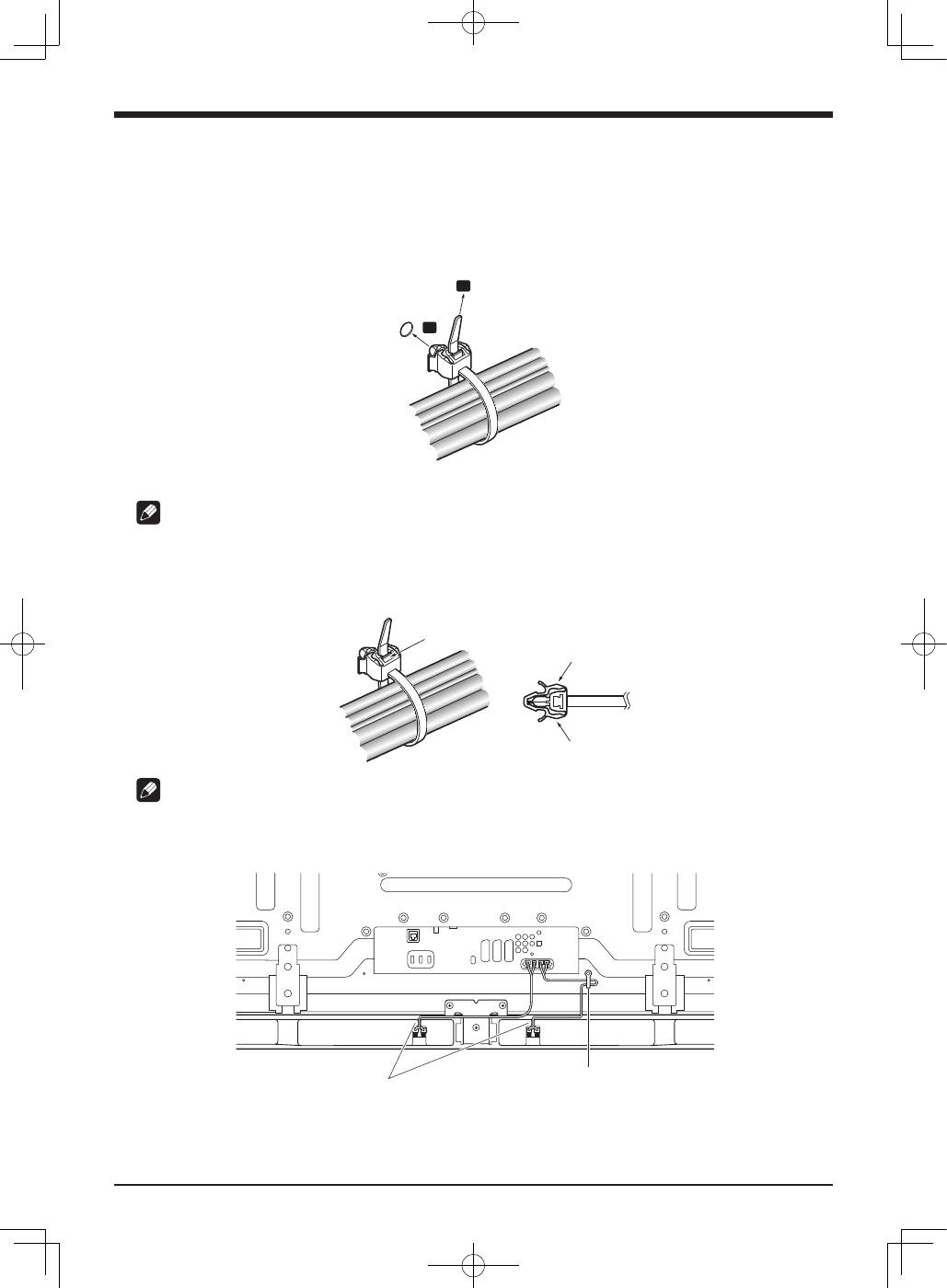
- 4. Connect the supplied the speaker cables to the speaker. 5. Connect the other end of the speaker cables to the rear of flat screen TV.
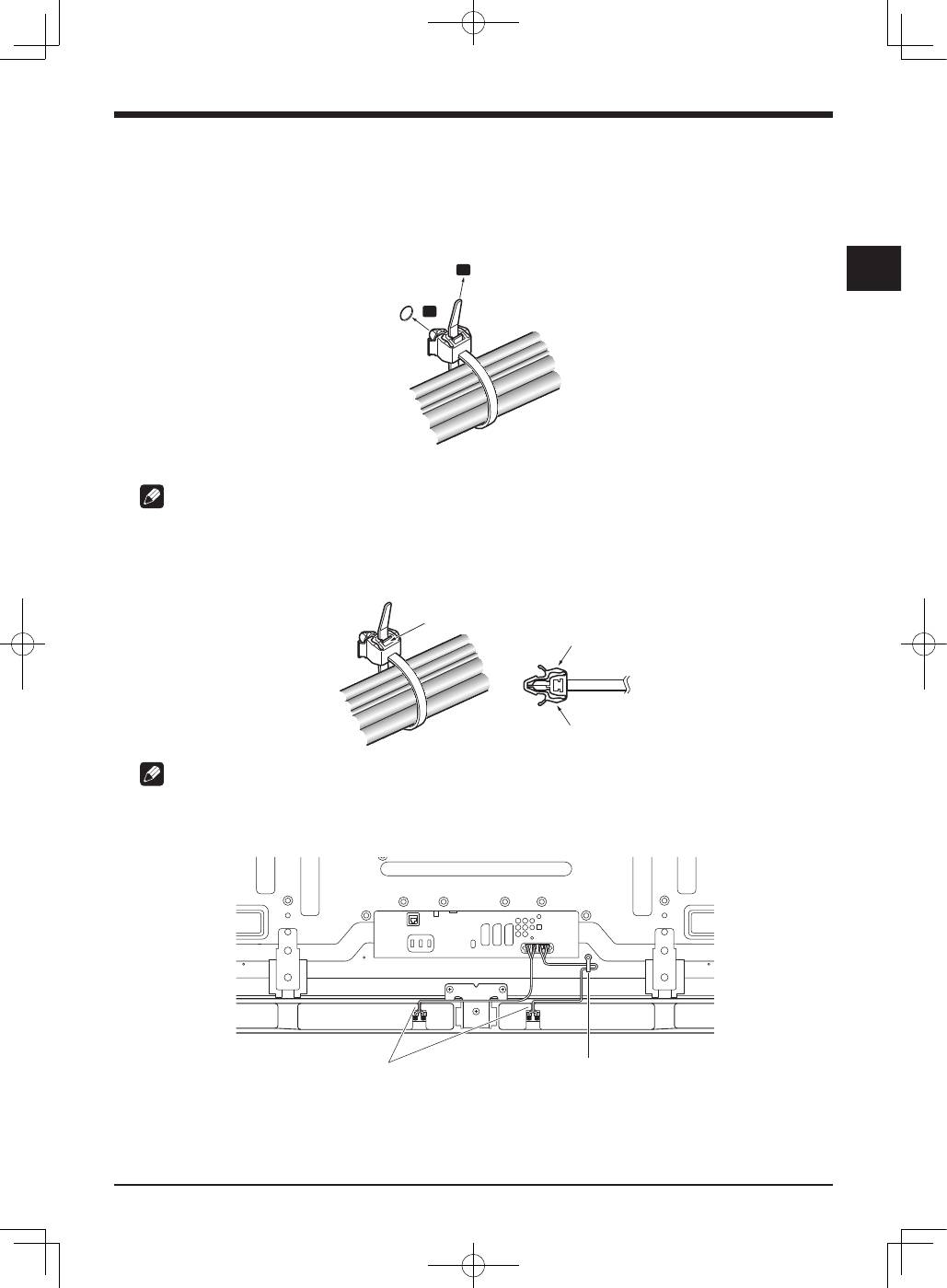
- 6. Fit the cables into the groove of the speaker.
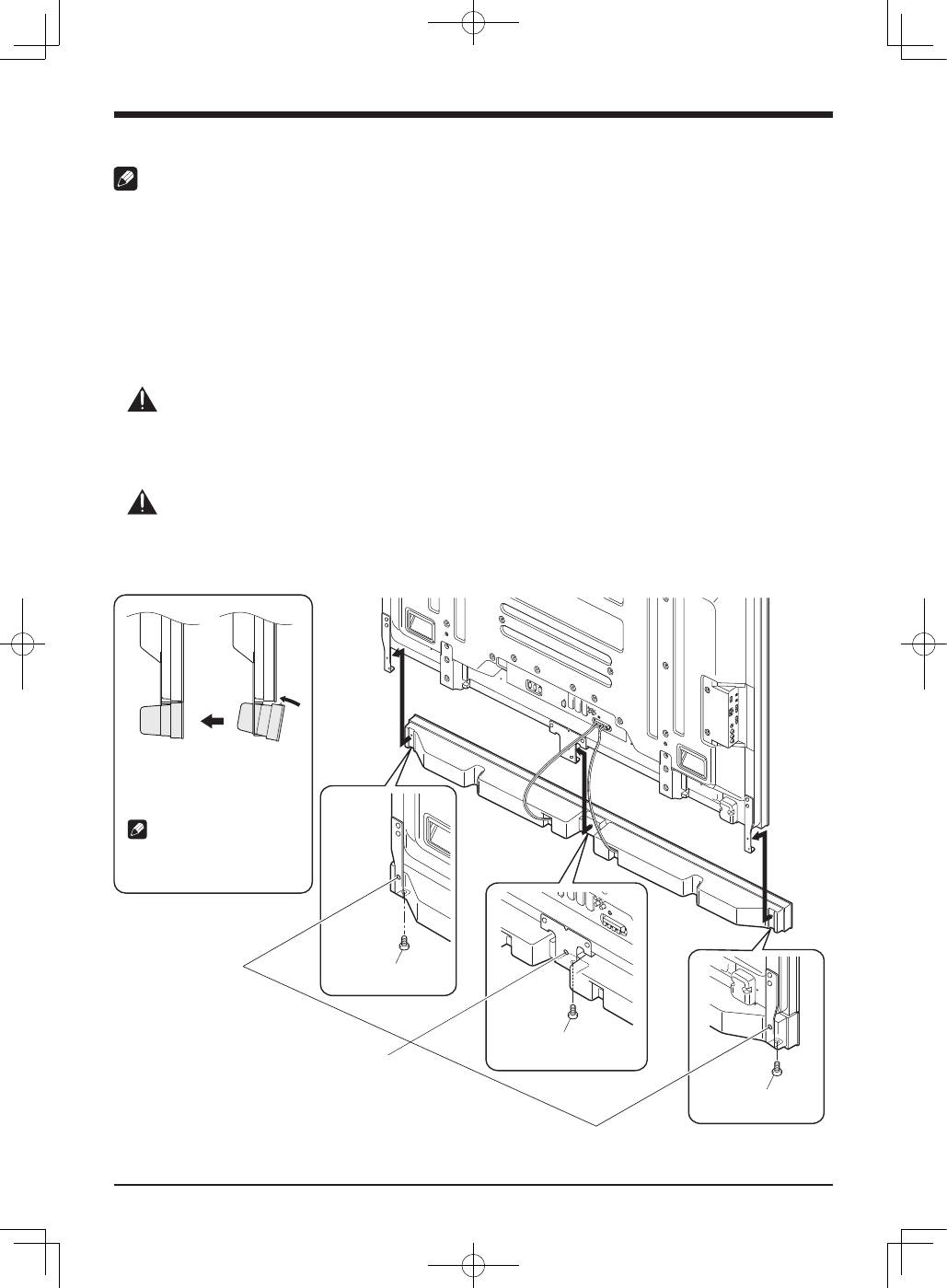
- When using the hung on wall unit:
- CABINET MAINTENANCE SPECIFICATIONS

English
2
Thank you for buying this Pioneer product.
Please read through these operating instructions before
using your speaker system so you will know how to make
the most of its performance. After you have finished reading
the instructions, put them away in a safe place for future
reference.
CAUTION
About compatibility
This product is designed exclusively for use with the Pioneer
flat screen TV. For more information on compatibility, please
consult with your nearest Pioneer authorized dealer or
service center.
About installation and setting
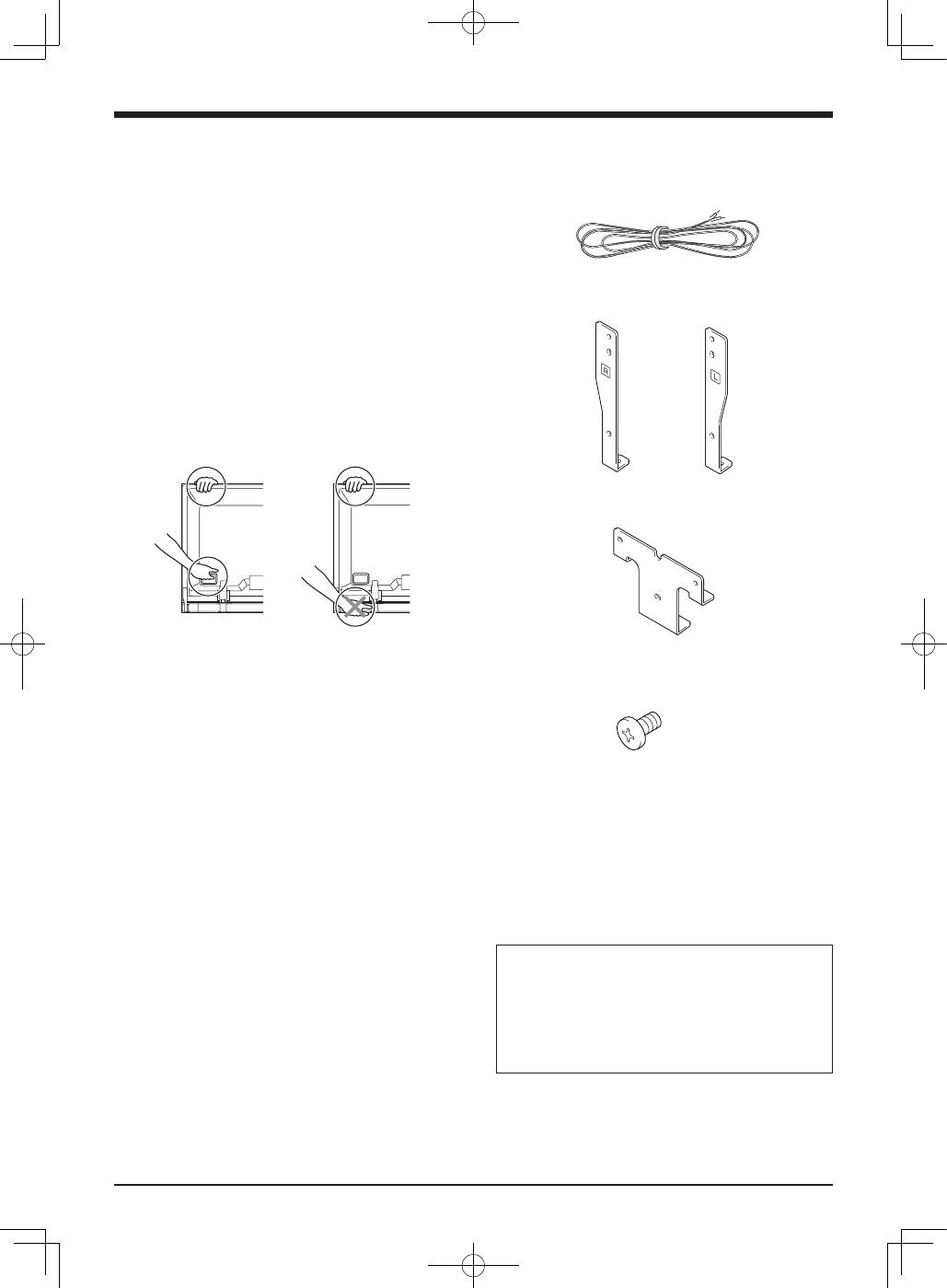
• Do not move the flat screen TV by holding the speaker or
speaker brackets. This could result in injury or damage
to the brackets. When moving the TV, hold by the top and
handles.
• The speaker is wide, and may become unstable when
installed by a one person alone. This may result in injury
or product damage. Therefore, at least two people must
assemble and install them.
• When installing the speaker, do not use any screws other
than those supplied, otherwise the speaker may come off
from the main unit and fall over.
• When installing the speaker, tighten the screws firmly.
• Please handle the speaker with sufficient care, as the
grille net and the cabinet can become damaged or broken
when they are subjected to strong external impacts.
• Placing a CRT computer screen or CRT monitor near to
the speaker may result in interference or color distortion.
If this happens, distance the monitor from the speaker.
About the input
• In order to prevent damage to the speaker system
resulting from input overload, please observe the
following precautions:
• Do not connect this speaker to anything other than the
specified flat screen TV. Doing so may result in damage
or fire.
• Be sure to turn the connected devices off and remove
the power cord from the wall outlet beforehand when
changing the connection or installation method.
• When using a tone control function to greatly emphasize
treble sounds, do not use excessive amplifier volume.
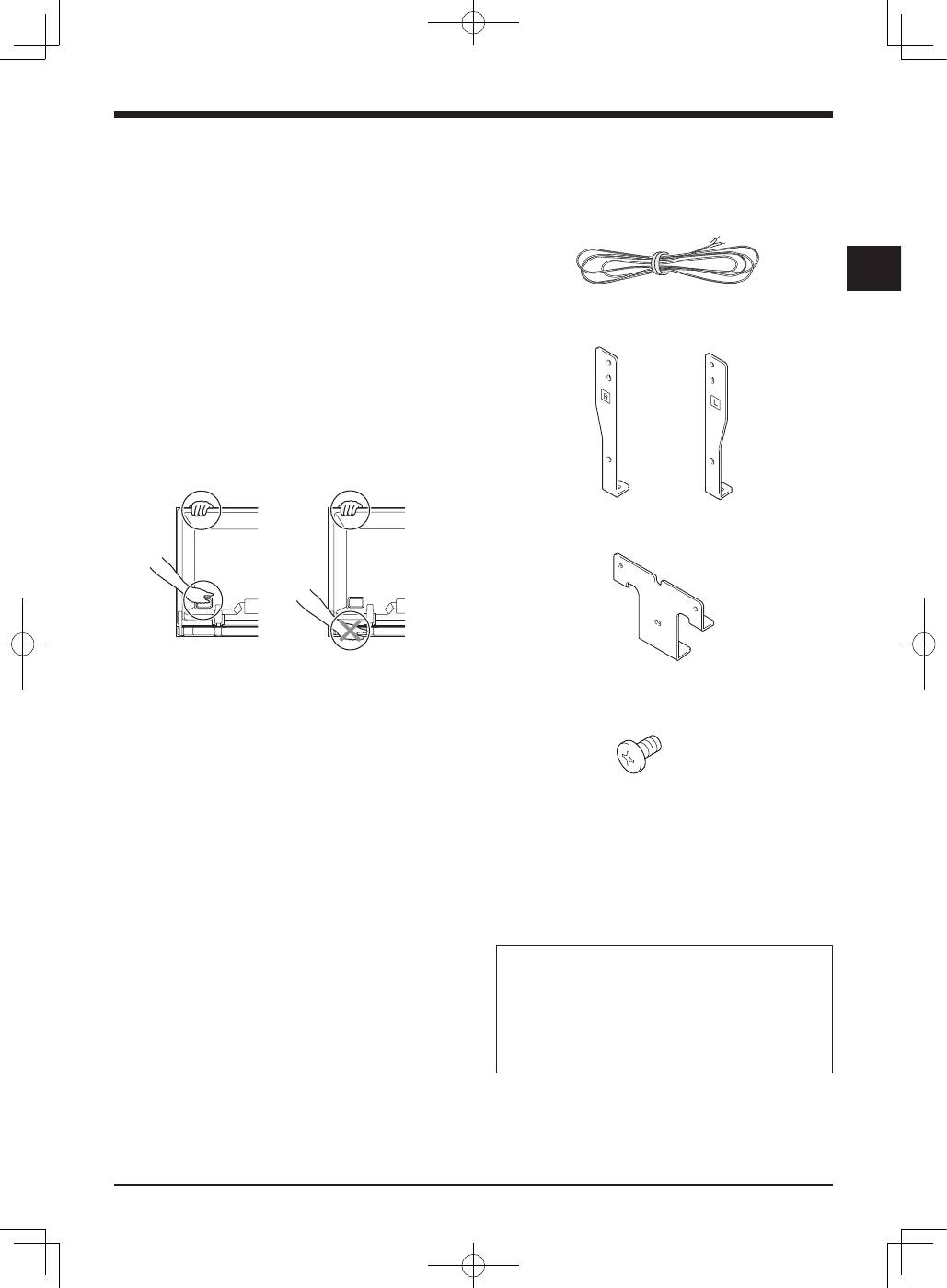
CHECKING THE ACCESSORIES
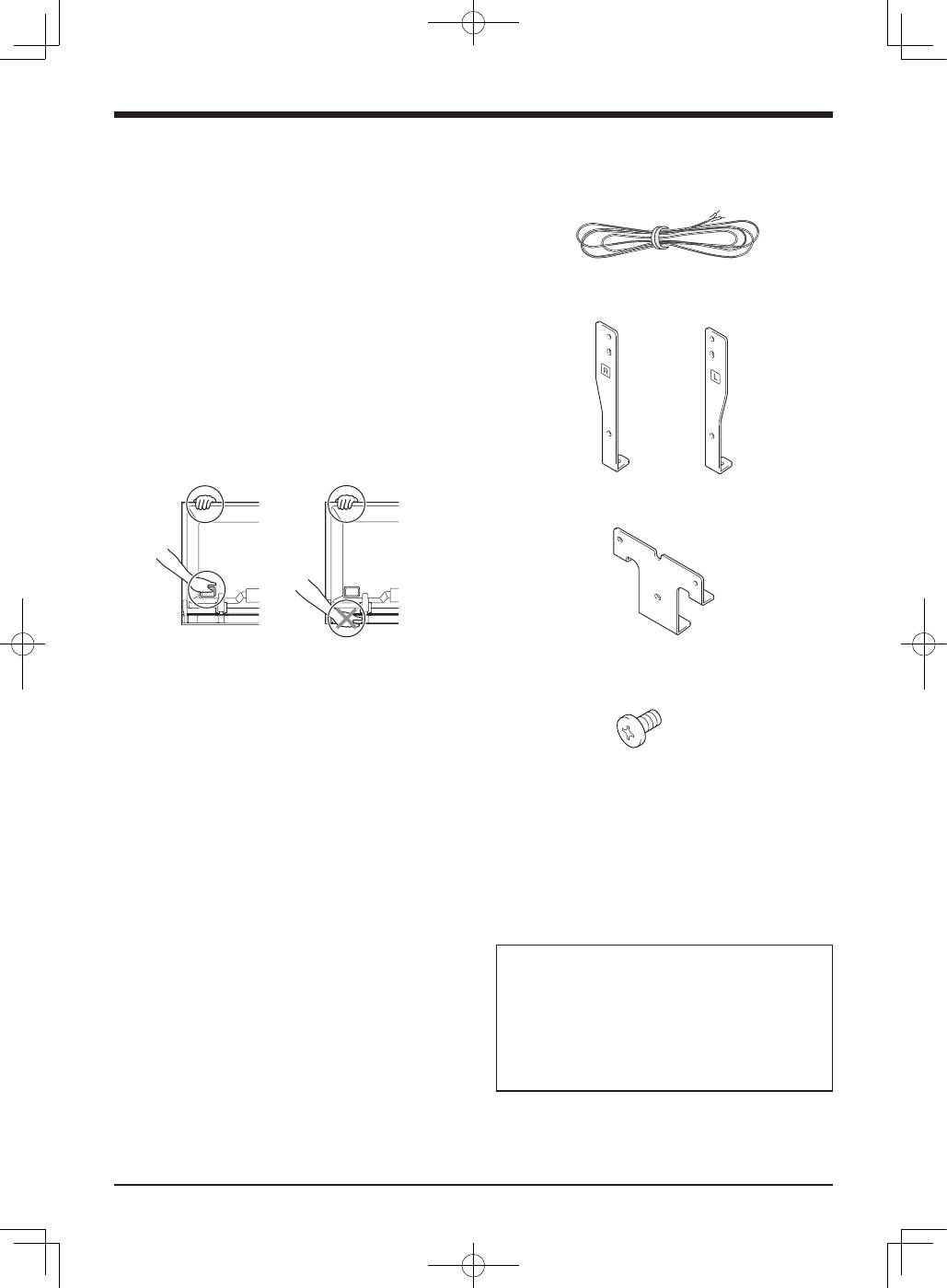
• Speaker Cables × 2
• Speaker Brackets (Left and Right)
• Speaker Bracket (Center)
• Speaker Mounting Screws
(M5 × 10 mm : Black) × 9
• Operating Instructions
Installation
• Consult your dealer if you encounter any difficulties
with this installation.
• Pioneer is not liable for any damage resulting from
improper installation, improper use, modification, or
natural disasters.
3
English
English
• Attach the bracket for center to the lower center on the
rear panel of the flat screen TV using the two supplied
screws.
�����������������
������������������
�
�
����������������������������
������������������������
������������������������
��������������������
������������������
������������������
INSTALLATION ON THE FLAT SCREEN TV
��������
��������������
������������
��������
��������������
������������
�����������������������
����������������������
�������
�������������
�����������
�����������������������������������
������������������������
�����������������������������������������
�����������������
������������������
When using the table top stand:
NOTE:
Before attaching the speaker, please attach the PDK-TS35 series table top stand (or another Pioneer flat screen TV stand) to the flat
screen TV.
1. Attach the speaker brackets to the rear of the flat screen TV.
• Attach the brackets for right and left sides to the bottom
right and left on the rear panel of the flat screen TV using
the supplied screws.
�
�
�����������������������
������������
������������������������
����������������
�����������
���������������������
�������������������
���������������������
�����������
����������������������
��������������������������������
��������������������������������
����������������������������������
����������������
English
4
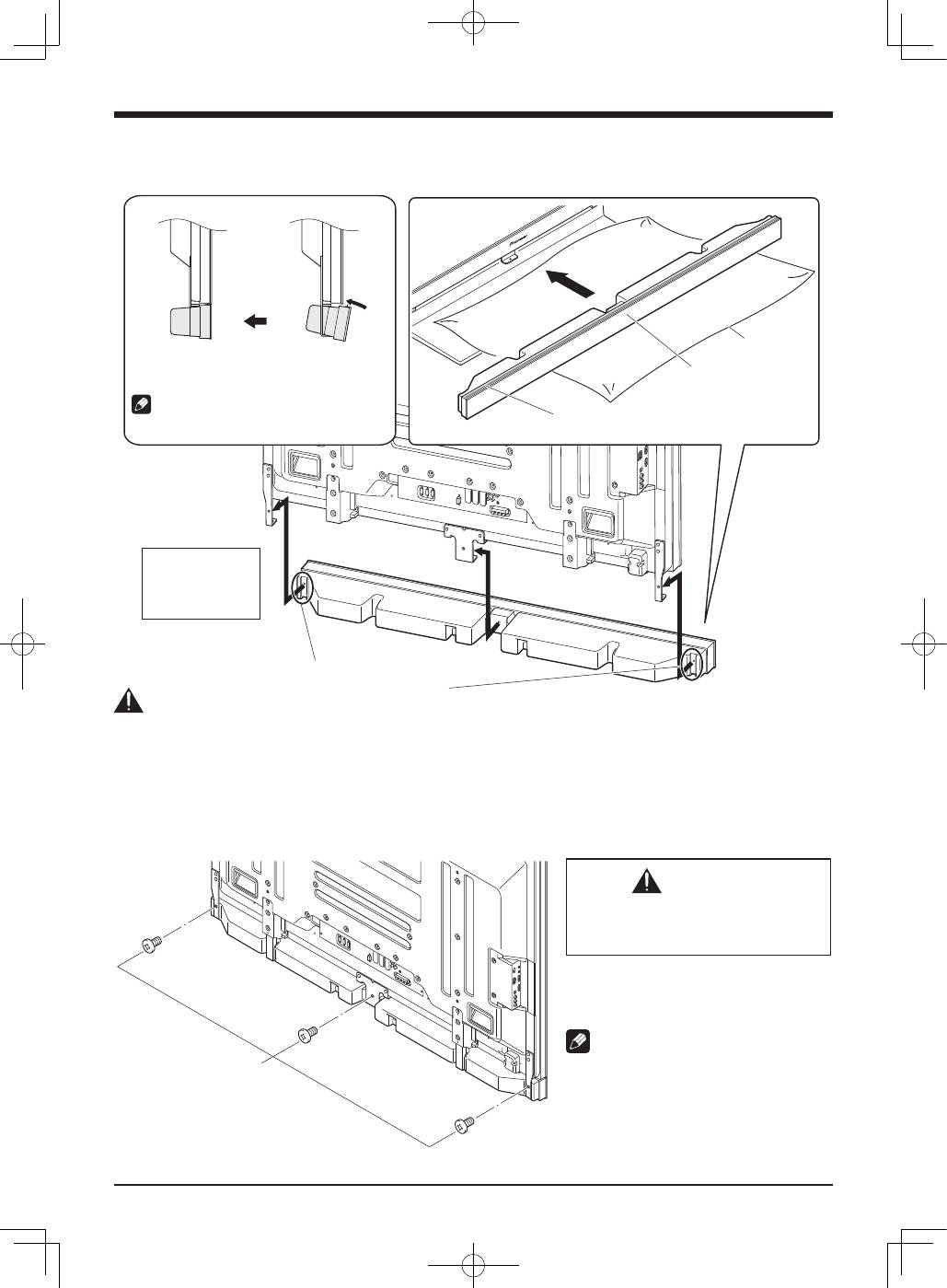
2. Fit the speaker to the brackets in the correct direction.
• Be sure not to mount the speaker upside down.
��������������������������
������������������������
�������������������
�������������������������
�����������������
��������������������
�����������������
���������������
�������������������������������������
�����������������������������������
�������������������������������������������������
����������������������������������������������������
������������
����������������������������������������
Caution
• To avoid any damage to the speaker and/or table top stand from striking against each other, fit the speaker to the bracket while
confirming their locations. As you may easily strike the stand, use the protective wrapping in which the speaker was wrapped
between the speaker and stand.
• When the speaker brackets do not fit the grooves at the rear of the speaker, adjust the speaker brackets angle.
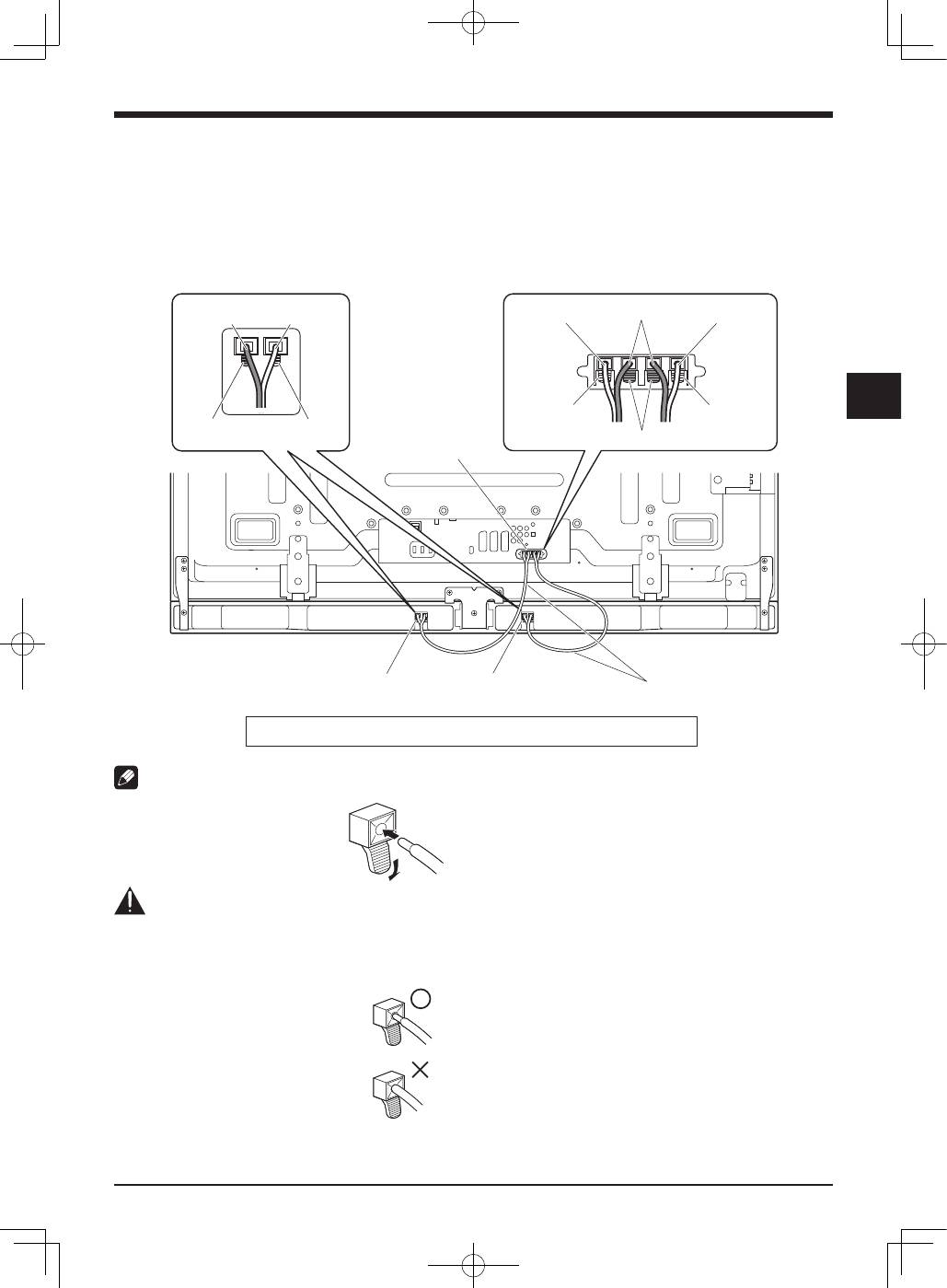
3. Tighten from back using the supplied screws (three locations).
• Tighten the three screws in order
➀
,
➁
,
➂
as shown in the diagram.
�����������������
������������������
�
�
�
CAUTION
Do not move the flat screen TV holding on
to the bracket. This can result in injury or
damage to the flat screen TV.
The screw hole at the bottom surface of the
speaker bracket is used when the flat screen
TV is installed on the wall. It is not used when
installed with the stand.
NOTE:
If after attaching the speaker its position needs
to be adjusted horizontally or vertically, first
loosen the speaker mounting screws, reposition
and then tighten the screws again at the
appropriate position.
5
English
English
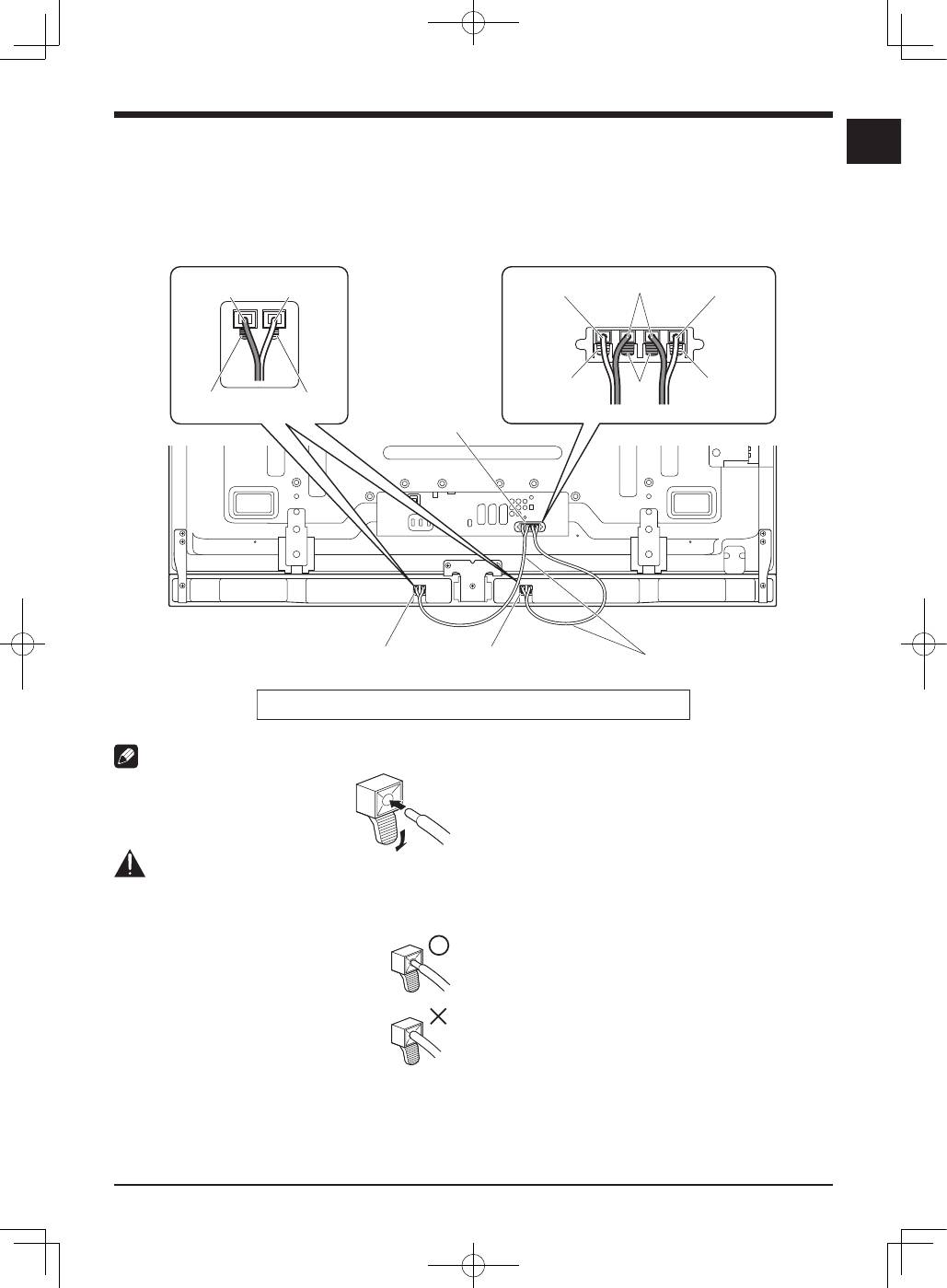
4. Connect the supplied the speaker
cables to the speaker.
• Connect the cables correctly with respect to the polarity
of the speaker terminals, that is,
cable (Gray) to
terminals (Red) and
cable (Black) to
terminals
(Black).
5. Connect the other end of the speaker
cables to the rear of flat screen TV.
• Connect the cables correctly with respect to the polarity
of the flat screen TV speaker terminals, that is,
cable
(Gray) to
terminals (Red) and
cable (Black) to
terminals (Black).
NOTE:
• Press the lever and insert the end of
the cable.
• When you release the lever, it clamps
onto the speaker cable.
Caution
• Be sure to turn the connected devices off and remove
the power cord from the wall outlet beforehand when
changing the connection or installation method.
• If you insert the speaker cable too far so
that the insulation is touching the speaker
terminal, you may not get any sound. Please
insert it with showing the copper wire.
• Check if the end of the speaker cables are
securely connected to the terminals by
slightly tugging on the cable after making
connections. Loose connections may result
in sound dropouts or noise.
����
���
�����
���
����
�����
�����
����
������
����
����������������
����������������
����������������
�������������
���������������������������������������������������������������������
• If there is a short in the
and
cables caused by an
exposed lead wire, excessive load may be applied to
the flat screen TV, resulting in interrupted operation or
malfunction.
• Incorrect connections of the speaker cable to the right
or left of the flat screen TV terminals with respect to the
polarity may result in insufficient stereo sound effects,
delivering poor bass sounds or unstable sound image.
• Bundle the cable without pulling.
English
6
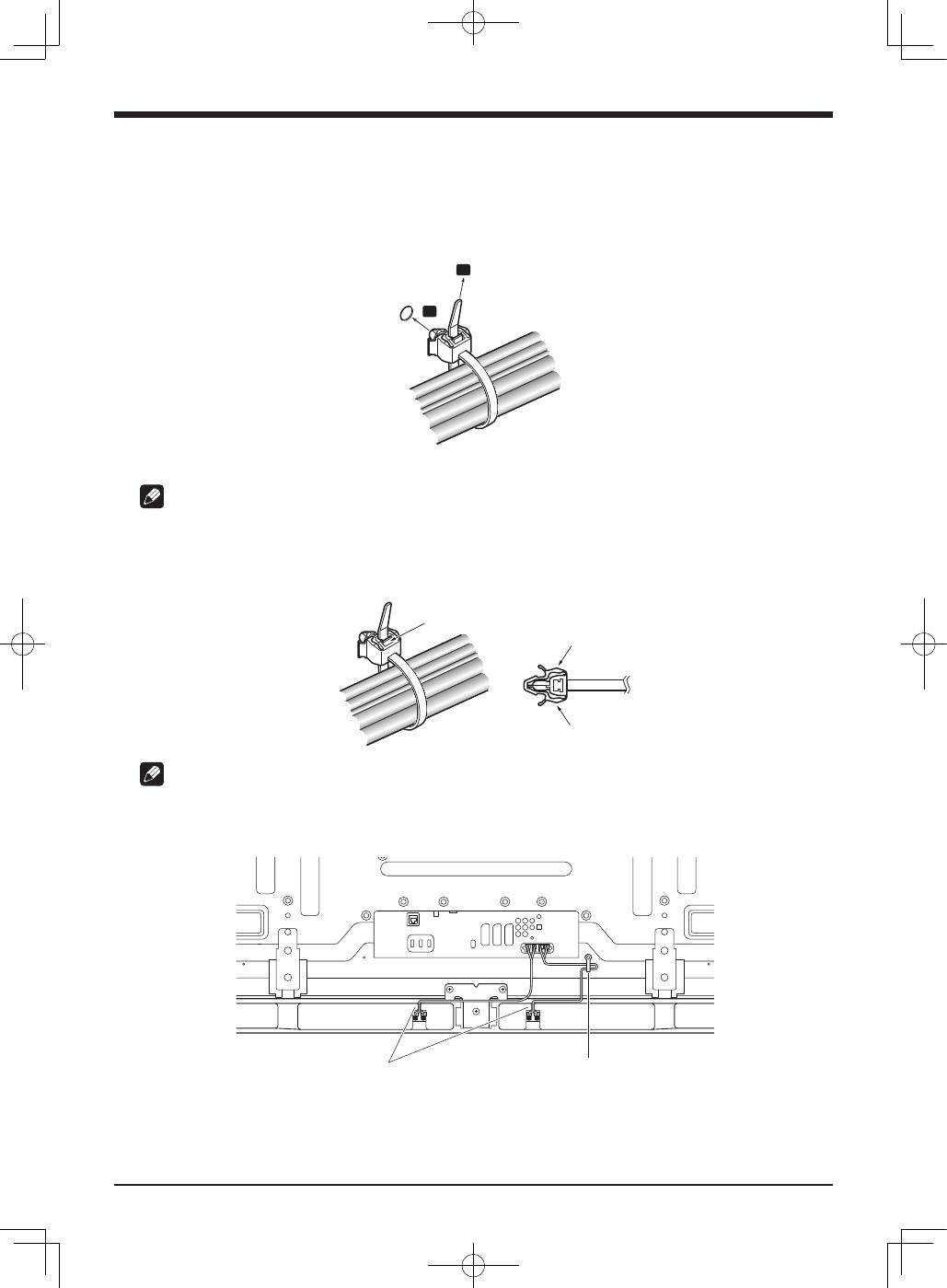
6. Fit the cables into the groove of the speaker.
7. Bundling the cables.
Follow the steps below to attach a cable clamp.
1 ) Thread the clamp band through the holder and bundle the cable(s) in the cable clamp.
2 ) Push and hold the levers then insert the hook into an appropriate hole on the rear of the flat screen TV.
3 ) Pull up the clamp band to lock.
�
�
4 ) Confirm that the cable clamp is seated firmly in the panel.
NOTE:
Avoid pinching or creating pressure points when routing or bundling cables.
To remove the clamp band, pull and hold the latch to release.
To remove the cable clamp, push and hold the levers then pull it out from the hole.
�����
�����
�����
NOTE:
The longer a clamp is in place, the better chance of deterioration. An older clamp is more easily damaged while being removed
and may not be reusable.
����������������������
�����������
����������������������������������������������
7
English
English
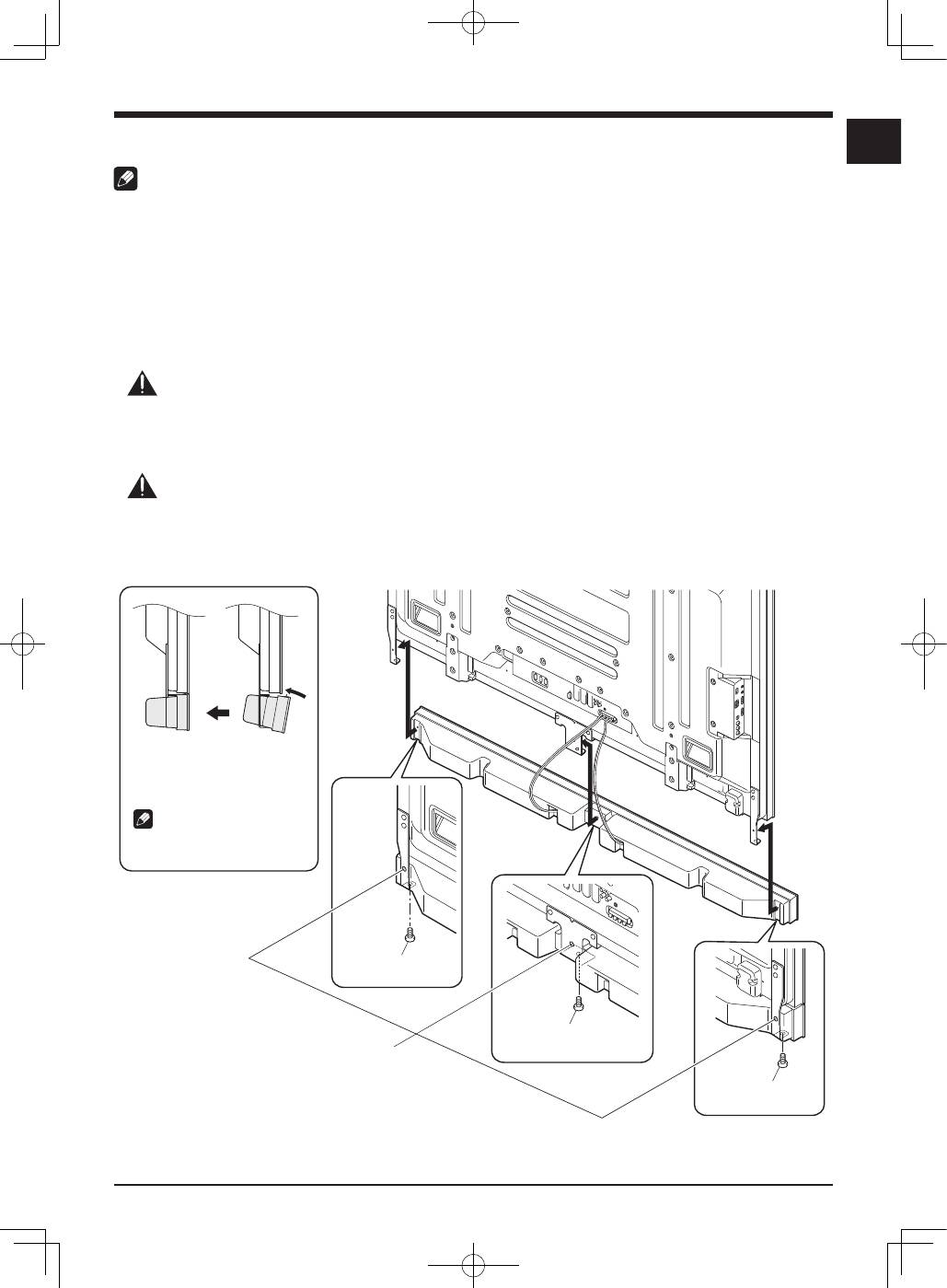
When using the hung on wall unit:
NOTE:
First lay the flat screen TV on top of a soft sheet etc., then attach the speaker brackets.
1. Attach the speaker brackets to the rear of the flat screen TV (See procedure 1 on
page 3).
2. Connect the supplied speaker cables to the rear of the flat screen TV (See procedure
5 on page 5).
• Connect the other cables and power cord to the flat screen TV.
3. Place the flat screen TV on the mounting fittings of the hung on wall unit.
• For details, refer to the operating instructions supplied with the hung on wall unit.
Caution
Be careful about the speaker brackets when installing or connecting. This may result in injury.
4. Connect the other end of the speaker cables to the speaker (See procedure 4 on
page 5).
Caution
Have two people perform this procedure.
5. Fit the speaker to the brackets the correct direction.
• Be sure not to mount the speaker upside down.
������������������������������
�������������������
��������������������������������
��������������������
������������
��������������������������������
��������
�����������������
������������������
�
�����������������
������������������
�
�
�����������������
������������������
����������������������������
�����������������������������
English
8
Published by Pioneer Corporation.
Copyright © 2008 Pioneer Corporation.
All rights reserved.
��������������������������������������������������������������������������������������������������������������������������������
����������������������������������������������������������������������������������������������������������
�����������������������������������������������������������������������������������������������������������������������������������������
��������������������������������������������������������������������������������������
������������������������������������������������������������������������������������������������������������
��������������������������������������������������������������������������������������������������������������������������������������������
�����������������������������������������������������
���������
6. Tighten from below using the
supplied screws (three locations).
• Tighten the three screws in order
➀
,
➁
,
➂
as shown in
the diagram (see page 7).
The screw hole at the rear surface of the speaker bracket
is used when the flat screen TV is installed with the table
top stand. It is not used when installed on the wall.
NOTE:
If after attaching the speaker its position needs to be
adjusted horizontally, first loosen the speaker mounting
screws, reposition and then tighten the screws again at the
appropriate position.
7. Bundling the cables (See procedure 7
on page 6).
CABINET MAINTENANCE
• Use a polishing cloth or dry cloth to wipe off dust and dirt.
• When the cabinet is very dirty, wipe with a soft cloth
moistened with water-diluted cleanser; then wipe again
with a dry cloth. Do not use furniture wax or cleaners.
They may damage the surface of the cabinet.
• Never use thinner, benzine, insecticide sprays and other
chemicals on or near the cabinets, since these will
corrode the surfaces.
• When a chemical cloth is used, read the cautions for the
chemical cloth carefully.
SPECIFICATIONS
Cabinet ............................................................Bass-reflex type
Used speaker (two-way system):
Woofer (for low tones) ................ 4.8 cm
×
13 cm cone type
Tweeter (for high tones) ....................2.5 cm semidome type
Impedance ...........................................................................6
Ω
Frequency Range ........................................55 Hz to 30 000 Hz
Sensitivity (1 m, 1 W) ....................................................... 80 dB
Permissible input :
Max. input ...................................................................... 18 W
Rated input ..................................................................... 6 W
Crossover frequency ........................................................3 kHz
External Dimensions
..............................1 465 (W) mm
×
78 (H) mm
×
93 (D) mm
Weight :
Speaker only ...............................................................3.15 kg
With cables, brackets and screws .............................. 3.7 kg
Accessory parts
................................................................. Speaker Cables
×
2
....................................................................Speaker Brackets
Left
×
1
Right
×
1
Center
×
1
...................... Speaker Mounting Screws (M5
×
10 mm)
×
9
..................................................... Operating Instructions
×
1
NOTE:
Specifications and design subject to possible modification
without notice, due to improvements.
9
Français
Français
Merci pour votre achat de cet appareil Pioneer.
Veuillez lire attentivement la totalite de ce mode d’emploi
avant d’utiliser vos enceintes acoustiques de façon à
pouvoir en tirer le meilleur profit. Après lecture complète du
livret d’instructions de fonctionnement, le ranger dans un
endroit sûr afin de pouvoir vous y reporter facilement en cas
de besoin lors de l’utilisation des l’enceintes acoustiques.
ATTENTION
À propos de la compatibilité
Ce produit a été conçu exclusivement en vue d’une
utilisation avec le téléviseur à écran plat Pioneer. Pour de
plus amples informations sur la compatibilité, veuillez vous
adresser au distributeur ou au centre de service Pioneer
agréé le plus proche.
À propos de l’installation et des réglages
• Ne déplacez pas le téléviseur à écran plat en le tenant par
l’enceinte ou les supports de l’enceinte. Vous risqueriez
de vous blesser ou d’endommager les supports. Pour
déplacer le téléviseur, tenez-le par le haut et par les
poignées.
VÉRIFICATION DES ACCESSOIRES
• Câbles de l’enceinte × 2
• Supports de l’enceinte (Gauche et droite)
• Support de l’enceinte (Centre)
• Vis de montage de l’enceinte
(M5 × 10 mm : Noir) × 9
• Mode d‘emploi
Installation
• En cas de difficultés, veuillez consulter votre revendeur.
• Pioneer ne saurait être tenu responsable d’aucun
dommage résultant d’une installation ou d’une
utilisation incorrecte de ce produit, de sa modification
ou encore de catastrophes naturelles.
• Les enceintes sont larges et elles risquent d’être
déstabilisées si elles sont installées par une seule
personne, ce qui peut entraîner des blessures ou des
dégâts à l’appareil. Par conséquent, il est conseillé d’agir
à deux pour assembler et installer les éléments.
• À l’installation des enceintes, utilisez uniquement les vis
fournies, car d’autres pourraient se détacher de l’unité
principale et entraîner la chute des enceintes.
• A l’installation des enceintes, serrez les vis à fond.
• Manipuler les enceintes avec suffisamment de soin, car
autrement, l’enjoliveur frontal et le coffret risqueraient d’
être endommagés ou hors d’usage en les soumettant à
des chocs externes exagérés.
• La présence d’un écran d’ordinateur ou d’un moniteur à
tube cathodique près des enceintes peut provoquer des
interférences et une distorsion des couleurs. Si c’est le
cas, éloignez l’écran par rapport aux enceintes.
À propos de l’entrée des signaux
• Afin d’éviter d’endommager les enceintes acoustiques,
suite à une surcharge à l’entrée, veuillez observer les
précautions suivantes:
• Ne raccordez pas cette enceinte à un appareil autre que
le téléviseur à écran plat spécifié. Faute de quoi, des
dégâts, voire un incendie pourraient en résulter.
• Prenez soin de mettre hors tension les appareils
raccordés et de débrancher le cordon d’alimentation
au niveau de la prise secteur avant de changer les
connexions ou la méthode d’installation.
• Si vous utilisez une fonction de contrôle des tonalités
pour accentuer fortement les aigus, n’élevez pas
excessivement le volume sonore.
Français
10
• Installez le support centrale au centre en bas du panneau
arrière du téléviseur à écran plat à l’aide des deux vis
fournies.
��������������
�������������
������������
�
�
���������������������������
����������
������������������������������
�������������������������
�������������������
INSTALLATION SUR LE TÉLÉVISEUR À ÉCRAN PLAT
����������������������
��������
����������������������
��������
��������
����������������
�������������������
����������������������������������������
����������������������
��������
�����������������������������������������������
��������������
�������������
������������
��������������
�������������
������������
��������������
�������������
������������
Si vous utilisez un pied de table :
REMARQUE :
Avant de poser l’enceinte, fixez le pied de table série PDK-TS35 (ou un autre pied de table de téléviseur à écran plat Pioneer) au
téléviseur à écran plat.
1. Posez les supports de l’enceinte à l’arrière du téléviseur à écran plat.
• Installez les supports gauche et droite respectivement en
bas à gauche et à droite du panneau arrière du téléviseur
à écran plat à l’aide des vis fournies.
�
�
������������������������
����������������
��������
�������������������
��������������������
������������
������������������������������
����������������������������������
�����������������������
�������������������������������
��������������������������������
��������������
��������������
������������
11
Français
Français
2. Glissez l’enceinte dans les supports dans le bon sens.
• Veillez à ne pas poser l’enceinte à l’envers.
����������������������������
�����������������������������������
�������������
����������
������������������������
���������������������
�����������������
����������
���������������
��������������������������������������������
������������������������������������
�������������������������������������������
������������������������������������������������
�����������
�����������������
������������������������������������������������������
Attention
• Pour éviter d’endommager l’enceinte et/ou empêcher les chocs avec le pied de table, vérifiez l’endroit où les supports se
trouvent avant de mettre l’enceinte en place. Pour éviter de faire des chocs sur le pied, placez entre l’enceinte et le pied
l’emballage de protection dans lequel l’enceinte était emballée.
• Si les supports de l’enceinte ne rentrent pas dans les fentes situées au dos de l’enceinte, ajustez l’angle des
supports de
l’enceinte.
3. Immobilisez l’enceinte par l’arrière à l’aide des vis fournies (trois vis).
• Serrez les trois vis dans l’ordre
➀
,
➁
,
➂
indiqué sur le schéma.
���������������
��������������
������������
�
�
�
ATTENTION
Ne déplacez pas le téléviseur à écran plat en
le tenant par les support de l’enceinte. Vous
risqueriez de vous blesser ou d’endommager
le téléviseur à écran plat.
Le trou de vis situé au bas du support de
l’enceinte est utilisé lorsque le téléviseur à
écran plat est installé au mur.
Il n’est pas utilisé en cas d’installation avec le
pied.
REMARQUE :
Si, après avoir installé l’enceinte, sa position doit
être ajustée horizontalement ou verticalement,
desserrez les vis, repositionnez l’enceinte puis
resserrez les vis dans la position souhaitée.
Français
12
4. Branchez les câbles d’enceinte fournis
sur l’enceinte.
• Branchez les câbles correctement en respectant la
polarité des bornes d’enceintes, c’est à dire le câble
(gris) sur les bornes
(rouge) et le câble
(noir) sur les
bornes
(noir).
5. Branchez l’autre extrémité des câbles
d’enceinte à l’arrière du téléviseur à
écran plat.
• Branchez les câbles correctement en respectant la
polarité des bornes d’enceintes du téléviseur à écran plat,
c’est à dire le câble
(gris) sur les bornes
(rouge) et
le câble
(noir) sur les bornes
(noir).
REMARQUE :
• Appuyez sur le levier et insérez
l’extrémité du câble.
• Quand vous relâchez le levier, il se
resserre autour du câble d’enceinte.
Attention
• Pensez à mettre les appareils hors tension et à retirer
le cordon d’alimentation de la prise murale avant de
modifier les branchements ou l’installation.
• Si vous poussez le câble d’enceinte trop
loin et que l’isolant est en contact avec la
borne d’enceinte, il est possible que vous
n’obteniez aucun son. Une fois le câble
inséré, vous devez toujours pouvoir voir le fil
de cuivre.
• Vérifiez que les extrémités des câbles
d’enceinte sont bien branchées sur les
bornes en tirant légèrement sur le câble
une fois les branchements effectués. Des
câbles mal raccordés peuvent entraîner des
interruptions du son ou du bruit.
����
�����
����
�����
����
����
����
����
�����
������
����������������
����������������
����������������
����������������
���������������������������������������������������������������
• En cas de court-circuit dans les câbles
et
en raison
d’un fil de sortie exposé, le téléviseur à écran plat risque
de recevoir une charge excessive, ce qui provoquerait un
arrêt de son fonctionnement ou des dysfonctionnements.
• Une erreur de polarité dans le raccordement du câble de
l’enceinte sur les bornes droite ou gauche du téléviseur
à écran plat peut se traduire par des effets stéréo
insuffisants, des basses de mauvaise qualité ou une
image sonore instable.
• Rassemblez les câbles sans les tirer.
13
Français
Français
6. Insérez les câbles dans la fente de l’enceinte.
7. Relier les câbles.
Suivez les étapes suivantes pour poser un collier pour câbles.
1 ) Passez la languette du collier dans le support et placez le ou les câbles dans le collier pour câbles.
2 ) Poussez et retenez les leviers puis insérez le crochet dans un trou adapté au dos du téléviseur à écran plat.
3 ) Tirez la languette du collier pour bloquer les câbles.
�
�
4 ) Vérifiez que le collier pour câbles est bien installé contre le panneau.
REMARQUE :
Evitez de pincer ou de créer des points de pression sur les câbles lorsque vous les posez ou que vous les reliez.
Pour retirez la languette du collier, tirez le taquet pour dégager le tout.
Pour retirez le collier pour câbles, poussez les leviers puis retirez-les du trou.
������
������
������
REMARQUE :
Plus un collier reste longtemps en place, plus il risque de se détériorer. Les vieux colliers ont tendance à s’abîmer plus facilement
lors de la dépose et vous risquez de ne pas pouvoir les réutiliser.
����������������������������������
�������������������
�����������������������������������������������
Français
14
En cas d’utilisation de l’unité d’installation murale :
REMARQUE :
Tout d’abord, couchez le téléviseur à écran plat sur la face avant sur un morceau de tissu doux etc., puis installez les supports de
l’enceinte.
1. Installez les supports de l’enceinte au dos du téléviseur à écran plat (Voir la
procédure 1, page 10).
2. Branchez les câbles d’enceinte fournis à l’arrière du téléviseur à écran plat (Voir la
procédure 5, page 12).
• Branchez les autres câbles et le cordon d’alimentation sur le téléviseur à écran plat.
3. Placez le téléviseur à écran plat sur les ferrures de fixation de l’écran mural.
• Pour de plus amples informations, reportez-vous aux instructions d’utilisation fournies avec l’unité d’installation murale.
Attention
Faites attention aux supports de l’enceinte lors de l’installation ou du raccordement. Ils peuvent provoquer des blessures.
4. Branchez l’autre extrémité des câbles d’enceintes sur l’enceinte (voir la procédure 4,
page 12).
Attention
L’opération doit être effectuée par deux personnes.
5. Glissez l’enceinte dans les supports dans le bon sens.
• Veillez à ne pas monter l’enceinte à l’envers.
�������������������������������
������������
����������������������������������
�������������������������
�����������������
�������������������������������������
�����������������
�����������������
�����������������������
�
�
�
�������������������������������
�������������������������
�����������������
�����������������������
�����������������
�����������������������
15
Français
Français
6. Immobilisez l’enceinte par le dessous
à l’aide des vis fournies (trois vis).
• Serrez les vis dans l’ordre
➀
,
➁
,
➂
indiqué sur le schéma
(voir page 14).
Le trou de vis situé sur la surface arrière du support de
l’enceinte est utilisé lorsque le téléviseur à écran plat est
installé avec le pied de table. Il n’est pas utilisé lorsque le
téléviseur est installé au mur.
REMARQUE :
Si après avoir installé l’enceinte, sa position doit être
ajustée horizontalement, desserrez les vis, repositionnez
l’enceinte puis resserrez les vis dans la position souhaitée.
7. Rassemblez les câbles (Voir la
procédure 7, page 13).
ENTRETIEN DU COFFRET
• Utiliser un chiffon à polir ou un chiffon sec pour essuyer
la poussière et éliminer les salissures.
• Si le coffret est très sale, le frotter avec un chiffon doux
imbibé de liquide à nettoyer dilué d’eau. Ensuite, essuyer
à nouveau avec un chiffon sec. Ne pas utiliser de cire
à meuble ou de produits de nettoyage corrosifs. Ils
risqueraient d’endommager la surface du coffret.
• Ne jamais utiliser non plus de diluant, de benzine,
d’insecticides en vaporisateur et autres produits
chimiques sur le coffret ou à proximité, car ils risquent de
corroder les surfaces.
• Si l’on utilise un chiffon chimique, lire et observer
attentivement les précautions à prendre pour son usage
adéquat.
SPECIFICATIONS
Coffret .............................................................. Type bass-reflex
Haut-parleurs utilisés (système à double voie) :
Haut-parleur de graves ......Type à cône de 4,8 cm × 13 cm
Haut-parleur d’aigus ...............Type à semi-dôme de 2,5 cm
Impédance ..........................................................................6
Ω
Plage de fréquences ...................................55 Hz à 30 000 Hz
Sensibilité (1 m, 1 W) ...................................................... 80 dB
Entrée admissible :
Entrée max. ................................................................... 18 W
Entrée nominale ............................................................. 6 W
Fréquence de recouvrement ...........................................3 kHz
Encombrement
............................. 1 465 (L) mm × 78 (H) mm × 93 (P) mm
Poids :
Enceinte uniquement ................................................3,15 kg
Avec câbles, supports et vis ........................................ 3,7 kg
Pièces accessoires
.......................................................... Câble de l’enceinte × 2
............................................................Supports de l’enceinte
Gauche
×
1
Droite
×
1
Centre
×
1
................Vis de montage de l’enceinte (M5 × 10 mm) × 9
................................................................. Mode d’emploi × 1
REMARQUE:
Les spécifications et la finition sont susceptibles d’être
modifiées sans préavis en vue de l’amélioration.
Publication de Pioneer Corporation.
© 2008 Pioneer Corporation.
Tous droits de reproduction et de traduction réservés.
Deutsch
16
Wir danken Ihnen dafür, dass Sie sich für ein Produkt von
Pioneer entschieden haben.
Bitte lesen Sie vor der Verwendung Ihrer Lautsprecheranlage
diese Anleitung aufmerksam durch, um die Vorzüge des
Systems optimal ausnützen zu können. Nachdem Sie die
Bedienungsanleitung durchgelesen haben, bewahren Sie
sie sorgfältig auf, um sich im Bedarfsfall jederzeit darauf
beziehen zu können.
VORSICHT
Hinweis zur Kompatibilität
Dieses Produkt ist ausschließlich für den Gebrauch mit
dem Flachbildfernseher von Pioneer bestimmt. Weitere
Informationen zur Kompatibilität bringen Sie bitte bei
Ihrem autorisierten Pioneer-Händler oder einer Pioneer-
Kundendienststelle in Erfahrung.
Hinweise zur Installation und Einstellung
• Bewegen Sie den Flachbildfernseher nicht fort, indem
sie ihn am Lautsprecher oder an den Lautsprecher-
Halterungen festhalten. Das kann zu Verletzungen oder
zu Schäden an den Montageelementen führen. Halten
Sie den Fernseher beim Fortbewegen oben und an den
Handgriffen fest.
PRÜFEN DES ZUBEHÖRS
• Lautsprecherkabel × 2
• Lautsprecher-Halterungen (Links und Rechts)
• Lautsprecher-Halterung (Mitte)
• Lautsprecher-Montageschrauben
(M5 × 10 mm : schwarz) × 9
• Bedienungsanleitung
Installation
• Wenn es bei dieser Installation zu Problemen kommen
sollte, wenden Sie sich bitte an Ihren Händler.
• Pioneer haftet für keinerlei Schäden, die sich auf
falsche Installation, unsachgemäßen Gebrauch,
Modifikationen oder Naturkatastrophen zurückführen
lassen.
• Dieser Lautsprecher ist sehr breit und kann unstabil
werden, wenn er von einer einzigen Person installiert
wird. Da dies Verletzungen oder eine Beschädigung
verursachen kann, sollte die Installation grundsätzlich
von mindestens zwei Personen ausgeführt werden.
• Verwenden Sie zur Installation ausschließlich die
Schrauben im Lieferumfang. Andernfalls kann sich der
Lautsprecher vom Flachbildfernseher lösen und kann
herunterfallen.
• Achten Sie bei der Installation des Lautsprechers darauf,
die Schrauben fest anzuziehen.
• Die Lautsprecher sind vorsichtig zu behandeln, da Ziergitter
und Gehäuse durch starke Stöße und Erschütterungen
verkratzt oder beschädigt werden können.
• Wenn ein CRT-Computer-Monitor oder ein CRT-Monitor
in der Nähe des Lautsprechers aufgestellt wird, kann
dies Bildrauschen oder Farbstörungen verursachen. In
einem solchen Fall muss für einen größeren Abstand des
Monitors vom Lautsprecher gesorgt werden.
Hinweise zum Eingang
• Um eine Beschädigung des Lautsprechersystems durch
ein zu starkes Eingangssignal zu vermeiden, müssen die
folgenden Hinweise unbedingt beachtet werden:
• Schließen Sie den Lautsprecher nur an den
Flachbildfernseher an, für den er bestimmt ist. Wird der
Lautsprecher in Verbindung mit irgendeinem anderen
Gerät verwendet, besteht die Gefahr von Beschädigung
und Brandausbruch.
• Achten Sie unbedingt darauf, alle angeschlossenen
Geräte auszuschalten und den Netzstecker von der
Netzsteckdose zu trennen, bevor die Anschlüsse geändert
werden oder die Installation verändert wird.
• Bei Verwendung der Klangfarbenregelungs-Funktion
eines Verstärkers zu einer starken Anhebung der Höhen
darf die Lautstärke am Verstärker nicht auf einen
übermäßig hohen Pegel eingestellt werden.
17
Deutsch
Deutsch
• Montieren Sie das Montageelement für die Mitte
unter Verwendung der zwei mitgelieferten Schrauben
unten in der Mitte des hinteren Bedienfelds des
Flachbildfernsehers.
�������������
���������������
������������
�
�
�������������������������
�����������������������
��������������������
������������������������������
��������������
�����������������
�����������������������
��������������������
INSTALLATION AM FLACHBILDFERNSEHER
�������������
���������������
������������
�������������
���������������
������������
�����������������������
��������
�����������������������
�������
������������
�����������������
��������������
���������������������������������
����������������������
�������
�����������������������������������������������������
�������������
���������������
������������
Bei Verwendung des Tischständers:
HINWEIS:
Bitte bringen Sie vor der Montage des Lautsprechers den Tischständer der Serie PDK-TS35 (oder einen anderen Ständer für einen
Pioneer-Flachbildfernseher) an.
1. Montieren Sie die Lautsprecher-Halterungen an die Rückseite des
Flachbildfernsehers.
• Montieren Sie die Montageelemente für die rechte und
die linke Seite unter Verwendung der mitgelieferten
Schrauben unten rechts und links an das hintere
Bedienfeld des Flachbildfernsehers.
�
�
�������������
���������������
������������
�������������������������
�����������������������
��������������������
��������������
�����������������
�����������������������
�����������������
���������������������
��������������������
�������������
�����������������
������������������������������
�������������������������������
�������������������������������
�����������������������
���������������
Deutsch
18
2. Befestigen Sie den Lautsprecher in der richtigen Richtung an den Halterungen.
• Achten Sie darauf, den Lautsprecher nicht mit der Oberseite nach unten zu montieren.
�������������������������������������
������������������������
�����������
���������������
�������������
��������������
�����������
���������������������
�����������������������
����������������������������
���������������������������������
��������������������������������
�����������������������������������������������
��������������������������������������������
�������������������������������
���������������
�����������������������������������������������
�������������������������������
VORSICHT
• Befestigen Sie, um Schäden am Lautsprecher und/oder dem Tisch, auf dem er steht, durch Aufeinanderstoßen zu vermeiden,
den Lautsprecher am Befestigungselement, während Sie sich von den betreffenden Positionen überzeugen. Verwenden Sie,
da Sie leicht am Tischständer anstoßen können, zwischen dem Lautsprecher und dem Tischständer die Schützhülle, mit der
der Lautsprecher umhüllt war.
• Wenn die Lautsprecher-Halterungen die Rillen an der Rückseite des Lautsprechers nicht erfassen, dann stellen Sie den
Winkel der Lautsprecher-Halterungen anders ein.
3. Ziehen Sie unter Verwendung der mitgelieferten Schrauben von hinten fest (drei Positionen).
• Ziehen Sie die drei in der Abbildung unten dargestellten Schrauben in der Reihenfolge
➀
,
➁
,
➂
fest.
�������������
���������������
������������
�
�
�
VORSICHT
Bewegen Sie den Flachbildfernseher nicht fort,
indem sie ihn an den Halterungen festhalten.
Das kann zu Verletzungen oder zu Schäden
am Flachbildfernsehern führen.
Das Schraubloch an der unteren Oberfläche
der Lautsprecher-Halterung wird verwendet,
wenn der Flachbildfernseher an der Wand
installiert wird. Es wird nicht verwendet, wenn
er am Tischständer montiert wird.
HINWEIS:
Wenn die Position des Lautsprechers nach der
Montage horizontal oder vertikal justiert werden
muss, dann lösen Sie zuerst die Lautsprecher-
Montageschrauben, positionieren Sie dann den
Lautsprecher neu und ziehen Sie schließlich die
Schrauben wieder an ihren jeweiligen Positionen
fest.
19
Deutsch
Deutsch
4. Schließen Sie die mitgelieferten
Lautsprecherkabel an den
Lautsprecher an.
• Schließen Sie die Kabel hinsichtlich ihrer Polarität richtig
an die Lautsprecher-Anschlussklemmen an, das heißt,
das
-Kabel (Grau) an die
-Anschlussklemmen (Rot)
und das
-Kabel (Schwarz) an die
-Anschlussklemmen
(Schwarz).
5. Schließen Sie das andere Ende der
Lautsprecherkabel an die Rückseite
des Flachbildfernsehers an.
• Schließen Sie die Kabel hinsichtlich ihrer Polarität richtig
an die Lautsprecher-Anschlussklemmen an, das heißt,
das
-Kabel (Grau) an die
-Anschlussklemmen (Rot)
und das
-Kabel (Schwarz) an die
-Anschlussklemmen
(Schwarz).
HINWEIS:
• Drücken Sie den Hebel und führen
Sie das Kabelende ein.
• Beim anschließenden Loslassen des
Hebels wird das Lautsprecherkabel
festgeklemmt.
VORSICHT
• Achten Sie, bevor Sie die Anschlüsse oder die
Installationsweise der angeschlossenen Geräte ändern,
unbedingt darauf, dass die Geräte ausgeschaltet sind und
der Netzstecker aus der Steckdose gezogen worden ist.
• Wenn Sie das Lautsprecherkabel zu
weit einführen, so dass die Isolation den
Lautsprecheranschluss berührt, kann es
sein, dass kein Ton zu hören ist. Führen
Sie daher das Kabel so ein, dass der
Kupferdraht zu sehen ist.
����
���
�������
���
����
�������
�������
����
��������
����
���������������������
��������������������� ���������������������
�����������������
���������������������������������������������������������������������
• Prüfen Sie, nachdem Sie die Lautsprecherkabel
angeschlossen haben, ob die Enden dieser Kabel richtig
an den Anschlüssen befestigt sind, indem Sie leicht an
den Kabeln ziehen. Lose Anschlüsse können Tonausfall
oder Geräusche zur Folge haben.
• Wenn es, verursacht durch einen freiliegenden Draht,
einen Kurzschluss im
-Kabel oder im
-Kabel gibt,
kann es zu Überspannungen am Flachbildfernseher
kommen, was zu einem unterbrochenen Betrieb oder zu
fehlerhaften Funktionen führen kann.
• Falsche Anschlüsse des Lautsprecherkabels an die rechte
oder linke Seite des Flachbildfernsehers hinsichtlich der
Polarität können zu einem ungenügenden Stereoklang in
der Weise führen, dass die Basstöne nur schwach sind
oder dass das Klangbild instabil ist.
• Binden Sie das Kabel zusammen, ohne daran zu ziehen.
Deutsch
20
6. Fixieren Sie die Kabel in der Rille des Lautsprechers.
7. Bündelung der Kabel.
Verfahren Sie wie nachfolgend beschrieben, um eine Kabelhalterung anzubringen.
1) Ziehen Sie das Halterungsband durch die Halterung und fixieren/bündeln Sie das/die Kabel in der Kabelhalterung.
2) Drücken Sie den Hebel, halten Sie ihn gedrückt und führen Sie dann den Haken in eine geeignete Öffnung an der
Rückseite des Flachbildfernsehers ein.
3) Ziehen Sie das Halterungsband fest.
�
�
4 ) Überzeugen Sie sich, dass die Kabelhalterung fest im Bedienfeld sitzt.
HINWEIS:
Vermeiden Sie es, wenn Sie Kabel verlegen oder bündeln, diese zusammenzudrücken oder Druckpunkte zu schaffen.
Ziehen Sie zur Entfernung des Halterungsbandes die Arretierung, um sie zu lösen.
Drücken Sie zur Entfernung der Kabelhalterung die Hebel, halten Sie sie gedrückt und ziehen Sie das Band aus dem Loch.
�����������
�����
�����
HINWEIS:
Je länger eine Halterung angebracht ist, um so wahrscheinlicher ist es, dass ihre Eigenschaften schlechter werden. Eine ältere
Halterung wird leichter beschädigt, wenn sie entfernt wird, und kann dann möglicherweise nicht wiederverwendet werden.
���������������������������������
��������������
������������������������������������������������������
