
Pioneer CDJ-2000NXS: instruction
Class: Audio and DJ Equipment
Type:
Manual for Pioneer CDJ-2000NXS
Table of contents
- IMPORTANT
- POWER-CORD CAUTION
- Before you start
- Playable music file formats About the rekordbox music management software
- Functions usable in combination with a computer About the included CD-ROM Software end user license agreement
- Cautions on installing rekordbox (Mac/Windows) Installing rekordbox (Mac/Windows) Installation procedure (Macintosh)
- Installation procedure (Windows) Installing rekordbox (iOS/Android)
- Connections
- PRO DJ LINK (SD & USB Export) PRO DJ LINK (LINK Export)
- Using a wireless router and access points
- Operation Turning the power on Turning the power off Inserting discs Inserting SD memory cards Connecting USB devices Playback
- Playing storage devices (SD, USB) of Playing the rekordbox library on a computer or mobile device
- Error messages Specifications
Read Before Use (Important)/Quick Start Guide
A lire avant l’utilisation (Important)/Guide de démarrage rapide
Vor Gebrauch lesen (wichtig)/Kurzanleitung
Da leggere prima dell’uso (Importante)/Guida di avvio veloce
Lees dit voor gebruik (Belangrijk)/Snelstartgids
Léalo antes de usar (Importante)/Guía de inicio rápido
Leia Antes de Utilizar (Importante)/Guia de início rápido
Прочитайте перед использованием (Важно)/Краткое руководство пользователя
CDJ-2000NXS
CDJ-2000nexus
MULTI PLAYER
LECTEUR DE MULTI
MULTI-PLAYER
LETTORE MULTIPLO
MULTI-SPELER
MULTIRREPRODUCTOR
MULTI LEITOR
МНОГОФУНКЦИОНАЛЬНЫ
Й ПРОИГРЫВАТЕЛЬ
http://pioneerdj.com/support/
The Pioneer website shown above offers FAQs, information on software and various other types of information
and services to allow you to use your product in greater comfort.
Le site Pioneer ci-dessus offre une FAQ, des informations sur le logiciel et divers types d’informations et de
services permettant de tirer le meilleur parti de ce produit.
Die oben gezeigte Pioneer-Website enthält häufig gestellte Fragen, Informationen über Software und andere
wichtige Informationen und Dienste, die Ihnen helfen, Ihr Produkt optimal zu verwenden.
Il sito Web di Pioneer sopra menzionato offre FAQ, informazioni sul software e vari altri tipi di informazione e
servizi, in modo da permettervi di fare uso del vostro prodotto in tutta comodità.
De bovengenoemde Pioneer website biedt een overzicht van de vaak gestelde vragen, informatie over
software, tips en hulpfuncties om uw gebruik van dit product te veraangenamen.
El sitio Web de Pioneer indicado más arriba tiene una sección con las preguntas más frecuentes, y además
ofrece información del software y varios tipos de información y servicios para que usted pueda usar su
producto con la mayor comodidad.
O Website da Pioneer mostrado acima oferece FAQs, informações sobre o software e outros tipos de
informações e serviços para permitir utilizar o produto com um maior conforto.
На вебсайте Pioneer выше содержатся часто задаваемые вопросы, информация по программному
обеспечению и различные типы информации и услуг, позволяющих использовать данное изделие
более лучшим образом.
For more detailed explanations of usage procedures, see the “Operating Instructions” on the included
CD-ROM.
Pour plus de détails sur l’emploi, reportez-vous au “Mode d’emploi” sur le CD-ROM fourni.
Für detailliertere Erklärungen der Benutzungsverfahren siehe „Bedienungsanleitung“ auf der beiliegenden
CD-ROM.
Per una più dettagliata descrizione delle procedure di uso, vedere le “Istruzioni per l’uso” nel CD-ROM
accluso.
Zie de “Handleiding” op de meegeleverde CD-ROM voor meer gedetailleerde uitleg over de procedures voor
het gebruik.
Para conocer explicaciones más detalladas de los procedimientos de uso, consulte el “Manual de
instrucciones” en el CD-ROM incluido.
Para obter informações mais detalhadas sobre os procedimentos de utilização, consulte as “Instruções de
funcionamento” no CD-ROM incluído.
Более
подробное
описание
процедур
использования
смотрите
в
“
Инструкциях
по
эксплуатации
”
на
поставляемом
CD-ROM.
Fr
ançais
Deutsc
h
Italian
o
English
Nederland
s
Españo
l
Po
rtuguê
s
Ру
сски
й
2
En
Thank you for buying this Pioneer product. Please read through these operating instructions so you will know how to operate your model properly. After
you have finished reading the instructions, put them away in a safe place for future reference.
In some countries or regions, the shape of the power plug and power outlet may sometimes differ from that shown in the explanatory drawings.
However the method of connecting and operating the unit is the same.
The exclamation point within an equilateral
triangle is intended to alert the user to the
presence of important operating and
maintenance (servicing) instructions in the
literature accompanying the appliance.
The lightning flash with arrowhead symbol,
within an equilateral triangle, is intended to
alert the user to the presence of uninsulated
“dangerous voltage” within the product’s
enclosure that may be of sufficient
magnitude to constitute a risk of electric
shock to persons.
CAUTION:
TO PREVENT THE RISK OF ELECTRIC
SHOCK, DO NOT REMOVE COVER (OR
BACK). NO USER-SERVICEABLE PARTS
INSIDE. REFER SERVICING TO QUALIFIED
SERVICE PERSONNEL.
CAUTION
RISK OF ELECTRIC SHOCK
DO NOT OPEN
IMPORTANT
D3-4-2-1-1_A1_En
If you want to dispose this product, do not mix it with general household waste. There is a separate collection system for used
electronic products in accordance with legislation that requires proper treatment, recovery and recycling.
Private households in the member states of the EU, in Switzerland and Norway may return their used electronic products free of charge to
designated collection facilities or to a retailer (if you purchase a similar new one).
For countries not mentioned above, please contact your local authorities for the correct method of disposal.
By doing so you will ensure that your disposed product undergoes the necessary treatment, recovery and recycling and thus prevent potential
negative effects on the environment and human health.
K058b_A1_En
WARNING
This equipment is not waterproof. To prevent a fire or
shock hazard, do not place any container filled with
liquid near this equipment (such as a vase or flower
pot) or expose it to dripping, splashing, rain or
moisture.
D3-4-2-1-3_A1_En
WARNING
Before plugging in for the first time, read the following
section carefully.
The voltage of the available power supply differs
according to country or region. Be sure that the
power supply voltage of the area where this unit
will be used meets the required voltage (e.g., 230 V
or 120 V) written on the rear panel.
D3-4-2-1-4*_A1_En
WARNING
To prevent a fire hazard, do not place any naked flame
sources (such as a lighted candle) on the equipment.
D3-4-2-1-7a_A1_En
Operating Environment
Operating environment temperature and humidity:
+5 °C to +35 °C (+41 °F to +95 °F); less than 85 %RH
(cooling vents not blocked)
Do not install this unit in a poorly ventilated area, or in
locations exposed to high humidity or direct sunlight (or
strong artificial light)
D3-4-2-1-7c*_A1_En
If the AC plug of this unit does not match the AC
outlet you want to use, the plug must be removed
and appropriate one fitted. Replacement and
mounting of an AC plug on the power supply cord of
this unit should be performed only by qualified
service personnel. If connected to an AC outlet, the
cut-off plug can cause severe electrical shock. Make
sure it is properly disposed of after removal.
The equipment should be disconnected by removing
the mains plug from the wall socket when left unused
for a long period of time (for example, when on
vacation).
D3-4-2-2-1a_A1_En
3
En
POWER-CORD CAUTION
Handle the power cord by the plug. Do not pull out the
plug by tugging the cord and never touch the power
cord when your hands are wet as this could cause a
short circuit or electric shock. Do not place the unit, a
piece of furniture, etc., on the power cord, or pinch the
cord. Never make a knot in the cord or tie it with other
cords. The power cords should be routed such that they
are not likely to be stepped on. A damaged power cord
can cause a fire or give you an electrical shock. Check
the power cord once in a while. When you find it
damaged, ask your nearest PIONEER authorized
service center or your dealer for a replacement.
S002*_A1_En
CAUTION
This product is a class 1 laser product classified
under the Safety of laser products, IEC 60825-1:2007.
CLASS 1 LASER PRODUCT
D58-5-2-2a_A1_En
Before making or changing the connections,
switch off the power and disconnect the power
cord from the AC outlet.
D44-9-3_A1_En
Condensation
Water droplets (condensation) may form inside the unit
(on operating parts and lenses) in the winter, for
example, if the unit is moved from a cold place into a
warm room or if the temperature in the room in which
the unit is installed rises suddenly (through heating,
etc.). The unit will not operate properly and will not be
playable with condensation inside. Let the unit stand for
1 to 2 hours at room temperature (though this time
depends on the conditions of the condensation) without
turning on the power. The water droplets will evaporate
and the unit will become playable. Condensation can
occur in the summer as well if the unit is exposed to the
direct wind from an air-conditioner, etc. If this happens,
move the unit to a different location.
S005_A1_En
CAUTION
The
POWER
switch on this unit will not completely
shut off all power from the AC outlet. Since the power
cord serves as the main disconnect device for the
unit, you will need to unplug it from the AC outlet to
shut down all power. Therefore, make sure the unit
has been installed so that the power cord can be
easily unplugged from the AC outlet in case of an
accident. To avoid fire hazard, the power cord should
also be unplugged from the AC outlet when left
unused for a long period of time (for example, when
on vacation).
D3-4-2-2-2a*_A1_En
VENTILATION CAUTION
When installing this unit, make sure to leave space
around the unit for ventilation to improve heat radiation
(at least 5 cm at rear, and 5 cm at each side).
WARNING
Slots and openings in the cabinet are provided for
ventilation to ensure reliable operation of the product,
and to protect it from overheating. To prevent fire
hazard, the openings should never be blocked or
covered with items (such as newspapers, table-cloths,
curtains) or by operating the equipment on thick carpet
or a bed.
D3-4-2-1-7b*_A1_En
When using this product, confirm the safety
information shown on the bottom of the unit.
D3-4-2-2-4_B1_En
4
En
Before you start
How to read this manual
—
Be sure to read both this leaflet and the Operating Instructions
contained on the CD-ROM accompanying this product! Both
documents include important information that you must under-
stand before using this product.
!
In this manual, names of screens and menus displayed on the
computer screen, as well as names of buttons and terminals on the
product, etc., are indicated within brackets.
Examples:
—
Press the [
CUE
] button.
—
The [
UTILITY
] screen is displayed.
—
Click on the Windows [
Start
] menu button, then [
All Programs
]
> [Pioneer] > [rekordbox 2.x.x] > [rekordbox 2.x.x].
—
Connect the LAN cable properly to the [
LINK
] terminal.
About trademarks and registered
trademarks
!
Pioneer and rekordbox are trademarks or registered trademarks of
the PIONEER CORPORATION.
!
Microsoft
®
, Windows Vista
®
, Windows
®
and Internet Explorer
®
are
either registered trademarks or trademarks of Microsoft Corporation
in the United States and/or other countries.
!
Pentium is a registered trademark of Intel Corporation.
!
Adobe and Reader are either registered trademarks or trademarks
of Adobe Systems Incorporated in the United States and/or other
countries.
!
ASIO is a trademark of Steinberg Media Technologies GmbH.
!
“Made for iPod,” “Made for iPhone,” and “Made for iPad” mean
that an electronic accessory has been designed to connect specifi-
cally to iPod, iPhone, or iPad, respectively, and has been certified
by the developer to meet Apple performance standards. Apple is
not responsible for the operation of this device or its compliance
with safety and regulatory standards. Please note that the use
of this accessory with iPod, iPhone, or iPad may affect wireless
performance.
!
Apple, iPad, iPod, iPod touch, iPhone, iTunes, Safari, Finder, Mac,
Macintosh and Mac OS are trademarks of Apple Inc., registered in
the U.S. and other countries.
!
Android
™
is a trademark of Google Inc.
!
IOS is a registered trademark or trademark of Cisco Systems, Inc.
and its affiliates in the United States and certain other countries.
!
Wi-Fi
®
is a registered mark of the Wi-Fi Alliance.
About using MP3 files
This product has been licensed for nonprofit use. This product has not
been licensed for commercial purposes (for profit-making use), such
as broadcasting (terrestrial, satellite, cable or other types of broadcast-
ing), streaming on the Internet, Intranet (a corporate network) or other
types of networks or distributing of electronic information (online digi-
tal music distribution service). You need to acquire the corresponding
licenses for such uses. For details, see http://www.mp3licensing.com.
!
The names of companies and products mentioned herein are the
trademarks of their respective owners.
What’s in the box
!
CD-ROM (containing rekordbox (Mac/Windows), the driver software
and the operating instructions. The rekordbox (Mac/Windows)
license key is attached to the CD-ROM.)
!
Power cord
!
Audio cable
!
iPod cable
!
LAN cable
!
Disc force eject pin (mounted on bottom of product)
!
Warranty card
!
Read Before Use (Important)/Quick Start Guide (this document)
About the included CD-ROM
Operating environment
This CD-ROM can be used with Microsoft
®
Windows
®
XP/Vista/7 and
Apple Mac OS X 10.5.8 or later.
Adobe Reader (Version 4.0 or later) is required to read the manuals in
the CD-ROM.
Precautions For Use
This CD-ROM is for use with a personal computer. It cannot be used
with a DVD player, music CD player, or DJ player. Attempting to play
this CD-ROM with those player can damage speakers or cause impaired
hearing due to the large volume.
License
Please agree to the “Terms of Use” indicated below before using this
CD-ROM. Do not use if you are unwilling to consent to the terms of its
use.
Terms of Use
Copyright to data provided on this CD-ROM belongs to PIONEER
CORPORATION. Unauthorized transfer, duplication, broadcast, public
transmission, translation, sales, lending or other such matters that go
beyond the scope of “personal use” or “citation” as defined by Copyright
Law may be subject to punitive actions. Permission to use this CD-ROM
is granted under license by PIONEER CORPORATION.
General Disclaimer
PIONEER CORPORATION does not guarantee the operation of this
CD-ROM with respect to personal computers using any of the applicable
OS. In addition, PIONEER CORPORATION is not liable for any damages
incurred as a result of use of this CD-ROM and is not responsible for any
compensation.
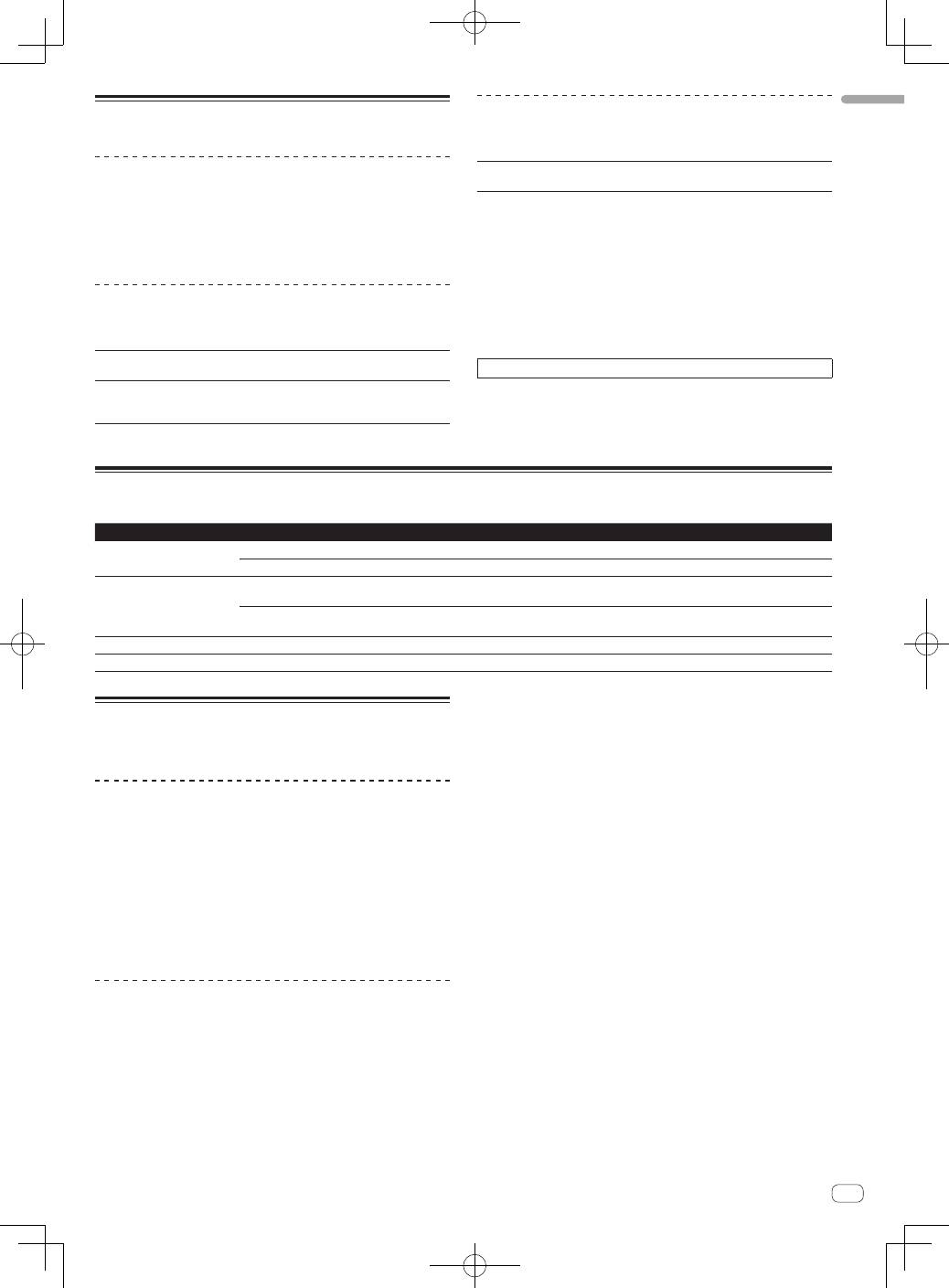
If the manual in the supplied CD-ROM is not automatically opened,
double-click on the CD-ROM icon to display the content and then open
the PDF file.
5
En
English
Usable media
About discs
This unit can play music CDs (CD-DA) and music files (MP3/AAC/
WAV/AIFF) recorded on CD-ROMs (CD-Rs and CD-RWs) or DVD-ROMs
(DVD-Rs, DVD-RWs, DVD-R DLs, DVD+Rs, DVD+RWs, and DVD+R
DLs).
!
8 cm discs cannot be played.
About SD memory cards
Music files (MP3/AAC/WAV/AIFF) recorded on SD memory cards con-
forming to SD standards can be played.
Supported
cards
1
!
SD memory cards: 8 MB – 2 GB
!
SDHC memory cards: 4 GB – 32 GB
Compatible
formats
!
SD memory cards: FAT12 and FAT16 (conforming to SD
standards)
!
SDHC memory cards: FAT32 (conforming to SD standards)
1
CPRM is not supported.
About USB devices
This unit supports USB mass storage class USB devices (external hard
disks, portable flash memory devices, digital audio players, etc.).
Supported file
systems
FAT16, FAT32 and HFS+ (NTFS is not supported.)
Tracks managed by rekordbox (iOS/Android) can be played by connect-
ing the mobile device on which rekordbox (iOS/Android) is installed
via USB. For supported devices, see the Pioneer DJ website (http://pio-
neerdj.com/support/). For instructions on rekordbox (iOS/Android), see
the rekordbox (iOS/Android) user’s manual.
!
Such information as disc identification data, cue points, loop points
and hot cues can be stored on storage devices (SD, USB).
!
Depending on the storage device (SD, USB) you are using, perfor-
mance may not be as expected.
!
Operation of all storage devices (SD, USB) is not guaranteed on this
unit.
For details, see this product’s operating instructions.
Playable music file formats
This unit supports music files in the formats shown below.
Type
File extension
Compatible formats
Bit depth
Bit rate
Sampling frequency
Encoding method
MP3
.mp3
MPEG-1 AUDIO LAYER-3
16 bit
32 kbps to 320 kbps
32 kHz, 44.1 kHz, 48 kHz
CBR, VBR
MPEG-2 AUDIO LAYER-3
16 bit
8 kbps to 160 kbps
16 kHz, 22.05 kHz, 24 kHz
CBR, VBR
AAC
.m4a, .aac and
.mp4
MPEG-4 AAC LC
16 bit
16 kbps to 320 kbps
16 kHz, 22.05 kHz, 24 kHz,
32 kHz, 44.1 kHz, 48 kHz
CBR, VBR
MPEG-2 AAC LC
16 bit
16 kbps to 320 kbps
16 kHz, 22.05 kHz, 24 kHz,
32 kHz, 44.1 kHz, 48 kHz
CBR, VBR
WAV
.wav
WAV
16 bit, 24 bit
—
44.1 kHz, 48 kHz
Uncompressed PCM
AIFF
.aif, .aiff
AIFF
16 bit, 24 bit
—
44.1 kHz, 48 kHz
Uncompressed PCM
About the rekordbox music
management software
rekordbox (Mac/Windows)
The included rekordbox music management software can be used
for the management (analysis, settings, creation, history storage) of
music files on computers. Using music files managed with rekordbox in
combination with this unit makes it possible to achieve outstanding DJ
performances.
In these operating instructions, the version of rekordbox for Mac/
Windows is referred to as “rekordbox (Mac/Windows)”. “rekordbox” is
used to indicate the versions of rekordbox (Mac/Windows) and rekord-
box (iOS/Android) simultaneously, as well as when referring to rekordbox
functions directly.
rekordbox (iOS/Android)
rekordbox (iOS/Android), a smartphone application that can be down-
loaded free of charge, can be used for the management (analysis, set-
tings, creation, history storage) of music files on mobile devices. Using
music files managed with rekordbox (iOS/Android) in combination with
this unit makes it possible to achieve outstanding DJ performances.
!
In these operating instructions, the version of rekordbox for mobile
devices is referred to as “rekordbox (iOS/Android)”.
6
En
Functions usable in combination with a computer
About the included CD-ROM
This unit can be used in combination with a computer when the software
is installed onto the computer from the included CD-ROM.
The included CD-ROM contains the operating instructions and the two
software applications described below.
rekordbox (Mac/Windows) music
management software
rekordbox is a software program allowing users who have purchased
a Pioneer DJ player supporting rekordbox to manage music files to be
used for DJ performances.
—
rekordbox (Mac/Windows) may be used for classifying and
searching for music files stored on your computer as well
as creating playlists, all of which can help improve your DJ
performance.
—
rekordbox (Mac/Windows) allows the detecting, measuring,
and editing of beats, tempos (BPM), and other elements of your
music files prior to a performance.
—
rekordbox (Mac/Windows) may be used to set and store detailed
point information (for cueing, looping, hot cueing, etc.) prior to a
performance.
Not only can various types of point information and playlists prepared
with rekordbox be used for playback on Pioneer DJ players, the playback
history, number of times played, point information, etc., can also be fed
back to rekordbox after playback.
Driver software
This driver software is an exclusive ASIO driver for outputting audio
signals from the computer. To use this unit connected to a computer on
which Windows is installed, install the driver software on the computer
beforehand.
There is no need to install the driver software when using Mac OS X.
!
For details, see this product’s operating instructions.
Software end user license
agreement
This Software End User License Agreement (“Agreement”) is between
you (both the individual installing the Program and any single legal
entity for which the individual is acting) (“You” or “Your”) and PIONEER
CORPORATION (“Pioneer”).
TAKING ANY STEP TO SET UP OR INSTALL THE PROGRAM MEANS
THAT YOU ACCEPT ALL OF THE TERMS OF THIS LICENSE AGREEMENT.
PERMISSION TO DOWNLOAD AND/OR USE THE PROGRAM IS
EXPRESSLY CONDITIONED ON YOUR FOLLOWING THESE TERMS.
WRITTEN OR ELECTRONIC APPROVAL IS NOT REQUIRED TO MAKE
THIS AGREEMENT VALID AND ENFORCEABLE. IF YOU DO NOT
AGREE TO ALL OF THE TERMS OF THIS AGREEMENT, YOU ARE NOT
AUTHORIZED TO USE THE PROGRAM AND MUST STOP INSTALLING IT
OR UNINSTALL IT, AS APPLICABLE.
1 DEFINITIONS
1
“Documentation” means written documentation, specifications
and help content made generally available by Pioneer to aid in
installing and using the Program.
2
“Program” means all or any part of Pioneer’s software licensed to
You by Pioneer under this Agreement.
2 PROGRAM LICENSE
1
Limited License. Subject to this Agreement’s restrictions,
Pioneer grants to You a limited, non-exclusive, non-transferable,
license (without the right to sublicense):
a To install a single copy of the Program in Your computer or
mobile device, to use the Program only for Your personal pur-
pose complying with this Agreement and the Documentation
(“Authorized Use”);
b To use the Documentation in support of Your Authorized Use;
and
c To make one copy of the Program solely for backup pur-
poses, provided that all titles and trademark, copyright and
restricted rights notices are reproduced on the copy.
2
Restrictions. You will not copy or use the Program or
Documentation except as expressly permitted by this Agreement.
You will not transfer, sublicense, rent, lease or lend the Program,
or use it for third-party training, commercial time-sharing or
service bureau use. You will not Yourself or through any third
party modify, reverse engineer, disassemble or decompile the
Program, except to the extent expressly permitted by applicable
law, and then only after You have notified Pioneer in writing of
Your intended activities.
3
Ownership. Pioneer or its licensor retains all right, title and
interest in and to all patent, copyright, trademark, trade secret
and other intellectual property rights in the Program and
Documentation, and any derivative works thereof. You do not
acquire any other rights, express or implied, beyond the limited
license set forth in this Agreement.
4
No Support. Pioneer has no obligation to provide support,
maintenance, upgrades, modifications or new releases for the
Program or Documentation under this Agreement.
3 WARRANTY DISCLAIMER
THE PROGRAM AND DOCUMENTATION ARE PROVIDED “AS IS”
WITHOUT ANY REPRESENTATIONS OR WARRANTIES, AND YOU
AGREE TO USE THEM AT YOUR SOLE RISK. TO THE FULLEST EXTENT
PERMISSIBLE BY LAW, PIONEER EXPRESSLY DISCLAIMS ALL
WARRANTIES OF ANY KIND WITH RESPECT TO THE PROGRAM AND
DOCUMENTATION, WHETHER EXPRESS, IMPLIED, STATUTORY,
OR ARISING OUT OF COURSE OF PERFORMANCE, COURSE OF
DEALING OR USAGE OF TRADE, INCLUDING ANY WARRANTIES
OF MERCHANTABILITY, FITNESS FOR A PARTICULAR PURPOSE,
SATISFACTORY QUALITY, ACCURACY, TITLE OR NON-INFRINGEMENT.
4 DAMAGES AND REMEDIES FOR BREACH
You agree that any breach of this Agreement’s restrictions would cause
Pioneer irreparable harm for which money damages alone would be
inadequate. In addition to damages and any other remedies to which
Pioneer may be entitled, You agree that Pioneer may seek injunctive
relief to prevent the actual, threatened or continued breach of this
Agreement.
5 TERMINATION
Pioneer may terminate this Agreement at any time upon Your breach
of any provision. If this Agreement is terminated, You will stop using
the Program, permanently delete it from your computer or mobile
device where it resides, and destroy all copies of the Program and
Documentation in Your possession, confirming to Pioneer in writing
that You have done so. Sections 2.2, 2.3, 2.4, 3, 4, 5 and 6 will continue in
effect after this Agreement’s termination.
6 GENERAL TERMS
1
Limitation of Liability. In no event will Pioneer or its subsidiaries
be liable in connection with this Agreement or its subject matter,
under any theory of liability, for any indirect, incidental, special,
consequential or punitive damages, or damages for lost profits,
revenue, business, savings, data, use, or cost of substitute pro-
curement, even if advised of the possibility of such damages or if
such damages are foreseeable. In no event will Pioneer’s liability
for all damages exceed the amounts actually paid by You to
Pioneer or its subsidiaries for the Program. The parties acknowl-
edge that the liability limits and risk allocation in this Agreement
are reflected in the Program price and are essential elements of
the bargain between the parties, without which Pioneer would
not have provided the Program or entered into this Agreement.
7
En
English
2
The limitations or exclusions of warranties and liability contained
in this Agreement do not affect or prejudice Your statutory rights
as consumer and shall apply to You only to the extent such limita-
tions or exclusions are permitted under the laws of the jurisdic-
tion where You are located.
3
Severability and Waiver. If any provision of this Agreement is held
to be illegal, invalid or otherwise unenforceable, that provision
will be enforced to the extent possible or, if incapable of enforce-
ment, deemed to be severed and deleted from this Agreement,
and the remainder will continue in full force and effect. The
waiver by either party of any default or breach of this Agreement
will not waive any other or subsequent default or breach.
4
No Assignment. You may not assign, sell, transfer, delegate or
otherwise dispose of this Agreement or any rights or obligations
under it, whether voluntarily or involuntarily, by operation of law
or otherwise, without Pioneer’s prior written consent. Any pur-
ported assignment, transfer or delegation by You will be null and
void. Subject to the foregoing, this Agreement will be binding
upon and will inure to the benefit of the parties and their respec-
tive successors and assigns.
5
Entire Agreement. This Agreement constitutes the entire agree-
ment between the parties and supersedes all prior or contem-
poraneous agreements or representations, whether written or
oral, concerning its subject matter. This Agreement may not be
modified or amended without Pioneer’s prior and express written
consent, and no other act, document, usage or custom will be
deemed to amend or modify this Agreement.
6
You agree that this Agreement shall be governed and construed
by and under the laws of Japan.
Cautions on copyrights
rekordbox restricts playback and duplication of copyright-protected
music contents.
!
When coded data, etc., for protecting the copyright is embedded in
the music contents, it may not be possible to operate the program
normally.
!
When rekordbox detects that coded data, etc., for protecting the
copyright is embedded in the music contents, processing (playback,
reading, etc.) may stop.
Recordings you have made are for your personal enjoyment and accord-
ing to copyright laws may not be used without the consent of the copy-
right holder.
!
Music recorded from CDs, etc., is protected by the copyright laws of
individual countries and by international treaties. It is the full respon-
sibility of the person who has recorded the music to ensure that it is
used legally.
!
When handling music downloaded from the Internet, etc., it is the
full responsibility of the person who has downloaded the music to
ensure that it is used in accordance with the contract concluded
with the download site.
Cautions on installing rekordbox
(Mac/Windows)
Read
Software end user license agreement
carefully before installing
rekordbox.
!
The included CD-ROM contains installation programs in the follow-
ing 12 languages.
English, French, German, Italian, Dutch, Spanish, Portuguese,
Russian, Chinese (simplified characters), Chinese (traditional char-
acters), Korean, Japanese.
!
When using an operating system in any language besides the ones
listed above, select [
English
] during the installation procedure.
Supported operating systems
Mac OS X (10.5.8 or later)
1
Windows
®
7 Home Premium/Professional/
Ultimate
32-bit version
1
64-bit version
1
Windows Vista
®
Home Basic/
Home Premium/Business/Ultimate
32-bit version
1
64-bit version
1
Windows
®
XP Home Edition/Professional
(SP2 or later)
32-bit version
1
Installing rekordbox (Mac/Windows)
Read
Cautions on installing rekordbox (Mac/Windows)
carefully before
installing rekordbox.
For details on driver software settings and operations with USB connec-
tions, see this product’s operating instructions.
For details on installing rekordbox (iOS/Android), see the Pioneer
website (http://rekordbox.com/).
Installation procedure (Macintosh)
!
Authorization of the computer’s administrator is required to install
and uninstall rekordbox.
Log on as the user which was set as the computer’s administrator
before installing.
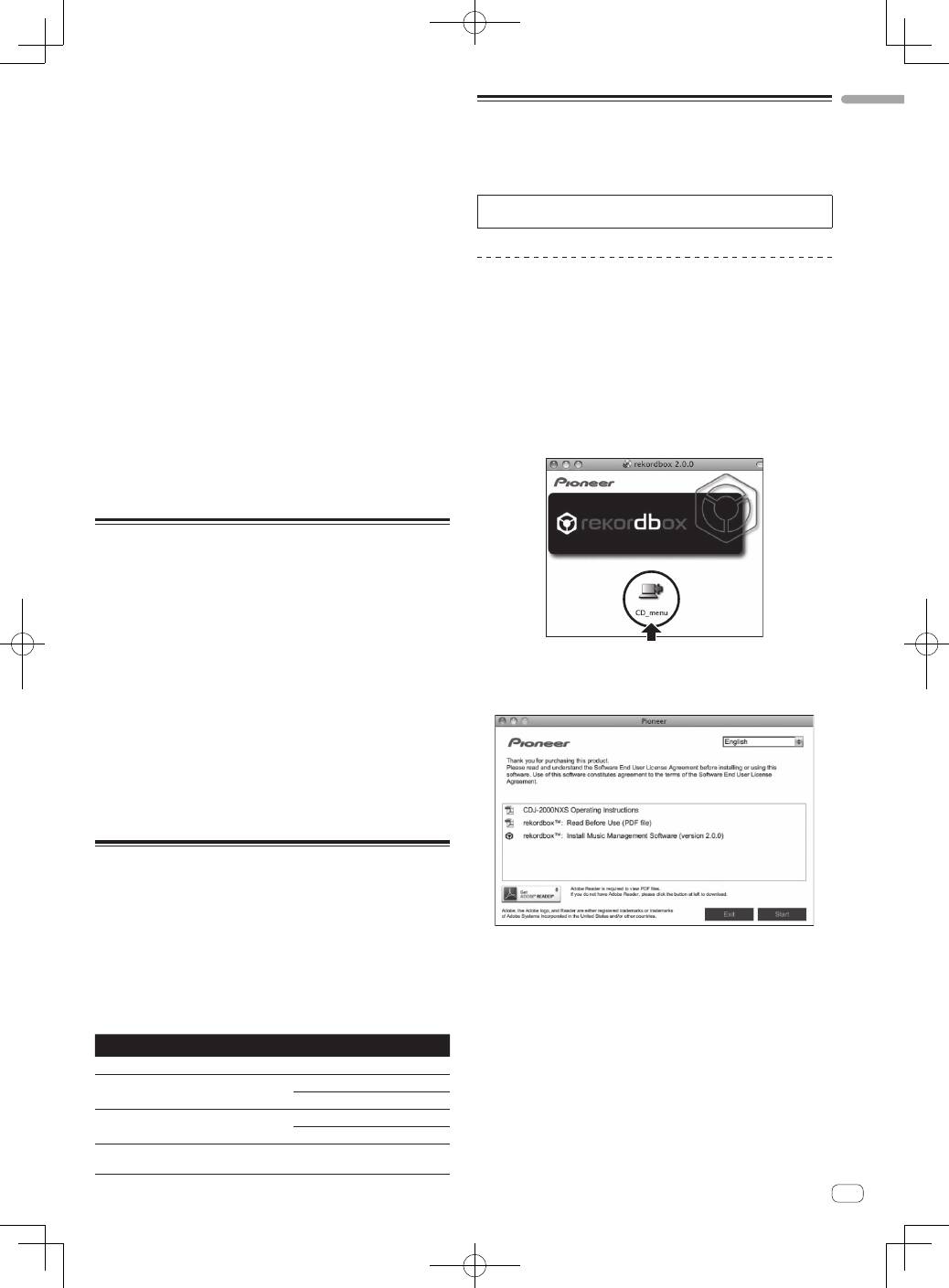
1 When the CD-ROM is inserted into the computer’s
optical drive, the optical drive opens on the screen.
Double-click the [CD_menu.app] icon.
!
If the window containing the [
CD_menu.app
] icon is not displayed
when the CD-ROM is inserted, use Finder to open the CD drive
manually and double-click the [
CD_menu.app
] icon.
2 When the CD-ROM’s menu is displayed, select
[rekordbox: Install Music Management Software], then
click [Start].
!
To close the CD-ROM menu, click [
Exit
].
3 When the license agreement screen appears, select
[English], read the
Software end user license agreement
carefully, then click [Continue].
!
You can select the one you desire from multiple languages as long
as the language is supported by the system environment of your
computer.
4 If you agree to the
Software end user license
agreement
, click [Agree].
!
If you do not consent to the provisions of the
Software end user
license agreement
, click [
I disagree
] and stop installation.
5 Install rekordbox by following the instructions on the
screen.
8
En
Installation procedure (Windows)
!
Authorization of the computer’s administrator is required to install
and uninstall rekordbox.
Log on as the user registered as the computer’s administrator before
installing rekordbox (Mac/Windows).
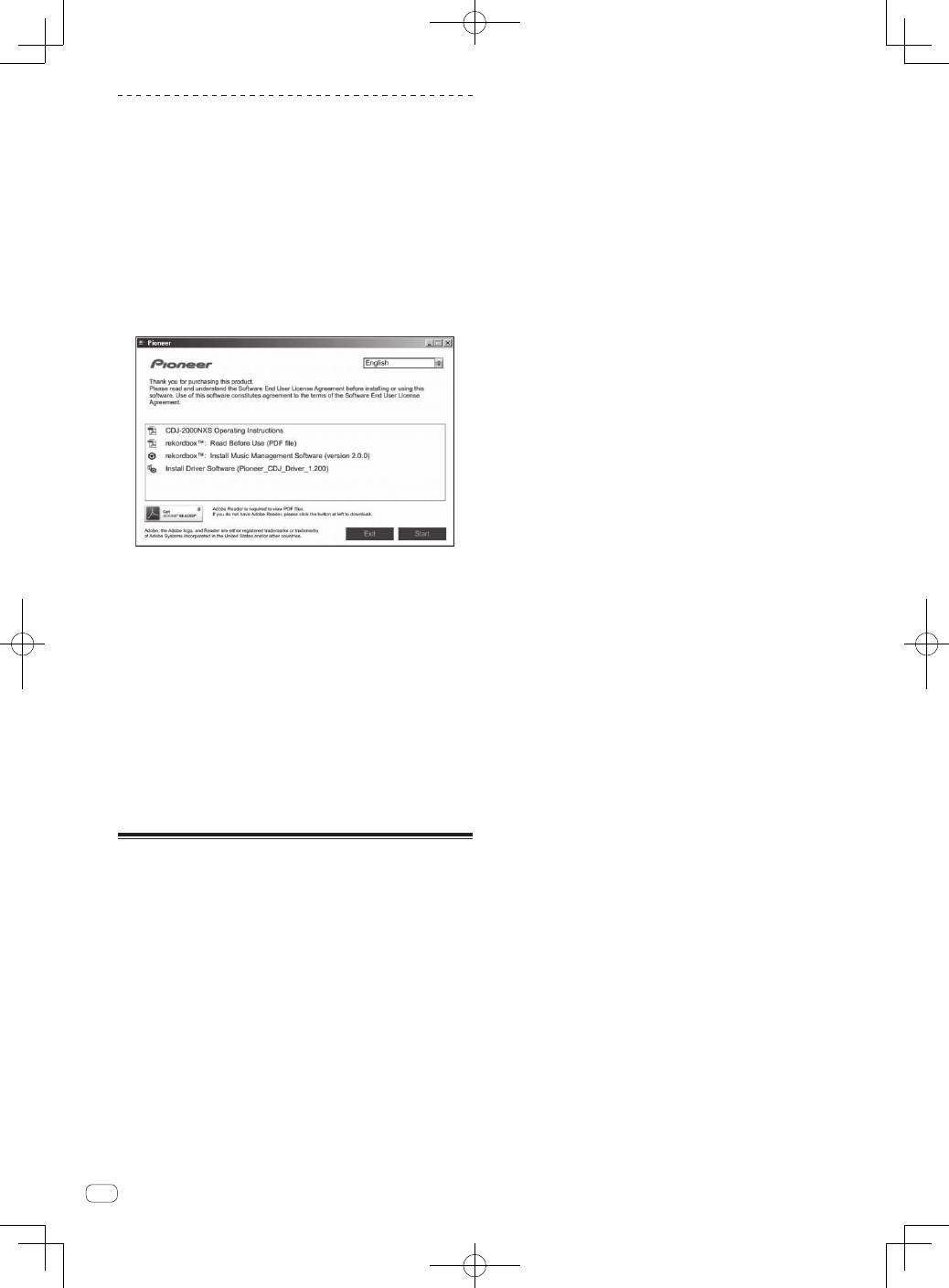
1 Insert the CD-ROM into the computer’s optical drive.
The CD-ROM menu is displayed.
!
If the CD-ROM menu does not appear when the CD-ROM is inserted,
open the CD drive from [
Computer
(or
My Computer
)] in the [
Start
]
menu, then double-click the [
CD_menu.exe
] icon.
2 When the CD-ROM’s menu is displayed, select
[rekordbox: Install Music Management Software], then
click [Start].
!
To close the CD-ROM menu, click [
Exit
].
3 When the language selection screen appears, select
[English] and click [OK].
!
You can select the one you desire from multiple languages as long
as the language is supported by the system environment of your
computer.
4 When the license agreement screen appears, read the
Software end user license agreement
carefully. If you
agree to the
Software end user license agreement
, click
[Agree].
!
If you do not consent to the provisions of the
Software end user
license agreement
, click [
Cancel
] and stop installation.
5 Install rekordbox by following the instructions on the
screen.
!
Click [
Cancel
] to cancel installation after it has started.
Installing rekordbox (iOS/Android)
Install rekordbox (iOS/Android) on the mobile device (smartphone, tablet
device, etc.). For instructions on installation and supported operating
system versions, see our website (http://rekordbox.com/).
9
En
English
Connections
!
Be sure to turn off the power and unplug the power cord from the power outlet whenever making or changing connections.
!
Refer to the operating instructions for the component to be connected.
!
Connect the power cord after all the connections between devices have been completed.
!
When using a LAN cable for connection, be sure to use either the LAN cable included with this product or an STP (shielded twisted pair) cable.
!
Do not disconnect the LAN cable when music files and/or information are being shared using PRO DJ LINK.
Basic style
Playback on this unit is performed mainly using tracks prepared with rekordbox installed on a computer.
!
For instructions on operating rekordbox, see rekordbox (Mac/Windows)’s operating instructions. The rekordbox (Mac/Windows) operating instruc-
tions can be viewed from the rekordbox (Mac/Windows) [Help] menu.
!
Also, for DJ players and DJ mixers, up to four PRO DJ LINK-compatible players can be connected with LAN cables (CAT5e) using PRO DJ LINK
connections.
!
A switching hub (commercially available) may be necessary, depending on the combination of models used. Use a switching hub of 100 Mbps or
greater. Some switching hubs may not operate properly.
!
A switching hub (commercially available) is necessary to connect to a mixer equipped with only one LAN port. For mixers with enough LAN ports for
all the DJ players and computers in the system, connect directly to the LAN ports on the mixer’s rear panel, without using a hub.
!
Use a wireless router (commercially available) and access point (commercially available) conforming to either IEEE802.11n or IEEE802.11g stan-
dards. Depending on the signal conditions in the usage environment and the wireless router or access point, PRO DJ LINK connections may not
operate properly.
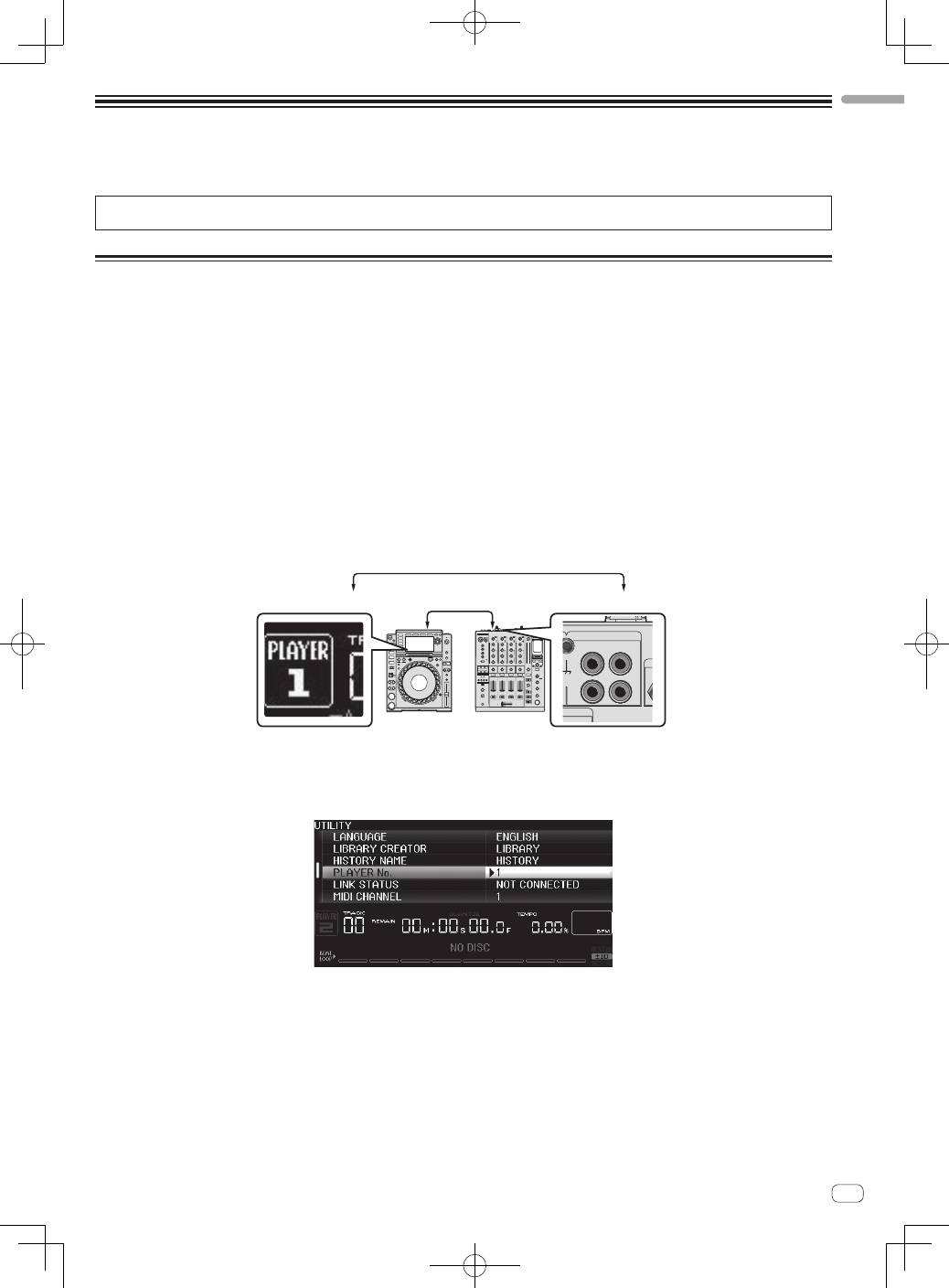
Connecting to a mixer with only one LAN port
When connecting to a mixer with only one LAN port using a switching hub, in order to use rekordbox’s music file management functions to their maxi-
mum, set the channel number of the mixer to which the audio or coaxial digital cable is connected and the player number displayed at the bottom left
of the main unit display to the same number.
(Ex.: When the audio cable is connected to channel 1)
L
R
PHONO
CH 1
CD/LINE
NAL GND
PLAYER 1
CH 1
Audio cable
To change the player number, follow the procedure below.
1
Disconnect the storage device (SD, USB) and LAN cable.
2
Press the [
MENU/UTILITY
] button for over 1 second to display the [
UTILITY
] screen.
3
Turn the rotary selector to select [
PLAYER No.
], then press the rotary selector.
4
Turn the rotary selector to select the player number, then press the rotary selector to enter it.
5
Press the [
MENU/UTILITY
] button to complete the setting.
10
En
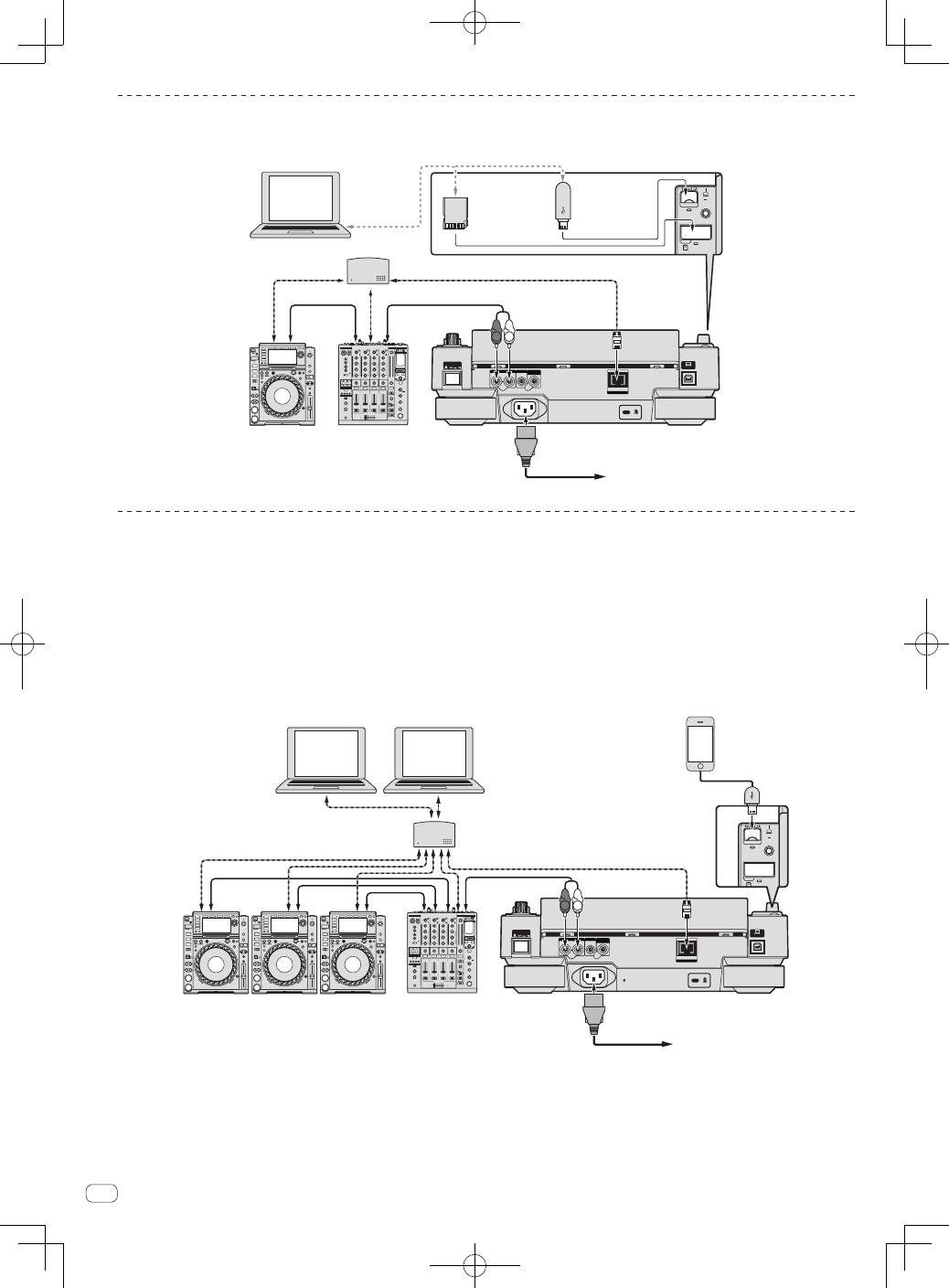
PRO DJ LINK (SD & USB Export)
!
rekordbox music files and data can be exchanged with this unit using a memory device (flash memory, hard disk, etc.), eliminating the need to take
a computer into the DJ booth. Such information as playlists, cues, loops and hot cues set in advance with rekordbox can be used for playback.
POWER
CONTROL
LINK
AUDIO OUT
R
L
CONTROL
DIGITAL
OUT
L
R
USB
STOP
LO
•I
REC / CALL
SD
HOT CUE
Q
DJ player
DJ mixer
Rear panel
LAN cable
LAN cable
LAN cable
Power cord
To an AC outlet
Audio cable
Audio
cable
rekordbox
Computer
Switching hub
USB device on
which
rekordbox data
is recorded
SD memory
card on which
rekordbox data
is recorded
PRO DJ LINK (LINK Export)
!
Tracks in rekordbox can be selected and played when the computer is taken into a DJ booth and connected to a computer on which rekordbox is
installed by LAN cable (CAT5e) or wireless LAN (Wi-Fi) router. Performances can be held using such information as playlists, cues, loops and hot
cues that have been set ahead of time with rekordbox.
!
Tracks in rekordbox can be selected and played when connected to a mobile device on which rekordbox (iOS/Android) is installed by USB cable or
wireless LAN (Wi-Fi) router. Performances can be held using such information as playlists, cues, loops and hot cues that have been set ahead of
time with rekordbox.
!
With wired LAN connections, up to two computers on which rekordbox is installed can be connected.
!
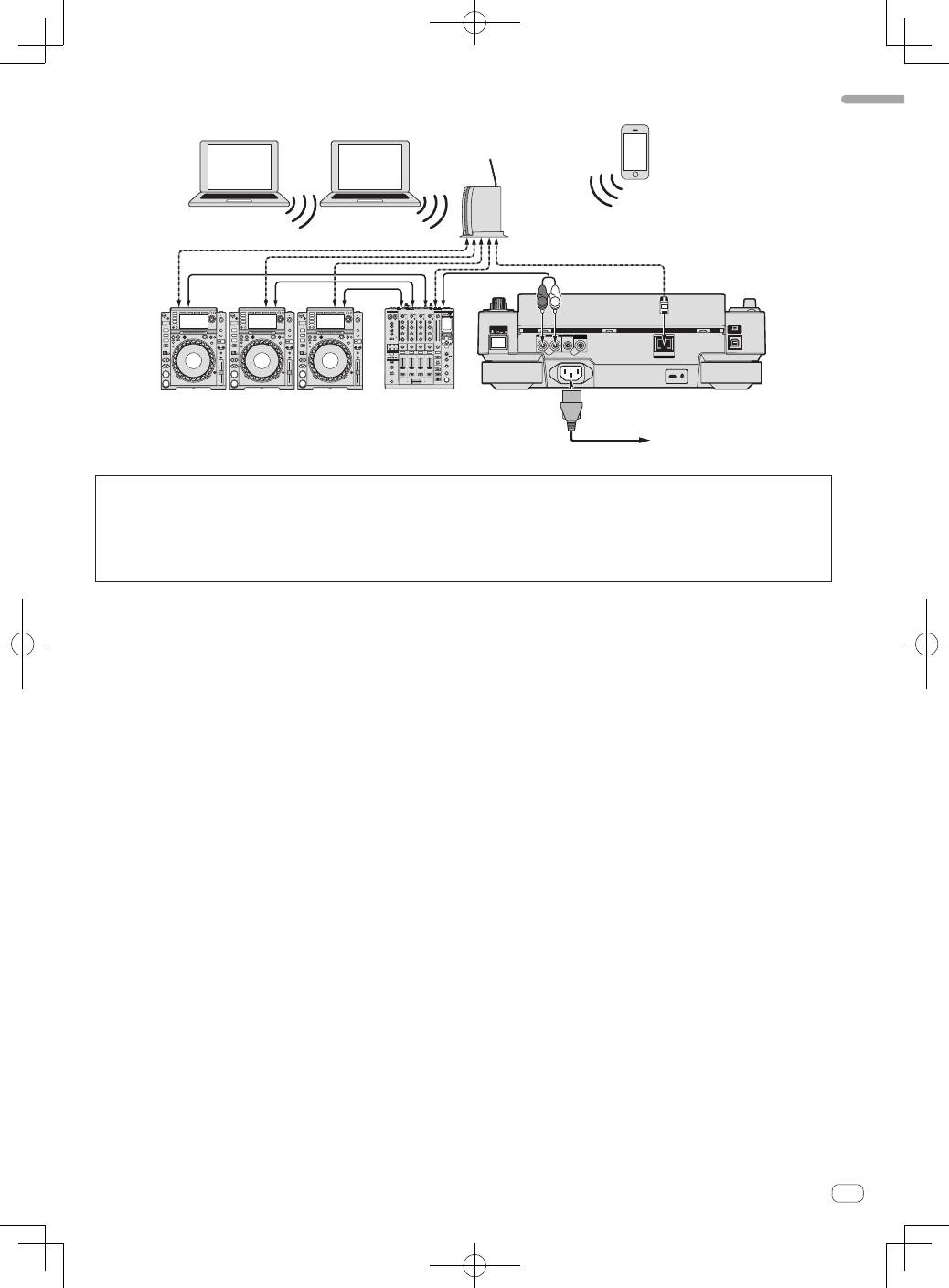
With wireless LAN (Wi-Fi) connections, up to four computers or mobile devices on which rekordbox is installed can be connected.
Using a switching hub
POWER
CONTROL
LINK
AUDIO OUT
R
L
CONTROL
DIGITAL
OUT
L
R
rekordbox
rekordbox
USB
STOP
SD
HOT CUE
QU
DJ player × 3
DJ mixer
Rear panel
LAN cable
LAN cable × 3
Switching hub
Audio cable
Audio cable
× 3
Power cord
To an AC outlet
Computer
Computer
LAN cable × 2
Mobile device on
which rekordbox
is installed
11
En
English
Using a wireless router and access points
POWER
CONTROL
LINK
AUDIO OUT
R
L
CONTROL
DIGITAL
OUT
L
R
rekordbox
rekordbox
DJ player × 3
DJ mixer
Rear panel
LAN cable
Audio cable
× 3
To an AC outlet
Computer
Wireless router
and access points
Mobile device on
which rekordbox
is installed
Computer
LAN cable × 3
Audio cable
Power cord
!
For combinations with other DJ software, etc., see this product’s operating instructions.
Cautions
To use rekordbox’s music file management functions to their maximum, set the channel of the audio or coaxial digital input cable connected to the
mixer and the player number to the same number.
If the player number is different, change the [
PLAYER No.
] setting on the [
UTILITY
] screen.
=
For instructions on changing the settings on the [
UTILITY
] screen, see this product’s operating instructions.
!
When a storage device is connected to this unit, [
PLAYER No.
] is displayed in gray and cannot be changed. Disconnect the storage device or LAN
cable to turn the link off, then change the setting.
12
En
Operation
Turning the power on
1 Make all the connections, then plug the power cord
into a power outlet.
=
Connections
(p.9)
2 Press the [POWER ON/OFF] button.
This unit’s indicators light and the power turns on.
Turning the power off
Press the [POWER ON/OFF] button.
This unit’s power turns off.
!
Do not pull out the SD memory card or turn off this unit’s power
while the SD memory card indicator is flashing. Doing so could
delete this unit’s management data and damage the SD memory
card, making it impossible to read.
!
Do not disconnect the USB device or turn off this unit’s power while
the USB indicator is lit or flashing. Doing so could delete this unit’s
management data and damage the USB device, making it impos-
sible to read.
Inserting discs
!
This unit is a one-disc player. Do not insert multiple disc.
!
Do not force discs into the disc insertion slot when this unit’s power
is off. Doing so could damage the disc and lead to malfunction of
this unit.
!
When the disc is being drawn in or ejected, do not apply any force
to the disc in the direction opposite its movement. Doing so could
damage the disc or this unit.
1 Press the [POWER ON/OFF] button to turn on this
unit’s power.
2 Insert the disc horizontally into the disc insertion slot,
with the printed surface facing up.
Playback starts after the medium’s information has been read.
!
When a disc containing music files recorded with a hierarchical
structure is loaded, playback starts from the tracks in the uppermost
layer.
TEM
PO
0
RE
V
FW
D
TE
MP
O
RE
SE
T
!
When auto cue is turned on, the disc pauses at the audio start posi-
tion. In this case, press the [
PLAY/PAUSE
f
] to start playback.
=
For details on the auto cue function, see this product’s operating
instructions.
!
When a disc is inserted while a storage device (SD, USB) that has
previously been inserted into or connected to this unit or another
Pioneer DJ player is connected, the number of discs stored in the
disc information memory is displayed for several seconds on the
main unit display.
=
For details the disc information memory, see this product’s
operating instructions.
Inserting SD memory cards
!
Do not insert any objects other than SD memory cards into the SD
memory card insertion slot. Inserting coins or other metal objects
could damage the internal circuitry, resulting in malfunction.
!
Do not forcibly insert or remove SD memory cards. Doing so could
damage the SD memory card or this unit.
1 Press the [POWER ON/OFF] button to turn on this
unit’s power.
2 Open the SD memory card door.
3 Insert the SD memory card.
Insert the SD memory card vertically, with the back side facing forward
and the notch facing down. Push the card in slowly until it stops.
4 Close the SD memory card door.
Connecting USB devices
1 Press the [POWER ON/OFF] button to turn on this
unit’s power.
2 Connect the USB device to the USB device insertion
slot.
Playback
This section describes basic track selection operations and how to
switch the screen.
=
Playing storage devices (SD, USB) of other players and mobile devices
on which rekordbox is installed
(p.13)
=
Playing the rekordbox library on a computer or mobile device
(p.13)
Playing media connected to or inserted in
this unit
1 Load the medium in this unit.
=
Inserting discs
(p.12)
=
Inserting SD memory cards
(p.12)
=
Connecting USB devices
(p.12)
2 Press the corresponding medium button ([DISC], [SD]
or [USB]).
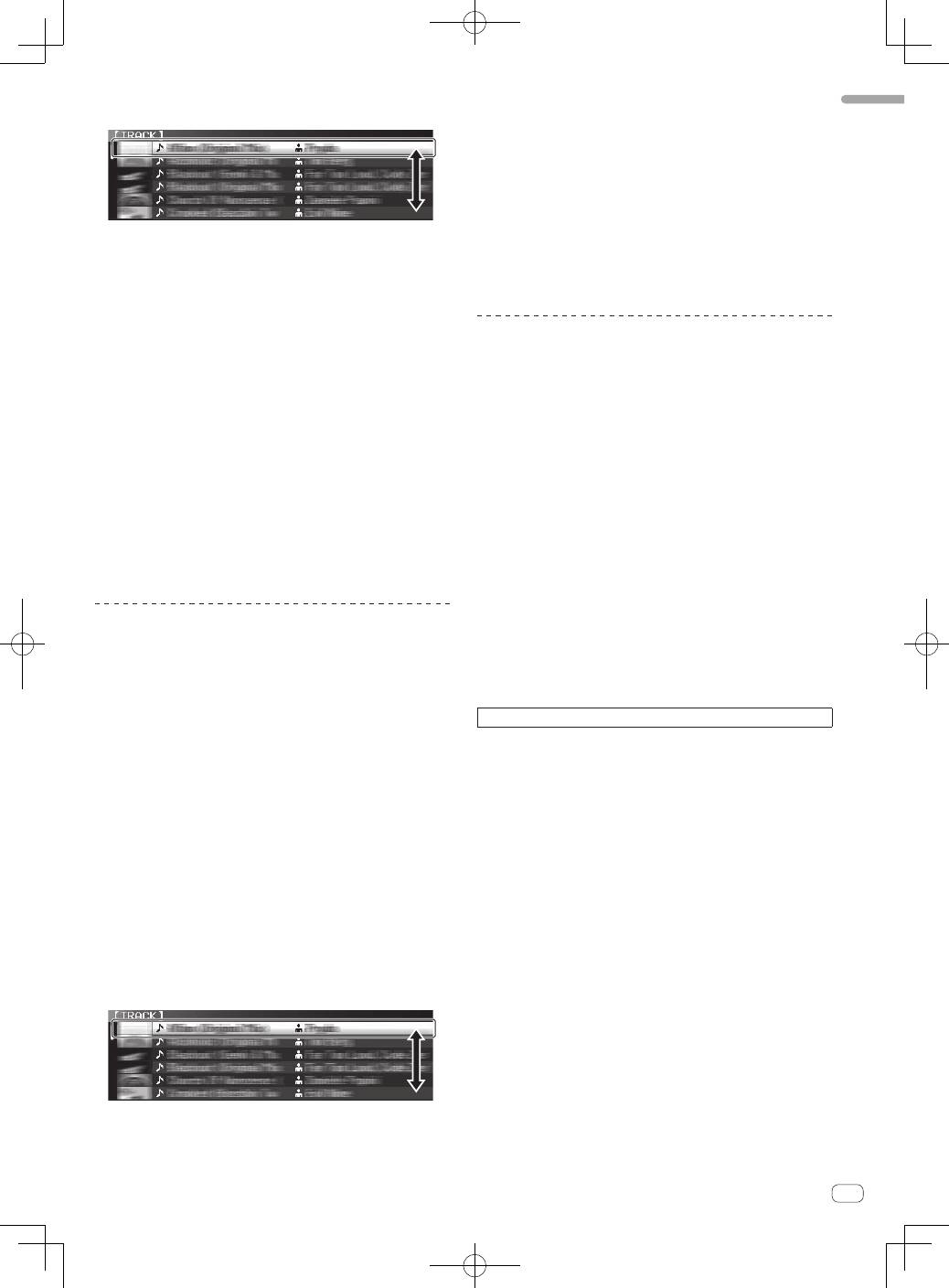
The tracks or folders are displayed on a list.
The medium whose contents are displayed on the main unit display can
be switched.
[
DISC
] button: Displays the contents on the inserted disc.
[
SD
] button: Displays the contents on the inserted SD memory card.
[
USB
] button: Displays the contents of the connected USB or mobile
device.
=
For details on the [
LINK
] button, see
Playing storage devices (SD,
USB) of other players and mobile devices on which rekordbox is
installed
on page 13.
=
For details on the [
rekordbox
] button, see
Playing the rekordbox
library on a computer or mobile device
on page 13.
!
If the storage device (SD, USB) contains rekordbox library informa-
tion, the rekordbox library is displayed.
=
For instructions on browsing the rekordbox library, see this prod-
uct’s operating instructions.
13
En
English
3 Turn the rotary selector.
Move the cursor and select the item.
!
Press the rotary selector to move to a lower level in the folder. Press
the [
BACK
] button to return to the level above.
!
When the [
BACK
] button is pressed for over 1 second or the medium
button for the medium being browsed is pressed, the display moves
to the topmost level.
!
Tracks in the currently playing track’s category/folder of can also be
selected using the [
TRACK SEARCH
o
,
p
] buttons.
4 Select the track and press the rotary selector.
When the track is loaded, the screen switches to the normal playback
screen.
The track is loaded, playback starts, and the corresponding medium
button flashes.
=
For details on the normal playback screen, see this product’s
operating instructions.
!
When [
EJECT/LOAD LOCK
] on the [
UTILITY
] menu is set to [
LOCK
],
it is not possible to load other tracks during playback. Either set
[
EJECT/LOAD LOCK
] to [
UNLOCK
] or press the [
PLAY/PAUSE
f
]
button to pause, then load the track.
!
When a track has been loaded while pausing, press the
[
PLAY/PAUSE
f
] button to start playback.
!
When auto cue is turned on, the disc pauses at the audio start posi-
tion. In this case, press the [
PLAY/PAUSE
f
] to start playback.
=
For details on the auto cue function, see this product’s operating
instructions.
Playing storage devices (SD, USB) of
other players and mobile devices on
which rekordbox is installed
Display the contents of the storage device (SD, USB) or of the mobile
device on which rekordbox is installed that is connected to the other
player connected to this unit by PRO DJ LINK on this unit’s screen.
!
The information of discs inserted on other players cannot be
browsed.
1 Connect the storage device (SD, USB) or mobile device
on which rekordbox is installed to the other player
connected to this unit by PRO DJ LINK.
2 Press the [LINK] button.
The tracks and/or folders on the storage device (SD, USB) or mobile
device on which rekordbox is installed that is connected to the other
player are displayed.
!
When multiple media are connected, a screen for selecting the
medium appears.
!
If the storage device (SD, USB) contains rekordbox library informa-
tion, the rekordbox library is displayed.
=
For instructions on browsing the rekordbox library, see this prod-
uct’s operating instructions.
3 Turn the rotary selector.
Move the cursor and select the item.
4 Select the track and press the rotary selector.
When the track is loaded, the screen switches to the normal playback
screen.
The track is loaded, playback starts, and the corresponding medium
button flashes.
=
For details on the normal playback screen, see this product’s
operating instructions.
If the medium contains the rekordbox library
If the SD memory card or USB device inserted into/connected to this
unit or another player connected by PRO DJ LINK contains rekordbox
library information, the rekordbox library is displayed.
!
Music files are displayed in the categories (album, artist, etc.) set
with rekordbox.
!
The types of items on the category menu can be changed in rekord-
box’s preferences.
Playing the rekordbox library on a
computer or mobile device
Music files are displayed in the categories (album, artist, etc.) set with
rekordbox.
1 Press the [rekordbox] button.
The rekordbox library is displayed on this unit’s main unit display.
!
With wireless LAN (Wi-Fi) connections, if [
Please push the
rotary selector to permit mobile connection.
] appears on this
unit’s main unit display when connecting, connection is possible
by pressing the rotary selector.
!
To select a mobile device connected by USB, press the [
USB
]
button.
Also, to select a mobile device connected to another player that
is connected by PRO DJ LINK, press the [
LINK
] button.
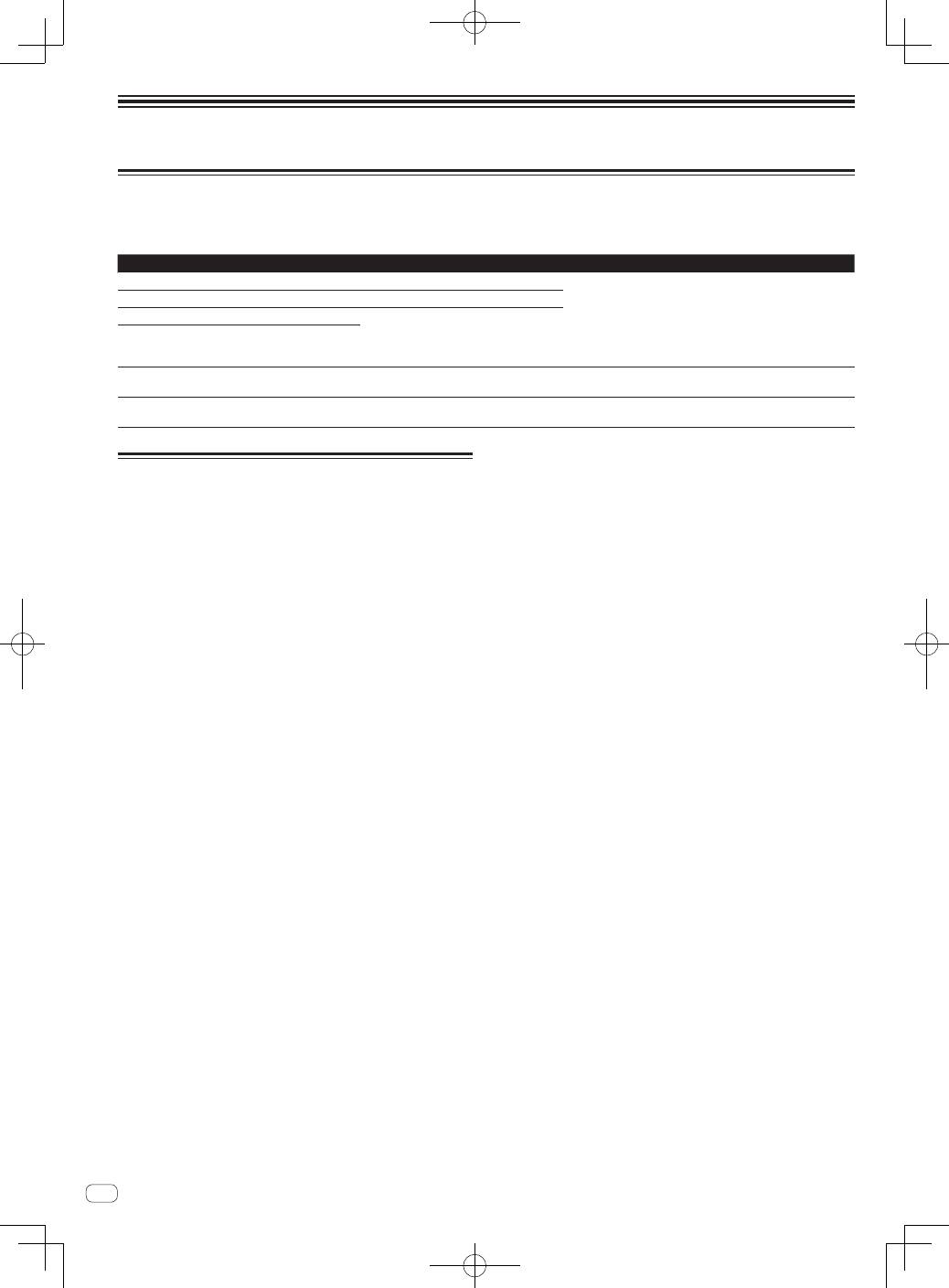
2 Turn the rotary selector.
Move the cursor and select the item.
3 Select the track and press the rotary selector.
When the track is loaded, the screen switches to the normal playback
screen.
The track is loaded, playback starts, and the corresponding medium
button flashes.
=
For details on the normal playback screen, see this product’s
operating instructions.
For other operations, see this product’s operating instructions.
14
En
Additional information
Error messages
When this unit cannot operate normally, an error code appears on the display. Check the table below and take the measures indicated. If an error code
not shown on the table below is displayed, or if the same error code is displayed again after taking the indicated action, contact your store of purchase
or a nearby Pioneer service station.
Error code
Error type
Description of error
Cause and action
E-7201
CANNOT READ DISC
TOC data cannot be read.
!
Disc is cracked.
d
Replace the disc.
!
Disc is dirty.
d
Clean the disc.
!
If operation is normal with other discs, the problem is with that
disc.
!
The track data (file) may be corrupt.
d
Check whether the track
(file) can be played on another player, etc., capable of playing
the same formats as this unit.
E-8301
CANNOT READ DISC
Disc that cannot be played normally is loaded.
E-8302
CANNOT PLAY TRACK(****)
Track data (file) on the disc or storage device
(SD, USB) cannot be read properly.
E-8303
CANNOT PLAY TRACK
E-8304
E-8305
UNSUPPORTED FILE FORMAT
Music files that cannot be played normally
are loaded.
Format is wrong.
d
Replace with music files in the proper format.
E-9101
MECHANICAL TIMEOUT
Mechanical error (time out) during loading or
ejecting of disc.
Displayed when mechanism operation is not completed within the
specified time.
Specifications
Power requirements .................................... AC 220 V to 240 V, 50 Hz/60 Hz
Power consumption ............................................................................... 37 W
Power consumption (standby) ............................................................. 0.4 W
Main unit weight ...................................................................................4.7 kg
External dimensions ........... 320 mm (W) × 106.5 mm (H) × 405.7 mm (D)
Tolerable operating temperature ........................................ +5 °C to +35 °C
Tolerable operating humidity ...................... 5 % to 85 % (no condensation)
Analog audio output (AUDIO OUT L/R)
Output terminals ...................................................................... RCA terminal
Output Level .........................................................................2.0 Vrms (1 kHz)
Frequency response................................................................ 4 Hz to 20 kHz
S/N ratio ............................................................................................... 115 dB
Total harmonic distortion ................................................................0.0018 %
Digital audio output (DIGITAL OUT)
Output terminals ...................................................................... RCA terminal
Output type ............................................................... Coaxial digital (S/PDIF)
Output level ............................................................................ 0.5 Vp-p (75
W
)
Output format .............................................................. 44.1 kHz, 24 bit/16 bit
USB downstream section (USB)
Port .......................................................................................................Type A
Power supply ........................................................................ 5 V/2.1 A or less
USB upstream section (USB)
Port .......................................................................................................Type B
LAN (PRO DJ LINK)
Rating .......................................................................................... 100Base-TX
Control output (CONTROL)
Port .................................................................................................. Mini-jack
SD memory card section
File system ............... Conforming to “SD Specifications Part 2 File System
Specification Version 2.00”
Max. memory capacity ..........................................................................32 GB
Main display
Display type ...........................Active matrix TFT liquid crystal display (LCD)
Screen size ...............................................................................6.1-inch, wide
Supported languages .............................................................. 18 languages
—
The specifications and design of this product are subject to
change without notice.
©
2012 PIONEER CORPORATION. All rights reserved.

2
Fr
Nous vous remercions d’avoir acquis un produit Pioneer. Veuillez lire attentivement ce mode d’emploi afin de connaître la manière d’utiliser l’appareil
comme il convient. Cela fait, conservez le mode d’emploi de façon à pouvoir vous y référer en cas de nécessité.
Dans certains pays ou certaines régions, la forme de la fiche et de la prise d’alimentation est un peu différente de ce qui est montré dans les illustra-
tions. Toutefois, l’appareil se raccorde et fonctionne de la même façon.
Ce point d’exclamation, placé dans un
triangle équilatéral, a pour but d’attirer
l’attention de l’utilisateur sur la présence,
dans les documents qui accompagnent
l’appareil, d’explications importantes du
point de vue de l’exploitation ou de
l’entretien.
Ce symbole de l’éclair, placé dans un
triangle équilatéral, a pour but d’attirer
l’attention de l’utilisateur sur la présence, à
l’intérieur du coffret de l’appareil, de
“tensions dangereuses” non isolées d’une
grandeur suffisante pour représenter un
risque d’électrocution pour les êtres
humains.
ATTENTION :
POUR ÉVITER TOUT RISQUE
D’ÉLECTROCUTION, NE PAS ENLEVER LE
COUVERCLE (NI LE PANNEAU ARRIÈRE).
AUCUNE PIÈCE RÉPARABLE PAR
L’UTILISATEUR NE SE TROUVE À
L’INTÉRIEUR. CONFIER TOUT ENTRETIEN À
UN PERSONNEL QUALIFIÉ UNIQUEMENT.
ATTENTION
DANGER D´ELECTROCUTION
NE PAS OUVRIR
IMPORTANT
D3-4-2-1-1_A1_Fr
AVERTISSEMENT
Cet appareil n’est pas étanche. Pour éviter les risques
d’incendie et de décharge électrique, ne placez près de
lui un récipient rempli d’eau, tel qu’un vase ou un pot
de fleurs, et ne l’exposez pas à des gouttes d’eau, des
éclaboussures, de la pluie ou de l’humidité.
D3-4-2-1-3_A1_Fr
AVERTISSEMENT
Avant de brancher l’appareil pour la première, lisez
attentivement la section suivante.
La tension de l’alimentation électrique disponible
varie selon le pays ou la région. Assurez-vous que
la tension du secteur de la région où l’appareil sera
utilisé correspond à la tension requise (par ex. 230
V ou 120 V), indiquée sur le panneau arrière.
D3-4-2-1-4*_A1_Fr
ATTENTION
L’interrupteur
POWER
de cet appareil ne coupe pas
complètement celui-ci de sa prise secteur. Comme le
cordon d’alimentation fait office de dispositif de
déconnexion du secteur, il devra être débranché au
niveau de la prise secteur pour que l’appareil soit
complètement hors tension. Par conséquent, veillez à
installer l’appareil de telle manière que son cordon
d’alimentation puisse être facilement débranché de
la prise secteur en cas d’accident. Pour éviter tout
risque d’incendie, le cordon d’alimentation sera
débranché au niveau de la prise secteur si vous
prévoyez une période prolongée de non utilisation
(par exemple avant un départ en vacances).
D3-4-2-2-2a*_A1_Fr
Milieu de fonctionnement
Température et humidité du milieu de fonctionnement :
De +5 °C à +35 °C (de +41 °F à +95 °F) ; Humidité
relative inférieure à 85 % (orifices de ventilation non
obstrués)
N’installez pas l’appareil dans un endroit mal ventilé ou
un lieu soumis à une forte humidité ou en plein soleil
(ou à une forte lumière artificielle).
D3-4-2-1-7c*_A1_Fr
AVERTISSEMENT
Pour éviter les risques d’incendie, ne placez aucune
flamme nue (telle qu’une bougie allumée) sur
l’appareil.
D3-4-2-1-7a_A1_Fr
Si vous souhaitez vous débarrasser de cet appareil, ne le mettez pas à la poubelle avec vos ordures ménagères. Il existe un système de
collecte séparé pour les appareils électroniques usagés, qui doivent être récupérés, traités et recyclés conformément à la législation.
Les habitants des états membres de l’UE, de Suisse et de Norvège peuvent retourner gratuitement leurs appareils électroniques usagés aux
centres de collecte agréés ou à un détaillant (si vous rachetez un appareil similaire neuf).
Dans les pays qui ne sont pas mentionnés ci-dessus, veuillez contacter les autorités locales pour savoir comment vous pouvez vous débarrasser
de vos appareils.
Vous garantirez ainsi que les appareils dont vous vous débarrassez sont correctement récupérés, traités et recyclés et préviendrez de cette façon
les impacts néfastes possibles sur l’environnement et la santé humaine.
K058b_A1_Fr
3
Fr
Lorsque vous utilisez ce produit, vérifiez les
informations concernant la sécurité sous l’appareil.
D3-4-2-2-4_B1_Fr
ATTENTION
Cet appareil est un produit laser de Classe 1, classé
selon l’article IEC 60825-1:2007 relatif à la Sécurité
des produits laser.
APPAREIL À LASER DE CLASSE 1
D58-5-2-2a_A2_Fr
Avant d’effectuer les raccordement, ou de les
modifier, veillez à couper l’alimentation et à
débrancher la fiche du cordon d’alimentation.
D44-9-3_A1_Fr
Condensation
Des gouttelettes d’eau (condensation) peuvent se
former à l’intérieur de l’appareil (sur les pièces et les
lentilles) en hiver, par exemple, si vous transportez sans
transition l’appareil d’un endroit froid dans un pièce
chaude, ou si la température de la pièce où se trouve
l’appareil augmente rapidement (un appareil de
chauffage, par exemple, est mis en marche). Cet
appareil ne fonctionne pas correctement et la lecture
n’est pas possible si de la condensation s’est formée
dans l’appareil. Laissez l’appareil éteint pendant 1 ou 2
heures à la température ambiante (selon l’intensité de
la condensation). Les gouttelettes d’eau s’évaporeront
et la lecture sera de nouveau possible. De la
condensation peut aussi se former en été si l’appareil
est exposé à l’air d’un climatiseur, etc. Dans ce cas,
installez l’appareil à un autre endroit.
S005_A1_Fr
Si la fiche d’alimentation secteur de cet appareil ne
convient pas à la prise secteur à utiliser, la fiche doit
être remplacée par une appropriée. Ce
remplacement et la fixation d’une fiche secteur sur le
cordon d’alimentation de cet appareil doivent être
effectués par un personnel de service qualifié. En cas
de branchement sur une prise secteur, la fiche de
coupure peut provoquer une sérieuse décharge
électrique. Assurez-vous qu’elle est éliminée
correctement après sa dépose.
L’appareil doit être déconnecté en débranchant sa
fiche secteur au niveau de la prise murale si vous
prévoyez une période prolongée de non utilisation
(par exemple avant un départ en vacances).
D3-4-2-2-1a_A1_Fr
NOTE IMPORTANTE SUR LE CABLE
D’ALIMENTATION
Tenir le câble d’alimentation par la fiche. Ne pas
débrancher la prise en tirant sur le câble et ne pas
toucher le câble avec les mains mouillées. Cela risque
de provoquer un court-circuit ou un choc électrique. Ne
pas poser l’appareil ou un meuble sur le câble. Ne pas
pincer le câble. Ne pas faire de noeud avec le câble ou
l’attacher à d’autres câbles. Les câbles d’alimentation
doivent être posés de façon à ne pas être écrasés. Un
câble abîmé peut provoquer un risque d’incendie ou un
choc électrique. Vérifier le câble d’alimentation de
temps en temps. Contacter le service après-vente
PIONEER le plus proche ou le revendeur pour un
remplacement.
S002*_A1_Fr
PRÉCAUTION DE VENTILATION
Lors de l’installation de l’appareil, veillez à laisser un
espace suffisant autour de ses parois de manière à
améliorer la dissipation de chaleur (au moins 5 cm à
l’arrière et 5 cm de chaque côté).
AVERTISSEMENT
Les fentes et ouvertures du coffret sont prévues pour la
ventilation, pour assurer un fonctionnement stable de
l’appareil et pour éviter sa surchauffe. Pour éviter les
risques d’incendie, ne bouchez jamais les ouvertures et
ne les recouvrez pas d’objets, tels que journaux, nappes
ou rideaux, et n’utilisez pas l’appareil posé sur un tapis
épais ou un lit.
D3-4-2-1-7b*_A1_Fr
4
Fr
Avant de commencer
Comment lire ce manuel
—
Veillez à lire cette brochure et le mode d’emploi sur le CD-ROM
livré avec ce produit. Les deux documents contiennent des infor-
mations importantes qui doivent être comprises avant d’utiliser
ce produit.
!
Dans ce manuel, les noms d’écrans et de menus s’affichant sur
l’écran de l’ordinateur, de même que les noms de touches, boutons
et de prises sur le produit, etc. sont indiqués entre parenthèses.
Exemples :
—
Appuyez sur la touche [
CUE
].
—
L’écran [
UTILITY
] apparaît.
—
Cliquez sur le bouton du menu [
Démarrer
] de Windows, puis
sur [
Tous les programmes
] > [Pioneer] > [rekordbox 2.x.x] >
[rekordbox 2.x.x].
—
Raccordez le câble LAN correctement à la prise [
LINK
].
À propos des marques commerciales
et des marques déposées
!
Pioneer et rekordbox sont des marques commerciales ou des
marques déposées de PIONEER CORPORATION.
!
Microsoft
®
, Windows Vista
®
, Windows
®
et Internet Explorer
®
sont
des marques déposées ou des marques commerciales de Microsoft
Corporation aux États-Unis et/ou dans d’autres pays.
!
Pentium est une marque déposée de Intel Corporation.
!
Adobe et Reader sont soit des marques déposées soit des marques
commerciales de Adobe Systems Incorporated aux États-Unis et/ou
dans d’autres pays.
!
ASIO est une marque commerciale de Steinberg Media Technologies
GmbH.
!
Les accessoires électroniques portant la mention « Made for iPod »,
« Made for iPhone » et « Made for iPad » ont été conçus pour fonc-
tionner respectivement avec un iPod, un iPhone ou un iPad et sont
certifiés conformes aux exigences d’Apple par le fabricant. Apple
n’est pas responsable pour le fonctionnement de cet appareil ou
de sa compatibilité avec les normes réglementaires et de sécurité.
Veuillez noter que l’emploi de cet accessoire avec un iPod, iPhone
ou iPad peut affecter les performances sans fil.
!
Apple, iPad, iPod, iPod touch, iPhone, iTunes, Safari, Finder, Mac,
Macintosh et Mac OS sont des marques commerciales d’Apple Inc.,
déposées aux États-Unis et dans d’autres pays.
!
Android
™
est une marque commerciale de Google Inc.
!
IOS est une marque déposée ou une marque commerciale de Cisco
Systems, Inc. et de ses affiliés aux États-Unis et dans d’autres pays.
!
Wi-Fi
®
est une marque déposée de Wi-Fi Alliance.
À propos de l’utilisation de fichiers MP3
La licence de ce produit a été accordée pour un usage non lucratif. La
licence n’a pas été accordée à ce produit pour un usage commercial
(but lucratif), comme la diffusion radiotélévision (terrestre, satellite,
câblée ou autre), la diffusion sur Internet ou Intranet (réseau d’entre-
prise) ou sur tout autre type de réseaux ou de services de distribution
d’informations électroniques (services de distribution de musique
numérique en ligne). Pour de tels usages vous devez acquérir les
licences appropriées. Pour le détail, consultez le site: http://www.
mp3licensing.com.
!
Les noms de sociétés et de produits mentionnés ici sont des
marques commerciales de leurs détenteurs respectifs.
Contenu du carton d’emballage
!
CD-ROM (contenant rekordbox (Mac/Windows), le pilote et le mode
d’emploi. La clé de licence rekordbox (Mac/Windows) est sur le
CD-ROM.)
!
Cordon d’alimentation
!
Câble audio
!
Câble d’iPod
!
Câble LAN
!
Broche d’éjection forcée de disque (sous le produit)
!
Carte de garantie
!
A lire avant l’utilisation (Important)/Guide de démarrage rapide (ce
document)
À propos du CD-ROM fourni
Environnement opérationnel
Le CD-ROM peut être utilisé avec Microsoft
®
Windows
®
XP/Vista/7 et
Apple Mac OS X 10.5.8 ou ultérieur.
Adobe Reader (Version 4.0 ou ultérieure) doit être installé pour pouvoir
lire les manuels sur le CD-ROM.
Précautions d’emploi
Ce CD-ROM doit être utilisé avec un ordinateur personnel. Il ne peut pas
être utilisé avec un lecteur DVD, un lecteur CD audio ou un lecteur DJ.
Lire ce CD-ROM avec ce type de lecteurs peut endommager les haut-
parleurs ou causer des lésions auditives.
Licence
Vous devez accepter les “Conditions d’emploi” suivantes avant d’utili-
ser ce CD-ROM. Ne l’utilisez pas si vous n’acceptez pas les conditions
d’emploi.
Conditions d’emploi
Les données de ce CD-ROM sont la propriété intellectuelle de PIONEER
CORPORATION. Le transfert, la copie, la diffusion, la transmission
publique, la traduction, la vente, le prêt ou tout autre emploi non auto-
risé hors un “emploi personnel” ou “les autorisations citées” tels que
définis par la loi sur la propriété intellectuelle peuvent entraîner des
actions en justice. La permission d’utiliser ce CD-ROM est accordée
sous licence par PIONEER CORPORATION.
Avis de non-responsabilité
PIONEER CORPORATION ne garantit pas le fonctionnement de ce
CD-ROM même si le système d’exploitation de l’ordinateur utilisé est
compatible. En outre, PIONEER CORPORATION décline toute respon-
sabilité quant aux dommages résultant de l’utilisation de ce CD-ROM et
n’accorde aucun dédommagement.
Si le manuel présent sur le CD-ROM fourni ne s’ouvre pas automatique-
ment, double-cliquez sur l’icône du CD-ROM pour afficher le contenu et
ouvrez le fichier PDF.
5
Fr
Français
Support utilisable
À propos des disques
Cet appareil peut lire les CD de musique (CD-DA) et les fichiers de
musique (MP3/AAC/WAV/AIFF) enregistrés sur CD-ROM (CD-R et
CD-RW) ou DVD-ROM (DVD-R, DVD-RW, DVD-R DL, DVD+R, DVD+RW
et DVD+R DL).
!
Les disques de 8 cm ne peuvent pas être lus.
À propos des cartes mémoire SD
Les fichiers de musique (MP3/AAC/WAV/AIFF) enregistrés sur des
cartes mémoire SD conformes aux normes SD peuvent être lus.
Carte prises en
charge
1
!
Cartes mémoire SD : 8 Mo – 2 Go
!
Cartes mémoire SDHC : 4 Go – 32 Go
Formats
compatibles
!
Cartes mémoire SD : FAT12 et FAT16 (conformes aux
normes SD)
!
Cartes mémoire SDHC : FAT32 (conformes aux normes SD)
1
Le CPRM n’est pas pris en charge.
À propos des appareils USB
Cet appareil prend en charge les dispositifs USB de stockage de masse
(disques durs externes, mémoires flash portables, lecteurs audio numé-
riques, etc.).
Systèmes de
fichiers pris en
charge
FAT16, FAT32 et HFS+ (NTFS n’est pas pris en charge.)
En raccordant via le port USB le dispositif portable sur lequel rekordbox
(iOS/Android) est installé, vous pouvez lire les morceaux gérés par
rekordbox (iOS/Android). Pour les dispositifs pris en charge, consultez le
site Pioneer DJ (http://pioneerdj.com/support/). Pour les instructions sur
rekordbox (iOS/Android), reportez-vous au mode d’emploi de rekordbox
(iOS/Android).
!
Les informations, telles que les données d’identification d’un disque,
les points de repère, les points de boucle et les points instantanés,
peuvent être enregistrées sur des dispositifs de stockage (SD, USB).
!
Selon le dispositif de stockage (SD, USB) utilisé, la performance peut
ne pas être telle qu’escomptée.
!
Le fonctionnement de tous les dispositifs de stockage (SD, USB) sur
cet appareil n’est pas garanti.
Pour le détail, reportez-vous au mode d’emploi de ce produit.
Formats de fichiers de musique lisibles
Cet appareil prend en charge les fichiers de musique enregistrés dans les formats suivants.
Type
Extension de
fichier
Formats compatibles
Profondeur
de bit
Débit binaire
Fréquence
d’échantillonnage
Méthode
d’encodage
MP3
.mp3
MPEG-1 AUDIO LAYER-3
16 bits
32 kbps à 320 kbps
32 kHz, 44,1 kHz, 48 kHz
CBR, VBR
MPEG-2 AUDIO LAYER-3
16 bits
8 kbps à 160 kbps
16 kHz, 22,05 kHz, 24 kHz
CBR, VBR
AAC
.m4a, .aac et .mp4
MPEG-4 AAC LC
16 bits
16 kbps à 320 kbps
16 kHz, 22,05 kHz, 24 kHz,
32 kHz, 44,1 kHz, 48 kHz
CBR, VBR
MPEG-2 AAC LC
16 bits
16 kbps à 320 kbps
16 kHz, 22,05 kHz, 24 kHz,
32 kHz, 44,1 kHz, 48 kHz
CBR, VBR
WAV
.wav
WAV
16 bits, 24 bits
—
44,1 kHz, 48 kHz
PCM non compressé
AIFF
.aif, .aiff
AIFF
16 bits, 24 bits
—
44,1 kHz, 48 kHz
PCM non compressé
À propos du logiciel de gestion de
musique rekordbox
rekordbox (Mac/Windows)
Le logiciel de gestion de la musique rekordbox fourni peut être utilisé
pour la gestion (analyse, réglages, création, stockage d’historiques)
de fichiers de musique sur des ordinateurs. En utilisant les fichiers de
musique gérés avec rekordbox, cet appareil permet de réaliser d’excel-
lentes prestations DJ.
Dans ce mode d’emploi, la version de rekordbox pour Mac/Windows est
désignée par “rekordbox (Mac/Windows)”. “rekordbox” est utilisé pour
indiquer simultanément les versions de rekordbox (Mac/Windows) et
rekordbox (iOS/Android) et pour faire référence aux fonctions de rekord-
box proprement dites.
rekordbox (iOS/Android)
rekordbox (iOS/Android), une application pour smartphone pouvant être
téléchargée gratuitement, peut être utilisée pour la gestion (analyse,
réglages, création, stockage d’historiques) de fichiers de musique sur
des dispositifs portables. En utilisant les fichiers de musique gérés avec
rekordbox (iOS/Android), cet appareil permet de réaliser d’excellentes
prestations DJ.
!
Dans ce mode d’emploi, la version de rekordbox pour dispositifs
portables est désignée par “rekordbox (iOS/Android)”.
6
Fr
Fonctions utilisables avec un ordinateur
À propos du CD-ROM fourni
Cet appareil peut être utilisé avec un ordinateur si le logiciel présent sur
le CD-ROM fourni est installé sur l’ordinateur.
Le CD-ROM fourni contient le mode d’emploi et les deux applications
suivantes.
Logiciel de gestion de musique
rekordbox (Mac/Windows)
rekordbox est une application logicielle qui permet aux utilisateurs en
possession d’un lecteur DJ Pioneer rekordbox de gérer les fichiers de
musique nécessaires à leurs prestations DJ.
—
rekordbox (Mac/Windows) peut être utilisé pour classer et
rechercher des fichiers de musique enregistrés sur un ordinateur
et pour créer des listes de lecture qui amélioreront vos presta-
tions DJ.
—
rekordbox (Mac/Windows) permet de détecter, mesurer et modi-
fier les temps, les tempos (BPM) et d’autres éléments de vos
fichiers de musique avant une prestation.
—
rekordbox (Mac/Windows) peut être utilisé pour définir et
enregistrer des informations détaillées sur les points (repères,
boucles, repères instantanés, etc.) avant une prestation.
Les différents types d’informations concernant les points ainsi que les
listes de lecture préparés avec rekordbox peuvent non seulement être
utilisés pour la lecture sur des lecteurs DJ Pioneer, mais l’historique des
lectures, le nombre de lectures, les informations concernant les points,
etc. peuvent également être renvoyés à rekordbox après la lecture.
Pilote
Ce logiciel est un pilote ASIO prévu exclusivement pour transmettre des
signaux audio de l’ordinateur. Installez le logiciel sur l’ordinateur pour
pouvoir utiliser cet appareil s’il est raccordé à un ordinateur Windows.
Il n’est pas nécessaire d’installer le pilote dans le cas de Mac OS X.
!
Pour le détail, reportez-vous au mode d’emploi de ce produit.
Accord de licence du logiciel
Cet accord de licence du logiciel (“accord”) est entre vous (aussi bien
la personne installant le programme que toute entité légale unique
pour laquelle cette personne agit) (“vous” ou “votre”) et PIONEER
CORPORATION (“Pioneer”).
TOUTE MESURE PRISE EN VUE DE CONFIGURER OU D’INSTALLER LE
PROGRAMME SIGNIFIE QUE VOUS ACCEPTEZ TOUS LES TERMES DE
CET ACCORD DE LICENCE. L’AUTORISATION DE TÉLÉCHARGER ET/
OU D’UTILISER LE PROGRAMME EST EXPRESSÉMENT CONDITIONNÉE
À VOTRE RESPECT DE CES TERMES. AUCUNE APPROBATION ÉCRITE
OU ÉLECTRONIQUE N’EST NÉCESSAIRE POUR VALIDER ET EXÉCUTER
CET ACCORD. SI VOUS N’ACCEPTEZ PAS LA TOTALITÉ DES TERMES
DE CET ACCORD, VOUS N’ÊTES PAS AUTORISÉ À UTILISER LE
PROGRAMME ET VOUS DEVEZ ARRÊTER SON INSTALLATION OU LE
DÉSINSTALLER, COMME APPLICABLE.
1 DÉFINITIONS
1
Le mot “documentation” signifie la documentation écrite, les
spécifications et l’aide fournies par Pioneer pour aider à installer
et à utiliser le programme.
2
Le mot “programme” signifie la totalité ou toute partie du logiciel
Pioneer et dont Pioneer vous concède la licence par cet accord.
2 LICENCE DE PROGRAMME
1
Licence limitée. Sous réserve des restrictions stipulées dans cet
accord, Pioneer vous concède une licence limitée, non-exclusive,
non-transférable (sans le droit de sous-licencier) :
a Pour installer une seule copie du programme sur votre
ordinateur ou dispositif mobile, pour utiliser le programme
seulement pour votre besoin personnel conformément à cet
accord et à la documentation (“Utilisation autorisée”) ;
b Pour utiliser la documentation d’assistance à votre utilisation
autorisée ; et
c Pour faire une copie du programme seulement à des fins de
sauvegarde, pourvu que tous les titres et marques, copyright
et avertissements de droits limités soient reproduits sur cette
copie.
2
Restrictions. Vous ne pouvez pas copier ou utiliser le programme
ou la documentation de façon autre que celle expressément per-
mise par cet accord. Vous ne pouvez pas transférer, sous-licen-
cier, louer, louer à crédit bail ou prêter le programme, ou l’utiliser
pour la formation d’une tierce partie, dans une activité commer-
ciale de service informatique en temps partagé ou d’assistance.
Vous ne pouvez pas, vous-même ou par l’intermédiaire d’une
tierce partie, modifier, désosser, désassembler ou décompiler
le programme, sauf dans la limite expressément permise par la
loi en vigueur et, le cas échéant, seulement après que vous ayez
informé Pioneer par écrit de vos intentions.
3
Propriété. Pioneer ou son concédant garde tout droit, titre et inté-
rêt dans et sur tout brevet, copyright, marque, secret commercial
et autres droits de propriété intellectuelle liés au programme et à
la documentation, ainsi qu’à tout produit qui en dérive. Vous ne
faites l’acquisition d’aucun droit, explicite ou implicite, hors de la
licence limitée décrite dans cet accord.
4
Pas d’assistance. Pioneer n’a aucune obligation de fournir une
assistance, une maintenance, des mises à niveau, des modifica-
tions ou des nouvelles versions pour le programme ou la docu-
mentation liés à cet accord.
3 EXCLUSION DE GARANTIE
LE PROGRAMME ET LA DOCUMENTATION SONT FOURNIS “TELS
QUELS” SANS CONDITION OU GARANTIE D’AUCUNE SORTE, ET
VOUS ACCEPTEZ DE LES UTILISER À VOS RISQUES ET PÉRILS.
DANS LA MESURE PERMISE PAR LA LOI, PIONEER EXCLUT
EXPLICITEMENT TOUTE GARANTIE DE TOUTE SORTE DU PROGRAMME
ET DE LA DOCUMENTATION, EXPRESSE, IMPLICITE, OFFICIELLE,
OU ÉMANANT DE L’UTILISATION, DE LA TRANSACTION OU DE
L’ÉCHANGE, Y COMPRIS LES GARANTIES DE QUALITÉ MARCHANDE,
D’ADÉQUATION À UN USAGE PARTICULIER, DE QUALITÉ, DE
PRÉCISION, DE TITRE OU DE NON-CONTREFAÇON.
4 DOMMAGES-INTÉRÊTS ET RECOURS POUR
INFRACTION
Vous acceptez que toute infraction aux restrictions de cet accord cau-
serait à Pioneer un mal irréparable pour lequel des dommages-intérêts
seuls seraient inadéquats. En plus des dommages-intérêts et autres
recours auxquels Pioneer peut avoir droit, vous acceptez que Pioneer
puisse saisir la justice pour empêcher toute infraction ou tout risque
d’infraction ou pour faire cesser toute infraction à cet accord.
5 RÉSILIATION
Pioneer peut résilier cet accord à tout moment sur votre infraction à
n’importe quelle de ses clauses. Si cet accord est résilié, vous devez
arrêter d’utiliser le programme, le supprimer définitivement de votre
ordinateur ou dispositif mobile où il réside, et détruire toutes les copies
du programme et de la documentation en votre possession, avec confir-
mation écrite à Pioneer de l’exécution de ces obligations. Les sections
2.2, 2.3, 2.4, 3, 4, 5 et 6 resteront en vigueur après la résiliation de cet
accord.
6 CONDITIONS GÉNÉRALES
1
Limitation de responsabilité. En aucun cas Pioneer ou ses
filiales ne seront responsables au sujet de cet accord ou de
son contenu, quel que soit le fondement invoqué, de quelque
dommage que ce soit, indirect, direct, spécial, induit ou à valeur
répressive, ou de dommages en raison de perte de bénéfices,
de revenu, d’affaires, d’économies, de données, d’utilisation,
ou de coût d’acquisition d’un produit de substitution, même
s’ils sont prévenus de la possibilité de tels dommages ou si ces
