
Pioneer CDJ-2000NXS: PRO DJ LINK (SD & USB Export) PRO DJ LINK (LINK Export)
PRO DJ LINK (SD & USB Export) PRO DJ LINK (LINK Export): Pioneer CDJ-2000NXS
Table of contents
- IMPORTANT
- POWER-CORD CAUTION
- Before you start
- Playable music file formats About the rekordbox music management software
- Functions usable in combination with a computer About the included CD-ROM Software end user license agreement
- Cautions on installing rekordbox (Mac/Windows) Installing rekordbox (Mac/Windows) Installation procedure (Macintosh)
- Installation procedure (Windows) Installing rekordbox (iOS/Android)
- Connections
- PRO DJ LINK (SD & USB Export) PRO DJ LINK (LINK Export)
- Using a wireless router and access points
- Operation Turning the power on Turning the power off Inserting discs Inserting SD memory cards Connecting USB devices Playback
- Playing storage devices (SD, USB) of Playing the rekordbox library on a computer or mobile device
- Error messages Specifications
10
En
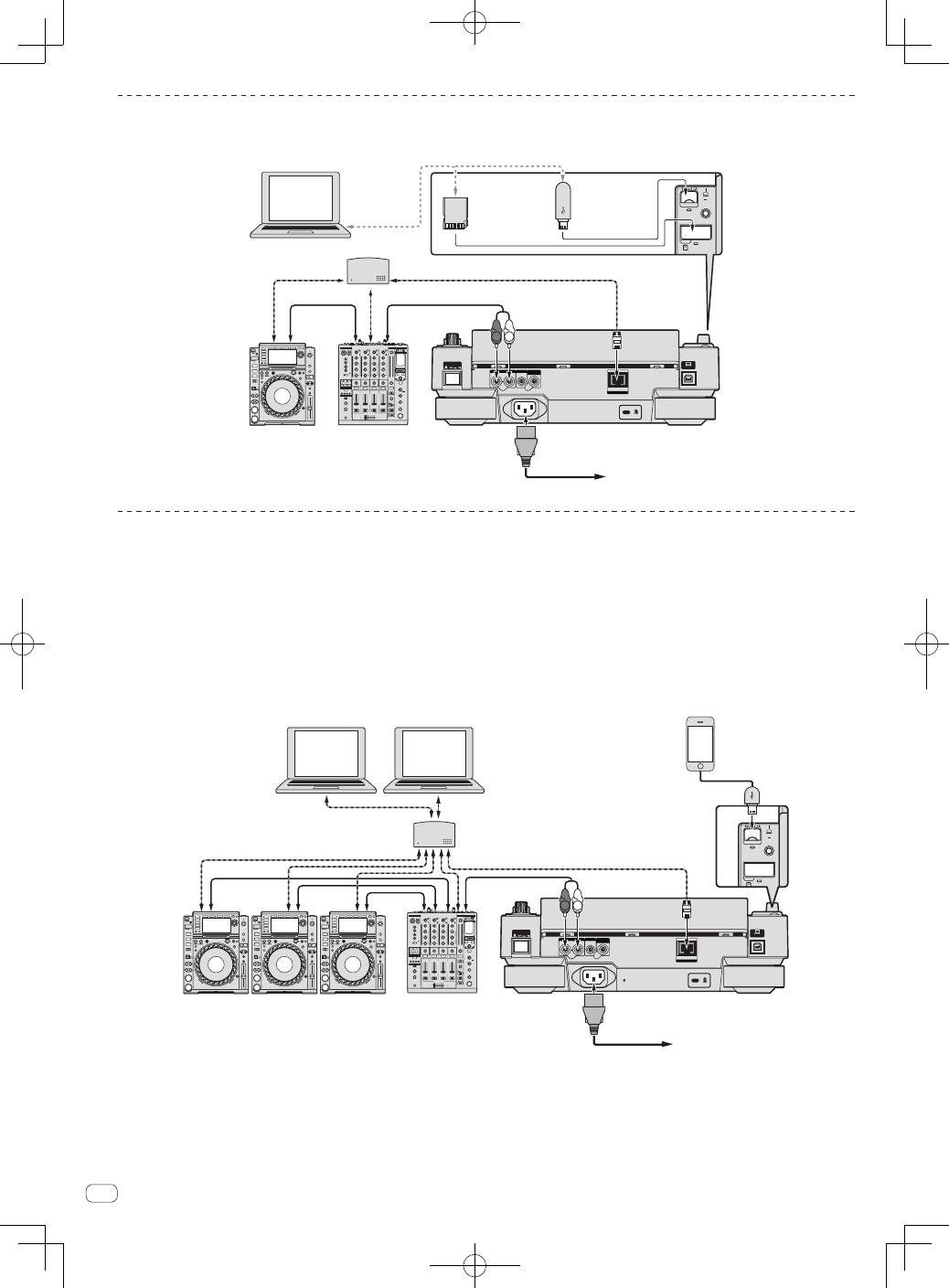
PRO DJ LINK (SD & USB Export)
!
rekordbox music files and data can be exchanged with this unit using a memory device (flash memory, hard disk, etc.), eliminating the need to take
a computer into the DJ booth. Such information as playlists, cues, loops and hot cues set in advance with rekordbox can be used for playback.
POWER
CONTROL
LINK
AUDIO OUT
R
L
CONTROL
DIGITAL
OUT
L
R
USB
STOP
LO
•I
REC / CALL
SD
HOT CUE
Q
DJ player
DJ mixer
Rear panel
LAN cable
LAN cable
LAN cable
Power cord
To an AC outlet
Audio cable
Audio
cable
rekordbox
Computer
Switching hub
USB device on
which
rekordbox data
is recorded
SD memory
card on which
rekordbox data
is recorded
PRO DJ LINK (LINK Export)
!
Tracks in rekordbox can be selected and played when the computer is taken into a DJ booth and connected to a computer on which rekordbox is
installed by LAN cable (CAT5e) or wireless LAN (Wi-Fi) router. Performances can be held using such information as playlists, cues, loops and hot
cues that have been set ahead of time with rekordbox.
!
Tracks in rekordbox can be selected and played when connected to a mobile device on which rekordbox (iOS/Android) is installed by USB cable or
wireless LAN (Wi-Fi) router. Performances can be held using such information as playlists, cues, loops and hot cues that have been set ahead of
time with rekordbox.
!
With wired LAN connections, up to two computers on which rekordbox is installed can be connected.
!
With wireless LAN (Wi-Fi) connections, up to four computers or mobile devices on which rekordbox is installed can be connected.
Using a switching hub
POWER
CONTROL
LINK
AUDIO OUT
R
L
CONTROL
DIGITAL
OUT
L
R
rekordbox
rekordbox
USB
STOP
SD
HOT CUE
QU
DJ player × 3
DJ mixer
Rear panel
LAN cable
LAN cable × 3
Switching hub
Audio cable
Audio cable
× 3
Power cord
To an AC outlet
Computer
Computer
LAN cable × 2
Mobile device on
which rekordbox
is installed
