
Pioneer X-CM56: instruction
Class: Hi-Fi equipment
Type:
Manual for Pioneer X-CM56
Table of contents
- VENTILATION CAUTION POWER-CORD CAUTION
- Information for users on collection and disposal of old equipment and used batteries
- Contents
- Chapter 1: Before you start What’s in the box Loading the batteries in the remote control
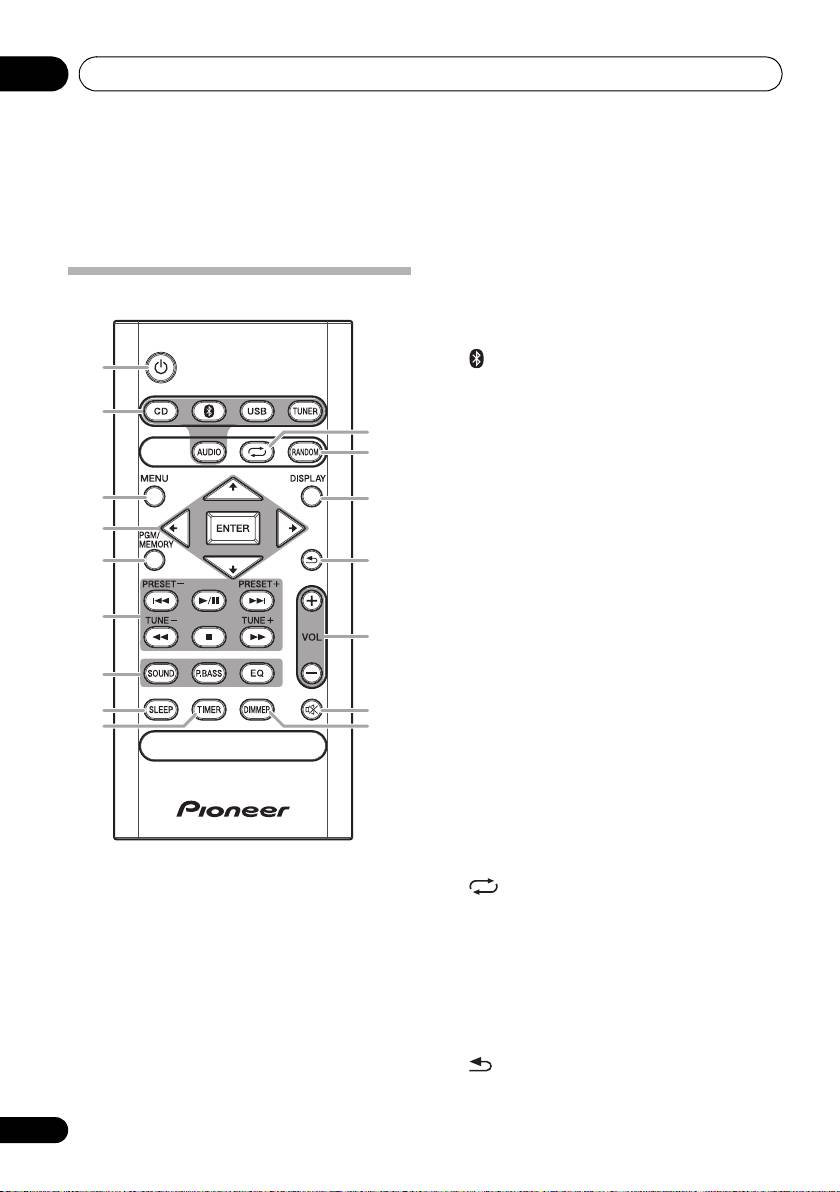
- Chapter 2: Part names and functions Remote control
- Part names and functions 02
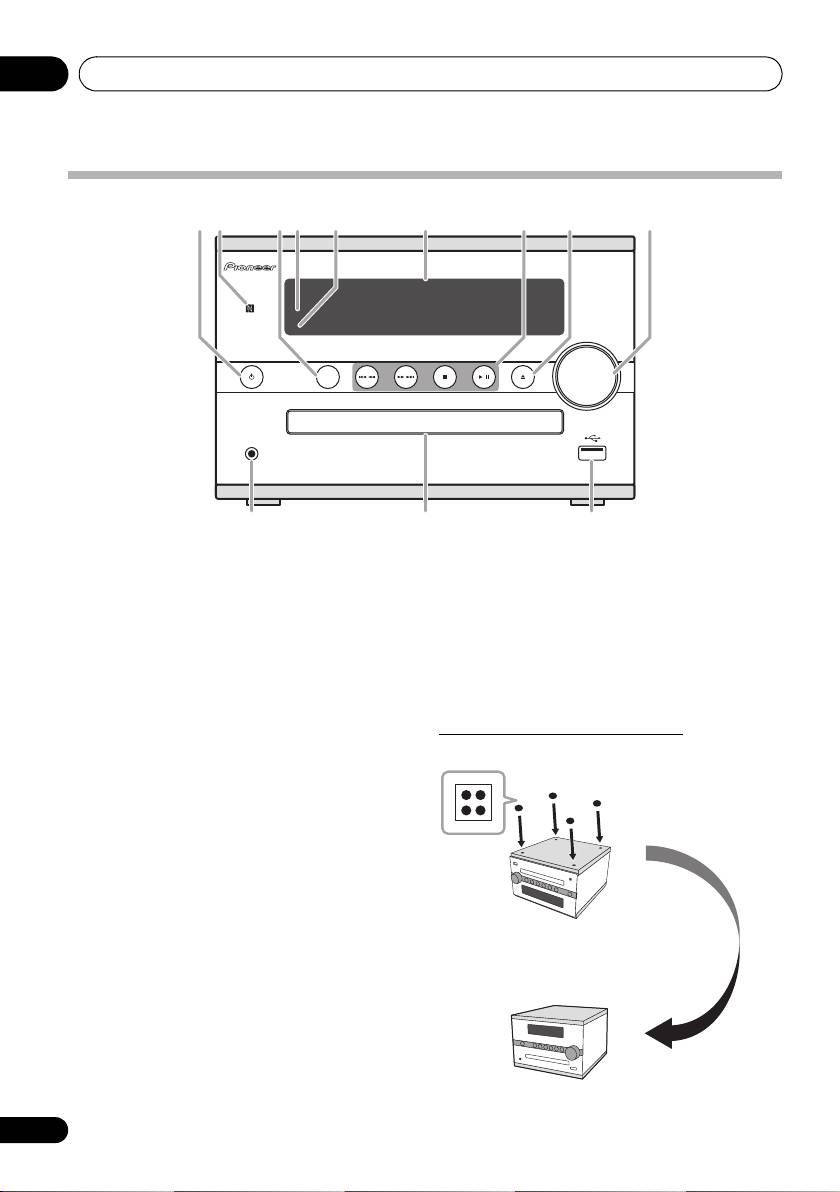
- Front panel
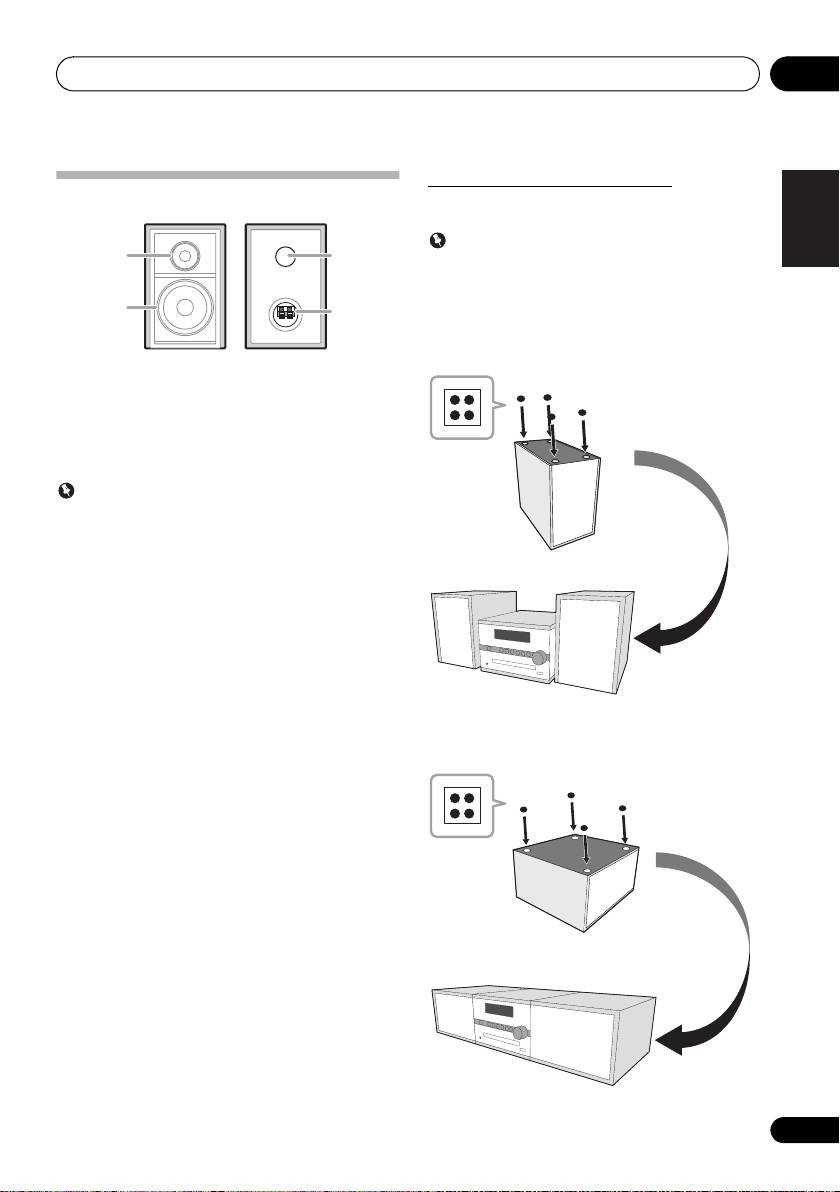
- Speaker system
- Chapter 3: Connections Speaker connection
- Connecting antennas
- Plugging in
- Chapter 4: Getting started To turn the power on General control Setting the clock
- Sound controls Setting the wake-up timer
- Using Headphones Using the sleep timer
- Chapter 5: Disc playback Playing discs or files
- Basic operations Advanced CD or MP3 disc playback
- Programmed play (CD) Switch the display contents About downloading MP3
- Chapter 6: USB playback Playing USB storage devices
- Chapter 7: Using the tuner Listening to FM (X-CM56D)/ Listening to FM or AM (X-CM56)
- Using the Radio Data System (RDS) (for European models only)
- Using the Auto Station program Memory (ASPM)
- Listening to the DAB+ (X-CM56D only)
- Changing the information display DAB Frequency table (BAND III) Memorising a station
- Chapter 8: Other connections Connecting auxiliary components
- Chapter 9: Bluetooth Audio playback Music playback using Bluetooth Remote control operation wireless technology Pairing with the unit (Initial registration)
- BT STANDBY Listen to music on the unit from a Bluetooth capable device
- Pairing and connection using NFC Radio wave caution
- Scope of operation Radio wave reflections Precautions regarding connections to products supported by this unit
- Chapter 10: Additional information Troubleshooting General problem Problem Check Remedy
- When a USB storage device is connected Problem Check Remedy
- When the Bluetooth wireless technology device is connected or operated Problem Remedy Playable discs and formats
- Cautions on use
- Handling discs Auto power off setting Restoring all the settings to the defaults
- Specifications
SN29402593_X-CM56&56D_En.book 1 ページ 2016年5月27日 金曜日 午後3時47分
X-CM56/X-CM56D
CD Receiver System
Micro chaîne CD
CD-Receiversystem
Sistema CD con amplificatore
CD Receiver System
Sistema receptor de CD
Система ресивера CD
Register your product on/ Enregistrez votre produit sur / Registre su producto en
Registrare il proprio prodotto su / Registrieren Sie hier Ihr Produkt /
Registreer uw product op / Зарегистрируйте ваше изделие
http://www.pioneer.eu
(Europe / Europe / Europa / Europa / Europa / Europa / Европа)
Operating Instructions
Mode d’emploi
Bedienungsanleitung
Istruzioni per l’uso
Handleiding
Manual de instrucciones
Инструкции по эксплуатации
SN29402593_X-CM56&56D_En.book 2 ページ 2016年5月27日 金曜日 午後3時47分
CAUTION
CAUTION
TO PREVENT THE RISK OF ELECTRIC SHOCK, DO
The STANDBY/ON switch on this unit will not
NOT REMOVE COVER (OR BACK). NO
completely shut off all power from the AC outlet.
USER-SERVICEABLE PARTS INSIDE. REFER
Since the power cord serves as the main disconnect
SERVICING TO QUALIFIED SERVICE PERSONNEL.
device for the unit, you will need to unplug it from
D3-4-2-1-1_B1_En
the AC outlet to shut down all power. Therefore,
make sure the unit has been installed so that the
WARNING
power cord can be easily unplugged from the AC
This equipment is not waterproof. To prevent a fire or
outlet in case of an accident. To avoid fire hazard,
shock hazard, do not place any container filled with
the power cord should also be unplugged from the
liquid near this equipment (such as a vase or flower
AC outlet when left unused for a long period of time
pot) or expose it to dripping, splashing, rain or
(for example, when on vacation).
moisture.
D3-4-2-2-2a*_A1_En
D3-4-2-1-3_A1_En
CAUTION
WARNING
This product is a class 1 laser product classified
To prevent a fire hazard, do not place any naked flame
under the Safety of laser products, IEC 60825-1:2007.
sources (such as a lighted candle) on the equipment.
D3-4-2-1-7a_A1_En
CLASS 1 LASER PRODUCT
VENTILATION CAUTION
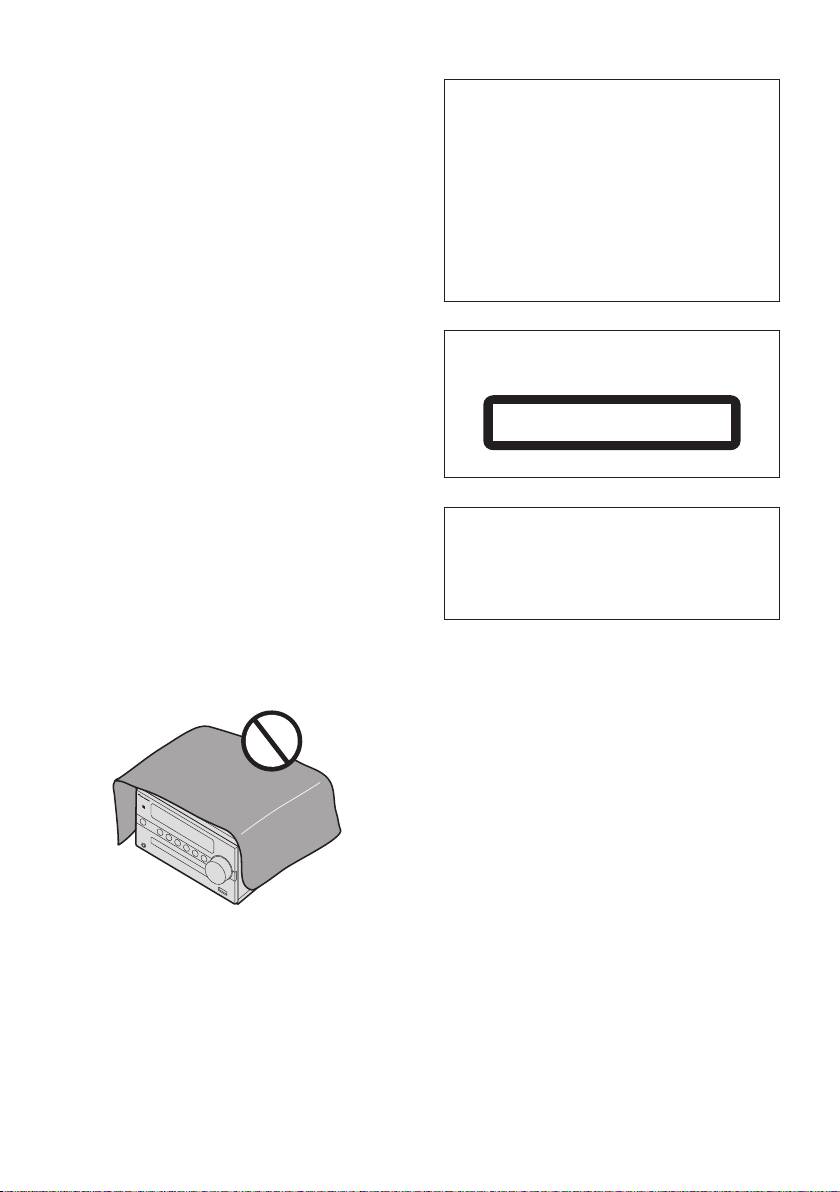
When installing this unit, make sure to leave space
D58-5-2-2a_A1_En
around the unit for ventilation to improve heat radiation
(at least 25 cm at top, 15 cm at rear, and 5 cm at each
side).
This product is for general household purposes. Any
failure due to use for other than household purposes
WARNING
(such as long-term use for business purposes in a
Slots and openings in the cabinet are provided for
restaurant or use in a car or ship) and which
ventilation to ensure reliable operation of the product,
requires repair will be charged for even during the
and to protect it from overheating. To prevent fire
warranty period.
K041_A1_En
hazard, the openings should never be blocked or
covered with items (such as newspapers, table-cloths,
curtains) or by operating the equipment on thick carpet
or a bed.
POWER-CORD CAUTION
D3-4-2-1-7b*_A1_En
Handle the power cord by the plug. Do not pull out the
plug by tugging the cord and never touch the power
cord when your hands are wet as this could cause a
short circuit or electric shock. Do not place the unit, a
piece of furniture, etc., on the power cord, or pinch the
cord. Never make a knot in the cord or tie it with other
cords. The power cords should be routed such that
they are not likely to be stepped on. A damaged power
cord can cause a fire or give you an electrical shock.
Check the power cord once in a while. When you find
it damaged, ask your nearest our authorized service
center or your dealer for a replacement.
S002*_A1_En
Operating Environment
Operating environment temperature and humidity:
+5 °C to +35 °C (+41 °F to +95 °F); less than 85 %RH
(cooling vents not blocked)
Do not install this unit in a poorly ventilated area, or in
locations exposed to high humidity or direct sunlight
(or strong artificial light)
D3-4-2-1-7c*_A1_En
SN29402593_X-CM56&56D_En.book 3 ページ 2016年5月27日 金曜日 午後3時47分
Information for users on collection and disposal of old equipment and used batteries
Symbol for
These symbols on the products, packaging, and/or accompanying documents mean
equipment
that used electrical and electronic products and batteries should not be mixed with
general household waste.
For proper treatment, recovery and recycling of old products and used batteries,
please take them to applicable collection points in accordance with your national
legislation.
By disposing of these products and batteries correctly, you will help to save valuable
Symbol examples
resources and prevent any potential negative effects on human health and the
for batteries
environment which could otherwise arise from inappropriate waste handling.
For more information about collection and recycling of old products and batteries,
please contact your local municipality, your waste disposal service or the point of sale
where you purchased the items.
These symbols are only valid in the European Union.
For countries outside the European Union:
If you wish to discard these items, please contact your local authorities or dealer and
ask for the correct method of disposal.
Pb
K058a_A1_En
Radio wave caution
WARNING
This unit uses a 2.4 GHz radio wave frequency, which
Store small parts out of the reach of children and
is a band used by other wireless systems (Microwave
infants. If accidentally swallowed, contact a doctor
ovens and Cordless phones, etc.). In this event noise
immediately.
appears in your television image, there is the
possibility this unit (including products supported by
this unit) is causing signal interference with the
antenna input connector of your television, video,
satellite tuner, etc. In this event, increase the distance
between the antenna input connector and this unit
(including products supported by this unit).
• We are not responsible for any malfunction of the
compatible product due to communication
error/malfunctions associated with your network
connection and/or your connected equipment.
Please contact your Internet service provider or
network device manufacturer.
• A separate contract with/payment to an Internet
service provider is required to use the Internet.

SN29402593_X-CM56&56D_En.book 4 ページ 2016年5月27日 金曜日 午後3時47分
Thank you for buying this Pioneer product.
Please read through these operating instructions so that you will know how to operate your model properly. After you
have finished reading the instructions, put them in a safe place for future reference.
Contents
01 Before you start
07 Using the tuner
What’s in the box . . . . . . . . . . . . . . . . . . . . . . . . . . . . . . . .5
Listening to FM (X-CM56D)/
Loading the batteries in the remote control . . . . . . . . . . . .5
Listening to FM or AM (X-CM56) . . . . . . . . . . . . . . . . . . 20
Using the remote control . . . . . . . . . . . . . . . . . . . . . . . 5
Tuning. . . . . . . . . . . . . . . . . . . . . . . . . . . . . . . . . . . . . 20
Saving station presets. . . . . . . . . . . . . . . . . . . . . . . . . 20
02 Part names and functions
Using the Radio Data System (RDS)
Remote control . . . . . . . . . . . . . . . . . . . . . . . . . . . . . . . . .6
(for European models only) . . . . . . . . . . . . . . . . . . . . 21
Front panel . . . . . . . . . . . . . . . . . . . . . . . . . . . . . . . . . . . .8
Listening to the DAB+ (X-CM56D only) . . . . . . . . . . . . . 23
Attaching the Non-skid pads . . . . . . . . . . . . . . . . . . . . 8
About DAB+ (Digital Audio Broadcasting) . . . . . . . . . 23
Speaker system . . . . . . . . . . . . . . . . . . . . . . . . . . . . . . . . .9
Tuning. . . . . . . . . . . . . . . . . . . . . . . . . . . . . . . . . . . . . 23
Attaching the Non-skid pads . . . . . . . . . . . . . . . . . . . . 9
Changing the information display . . . . . . . . . . . . . . . . 24
03 Connections
Memorising a station. . . . . . . . . . . . . . . . . . . . . . . . . . 24
Speaker connection . . . . . . . . . . . . . . . . . . . . . . . . . . . . .10
DAB Frequency table (BAND III) . . . . . . . . . . . . . . . . 24
Connecting antennas . . . . . . . . . . . . . . . . . . . . . . . . . . . .11
08 Other connections
Using external antennas . . . . . . . . . . . . . . . . . . . . . . 11
Connecting auxiliary components . . . . . . . . . . . . . . . . . . 25
Plugging in . . . . . . . . . . . . . . . . . . . . . . . . . . . . . . . . . . . .12
®
09 Bluetooth
Audio playback
04 Getting started
Music playback using Bluetooth wireless technology . . . 26
To turn the power on . . . . . . . . . . . . . . . . . . . . . . . . . . . .13
Remote control operation . . . . . . . . . . . . . . . . . . . . . . . . 26
Setting the clock . . . . . . . . . . . . . . . . . . . . . . . . . . . . . . .13
Pairing with the unit (Initial registration) . . . . . . . . . . . . . 26
General control . . . . . . . . . . . . . . . . . . . . . . . . . . . . . . . . .13
Listen to music on the unit
Input function . . . . . . . . . . . . . . . . . . . . . . . . . . . . . . . 13
from a Bluetooth capable device
. . . . . . . . . . . . . . . . . . . . 27
Display brightness control . . . . . . . . . . . . . . . . . . . . . 13
BT STANDBY . . . . . . . . . . . . . . . . . . . . . . . . . . . . . . . . . 27
Volume auto set-in . . . . . . . . . . . . . . . . . . . . . . . . . . . 13
Pairing and connection using NFC . . . . . . . . . . . . . . . . . 28
Volume control . . . . . . . . . . . . . . . . . . . . . . . . . . . . . . 13
Radio wave caution . . . . . . . . . . . . . . . . . . . . . . . . . . . . . 28
Muting . . . . . . . . . . . . . . . . . . . . . . . . . . . . . . . . . . . . 13
Scope of operation . . . . . . . . . . . . . . . . . . . . . . . . . . . 29
Sound controls . . . . . . . . . . . . . . . . . . . . . . . . . . . . . . . . .14
Radio wave reflections . . . . . . . . . . . . . . . . . . . . . . . . 29
Equalizer . . . . . . . . . . . . . . . . . . . . . . . . . . . . . . . . . . 14
Precautions regarding connections
P.BASS control . . . . . . . . . . . . . . . . . . . . . . . . . . . . . 14
to products supported by this unit
. . . . . . . . . . . . . . . . . 29
BASS/TREBLE control. . . . . . . . . . . . . . . . . . . . . . . . 14
Setting the wake-up timer . . . . . . . . . . . . . . . . . . . . . . . .14
10 Additional information
Calling the wake-up timer . . . . . . . . . . . . . . . . . . . . . 15
Troubleshooting . . . . . . . . . . . . . . . . . . . . . . . . . . . . . . . 30
Cancelling the wake-up timer. . . . . . . . . . . . . . . . . . . 15
Playable discs and formats . . . . . . . . . . . . . . . . . . . . . . . 32
Using the wake-up timer . . . . . . . . . . . . . . . . . . . . . . 15
Regarding copy protected CDs. . . . . . . . . . . . . . . . . . 33
Using the sleep timer . . . . . . . . . . . . . . . . . . . . . . . . . . . .15
Supported audio file formats . . . . . . . . . . . . . . . . . . . . 33
Using Headphones . . . . . . . . . . . . . . . . . . . . . . . . . . . . .15
Cautions on use . . . . . . . . . . . . . . . . . . . . . . . . . . . . . . . 33
When moving this unit. . . . . . . . . . . . . . . . . . . . . . . . . 33
05 Disc playback
Place of installation . . . . . . . . . . . . . . . . . . . . . . . . . . . 33
Playing discs or files . . . . . . . . . . . . . . . . . . . . . . . . . . . .16
Do not place objects on this unit . . . . . . . . . . . . . . . . . 33
Load the disc . . . . . . . . . . . . . . . . . . . . . . . . . . . . . . . 16
About condensation . . . . . . . . . . . . . . . . . . . . . . . . . . 33
Play tracks on a CD . . . . . . . . . . . . . . . . . . . . . . . . . . 16
Cleaning the product. . . . . . . . . . . . . . . . . . . . . . . . . . 34
Play MP3 music files . . . . . . . . . . . . . . . . . . . . . . . . . 16
Cleaning the lens . . . . . . . . . . . . . . . . . . . . . . . . . . . . 34
Advanced CD or MP3 disc playback . . . . . . . . . . . . . . . .17
Handling discs . . . . . . . . . . . . . . . . . . . . . . . . . . . . . . . . 34
Repeat play . . . . . . . . . . . . . . . . . . . . . . . . . . . . . . . . 17
Storing. . . . . . . . . . . . . . . . . . . . . . . . . . . . . . . . . . . . . 34
Random play . . . . . . . . . . . . . . . . . . . . . . . . . . . . . . . 17
Cleaning discs. . . . . . . . . . . . . . . . . . . . . . . . . . . . . . . 34
Programmed play (CD) . . . . . . . . . . . . . . . . . . . . . . . 18
About specially shaped discs . . . . . . . . . . . . . . . . . . . 34
About downloading MP3 . . . . . . . . . . . . . . . . . . . . . . 18
Auto power off setting . . . . . . . . . . . . . . . . . . . . . . . . . . . 34
Switch the display contents . . . . . . . . . . . . . . . . . . . . 18
Restoring all the settings to the defaults . . . . . . . . . . . . . 34
06 USB playback
Specifications . . . . . . . . . . . . . . . . . . . . . . . . . . . . . . . . . 35
Playing USB storage devices . . . . . . . . . . . . . . . . . . . . .19
Repeat play . . . . . . . . . . . . . . . . . . . . . . . . . . . . . . . . 19
Random play . . . . . . . . . . . . . . . . . . . . . . . . . . . . . . . 19
Switch the display contents . . . . . . . . . . . . . . . . . . . . 19
4
En
Before you start 01
Chapter 1:
English
Before you start
• Do not heat batteries, disassemble them, or throw them
into flames or water.
What’s in the box
Français Español
• Batteries may have different voltages, even if they are
Please confirm that the following accessories are in the box
the same size and shape. Do not use different types of
when you open it.
batteries together.
• Remote Control
• To prevent leakage of battery fluid, remove the
• AAA batteries (R03) x 2
batteries if you do not plan to use the remote control for
• Power cord
a long period of time (1 month or more). If the fluid
• Speaker wire x 2
should leak, wipe it carefully off the inside of the case,
then insert new batteries. If a battery should leak and
• AM antenna cable*1
the fluid should get on your skin, flush it off with large
• FM wire antenna*1
quantities of water.
• DAB/FM wire antenna*2
• When disposing of used batteries, please comply with
• Non-skid pads x 12
governmental regulations or environmental public
• Warranty card*3
institution’s rules that apply in your country/area.
• Operating instructions (this document)
*1 X-CM56 only
WARNING
*2 X-CM56D only
• Do not use or store batteries in direct sunlight or other
*3 European models only
excessively hot place, such as inside a car or near a
heater. This can cause batteries to leak, overheat,
explode or catch fire. It can also reduce the life or
performance of batteries.
Loading the batteries in the remote
control
Using the remote control
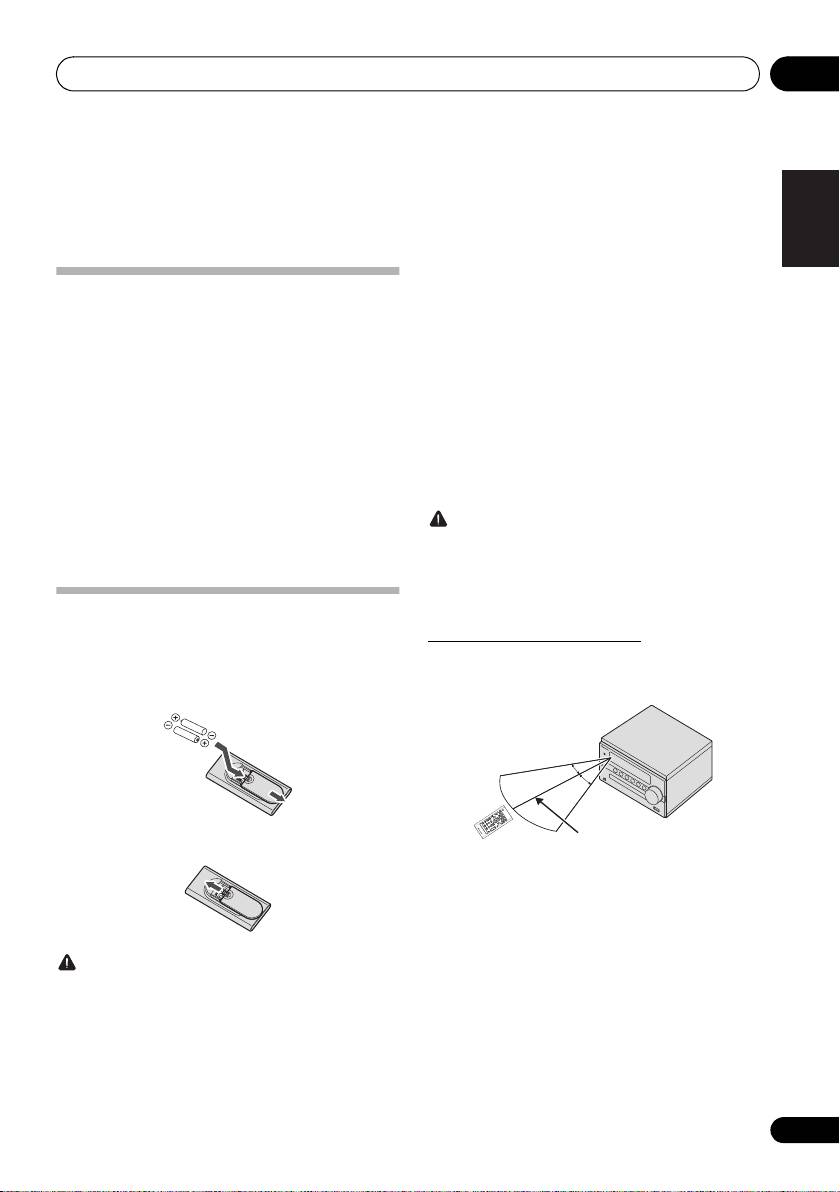
The remote has a range of about 7 m at an angle of about
1 Open the rear lid and load the batteries as
30º from the remote sensor.
illustrated below.
2 Close the rear lid.
Keep in mind the following when using the remote control:
• Make sure that there are no obstacles between the
remote and the remote sensor on the unit.
• Remote operation may become unreliable if strong
sunlight or fluorescent light is shining on the unit’s
remote sensor.
CAUTION
• Remote controllers for different devices can interfere
• Do not use any batteries other than the ones specified.
with each other. Avoid using remotes for other
Also, do not use a new battery together with an old one.
equipment located close to this unit.
• When inserting the batteries, make sure not to damage
• Replace the batteries when you notice a fall off in the
the springs on the battery’s - terminals. This can
operating range of the remote.
cause batteries to leak or over heat.
• When loading the batteries into the remote control, set
them in the proper direction, as indicated by the polarity
marks (+ and -).
5
En
30°
30°
7 m
SN29402593_X-CM56&56D_En.book 5 ページ 2016年5月27日 金曜日 午後3時47分
SN29402593_X-CM56&56D_En.book 6 ページ 2016年5月27日 金曜日 午後3時47分
Part names and functions02
Chapter 2:
Part names and functions
1 Í
Remote control
Switches the receiver between standby and on (page 13).
2 Input function buttons
Use to select the input source to this receiver (page 13).
1
Use to set up or play the audio file using the Bluetooth
network (page 26).
2
3MENU
10
Use to access the menu.
11
4
/
/
/
, ENTER
Use to select/switch system settings and modes, and to
3
confirm actions.
12
5 PGM/MEMORY
4
• Use to memory or program the CD (page 18).
• Use to store FM/AM (page 20) or DAB (page 24)
5
13
stations in memory.
6 Playback control buttons
Use to control each function after you have selected it using
6
the input function buttons (page 17).
14
TUNE +/–
Use to find radio frequencies (page 20).
7
PRESET +/–
8
15
Use to select preset radio stations (page 20).
9
16
7 Sound control buttons
Adjust the sound quality (page 14).
8SLEEP
See Using the sleep timer on page 15.
9TIMER
Use for setting the clock, as well as for setting and checking
the timers (page 13).
10
Press to change the repeat play setting from a CD (page 17)
or USB (page 19).
11 RANDOM
Press to randomize order play setting from a CD (page 17)
or USB (page 19).
12 DISPLAY
Press to change the display for MP3 (page 18), RDS
(page 21) or DAB (page 24) information.
13
Press to return to the previous display.
6
En
SN29402593_X-CM56&56D_En.book 7 ページ 2016年5月27日 金曜日 午後3時47分
Part names and functions 02
14 Volume control buttons
English
Use to set the listening volume (page 13).
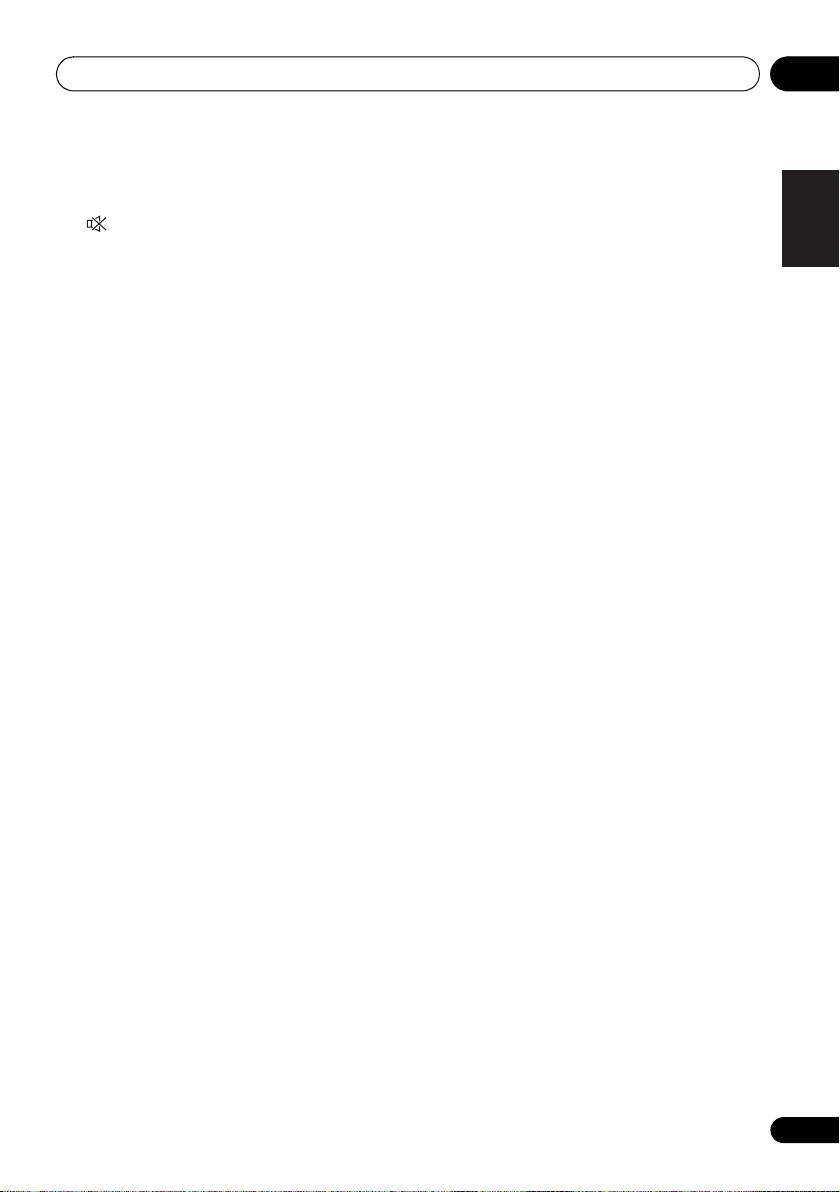
15
Mutes/unmutes the sound (page 13).
16 DIMMER
Dims or brightens the display. The brightness can be
Français Español
controlled in four steps (page 13).
7
En
Part names and functions02
Front panel
1 33 5 8 972 64
STANDBY/ON
INPUT
PHONES
10 11 12
1
Í
STANDBY/ON
10 Headphone socket
Switches the receiver between standby and on (page 13).
Use to connect headphones. When the headphones are
connected, there is no sound output from the speakers.
2 NFC area
Touching the NFC-equipped smartphone to this area, this
11 Disc tray
unit can establish Bluetooth connection simply (See
Place the disc, label side up (page 16).
Pairing and connection using NFC on page 28
).
12 USB terminal
3INPUT
Use to connect your USB mass storage device as an audio
Selects the input source.
source (page 19).
4 Remote sensor
Attaching the Non-skid pads
Receives the signals from the remote control.
Apply the accessory non-skid pads to the bottom surfaces of
5 TIMER indicator
this unit.
Lights when the receiver is power off with timer setting.
6 Main display
7 Playback control buttons
Selects the desired track or file to be played back. Use to
stop the playback. Stops playback or resumes playback from
the pause point.
8 Disc tray open/close button
Use to open or close the disc tray (page 16).
9 Volume control
Use to set the listening volume (page 13).
8
En
The bottom surface
of this unit
SN29402593_X-CM56&56D_En.book 8 ページ 2016年5月27日 金曜日 午後3時47分
Part names and functions 02
Attaching the Non-skid pads
English
Speaker system
Apply the accessory non-skid pads to the bottom surfaces of
the speakers.
Important
1
3
• Use the speaker is usually in an upright position.
• Take care not to jam your fingers when connecting the
receiver and the speaker and putting them in place.
Français Español
2
4
When placing speakers upright
When placing the speakers vertically upright, attach the non-
skid pads to the bottom surface of the speakers.
1 Tweeter
2 Woofer
3 Bass Reflex Duct
4 Speaker Terminals
Important
• Speaker grille cannot be removed.
• Both speakers can be used on either the right or the left
side.
When placing speakers horizontally
When placing the speaker horizontally, attach the non-skid
pads to what will be the bottom surface of the speakers.
9
En
The bottom surface
of the speaker
The bottom surface
of the speaker
when using it
horizontally
SN29402593_X-CM56&56D_En.book 9 ページ 2016年5月27日 金曜日 午後3時47分
Connections03
Chapter 3:
Connections
CAUTION
CAUTION
• Be sure to turn off the power and unplug the power cord
• These speaker terminals carry HAZARDOUS LIVE
from the power outlet whenever making or changing
voltage. To prevent the risk of electric shock when
connections.
connecting or disconnecting the speaker cables,
• Connect the power cord after all the connections
disconnect the power cord before touching any
between devices have been completed.
uninsulated parts.
• Do not connect any speakers other than those supplied
to this system.
• Do not connect the supplied speakers to any amplifier
Speaker connection
other than the one supplied with this system.
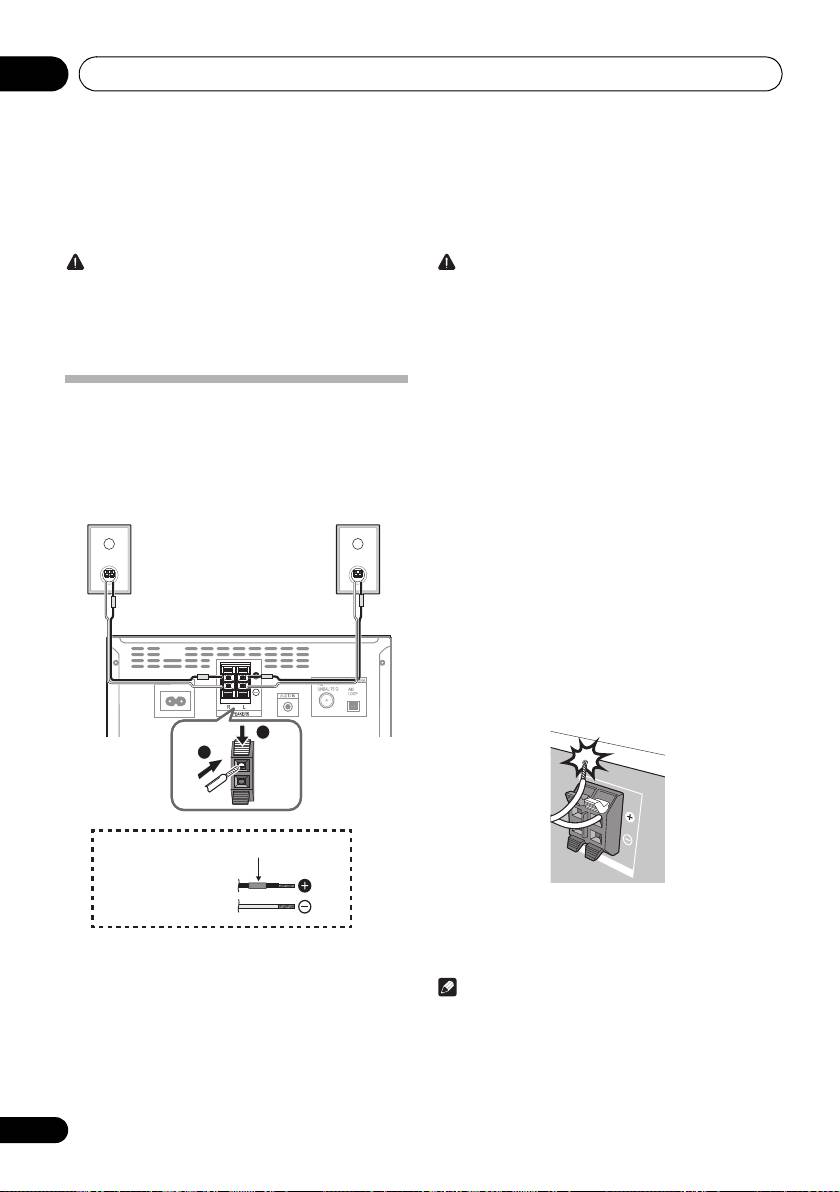
• Push open the tabs and insert exposed wire.
Connection to any other amplifier may result in
• The provided speaker wire with red tube is for the (+)
malfunction or fire.
terminal. Connect the wire with red tube the (+)
• Do not attach these speakers to the wall or ceiling. They
terminal, and other wire to the (–) terminal.
may fall off and cause injury.
• Both speakers can be used on either the right or the left
• Do not install your speakers overhead on the ceiling or
side.
wall. The grill is designed to be detachable, and as such
it may fall and cause damage or personal injury if
installed overhead.
• These speakers are magnetically shielded. However,
depending on the installation location, color distortion
may occur if the speaker system is installed extremely
close to the screen of a television set. If this happens,
turn off the television set, and then turn it on after 15 to
30 minutes. If the problem persists, move the speaker
system away from the television set.
• Make sure that the speaker cable cores do not become
exposed and make contact with other cable cores. This
may cause malfunction of the product.
• Do not allow the speaker cable core to come into
contact with the receiver body.
• If the speaker cable core comes into contact with any
metal portion of the receiver’s body, it may damage the
speakers and cause smoke and fire.
Insert speaker cables securely into the terminals and
check that the cable does not come out of easily.
Note
• There is no difference between L and R speakers.
10
En
1
2
Right
Left
speaker
speaker
This unit’s rear panel
Red tube
Supplied
speaker wire
SN29402593_X-CM56&56D_En.book 10 ページ 2016年5月27日 金曜日 午後3時47分
Connections 03
Using external antennas
English
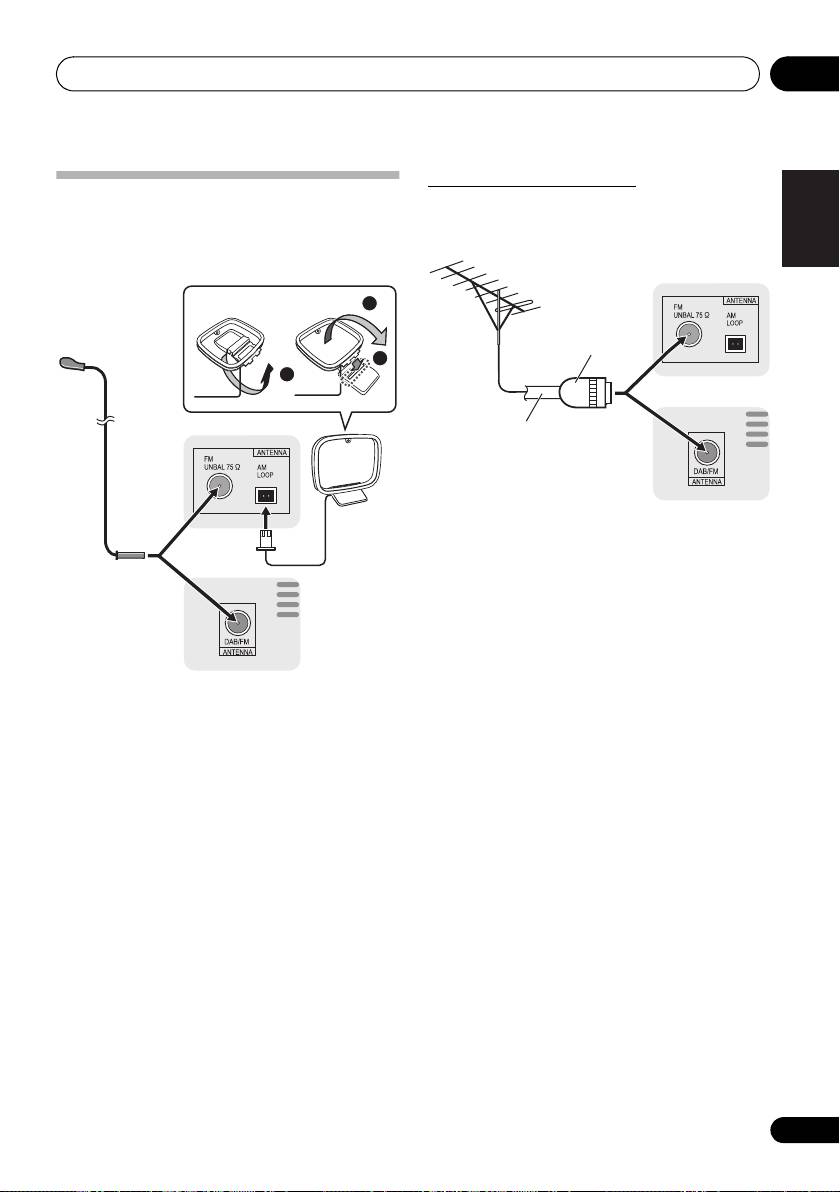
Connecting antennas
To improve FM reception
• Connect the AM loop antenna and the FM (DAB/FM)
Use a PAL connector (not supplied) to connect an external
wire antenna as shown below.
FM (DAB/FM) antenna.
• To improve reception and sound quality, connect
external antennas (see Using external antennas).
Français Español
1 Connect the AM antenna wires.
Holding the connector to connect.
2 Fix the AM loop antenna to the attached
stand.
Set up as illustrated above.
3 Place the AM antenna on a flat surface and
in a direction giving the best reception.
• Place the antenna near a window, etc. for the best
reception.
• Do not place the antenna near a computer or TV. It may
result in noise.
4 Connect the FM (DAB/FM) wire antenna into
the FM antenna socket.
For best results, extend the FM (DAB/FM) antenna fully and
fix to a wall or door frame. Don’t drape loosely or leave coiled
up.
11
En
2
3
1
X-CM56
2
3
4
1
X-CM56D
X-CM56
X-CM56D
One-touch PAL
connector
75 Ω coaxial
cable
SN29402593_X-CM56&56D_En.book 11 ページ 2016年5月27日 金曜日 午後3時47分
Connections03
Plugging in
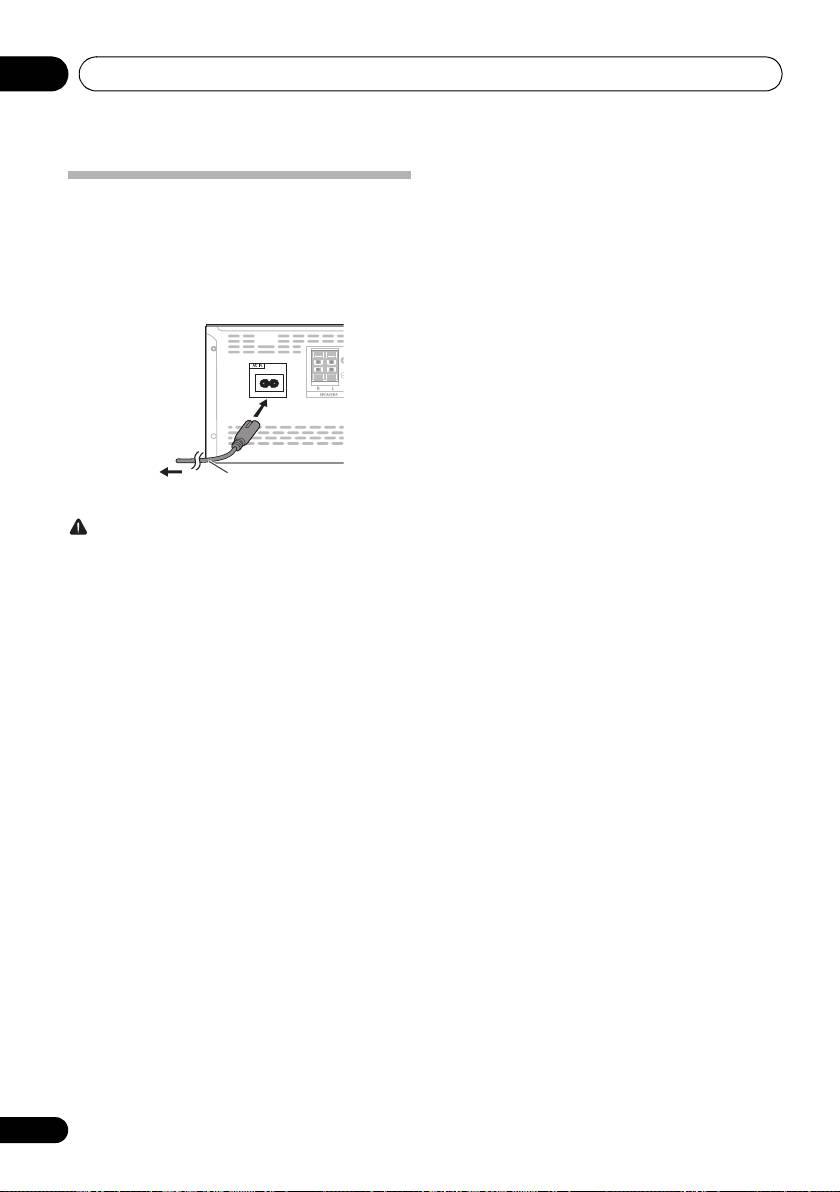
Before making or changing the connections, switch off the
power and disconnect the power cord from the AC outlet.
After you’ve finished making all connections, plug the unit
into an AC outlet.
CAUTION
• Do not use any power cord other than the one supplied
with this unit.
• Do not use the supplied power cord for any purpose
other than that described above.
12
En
This unit’s rear panel
Power cord
To AC outlet
SN29402593_X-CM56&56D_En.book 12 ページ 2016年5月27日 金曜日 午後3時47分
Getting started 04
Chapter 4:
English
Getting started
To turn the power on
General control
Français Español
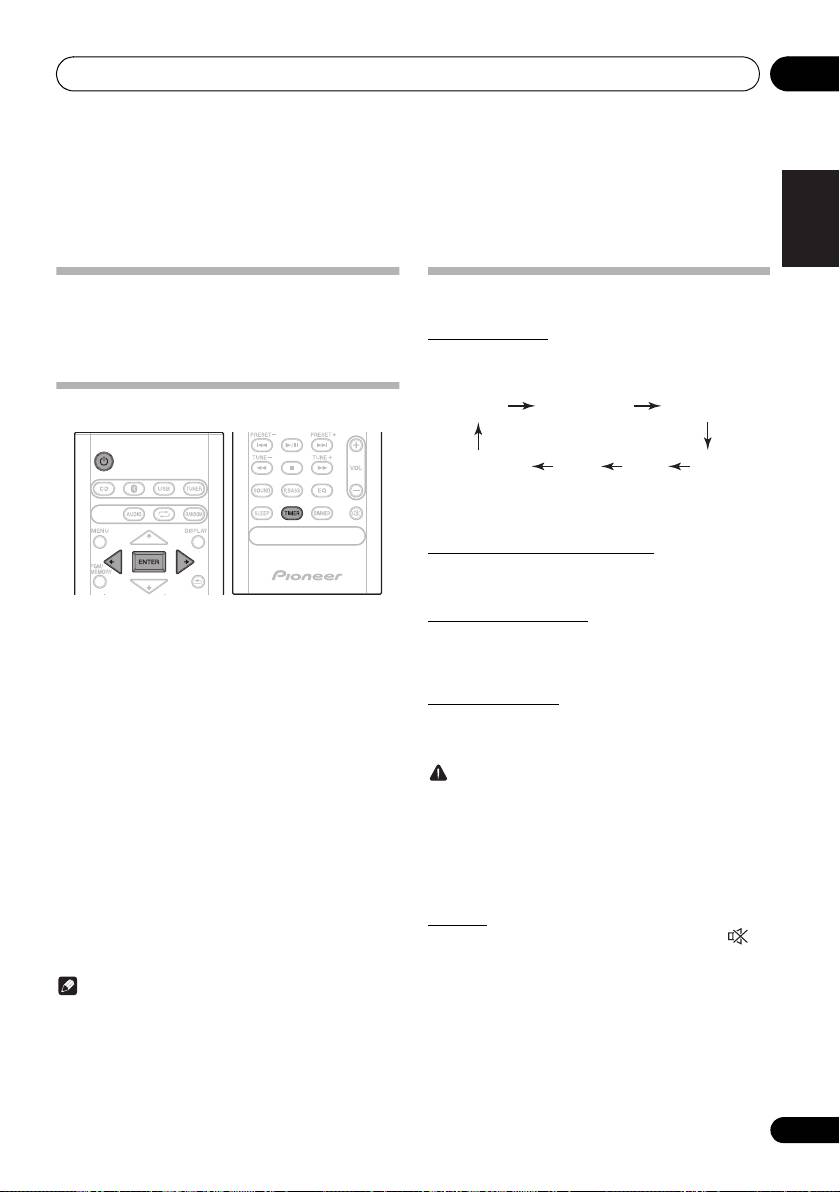
Press the Í to turn the power on.
After use:
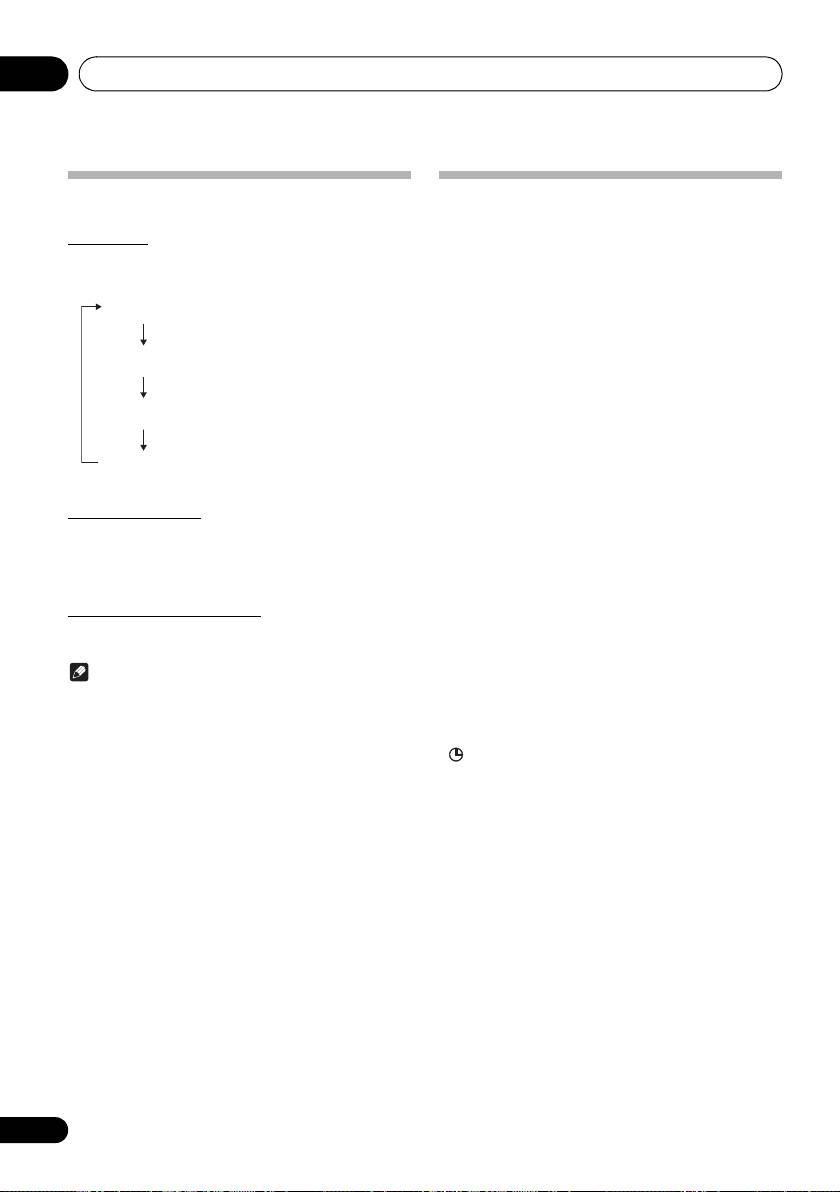
Input function
Press the Í to enter the power stand-by mode.
When the INPUT on main unit is pressed, the current
function will change to different mode. Press the INPUT
repeatedly to select desired function.
Setting the clock
*1 X-CM56D only
*2 X-CM56 only
Display brightness control
Press DIMMER to dims the display brightness. The
brightness can be controlled in four steps.
Volume auto set-in
1 Press
Í
to turn the power on.
If you turn off and on the main unit with the volume set to 31
or higher, the volume starts at 30 and sets in to the last set
2 Press TIMER on the remote control.
level.
“CLOCK” is shown on the main display.
3 Press ENTER.
Volume control
Turn the volume knob towards VOLUME (on main unit) or
4 Press
/
to set the day, then press
press VOL +/– (on remote control) to increase or decrease
ENTER.
the volume.
5 Press
/
to set the hour, then press
CAUTION
ENTER.
• The sound level at a given volume setting depends on
speaker efficiency, location, and various other factors.
6 Press
/
to set the minute, then press
It is advisable to avoid exposure to high volume levels.
ENTER to confirm.
Do not turn the volume on to full at switch on. Listen to
music at moderate levels. Excessive sound pressure
7 Press ENTER.
from earphones and headphones can cause hearing
To confirm the time display:
loss.
Press the TIMER. The time display will appear for about 10
seconds.
Muting
To readjust the clock:
The volume is muted temporarily when pressing the on
the remote control. Press again to restore the volume.
Perform “Setting the clock” from step 1.
Note
• When power supply is restored after unit is plugged in
again or after a power failure, reset the clock.
13
En
1
CD
Bluetooth DAB
*
2
AMAudio In
*
FMUSB
SN29402593_X-CM56&56D_En.book 13 ページ 2016年5月27日 金曜日 午後3時47分
Getting started04
Sound controls
Setting the wake-up timer
Used to change the existing timer setting, or to set a new
timer.
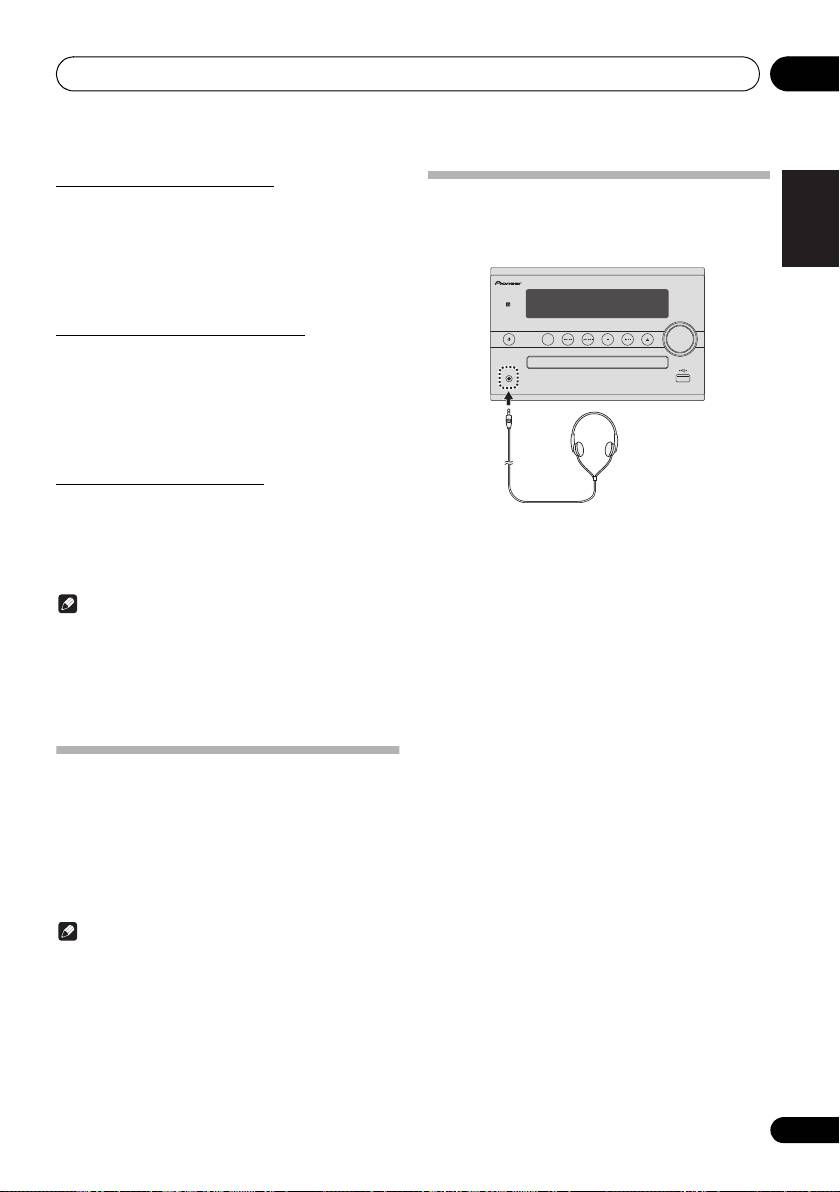
Equalizer
When the EQ is pressed, the current mode setting will be
1 Press
Í
to turn the power on.
displayed. To change to a different mode, press the EQ
repeatedly until the desired sound mode appears.
2 Press and hold TIMER on the remote
FLAT A flat and basic sound
control.
3 Press
/
to select “ONCE” or “DAILY”,
A powerful sound that
then press ENTER.
ACTIVE
emphasizes low and high tones
ONCE – Once timer play works for one time only at a
preset time.
DAILY – Daily timer play works at the same preset time
A sound that allows the radio o
DIALOGUE
and days of week.
4 Press
/
to select “TIMER SET”, then
A sound that can be enjoyed
press ENTER.
NIGHT
at night even with lower volume
5 Press
/
to select the timer playback
P.BASS control
source, then press ENTER.
CD, DAB (X-CM56D only), FM, AM (X-CM56 only), and USB
When the power is first turned on, the unit will enter the
can be selected as the playback source.
P.bass mode which emphasises the bass frequencies. To
cancel the P.bass mode, press the P.BASS on the remote
6 Press
/
to select the timer day, then
control.
press ENTER.
BASS/TREBLE control
7 Press
/
to set the hour, then press
Press the SOUND to select “BASS” or “TREBLE”, then
ENTER.
press
/
to adjust the bass or treble.
8 Press
/
to set the minute, then press
Note
ENTER.
• The EQ and P.BASS cannot operate simultaneously.
Set the time to finish as in steps 7 and 8 above.
The most recently selected of these two functions will
9 Adjust the volume press VOL +/– , then
be the one used.
• SOUND can operate alongside either the EQ or
press ENTER.
P.BASS.
“ ” appears on the display.
When one of the above two functions is selected,
10 Press
Í
to enter the power standby mode.
the function that is not selected will be displayed
The TIMER indicator lights up.
as follows.
1 When P.BASS setting (ON/OFF) is changed
• EQ : FLAT
2 When EQ setting is changed
• P.BASS : OFF
14
En
r
SN29402593_X-CM56&56D_En.book 14 ページ 2016年5月27日 金曜日 午後3時47分
vocals to be heard more easily
Getting started 04
Calling the wake-up timer
English
It can be used to re-use an existing timer setting.
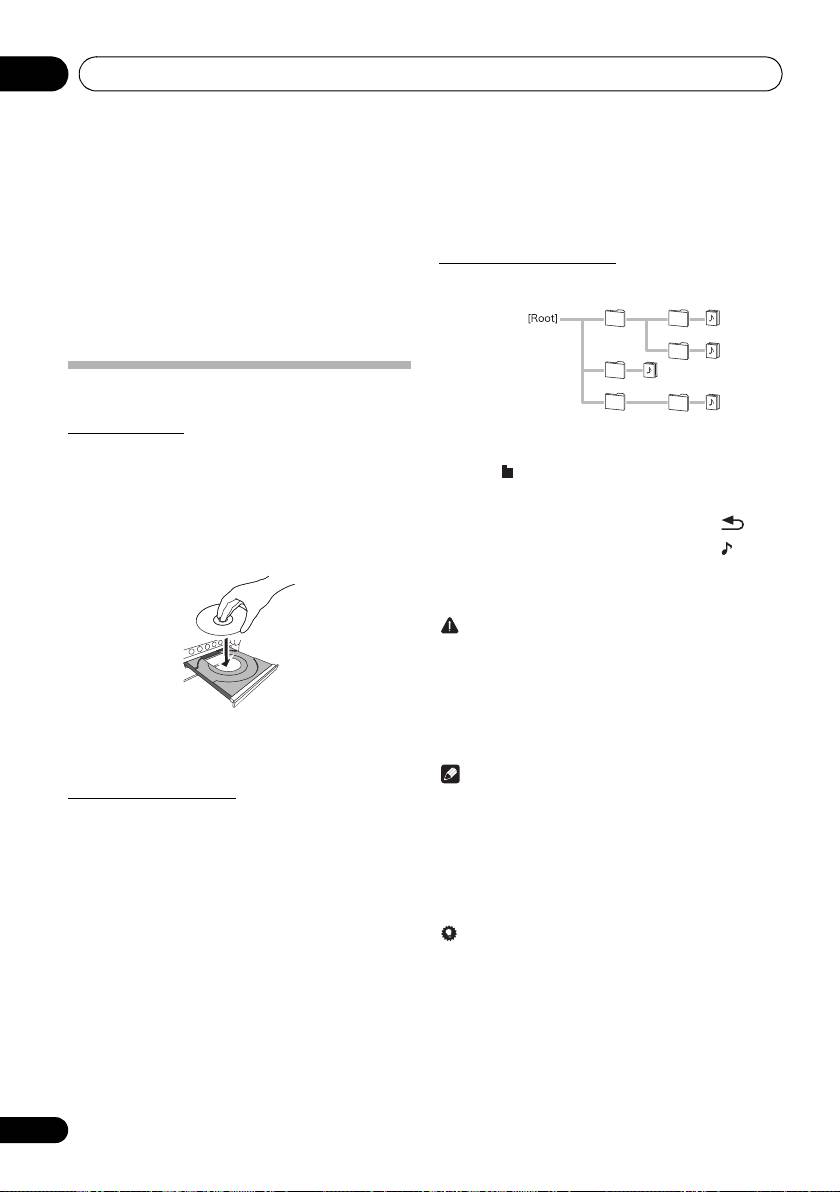
Using Headphones
Connect to the jack plug of the headphones.
1 As well as steps 1 through 3 in “Setting the
When the headphones are connected, there is no sound
wake-up timer”.
output from the speakers.
2 Press
/
to select “TIMER ON”, then
press ENTER.
Français Español
Cancelling the wake-up timer
It can be used to turn off the timer setting.
1 As well as steps 1 through 3 in “Setting the
wake-up timer”.
2 Press
/
to select “TIMER OFF”, then
press ENTER.
Using the wake-up timer
1 Press
Í
to turn the power off.
• Do not turn the volume on to full at switch on and listen
2 At the wake-up time, this unit will turn on
to music at moderate levels. Excessive sound pressure
from earphones and headphones can cause hearing
automatically and play the selected input
loss.
function.
• Before plugging in or unplugging the headphone,
reduce the volume.
Note
• Be sure your headphone has a 3.5 mm diameter plug
• If at the wake-up time the USB storage device is not
and impedance between 16
Ω
and 50
Ω
. The
connected to this unit or a disc is not inserted, this unit
recommended impedance is 32
Ω
.
will be turned to on and not play back the track.
• Some discs may not be played automatically at the
wake-up time.
• If you set the timer, take one minute or more between
the start and end time.
Using the sleep timer
The sleep timer switches off the unit after a specified time so
you can fall asleep without worrying about it.
1 Press SLEEP repeatedly to select a switch
off time.
Choose between 10 min, 20 min, 30 min, 60 min, 90 min, 120
min, 150 min, 180 min or OFF. The newly set value displays
for 3 seconds, and then the setting is completed.
Note
• The sleep timer can be set by pressing SLEEP while
the remaining time is displayed.
15
En
STANDBY/ON
INPUT
PHONES
SN29402593_X-CM56&56D_En.book 15 ページ 2016年5月27日 金曜日 午後3時47分
Disc playback05
Chapter 5:
Disc playback
This system can play back a standard CD, CD-R/RW in the
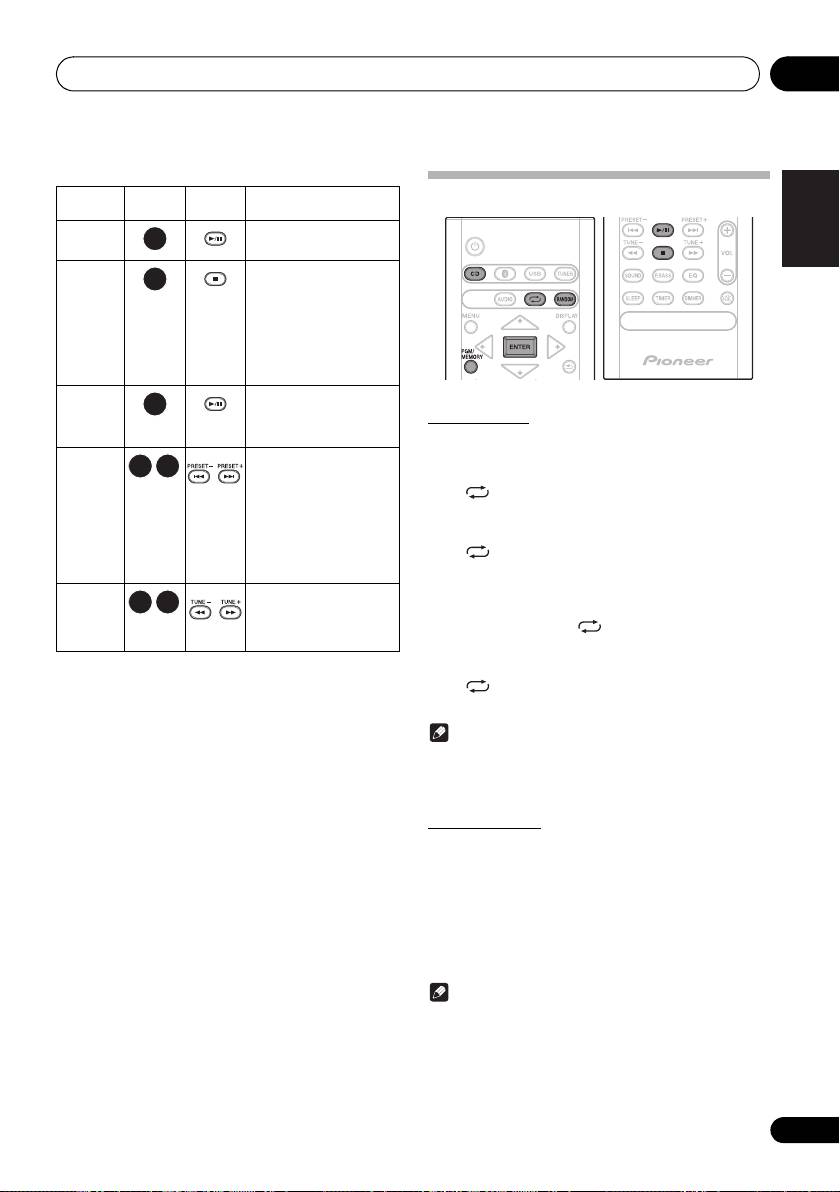
Play MP3 music files
CD format and CD-R/RW with MP3 files, but cannot record
MP3 track data is called “music file” and the location they are
on them. Some audio CD-R and CD-RW discs may not be
stored is called a “folder” in this document.
playable due to the state of the disc or the device that was
used for recording.
• For details about MP3, see page 33.
Playing discs or files
Load the disc
1 When the recognition is completed, press
/
to select the folder where the music file is
1 Press
Í
to turn the power on.
stored ([ ]), then press
or ENTER.
2 Press CD on the remote control or INPUT
• Repeat this step if there are other folders inside the
repeatedly on the main unit to select CD input.
selected folder.
• To return to the previous folder, press
or .
3 Press
<
on the main unit to open the disc tray.
2 Press
/
to select the music file ([ ]), and
4 Place the disc on the disc tray, label side up.
then press
1;
or ENTER.
• Once play starts, only music files inside the same folder
can be played continuously.
CAUTION
• Do not place two discs in one disc tray.
• Do not play discs of special shapes (heart, octagon,
etc). It may cause malfunctions.
• Do not push the disc tray whilst it is moving.
• If the power fails whilst the tray is open, wait until the
power is restored.
5 Press
<
on the main unit to close the disc
• Be sure to place 8 cm disc in the middle of the disc tray.
tray.
Note
Play tracks on a CD
• Due to the structure of the disc information, it takes
longer to read an MP3 disc than a normal CD
1 When the recognition is completed, press
(approximately 20 to 90 seconds).
1;
.
• When the beginning of the first track is reached during
After the last track is played, the unit will stop automatically.
fast reverse, the unit will enter the playback mode (only
for CD).
• If TV or radio interference occurs during CD operation,
move the unit away from the TV or radio.
Tip
• When no operation has done in CD mode and the audio
file is not played for more than 20 minutes, the power
will automatically turn off. In this case it is required that
the Auto power off is switched to ON.
• Auto power off can be switched to ON/OFF (page 34).
16
En
e.g.,
SN29402593_X-CM56&56D_En.book 16 ページ 2016年5月27日 金曜日 午後3時47分
Disc playback 05
Basic operations
English
Function Main unit Remote
Operation
Advanced CD or MP3 disc playback
control
Play
Press in the stop mode.
Stop
Press in the playback mode.
(when playing a CD)
Français Español
“RESUME” is displayed
and the place where you
stopped play is
memorized. Press again
and the memorized
position is cleared.
Pause
Press in the playback mode.
Press
1;
to resume
Repeat play
playback from the paused
point.
Repeat play can play one track, all tracks or a programmed
sequence continuously.
Track up/
Press in the playback or
down
stop mode.
To repeat one track:
If you press the button in the
Press repeatedly until “REPEAT ONE” appears. Press
stop mode, press
1;
to
start the desired track.
ENTER.
(when playing MP3)
To repeat all tracks:
You can only skip forward
Press repeatedly until “REPEAT ALL” appears. Press
or back to music files
inside the same folder.
ENTER.
Fast
Press and hold down in the
To repeat desired tracks:
forward/
playback mode.
Perform steps 1 - 5 in “Programmed play (CD)” section
reverse
Release the button to
(page 18) and then press repeatedly until “REPEAT
resume playback.
ALL” appears. Press ENTER.
To cancel repeat play:
Press repeatedly until “REPEAT OFF” appears. Press
ENTER.
Note
• After performing repeat play, be sure to press ∫.
Otherwise, the disc will play continuously.
• During repeat play, random play is not possible.
Random play
The tracks on the disc can be played in random order
automatically.
To random play all tracks:
Press RANDOM repeatedly until “RANDOM ON” appears.
Press ENTER.
To cancel random play:
Press RANDOM repeatedly until “RANDOM OFF” appears.
Press ENTER.
Note
• If you press the 9 during random play, you can move
to the track selected next by the random operation.
• In random play, the unit will select and play tracks
automatically. (You cannot select the order of the
tracks.)
• During random play, repeat play is not possible.
17
En
SN29402593_X-CM56&56D_En.book 17 ページ 2016年5月27日 金曜日 午後3時47分
Disc playback05
Programmed play (CD)
Switch the display contents
You can choose up to 24 selections for playback in the order
you like.
1 Press DISPLAY during playback.
If the title, artist and album name has been written to the file,
1 Whilst in the stop mode, press PGM/
that information will be displayed. (You can view this unit is
MEMORY on the remote control to enter the
only alphanumeric characters. Non- alphanumeric character
are displayed in the “∫”.)
programming save mode.
2 Press
:
9
to select the desired tracks.
3 Press ENTER to save track number.
4 Repeat steps 2 - 3 for other tracks. Up to 24
tracks can be programmed.
• If you want to check the programmed tracks, press
PGM/MEMORY.
• If you make a mistake, the last programmed tracks will
be canceled by pressing .
5 Press
1;
to start playback.
To cancel the programmed play mode:
Note
To cancel the programmed play, press twice ∫ on the
• “Not supported playback file” can not be playback. In
remote control. The display will show “PRG CLEAR” and all
this case, will be skipped automatically.
the programmed contents will be cleared.
• There may be cases where no information can be
Adding tracks to the program:
displayed.
Press the PGM/MEMORY. Then follow steps 2 - 3 to add
• Displaying title, artist, and albums is only supported with
tracks.
ID3 Version 1 (1.0 or 1.1).
Note
• When a disc is ejected, the program is automatically
cancelled.
• If you press the Í to enter the standby mode or change
the function from CD to another, the programmed
selections will be cleared.
• During the program operation, random play is not
possible.
About downloading MP3
There are many music sites on the internet that you can
download MP3 music files. Follow the instructions from the
website on how to download the music files. You can then
play back these downloaded music files by burning them to
a CD-R/RW disc.
• Your downloaded song/files are for personal use only.
Any other usage of the song without owner’s
permission, is against the law.
18
En
Number of the track, title
Title display
display
Number of the track in a
Artist display
folder, remaining time
display
Number of the track in
Album display
a folder, playback time
display
SN29402593_X-CM56&56D_En.book 18 ページ 2016年5月27日 金曜日 午後3時47分
USB playback 06
Chapter 6:
English
USB playback
Note
Français Español
Playing USB storage devices
• This unit may not recognize a USB storage device, play files
It is possible to listen to two-channel audio using the USB
or supply power to a USB storage device. For details, see
interface with MP3 files on the front of this receiver.
When a USB storage device is connected
on page 31.
• When a USB storage device is not playing and the unit has
• Pioneer does not guarantee that any file recorded on a
not been operated for 20 minutes or more, the power will
USB storage device will play or that power will be supplied
automatically turn off. In this case it is required that the
to a USB storage device. Also note that Pioneer will accept
Auto power off is switched to
ON
(page 34).
no responsibility whatsoever for loss of files on USB
storage devices caused by connection to this unit.
• For details about MP3, see page 33.
Repeat play
Repeat play can play one track, all tracks or a programmed
1 Press USB as the input source.
sequence continuously.
“USB” is shown on the main display.
To repeat one track:
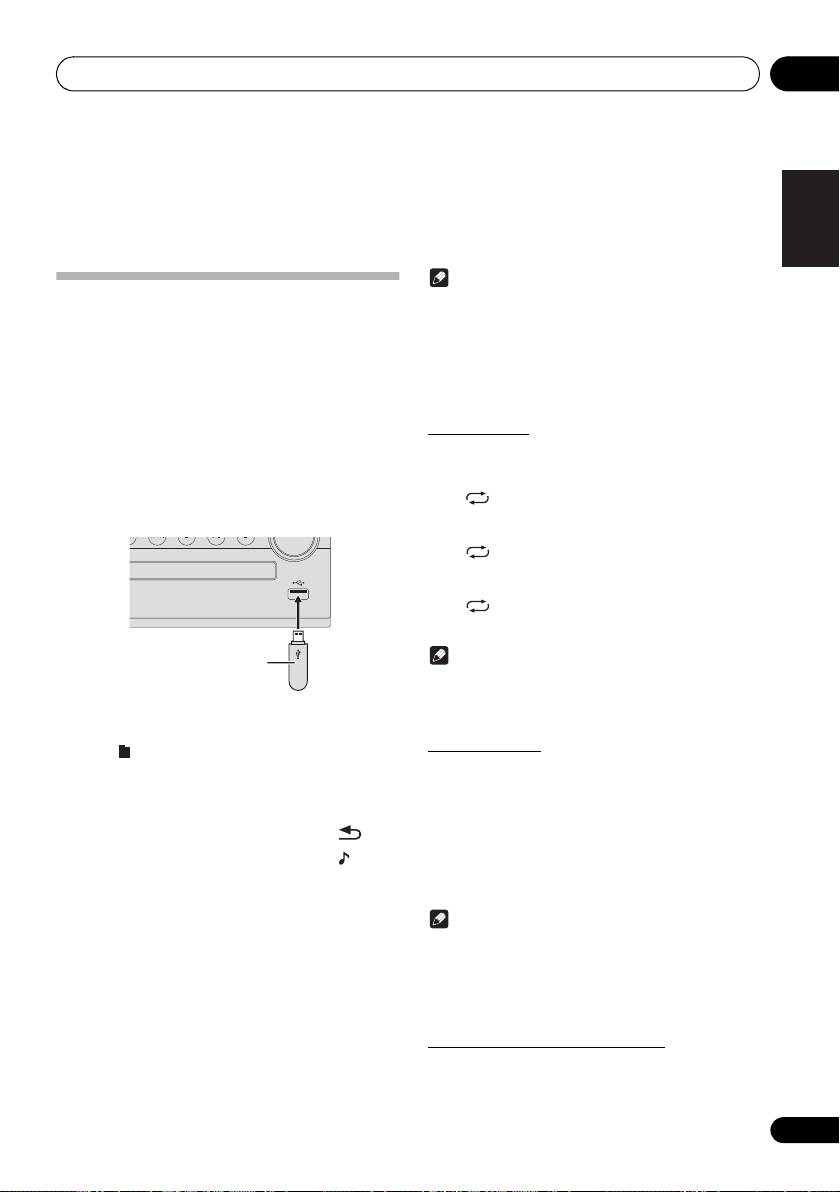
2 Connect the USB storage device.
Press repeatedly until “REPEAT ONE” appears. Press
• This receiver does not support a USB hub.
ENTER.
To repeat all tracks:
Press repeatedly until “REPEAT ALL” appears. Press
ENTER.
To cancel repeat play:
Press repeatedly until “REPEAT OFF” appears. Press
ENTER.
Note
• After performing repeat play, be sure to press
∫
. Otherwise,
the file of USB storage device will play continuously.
• During repeat play, random play is not possible.
3 When the recognition is completed, press
/
to select the folder where the music file is
Random play
stored ([ ]), then press
or ENTER.
The file of USB storage device can be played in random
• MP3 track data is called “music file” and the location
order automatically.
they are stored is called a “folder” in this document.
• Repeat this step if there are other folders inside the
To random play all tracks:
selected folder.
Press RANDOM repeatedly until “RANDOM ON” appears.
• To return to the previous folder, press
or .
Press ENTER.
To cancel random play:
4 Press
/
to select the music file ([ ]), and
Press RANDOM repeatedly until “RANDOM OFF” appears.
then press
1;
or ENTER.
Press ENTER.
• Once play starts, only music files inside the same folder
can be played continuously.
Note
• For details about the basic operations, see page 17.
• When changing to a different input source, stop the
• If you press the 9 during random play, you can move
USB memory playback first, before changing.
to the track selected next by the random operation.
• Turn the power off before removing the USB storage device.
• In random play, the unit will select and play tracks
automatically. (You cannot select the order of the tracks.)
• During random play, repeat play is not possible.
Switch the display contents
This unit can switch the information recorded in the USB
storage device. For details, see Switch the display contents
on page 18.
19
En
USB storage device
(commercially available)
SN29402593_X-CM56&56D_En.book 19 ページ 2016年5月27日 金曜日 午後3時47分
07_tuner.fm 20 ページ 2016年6月3日 金曜日 午後12時56分
Using the tuner07
Chapter 7:
Using the tuner
To receive an FM stereo transmission:
Listening to FM (X-CM56D)/
1 Press TUNER until “FM” appears on the display.
2 Press MENU and then press y/z until “FM STEREO/
Listening to FM or AM (X-CM56)
MONO” appears on the display.
The following steps show you how to tune in to FM and AM
3 Press ENTER and then press y/z until “AUTO”
radio broadcasts using the automatic (search) and manual
appears on the display.
(step) tuning functions. Once you are tuned to a station you
can memorize the frequency for recall later. See Saving
Improving poor FM reception:
station presets below for more on how to do this.
After performing the above steps 1 - 2, press ENTER and
then press y/z until “MONO” appears on the display.
This will change the tuner from stereo to mono and usually
improve the reception.
Saving station presets
If you often listen to a particular radio station, it’s convenient
to have the receiver store the frequency for easy recall
whenever you want to listen to that station (Preset tuning).
This saves the effort of manually tuning in each time. This
unit can memorize up to 45 stations.
(FM 30 stations/AM 15 stations)
Tuning
1 Press the
Í
to turn the power on.
2 Press TUNER repeatedly to select desired
frequency band (FM or AM).
• (X-CM56D) You can select “FM” and “DAB”.
For details about “DAB”, see page 23.
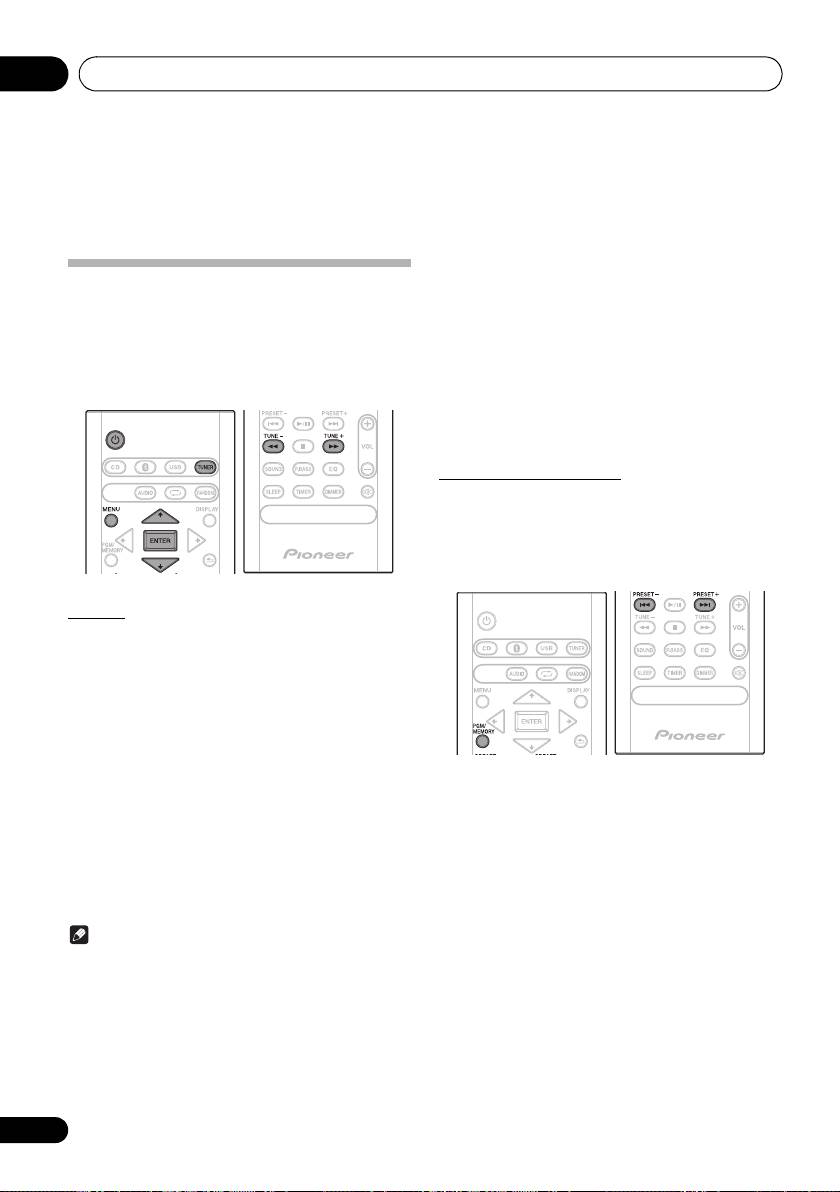
3 Press TUNE +/– on the remote control to
tune in to the desired station.
1 Tune to a station you want to memorize.
Automatic tuning:
See Tuning above for more on this.
Press and hold TUNE +/–, scanning will start automatically
and the tuner will stop at the first receivable broadcast
2 Press PGM/MEMORY.
station.
The preset number will flash.
Manual tuning:
3 Press PRESET +/– to select the preset
Press the TUNE +/– repeatedly to tune in to the desired
channel number.
station.
4 Press PGM/MEMORY to store that station
Note
in memory.
If the preset number has changed from flashing to lighting,
• When radio interference occurs, automatic tuning may
before the station is memorised, repeat the operation from
stop automatically at that point.
step 2.
• Automatic tuning will skip weak signal stations.
• Repeat steps 1 - 4 to set other stations, or to change a
• To stop the automatic tuning, press ∫.
preset station. When a new station is stored in the
• When an RDS (Radio Data System) station is tuned in,
memory, the station previously memorised for that
the frequency will be displayed first. Finally, the station
preset channel number will be erased.
name will appear.
• Full auto tuning can be achieved for RDS stations using Auto
Station Program Memory (ASPM) mode, see page 22.
20
En
